
VDWALL 2K Series · 10-Channel Input · 2.65 Million Pixels · Built-In Sending-Card Slots
VDWALL LVP605 LED Video Processor
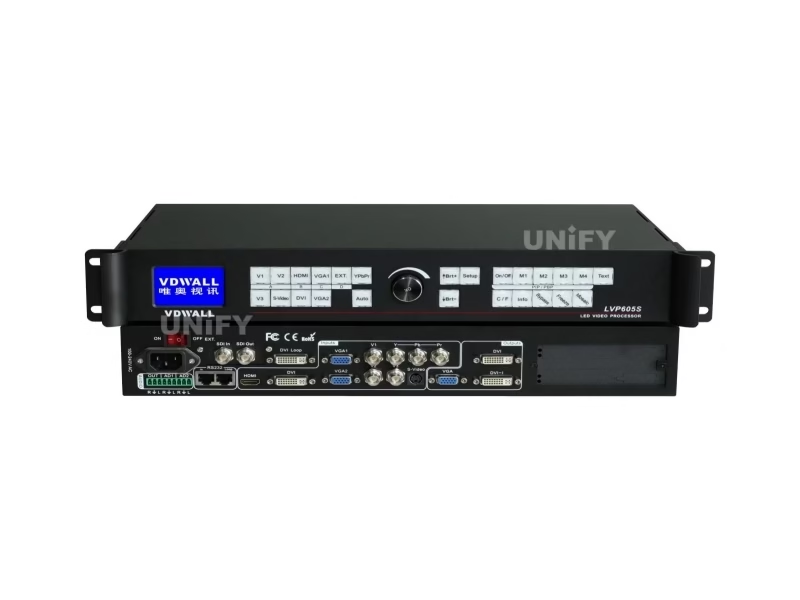
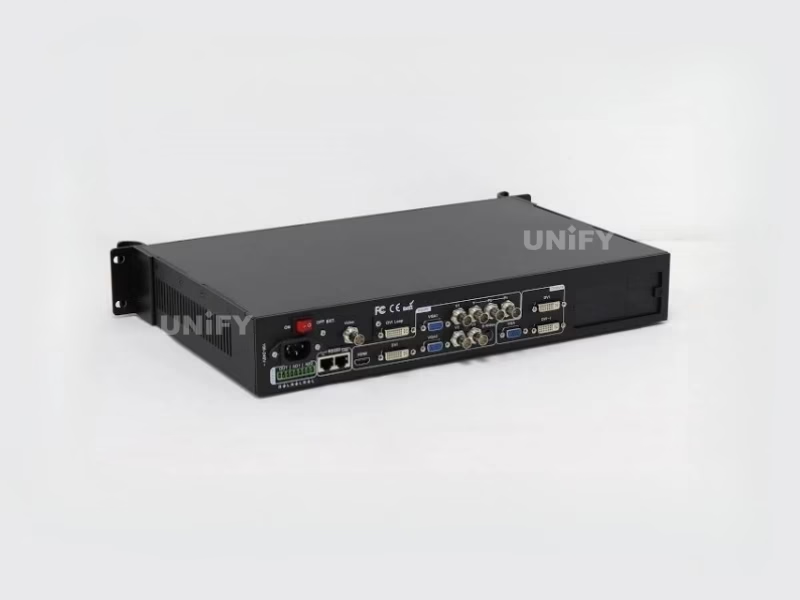
The VDWALL LVP605 LED Video Processor is a ten-input, rack-width scaler-switcher that drives LED walls up to 2304×1152 pixels from one unit — with three model variants (LVP605, LVP605S with SDI, LVP605D with DVI/HDMI extension), two built-in sending-card slots, PIP/POP, text overlay and frame-synchronized mosaic for walls that outgrow a single box.
Short answer
The VDWALL LVP605 is a ten-channel LED video processor built for rental stages, studios and fixed installs whose LED walls stay at or below 2304×1152 pixels per unit. It scales any of ten inputs — three composite, S-Video, YPbPr, two VGA, DVI, HDMI plus one module slot — onto the exact pixel grid of your wall, switches sources with cut, fade or blend transitions, and stacks up to four or more units in frame-synced mosaic for bigger canvases. The LVP605S adds SDI/HD-SDI/3G-SDI input and the LVP605D adds a VGA/DVI/HDMI extension, so you pick the variant by the last input your rack actually needs.
What Is the VDWALL LVP605 LED Video Processor?
The VDWALL LVP605 is a hardware LED video processor from Shenzhen VDWALL Co., Ltd. that converts up to ten separate video sources into one correctly sized, correctly positioned signal for an LED screen, and passes that signal to the wall through up to two LED sending cards mounted inside the chassis. Shenzhen VDWALL documents the series in a 50-page user manual that covers three models: the base LVP605 (extended input = composite video), the LVP605S (extended input = SDI/HD-SDI/3G-SDI) and the LVP605D (extended input = VGA/DVI/HDMI behind a dial switch).
Where a media server or a switcher feeds many screens, a processor like the LVP605 does one job that matters on any LED video processor shortlist: it matches the signal to the wall. LED cabinets add up to pixel counts that never land on a broadcast standard — a 12×5 array of P3 cabinets is neither 1080p nor 4K — so the processor crops, scales and maps the picture onto exactly that grid, pixel by pixel.
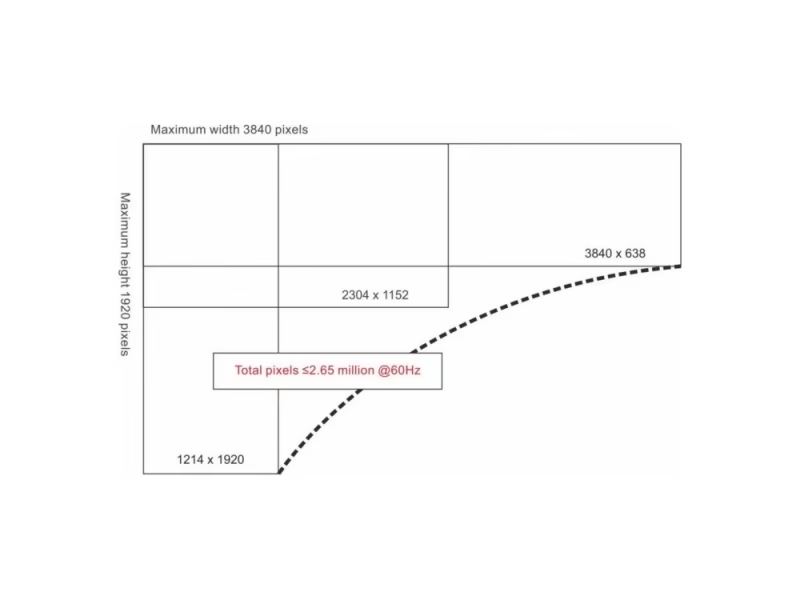
The LVP605 occupies the 2K class of that market. Its single-unit ceiling is 2304×1152 — the arithmetic works out to 2,654,208 pixels, which VDWALL marketing rounds to 2.65 million — and its control philosophy stays deliberately manual: 25 front-panel keys, one knob and an RS232 port, with the ViewRGB Windows application on top for timed shows and fast mosaic configuration.
What Are the VDWALL LVP605 LED Video Processor Specifications?
Every figure below is taken from the official LVP605 Series User Manual (Shenzhen VDWALL Co., Ltd.), unless a row is explicitly attributed to a reseller source. Where public reseller listings disagree with the manual, both numbers are shown so you can judge which figure governs your purchase.
Core Specifications (Official User Manual)
| Block | Specification |
|---|---|
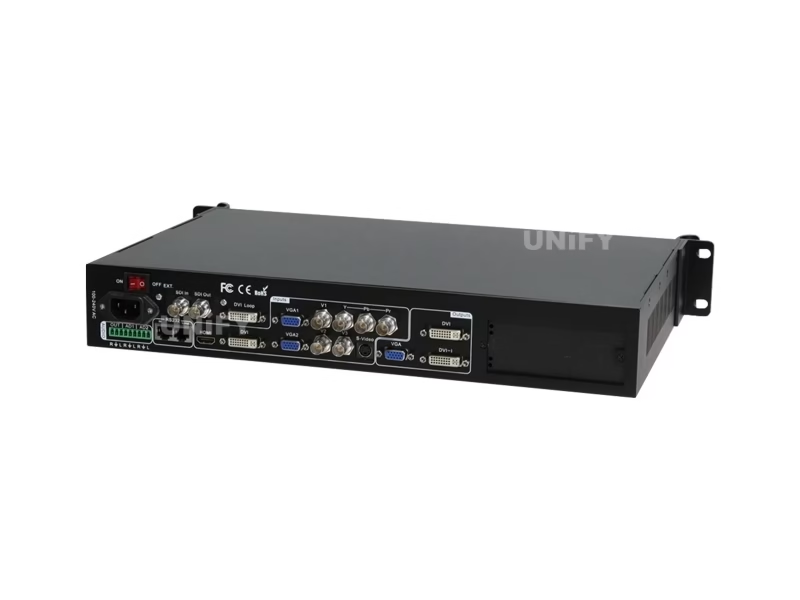
| Video inputs | 10 channels — 3× composite video (BNC, PAL/NTSC), 1× S-Video (4-pin mini DIN), 1× YPbPr component (BNC×3), 2× VGA (15-pin D-Sub, RGBHV), 1× DVI (24+1 DVI-D), 1× HDMI, 1× EXT module port |
| Input formats | VGA ≤2048×1152 @60 Hz · DVI (PC/VESA) ≤2304×1152 @60 Hz · HDMI (PC/VESA) ≤2304×1152 @60 Hz and HDMI 1.3 (CEA-861) ≤1920×1080p @60 Hz · YPbPr ≤1920×1080p @60 Hz · SDI/HD-SDI/3G-SDI on LVP605S: 480i, 576i, 720p, 1080i, 1080p (SMPTE 259M-C / 292M / 274M / 296M / 424M / 425M) |
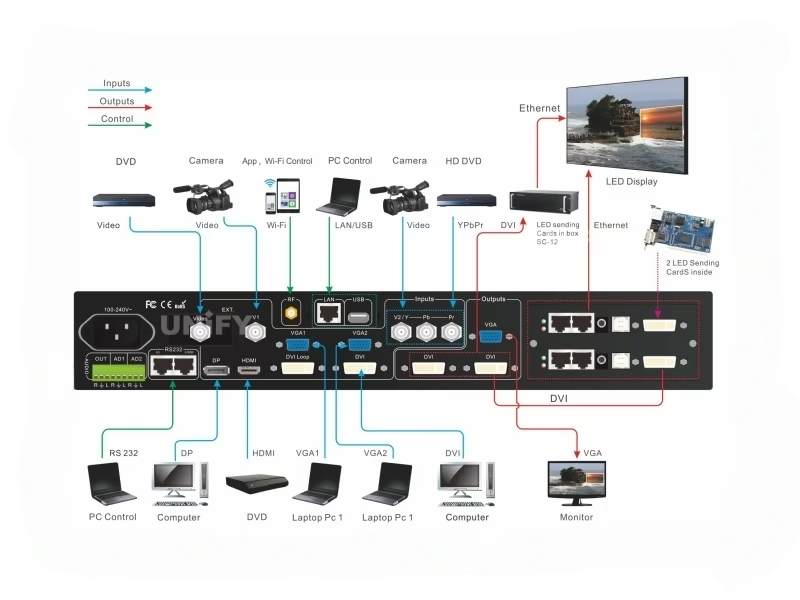
| Video outputs | 1× VGA OUT (monitor preview), 2× DVI OUT (identical content, for two sending cards or sending boxes), 1× DVI loop OUT, 1× SDI loop OUT (active on LVP605S only) |
| Output formats | 17 presets from 1024×768 up to 2304×1152 and 2560×816, including 1536×1536 and 1080×1920 portrait, plus a custom format (see the resolution section) |
| Sending cards | 2 internal sending-card slots (cards are optional); two DVI outputs exist because one 2304×1152 canvas takes two sending cards |
| Audio | 5 stereo channels switched in sync with video — 3 embedded (HDMI/SDI follow) + 2 external (AD1/AD2); separate audio OUT; AD1/AD2 must bind to different video inputs |
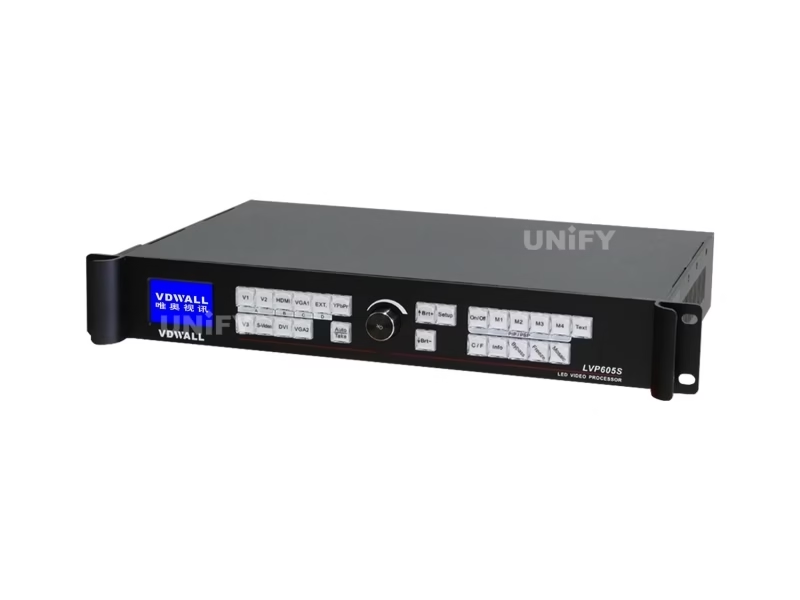
| Control | 25 panel keys + rotary knob; RS232 IN and RS232 LOOP (RJ45, daisy-chain multiple units to one PC); ViewRGB control software for Windows |
| Power / environment | 100–240 VAC, 50/60 Hz, ≤20 W (manual figure); operating 5–40 °C, humidity 15–85% |
| Mechanical | 482.6 mm (L) × 274 mm (W) × 66.6 mm (H) — a 19-inch rack chassis; net weight 3.2 kg, gross 5.0 kg; package 535×370×145 mm |
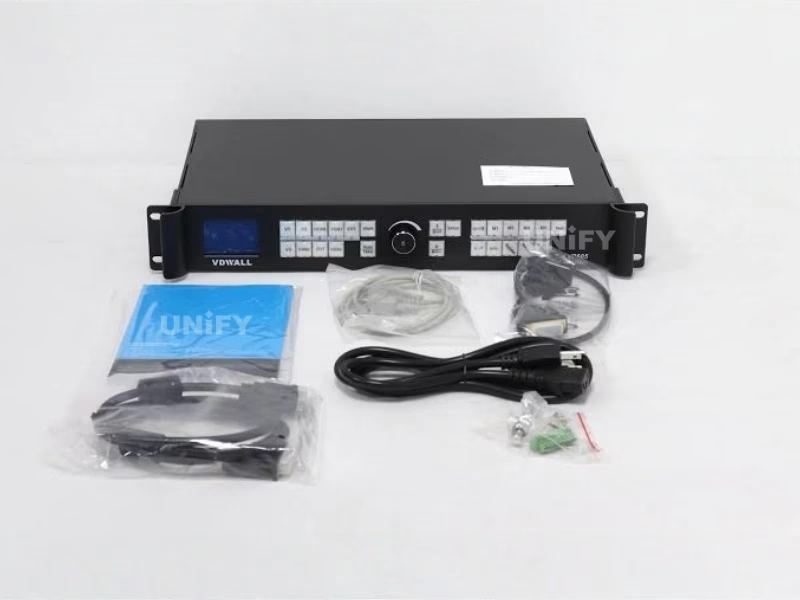
| In the box | Power cord (1.5 m), DVI cables (1.5 m and 0.5 m), RS232-RJ45 cable, net cable, 3× BNC-RCA adapters, audio PCB connector, user manual, driver disk; DVI-I to VGA adapter ships with the LVP605D |
Spec conflicts we found — read before you compare listings
- Power draw: the manual states ≤20 W; the ledscreenparts.com listing states 35 W. The manual governs; the listing figure is likely a conservative PSU rating.
- DVI input ceiling: the manual lists DVI PC input up to 2304×1152; the same reseller listing caps DVI at 2048×1152. VDWALL's own FAQ notes that in practice a PC obeys the EDID table and commonly lands at 2048×1152 or below — see the troubleshooting section.
- Faroudja processing: the "10-bit Faroudja DCDI Cinema Processing, Real Color, TrueLife" phrasing appears on reseller pages (ledscreenparts.com, SinaPlug) but not anywhere in the official manual text. Treat it as a reseller-claimed feature, not a factory-published specification.

How Does the LVP605 Fit Non-Standard LED Screen Resolutions?
No LED wall lands exactly on a broadcast format, so the useful question for any LED pixel pitch plan is not "does it do 1080p" but "can it output my wall's exact grid". The LVP605 answers that two ways.
17 Preset Output Formats
The Output Format menu offers 1024×768, 1280×1024 and 1600×1200 at 60/75 Hz, 1920×1080 at 50/60 Hz, 1366×768, 1440×900, 1920×1200, 2048×1152, 2304×1152, 2560×816, plus portrait and square canvases (1200×1600, 1080×1920, 1536×1536). Whatever you pick, the rule is to choose a format equal to or larger than the wall, then set the live window with four parameters — Out_Hori_Width, Out_Hori_Start, Out_Vert_Height, Out_Vert_Start — previewed as a frame on the LCD as you turn the knob.
Custom Output Resolution: Four Conditions, One Formula
When no preset matches, the custom format must satisfy all four of these conditions from the quick use guide:
That fourth condition is the real pixel budget, and it is why the "2.65 million" headline deserves a second look: a 2304×1152 canvas at 60 Hz consumes roughly 2.9 billion pixel-clocks against the 165-million gate, which the hardware handles through its two-output architecture — the manual explains that one 2304×1152 or 2560×816 canvas takes two sending cards, and that is exactly why the chassis has two slots. For anything wider, you move to mosaic mode with multiple units.
Planning a wall around this ceiling? Our LED screen calculator turns cabinet counts into the exact pixel grid you need to compare against the LVP605's limits.
Which LVP605 Model Do You Need: LVP605, LVP605S or LVP605D?
The three variants share one chassis, one manual and one feature set. The difference lives entirely in the extended input port (EXT.) — the tenth channel that takes a plug-in module.
| Model | EXT. module carries | Formats on the EXT. port | Choose it when |
|---|---|---|---|
| LVP605 | 1× composite video | PAL/NTSC camera or player feeds | Your extra source is analog — a fourth camera, a DVD player, a set-top box |
| LVP605S | 1× SDI / HD-SDI / 3G-SDI | 480i, 576i, 720p, 1080i, 1080p over BNC (SMPTE 259M-C/292M/274M/296M/424M/425M), plus SDI loop out | Broadcast cameras, switchers or long BNC runs are in the signal chain |
| LVP605D | 1× VGA / DVI / HDMI | Selected by a rear dial switch: VGA position, or DVI/HDMI position | A third digital source or a second PC needs its own channel |
3 key differences behind the model letters:
- Signal type, not processing power. All three models scale, switch and mosaic identically — the manual's Chapter 8 dedicates four lines to the EXT. port and nothing else.
- Only the S model loops SDI out. The SDI loop output exists solely when the extended input is SDI/HD-SDI/3G-SDI, which matters for broadcast racks that need to re-feed a signal downstream.
- The D model splits its port with a dial switch. VGA and DVI/HDMI share the connector, so you choose one family per installation — you do not get all three at once.
What Does the VDWALL LVP605 LED Video Processor Do on a Live Show?
🎬 Source switching: cut, fade, blend
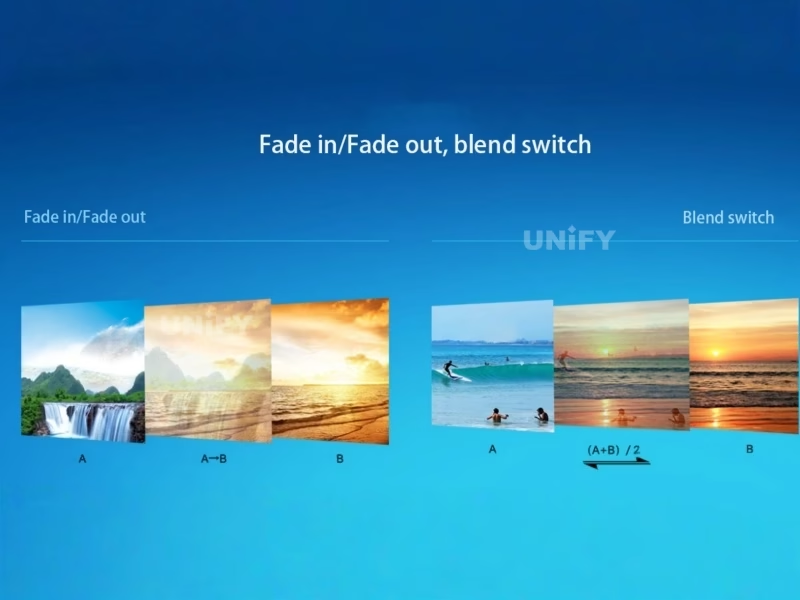
Switching between inputs on different channels runs three ways: cut (the default, frame-accurate with no blank frame), fade at 0.5 s, 1 s or 1.5 s, and blend, where two signals mix until you release one. Two limits from the manual are worth knowing before show day: signals on the same channel carry a brief blank during the switch, and YPbPr sits outside the seamless-switch and blend engine entirely — switching to it always flashes black for a moment.
🖼️ PIP/PBP with four savable layouts
The PIP/PBP engine places a second window in or beside the main picture, sized and positioned by eight parameters (four for the background, four for the PIP). Four complete layouts save to the M1–M4 keys, and each mode remembers its own transition style — seamless or one of the three fade times. The AIAO (any in any out) phrasing used by resellers describes this same crop-and-place window engine.
✍️ Text and logo overlay
The Text key overlays a caption, logo or flash graphic from any second input onto the live picture. You build the text in PowerPoint or any office tool, feed it in as a source, and the processor keys it with adjustable RGB thresholds (0–248 per channel) in either higher-than or lower-than mode.
🧯 Hot spare on four input pairs
Four hot-spare pairs — V1→V3, V2→S-Video, HDMI→DVI, VGA1→VGA2 — watch the live input and cut to the backup automatically when the primary dies. For rental shows where a laptop is the single point of failure, pairing HDMI→DVI is the cheapest insurance in the rack.
🔎 Image tools: freeze, bypass, brightness
Freeze holds the current frame during source changes. Bypass switches a PC source between part display (1:1 pixels, no compression) and full display (scaled to the wall) — it only engages on VGA/DVI/HDMI inputs, and part display is invalid when the input is smaller than the wall. A 32-level brightness control (0–64 or 0–100 scale), saturation, sharpness and a 0–100 grayscale trim round out the picture menu.
🧪 36 test patterns on board
The generator outputs 36 internal test patterns straight to the wall for commissioning — dead-pixel hunts, color checks and receiving-card mapping all happen without a source connected. An ADC calibration routine re-trims white balance against analog inputs, and a video stabilization setting fixes jitter when interlaced 1080i material runs as a PIP window.
How Does LVP605 Mosaic Mode Drive LED Walls Above 2304×1152?
Above the single-unit ceiling, the LVP605 plays the same trick documented across every serious synchronous LED control system: split the canvas into tiles and give each processor one tile. The LVP605 calls it Mosaic mode, and the manual's worked example is a 3456×1920 wall divided into four 1728×960 quadrants.
The signal topology is a master-and-workers chain: every input lands on unit #0 (the master), which feeds its DVI loop out to unit #1 and #2; #1 and #2 loop onward to #3 and #4. Each worker then crops its own In_Hori_Width/Start and In_Vert_Height/Start rectangle from the shared 1920×1080 master output, scales it to its quadrant, and all four fire in Sync Mosaic mode so the frames stay locked. A No Sync Mosaic mode exists purely as a debugging aid.
The applications booklet adds two bigger arrangements: four units in parallel plus one dedicated master drive a 4032×2112 wall, and two units can show up to three different pictures on one wall while accepting as many as 19 input signals between them.
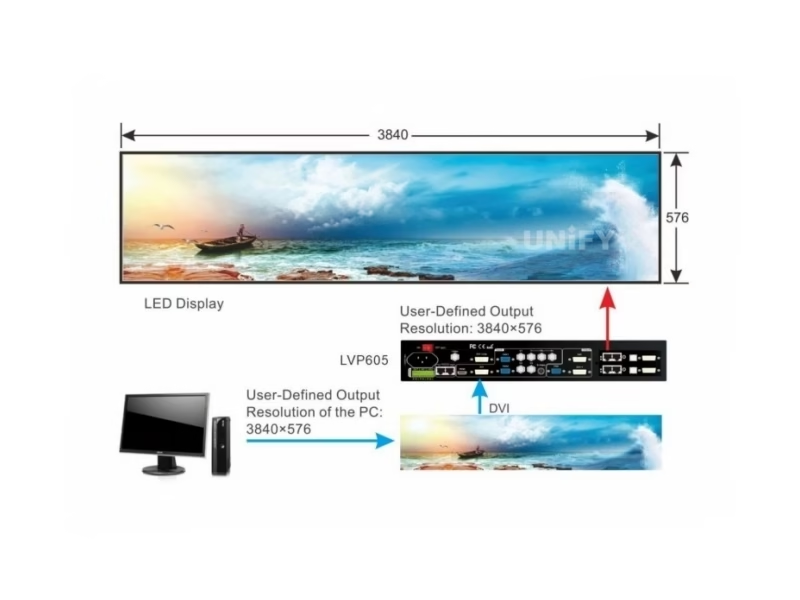
Three mosaic rules from the manual that save show-day debugging
- Every worker runs DVI, locked. In Sync Mosaic the workers' input must stay on DVI and cannot be switched; only the master changes sources.
- Match every picture setting across units. Brightness level, saturation, sharpness and grayscale must be identical on all units — two units set to different brightness scales (0–64 vs 0–100) will visibly disagree, and the brightness level choice survives even a factory reset.
- Do not chain DVI loop outputs too far. The manual warns that excessive DVI loop use attenuates the signal; keep the cascade shallow and the cables short.
Designing a multi-unit wall also means planning power and data redundancy properly — our guide to multi-sending-card backup and cascade covers the wiring patterns that pair well with a mosaic rack.
How Do You Control the LVP605 Video Processor: Panel, RS232 or ViewRGB Software?
Three control layers ship in the box, and each one has a distinct job.
1. Front panel: 25 keys + knob
Input keys V1–V3, S-Video, YPbPr, VGA1/2, DVI, HDMI and EXT. select sources; the C/F key sets cut/fade/blend; dedicated keys carry PIP on/off, M1–M4 modes, Text, Freeze, Bypass, Mosaic, Info and brightness. The three-line LCD reports input, active format (for example 1080p_60Hz) and the current transition. The knob doubles as a save button, and its rotation speed sets how fast a value steps.
2. RS232: single units and daisy chains
The RS232 IN port accepts commands from a PC serial port; the RS232 LOOP port (RJ45) chains further LVP605 units so one PC controls the whole rack. Each unit carries a device ID from 1 to 255 set in the factory menu, which is how the software addresses individual boxes in a mosaic.
3. ViewRGB software: timers and Fast Mosaic
The Windows application mirrors every panel function and adds two: a timer engine with day, week, month and one-shot plans for unattended source switching, and Fast Mosaic — pick the wall layout, type each tile's pixel dimensions, and the software computes every unit's input/output parameters, then pushes them over RS232. The manual's one caution: auto-calculated values can land on odd numbers, and mosaic parameters must be even, so correct and re-save when prompted.
Note what is absent: no LAN, no USB control and no Wi-Fi on this generation — that is the line between the LVP605 and newer processors in VDWALL's own ladder, and it is the first question we ask buyers who plan to drive the rack from a show-control PC.
How Do You Set Up the VDWALL LVP605 With a Sending Card and LED Screen?
The quick use guide sequences the whole install in ten steps; compressed to the five that decide success, they are:
Mount the sending card
Power down and unplug, remove the cover and the slot blank, seat the card in the internal slot, connect the +5 V lead and close up. A card can alternatively live in a desktop PC's PCI slot instead.
Wire inputs, outputs and the wall
Sources into their inputs; DVI OUT to the sending card's DVI in; the sending card's Ethernet to the wall's first receiving card; VGA OUT to a local monitor — the manual calls the VGA preview port highly recommended for setup work. Set the output format, restart when prompted, then trim Out_Hori_Width/Out_Vert_Height to the wall's exact pixel size.
Match the PC to the processor
In the graphics driver, set the display that is the LVP605 to the same resolution you chose in step 2, and pick a scaling mode that preserves your chosen resolution (copy or extend mode, custom aspect ratio) rather than the card's "best" mode — the EDID trap in the troubleshooting section below lives exactly here.
Choose full or part display
With input and output resolutions equal, Bypass toggles between part display (1:1, a crop of the source fills the wall) and full display (the whole source compresses onto the wall). Pick per content: data walls usually want part, video walls want full.
Verify with a test pattern
Output one of the 36 internal patterns to confirm the wall maps edge to edge before any source is trusted. If analog sources look off-color, run the ADC calibration routine on that input, and switch Video stabilization on if 1080i PIP windows jitter.
The receiving-card side of this chain — which cards pair with which wall — is covered in our LED sending card configuration guide and, for the Novastar ecosystem, our receiving card selection guide.
What Problems Do Real LVP605 Users Hit — and How Do You Fix Them?
These four come from VDWALL's own FAQ, the manual's limitation notes and field questions from working operators — the list we would hand a renter opening the flight case for the first time.
🖥️ The PC sticks at 2048×1152 and the panel can't change it
Symptom: the DVI/HDMI input reads one resolution and the front panel never changes it. Cause (VDWALL FAQ, 2015): the PC reads the input's EDID and a modern graphics card auto-outputs its "best" resolution — 2048×1152 — regardless of the panel setting. Fix: in the graphics driver's display scaling options, switch the output to a custom or "preserve aspect ratio" mode so the card sends the resolution you actually set. VDWALL demonstrates on an Intel dual-graphics notebook: Graphics Options → Screen Adaptation → Digital TV → Preserve Aspect Ratio.
🔌 Second-hand wall, unknown sending card
A recurring r/VIDEOENGINEERING question: a used wall arrived with an LVP605 inside and rebranded control software, and the owner wants to add a second sending card or swap processors without knowing which receiver cards the panels carry. Fix: identify the receiving card physically (open a cabinet and read the board) before buying anything, because the sending side must speak the receiver's protocol; our sending card troubleshooting guide walks the detection steps.
⚡ The picture flashes black when switching to YPbPr
This is documented behavior, not a fault: YPbPr does not participate in seamless switching or blending, so every cut to it shows a brief blank, and signals on the same channel also blank briefly. Route the sources that need clean transitions onto different channels (DVI/HDMI/VGA side) and leave YPbPr for material that tolerates the blink.
🧩 Two mosaic tiles shine brighter than the other two
The brightness menu has two scales — 0–64 and 0–100 — and the level is stored even across a factory reset. If one unit was switched to 0–100 and its neighbors stayed on 0–64, identical numeric settings still produce different output. Set Brightness level identically on every unit, along with saturation, sharpness and grayscale, before Sync Mosaic goes live.
Where Is the VDWALL LVP605 LED Video Processor Used?
VDWALL's applications booklet names the target rooms directly: rental and staging, TV studio centers, theaters, high-end meetings and exhibitions. Mapped to the purchases we see, that list looks like this:
🎪 Rental and staging
The classic fit: a 2K-class stage LED backdrop within 2304×1152, camera and playback sources on separate channels, hot spare set as HDMI→DVI for the presenter laptop.
📺 TV studio and broadcast
The LVP605S earns its slot here: SDI/3G-SDI in from the gallery, SDI loop out to downstream gear, and text overlay keyed from a graphics feed for lower thirds.
⛪ Venues, churches and meeting rooms
Fixed-install screens that run one or two sources benefit from the timer plans in ViewRGB — screens switch on schedule with nobody at the rack. See our church LED screen guide for the full room-design checklist, and our event LED screen overview for the rental side.
For exhibition and theater walls that exceed the single-unit canvas, the mosaic arrangements in the section above are the documented path — the applications booklet's 4032×2112 example exists precisely for those rooms.
How Much Does the VDWALL LVP605 LED Video Processor Cost?
VDWALL sells through distribution, so street prices are the honest reference. Two independent listings give the current band:
Price range across the LVP605 / LVP605S / LVP605D variants, in stock, listed 2024-12-05.
LVP605 product listing, June 2026; the same store lists the LVP615 at $620.50.
Novastar VX4U all-in-one controller at ledscreenparts.com — the bracket the LVP605 undercuts.
Project volume, shipping and the sending cards themselves move the final number. Tell us the wall size and source list, and we will quote the complete chain — processor, cards and cabling — as one package.
LVP605 vs LVP615 and Novastar or Colorlight Controllers: Which Video Processor Fits Your Wall?
Within VDWALL's own ladder, the choice against the LVP605 is the LVP615S LED video processor generation, which raises the custom-output ceiling to 3840×1920 and adds USB, LAN and Wi-Fi control paths on top of panel and RS232. For shows that outgrow two outputs entirely, the four-output LVP909 video wall processor binds its ports into mosaic canvases up to 14400×6400 and adds a built-in preview monitor. Below it, the discontinued LVP100 economy processor covers four-source rooms at the family’s floor price. Across brands, the LVP605 competes in the all-in-one 2K controller class that our Novastar controller, Colorlight controller, Huidu controller and Mooncell controller hubs map in detail.
| Dimension | VDWALL LVP605 | Where it sits in the wider market |
|---|---|---|
| Single-unit canvas | 2304×1152 or 2560×816 (official manual) | 2K class — below the 4K all-in-ones; above pure sending boxes |
| Beyond one unit | Frame-synced mosaic; 4+1 master arrangement to 4032×2112 (applications booklet) | Equivalent tiling exists across brands — compare architectures in our video processor vs video splicer explainer |
| Broadcast input | SDI/HD-SDI/3G-SDI on the S variant | SDI remains the differentiator for studio racks — see the switcher vs processor comparison for where switchers take over |
| Control paths | Panel + RS232 (daisy-chain) + ViewRGB software | Newer generations add LAN/USB/Wi-Fi — ask us what your show-control stack needs |
| Street price | $577.70–$759 (sourced listings above) | Undercuts the Novastar VX4U's $1,190 street price by roughly half |
For deeper per-model arithmetic on the alternatives, our reviews of the Novastar VX4S-N, VX16s, Colorlight X16 and Huidu VP620 publish the same source-checked loading numbers this page applies to the LVP605.
VDWALL LVP605 LED Video Processor: Frequently Asked Questions
What is the VDWALL LVP605 LED video processor?
A ten-input scaler-switcher for LED screens: it maps up to ten video sources onto the wall's exact pixel grid, outputs through two internal sending-card slots, and drives canvases up to 2304×1152 (2,654,208 pixels) per unit. Three variants differ only in the extended input port: composite (LVP605), SDI/HD-SDI/3G-SDI (LVP605S) or VGA/DVI/HDMI (LVP605D).
How big an LED screen can one LVP605 drive?
Per the manual, 2304×1152 or 2560×816 pixels — the reason a single canvas that large takes two sending cards, and the reason the chassis has two slots. Bigger walls use several units in Sync Mosaic: the manual's four-unit example drives 3456×1920, and the applications booklet documents a 4032×2112 arrangement.
Can the LVP605 output a custom resolution?
Yes, under four conditions: width ≤3840, height ≤1920, field frequency 23–80 Hz, and ((width+184) × (height+45) × frequency) < 164,999,000. If a proposed canvas fails the formula, split the wall and run mosaic instead.
Why does my PC stay at 2048×1152 on the LVP605's DVI input?
The graphics card, not the processor, is choosing the resolution. It reads the input's EDID and auto-outputs its "best" mode — 2048×1152 — so the panel setting never applies. VDWALL's FAQ fix: set the graphics driver's scaling to a custom or preserve-aspect-ratio mode so the card transmits the resolution you select.
Does the LVP605 switch sources without a blank frame?
Between inputs on different channels, yes — cut mode is frame-accurate, with 0.5/1/1.5 s fades and blending also available. Two exceptions from the manual: same-channel switches carry a brief blank, and YPbPr never participates in seamless switching or blend, so it always blinks on a cut.
Which sending cards fit the LVP605?
The chassis takes two internal sending cards, sold separately — the manual ships the slots, not the cards. Match the card to your wall's receiving-card system: identify the receivers first (especially on second-hand walls), then buy the matching sender. Our sending card configuration guide covers the pairing logic.
LVP605, LVP605S or LVP605D — which variant should I buy?
Decide by the tenth input your rack needs. Extra analog camera or player → LVP605. Broadcast SDI chain (with loop-out) → LVP605S. A third digital source → LVP605D, remembering its VGA/DVI/HDMI port is chosen by dial switch, not simultaneous.
Does the LVP605 switch audio with the video?
Yes — five stereo channels follow the selected video: three embedded (HDMI/SDI) plus two external inputs, AD1 and AD2, each bound to a chosen video input in the menu. AD1 and AD2 cannot bind to the same input, and a matching audio OUT feeds your sound system.
Can I replace an LVP605 on a second-hand LED wall with another processor?
Usually, yes — the LVP605 outputs standard DVI to the wall's sending card, so any processor that drives the same sending/receiving card family can replace it. The open question is which receivers the panels carry; open a cabinet and read the card before buying, as the r/VIDEOENGINEERING threads on rebranded walls show.
How is the LVP605 controlled remotely?
RS232 from a PC, with the RS232 LOOP port daisy-chaining multiple units to one controller, and the ViewRGB Windows software for full parameter control, timed shows (day/week/month/one-shot plans) and Fast Mosaic auto-configuration. There is no LAN, USB or Wi-Fi control on this generation.
How much does the VDWALL LVP605 cost?
Published listings run from $577.70 (SinaPlug, June 2026) to $649–759 across the three variants (ledscreenparts.com, December 2024). Volume pricing depends on the sending cards and cabling in the package — request a quote with your wall size for the complete chain.
What warranty and documents ship with the unit?
The box carries the processor, power cord, two DVI cables, RS232-RJ45 and network cables, three BNC-RCA adapters, an audio connector, the printed manual and the software disk (plus the DVI-I→VGA adapter on the LVP605D). Downloadable copies of the manual, quick guide and applications booklet are linked at the foot of this page, and every unit we supply carries our standard warranty support.
Tell Us Your Wall — We'll Quote the Full LVP605 Chain
Processor, sending cards, receiving cards and cabling, matched to your exact pixel grid and source list — one package, factory-direct pricing, from a LED screen manufacturer that ships worldwide.
📞 / WhatsApp: +86-191-18802497 · Shenzhen, China · GMT+8
VDWALL LVP605 LED Video Processor: The Complete Buying Guide (2026)
Chapter 1 — What a 2.65-Million-Pixel Ceiling Means for Your LED Video Processor Plan
The number that defines the LVP605 is not a feature, it is a boundary: 2304×1152 works out to 2,654,208 pixels, and every purchase decision that follows is really a question of whether your wall fits inside that rectangle. A 6-meter P2.5 wall (2400 pixels wide) already misses it. A 5-meter P2.5 wall (2000 pixels) fits with room to spare at 800 pixels tall — comfortably inside even the 2560×816 alternative, which trades height for width on ultra-wide showpiece walls. Run the arithmetic the other way and the ceiling becomes a design tool: at P4, 2304 pixels spans 9.2 meters, which is why the LVP605 keeps selling into large-format indoor installs while the same canvas would be tiny for a P1.5 broadcast wall. The resolution section's four-condition formula is the same logic expressed as hardware limits, and it is the first calculation we run for any buyer who sends a cabinet count.
Chapter 2 — The 10-Input Story: Matching the LVP605 to Your Source List
Ten inputs sounds generous until you count what a modern show actually brings. The honest inventory for a rental LVP605 rack: one DVI from the playback PC, one HDMI from the backup player, one VGA for the legacy presenter laptop, one HDMI camera feed — and the three composite inputs spent on whatever analog world still surrounds the venue. That leaves headroom exactly where the three variants differ. The base LVP605's composite extension suits stage rooms that still run analog cameras; the LVP605S swaps that for an SDI chain with loop-out, which is the difference between "in the rack" and "in the gallery" for studio work; the LVP605D adds the third digital socket that corporate events keep demanding. The pattern to avoid is buying the base model and discovering the show's second digital source has nowhere to land — the EXT. port is fixed at purchase, not field-changeable in practice.
Chapter 3 — The Custom Resolution Math: Four Conditions, One Formula
Most "my LVP605 won't accept my resolution" cases fail on condition four, not the obvious width and height caps. The formula ((width+184) × (height+45) × field frequency) < 164,999,000 is a pixel-clock budget, and the +184/+45 padding means wide-but-short canvases fail earlier than intuition suggests: 2560×816 passes at 60 Hz, while a hypothetical 3840×768 at 60 Hz — the same pixel count — fails, because the padding terms scale with the sum of both dimensions. Two practical consequences follow. First, check the formula before ordering a custom cabinet layout, not after; second, remember the field-frequency lever — a canvas that misses the gate at 60 Hz may pass at 50 Hz if the content and the wall both tolerate it. When the math fails outright, the answer is the mosaic architecture in Chapter 4, not a different scaler.
Chapter 4 — Mosaic Arithmetic: Splitting a 3456×1920 Wall Across Four LVP605 Units
The manual's four-unit example deserves a walkthrough because the parameter discipline transfers to every multi-unit build. The wall is 3456×1920; each unit owns a 1728×960 quadrant. Unit #0 is the master: it takes the show's sources, outputs 1920×1080 (scaled to fit) on its two DVI ports, and does not itself run mosaic — its job is distribution. Units #1 and #2 receive that canvas on DVI, then loop it onward to #3 and #4. Each worker sets In_Hori_Width=960 (in the horizontal-split example the manual walks first), In_Hori_Start=0 or 960 per column, and the vertical equivalents per row, then Mosaic Mode=Sync. The three failure modes the manual calls out are the ones we see in the field: a worker accidentally switched off DVI, brightness scales mismatched across units (Chapter 5's neighbor), and DVI loops chained until the signal attenuates. Keep the topology as drawn, and Sync Mosaic behaves as one screen.
Chapter 5 — Hot Spare, Freeze and Test Patterns: The Show-Safety Toolkit
Three unglamorous features carry most of the LVP605's reliability story. Hot spare pairs four input groups (V1→V3, V2→S-Video, HDMI→DVI, VGA1→VGA2) so a dead laptop cuts to its backup without an operator touching the rack — set the pair at load-in, not mid-show. Freeze holds the last good frame while a source is rebooted, which converts a "screen went black" moment into a held image. The 36 test patterns let commissioning happen before any source exists: feed pattern 1–36 straight to the wall to verify mapping, then hand the rack to the sources. Add the brightness/grayscale trim (set identically across mosaic units, on the same 0–64/0–100 level) and the video stabilization flag for interlaced PIP material, and the safety checklist is complete — none of it needs the software, which is the point: every tool here lives on the panel where a stagehand can reach it.
Chapter 6 — The Sending-Card Question: What Fits Inside the LVP605?
The two internal slots are the quiet reason this processor owns the second-hand market: any wall whose receivers speak the same protocol as a fitting sending card can adopt the LVP605, and any LVP605 rack can grow a second card when the wall splits into two displays. The practical sequence for an unknown wall runs: open a cabinet, read the receiving card's silkscreen, identify the family, then source the matching sending card — the LVP605 does not dictate the card brand, the wall does. That is also the resolution to the Reddit threads where a rebranded wall arrives with an LVP605 and mysterious software: the processor was never the locked part; the receivers and their configuration file are. Our sending card configuration guide and the receiving card selection guides for each major brand cover this pairing in depth.
Chapter 7 — LVP605 or LVP615: Where the Upgrade Pays Off
The successor's headline is the custom-output ceiling: 3840×1920 against the LVP605's formula-gated budget, which retires Chapter 3's arithmetic for walls in between. The second change is control — USB, LAN and (on many units) Wi-Fi join the panel and RS232, which matters once a show-control PC or a tablet replaces the stagehand at the rack. The third is generational: newer input silicon, more PIP flexibility, and the AIAO cropping workflow that resellers emphasize. What does not change is the architecture — two sending-card slots, the same mosaic concept, the same cut/fade/blend grammar — so a crew that knows the LVP605 runs the LVP615 on day one. The street prices sit close together ($577.70 vs $620.50 at SinaPlug in June 2026), which makes the decision almost purely about the wall's pixel count and the control room's habits; at 4K-class walls, neither model is the answer and the all-in-one 4K controllers in our Novastar and Colorlight hubs take over.
Chapter 8 — Price, Availability and the Buying Checklist
Sourced street prices bracket the LVP605 between $577.70 (SinaPlug, June 2026) and $649–759 across variants (ledscreenparts.com, December 2024) — call it a $600–760 band, against $1,190 for the Novastar VX4U in the same class bracket. Before ordering, run this list: the wall's exact pixel dimensions against the resolution formula; the source inventory against the ten inputs, with the EXT. variant chosen last; the sending/receiving card family identified (two cards for a full 2304×1152 canvas); the control plan — panel-only rooms stop reading here, show-control rooms should weigh the LVP615's LAN/Wi-Fi; and the mosaic question, because a wall planned to grow later should buy the fourth unit's rack space now. Send us that list and the quote comes back as a complete chain, cables included.
Which LED Video Processors Should You Explore Next?
Novastar
Colorlight
Huidu · Mooncell · RGBlink
Huidu VP620 · VP830 · Mooncell M40 · RGBlink VSP 628pro · All RGBlink switchers
Where Can You Download LVP605 Resources?
📕 LVP605 Series User Manual (50 pages)
⚡ LVP605 Series Quick Use Guide (5 pages)
🏭 Applications of LVP605 Series (3 pages)
VDWALL LED Video Processor: Hub, Family & Guides
Family: VDWALL LED video processor hub (full catalog) · LVP100/100U · LVP605 · LVP615S · LVP909
Guides: How to Choose · VDWALL vs Novastar · Family Comparison · Church Setup · 2026 Price Guide · Troubleshooting
System: LED video processor overview · sending card configuration · multi-card backup · screen calculator