
Colorlight X16 LED Video Controller
The Colorlight X16 LED Video Controller is Colorlight’s flagship sending controller: a 4K60 input stage (HDMI 2.0 + 4× DVI + 2× 3G-SDI), an 8.88-million-pixel loading capacity across 16 Gigabit Ethernet outputs, seven-window picture-in-picture with broadcast-quality scaling, HDCP 2.2, and Genlock input with loop output — the controller tier for high-end rental, virtual production studios and sports venues.
What Is the Colorlight X16 LED Video Controller?
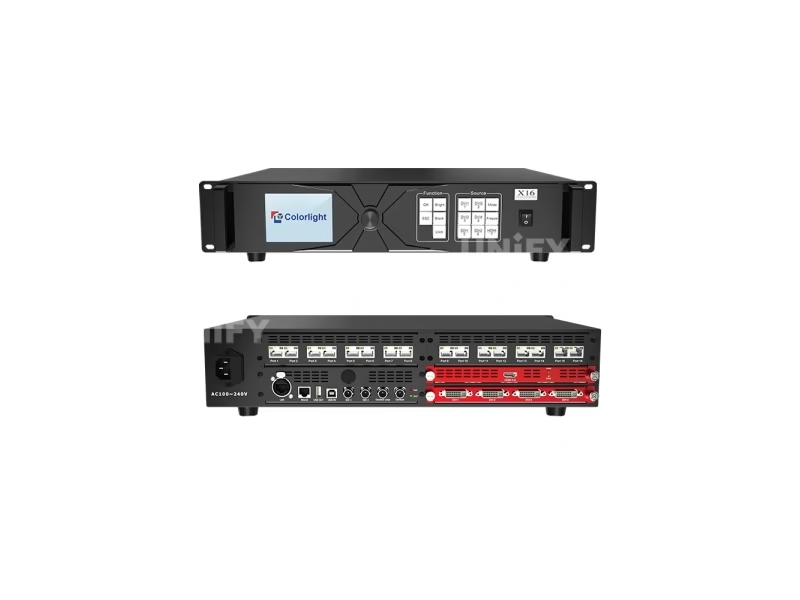
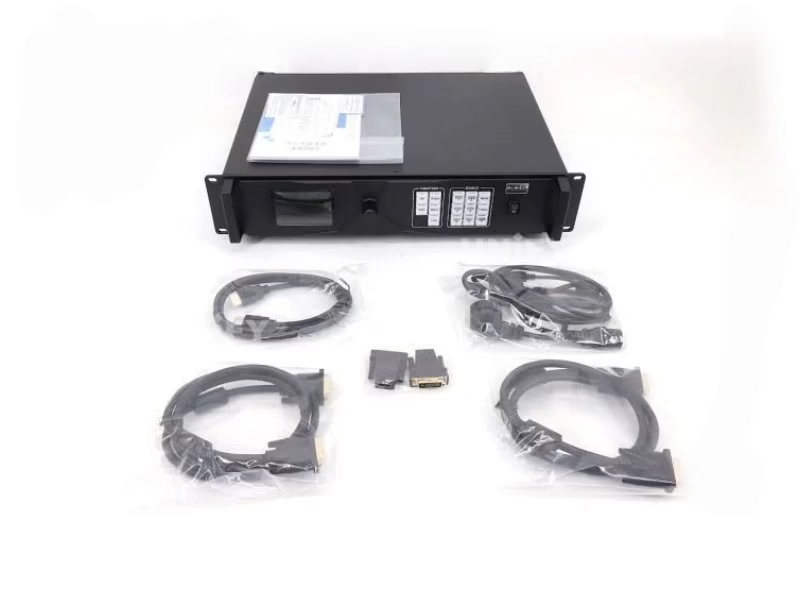
The Colorlight X16 LED Video Controller is a professional LED display controller in a 2U rack chassis — the flagship of the X series. It receives digital video over HDMI 2.0, four DVI ports and two 3G-SDI ports, processes up to seven windows with broadcast-quality scaling and flicker-free switching, and drives 8.88 million pixels through 16 Gigabit Ethernet outputs. In the X series ladder it stands above the 8-port Colorlight X8m LED Video Processor (5.24M pixels) — the tier built for high-end rental fleets, virtual production volumes and high-resolution permanent walls.
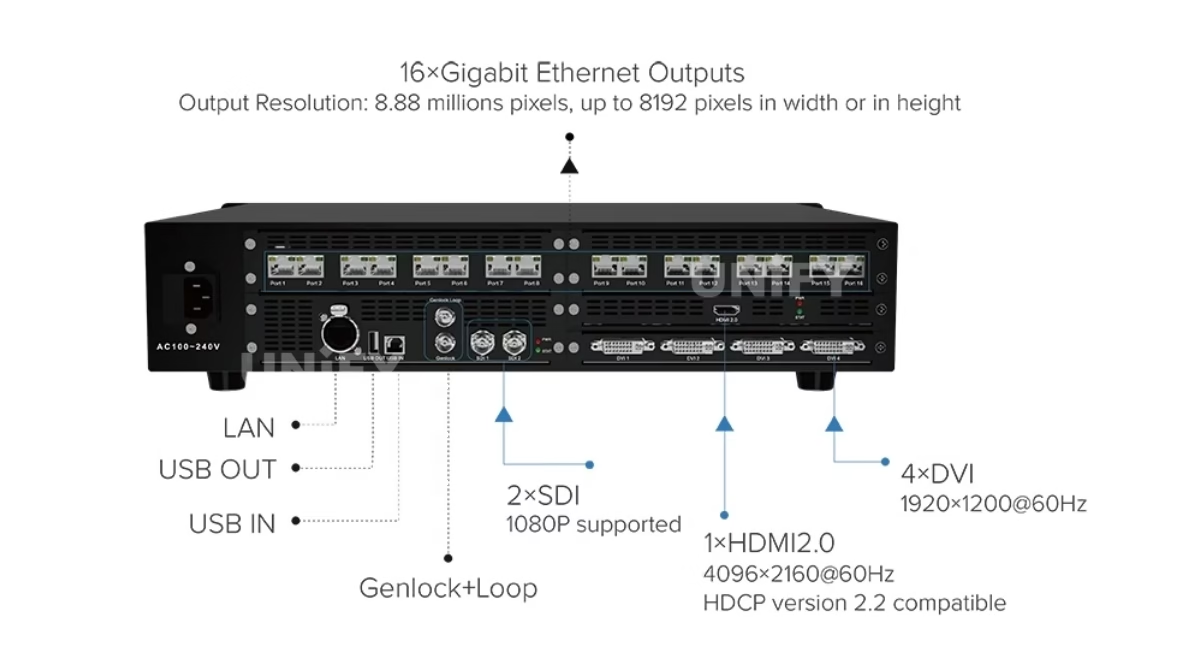
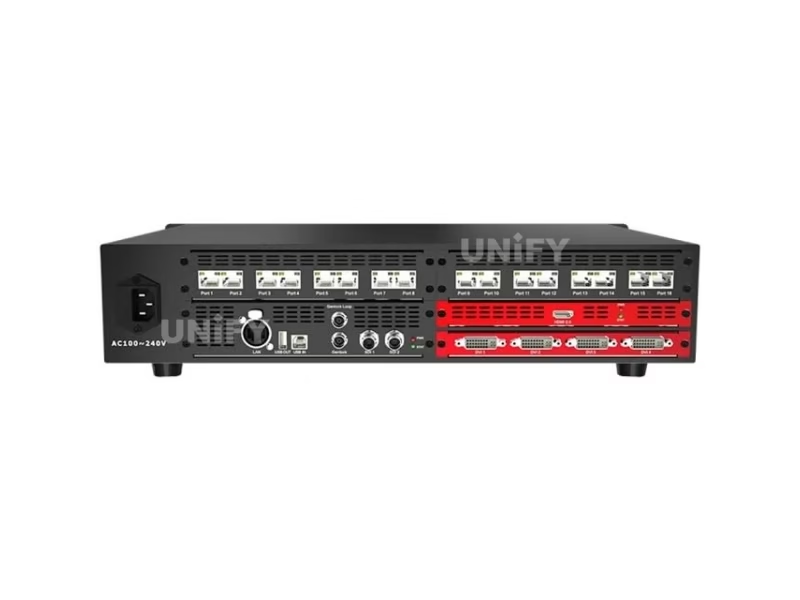
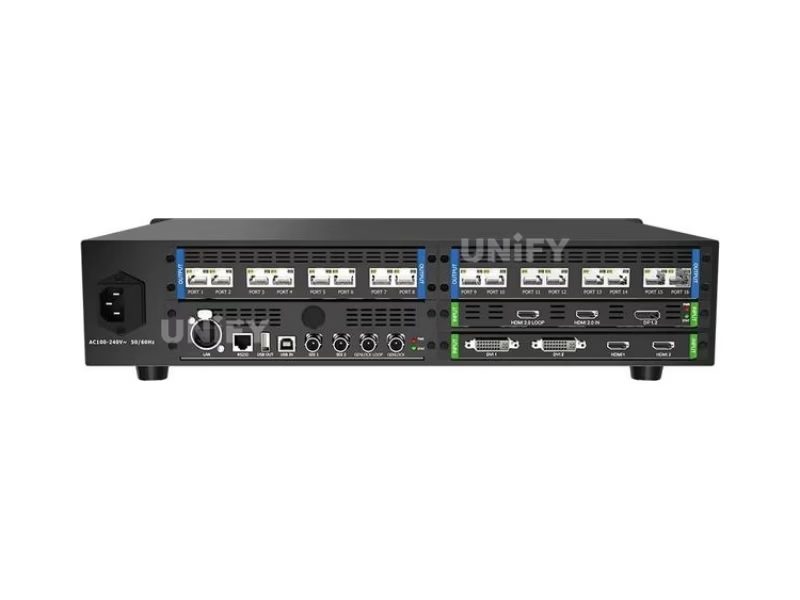
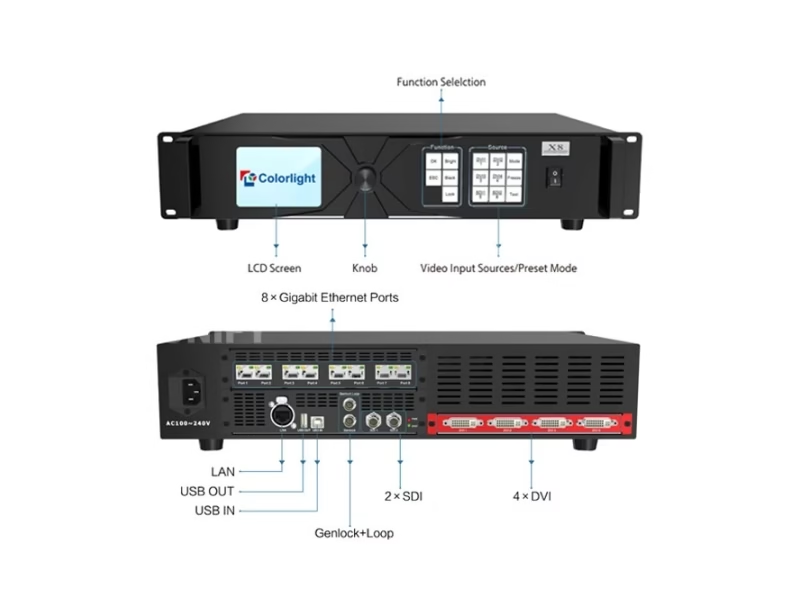
Short answer: The Colorlight X16 is a 2U flagship controller with 1× HDMI 2.0 (4096×2160@60Hz, HDCP), 4× DVI and 2× 3G-SDI inputs, an 8.88-million-pixel loading capacity, 16 Gigabit Ethernet outputs, a 8192-pixel maximum width/height, seven-window PiP, HDCP 2.2, Genlock input with loop output, and a 3.5-inch LCD front panel. It is configured with the iSet software and priced around $1,500–$1,700 on the open market.
The X16’s flagship status rests on three numbers no other X series model combines: 16 outputs, 8.88M pixels and Genlock I/O. Where the X2/X4 transport pixels and the X8m composes windows, the X16 adds the frame-synchronization layer that camera-facing and multi-controller installations need. All figures on this page come from the official Colorlight X16 User Manual — the marketplace listings for this model carry a DP-input claim the real hardware does not have, documented in the correction table below. For the processor category context, see LED video processor.
Colorlight’s official X16 introduction:
Colorlight Official — InfoComm 2018 Colorlight Explains X16 4K Controller video
What Are the Colorlight X16 LED Video Controller Specifications?
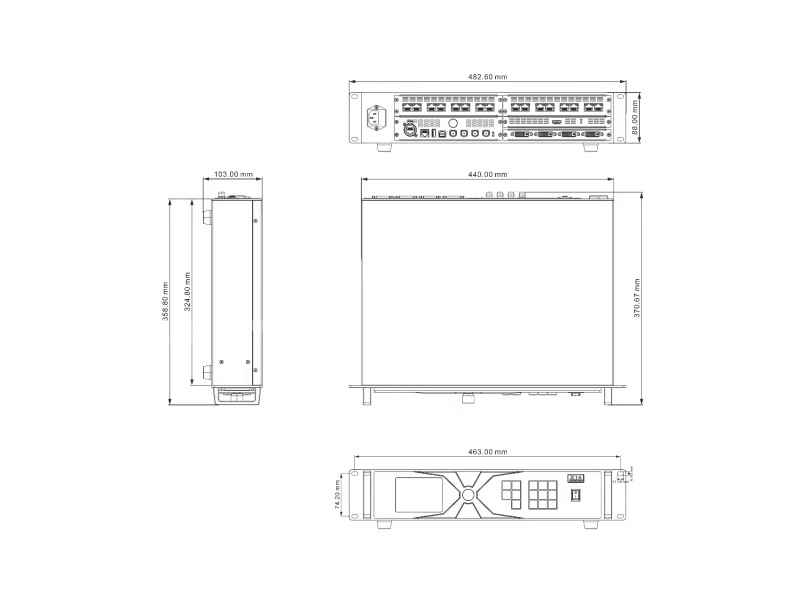
All data from the official Colorlight X16 User Manual.
Inputs (Official Manual)
Outputs & Processing (Official Manual)
Physical & Electrical (Official Manual)
Why Do Colorlight X16 LED Screen Controller Spec Sheets Disagree?
In August 2026 listings we reviewed, the X16 carries three recurring errors — one of them an input port the real hardware does not have. Verified against the official Colorlight X16 User Manual:
Why these errors cost money: A wall designed around a DP input arrives at site with an HDMI/DVI/SDI-only rear panel; a wall planned against 10.4M exceeds the X16’s real 8.88M ceiling by 17%; an ambiguous 8192 reading ends in a cabling plan that does not match the canvas. The countermeasure is the same discipline as every X series purchase: verify against the official Colorlight X16 User Manual, or ask the supplier to state the manual revision they quote.
How Does the Colorlight X16 LED Video Controller Compare Across the X Series?
The X16 tops the X series ladder on ports, pixels and synchronization. The full chain, each tier documented on its own page:
The ladder in three numbered differences:
- Capacity and ports. 1.3M/2 ports through 8.88M/16 ports — each tier loads roughly twice the pixels of the one below with double the cable runs.
- Processing depth. Windows, presets and Genlock start at the X8m; the X16 adds Genlock loop output and seven windows — the synchronization layer for multi-controller and camera-facing installations.
- HDCP generation. 1.4 on the transport tiers, 2.2 on the X16 — the flagship is the X series model for protected 4K content.
Each tier has its own page: X2 (1.3M) · X4 (2.3M) · X8m (5.24M) · X16 (8.88M). For the receiving cards the controller feeds, see the receiving card selection guide.
How Do the 7 Windows and Broadcast Scaling Work on the Colorlight X16 LED Display Controller?
Seven-Picture PiP
Up to 7 independent windows on one canvas, each freely positioned and sized — multi-camera feeds, playback and graphics composed on the controller.
Flicker-Free Source Switching
Switching between the 7 input sources without frame loss — no black flash between cameras on live events.
Broadcast-Quality Scaling
Input images spliced and scaled to the screen resolution with broadcast-grade interpolation — 4K sources fitted to any wall shape without distortion.
Picture Adjustment
Brightness, chromaticity and low-brightness grayscale improvement per the official manual — walls tuned for studio and dimmed environments.
How Does Genlock Make the Colorlight X16 LED Video Controller Fit for Virtual Production?
The X16 is the only X series model with physical Genlock connectors: a Genlock IN that accepts bi-level or tri-level sync signals, and a Genlock LOOP that passes the sync onward to the next device. The architecture this enables:
Camera-facing walls stay frame-locked
An unsynchronized LED wall on a broadcast camera shows rolling bands and tearing. With the wall locked to the studio’s sync generator through Genlock IN, every frame arrives on the camera’s timing — the basic requirement for televised content.
Multi-controller walls share one clock
Cascaded X16 units chain through Genlink LOOP → next unit’s Genlock IN, so a wall spanning several controllers renders as one synchronized canvas — no drift between regions, no seam artifacts.
Virtual production and XR volumes
In an LED volume, the wall, the camera and the render engine must agree on frame timing or the seams flicker on camera. Genlock IN takes the studio’s sync; LOOP feeds the next device in the chain — the X16’s specific edge over every controller below it in the series.
Colorlight’s official virtual production overview:
Colorlight Official — Virtual Production and ST2110 at ISLE 2024 video
Which Colorlight X16 Variant Should You Choose — X16, X16B or X16C?
The X16 ships in three input configurations, and an optional 4K input board extends the standard version:
The rule: start from the source list. Mixed broadcast-plus-PC shows take the standard X16; a wall fed entirely by DVI matrix outputs takes the X16B; dual-4K event feeds take the X16C or the optional board. Everything downstream — 16 ports, 8.88M pixels, Genlock — is identical across variants. Colorlight’s official X16E introduction shows the platform family in context:
Colorlight Official — X16E Controller introduction video
How Do You Operate the Front Panel of the Colorlight X16 LED Display Controller?
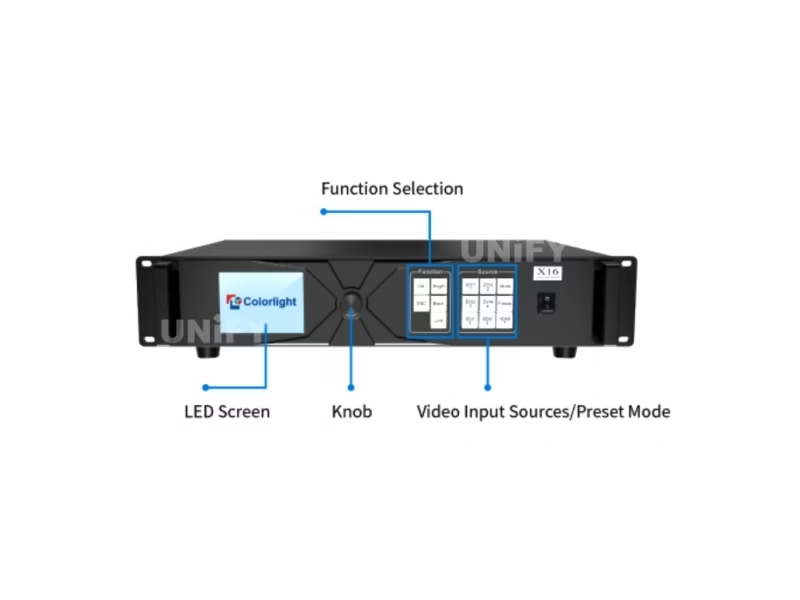
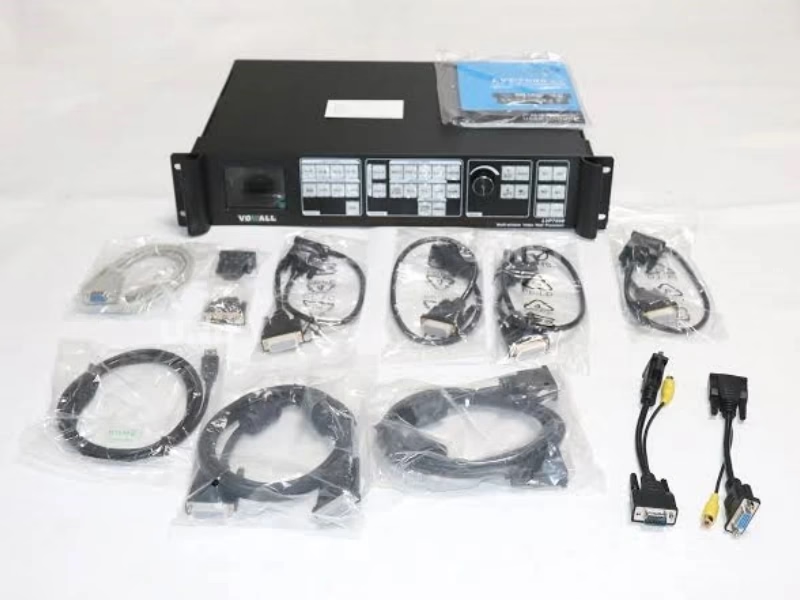
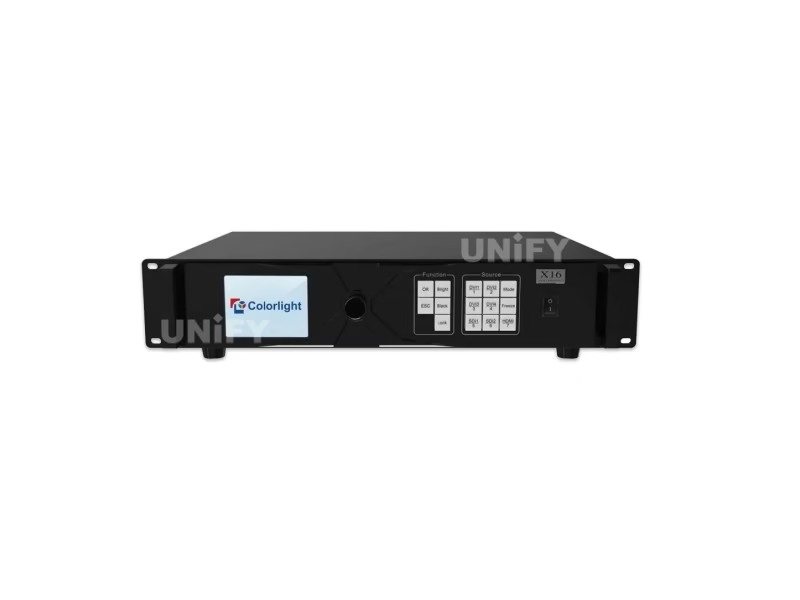
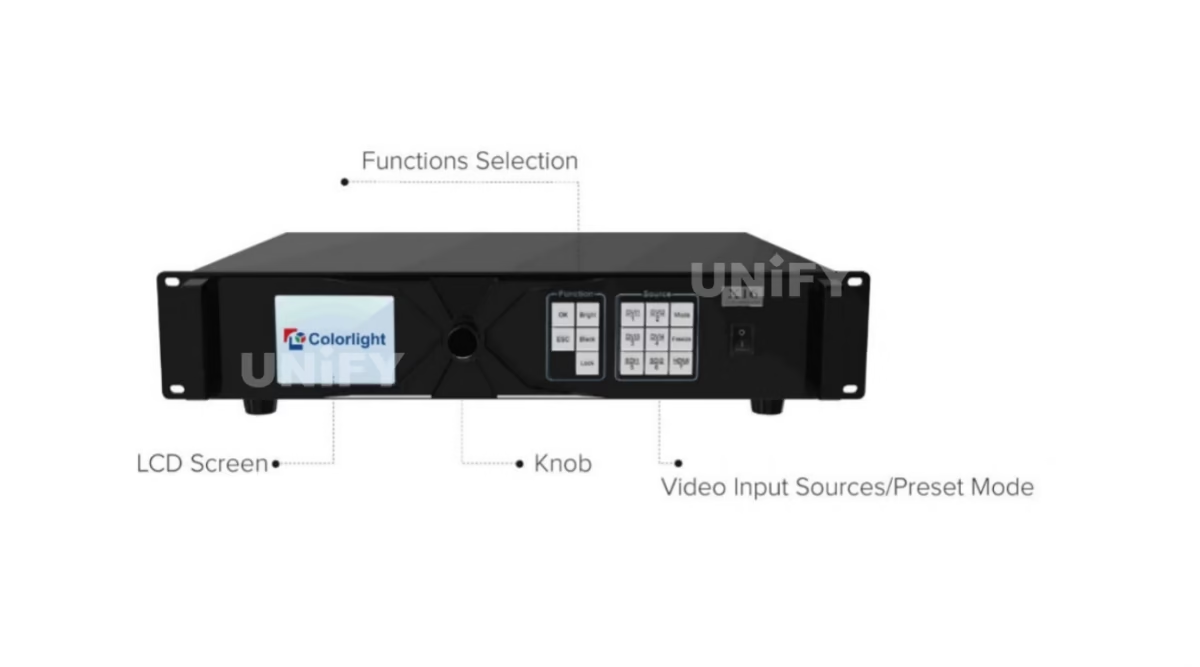
The X16 carries the largest front panel in the X series — a 3.5-inch LCD with the knob, four function keys, seven source keys and a power switch:
📺 3.5-inch LCD
Operation menu, system information, input status and resolution readouts — the largest display on any X series panel.
🔒 LOCK key
Locks the panel buttons against accidental changes in staffed or public spaces.
🎬 MODE key
Cycles image output modes — recalled layouts without a PC.
⏸ FREEZE key
Holds the current frame — the live-show safety key when a source drops mid-set.
🎛 Source keys ×7
HDMI / DVI1–4 / SDI1–2 — direct one-key switching to any of the seven inputs.
☀️ BRIGHT / BLACK + Knob
Instant brightness control and screen blanking; the knob edits menu parameters with auto-save.
How Do You Set Up the Colorlight X16 LED Video Controller with iSet?
The X16 configures with Colorlight’s iSet software (free download from colorlightinside.com). Seven steps from the official user manual take a wired X16 to a displaying wall:
Wire the hardware
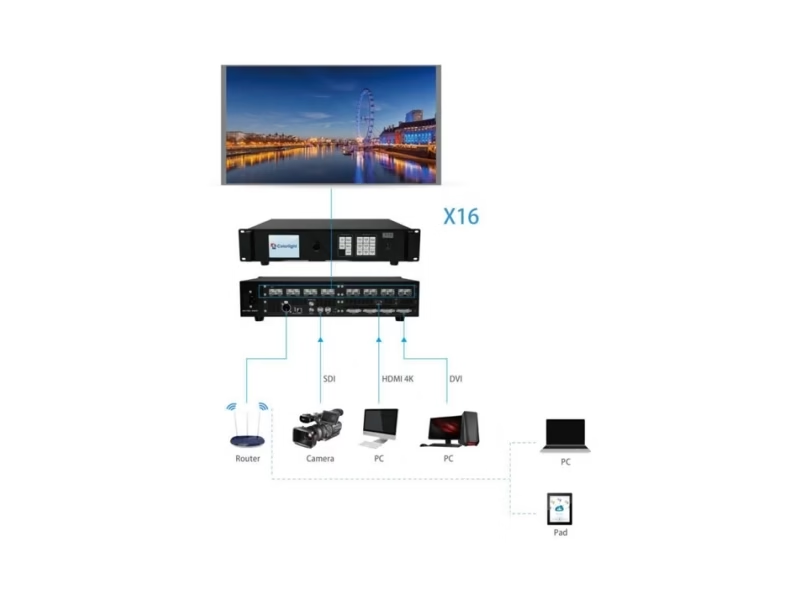
AC 100–240V power, the video sources to their inputs, RJ45 from the 16 ports to the receiving cards, USB A/B from PC to USB IN.
Install iSet
Download the iSet package from colorlightinside.com, select English, complete the installer.
Detect sender and receiver cards
Device Information → Detect Senders, then Detect Receiver Cards — index, type and cable status per port appear in the display area.
Set video sources
Scale each input (X/Y/width/height), crop regions, choose 1–7 layers via the Screen Setup Wizard, set EDID per source.
Configure the sender
Sender Setting: output parameters, EDID and port backup settings — the 16-port plan lives here.
Map the screen connection
Screen Connection Setting: cabinet rows/columns and connection lines per port — the software calculates each port’s control region.
Send, save presets, verify
Send the parameters, verify the wall displays, then Save As Preset — the X16 stores 16 preset modes covering scaling, cropping, layers and EDID.
Colorlight’s official iSet tutorial:
Colorlight Official — iSet User Guide Beginner’s Tutorial video
How Big a Screen Can the Colorlight X16 LED Video Controller Drive?
8.88 million pixels across 16 ports translates into these real formats (per-port average ≈ 555,000 pixels, derived from the official total):
Two ceilings bind. The pixel ceiling: 8.88M total. The dimension ceiling: 8192 pixels in width or height. A 4K wall at 4096×2160 is 8.85M pixels — a hair under the X16’s ceiling, which is why the 4K-wall class lands on this controller rather than the 5.24M tier below. For larger canvases, the USB OUT/USB IN cascade links further X16 units with Genlock keeping every controller on one clock.
Where Is the Colorlight X16 LED Video Controller Used?
Virtual Production & XR Volumes
Genlock IN/LOOP locks the volume to camera and render-engine timing; 7 windows mix camera feeds with playback; HDCP 2.2 handles protected 4K content.
High-End Rental & Tours
2U chassis in the rack, 16 ports per unit, flicker-free switching and the FREEZE key for live shows. See LED screen for events.
Sports Venues & Stadiums
8.88M pixels runs large-format boards from one controller; 7 windows mix the broadcast feed, scores and sponsor content.
International Conferences
Multi-camera plenary stages with simultaneous interpretation screens — 7-layer PiP composes speaker, slides and feeds on one canvas.
Colorlight’s flagship virtual studio project:
Colorlight Official — World’s Largest LED Virtual Studio project video
Why Buy the Colorlight X16 LED Video Controller From an LED Display Factory?
At flagship-tier prices, the difference between a box and a commissioned system is the entire purchase. Buying through a full-line LED screen manufacturer changes the X16 purchase in three ways:
1. Verified hardware against the official manual. Every X16 we ship comes from Colorlight’s authorized channel, is tested on live LED modules before dispatch, and carries serial-number traceability. The first question we answer is the one most listings cannot: which manual revision the unit matches — including the variant letter (X16/X16B/X16C) actually in the box.
2. Commissioning that finishes the flagship layer. Our engineers configure the X16 with iSet end to end — the 16-port plan, the seven-window layouts, the Genlock chain and the 16 presets — against your actual wall and receiving cards. Our quality control of LED display process applies the same rigor to every batch.
3. Lifecycle economics. The control layer typically outlives the LED modules it drives — LED screen lifespan is set by the modules, not the electronics. We back the X16 with a 2-year warranty and keep spares for the project’s operating life.
How Much Does the Colorlight X16 LED Video Controller Cost?
Price transparency, stated plainly: in August 2026 listings we reviewed, the X16 traded between $1,500 and $1,700 (roughly ¥9,988 in the Chinese market). The spread is channel margin and volume tier, not hardware differences — the same controller sits at both ends. Factory-direct tiers for B2B buyers:
For context: the LED display control system market reached US$659 million in 2025, projected at 13.6% CAGR to US$1.59 billion by 2032 (QYResearch, Global LED Display Control System Market Report 2026). Flagship-tier pricing scales with volume like the rest of the category — ask for a factory-direct quote at your quantity.
What Do Buyers Ask About the Colorlight X16 LED Video Controller?
Why Trust the Colorlight X16 LED Video Controller From UnifyLED?
Every batch ships with Colorlight original packaging, tested on live modules before dispatch.
Ready to Source the Colorlight X16 LED Video Controller?
Factory-direct pricing, genuine stock, 16-port iSet commissioning and 2-year warranty.
unifyledscreen@gmail.com | +86-191-18802497
What Should Engineers Know Before Buying the Colorlight X16 LED Video Controller?
Published: August 2026 | 14 min read | UnifyLED Engineering Team
The Colorlight X16 LED Video Controller is the flagship of the X series — the model where ports, pixels and synchronization all peak, and where the marketplace listings are sloppiest. Three errors circulate on this model that do not appear on any other X series page, and one of them describes an input port the real hardware does not have. This guide resolves all of it against the official Colorlight X16 User Manual, then walks the decisions that follow for the flagship tier.
Short answer: The Colorlight X16 is a 2U flagship controller with 1× HDMI 2.0 (4K60), 4× DVI and 2× 3G-SDI inputs, an 8.88-million-pixel loading capacity across 16 Gigabit Ethernet outputs, seven-window PiP, flicker-free switching, broadcast-quality scaling, HDCP 2.2, and Genlock input with loop output. It has no DP input. Market pricing runs $1,500–$1,700; the X16B (8× DVI) and X16C (2× HDMI 2.0) variants share the same output stage. The X8m below it loads 5.24M pixels on 8 ports.
Chapter 1 — Definition: The Flagship’s Job
The Colorlight X16 LED Video Controller is a professional LED display controller built for the two hardest deployment classes in the industry: high-end rental fleets and high-resolution permanent walls. Its flagship status rests on three numbers the rest of the X series cannot match: 16 Gigabit Ethernet outputs, an 8.88-million-pixel loading capacity, and physical Genlock connectors with loop output. Where the X2 and X4 transport pixels and the X8m composes windows, the X16 adds the frame-synchronization layer that camera-facing and multi-controller installations depend on.
The input stage defines the flagship’s media story: one HDMI 2.0 port at 4096×2160@60Hz, four DVI ports at 1920×1200@60Hz, and two 3G-SDI ports at 1080P — seven digital sources, all switchable without frame loss, all covered by HDCP (2.2 on the platform). Notably absent: a DisplayPort. The DP claim appears on at least one major distributor listing, but the official manual lists no DP input, and no X16 rear panel has one. For the processor category context around this tier, see LED video processor.
Chapter 2 — Loading: 8.88M Pixels and the 16-Port Architecture
The X16’s official loading capacity is 8.88 million pixels — the number the correction table exists to defend, because the market’s most common alternative figure is 10.4M. That 1.52M-pixel gap is 17% of the real ceiling: a wall planned against the wrong number exceeds the controller’s capacity and forces a second unit nobody budgeted.
The 16-port architecture is what makes 8.88M practical. Each Gigabit port carries roughly 555,000 pixels on average (derived from the official total), and a wall’s port plan divides the canvas into sixteen independently routed regions. The practical formats: a dual-1080p stacked canvas (3840×2160 = 8.29M) fits with headroom; a 4096×2160 4K wall at 8.85M pixels sits a hair under the ceiling — which is exactly why the 4K-wall class lands on the X16 rather than the 5.24M tier below. The dimension ceiling is 8192 pixels in width or height, so an 8192×512 strip (4.19M) or an 8192×1083 fascia stays inside both bounds.
For canvases beyond 8.88M, the USB OUT/USB IN cascade links further X16 units — and here the Genlock connectors earn their place, keeping every controller in the chain on one clock so the composite wall renders as a single synchronized canvas. The multi-controller path is the X16’s documented growth story: flagship walls scale by adding flagship units, not by switching platforms.
The cabling reality behind 16 ports deserves its own line in the plan. Sixteen Gigabit runs per controller means the port map is the wall map — each port’s roughly 555K-pixel region corresponds to a physical CAT5e/6 run to a cabinet cluster. On a touring wall, that map changes venue to venue; on a fixed install, it is permanent infrastructure. Either way, the 16-port plan is the document that turns the X16 from a box in the rack into a driven wall, and it belongs in the project files next to the configuration backup.
Chapter 3 — Seven Windows, Flicker-Free Switching, Broadcast Scaling
The X16 composites seven-picture PiP: up to seven independent windows on one canvas, each freely positioned and sized, fed by any of the seven inputs. The show-facing combination that matters: multi-camera feeds plus playback plus graphics, composed on the controller rather than in an external switcher. For live events, the flicker-free switching claim is the difference that pays for the tier — switching between sources without frame loss means no black flash between cameras.
The scaling layer underneath is broadcast-grade: input images are spliced and scaled to the screen resolution with broadcast-quality interpolation, so a 4K source lands on a 8.85M wall without the distortion of simple stretch. Combined with per-source cropping, the X16 extracts any region of any source and maps it to any region of the canvas — the geometry that stage designers and control-room layouts actually use. Sixteen preset modes store the full state (scaling, cropping, layers, EDID) for one-key recall.
Chapter 4 — Genlock and the Virtual Production Story
The X16 is the only X series model with physical Genlock connectors: Genlock IN accepts bi-level or tri-level sync signals, and Genlock LOOP passes the sync onward to the next device. The engineering meaning: the wall locks to the studio’s sync generator, and every cascaded controller in the chain shares the same clock. An unsynchronized LED wall on a broadcast camera shows rolling bands and tearing; a Genlock-locked wall renders every frame on the camera’s timing.
The virtual production use case is where the loop output matters most. In an LED volume, the wall, the camera and the render engine must agree on frame timing or the seams flicker on camera. The X16 takes the studio’s sync on Genlock IN and hands it down the chain through LOOP — the specific edge over every controller below it in the series, and the reason XR volumes and broadcast studios spec the X16 class. Colorlight’s XR solutions overview:
Colorlight Official — XR Solutions video, virtual production without green screen
Chapter 5 — X16, X16B, X16C: The Variant Decision
The X16 ships in three input configurations, and the choice is a source-list decision in three numbered differences:
- Standard X16. 1× HDMI 2.0 (4K60) + 4× DVI + 2× SDI-3G. Mixed 4K, broadcast and PC sources — the default for shows with everything.
- X16B. 8× DVI. Walls fed entirely by DVI matrix outputs — control rooms and matrix-driven installs where every source is a PC.
- X16C. 2× HDMI 2.0. Dual-4K playback and event feeds, plus an optional 4K input board on the standard X16 for a second 4K source.
Everything downstream — 16 ports, 8.88M pixels, seven windows, Genlock — is identical across variants. The variant letter changes the rear panel, not the platform, which is why asking the supplier to state the exact variant before quoting is the fastest way to separate careful channels from relisters. A second habit pays off at procurement: confirm the optional 4K input board is physically installed when ordered — the standard X16 ships with one 4K60 input, and the board doubles it.
Chapter 6 — The Spec Errors That Cost Money
In August 2026 listings we reviewed, the X16 carries three recurring errors:
“DP 1.2 input.” The official manual lists HDMI 2.0, 4× DVI and 2× SDI — no DisplayPort. A wall designed around a DP input arrives at site with an HDMI/DVI/SDI-only rear panel. This error appears on at least one major distributor’s X16 page.
“10.4 million pixels.” The official figure is 8.88M. The 10.4M value belongs to later platforms and rides along on X16 copy. The gap is 17% of the real ceiling.
Unclear 8192 readings. The manual states maximum width/height of 8192 pixels each — with total loading still capped at 8.88M. Listings quoting “8192×4096” or implying 8192 in both dimensions at once overstate the canvas.
The countermeasure is the same discipline as every X series purchase: verify against the official Colorlight X16 User Manual, or ask the supplier to state the manual revision and the variant letter they quote. A supplier who cannot answer both in seconds is sourcing blind.
Chapter 7 — Commissioning: iSet and the 16-Port Plan
The X16 commissions with Colorlight’s iSet software — the free configuration package named throughout the official manual. The seven-step sequence: wire the hardware, install iSet, detect sender and receiver cards, set video sources (scaling, cropping, 1–7 layers, EDID), configure the sender, map the screen connection across the 16 ports, then send and save as preset. The X16-specific steps are the layer count and the port plan: with 16 outputs, the screen-connection mapping is where the wall’s physical layout becomes the controller’s canvas definition.
Two habits protect the flagship configuration. First, after every commissioning or change, read the configuration back and store the file with the project documentation. Second, use the 16 presets deliberately — one per show state, named for what they do. A rental house that returns to a venue twice a year should recall the venue’s layout in seconds, not rebuild it. The control system software and hardware guide covers the documentation set.
Chapter 8 — Price and Total Cost of Ownership in 2026
The X16’s street price in August 2026 listings spans $1,500 to $1,700 (roughly ¥9,988 in the Chinese market), and the spread is channel economics — the same controller sits at both ends. At flagship prices, what changes with the channel is what comes with it: test reports, pre-loaded configurations, Genlock commissioning support, warranty handling and spare-stock access. The difference between a box and a commissioned system is the difference between the two ends of that range.
The market context: the LED display control system market reached US$659 million in 2025, projected at a 13.6% CAGR to US$1.59 billion by 2032 (QYResearch, Global LED Display Control System Market Report 2026). Within the video wall controller segment, Futuresource Consulting measured US$316 million in 2024 growing at 17% annually toward US$693 million by 2029 — with third-party controllers holding 84.5% of market value and Novastar and Colorlight together commanding roughly three-quarters of that third-party segment. Flagship hardware inside that duopoly keeps spares and software support alive for the wall’s whole life.
Chapter 9 — When the X16 Beats the Novastar VX16s
At the 16-port flagship tier, the mirror-side comparison is the Novastar VX16s — the natural cross-ecosystem alternative integrators evaluate. The X16’s structural arguments: physical Genlock IN/LOOP connectors for studio and multi-controller chains, the 3.5-inch LCD front panel with Lock/Mode/Freeze keys for staff-operated walls, and HDCP 2.2 on the platform for protected 4K content. The Novastar processor tier’s NovaPro UHD Jr page documents the mirror side of that comparison.
The ecosystem rule from the smaller pages applies unchanged at flagship prices: the sending controller follows the receiving cards. If the project’s cards, spares and technicians speak Colorlight, the X16 is the flagship of that ecosystem; if they speak Novastar, the Novastar LED display controller range is the mirror decision. Mixing chains is unsupported by both vendors — and at 8.88M pixels per unit, the decision compounds faster than at any tier below.
Conclusion
The Colorlight X16 LED Video Controller holds the X series’ flagship slot in 2026 for three reasons that survive all the marketplace noise: 16 Gigabit outputs carrying 8.88M pixels, seven-window composition with broadcast scaling, and Genlock IN/LOOP that locks camera-facing and multi-controller walls to one clock. Specify it with the verified numbers in hand — 8.88M, not 10.4M; HDMI/DVI/SDI, not DP; 8192 per dimension, not 8192×8192 — and the variant letter that matches the source list. Buy it through a verified LED screen manufacturer that tests hardware on live modules and commissions the port plan, layer layouts and Genlock chain against your actual wall. Choose it when the project is a volume, a stadium, a tour — anything camera-facing or beyond 5.24M pixels — and the flagship layer becomes the part of the show nobody thinks about, which is exactly what it is for.
Which LED Video Controllers Should You Compare With the Colorlight X16?
The complete Colorlight X series chain plus Novastar processor-tier comparisons on UnifyLED.
Colorlight X Series
Novastar Processor Tier
Guides & Resources
Where Can You Download Colorlight X16 LED Video Controller Resources?
The official Colorlight X16 User Manual — the data source for every figure on this page — plus the free iSet configuration software.