
VDWALL Economy Tier · 4 Inputs · 1U Half-Rack Chassis · 2304×1152 Max Canvas
VDWALL LVP100 LED Video Processor
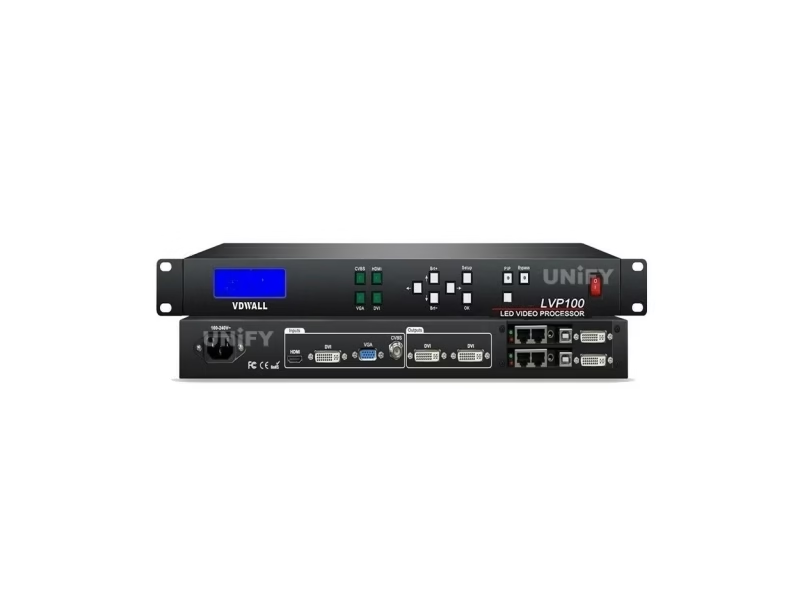
The VDWALL LVP100 LED Video Processor is the economy floor of VDWALL’s line — four inputs, two DVI outputs, a 2304×1152 canvas ceiling and panel-only control in a 1U half-depth chassis that weighs 2.5 kg. The original unit is now out of production and superseded by the LVP100U, which adds a fifth input, audio output and ten scene presets; this guide covers both and where each still makes sense.
Short answer
The VDWALL LVP100 is a four-input, two-output LED video processor built for small walls — up to 2304×1152 pixels — that need correct scaling, clean cut and fade switching, and a picture-in-picture window, without paying for SDI, network control or multi-unit features. It runs entirely from the front panel (RS232 is an optional port for central-control systems), fits a 1U half-depth chassis at 2.5 kg, and lists at the bottom of VDWALL’s price ladder. The original LVP100 is discontinued; the current LVP100U adds a fifth input, an audio output, USB media playback and ten scene presets. Buy the 100U for a new small-wall build, and treat surviving LVP100 stock as a bargain for panel-only installations.
What Is the VDWALL LVP100 LED Video Processor?
The VDWALL LVP100 is a hardware LED video processor from Shenzhen VDWALL Co., Ltd. that scales any of four inputs — composite video, VGA, DVI or HDMI — onto the exact pixel grid of a small LED screen and passes the result out through two DVI ports feeding up to two sending cards. Shenzhen VDWALL documents it in a 30-page user manual (V1.0, first released June 2018) and a product overview (V1.0, May 2018); the image engine is the same Faroudja Real Color 10+ bit DCDI processing family the rest of the line carries, stated openly in the official overview.
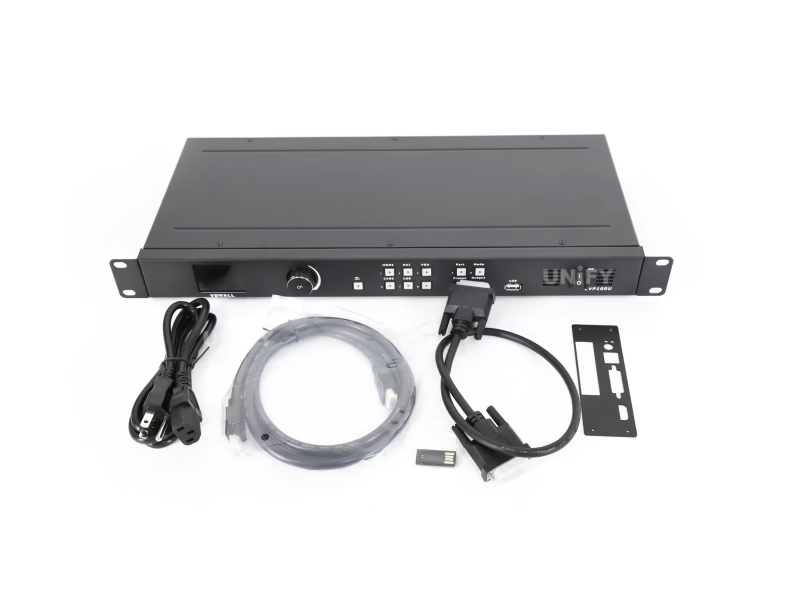
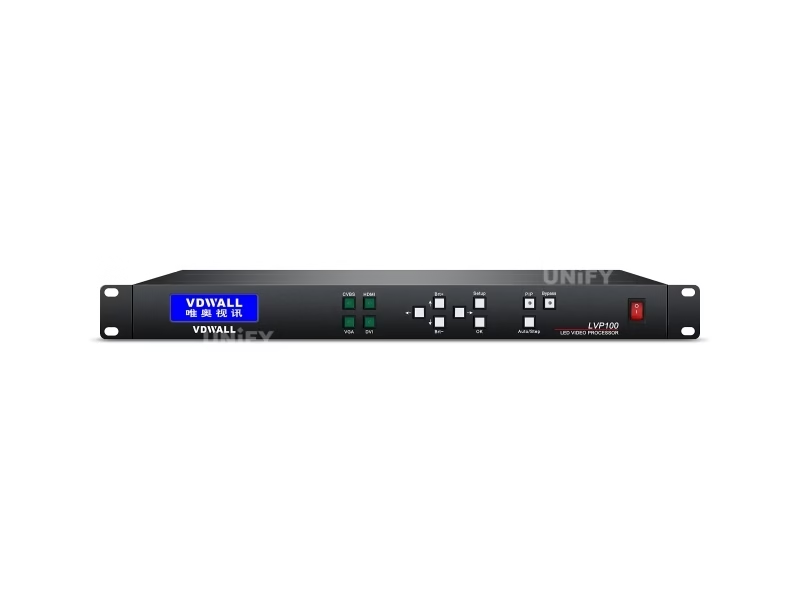
Everything about the chassis says economy on purpose: 482.6 mm wide to fit a rack, but only 200 mm deep and 44 mm tall — a 1U half-rack — at 2.5 kg net. Where the ten-input LVP605 spends its budget on inputs and the four-output LVP909 spends its on outputs and preview paths, the LVP100 spends its on the one thing every small wall needs: a correct, stable, pixel-matched picture from a PC or a camera, switched from the front panel by whoever is nearest.
The production story matters for buyers. Resellers now state plainly that the LVP100 is out of production and that the LVP100U replaces it — a current official VDWALL listing describes the 100U with five inputs, two outputs, an audio output and ten preset scene modes. Both models share the manual’s menu grammar, so the guidance below applies to either unless noted.
Which Inputs and Outputs Does the LVP100 LED Video Processor Support?
Figures come from the official user manual V1.0; the two documentation quirks we found are disclosed below the table.
| Block | Specification |
|---|---|
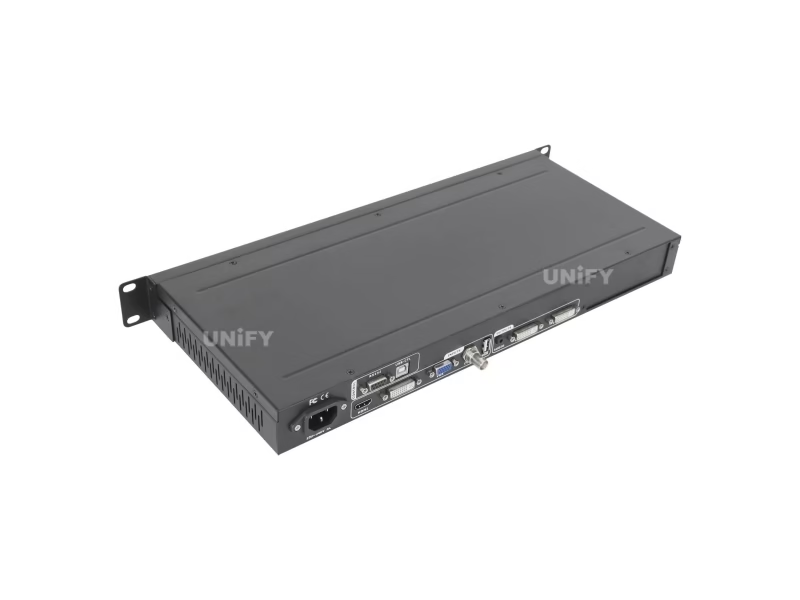
| Video inputs (4) | 1× CVBS composite (BNC, PAL/NTSC), 1× VGA (15-pin D-Sub, ≤2048×1152 @60), 1× DVI (24+1 DVI-D, ≤2304×1152 @60), 1× HDMI 1.3 (type A, ≤1080p60) |
| Video outputs (2) | 2× DVI (24+1 DVI-D) carrying identical content — to sending cards, a sending box, or a local monitor for setup |
| Output presets (16) | 1024×768_60/75, 1080×1920 and 1200×1600 portrait, 1280×1024_60/75, 1366×768, 1440×900, 1536×1536, 1600×1200, 1920×1080_50/60, 1920×1200, 2048×1152, 2304×1152, 2560×816 ultra-wide |
| Switching | Cut (0 s) and fade at 0.5/1/1.5 s, set in menu 8 — except between DVI and HDMI, where the manual states seamless switching does not apply |
| PIP | Dual picture from any two inputs (sub-source rules apply), position and size free; four savable layouts per the manual — the overview counts three presets, and both figures are quoted here |
| EDID | DVI EDID selectable in menu 3 (and an HDMI EDID entry in the hidden factory menu) so the source outputs the wall’s true geometry for pixel-to-pixel display |
| Picture tools | 36 test patterns; brightness quick-keys (32-step scale) plus menu brightness on the family’s 0–64/0–100 Bright Level system; saturation 0–100; sharpness smooth/sharp; low-gray Bias 0–100; DeInterlace for interlaced PIP material; NTSC Image Mode (Soft/Standard) for composite sources; ADC white-balance calibration for CVBS/VGA |
| Control | Front panel keys (input select, PIP, Auto, BRT+/−, Setup/OK/arrows with a Step key for value increments); RS232 port is optional and carries a Device ID (0–255) for central-control systems addressing multiple units |
| Power / environment | 100–240 VAC 50/60 Hz, ≤25 W; 0–45 °C, 15–85% humidity; 24/7 duty rated |
| Mechanical | 482.6 × 200 × 44 mm — a 1U, half-depth chassis; net 2.5 kg, gross 4 kg; package 535×315×145 mm |
| In the box | Power cord (1.5 m), one DVI cable (1.5 m), user manual, operation CD, 2× BNC-RCA adapters; two sending cards optional |
Two documentation quirks, disclosed
- The manual’s input-section heading reads “supports 8 video input signals” while listing exactly four — the overview agrees with four, and four is what the rear panel carries. Treat 8 as a copy-editing error.
- Brightness is documented two ways: the panel’s BRT keys run a 32-step scale (0–32), while the setup menu exposes the family’s 0–64/0–100 Bright Level system. Both are real; they are different surfaces, and the quick-keys are the ones an operator touches mid-show.
How Do You Match the LVP100 Output to a Non-Standard LED Wall?
Small walls come in every pixel shape, and the LVP100 handles them with the same three-step logic as the rest of the family. First, pick one of the sixteen presets at or above the wall’s real size — including the 2560×816 ultra-wide entry for ribbon displays and the 1080×1920 portrait entry for totems. Second, trim the live window to the wall’s true pixel grid with four parameters (Out_Hori_Width, Out_Hori_Start, Out_Vert_Height, Out_Vert_Start), adjusted with the arrow keys and saved with OK. Third, align the source: the DVI EDID menu tells the connected PC what geometry to output, which is how the box achieves pixel-to-pixel display without a scaling fight in the graphics driver.
The 2304×1152 ceiling covers about 2.65 million pixels — the arithmetic lands at 2,654,208 — and the two DVI outputs exist because a full canvas that size takes two sending cards. There is no mosaic mode here: past the ceiling, the family answer is a second processor, and the ladder section below points to where each tier takes over. Plan the wall first with our LED screen calculator and confirm the viewing geometry with our pixel pitch guide.
LVP100 vs LVP100U: Which Economy Processor Should You Buy?
One letter separates two buying situations, and the difference is production status as much as features:
| Model | Status | Inputs / outputs | What the letter adds |
|---|---|---|---|
| LVP100 | Out of production — resellers direct buyers to the 100U; remaining stock sells at clearance pricing | 4 in (CVBS, VGA, DVI, HDMI) / 2× DVI out | The baseline economy processor; fine for panel-only installs where spare-unit risk is acceptable |
| LVP100U | Current production (official VDWALL product page) | 5 in / 2× DVI out + audio output | A fifth input, audio output for sound-system feeds, USB media playback, and ten preset scene modes for one-key recall of show states |
3 key differences behind the decision:
- Availability is the first spec. A discontinued processor is a fine deal for a fixed install and a poor deal for a rental fleet that needs matched spares — the 100U is the safe order either way.
- The fifth input changes the room. Small venues rarely stay at four sources; the 100U’s extra channel absorbs the second player or camera without a switcher in front.
- Audio out closes the loop. With an audio output and USB playback, the 100U can drive both the wall and the sound system from one box — the LVP100 hands audio duties to whatever is beside it.
What Can the LVP100 PIP Mode Do on a Small LED Wall?
The PIP key opens a dual-picture engine: choose the background source, press PIP, choose the window source, and set the window’s position and size with the menu. Four layout combinations save for one-key recall — useful for a storefront that runs a promo loop with a live camera corner during business hours and switches to a single full-screen loop after closing. The manual notes the sub-source must come from a compatible input grouping, and the LCD reports both sources with their formats (for example Main = HDMI 1080p60, PIP = VGA 1440×900) so the operator always knows what is layered on the wall.
What the economy tier does not carry is worth stating too: no multi-window layouts beyond the dual picture, no text overlay engine, and no hot-spare pairs — venues that need those step up the family ladder, and the price difference is the measure of what was left out.
How Do You Operate the LVP100 Without Software or a Network?
The LVP100 is deliberately panel-first. Every operator function — input select, PIP, brightness, VGA auto-adjust, freeze, bypass — has a key or a menu entry, and the setup system uses arrow keys with a dedicated Step key that changes how fast values move, which is faster than a knob for large parameter jumps. No PC software ships with this model, and there is no LAN, USB or WiFi control; that absence is most of the price difference to its siblings.
Installations that do need remote control have one path: the optional RS232 port with a Device ID from 0 to 255, which lets a central-control system (Crestron-style or a simple serial controller) address multiple LVP100 units individually. There is no published Windows application for this model — the central controller drives the serial protocol directly.
The service layer hides behind a factory menu: enter Device ID (item 15) and press the CVBS key five times, and items 16–23 unlock — ADC calibration, DVI hotplug toggle (the fix when extended-desktop players misbehave), low-gray Bias, Bright Level, DeInterlace, Device Init, HDMI EDID and the LCD’s own contrast. The manual marks these factory settings for technicians, and the DVI hotplug entry is the one most likely to solve a real problem on show day.
How Do You Set Up the LVP100 With a Sending Card and LED Screen?
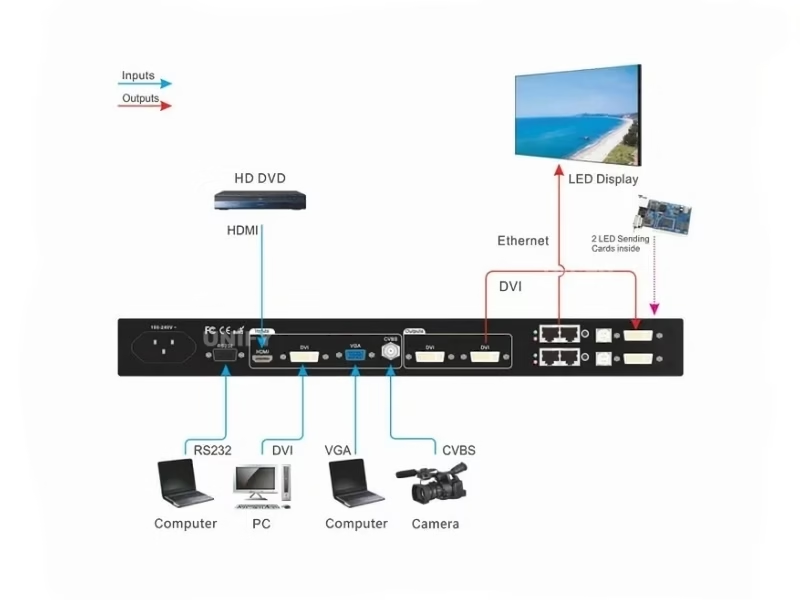
Five steps cover the install, mirroring the manual’s sequence:
Seat the sending cards
Cards are optional and fit inside the chassis; a full 2304×1152 canvas takes both slots. Connect each card’s +5 V lead per the manual.
Wire sources and the wall
Sources into CVBS/VGA/DVI/HDMI; the two DVI outputs to the sending cards; RJ45 from the cards to the wall’s first receiving card. Use the second DVI port to feed a local monitor while setting up if no spare screen exists.
Set the canvas
Menu 2 picks the preset (the unit restarts on apply); menus 4–7 trim the output window to the wall’s exact pixel size with the Step key controlling jump size.
Align the PC with EDID
Menu 3 sets the DVI EDID to the working resolution so the graphics card outputs the wall’s geometry directly; the LCD confirms what the source is actually sending.
Verify and tune
Output a test pattern (36 available) to confirm edge-to-edge mapping, run ADC calibration if analog sources drift, set NTSC Image Mode to taste for composite feeds, and set the switching time in menu 8.
The receiving-card side follows the wall’s own system — our sending card configuration guide covers pairing, and the detection troubleshooting guide covers second-hand walls with unknown cards.
What Problems Do Real LVP100 Users Hit — and How Do You Fix Them?
⚡ The LVP100 screen blinks between DVI and HDMI
Documented behavior, not a fault: the manual’s switching section states seamless switching applies among the inputs except between DVI and HDMI. Put the two sources that need clean cuts on other pairings — PC on DVI switching to camera inputs, or plan the show so the DVI↔HDMI transition happens on a fade the audience expects.
🎚️ Brightness keys stop at 32 but the menu says 64
Two real surfaces: the BRT quick-keys run a 32-step scale, and the setup menu exposes the 0–64/0–100 Bright Level system the rest of the family uses. For show operation use the keys; for commissioning match other VDWALL units on the same wall through the menu values — and remember Bright Level survives a device reset.
📺 NTSC composite footage looks washed out or heavy
The NTSC Image Mode menu (Soft or Standard) exists for exactly this — some CVBS sources have backgrounds that render too bright or too dark in one mode. Toggle it before touching saturation, and if analog sources drift after a venue change, run the hidden ADC calibration routine on the live input.
📦 Buying a discontinued LVP100 — what fails later?
The LVP100’s failure surface is ordinary (power, keys, LCD), and its sending-card ecosystem is shared with the rest of the family, so spares remain available. The real risk is fleet matching: rental stocks should standardize on the 100U, while fixed installs that already run a healthy LVP100 can buy a second clearance unit as a shelf spare for less than the cost of a tier upgrade.
Where Is the VDWALL LVP100 LED Video Processor Used?
The economy tier earns its keep where the wall is small, the sources are few, and nobody on site is an AV engineer:
⛪ LVP100 in small worship venues and community halls
One presentation PC on HDMI or DVI, one camera, lyrics and announcements on a wall inside 2304×1152 — panel operation a volunteer can learn in minutes. Room design starts at our church LED screen guide.
🏪 LVP100 in retail, meeting rooms and pop-up events
A media player plus a laptop, switched from the panel, with the PIP window layering a camera over a promo loop. The 24/7 duty rating and the 1U depth suit closet-mounted installs — our event LED screen overview covers the rental side of small-format shows.
For walls past this tier’s ceiling, the ladder continues: the LVP605 adds inputs and hot-spare pairs, the LVP615S adds SDI, DisplayPort and app control, and the LVP909 adds four outputs, preview and multi-window composition.
How Much Does the VDWALL LVP100 LED Video Processor Cost?
This is the family’s floor price, and the sourced band reflects the discontinued/clearance situation:
LVP100, discounted from a $149 list, in stock — the low marker.
ledpartsmall ($160–180, noting the discontinuation) and led-card.net ($195, in stock).
LVP100U at controller-led.com ($140, list $260); VDWALL LVP300 at $299 and LVP605 from $577 — the ladder above.
Bulk tiers start around the $2,500 mark on some factory listings, and the sending cards belong in the same budget. Tell us the wall and sources — the quote comes back as one package.
LVP100 vs LVP605 vs LVP909: Where Does the Economy Tier End?
Four processors, one grammar — the ladder decides by inputs, outputs and operator model:
| Dimension | LVP100 / 100U (this page) | LVP605 | LVP615S | LVP909 |
|---|---|---|---|---|
| Class | Economy 1U, panel-first | 2K ten-input workhorse | Broadcast scaler-switcher + app | Switcher + splicer + preview |
| I/O | 4–5 in / 2× DVI out | 10 in / 2× DVI out | 8 in (SDI+DP) / 2× DVI out | 6 in (SDI) / 4× DVI out bindable |
| Canvas ceiling | 2304×1152 per unit, no mosaic | 2304×1152 + frame-sync mosaic | ~2.65M px, custom ≤3840 wide | 14400×6400 sync zoom |
| Control | Panel (RS232 optional, central control) | Panel + RS232 + Windows software | Panel / IR / RS232 / USB / LAN / WiFi app | Panel / RS232 / USB / LAN / WiFi + video return |
| Chassis | 1U · 200 mm deep · 2.5 kg | 2U-class · 66.6 mm · 3.2 kg | 2U-class · 66.6 mm · 4.2 kg | 2U-class · 66.6 mm · 4.2 kg |
| Street price | $120–195 | $577–759 | $519–659 | $843 |
3 key differences that draw the line:
- Sources decide first. Four (or five) fixed sources with no growth plans fit the economy tier; a real source list with analog depth needs the 605’s ten channels.
- Growth plans decide second. No mosaic here — a wall that will grow next year starts at the 605 tier, where cascade and hot-spare pairs live.
- The operator decides third. A volunteer at the panel is the 100’s model; a phone-wielding director is the 615S’s; a preview-driven desk is the 909’s.
Cross-brand context for this bracket: our LED video processor category overview and the Novastar, Colorlight, Huidu, Mooncell and RGBlink hubs map the same price bands brand by brand.
VDWALL LVP100 LED Video Processor: Frequently Asked Questions
What is the VDWALL LVP100 LED video processor?
A four-input, two-output economy LED video processor: composite, VGA, DVI and HDMI in, two DVI outputs to sending cards, a 2304×1152 canvas ceiling, cut/fade switching, a PIP window, and panel-only control in a 1U half-depth 2.5 kg chassis. It is the entry model of VDWALL’s processor line.
Is the LVP100 discontinued?
Yes — multiple resellers state the LVP100 is out of production and direct buyers to the LVP100U. Remaining stock sells at clearance prices ($120–195 across listings), and it remains a sensible buy for fixed installs that accept the spares risk. New builds should order the 100U.
What does the LVP100U add over the LVP100?
Per VDWALL’s official product page: a fifth input, an audio output, USB media playback and ten preset scene modes, on the same two-output, panel-controlled platform. Both models take two internal sending cards and share the menu grammar.
How big an LED wall can the LVP100 drive?
Up to 2304×1152 pixels — 2,654,208 pixels — through its two DVI outputs and two sending cards. Sixteen presets cover standard formats plus the 2560×816 ultra-wide and portrait entries. There is no mosaic mode; bigger walls move up the family ladder.
Why does the picture blink when I switch between DVI and HDMI?
The manual states seamless switching applies among the inputs except between DVI and HDMI. Route the sources that need clean transitions onto other pairings, or accept the blink on that one transition path.
Can the LVP100 be controlled remotely?
Only through the optional RS232 port, using the Device ID system (0–255) so a central controller can address multiple units individually. There is no LAN, USB, WiFi or phone-app control on this model — that is the economy tier’s defining trade-off.
Why do the brightness keys stop at 32 when the menu reaches 64 or 100?
The BRT quick-keys run a 32-step scale for show-floor adjustments, while the setup menu exposes the family’s 0–64/0–100 Bright Level system for commissioning. Both are documented; match other units through the menu values, and remember Bright Level survives a reset.
Which sending cards fit the LVP100?
Two internal slots, cards optional — a full-size canvas uses both. The card must speak the wall’s receiving-card protocol, so identify the receivers first (especially on second-hand walls) and buy the matching sender.
Where is the HDMI EDID setting?
Inside the hidden factory menu: enter item 15 (Device ID), press the CVBS key five times, and items 16–23 unlock — including HDMI EDID, DVI hotplug, Bias, Bright Level, DeInterlace and ADC calibration. The manual reserves these for technicians.
How much does the VDWALL LVP100 cost?
Published listings run $120 (ledcontrollercard.com) to $195 (led-card.net), with clearance quotes of $160–180 where the discontinuation is noted; the LVP100U successor lists at $140 (controller-led.com, from a $260 list). Reference points above the tier: LVP300 $299, LVP605 from $577.
Is the LVP100 still a good buy in 2026?
For a fixed small-wall install inside 2304×1152 with four or fewer sources and panel-only operation — yes, at clearance pricing it is the cheapest way into a genuine VDWALL processor. For rental fleets, growing walls, or rooms that will need remote control, buy the LVP100U or step up the ladder.
What documents ship with the unit?
The box carries the processor, a 1.5 m power cord, one 1.5 m DVI cable, the printed user manual, an operation CD and two BNC-RCA adapters. Both official documents — user manual V1.0 and product overview V1.0 — download from this page.
Small Wall, Tight Budget — We’ll Match the Processor and the Cards
Tell us the pixel grid and the sources; we quote the LVP100 or LVP100U with the right sending cards, from a LED screen manufacturer that ships worldwide.
📞 / WhatsApp: +86-191-18802497 · Shenzhen, China · GMT+8
VDWALL LVP100 LED Video Processor: The Complete Buying Guide (2026)
Chapter 1 — Buying a Discontinued Processor on Purpose
Most buying guides assume the product is current; the LVP100’s situation demands the opposite starting point. Production has ended, resellers say so in their listings, and the official line has moved to the LVP100U. That does not make the LVP100 a bad purchase — it makes it a specific one. A fixed installation (a shop wall, a community hall, a meeting room) buys the box once and touches it rarely; its real risks are power supply and buttons, not firmware roadmaps. Clearance pricing of $120–195 against the 100U’s $140–260 band means the discount is modest, so the honest framing is: pay the small premium for the U when the fifth input, audio out or USB playback could ever matter, and take the discontinued unit when the price gap is wide and the install is frozen. What never makes sense is building a rental fleet on a discontinued platform — matching spares are the whole game in rental, and that game ends when production does.
Chapter 2 — The LVP100 1U Engineering Story: What 44 Millimeters Buys and Costs
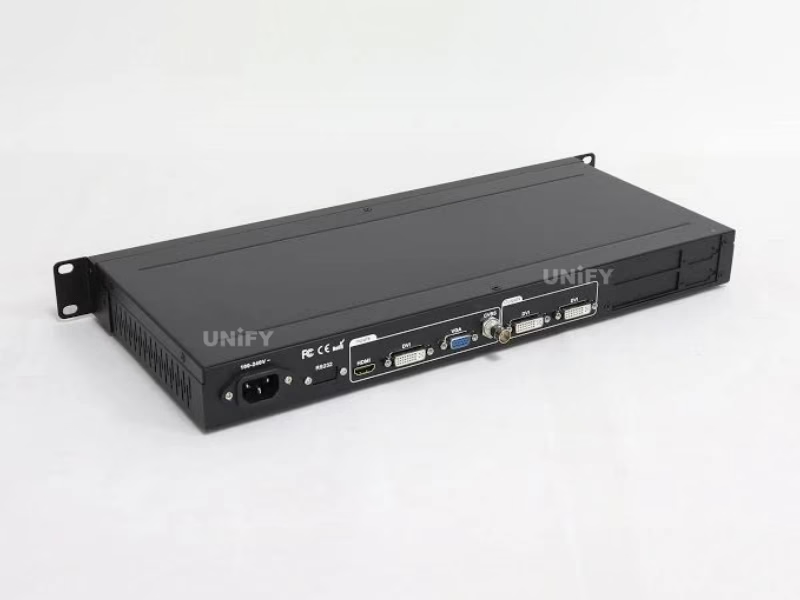
The LVP100’s chassis is the most distinctive thing about it: 44 mm tall, 200 mm deep, 2.5 kg — a half-rack that mounts where the deeper 605/615S/909 chassis physically cannot. Shallow wall-mount cabinets, under-counter AV shelves, the back of a cart — the economy tier fits the rooms its customers actually have. The engineering trade shows in the port count: four inputs on one BNC, one VGA, one DVI and one HDMI; two DVI outputs sharing identical content for the two sending cards a full canvas needs. Heat and power stay modest (≤25 W), the 24/7 duty rating covers signage duty cycles, and the stripped control surface — keys, no network — is what keeps both the price and the failure surface small. The chassis is the feature summary: everything the room needs, nothing it does not.
Chapter 3 — Two Brightness Scales on the LVP100: Reading the Documentation Honestly
The LVP100’s manual documents brightness twice, and both entries are correct. The panel’s BRT keys run a 32-step scale — an operator-facing control tuned for mid-show adjustments, where thirty-two steps are plenty and counting past them is nobody’s job. The setup menu exposes the family’s Bright Level system (0–64 or 0–100, factory 0-64), which is the commissioning surface shared with the LVP605, 615S and 909. The practical rules follow: operate with the keys, commission with the menu, and when a 100 shares a canvas with other VDWALL models, match by eye against a test pattern rather than by number — the same advice our 909 review gives, for the same reason. Documentation that exposes its own seams is common in this industry; the professional habit is learning which surface each number lives on.
Chapter 4 — LVP100 EDID and the Pixel-to-Pixel Promise
Small walls succeed or fail on geometry, and the LVP100 attacks the problem from both ends of the cable. Downstream, the four output-window parameters trim the canvas to the wall’s exact pixel grid over any of the sixteen presets. Upstream, the DVI EDID menu rewrites what the connected PC believes the display is, so the graphics card outputs the wall’s native geometry instead of its own idea of “best” — the same EDID trap our LVP605 review documents from VDWALL’s FAQ, and the same fix: make the source agree with the wall rather than fighting the source after the fact. An HDMI EDID entry hides in the factory menu for the digital source side. Together with the arrow-and-Step key system, which moves values in chosen jump sizes, the whole geometry session happens on the panel in minutes — no software, no network, no laptop.
Chapter 5 — Central Control Without a Network: The RS232 Path
The absence of LAN and WiFi control is the economy tier’s defining trade-off, but the optional RS232 port keeps the door open for the installations that need automation. The Device ID system (0–255) lets one serial controller address a bank of LVP100 units individually — the pattern AV integrators use in classrooms, museums and retail chains where a schedule or a wall panel needs to switch sources without a human at the rack. There is no published Windows application for this model; the central controller speaks the serial protocol directly, which suits the integrators who specify this tier anyway. The arithmetic for buyers is simple: if the room will never automate, skip the RS232 option entirely; if it will, the port plus a controller costs less than stepping up a tier for network features the room will not use.
Chapter 6 — Where the LVP100 Economy Tier Ends: The Ladder in Practice
Ladders clarify purchases, so the four-rung version: the LVP100/100U owns the room with four or five fixed sources, a wall inside 2304×1152, and a panel operator. The LVP605 takes over when the source list grows to ten, when hot-spare pairs become insurance worth having, or when frame-synced mosaic enters the plan. The LVP615S takes over when SDI or DisplayPort enters the signal chain, when the operator moves to a phone, or when a custom canvas wider than 2304 columns appears. The LVP909 takes over when outputs multiply — four walls, ultra-wide ribbons, a preview-driven desk, multi-window composition. Price marks the rungs ($120–195, $577–759, $519–659, $843), and the failure mode to avoid is buying up the ladder for features the room will never touch — the economy tier exists precisely because most small rooms never leave it.
Chapter 7 — The LVP100U Upgrade Path: What Changes, What Carries Over
For owners of working LVP100 units, the 100U is a sideways move with three specific gains rather than a generation change: the fifth input absorbs the source that never had a home, the audio output lets the box feed the sound system directly, and the ten preset scene modes turn multi-state venues (service mode, event mode, signage mode) into one-key recalls. The menu grammar, the sending-card architecture, the EDID workflow and the panel operation all carry over — a crew that runs a 100 runs a 100U without training. The migration math mirrors the purchase math: fixed installs with healthy 100s gain little and should stay put; new builds and expanding rooms gain the input, the audio and the presets, which is exactly what the $140–260 band buys.
Chapter 8 — LVP100 Price, Documents and the Buying Checklist
The sourced band brackets the LVP100 at $120 (ledcontrollercard.com), $160–180 clearance (ledpartsmall.com, which notes the discontinuation) and $195 (led-card.net), with the LVP100U at $140 from a $260 list (controller-led.com) — the floor of the VDWALL ladder, against $299 for the LVP300 and $577 and up for the LVP605. Before ordering, walk the checklist: the wall’s pixel grid inside 2304×1152 (the calculator confirms it); the source list at four or five and its growth prospects; the discontinued-unit question answered honestly against the install’s spare-parts risk; the control plan — panel-only, or the RS232 option with a central controller; and the sending cards matched to the wall’s receiver family, two of them for a full canvas. Both official documents (user manual V1.0, overview V1.0) download below, and the quote request returns the complete chain at economy-tier pricing.
Which LED Video Processors Should You Explore Next?
VDWALL Video Processor Family
LVP605 (2K workhorse) · LVP615S (SDI + WiFi app) · LVP909 (4 outputs + preview) · VDWALL hub
Novastar LED Controllers
Colorlight, Huidu, Mooncell and RGBlink Processors
Colorlight X16 · Huidu VP620 · Mooncell M40 · RGBlink switchers
Where Can You Download LVP100 Resources?
📕 LVP100 User Manual V1.0 (30 pages)
🏭 Overview of LVP100 V1.0 (6 pages)
VDWALL LED Video Processor: Hub, Family & Guides
Family: VDWALL LED video processor hub (full catalog) · LVP100/100U · LVP605 · LVP615S · LVP909
Guides: How to Choose · VDWALL vs Novastar · Family Comparison · Church Setup · 2026 Price Guide · Troubleshooting
System: LED video processor overview · sending card configuration · multi-card backup · screen calculator