
NovaStar All-in-One Series

NovaStar VX4S-N LED Display Controller

Professional all-in-one LED video controller with Nova G4 engine — 2.3 million pixels, 6-input support, PIP, and no-PC screen configuration in a compact 1U chassis.

2.3M Pixels 4× Ethernet 6 Inputs Nova G4

Get Quote & Availability

▶ All-in-one Controller — NovaStar VX4S Official Product Video by NovaStar

13+
Years Experience
108+
Countries Served
6+
Certifications
24h
Quote Response

What Is the NovaStar VX4S-N All-in-One Controller?

The NovaStar VX4S-N LED Display Controller is an all-in-one device that combines a 6-input LED video processor with a synchronous LED control system in a compact 1U chassis. It replaces the discontinued VX4S with the same feature set — 3G-SDI, VGA, CVBS, DVI, HDMI 1.3, and DP inputs — driving up to 2,300,000 pixels across 4 Gigabit Ethernet ports.

Powered by the Nova G4 engine, the VX4S-N delivers flicker-free images with 10-bit color depth. The on-device knob and button interface enables full screen configuration without a PC — a critical advantage for rental staging and live events where every minute of setup time counts.

At 25W power draw and 2.55 kg, the VX4S-N is one of the most energy-efficient all-in-one controllers in its class. Certified to CE, RoHS, FCC, UL, and CMIM standards.

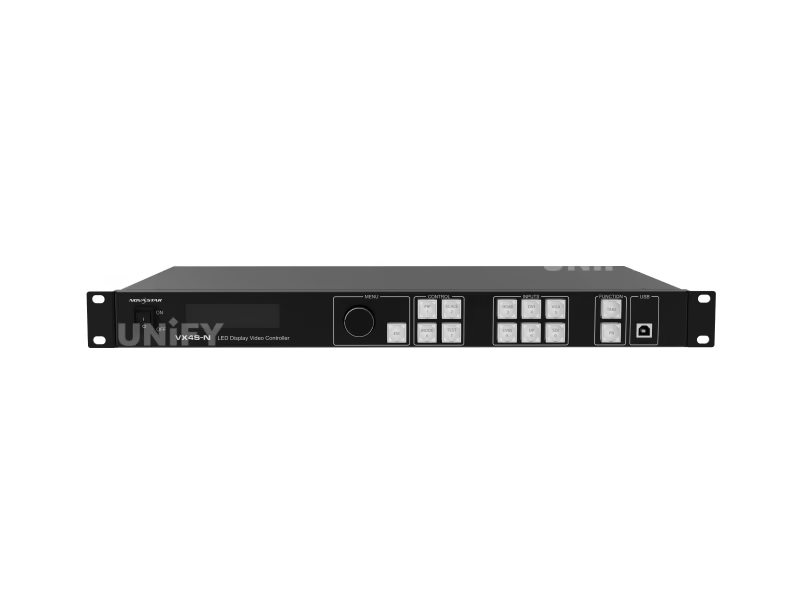
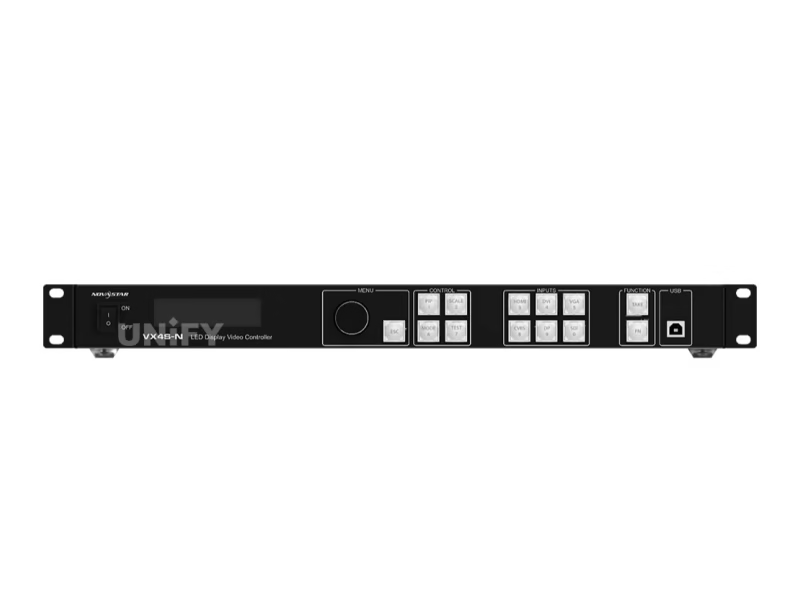
NovaStar VX4S-N LED Display Controller front panel with LCD screen and control buttons

▶ ENHANCE YOUR ARSENAL — NovaStar All-in-One Video Controllers Official Lineup Overview

VX4S-N Technical Specifications

Based on NovaStar official documentation V1.0.1.

Video Input

Connector Qty Max Resolution Notes
3G-SDI 1 1920×1080@60Hz Loop through · Deinterlacing · ST-424/ST-292
HDMI 1.3 1 1920×1200@60Hz HDCP 1.4 · Custom EDID · Max 3840×652@60Hz
DVI 1 1920×1200@60Hz HDCP 1.4 · Loop through · Custom EDID
DP 1 1920×1200@60Hz HDCP 1.3 · Custom EDID
VGA 1 1920×1200@60Hz VESA standard
CVBS 1 PAL/NTSC Composite video
AUDIO 1 External audio input · HDMI audio supported

Video Output & Control

Connector Qty Details
Ethernet 4 Gigabit · 2.3M px total · Max 3840×1920 · Port 1 for audio output
DVI OUT 1 Output monitoring
ETHERNET 1 PC communication / Network control
USB Type-B 1 PC control / Multi-device cascade input
USB Type-A 1 Multi-device cascade output

Physical

Dimensions 482.6 × 250.0 × 50.0 mm
Net Weight 2.55 kg
Power Consumption 25 W (AC 100–240V 50/60Hz, 1.5A)
Operating Temp –20°C to 60°C
Noise Level 38 dB (A) at 25°C
Certifications CE · RoHS · FCC · UL · CMIM

Video Processing

Engine Nova G4
Color Depth 8-bit / 10-bit
Max Width/Height 3840 px / 1920 px (custom EDID)
Scaling Full screen · Pixel-to-Pixel · Custom
Switching Seamless high-speed + Fade effect

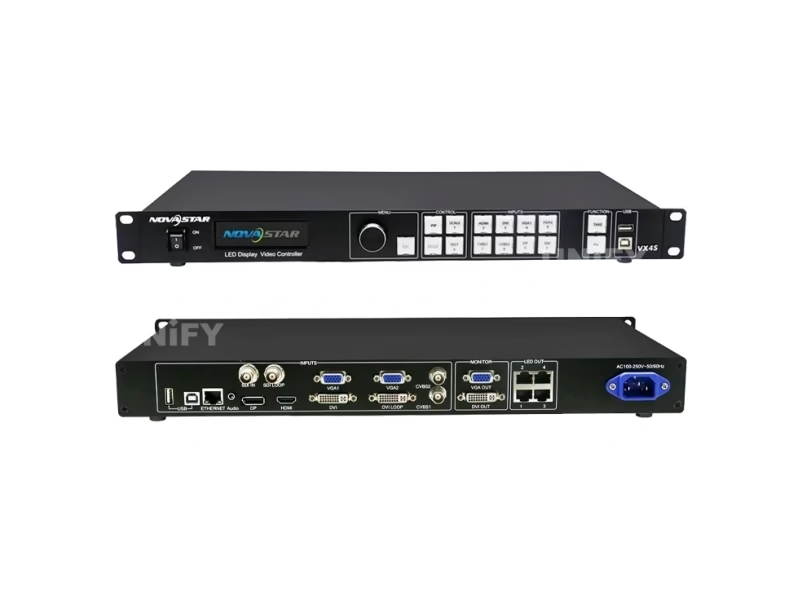
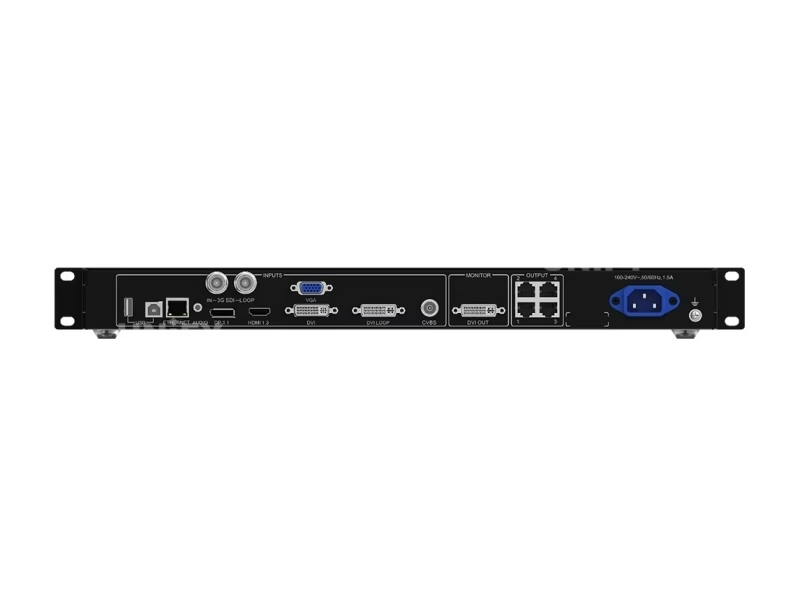
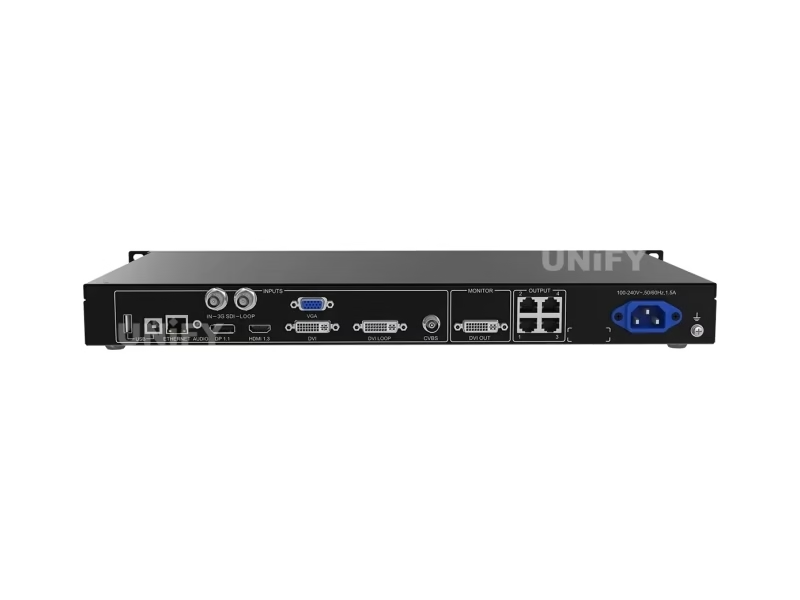
NovaStar VX4S-N rear panel — input and output connector layout

Core Features of the VX4S-N Controller

Each feature evaluated from an integrator and rental operator perspective.

🎯

Nova G4 Image Engine

Flicker-free display with enhanced depth perception and color accuracy. 10-bit processing eliminates banding in smooth gradients — critical for broadcast and fine-pitch LED screens. The engine supports both 8-bit and 10-bit HD video sources with RGB and YCbCr 4:4:4/4:2:2 color spaces.

📺

6-Input Simultaneous Support

3G-SDI for broadcast cameras, HDMI and DP for media players and laptops, DVI for legacy sources, VGA and CVBS for analog backup — all supported concurrently. Front-panel input buttons with LED status indicators for instant source switching without software.

🖼️

PIP — Picture in Picture

Two independent layers with adjustable position and size. Route a presentation on the main layer while displaying a speaker close-up in the PIP window. The TAKE button on the front panel instantly swaps between the main layer and PIP — no menu navigation required during live operation.

2.3M Pixel Capacity

Four Gigabit Ethernet ports load up to 2,300,000 pixels total — max width 3,840 px, max height 1,920 px. At standard 1920×1080 (2.07MP), all four ports combined drive a full-HD screen. Custom EDID enables ultra-wide formats like 3840×600@60Hz for ribbon displays.

🔧

No-PC Smart Configuration

Full screen configuration via the front-panel knob and OLED display — no computer required. Complete a 4-step setup (Input → Screen → Brightness → Output) in under 30 seconds. The innovative architecture enables smart cabinet mapping that auto-detects connected panels, dramatically reducing on-site preparation time.

🔗

Multi-Unit Image Mosaic

Cascade multiple VX4S-N units via USB (Type-B → Type-A) for large-screen splicing. Two mosaic modes: Equal Division (identical load per unit) and Unequal Division (custom load area per unit). Supports pixel-level calibration and white balance matching across all cascaded units for seamless color uniformity.

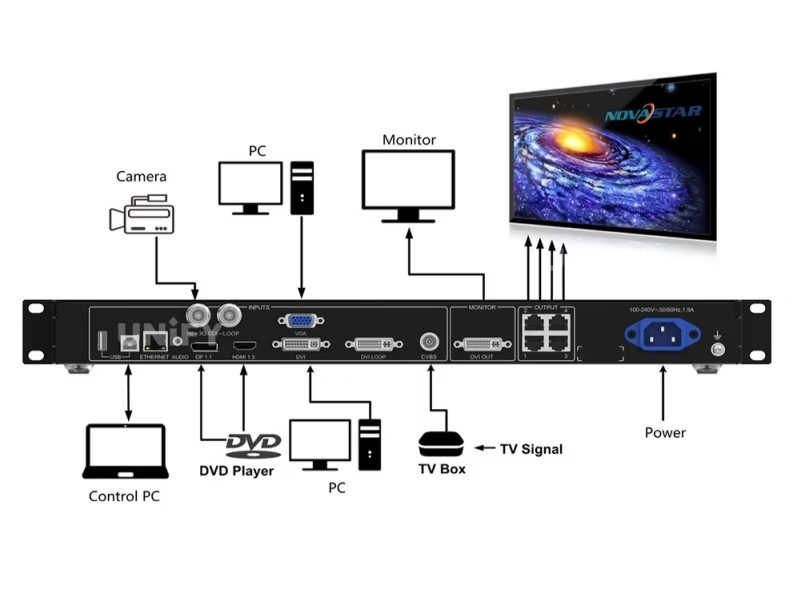
NovaStar VX4S-N signal workflow diagram — input sources to Ethernet output
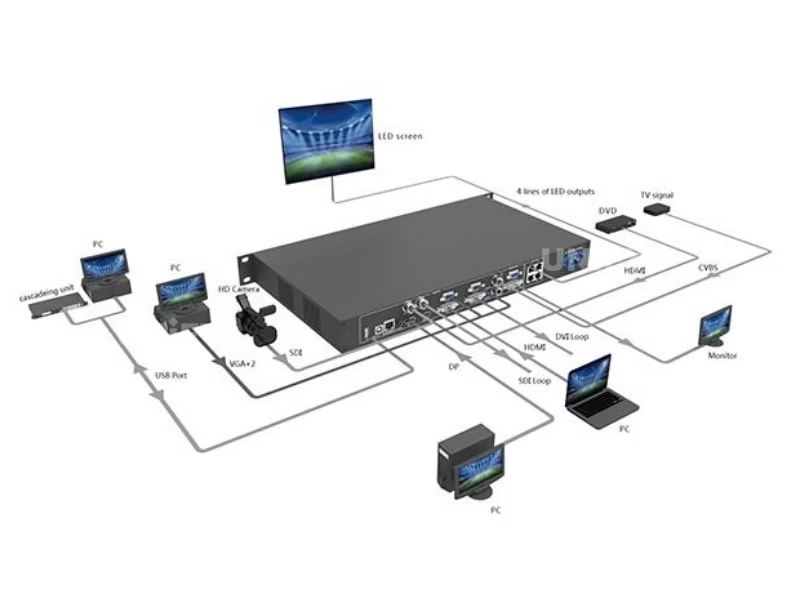
NovaStar VX4S-N LED display screen controller integrated system diagram

NovaStar Control System & NovaLCT Software

The VX4S-N operates within NovaStar’s synchronous control ecosystem. Download NovaStar LED controller software for free.

On-Device Control (No PC)

  • 4-step wizard: Input → Screen → Brightness → Output
  • Knob + ESC button for all menu navigation
  • OLED display showing live status, IP, signal format
  • 10 shortcut keys for input source switching
  • PIP, SCALE, MODE, TEST one-touch buttons
  • Key lock function to prevent accidental changes

NovaLCT Software (PC/Mac)

  • Receiving card configuration & rcfgx management
  • Advanced screen mapping & cabinet topology
  • Pixel-level calibration via NovaCLB
  • White balance & color gamut mapping
  • Firmware updates via USB or Ethernet
  • Refresh rate & scan mode optimization

▶ Basic Knowledge Of NovaStar Control System — Official NCE Training by NovaStar

VX4S-N Quick Setup Guide

The 4-step wizard accessible from the front panel. For full details, see LED screen installation guide.

1

Input Settings

Select input source and set resolution. For DVI, HDMI, and DP: choose from preset resolutions or set custom EDID (max 3840×652@60Hz). SDI supports 1920×1080@60Hz with auto-deinterlacing. CVBS auto-detects PAL/NTSC. External audio via dedicated AUDIO port or HDMI.

2

Screen Settings

Load cabinet rcfgx files via NovaLCT or use the smart auto-detection. Set Cabinet Row Qty, Column Qty, and per-port cabinet count. Define data flow direction (Front View). Port 1 must be the data flow start position. For irregular cabinets, use NovaLCT-Mars software.

3

Brightness Calibration

Adjust global brightness via the knob (0–100%). For advanced calibration: white balance correction and color gamut mapping based on specific LED characteristics. NovaStar’s pixel-level calibration via NovaCLB compensates for LED aging drift and manufacturing tolerances.

4

Output Settings

Three scaling modes: Disable Scaling (point-to-point, for pixel-critical content), Auto Fit (full-screen adaptation), and Custom Scaling (input crop + output layer positioning). Configure image mosaic for multi-unit setups — Equal or Unequal Division modes. Verify via DVI OUT monitor port.

▶ NovaLCT Basic Configuration — Official NCE Online Training by NovaStar

▶ Redundancy Setting for LED Display — How to Set Up Backup to Avoid Black Screen

▶ Troubleshooting Webinar — Blackout Issue & Screen Flickering (NovaStar Official NCE Training)

Where the VX4S-N Excels

Four deployment scenarios where the all-in-one architecture and no-PC configuration prove decisive.

🎪

Stage & Live Events

Seamless high-speed switching and fade effects deliver broadcast-quality transitions. 10 shortcut keys enable instant source changes during live shows. For stage LED displays, the 30-second smart configuration minimizes setup time between acts.

🎬

Broadcast & Studios

3G-SDI input with deinterlacing and loop-through makes the VX4S-N broadcast-native. 10-bit color depth and Nova G4 engine ensure smooth gradients on camera. Genuine color reproduction via white balance calibration and color gamut mapping tuned for specific LED modules.

🏛️

Conferences & Exhibitions

PIP enables simultaneous presentation + speaker close-up on one screen. For conference LED display solutions, the no-PC knob interface lets venue staff adjust settings without an AV technician. Multiple VX4S-N units cascade for large exhibition video walls.

🚚

Rental & Touring

2.55 kg with included carrying case — built for transport. 25W power draw means minimal heat and silent 38dB operation. For rental LED display fleets, the 30-second smart config per venue dramatically reduces per-event labor compared to PC-dependent controllers.

Multiple NovaStar VX4S-N units in rack-mount and portable configurations

VX4S-N vs. NovaStar VX Series Controllers

Understanding where the VX4S-N fits in NovaStar’s all-in-one product line.

Feature VX4S-N VX4S (Discontinued) VX6s VX1000
Max Pixels 2,300,000 2,300,000 3,900,000 6,500,000
Ethernet Ports 4 4 6 10
Input Types 6 (SDI+VGA+CVBS+DVI+HDMI+DP) 8 (2×VGA+2×CVBS+SDI+DVI+HDMI+DP) 8 (2×SDI+2×HDMI+2×DVI+…) 4 (DP+HDMI+DVI+SDI)
Max Resolution 1920×1200@60Hz 1920×1200@60Hz 1920×1200@60Hz 4K×2K@60Hz
Layers PIP PIP 3 Layers 2 + BKG
Power 25W 25W 25W 70W
Weight 2.55 kg 2.55 kg 3.5 kg 6.3 kg
Market Price $1,049–$1,100 Discontinued $700–$900 $1,500–$2,500

VX4S-N highlighted. Contact UnifyLED for factory-direct pricing on any VX series controller.

NovaStar VX4S-N close-up detail view of front panel OLED display and control buttons

Why Source Your VX4S-N from UnifyLED?

As a direct LED screen manufacturer and NovaStar partner, we offer factory-direct pricing with pre-shipment configuration.

💰

Factory-Direct Pricing

15–30% below US/EU distributor pricing ($1,049–$1,100 retail). We pass procurement efficiency directly to B2B buyers. Bulk pricing available for 10+ units.

🔍

Pre-Shipment Testing

Every VX4S-N is powered on, configured, and tested with a live LED screen before packaging. Our quality control process catches DOA units before they leave our LED display factory.

🔗

Integrated Ecosystem

Complete chain: LED cabinets + NovaStar controllers + receiving cards + cables — pre-configured to work together. Single warranty, single support contact. Compatible with all NovaStar sending cards and COB LED display systems.

🌍

Global Logistics

80+ countries served. HS codes, certificates of origin, CE/FCC/UL compliance documentation included. VX4S-N ships with carrying case, power cord, USB/DVI/HDMI cables, and user manual.

NovaStar VX4S-N LED screen controller — complete package with accessories and carrying case

Frequently Asked Questions

Q: What is the maximum loading capacity of the VX4S-N?

2,300,000 pixels across 4 Gigabit Ethernet ports. Maximum width: 3,840 pixels; maximum height: 1,920 pixels. At standard 16:9, this supports up to 2048×1152@60Hz.

Q: What is the difference between VX4S and VX4S-N?

The VX4S-N is the cost-optimized successor to the discontinued VX4S. The VX4S-N has single CVBS and VGA inputs (vs. dual on VX4S) and DVI output monitoring (vs. VGA+DVI on VX4S). All core features — Nova G4 engine, 2.3M pixels, PIP, smart configuration — are identical.

Q: Can I cascade multiple VX4S-N units for larger screens?

Yes. Connect units via USB Type-B → Type-A. Two mosaic modes: Equal Division (identical pixel load per unit) and Unequal Division (custom load area per unit). Each unit requires its own input source. Configure via the Image Mosaic menu.

Q: Do I need a computer to configure the VX4S-N?

No. The VX4S-N features complete on-device configuration via the front-panel knob, ESC button, and OLED display. The 4-step wizard (Input → Screen → Brightness → Output) enables full setup in under 30 seconds. For advanced features like rcfgx management and firmware updates, NovaLCT software on a PC is required.

Q: What input resolutions does VX4S-N support?

Standard: up to 1920×1200@60Hz on DVI, HDMI, DP, and VGA. 3G-SDI: up to 1920×1080@60Hz. Custom EDID supported on DVI, HDMI, and DP — enabling ultra-wide formats like 3840×652@60Hz or ultra-tall formats like 1246×1920@60Hz. CVBS: PAL/NTSC auto-detection.

Q: How does PIP work on the VX4S-N?

Press the PIP button to enable Picture-in-Picture. Short-press an input source button to set the main layer; long-press to set the PIP layer. Use the TAKE button to swap between layers. PIP position and size are adjustable via the menu. The OLED display shows main layer and PIP source status simultaneously.

Q: What certifications does the VX4S-N carry?

CE, RoHS, FCC, UL, and CMIM — meeting regulatory requirements for North America, Europe, and Asia-Pacific markets. Noise level: 38 dB(A) at 25°C ambient.

NovaStar VX4S-N — The Complete B2B Buyer’s Guide

Published July 2026 · UnifyLED Engineering Team · 13 min read

1. Why the VX4S-N Replaced the VX4S — And What Changed

The NovaStar VX4S-N LED Display Controller is the direct successor to the discontinued VX4S. NovaStar made two hardware changes: single CVBS and VGA inputs (down from dual on VX4S) and DVI-only monitoring output (replacing VGA+DVI). Everything else — the Nova G4 engine, 2.3M pixel capacity, PIP, smart knob-based configuration, and all six input types — remains identical. For B2B buyers, the VX4S-N delivers the same operational capability at a lower unit cost ($1,049 vs. the VX4S’s original $1,200+).

The practical implication: if you are replacing a failed VX4S in an existing installation, the VX4S-N is a drop-in replacement. If you are planning new deployments, the VX4S-N is the current-production model with full NovaStar support and firmware updates. See our LED video processor guide for broader controller comparisons.

2. Nova G4 Engine — What the Silicon Actually Does

The Nova G4 is NovaStar’s fourth-generation image processing ASIC, and it is the single most important component inside the VX4S-N. Unlike general-purpose FPGAs used in competing controllers, the G4 is purpose-built for LED display processing. Its key capabilities: 10-bit color depth processing (1.07 billion colors vs. 16.7 million at 8-bit), hardware-based deinterlacing for SDI inputs, flicker-free output (no scanning lines even at low refresh rate settings), and real-time color gamut mapping.

The G4 engine’s color gamut mapping is particularly relevant for B2B buyers deploying mixed batches of LED cabinets. LED modules from different production runs can exhibit slight color temperature variations (typically 200–500K). The G4’s per-pixel calibration compensates for these variations automatically — a feature that, in separate-component architectures, would require an external color processor costing $500–$1,500.

3. Input/Output Architecture — Real-World Signal Flow

The VX4S-N’s six input types each serve a distinct role in production environments. A typical conference setup: PTZ camera via 3G-SDI (broadcast-grade, up to 100m cable runs), presenter laptop via HDMI, backup media player via DP, legacy DVD player via CVBS, and a secondary PC via VGA. The DVI input with loop-through allows daisy-chaining to a second display or recorder without an external splitter.

On the output side, the four Ethernet ports each carry independent data streams to LED receiving cards. The total 2.3M-pixel budget must be distributed across ports — a common mistake is overloading one port while underutilizing others. The DVI OUT monitoring port provides a real-time confidence feed of what the LED screen is displaying, invaluable for troubleshooting without needing to look at the actual LED wall.

4. PIP & Multi-Layer Workflow — Two Sources, One Screen

The VX4S-N supports one main layer and one PIP layer with independently adjustable position and size. Short-press an input button to assign the main source; long-press to assign the PIP source. The TAKE button instantly swaps them — critical during live events when you need to switch between a full-screen presentation and a speaker-plus-slides layout without menu navigation.

For permanent installations requiring more than two layers, upgrade to the VX6s (3 layers) or VX1000 (2 layers + BKG). For conference LED display solutions, the VX4S-N’s PIP capability covers the most common use case: content on the main layer, speaker on PIP.

5. Total Cost of Ownership — VX4S-N vs. Separate Components

Separate Components: Entry-level video scaler ($300–$600) + sending card ($120–$300) + configuration hardware + cabling = $420–$900 before operational overhead of managing 2–3 separate devices.

VX4S-N: Single $1,049 device consolidating all three functions. 5-year electricity at 25W × 8h/day × $0.12/kWh ≈ $44. The 25W power draw is among the lowest in its class — less than half the VX1000’s 70W and comparable to a small LED light bulb. For a rental company operating 10+ controllers on a single generator circuit at outdoor festivals, this power efficiency directly reduces generator rental costs.

The real TCO advantage is operational. One device to rack, cable, and configure. For technicians, one manual, one firmware update procedure, one support contact. With LED display lifespan expectations of 100,000 hours, controller longevity directly impacts project ROI over the deployment lifetime.

6. Smart Configuration — When You Cannot Bring a PC

The VX4S-N’s defining operational advantage is the no-PC configuration workflow. The front-panel OLED display shows device status, IP address, input source format, and PIP status at a glance. Rotating the knob navigates menus; pressing confirms. The ESC button exits. Four dedicated shortcut buttons (PIP, SCALE, MODE, TEST) plus ten input source buttons provide one-touch access to the most frequently used functions.

The 4-step wizard — Input Settings → Screen Settings → Brightness → Output Settings — can be completed in under 30 seconds by a trained technician. For rental staging companies, this means the local venue AV tech can reconfigure the controller for each event’s specific screen layout without needing the touring engineer to be on site. The key lock function (long-press knob + ESC) prevents accidental changes once configured. See our LED Academy for step-by-step tutorials.

7. Image Mosaic — Multi-Unit Cascading for Large Screens

When a single VX4S-N’s 2.3M-pixel capacity is insufficient, multiple units can be cascaded via USB (Type-B output → Type-A input). Two mosaic modes: Equal Division assigns identical pixel loads to each unit (simplest, best for regular grid layouts), and Unequal Division assigns custom load areas (useful for irregular screen shapes or mixed-resolution walls).

Important constraints: each cascaded unit requires its own video input source. The system does not split a single input across multiple VX4S-N units — you must use an external DA (distribution amplifier) if all units need the same source. For installations requiring single-source multi-unit distribution, the VX6s or VX1000 with built-in loop-through may be more appropriate.

8. Color Calibration & White Balance

The VX4S-N supports NovaStar’s pixel-level calibration technology via NovaCLB software. The calibration pipeline: (1) measure each LED pixel with a supported colorimeter at multiple brightness levels, (2) NovaCLB computes per-pixel correction coefficients targeting D65/6500K, (3) coefficients are uploaded to receiving card memory for hardware-level correction — zero added latency, persists through power cycles.

White balance calibration and color gamut mapping can be performed directly from the VX4S-N’s on-device menu for basic adjustments, or via NovaLCT for advanced per-module tuning. For fine-pitch LED displays where viewers stand close to the screen, this calibration capability is the difference between a visibly uniform image and one with perceptible color patches.

9. Firmware & Software Ecosystem

The VX4S-N is managed through NovaStar’s software suite: NovaLCT for screen configuration and receiving card management, SmartLCT for alternative configuration workflows, and NovaCLB for calibration. All three are free downloads from novastar.tech, Windows 10/11 compatible. The device communicates via USB Type-B or Ethernet (TCP/IP). Firmware updates are applied through NovaLCT — always back up rcfgx files before updating, as firmware updates can reset receiving card configurations to defaults.

10. Sourcing Strategy — Factory Direct vs. Distributor

B2B buyers choose between regional distributors (local stock, local warranty, $1,049–$1,100 per unit) and factory-direct from a LED screen manufacturer that is also a NovaStar partner (15–30% lower pricing, pre-shipment configuration, integrated ecosystem support).

Key questions: Does the supplier test each VX4S-N with a live LED screen before shipping? Can they provide the complete system (cabinets + controller + receiving cards) pre-configured? Our quality control process documentation details our testing — we encourage direct comparison.

— Is the VX4S-N Right for Your Project?

The NovaStar VX4S-N LED Display Controller occupies a specific, well-defined position: it is the most cost-effective current-production all-in-one controller in NovaStar’s lineup, purpose-built for projects that need broadcast-grade inputs, 2.3M-pixel capacity, and no-PC configuration — without paying for 4K capability or multi-layer compositing that may never be used. For B2B buyers deploying LED screens in the 2MP range for stage, broadcast, conference, and rental applications, the VX4S-N represents the optimal intersection of capability, reliability, and cost.

When evaluating controllers, move beyond the spec sheet. Ask: Can I configure this without a PC in the field? How many watts does it draw on my generator? Does my supplier test each unit before shipping? At UnifyLED, we answer these questions with specific, verifiable data.

Ready to Deploy the VX4S-N?

Factory-direct pricing, pre-shipment testing, integrated technical support. Send your specifications — we respond within 24 hours.

Get Factory Quote

Explore the Complete NovaStar Controller Range

Download VX4S-N Resources

Official NovaStar VX4S-N user manual and specifications.

Contact Us!

Order LED Screen? Please feel free to contact us at any time, and we will respond to you within 24 hours.