
Mooncell · 2-in-1 Video Processor & Sending Controller
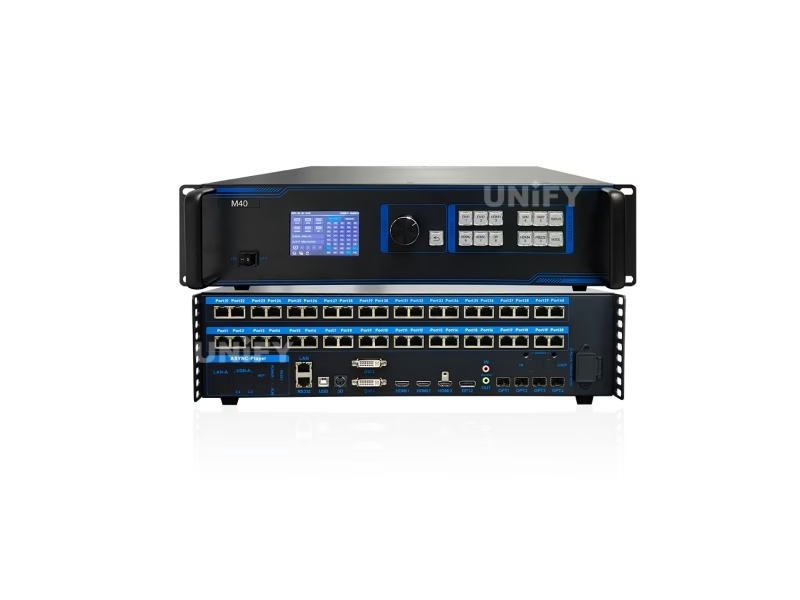
Mooncell M40 2-in-1 LED Video Processor
The Mooncell M40 2-in-1 LED Video Processor combines a 4K video processor and a sending controller in one unit: 40 Gigabit Ethernet outputs, a 26-million-pixel loading capacity, a 16384×16384 canvas ceiling, seven video inputs and four 10G fiber optic ports for long-distance runs.
Product Overview
What Is the Mooncell M40 2-in-1 LED Video Processor?
The Mooncell M40 2-in-1 LED Video Processor is a large-format LED display processor that combines a 4K multi-source video processor and a sending controller in a single chassis: seven video inputs feed up to six simultaneous display windows, and forty Gigabit Ethernet outputs — or four 10G fiber optic ports — drive LED receiving cards directly, up to 26 million pixels with a 16384×16384 canvas ceiling. The “2-in-1” in the name means the processor and the sending stage live in one box, replacing a two-device chain with one rack unit. This page uses the official Mooncell M40 Specification V4.1 as its data source.
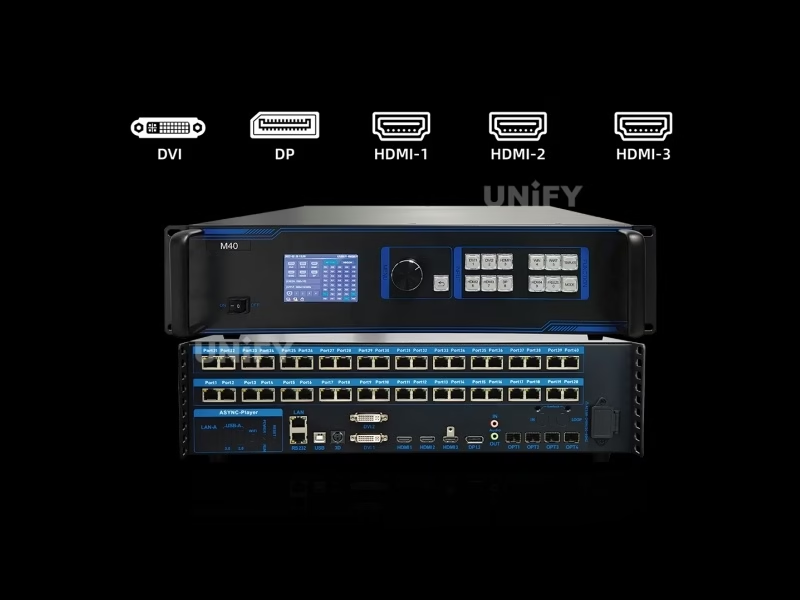
Short answer: The Mooncell M40 is a 2-in-1 LED video processor and sending controller with 7 video inputs (2× HDMI 2.0, 2× HDMI 1.4, 1× DP 1.2, 2× DVI), up to 6 simultaneous windows, 40 Gigabit Ethernet outputs and 4× 10G fiber ports, a 26-million-pixel loading capacity (20.8 million over fiber), a 16384×16384 width/height ceiling, 128 scene templates, active 3D, HDR10 and optional Genlock. It replaced the separate processor-plus-sending-card chain at ISE 2025, where Mooncell launched the M-series.
In the Mooncell lineup the M40 is the flagship of the 2-in-1 processor family, one step above the M32 (32 network ports). The product was first shown at ISE 2025 and recommended by the organisers of ISLE 2026. Where the Mooncell C2 LED display control system is the server that plays and splices content, the M40 is the processor that takes live inputs, scales and mixes them, and sends the result straight to the wall — the two devices answer different halves of the control chain. For projects that also need scheduled playback alongside live switching, a LED video processor plus a playback server is the classic pairing.
A Mooncell walkthrough of the 2-in-1 processor class this unit belongs to — unboxing and scaling demo of the same product family:
Mooncell Official — 2IN1 LED Video Processor unboxing and scaling overview
Specifications
What Are the Mooncell M40 2-in-1 LED Video Processor Specifications?
Data from the official Mooncell M40 Specification V4.1 (released December 2025; first revision V4.0, June 2025). Hardware revision V1.0.0.
Video Inputs (7 Ports, 5 Source Types)
Outputs & Loading (Dual Mode)
Processing, Control & Physical
Exclusive — Dual-Mode Loading
How Many Pixels Can the Mooncell M40 2-in-1 LED Video Processor Drive?
The M40 has two loading answers, and the choice between them is a wiring decision, not a spec decision. Network mode uses all 40 Gigabit ports for a 26-million-pixel wall. Fiber mode groups the ports into four 10G links — OPT1 drives ports 1–8, OPT2 ports 9–16, OPT3 ports 17–24, OPT4 ports 25–32 — for a 20.8-million-pixel wall over long cable runs. Three facts from the official V4.1 sheet every project should budget for:
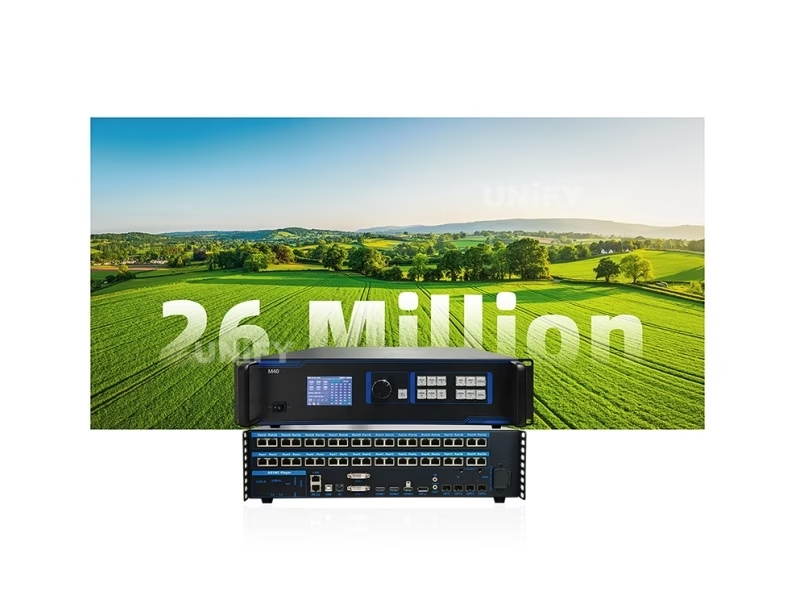
Three budget facts from the official sheet: ① The 26M figure applies to network mode; fiber mode is 20.8M — a 5.2M-pixel difference that changes how many cabinets one M40 covers. ② Optical modules are not included by default and must be purchased and installed separately — budget them with the quote. ③ Above 8192 pixels of load height, the total capacity reduces gradually with height but never falls below 11.98 million pixels — a vertical tower beyond 8192 tall loads less than the headline 26M.
Each network port loads a standard 655,360 pixels at 1280×512 — the same per-port standard as the Colorlight X-series sending class — which keeps cabling math consistent across ecosystems. The canvas and wiring logic for multi-sending-card systems is documented in the multi-sending-card backup and cascade guide.
Sizing Guide
How Big a Screen Can the Mooncell M40 Drive in 2026?
Two ceilings bind the M40: 16,384 pixels in width or height, and 26 million pixels total in network mode. The second ceiling usually binds first — a 16K-wide canvas at full height would exceed 26M, so the practical designs sit inside both limits. Real wall formats per pitch:
Reading the table: the wide-strip row shows the width ceiling — one M40 handles a 49-meter-wide P3 concourse band. The tower row shows the height rule in action: above 8192 pixels of height the load drops from 26M toward the 11.98M floor, so a 16K-tall tower loads about 12.1M pixels, not the headline figure. The network port wiring is calculated on actual loaded pixels rather than the rectangular area — irregular and shaped screens use ports more efficiently than their bounding box suggests.
For pixel-pitch and viewing-distance context behind these numbers, see the LED screen for events guide before locking the canvas.
Engineering Advantages
What Are the 6 Core Capabilities of the Mooncell M40 2-in-1 LED Video Processor?
Seven Inputs, Six Simultaneous Windows
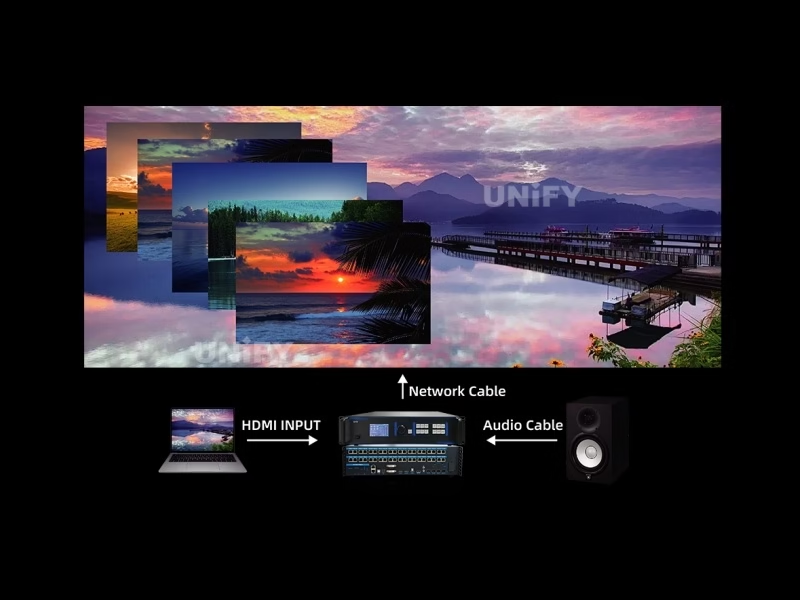
2× HDMI 2.0, 2× HDMI 1.4, DP 1.2 and 2× DVI feed up to six live windows — 2× 4K + 2× 2K, or 6× 2K — with PIP overlay, roaming and smooth switching.
128 Scenes with Scheduled Switching
128 scene templates recall with the MODE key; the built-in clock switches scenes on schedule — a venue that changes content by time of day runs itself.
Active 3D & Genlock
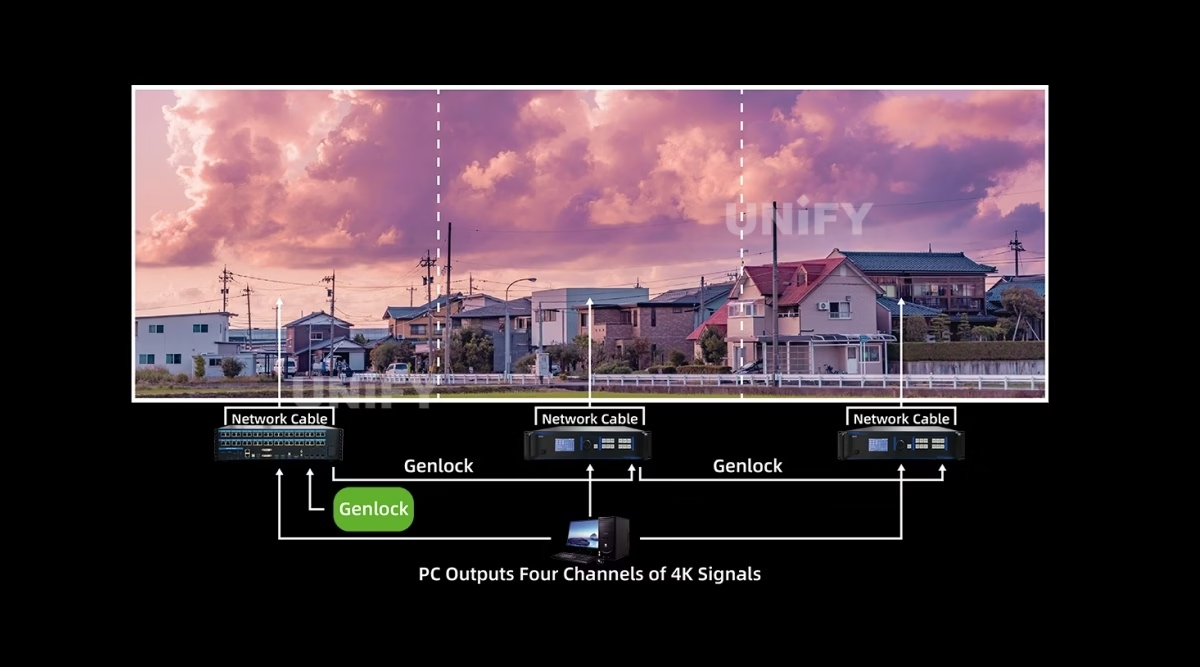
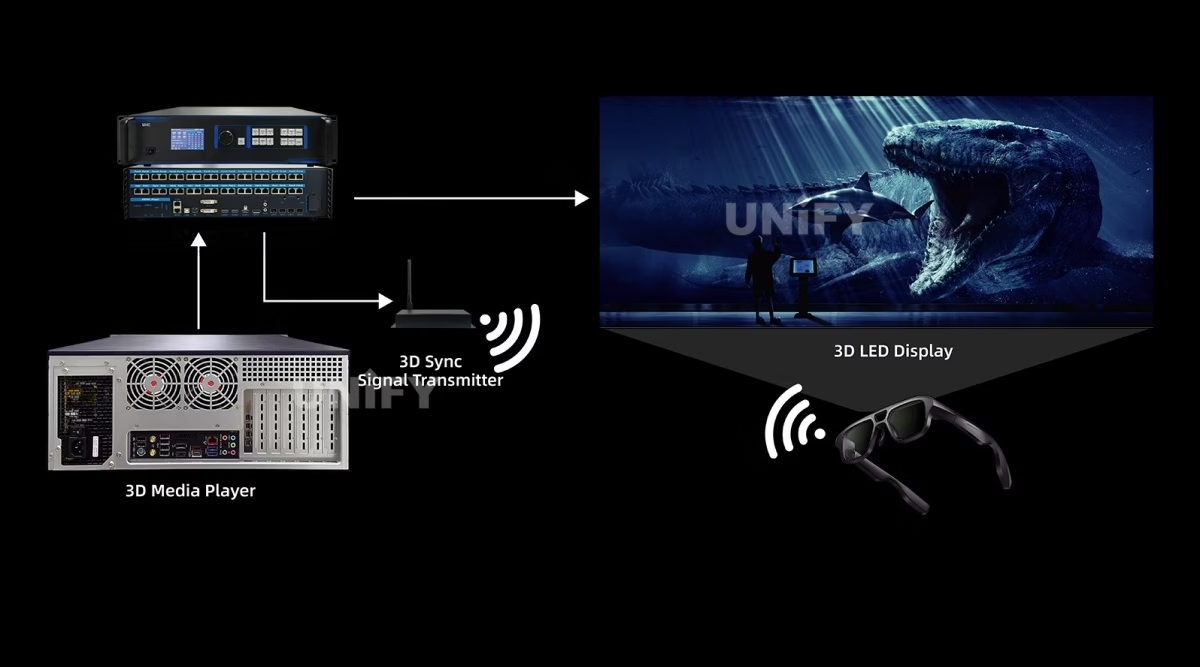
Active-3D output with a 3D transmitter interface, plus optional Genlock (one input, one loop-through) for synchronized cascades — production and attraction-grade features.
HDR10 & Ultra-Clear Processing
HDR10 support with 10-bit inputs, adaptive de-interlacing and a noise-reduction engine that removes smearing and jaggies — see 4K60 HDCP HDR controllers for the broader class.
Quick Mapping Without a PC
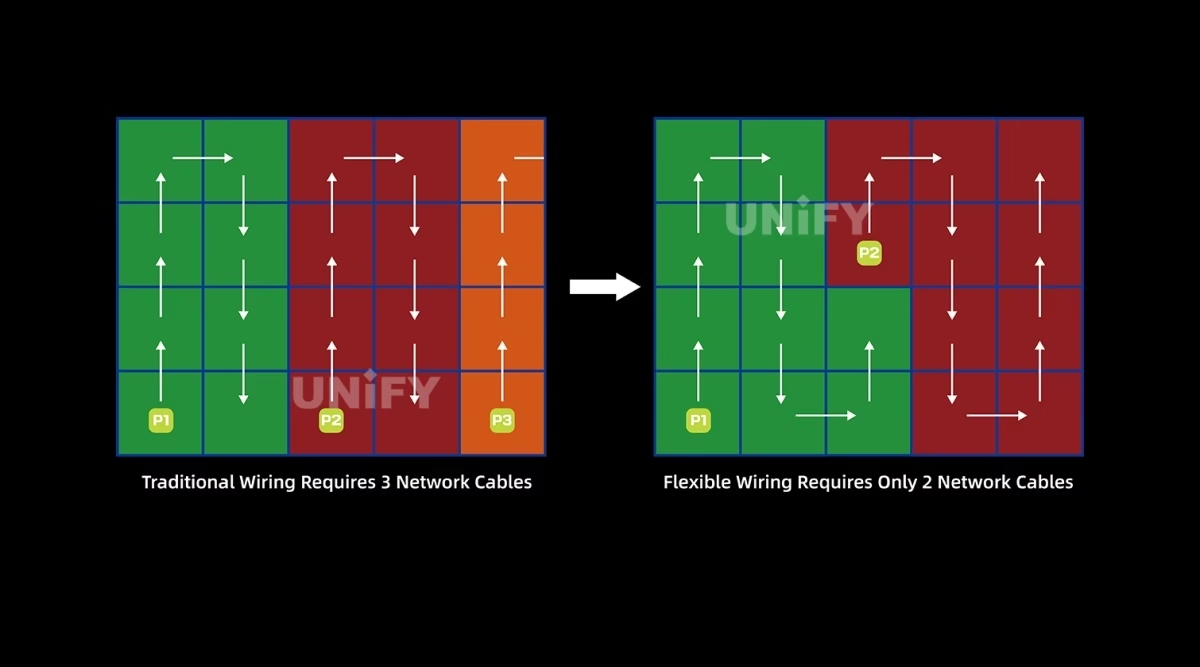
Screen mapping completes from the front panel — a fail-fast workflow at site when a laptop is the delay. Flexible wiring counts actual loaded pixels, not bounding boxes.
Key Lock, Freeze & Auto-Recovery
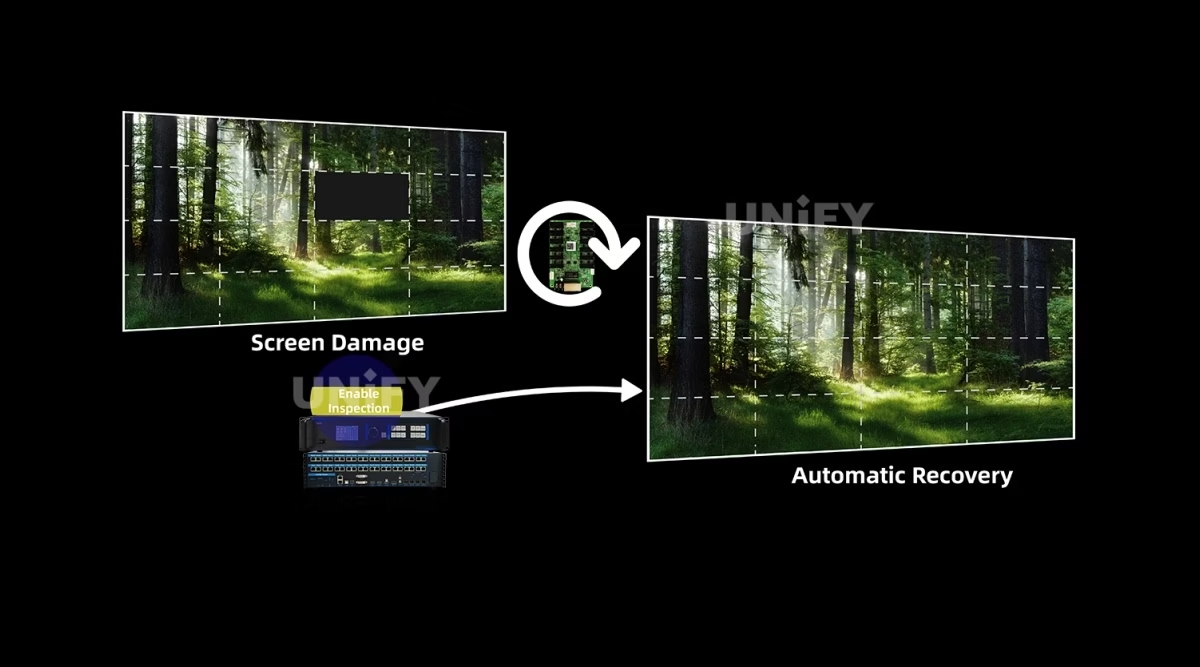
Key lock prevents accidental changes during a show; freeze and one-key black screen protect the wall; internal flash auto-recovers data for fast after-sales service. See LED display system redundancy & backup.
Creative and special-shaped LED displays — the category where the M40’s 3D output and flexible wiring earn their place:
Mooncell Official — Creative and special-shaped LED display showcase
Category Comparison
How Does the Mooncell M40 Compare to a Separate Processor and Sending Card?
The 2-in-1 architecture is a chain decision. A classic large-format system chains a video processor to a sending controller to the receiving cards. The M40 merges the first two devices into one: the processing stage feeds the 40 output ports directly, with no inter-device cable, no second power supply and one device to configure. The comparison against the split chain, where our own Huidu HD-VP210 video processor and Huidu HD-VP830 video processor pages document the same 2-in-1 concept in the Huidu ecosystem:
The four differences that change a purchase decision:
- Deployment. One M40 replaces a two-device chain — fewer cables, one rack unit, one power budget. Sites with tight equipment rooms buy the 2-in-1 for footprint alone.
- Configuration. A single device has one mapping surface: inputs, windows and the 40-port output map live in the same software, which shortens commissioning time on multi-source walls.
- Failure model. The 2-in-1 is a single point of failure, covered by the internal flash auto-recovery; a split chain can lose one stage and keep the other — the redundancy & backup guide weighs that trade-off honestly.
- Scaling. Past one M40’s 26M pixels, the platform scales by Genlock-cascading additional M40 units — each adds another 40 ports and 26M to the synchronized wall.
Mooncell’s own demonstration of the 8-output processor class driving walls with scaling — the load logic scales the same way across the M-series:
Mooncell Official — MVB8S video processor with 8 LED outputs and scaling
Model Selection
Which Mooncell M40 Processor Do You Need: M32 or M40?
Mooncell sells the 2-in-1 family in two sizes: the M32 with 32 network ports and the M40 with 40. Both share the 7-input architecture and the processing engine; they divide on output count, Genlock and quick mapping. The M40 column is the subject of this page; M32 figures come from Mooncell’s published model data.
The decision in four numbered differences:
- Loading class. The M40’s 40 ports carry 26M pixels; the M32’s 32 ports carry roughly 20.9M. A full-4K wall (8.3M) fits either; an 8K-class canvas (above 16M) is M40 territory.
- Fiber. The M40 adds 4× 10G fiber ports for long runs; the M32 has none. Stadiums and distributed racks read this as the deciding row.
- Broadcast sync. Genlock exists only on the M40 — the row that rules the M32 out of broadcast and virtual-production chains that need external sync.
- Commissioning. Quick front-panel mapping on the M40 removes the laptop from site setup; the M32 maps through PC software only.
Rule of thumb: the M32 is the correct answer for a fixed indoor wall under 20.9M pixels with no fiber and no broadcast sync. Every stadium, studio, touring rig and multi-unit cascade in this class reads M40. If the project also needs playback-side control, the Mooncell C2 LED display control system is the complementary server.
On-Site Operation
How Do You Operate the Mooncell M40 2-in-1 LED Video Processor on Site?
The M40 runs three control surfaces: the front panel for daily operation, PC software for layout work, and serial/network protocols for integration. From the official manual:
Front Panel LCD & Knob
LCD shows device status; knob enters menus, selects and adjusts; long-press releases the menu lock. ESC returns or cancels.
Source Keys
DVI1/DVI2/HDMI1/HDMI2/HDMI3/DP keys with per-source LED status — off, flashing (selected, no signal) or solid (live).
Function Keys
WIN (layer), PART (partial/fullscreen), TEMPLATE (multi-window switch), HDMI4 (built-in player), FREEZE, MODE (scene recall).
PC Software
Drag-and-drop window opening, resizing and positioning; quick screen mapping without visiting the rack. Connect via USB-B or 100M LAN.
Protocols
RS232 serial, 100M Ethernet and USB-B — integrate into third-party control rooms and show control via the control system software and hardware patterns.
Protection
Key lock prevents mid-show changes; FREEZE holds the frame; one-key black screen blanks the wall instantly; data inspection patrols output health.
Wiring note from the official sheet: flexible network wiring means port utilization is calculated on actual loaded pixels, not the rectangular bounding area — irregular screens keep more ports in service. For the wider commissioning sequence around this class of device, LED display configuration and system debugging covers the end-to-end workflow, and basic debugging of LED displays handles the fault patterns that follow.
Applications
Where Is the Mooncell M40 2-in-1 LED Video Processor Used?
Stadiums & Arenas
40 ports or 4× 10G fiber reach far-flung corner and fascia screens; 128 scheduled scenes switch between match-day content and sponsor loops. Fiber mode covers the long runs without signal loss.
Broadcast & Production
Genlock sync for studio walls, HDR10 and 10-bit inputs for camera-fed canvases, and six simultaneous windows for multi-angle stages.
Stage & Tours
Touring rigs value the 2-in-1 footprint, quick front-panel mapping and key lock; scheduled scenes switch between acts without a stagehand at the rack — see LED screen for events.
Exhibitions, Bars & KTV
Built-in player input (HDMI4) plays loop content; active 3D and transparent/irregular screens run from the same processor; scheduled switching runs the venue day automatically.
Mooncell’s case footage for the two venue classes this processor serves — a concert main stage and a KTV room:
Mooncell Official — concert case
Mooncell Official — LED control for KTV rooms
Factory Strength
Why Buy the Mooncell M40 2-in-1 LED Video Processor From an LED Display Factory?
A processor bought from a parts channel arrives as a box. Buying through a full-line LED screen manufacturer adds the three things a large-format project needs:
1. Verified hardware and honest spec answers. Every M40 we supply is sourced through Mooncell’s authorized channel and tested on live LED modules before dispatch. The dual-mode numbers above — 26M vs 20.8M, the 8192-height rule, the fiber-module cost — are exactly the questions an unverified channel cannot answer in writing. We answer them in the quote.
2. The full chain in one order. M40, receiving cards, optical modules and cabinets ship together, pre-tested as a chain. Our engineers pre-load the receiving-card configuration and support the remote handover at site. Our quality control of LED display process covers every batch.
3. Lifecycle economics. The M40 runs at a rated 36W — a small power line in a 26M-pixel system — and carries a 2-year warranty with spare units for the project’s operating life. The control layer sits inside the LED screen lifespan math as a fixed cost; a failed unit is replaced, not debated.
B2B Procurement
How Much Does the Mooncell M40 2-in-1 LED Video Processor Cost?
Price transparency, stated plainly: the M40 appears in distributor listings from approximately $3,200 (Alibaba-class listings reviewed August 2026), before fiber modules and receiving hardware. The spread across channels reflects volume tier and what ships in the box — optical modules are not included by default, so a fiber-mode quote should state the module cost separately. Factory-direct tiers for B2B buyers:
Market context: the LED display control system market reached US$659 million in 2025 and is projected to grow at 13.6% CAGR to US$1.59 billion by 2032 (QYResearch, Global LED Display Control System Market Report), with large-format and 8K-class processing as a growth driver. For processing-only needs without the 40-port output stage, the LED video processor category page maps the alternatives — ask for a factory-direct quote at your quantity.
FAQ
What Do Buyers Ask About the Mooncell M40 2-in-1 LED Video Processor?
What Assurance Comes With the Mooncell M40 2-in-1 LED Video Processor?
Every M40 ships with Mooncell original packaging and compliance documentation.
Ready to Specify the Mooncell M40 2-in-1 LED Video Processor?
Factory-direct pricing, genuine Mooncell stock, fiber-module options and 2-year warranty.
unifyledscreen@gmail.com | +86-191-18802497
Technical Deep-Dive
What Should Engineers Know Before Buying the Mooncell M40 2-in-1 LED Video Processor?
Published: August 2026 | 14 min read | UnifyLED Engineering Team
The Mooncell M40 2-in-1 LED Video Processor answers a question most of the market stopped asking in separate boxes: where does processing end and sending begin? Mooncell’s answer is that for large-format walls, the boundary should not exist — one 40-port unit does both. This guide is written for engineers and procurement teams who need to specify and buy the M40 in 2026, using the official Mooncell M40 Specification V4.1 as the data source, with the dual-mode loading math and the height rule that most listing copy omits.
Short answer: The Mooncell M40 is a 2-in-1 LED video processor and sending controller with 7 video inputs, up to 6 simultaneous windows, 40 Gigabit Ethernet outputs, 4× 10G fiber ports, a 26-million-pixel network-mode loading capacity (20.8 million over fiber), a 16,384×16,384 width/height ceiling, 128 scene templates, active 3D, HDR10, optional Genlock and front-panel quick mapping. It replaces the separate processor-plus-sending-card chain in stadium, broadcast, stage and multi-unit applications, and it costs from roughly $3,200 in distributor listings.
Chapter 1 — Definition: What the 2-in-1 Architecture Is
The M40 is a synchronous video processor: it takes live inputs, scales and mixes them into a composed canvas, and transmits that canvas over Gigabit Ethernet to the receiving cards on the LED modules. What makes it “2-in-1” is that the sending stage — the controller that would normally sit between the processor and the receiving cards — is built into the same chassis and the same 40-port output stage. That placement matters more than the hardware: one configuration surface, one vendor, one cable set from the processor to the wall. The architecture comparison with a split chain is covered in the category section above, and the underlying signal-path logic in synchronous vs asynchronous LED control applies unchanged.
The M40 sits at the top of Mooncell’s 2-in-1 family, one step above the M32, and it was Mooncell’s flagship launch at ISE 2025. The specification sheet is young — V4.0 first released June 2025, V4.1 December 2025 updating the rear-panel imagery on the same hardware revision V1.0.0 — which is worth noting in procurement: the hardware is a single revision, so a “V4.1” quote and a “V4.0” quote describe the same unit.
Chapter 2 — Loading: The Dual-Mode Math
The M40’s headline number, 26 million pixels, is a network-mode figure. In fiber mode the four 10G ports carry 20.8 million pixels — a 5.2M difference that changes the cabinet count on the same project. The per-port standard is 655,360 pixels at 1280×512, the same class as Colorlight’s X-series sending hardware, which keeps cabling math consistent when a project mixes ecosystems. The dimension ceiling is 16,384 pixels in width or height, and the two ceilings bind together: a 16K-wide canvas at full height would exceed 26M, so the practical designs sit inside both — a 16,384×1,536 strip loads 25.2M, and a 4,096×4,096 square loads 16.8M.
The rule most listings omit: above 8,192 pixels of load height, the total capacity reduces gradually with height but never falls below 11.98 million pixels. A vertical tower 16,384 tall loads roughly 12.1M pixels at 16,384×736, not the headline 26M. For a project whose design exceeds 8,192 in height — a building-wrapped column, a tall interior atrium wall — the honest capacity is the 11.98M floor, and the quote should say so. The multi-sending-card backup and cascade guide covers what happens beyond one unit’s capacity.
Chapter 3 — Network Ports vs Fiber: A Wiring Decision
The 40 Gigabit ports and the 4 fiber ports are not parallel outputs — the fiber ports are grouped gateways over the same 32 ports they serve: OPT1 drives ports 1–8, OPT2 ports 9–16, OPT3 ports 17–24, OPT4 ports 25–32, each link at 10 Gbit/s. Choosing fiber mode changes both the loading ceiling (20.8M) and the wiring plan (one fiber pair per eight ports instead of eight cables), and it carries a cost the spec sheet states plainly: optical modules are not included by default. A fiber-mode quote that does not itemize module cost is incomplete.
The decision logic: network mode for rack-to-rack wiring under a hundred meters, where 40 clean CAT5E/6 runs are the simplest serviceable path; fiber mode for stadiums and distributed racks, where the run lengths or the cable count make eight-port-per-link fiber the cheaper install. Both modes share the same flexible-wiring rule — port utilization is calculated on actual loaded pixels rather than the rectangular bounding area, so irregular screens keep more ports in service than their bounding box suggests.
Field note from installers: label every run by port number at both ends before the cabinets go up. The 40-port stage makes physical tracing the slow part of commissioning — a wall that fails one zone is debugged faster when the run labels match the software map. Fiber mode simplifies this: one labeled pair per eight ports, and the OPT-to-port mapping (OPT1→ports 1–8, OPT2→ports 9–16, OPT3→ports 17–24, OPT4→ports 25–32) is fixed in the manual, so the label scheme is known before the cable is pulled.
Chapter 4 — Processing: Inputs, Windows, Scenes
The input stage is seven ports across five source types: 2× HDMI 2.0 (one of them the built-in playback board), 2× HDMI 1.4, 1× DP 1.2 and 2× DVI. HDMI 2.0 and DP accept 3840×2160@60Hz at 8 or 10-bit color with RGB 4:4:4, and both accept ultra-wide custom resolutions up to 7680 pixels in width or height — a 7680×1080 long-strip input passes through without scaling. The processing stage composes up to six simultaneous windows — 2× 4K plus 2× 2K, or 6× 2K — with PIP overlay, roaming and smooth switching, backed by 128 scene templates and a built-in clock for scheduled scene switching. A venue that changes content by time of day runs itself from the MODE key.
Two features matter to specific buyers. Active 3D with a 3D transmitter interface puts the M40 in attraction and immersive work; HDR10 with 10-bit input paths covers broadcast and cinema-grade sources — the class context is documented in 4K60 HDCP HDR controllers. And the built-in playback board input (HDMI4) means a venue can loop stored content without a separate player — a smaller answer to the same question the Mooncell C2 server answers at full scale.
Chapter 5 — On-Site Operation: Panel, Software, Protocols
The front panel is a complete operator station: LCD status, knob navigation with long-press menu release, per-source LED keys that show signal state at a glance, and dedicated function keys — WIN for layers, PART for partial/fullscreen, TEMPLATE for window switching, FREEZE, and MODE for scene recall. Quick screen mapping completes from the panel without a laptop, which is the difference between a 15-minute site fix and a laptop hunt during load-in. The PC software adds drag-and-drop window layout over USB-B or the 100M LAN port, and RS232 opens the processor to control rooms and show control. The commissioning patterns around this class are covered in LED display configuration and system debugging and the fault patterns in basic debugging of LED displays.
The protection features are the ones technicians notice first: key lock stops accidental changes mid-show, freeze holds the frame when a source drops, one-key black screen blanks the wall before anything unplanned reaches it, data inspection patrols output health, and the internal flash auto-recovers configuration data — the after-sales pattern that LED display system redundancy & backup frames as a recovery, not a re-commission.
One habit prevents most field problems: after every commissioning or scene change, store the configuration and keep a copy with the project documentation. The M40 auto-recovers its own data after a power event, but a stored backup also gives the site team a known-good state to return to after experimental changes — the difference between a reload and a re-commission, and the reason the after-sales pattern is taught as recovery first.
Chapter 6 — M32 vs M40: The Numbered Differences
The M32 is the M40’s smaller sibling, and the differences are exactly four:
- Ports and loading. 32 ports at ~20.9M pixels versus 40 ports at 26M. The M32 carries any wall up to full-4K; the 8K-class canvases above 16M belong to the M40.
- Fiber. The M40 adds 4× 10G fiber for long runs; the M32 has none. Stadium and distributed-rack projects read this row first.
- Genlock. Optional on the M40, absent on the M32. Broadcast and multi-unit synchronized cascades require the M40.
- Quick mapping. Front-panel mapping exists on the M40 only; the M32 maps through PC software. Commissioning speed and site autonomy are M40 advantages.
A Mooncell unboxing of the entry point of the same processor family — the MVB2S — shows how the family is packaged and what scaling looks like at the smaller end:
Mooncell Official — MVB2S video processor unboxing and overview
Vendors and rental houses that run both sizes keep one rule: buy the M40 for anything that moves or anything that broadcasts, and consider the M32 only for fixed walls that will never re-wire. The price delta between the two is small next to the cost of re-cabling a venue when a wall grows past 20.9M pixels — output capacity is the only spec you cannot upgrade in the field.
Chapter 7 — Price and Total Cost of Ownership in 2026
The M40 appears in distributor listings from approximately $3,200 (Alibaba-class listings reviewed August 2026). Two costs sit outside that number: fiber modules if the project runs fiber mode, and the receiving hardware the 40 ports drive. A full chain quote — processor, modules, receiving cards, cabinets — is the honest comparison, and that is how we quote. The channel spread on the M40 is volume economics, not hardware differences: the same unit trades at different prices because the box contents and the support terms differ.
On the TCO side the M40 is cheap to run and expensive to ignore: 36W rated power in a 26M-pixel system is a rounding error in the venue power budget, and the 2-year warranty with spare-unit support means the realistic failure path — a unit DOA at commissioning — resolves in days. The control layer sits inside the LED screen lifespan calculation as a fixed cost: modules depreciate and the processor class outlives them, which is why we treat the chain as the long-lived part of the project.
A checklist for the purchase order: the processor itself, optical modules if fiber mode is planned, receiving cards sized to the per-port load (655,360 pixels per port), CAT5E/6 for the network runs, and a spare unit for venues that cannot wait on cross-border shipping. A quote that names each line — rather than one bundled price — is a quote you can compare, and comparing is the point. Every figure on this page is cross-checked against the Mooncell M40 Specification V4.1.
Conclusion
The Mooncell M40 2-in-1 LED Video Processor is the answer to the large-format question in one chassis: process seven sources into six windows, and send the composed canvas over 40 ports to a 26-million-pixel wall. Specify it with three numbers in hand — 26M in network mode, 20.8M in fiber mode, and the 11.98M floor above 8,192 pixels of height — and with the fiber-module cost written into the quote. Buy it through a verified LED screen manufacturer that tests the chain on live modules and stocks spares, and the processor becomes the most dependable part of the wall.
LED Control System Range
Which LED Control and Processing Products Should You Explore Next?
Video processors, control servers, receiving card guides and free resources on UnifyLED.
Mooncell Series
2-in-1 Processors
Guides & Resources
Where Can You Download Mooncell M40 Resources?
The official Mooncell M40 Specification V4.1 — the data source for every figure on this page.