
Novastar DH7508-S LED Receiving Card
Cost-effective receiving card with 512×512 pixel load, 8× HUB75E interfaces, pixel-level calibration, and loop redundancy — engineered for fine-pitch indoor displays, rental stages, and fixed LED installations.
What Is the Novastar DH7508-S Receiving Card?
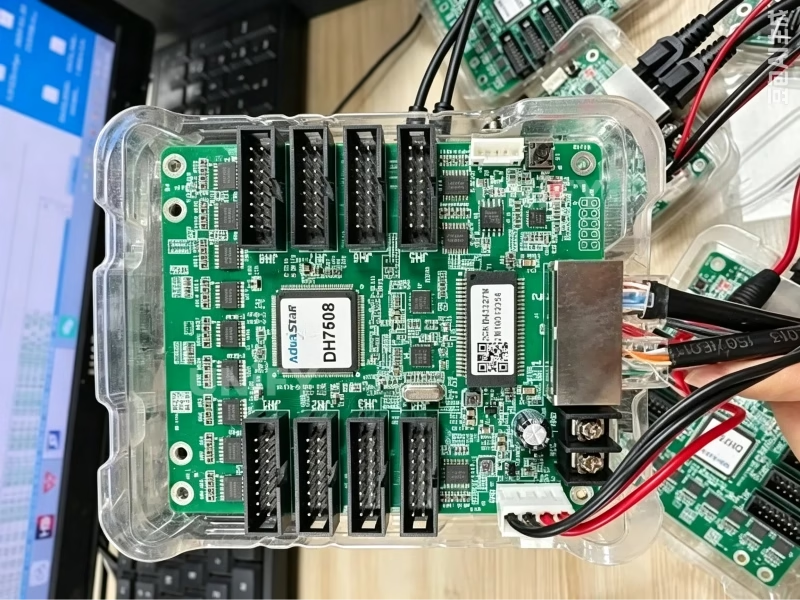
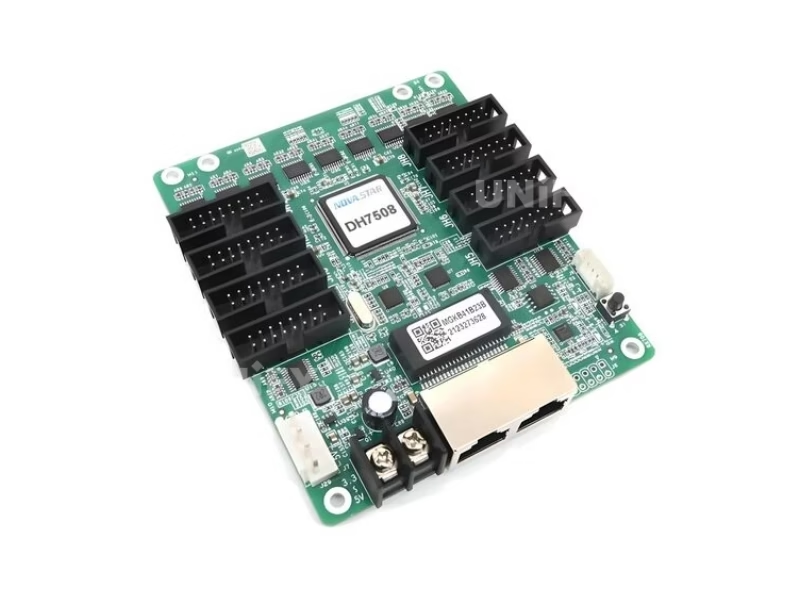
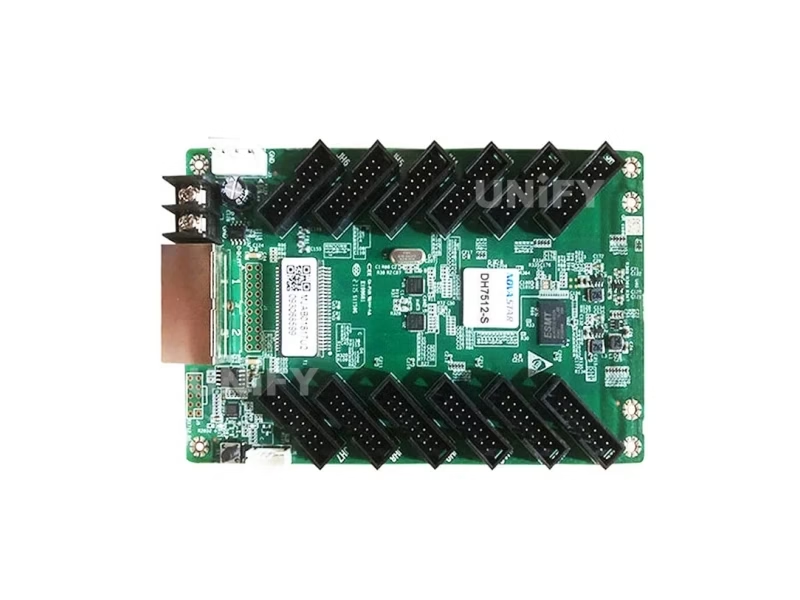
The Novastar DH7508-S LED Receiving Card is a cost-effective, high-performance receiving card developed by Xi’an NovaStar Tech Co., Ltd. — the latest upgrade in the DH7508 series. A single DH7508-S loads up to 512×512 pixels @60Hz when paired with PWM driver ICs, effectively doubling the capacity of its predecessor (DH7508: 256×256). It serves as the critical bridge between the LED video processor (sending card) and the LED modules, decoding video data and driving each pixel with precision.
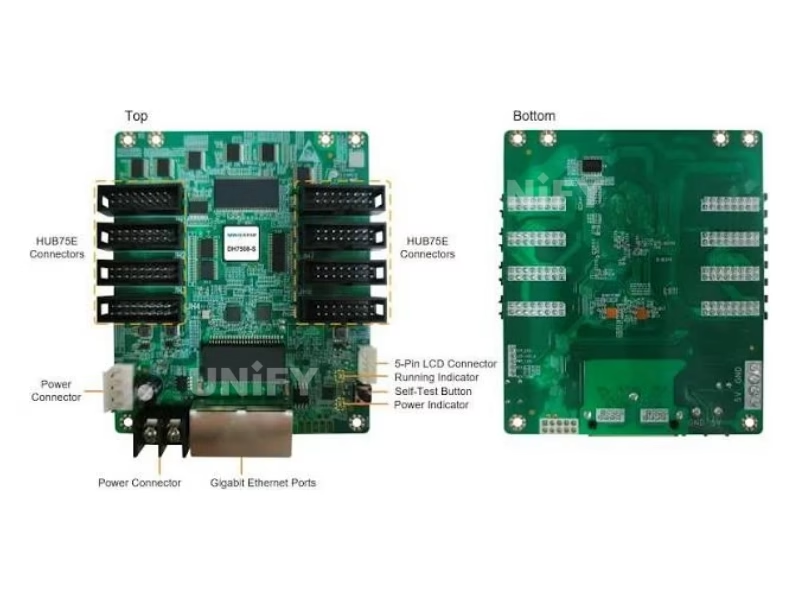
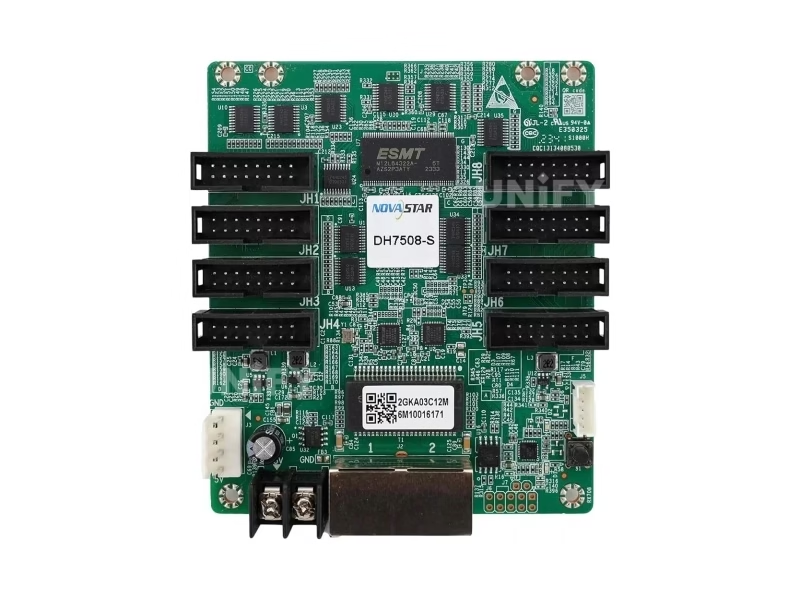
Unlike PCIe-based sending cards that occupy a computer chassis, the DH7508-S mounts directly onto the LED module hub board via 8 standard HUB75E connectors. Each connector supports up to 16 groups of parallel RGB data — eliminating the need for a separate HUB board and simplifying cabling in both rental and fixed installations. Its EMC Class A compliant hardware design ensures stable operation across diverse on-site environments, from indoor fine-pitch walls to outdoor fixed billboards.
DH7508-S Technical Specifications
| Parameter | Specification |
|---|---|
| Maximum Resolution | 512×512@60Hz (PWM driver IC); 512×384@60Hz (Common driver IC) |
| Connectors | 8× Standard HUB75E (supports up to 16 groups parallel RGB data) |
| Ethernet Ports | 2× Gigabit RJ45 (each configurable as input or output for cascading) |
| Input Voltage | DC 3.8V – 5.5V |
| Rated Current / Power | 0.5A / 2.5W |
| Dimensions | 95.5mm × 109.0mm × 19.4mm (board thickness ≤2.0mm) |
| Net Weight | 72.4g |
| Operating Environment | –20°C to +70°C, 10%–90% RH non-condensing |
| Storage Environment | –25°C to +125°C, 0%–95% RH non-condensing |
| Certifications | RoHS, EMC Class A |
| Compatible Software | NovaLCT V5.2.0 or later |
| Packing | Blister pack, 100 cards per box (650mm × 500mm × 200mm) |
Display Enhancement Features
🎨 Pixel-Level Calibration
Works with NovaStar’s high-precision calibration system to calibrate both brightness and chroma at the individual pixel level. Effectively removes brightness differences across modules and cabinets — critical for fine-pitch indoor displays where color uniformity directly impacts the viewer experience.
🔧 Quick Dark/Bright Line Adjustment
Instantly corrects dark or bright lines caused by module or cabinet splicing. The adjustment is visual, takes effect immediately, and can also be performed via mobile phone software when paired with TU series products — no calibration equipment needed.
🎬 3D Function
Supports stereoscopic 3D output when paired with a 3D-capable sending card. Loading capacity is halved in 3D mode (256×256@60Hz PWM), making it suitable for 3D rental stages, immersive exhibitions, and naked-eye 3D installations.
🌈 Individual RGB Gamma Control
Independent red, green, and blue gamma adjustment — fix low-grayscale non-uniformity and white balance offset without affecting overall brightness. Essential for broadcast studios and high-grayscale applications.
🔄 90° Image Rotation
Rotate the display output in 0°, 90°, 180°, or 270° increments at the receiving card level. Enables creative cabinet orientations without reconfiguring the entire video pipeline — particularly useful for irregular-shaped LED walls and creative installations.
📱 Mobile Seam Correction
Automatically or manually adjust brightness discrepancies at module and cabinet seams via mobile phone software (requires TU series products). Field technicians can fine-tune display uniformity on-site without a laptop.
Reliability & Maintainability
🔁 Loop Backup
The receiving card and sending card form a loop via primary and backup line connections. If a fault occurs at any point in the line, the screen continues displaying normally without interruption — no single point of failure in the data path.
💾 Dual Program Backup
Two copies of firmware are stored in the application area at the factory. If a firmware update fails mid-process, the card automatically falls back to the backup program — eliminating the risk of bricking during field updates.
🌡️ Temperature & Voltage Monitoring
Real-time monitoring of receiving card temperature and voltage without external peripherals. Cabinet LCD modules can also display temperature, voltage, single run time, and total run time via the 5-pin LCD connector.
🗺️ Mapping 1.1
Cabinets display the controller number, receiving card number, and Ethernet port information — allowing technicians to instantly identify the physical location and connection topology of every receiving card in the system.
📡 Bit Error Detection
Monitors Ethernet port communication quality and records the number of erroneous packets. Helps troubleshoot network communication problems before they cause visible display artifacts.
📋 Parameter & Firmware Readback
Both configuration parameters and firmware programs can be read back from a working receiving card and saved to a local computer — enabling rapid duplication of settings across large installations and simplifying replacement procedures.
Loading Capacity & Compatibility Matrix
Pixel Loading by Driver IC Type
| Driver IC Type | Max Resolution @60Hz | 3D Mode Loading | Typical Application |
|---|---|---|---|
| PWM IC | 512×512 | 192×256 | Fine-pitch indoor, broadcast studios |
| Common IC | 512×384 | 176×256 | Standard indoor/outdoor fixed, rental |
Compatible Sending Controllers
| Series | Models | Best For |
|---|---|---|
| VX All-in-One | VX4S-N, VX600, VX16s, VX1000 | Rental stages, live events |
| COEX MX | MX40 Pro, MX30 | Large-scale fixed installations |
| MCTRL Sending Boxes | MCTRL300, MCTRL600, MCTRL660, MCTRL660 Pro, MCTRL R5, MCTRL4K | Fixed installations, control rooms |
| Taurus Multimedia Players | TB1, TB2, TB3, TB30, TB40, TB50, TB60 | Asynchronous playback, digital signage |
How to Configure DH7508-S with NovaLCT
All DH7508-S configuration is performed through NovaLCT (NovaStar LED Configuration Tool), NovaStar’s unified software platform for LED display setup. Version V5.2.0 or later is required. Below is the complete workflow:
- Connect Hardware — Connect the DH7508-S to the sending card via Gigabit Ethernet. Ensure the power input is within DC 3.8V–5.5V. Verify the green running indicator flashes once per second (normal operation).
- Launch NovaLCT — Open NovaLCT V5.2.0+. Navigate to Screen Configuration → Receiving Card.
- Load RCFG File — Every LED module ships with a corresponding
.rcfgconfiguration file from the module manufacturer. Load it via Load Configuration File → select your module’s RCFG → Save to Hardware. If you don’t have the file, use Read from Receiving Card on a working card to extract it. - Verify Detection — The sending card should auto-detect all cascaded DH7508-S cards. Use the Mapping function to visually confirm each card’s position and Ethernet topology.
- Fine-Tune Performance — Adjust refresh rate, grayscale depth, and RGB gamma in the performance settings panel. For calibration, load the calibration coefficient file generated by NovaStar’s calibration system.
Pro Tip: After completing the initial configuration, use Configuration Parameter Readback to save a backup of all DH7508-S settings to your local computer. This backup can be rapidly restored to replacement cards — minimizing downtime during maintenance. For detailed troubleshooting when NovaLCT cannot detect a card, see our dedicated guide on NovaLCT detection issues.
DH7508 vs DH7508-S — What’s the Difference?
| Feature | DH7508 (Original) | DH7508-S (Updated) |
|---|---|---|
| Max Resolution (PWM IC) | 256×256@60Hz | 512×512@60Hz ⬆ |
| Max Resolution (Common IC) | 256×256@60Hz | 512×384@60Hz ⬆ |
| 3D Loading (PWM IC) | 192×256 | 192×256 |
| Connectors | 8× HUB75E | 8× HUB75E |
| Mobile Seam Correction | Not supported | Supported (TU series) ✓ |
| Multi-Batch Adjustment | Limited | Full support ✓ |
| Replaces Legacy Models | — | DH418, DH426, MRV328, MRV336, MRV366 |
⚠️ Compatibility Note: While the DH7508-S is backward-compatible with most existing NovaStar sending controllers, mixing DH7508-S with previous-generation receiving cards (DH418, DH426, MRV series) in the same display is not recommended — potential color differences may arise due to different calibration pipelines and gamma handling.
Status Indicators & Diagnostics
| Indicator | Color | Pattern | Meaning | Action Required |
|---|---|---|---|---|
| Running | Green | 1 flash / 1s | Normal operation. Ethernet OK, video source active. | None |
| Running | Green | 1 flash / 3s | Ethernet connection abnormal. | Check Ethernet cable and sending card output. |
| Running | Green | 3 flashes / 0.5s | Ethernet OK, but no video source. | Verify sending card is receiving video signal. |
| Running | Green | 1 flash / 0.2s | Using backup program (application firmware failed). | Re-flash firmware via NovaLCT. |
| Running | Green | 8 flashes / 0.5s | Loop backup took effect (redundancy switchover). | Inspect primary line for faults; repair at next maintenance window. |
| Power | Red | Always on | Power supply normal. | None. If off, check DC 3.8V–5.5V input. |
Frequently Asked Questions
Q: What is the difference between DH7508 and DH7508-S?
A: The DH7508-S doubles the maximum pixel loading capacity (512×512 vs 256×256 with PWM ICs), adds mobile seam correction support, and features improved multi-batch calibration for mixed-production-batch displays. It is the direct replacement for legacy DH418/DH426/MRV328/MRV336/MRV366 cards.
Q: How many DH7508-S cards do I need for my LED screen?
A: Calculate based on your total pixel count and pixel pitch. For example, a P2.5 display at 1920×1080 (Full HD) has 2,073,600 pixels. Each DH7508-S handles 512×512 = 262,144 pixels. You need 2,073,600 ÷ 262,144 ≈ 8 cards. Always add 10-15% margin for cascading overhead.
Q: Can I mix DH7508-S with older receiving cards (DH418, MRV336)?
A: Not recommended. While the cards may function together electrically, color rendering differences can occur due to different calibration pipelines and gamma processing. For uniform display quality, use the same receiving card model across the entire installation.
Q: Which NovaLCT version supports DH7508-S?
A: NovaLCT V5.2.0 or later. We recommend always using the latest version available from NovaStar’s official website to ensure full feature support and bug fixes.
Q: Does DH7508-S support HDR content?
A: The DH7508-S supports high-bit-depth grayscale processing (up to 18-bit via individual RGB gamma adjustment), which enables HDR-capable signal chains when paired with compatible sending controllers. For true HDR10/HLG end-to-end pipelines, consult our LED video processor selection guide.
Q: What is the maximum cascading distance?
A: Standard Gigabit Ethernet limits apply — up to 100 meters over Cat6 cable between each cascaded card. For longer runs, use fiber-optic converters or intermediate Ethernet switches as recommended in the LED display configuration guide.
Q: Does the DH7508-S need active cooling?
A: No. With a rated power consumption of just 2.5W and operating temperature range of –20°C to +70°C, the DH7508-S is designed for passive cooling in standard LED cabinet environments.
Buy DH7508-S from UnifyLED
As a professional LED screen manufacturer since 2013, UnifyLED supplies genuine Novastar DH7508-S receiving cards as part of complete LED display solutions. Every card is sourced directly from authorized NovaStar distribution channels, factory-sealed in blister packaging (100 cards per box), and tested before shipment.
Single-Unit Trial
$12–$18
Per card, sample order
1–10 pcs
Full testing before shipment
Technical datasheet included
Bulk Order
$9–$14
Per card, volume pricing
100–1,000+ pcs
Factory-sealed box (100/box)
3-year manufacturer warranty
Full Solution Package
Custom Quote
Receiving cards + sending controller
+ LED modules + cabinets
One-supplier convenience
Pre-configured RCFG files included
Request Quote & Availability
Chat on WhatsApp
Years Experience
Countries Served
Projects Delivered
Certifications
Technical Deep-Dive · By UnifyLED Engineering Team · August 2026 · 15 min read
The Complete Guide to LED Receiving Cards — Why the DH7508-S Matters for Your Display
The Novastar DH7508-S LED Receiving Card represents a meaningful step forward in NovaStar’s DH series lineup. But to understand why it matters, you first need to understand what a receiving card actually does — and why choosing the right one has an outsized impact on your display’s visual quality, reliability, and total cost of ownership. This guide covers the architecture, loading math, best practices, and real-world deployment considerations that most spec sheets leave out.
The Role of Receiving Cards in LED Display Architecture
Every synchronous LED display system follows the same fundamental signal chain: video source → video processor / sending card → Ethernet cable → receiving card → HUB board → LED module. The receiving card is the final intelligent node in this pipeline — it decodes the video data stream, drives the LED driver ICs row by row, and manages critical real-time functions like grayscale rendering, refresh timing, and fault detection.
Think of the sending card as the “brain” dispatching instructions, and the receiving card as the “hands” executing them at each cabinet. A poorly chosen or misconfigured receiving card can bottleneck an otherwise premium display — causing ghosting, uneven brightness, or complete signal loss at specific sections. This is why professional LED screen manufacturers like UnifyLED specify receiving cards as carefully as they specify LED lamps and driver ICs.
DH7508-S Architecture — What Changed Under the Hood
The DH7508-S is not merely a firmware-refreshed DH7508. NovaStar’s engineering team made several silicon-level improvements that directly translate to real-world deployment advantages:
Doubled Pixel Throughput: The most visible upgrade — from 256×256 to 512×512 pixels (PWM IC mode). This effectively means one DH7508-S can drive four times the pixel area of its predecessor in a single-card configuration, reducing the number of cards needed for large-format displays. For a P2.5 4K display (3840×2160 = 8.29M pixels), you go from ~127 DH7508 cards to ~32 DH7508-S cards — a 75% reduction in card count, cabling complexity, and potential failure points.
Improved Memory-on-Module Handling: The DH7508-S features enhanced calibration coefficient storage and faster readback throughput. When a module is replaced in the field, the receiving card can push stored calibration data to the new module more quickly — reducing on-site recalibration time from minutes to seconds per module.
Multi-Batch Calibration Engine: LED modules from different production batches inevitably have slight chroma variations due to LED binning tolerances. The DH7508-S’s multi-batch adjustment feature compensates for these batch-level differences at the receiving card level — a capability previous-generation cards in this price bracket simply didn’t have.
How to Calculate Loading Capacity — A Practical Formula
Here is the loading calculation every system integrator should perform before ordering receiving cards:
Step 1: Total Pixels = Display Width (px) × Display Height (px)
Step 2: Pixels Per Card = 512 × 512 = 262,144  (PWM IC mode)
Step 3: Minimum Cards = Total Pixels ÷ Pixels Per Card
Step 4: Practical Cards = Minimum Cards × 1.15  (15% cascading margin)

Example — P3.91 outdoor display, 4.8m × 2.4m:
  Width:  4,800mm ÷ 3.91mm ≈ 1,228 px  → 2 cards wide
  Height: 2,400mm ÷ 3.91mm ≈ 614 px    → 2 cards tall
  Total: 4 cards (with generous headroom — each card loads 614×614 max)
For displays using common (non-PWM) driver ICs, substitute 512×384 = 196,608 pixels per card. For 3D mode, the effective capacity halves — plan accordingly if your project requires stereoscopic output. Our pixel pitch guide provides detailed loading tables for every standard resolution.
Best Practices for Installation & Configuration
1. Always Start with the RCFG File: The .rcfg configuration file is specific to your LED module model. It defines the scan rate, RGB data grouping, and driver IC timing parameters. Loading the wrong RCFG — even for a module with the same pixel pitch — is the most common cause of display artifacts. If you lose the file, read it back from a working receiving card before making any changes.
2. Plan Your Ethernet Topology Before Cabling: For installations with more than 10 cascaded cards, consider using a star topology with a Gigabit Ethernet switch rather than daisy-chaining all cards. Each Ethernet hop adds negligible latency (~2µs), but a single broken cable in a 20-card daisy chain takes down everything downstream — while a star topology isolates the fault to one card. For redundancy-critical deployments, implement multi-sending-card backup with loop topology.
3. Power Supply Sizing: Each DH7508-S draws only 0.5A at 5V (2.5W), which seems negligible. But in a 100-card installation, that is 250W of additional load — roughly equivalent to 1.5 standard LED power supplies. Account for receiving card power in your cabinet power budget, especially for fine-pitch indoor displays where thermal management is already tight.
4. Firmware Management at Scale: For deployments exceeding 50 cards, use NovaLCT’s batch firmware update feature rather than updating cards one by one. Always read back and save the current working firmware before initiating a batch update — the dual program backup protects against update failures, but having a local backup saves time if you need to roll back.
Troubleshooting Common DH7508-S Issues
Symptom: Green indicator flashes once per 3 seconds (Ethernet abnormal). Check the Ethernet cable connection between the affected card and its upstream neighbor. If the cable tests good, swap the card with an adjacent working one to isolate whether the issue is with the card or the upstream signal. Refer to our LED display debugging guide for systematic diagnostic procedures.
Symptom: Visible color difference at module seams after replacement. The new module likely has different calibration data. Use NovaLCT to reload the coefficient file for that specific receiving card position. If the issue persists, run the quick dark/bright line adjustment for the affected seam — the DH7508-S can correct minor edge mismatches without a full recalibration cycle.
Symptom: NovaLCT does not detect the receiving card. Verify that your NovaLCT version is V5.2.0 or later. Older versions do not recognize DH7508-S hardware. Check that the sending card is powered and active — the receiving card will not appear in NovaLCT if the upstream sending card is offline. For complete troubleshooting steps, see NovaLCT detection troubleshooting.
DH7508-S in Real-World Deployments
The DH7508-S has been adopted across a wide range of applications since its release. In rental staging, its 512×512 loading capacity means fewer cards per square meter — reducing rigging weight and setup time. In fixed-installation control rooms, the loop backup and dual program redundancy provide the uptime guarantees that 24/7 operations demand. In outdoor advertising, the wide operating temperature range (–20°C to +70°C) and EMC Class A compliance ensure reliable operation without active cooling in most climate zones.
One particularly effective deployment pattern pairs the DH7508-S with the MCTRL660 sending controller for medium-scale fixed installations (20–80 m²). The MCTRL660’s dual Gigabit Ethernet outputs feed two independent DH7508-S cascades, providing both load balancing and automatic failover — a configuration that covers the vast majority of commercial indoor and outdoor projects.
Future-Proofing Your LED Control System
As LED display technology evolves toward higher resolutions, finer pixel pitches, and HDR-capable pipelines, the receiving card’s role becomes more critical — not less. The DH7508-S’s support for individual RGB gamma control, 18-bit grayscale processing, and multi-batch calibration positions it well for emerging requirements like HDR10 signal chains and AI-driven content optimization. When selecting a receiving card today, look beyond current resolution needs and consider: Will this card support the calibration workflows and color pipelines that next-generation content will demand?
Engineering Verdict
The Novastar DH7508-S LED Receiving Card is the strongest value proposition in NovaStar’s current receiving card lineup for displays up to 512×512 pixels per card. It delivers the key features of NovaStar’s premium Armor series (pixel calibration, loop backup, 3D support, mobile seam correction) at a fraction of the cost — typically $12–$18 per card depending on volume. For system integrators building indoor fine-pitch walls, rental LED screens, and outdoor fixed billboards, the DH7508-S hits the sweet spot of performance, reliability, and B2B procurement economics. When bundled with genuine NovaStar sending controllers and factory-calibrated LED modules from a single LED screen manufacturer, it forms a control system that competes with solutions costing 2–3× more.
Explore the Complete NovaStar Receiving Card Range
DH7508-S · 512×512 (PWM)
Cost-effective, 8× HUB75E, 2.5W
← You are here
A5s Plus · Armor Series
18Bit+, ClearView, premium calibration
A8s · Armor Series Flagship
High-load, advanced HDR pipeline
AT20 · Taurus Series
Smart, high-capacity, built-in memory
AT30 · Taurus Series
Top-tier loading, extreme environments
Download DH7508-S Specifications
📥 DH7508-S Datasheet (PDF) — V1.0.3
Need help selecting the right receiving card? Contact UnifyLED’s engineering team at unifyledscreen@gmail.com or call +86-191-18802497. We provide free system design consultations including receiving card quantity calculation, sending card matching, and complete BOM preparation for your LED display project.