
Novastar AT20 LED Wall Receiving Card
256×256@60Hz general-purpose receiving card with 24 parallel RGB data groups — pixel-level calibration, 3D support, individual RGB gamma adjustment, 90° image rotation, and EMC Class B compliance. The cost-effective choice for small to mid-size fixed LED display installations.
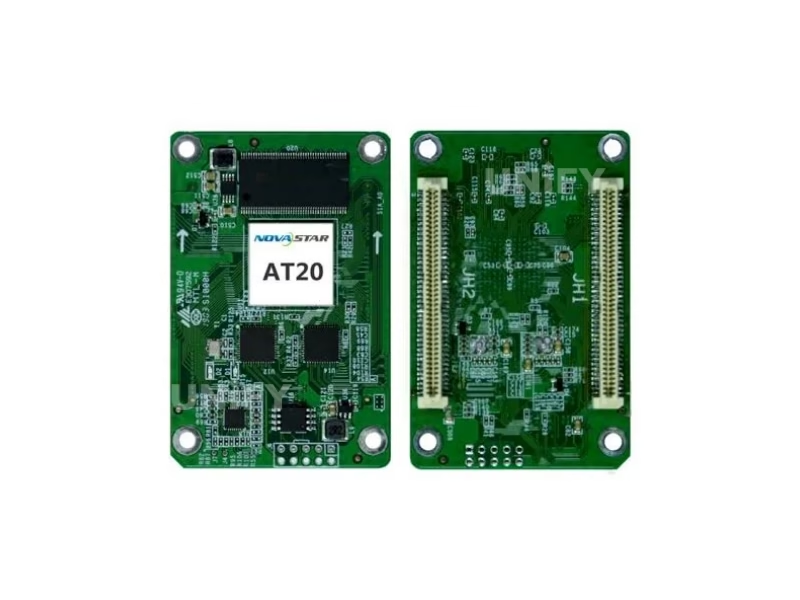
What Is the Novastar AT20 LED Wall Receiving Card?
The Novastar AT20 LED Wall Receiving Card is a compact, cost-effective general-purpose receiving card in NovaStar’s AT series. A single card supports resolutions up to 256×256@60Hz with 24 groups of parallel RGB data — expandable to 64 serial groups (up to 128 via multiplexing). It is the entry-level choice for small to mid-size fixed LED installations where budget is the primary constraint but professional calibration and reliability are still required.
The AT20 uses high-density connectors for dust and vibration resistance — the same connector technology found on NovaStar’s higher-end A5s Plus and A8s cards. It supports pixel-level brightness and chroma calibration via NovaCLB, 3D output with compatible sending controllers, individual red/green/blue gamma adjustment, 90° image rotation, and quick correction of dark or bright lines at module seams — all features typically found on cards costing 30–50% more.
The AT20 is EMC Class B certified — upgraded from Class A in hardware revision V1.2.0 — meaning it meets electromagnetic compatibility standards for residential and commercial environments. For churches, retail stores, and conference rooms where the LED screen operates near audio equipment, this certification prevents interference with wireless microphones and sound systems. As a LED screen manufacturer supplying cost-sensitive projects, we recommend the AT20 for displays under 10m² where a 512×384 card would be overspecified. For architecture reference, see our guide on synchronous vs asynchronous LED control.
Novastar AT20 Technical Specifications
Verified against official NovaStar AT20 Receiving Card Specifications V1.3.1 (September 2020)
| Parameter | Specification |
|---|---|
| Max Resolution | 256×256@60Hz |
| Parallel RGB Data Groups | 24 (64 serial, expandable to 128) |
| Calibration | Pixel-level brightness & chroma calibration (NovaCLB) |
| 3D Support | Yes (with compatible sending card) |
| Image Rotation | 90° increments (0°/90°/180°/270°) |
| Individual RGB Gamma | Yes (NovaLCT V5.2.0+) |
| Quick Dark/Bright Line Fix | Yes — instant correction at module seams |
| Dual Config Backup | Yes — application + factory area storage |
| EMC Certification | Class B (upgraded from Class A in V1.2.0) |
| Connector | High-density connector (dust & vibration resistant) |
| Input Voltage | DC 3.8 V to 5.5 V |
| Rated Current / Power | 0.5 A / 2.5 W |
| Operating Temperature | –20°C to +70°C |
| Humidity | 10%–90% RH, non-condensing |
| Certifications | RoHS, EMC Class B |
Novastar AT20 Key Features: Calibration, 3D & Professional Display Quality
The AT20 packs features typically found on higher-priced receiving cards — making it the value leader in NovaStar’s lineup for projects under 10m².
Pixel-Level Calibration
Works with NovaCLB to calibrate brightness and chroma of every individual LED. Eliminates module-to-module variance. Essential for indoor LED display screens viewed at close distance.
3D + Individual RGB Gamma
3D output with compatible sending card. Red/green/blue gamma independently adjustable — controls non-uniformity at low grayscale and white balance offset. Requires NovaLCT V5.2.0+.
Quick Line Fix + 90° Rotation
Dark or bright lines at module seams corrected instantly — no video source change needed. Display image rotates in 90° increments (0°/90°/180°/270°) for portrait and creative installations.
EMC Class B + Dual Config Backup
Class B compliance means no interference with nearby audio equipment — critical for churches and conference rooms. Configuration parameters stored in both application and factory areas for instant restoration if needed.
Novastar AT20 vs A5s Plus vs A8s: Which Receiving Card Fits Your Project?
The AT20 delivers 80% of the A5s Plus’s feature set at roughly 60% of the cost — but with half the pixel capacity. The right choice depends on your display size.
| Feature | AT20 ⭐ | A5s Plus | A8s |
|---|---|---|---|
| Max Resolution | 256×256 | 512×384 | 512×384 |
| Parallel RGB Groups | 24 | 32 | 32 |
| Color Management | No | 18bit+ | 22bit+ / HDR |
| 3D / RGB Gamma / Rotation | Yes / Yes / 90° | Yes / Yes / 90° | Yes / Yes / Any-angle |
| Dual Card Backup | No | Yes | Yes (5-fold) |
| EMC | Class B | Class B | Class B |
| Best For | Small displays (<10m²), budget projects | Mid-large professional walls | Broadcast, HDR, creative displays |
Decision rule: If your display is under 10m² and you don’t need Color Management or dual card backup → the AT20 is the optimal price-to-performance choice. For displays over 10m² or projects requiring 18bit+ grayscale → step up to the A5s Plus.
Novastar AT20 — How Much Screen Can 256×256 Pixels Actually Drive?
The AT20’s 256×256 pixel capacity is adequate for the majority of small to mid-size fixed LED installations. Here is the practical area calculation by pixel pitch — so you know exactly how many cards your project needs.
| Pixel Pitch | Area per AT20 Card | Cards Needed for 5m² Display | Cards Needed for 10m² Display |
|---|---|---|---|
| P2.5 (Indoor) | 0.64m × 0.64m = 0.41 m² | 13 | 25 |
| P3.91 (Outdoor) | 1.00m × 1.00m = 1.00 m² | 5 | 10 |
| P4.81 (Outdoor) | 1.23m × 1.23m = 1.51 m² | 4 | 7 |
| P10 (Outdoor Billboard) | 2.56m × 2.56m = 6.55 m² | 1 | 2 |
For P10 outdoor billboards, a single AT20 drives over 6.5m² — making it the most cost-efficient choice for large-pixel-pitch outdoor LED screens. For P2.5 indoor walls exceeding 10m², the A5s Plus’s 512×384 capacity (0.93m² per card) reduces card count by half.
Novastar AT20 EMC Class B — Why This Matters for Churches, Retail & Conference Rooms
The AT20 launched in 2019 with EMC Class A certification (industrial environments). In hardware revision V1.2.0 (October 2019), NovaStar upgraded it to Class B — the standard required for residential, commercial, and light-industrial environments.
Churches
Wireless microphones, in-ear monitors, and instrument pickups are highly sensitive to electromagnetic interference. A Class A receiving card near the stage can introduce audible noise into the audio chain. Class B eliminates this risk — the AT20 operates cleanly alongside professional audio equipment.
Retail & Corporate
LED screens in shopping malls and corporate lobbies sit near WiFi routers, POS terminals, security systems, and customer mobile devices — all operating in the 2.4/5GHz bands. Class B compliance ensures the AT20 doesn’t contribute to the electromagnetic noise floor in these dense RF environments.
Class A vs Class B
Class A: Industrial environments only — higher emission limits tolerated. Class B: Residential/commercial — stricter limits (approximately 10dB lower across most frequencies). The AT20’s V1.2.0+ hardware meets Class B per IEC/CISPR 32 standards. Always verify you’re receiving V1.2.0+ hardware when ordering.
Novastar AT20 Software & Calibration: NovaLCT + NovaCLB
Configure, calibrate, and manage all AT20 settings through NovaStar’s free Windows software suite.
NovaLCT V5.2.0+ (Windows)
Configure card parameters, individual RGB gamma, dark/bright line correction, mapping, and firmware updates. Free from NovaStar software downloads.
NovaCLB (Calibration)
Pixel-level brightness and chroma calibration. Works with X-Rite i1 Pro series colorimeters. Coefficients stored on the receiving card — persists through power cycles, independent of video source.
Config Readback & Dual Backup
Read back firmware and configuration to local PC. Dual config storage (application + factory area) — restore factory defaults if field config is corrupted. Firmware program readback for backup.
Novastar AT20 Application Scenarios: Where the Entry-Level Workhorse Excels
Small to Mid-Size Church Displays
For a 4m² P2.5 church stage screen, 10 AT20 cards provide full coverage at roughly half the receiving card cost of A5s Plus equivalents. EMC Class B protects wireless microphones and in-ear monitors. Pixel-level calibration ensures uniform worship lyrics across all modules.
Retail Storefront & Restaurant Displays
Small-format LED posters and menu boards (typically 1–3m² at P2.5–P4) are the AT20’s ideal application. 256×256 capacity is perfectly matched to these sizes — a 512×384 card would be overspecified. EMC compliance critical for POS equipment co-location.
Corporate Lobby & Conference Room Walls
Fine-pitch indoor LED display screens in corporate settings typically range 3–8m² — well within AT20 range. Pixel-level calibration is essential at P1.5–P2.5 viewing distances where even 5% brightness variance between modules is visible.
P10 Outdoor Billboards & Large-Pitch Signage
A single AT20 drives 6.55m² of P10 display — the most cost-efficient pairing for large-pitch outdoor LED screens. For a 20m² P10 roadside billboard, only 4 AT20 cards are needed. The 256×256 capacity is perfectly dimensioned for P10’s coarse pixel density.
Why Source Your Novastar AT20 from UnifyLED?
The AT20 is an entry-level card — but your supplier’s quality control determines whether it performs like one.
Genuine V1.3.1 Hardware — Verified Batch
As a LED screen manufacturer and NovaStar distributor, we ensure every AT20 is V1.2.0+ hardware with EMC Class B. Some grey-market sellers still ship pre-V1.2.0 Class A stock — we verify hardware revision before shipping.
Batch Testing & Calibration Support
10% per-batch QC: power-on indicator verification, Ethernet communication, calibration coefficient upload. Rcfgx file preparation for your specific LED modules included with every order.
Bulk Order Economics
AT20 cards ship blister-packaged individually. Volume pricing for 5+ boxes (400+ cards). Worldwide express 5–10 days, economy 15–25 days from Shenzhen. Full customs documentation included.
Multi-Brand Receiving Card Support
We supply the complete NovaStar receiving card range — AT20 through A8s. If your project grows beyond 10m² and needs A5s Plus upgrade, we provide consistent pricing and rcfgx continuity across card models.
Novastar AT20 Pricing & Bulk Order Information
What’s Included
- Original NovaStar AT20 (V1.3.1, EMC Class B verified)
- Blister-packaged individually
- Batch QC test report (upon request)
- Rcfgx file preparation for your LED modules
- Lifetime technical support
Get Your AT20 Quote
Response within 2 hours (GMT+8)
unifyledscreen@gmail.com
WhatsApp / Phone
+86-191-18802497
Frequently Asked Questions About the Novastar AT20 LED Wall Receiving Card
What is the maximum resolution of the Novastar AT20?
256×256@60Hz. This is the official specification per NovaStar V1.3.1. Some third-party websites incorrectly list 320×256 — this was changed in V1.3.0 (October 2019). Always verify against the official datasheet.
What is the difference between the AT20 and A5s Plus?
AT20: 256×256, 24 parallel RGB groups, no Color Management, no dual card backup. A5s Plus: 512×384, 32 parallel RGB groups, 18bit+ Color Management, dual card backup. For displays under 10m², the AT20 is the value choice. For larger or color-critical projects, choose A5s Plus.
Does the AT20 have EMC Class B certification?
Yes — since hardware revision V1.2.0 (October 2019). Early AT20 units (V1.0.0–V1.1.0) were Class A. Always verify you’re receiving V1.2.0+ hardware. All UnifyLED AT20 stock is V1.3.1 Class B verified.
Can the AT20 do pixel-level calibration?
Yes — brightness and chroma calibration via NovaCLB. Coefficients persist through power cycles. This is a premium feature unexpected at the AT20’s price point.
Can the AT20 work with non-NovaStar sending controllers?
No — NovaStar proprietary protocol only. Requires a NovaStar sending controller (MCTRL, VX, or Taurus series).
What software configures the AT20?
NovaLCT V5.2.0+ (Windows). Required for individual RGB gamma adjustment and dark/bright line correction. Free from novastar.tech.
Ready to Source the Novastar AT20 LED Wall Receiving Card?
256×256 capacity. 24 parallel data groups. EMC Class B. Pixel-level calibration. The entry-level workhorse — factory-direct pricing, rcfgx support, global logistics.
unifyledscreen@gmail.com | +86-191-18802497
How Receiving Card Resolution Affects LED Display Design — The Novastar AT20 Engineering Perspective
Published: August 2026 | 8 min read | UnifyLED Engineering Team
B2B buyers routinely overspecify receiving cards. They select a 512×384 card for a 3m² display that a 256×256 card could drive perfectly — paying 40–60% more per card with zero visible benefit. Understanding the relationship between receiving card resolution, pixel pitch, and display area is the single most effective way to optimize LED display BOM cost without compromising visual quality. This article explains the math, provides a decision framework, and identifies when the AT20 is the right engineering choice.
The Resolution-Area Calculation Every Integrator Should Know
Area per card = (card width px × pixel pitch mm) × (card height px × pixel pitch mm). For AT20 at P3.91: (256 × 3.91mm) × (256 × 3.91mm) = 1,001mm × 1,001mm ≈ 1.0m². For AT20 at P2.5: (256 × 2.5mm) × (256 × 2.5mm) = 640mm × 640mm ≈ 0.41m². The P2.5 number is the critical one — it means a 10m² P2.5 indoor wall needs approximately 25 AT20 cards. If each AT20 costs roughly 40% less than an A5s Plus, the total receiving card cost savings are significant for projects under 10m². For displays over 10m² at P2.5, the A5s Plus’s larger capacity (512×384 = 0.93m² per card) reduces card count from 25 to approximately 11 — at which point the higher per-card cost is offset by the reduced card count and simplified wiring. The crossover point varies by pixel pitch. See our LED pixel pitch guide for detailed area calculations.
When 24 Data Groups Are Enough
The AT20’s 24 parallel RGB data groups (vs 32 on A5s Plus/A8s) is the spec that integrators ask about most. Each data group drives one row of LEDs on a module. For a standard 320×160mm P2.5 module with 128×64 pixel resolution, a single AT20’s 24 groups can drive 24 rows simultaneously — mapping directly to the module’s physical layout. The limitation only becomes relevant on modules with higher vertical resolution or when a single card must drive multiple daisy-chained modules. For the single-module-per-output configurations typical of small to mid-size fixed installations, 24 groups is sufficient. For LED screen maintenance and module replacement, consistent data group mapping across all cards in the system is more important than the absolute group count.
Download the Novastar AT20 LED Wall Receiving Card Specifications
Official NovaStar AT20 datasheet V1.3.1. Includes pinout diagrams, dimension drawings, and full specifications.
unifyledscreen@gmail.com | +86-191-18802497 | Worldwide Shipping