
NovaStar Taurus Series · TB6 Replacement
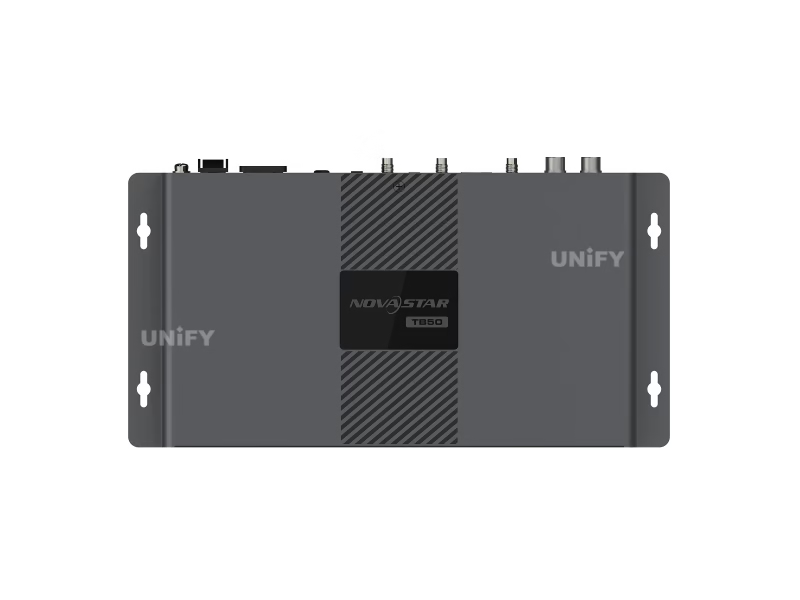
Novastar TB50 LED Multimedia Player
1.3 million pixel all-in-one playback & sending controller with 23 global certifications — 4K@60Hz H.265 decoding, HDMI sync+async dual-mode, AC direct power, VNNOX cloud ready. The official replacement for NovaStar TB6.
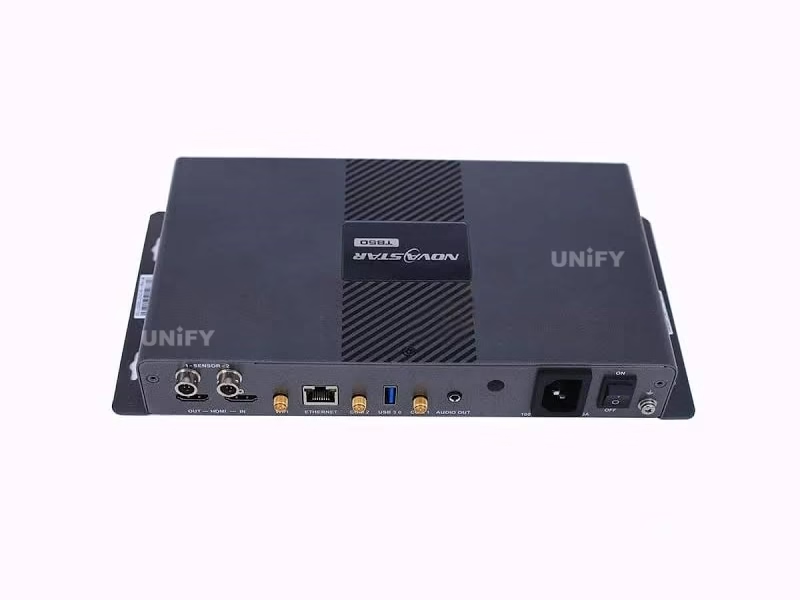
What Is the Novastar TB50 LED Multimedia Player?
The Novastar TB50 LED Multimedia Player is NovaStar’s flagship mid-range all-in-one playback and sending controller within the Taurus series, and the official replacement for the discontinued TB6. It integrates content playback, signal sending, and cloud-based remote management into a single compact unit powered by a built-in AC power supply — no external power adapter required.
With a loading capacity of 1,300,000 pixels (max 4096×4096), quad-core ARM A55 @1.8 GHz processing, and hardware H.265/HEVC 4K@60fps decoding, the TB50 handles 1× 4K, 2× 1080p, 5× 720p, or 6× 480p/360p simultaneous video streams. The synchronous and asynchronous LED control dual-mode operation — toggled via a front-panel hardware switch — makes it equally suited for scheduled advertising loops and live HDMI-fed presentations.
What truly sets the TB50 apart is its 23 international certifications (FCC, UL, CE, UKCA, CB, KC, PSE, MIC, NBTC and more) — the most comprehensively certified model in the Taurus lineup. For B2B buyers deploying across multiple regulatory regions, this eliminates the need for separate regional SKUs and streamlines customs clearance. The TB50 is a LED screen manufacturer-recommended controller for projects requiring global compliance.
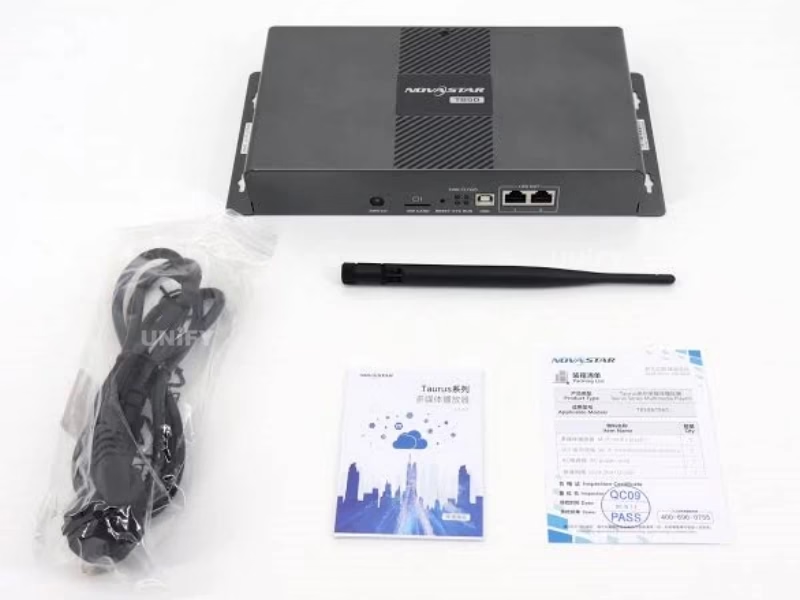
Novastar TB50 Technical Specifications
Verified against official NovaStar TB50 Multimedia Player Specifications V1.2.3 (January 2026)
| Parameter | Specification |
|---|---|
| Processor | Quad-Core ARM A55 @1.8 GHz |
| Operating System | Android 11 |
| RAM / Internal Storage | 1 GB / 32 GB |
| Max Loading Capacity | 1,300,000 pixels — Max Width: 4096 px, Max Height: 4096 px |
| Video Decoding | H.264 4K@30fps (80 Mbps) / H.265/HEVC 4K@60fps (100 Mbps) / MPEG4 / VP8 / VP9 |
| Simultaneous Playback | 1× 4K / 2× 1080p / 5× 720p / 6× 480p / 6× 360p |
| Ethernet Outputs | 2× Gigabit Ethernet — configurable as 2 Primary or 1+1 Backup |
| HDMI | 1× HDMI 1.3 IN (sync mode live input) + 1× HDMI 1.3 OUT (max 1920×1200@60Hz, HDMI Loop) |
| USB Ports | 1× USB 3.0 Type-A (playback, firmware upgrade, storage expansion) + 1× USB Type-B (PC control) |
| Audio Output | 3.5mm Stereo Audio Connector — fixed 48 kHz internal sample rate |
| Sensor Inputs | 2× Sensor Connectors — brightness sensor / temperature & humidity sensor |
| Network Connectivity | 1× Gigabit Ethernet RJ45 + 2.4 GHz Wi-Fi (AP + STA simultaneous) + Optional 4G module |
| Multi-Screen Sync | NTP / GPS (with 4G module + SIM) / RF (with RF module) |
| Power Supply | AC 100–240V~, 50/60Hz, 0.6A — Built-in PSU with ON/OFF switch / Max 18W |
| Dimensions / Weight | 274.3 × 139.0 × 40.0 mm / Net: 1234.0 g |
| Operating Environment | Temperature: –20°C to +60°C / Humidity: 0%–80% RH (non-condensing) |
| IP Rating | IP20 — protect from moisture; weatherproof enclosure required for outdoor use |
| Replaces | NovaStar TB6 (discontinued) — TB50 is the direct upgrade path |
Novastar TB50 Key Features: Processing Power, Dual-Mode & Global Certifications
Four capabilities that directly impact display reliability, content flexibility, and total cost of ownership across international deployments.
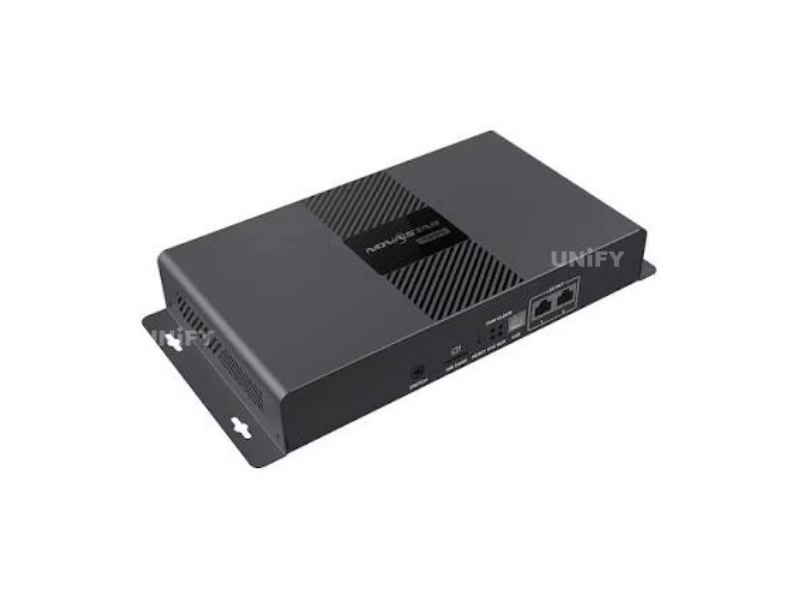
4K Decoding & Playback Performance
Quad-core ARM A55 @1.8 GHz with hardware H.265/HEVC 4K@60fps decoding at 100 Mbps. Supports 1× 4K, 2× 1080p, 5× 720p, or 6× 480p simultaneous playback. 1 GB RAM + 32 GB internal storage — identical processing core to the higher-priced TB60.
Sync & Async Dual-Mode + AC Power
Front-panel SWITCH toggles between async (internal/USB playback) and sync (live HDMI up to 1920×1200@60Hz). Built-in AC 100-240V power supply with physical ON/OFF switch eliminates external adapter clutter. Dual Gigabit Ethernet with configurable primary/backup redundancy.
Global Certification Compliance
23 international certifications — FCC (USA), UL (USA), CE (EU), UKCA (UK), CB (IEC), KC (Korea), PSE (Japan), MIC (Japan), NBTC (Thailand), IMDA (Singapore), RCM (Australia), IC (Canada), and more. The most comprehensively certified Taurus model, eliminating multi-SKU regional inventory.
VNNOX Cloud & Triple-Network Connectivity
Native VNNOX cloud integration for remote content updates and fleet management. Gigabit Ethernet + 2.4 GHz Wi-Fi AP/STA simultaneous + optional 4G module. Multi-screen sync via NTP, GPS, or RF. Priority: Wired > Wi-Fi > 4G.
Novastar TB50 Global Certifications: 23 International Compliance Marks
The TB50 holds the most extensive certification portfolio in the Taurus series — a critical advantage for B2B buyers shipping to multiple regulatory regions. One SKU, global compliance.
| Certification | Region / Country | Scope |
|---|---|---|
| FCC | USA | Electromagnetic compatibility |
| UL | USA | Product safety |
| CE / UKCA | EU / UK | Health, safety & environmental |
| CB (IEC) | International | Electrical safety (IEC scheme) |
| IC | Canada | Radio/telecom compliance |
| KC | South Korea | Broadcast & communication |
| PSE / MIC | Japan | Electrical safety / Radio |
| RCM | Australia / NZ | EMC & EMR compliance |
| NBTC | Thailand | Telecom equipment approval |
| IMDA | Singapore | Communication equipment |
| SRRC / CQC | China | Radio type approval / Quality |
| EAC / FAC DoC | EAEU / UAE | Customs union compliance |
| ENACOM / ICASA | Argentina / South Africa | Telecom regulatory |
| PSB / NTRA / PSTI | Singapore / Egypt / UK | Safety / Telecom / Security |
Novastar TB50 Panel Layout & Hardware Connectivity
Understanding each physical interface prevents misconfiguration and reduces on-site troubleshooting time. Note the ON/OFF power switch and AC input — TB50 uses built-in PSU, no external adapter.
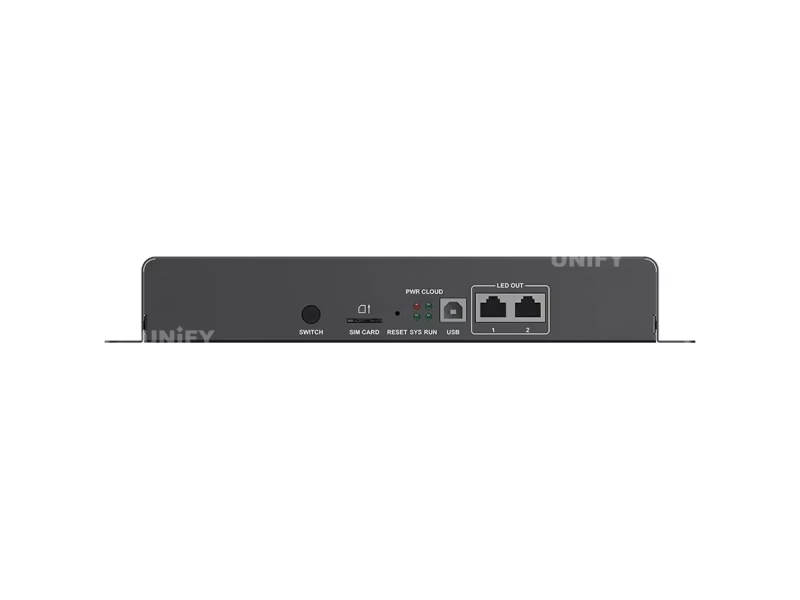
Front Panel
| SWITCH | Toggles Sync mode (solid LED) / Async mode (LED off) |
| SIM CARD | SIM card slot — anti-reverse insertion design |
| RESET | Press and hold 5 seconds to restore factory defaults |
| USB (Type B) | Connects to control PC for content publishing and screen management |
| LED OUT ×2 | Gigabit Ethernet outputs — configurable as dual-primary or primary+backup |
Rear Panel
| SENSOR ×2 | Connect brightness sensor or temperature & humidity sensor |
| HDMI IN + OUT | HDMI 1.3 IN (sync video source) + HDMI 1.3 OUT (1920×1200@60Hz, Loop) |
| WiFi | 2.4 GHz Wi-Fi antenna — AP + STA simultaneous operation |
| ETHERNET | Gigabit Ethernet port for LAN / public network / PC |
| COM 2 / COM 1 | GPS antenna / 4G antenna (4G module optional) |
| USB 3.0 (Type A) | USB drive playback (FAT32/NTFS, 2–128 GB), firmware upgrade |
| AUDIO OUT | 3.5mm stereo output connector |
| AC IN + ON/OFF | 100-240V~ 50/60Hz 0.6A built-in power supply + physical power switch |
Novastar TB50 vs TB30 vs TB40 vs TB60: Which Taurus Model Fits Your Project?
The TB50 sits at a unique position: same processor as TB40/TB60, more certifications than any other Taurus model, and the only one with built-in AC power. Here is the data-driven comparison.
| Feature | TB30 | TB40 | TB50 ⭐ | TB60 |
|---|---|---|---|---|
| Max Pixel Loading | 650,000 | 1,300,000 | 1,300,000 | 2,300,000 |
| HDMI Input/Output | None | 1 IN + 1 OUT | 1 IN + 1 OUT | 1 IN + 1 OUT |
| Power Supply | AC 100-240V | DC 12V Adapter | AC 100-240V Built-in | DC 12V Adapter |
| ON/OFF Switch | Yes | No | Yes | No |
| Certifications | 8+ | 3 (CQC, SRRC, RoHS) | 23 (Global) | 8+ |
| Ethernet Outputs | 1+1 (Fixed) | 2 (Configurable) | 2 (Configurable) | 4 (Configurable) |
| Dimensions / Weight | 274.3×139×40mm 1228.9g |
238.8×140.5×32mm 459.7g |
274.3×139×40mm 1234.0g |
Larger chassis |
Verdict: The TB50 is the globally certified workhorse of the Taurus lineup. It matches the TB40 and TB60 in processing power, adds the most extensive certification portfolio (23 marks), features built-in AC power with physical ON/OFF switch, and serves as the direct replacement for the discontinued TB6. For projects shipping across multiple regulatory regions, the TB50 eliminates the need for region-specific controller SKUs.
Novastar TB50 Media Decoding: Supported Formats & Codec Specifications
Before loading content, verify your media files match these specifications. Mismatched codecs are the #1 cause of support tickets.
Video Codecs
| Codec | Max Resolution | Max FPS | Max Bitrate | Container |
|---|---|---|---|---|
| H.265/HEVC | 4096×2304 | 60 fps | 100 Mbps | MP4, MKV, MOV |
| H.264 | 4096×2304 | 30 fps | 80 Mbps | MP4, AVI, MKV, MOV |
| VP9 | 4096×2304 | 60 fps | 80 Mbps | MKV, WEBM |
| MPEG4 | 1920×1088 | 30 fps | 38.4 Mbps | MP4, AVI, MKV, MOV |
| VP8 | 1920×1088 | 30 fps | 38.4 Mbps | MKV, WEBM |
Image Formats
| Format | Max Resolution | Notes |
|---|---|---|
| JPEG | 4096×2304 | SRGB + Adobe RGB |
| PNG / WEBP | 4096×2304 | PNG: alpha channel; WEBP: recommended |
| BMP | 4096×2304 | Uncompressed |
| GIF | 1920×1088 | Max 30fps @1280×720; 10fps @1920×1088 |
Pro Tip: For 4K content, always use H.265/HEVC — 60fps at 100 Mbps vs H.264’s 30fps cap. Videos between 2K and 4K are auto-processed as 4K and count against your single 4K playback slot.
Novastar TB50 Synchronous Playback: NTP, GPS & RF Configuration Guide
When multiple TB50 units play identical content across different screens, even a 100ms timing gap is visible to viewers. The TB50 supports three time synchronization methods — choose based on your network infrastructure.
Method 1: NTP — Network Time Protocol
Best for: All TB50 units sharing a local network (retail chains, building facades, control rooms).
Set up an NTP server on the local network (a standard PC can serve this role). In ViPlex Handy or ViPlex Express, enable Synchronous Playback on each TB50 unit, select NTP as the time source, and enter the server’s IP address or domain name. No additional hardware required — this is the recommended method for most deployments.
Method 2: GPS — Satellite Time Synchronization
Best for: Geographically distributed units without a shared network (roadside signage, lamp-post displays, smart city deployments).
Install a 4G module (NovaStar EC20) and SIM card in each TB50 unit. Enable GPS time synchronization through ViPlex Express or VNNOX. The GPS antenna (COM 2 port) receives satellite timing signals, ensuring all units across a city or region stay perfectly synchronized. This method also enables cellular data connectivity as a backup to wired/Wi-Fi.
Method 3: RF — Radio Frequency Local Sync
Best for: Colocated units without network access (stadium clusters, building exteriors with no Ethernet).
Install an RF module (NovaStar E32-433T30D-NW) on each TB50. Designate one unit as the master (time reference only, no screen loading required) and the remaining units as slaves with the same Group ID. Slaves synchronize to the master over the RF connection — no network infrastructure needed.
Important: Enabling synchronous playback halves the number of simultaneous video streams within the TB50’s decoding budget. Plan your content layout accordingly — what fits in autonomous async mode may need adjustment when sync is active. All three methods can also be configured remotely through VNNOX for units connected to the public internet.
Novastar TB50 Software & Setup: ViPlex, VNNOX & 4-Step Configuration Guide
Three software tools cover every control scenario — from on-site configuration to global fleet management. All are free downloads from NovaStar.
ViPlex Express (Windows)
Desktop powerhouse for comprehensive screen configuration, content editing, program publishing, and device management. Recommended for initial setup and complex layouts.
ViPlex Handy (Android/iOS)
Mobile companion for quick on-site adjustments. Connect via Wi-Fi to the TB50’s built-in hotspot (SSID: “TB50+Last 8 digits of SN”) for content updates and brightness control from your phone.
VNNOX Cloud Platform
NovaStar’s enterprise cloud for multi-screen fleet management. Publish content to hundreds of TB50 units worldwide, monitor real-time playback status, and receive automatic fault alerts — from any web browser.
Setup Process — 4 Steps to First Content
Hardware Connection
Connect AC power cord, attach Wi-Fi antenna, link LED OUT Ethernet ports to receiving cards, optionally connect HDMI source and LAN cable.
Install ViPlex Express
Download and install on Windows 10/11 PC. The software auto-detects the TB50 via USB Type-B or network connection.
Configure Screen
Set resolution (max 4096×4096), receiving card mapping, pixel clock ≤153 MHz. Select Sync or Async mode via SWITCH button.
Publish & Activate Cloud
Upload content, set schedules, register on VNNOX for remote management. CLOUD LED flashes every 2s when connected.
Novastar TB50 Application Scenarios: Smart City, Retail & Commercial Digital Signage
The TB50’s dual-mode architecture, 23 global certifications, and built-in AC power make it the go-to choice for multi-region commercial deployments.
Multi-Region Chain Store Networks
Deploy one TB50 SKU across stores in USA, EU, UK, Japan, Korea, Australia, and Southeast Asia — all covered by its 23 certifications. VNNOX cloud pushes content updates globally from a single dashboard. Eliminates the cost and complexity of maintaining region-specific controller inventory.
Smart City Lamp-Post & Roadside Displays
Built-in AC power eliminates external adapter failure points — critical for enclosed lamp-post installations. Optional 4G + GPS enables cellular connectivity and satellite time sync. Sensor inputs for adaptive brightness reduce LED display power consumption at night.
Fixed Advertising Billboards & Retail Signage
Direct AC power input + ON/OFF switch simplifies electrical installation — no low-voltage wiring. Dual Ethernet with configurable backup for 24/7 outdoor LED screen operations. Supports non-standard resolutions up to 153 MHz pixel clock for custom aspect ratios.
TB6 Legacy Upgrade Projects
The TB6 is discontinued with limited remaining inventory. The TB50 is the official pin-compatible replacement with upgraded processor, more certifications, and ongoing firmware support. For existing TB6 installations approaching end-of-life, the TB50 offers a drop-in upgrade path with improved 4K performance and LED screen maintenance continuity.
Why Source Your Novastar TB50 from UnifyLED?
Beyond product specifications, your supplier determines long-term reliability, technical support quality, and total cost of ownership.
Authorized Distributor — Guaranteed Genuine
As an authorized NovaStar distributor and professional LED screen manufacturer, UnifyLED sources every TB50 directly from NovaStar’s production line. Each unit includes full manufacturer warranty, original accessories (Wi-Fi antenna, AC power cord, Quick Start Guide, Certificate of Approval), and latest firmware.
Pre-Shipment QC — 4-Stage Testing
Every TB50 undergoes: (1) visual inspection, (2) power-on LED indicator verification including AC power circuitry, (3) full functional test of all ports and Wi-Fi AP broadcast, and (4) 2-hour burn-in under 4K decoding load. QC reports are documented and available upon request.
Lifetime Technical Support — Direct Engineering Access
From NTP server configuration to GPS module installation and multi-screen sync troubleshooting, our in-house LED control system engineers have deployed hundreds of TB50 units. Support via WhatsApp (+86-191-18802497), email, or remote desktop — not forwarded to a third party.
Global Logistics — Certified for Every Market
The TB50’s 23 certifications mean zero customs delays in major markets. We ship worldwide from Shenzhen with full documentation including certification compliance sheets. Packing: 385.0×280.0×75.0 mm carton. Express 5–10 days, economy 15–25 days. All shipments fully insured.
Novastar TB50 Pricing & Bulk Order Information: Factory-Direct Quotes
Factory-direct pricing with volume discounts — get a customized quote for your project requirements. TB50 price varies by 4G module option (Wi-Fi only vs Wi-Fi+4G) and order quantity.
What’s Included in Every Order
- 1× Novastar TB50 Multimedia Player (latest firmware)
- 1× Wi-Fi Omnidirectional Antenna
- 1× AC Power Cord
- 1× Quick Start Guide
- 1× Certificate of Approval
- Pre-shipment QC test report (upon request)
- Lifetime technical support access
TB6 Upgrade? If you’re replacing discontinued TB6 units, mention your existing setup for migration guidance and potential bundle discounts. The TB50 is pin-compatible with TB6 installations.
Get Your TB50 Quote
Response within 2 hours during business hours (GMT+8)
unifyledscreen@gmail.com
WhatsApp / Phone
+86-191-18802497
Location
Changsha, Hunan, China · GMT+8
Request Quote & Availability →
Bulk orders · Project pricing · TB6 migration · Technical consultation
Frequently Asked Questions About the Novastar TB50 LED Multimedia Player
Answers based on real customer inquiries and field deployment experience across 108+ countries.
What is the maximum pixel loading capacity of the Novastar TB50?
The TB50 supports up to 1,300,000 pixels with max width 4096 and max height 4096 pixels. Non-standard resolutions are supported in both sync and async modes, pixel clock ≤153 MHz.
Is the TB50 the replacement for the TB6?
Yes. The NovaStar TB6 has been discontinued with limited remaining inventory. The TB50 is the official replacement — it is pin-compatible, features an upgraded processor, adds 4G and GPS support, and carries 23 global certifications. For existing TB6 installations, the TB50 offers a direct upgrade path with ongoing firmware support.
Does the TB50 support 4K video playback?
Yes. H.265/HEVC: 4K@60fps at 100 Mbps. H.264: 4K@30fps at 80 Mbps. Simultaneous playback: 1× 4K, 2× 1080p, 5× 720p, or 6× 480p/360p videos.
How does the TB50’s built-in AC power differ from external adapters?
The TB50 has a built-in 100-240V AC power supply with a physical ON/OFF switch — unlike the TB40 and TB60 which use external DC adapters. This eliminates an external failure point, simplifies installation wiring (standard IEC power cord), and enables hard power-cycling via the physical switch without unplugging.
What certifications does the TB50 carry?
23 certifications: FCC, UL (USA), CE, UKCA (EU/UK), IC (Canada), CB/IEC (International), KC (Korea), PSE, MIC (Japan), RCM (Australia/NZ), NBTC (Thailand), IMDA, PSB (Singapore), SRRC, CQC (China), EAC (EAEU), FAC DoC (UAE), ENACOM (Argentina), ICASA (South Africa), NTRA (Egypt), PSTI (UK), EAC RoHS, and more.
Can the TB50 synchronize playback across multiple screens?
Yes — via NTP (local network, no extra hardware), GPS (requires 4G module + SIM), or RF (requires RF module E32-433T30D-NW). Enabling sync halves the simultaneous video stream count within the decoding budget.
What software controls the TB50?
NovaStar official software only: ViPlex Express (Windows), ViPlex Handy (Android/iOS), and VNNOX (cloud). Third-party applications from Linsn, HUIDU, or Colorlight are not supported.
How do I factory reset the TB50?
Press and hold the RESET button on the front panel for approximately 5 seconds. The device restores to factory default settings.
Is the TB50 suitable for outdoor use?
IP20 rating — no water resistance. For outdoor installations, house inside a weatherproof enclosure with ventilation. Operating: –20°C to +60°C, 0%–80% RH non-condensing.
What is the TB50’s power consumption?
AC 100-240V~, 50/60Hz, 0.6A input. Maximum power consumption: 18W. NovaStar recommends a 25W supply for headroom when using optional modules.
Ready to Source the Novastar TB50 LED Multimedia Player?
23 certifications. Built-in AC power. The official TB6 replacement. Free controller selection guidance, factory-direct pricing, global logistics. Tailored quotation within 24 hours.
unifyledscreen@gmail.com | +86-191-18802497
Technical Deep-Dive
How to Upgrade from TB6 to the Novastar TB50 LED Multimedia Player — Migration Guide & ROI Analysis
Published: August 2026 | Reading time: 12 min | UnifyLED Engineering Team
NovaStar discontinued the TB6 multimedia player in 2024, and remaining inventory across major distributors has dwindled to near zero. For the thousands of TB6 units deployed in retail chains, lamp-post displays, and fixed advertising installations worldwide, the question is no longer if to migrate — it’s when and to what. This guide provides the engineering rationale, migration checklist, and 5-year ROI analysis for upgrading to the NovaStar TB50.
Why TB6 Was Discontinued — And Why It Matters Now
The TB6 served as NovaStar’s workhorse multimedia player for nearly a decade. But its hardware platform — an older-generation ARM processor, Android 7.0 OS, and limited to H.264 1080p decoding — reached end of engineering life. Firmware updates stopped in early 2024. More critically, the TB6 carried only 5-6 regional certifications, creating compliance gaps for deployments in markets like Japan (PSE/MIC), Korea (KC), and Thailand (NBTC).
The TB50 addresses every TB6 limitation: quad-core A55 @1.8 GHz (vs dual-core A7 @1.2 GHz), Android 11 (vs Android 7), H.265 4K@60fps (vs H.264 1080p), and 23 certifications covering every major regulatory region. For B2B buyers managing multi-country deployments, the certification advantage alone often justifies the migration cost — one TB50 SKU replaces 3-4 region-specific TB6 variants.
Physical Compatibility: Drop-In Replacement
The TB50 shares the TB6’s mounting dimensions (274.3 × 139.0 mm footprint) and connector layout. Both use AC 100-240V direct input with physical ON/OFF switch. The front-panel SWITCH button, SIM card slot, RESET button, USB Type-B, and LED OUT ports are in identical positions. For most enclosed installations — roadside cabinets, retail backrooms, control racks — the TB50 slides into the TB6’s physical mounting without bracket modification.
The key wiring change: TB6 used a fixed 1+1 Ethernet configuration (one primary, one backup). The TB50 defaults to both ports as primary, with backup configurable via ViPlex Express. If your TB6 installation relied on automatic Ethernet failover, reconfigure this in software during migration. See our guide on LED screen installation for enclosure and cabling best practices.
Content Migration: What Transfers, What Needs Re-Encoding
If your TB6 content library consists primarily of H.264 1080p MP4 files, these will play directly on the TB50 without re-encoding — the TB50’s codec support is a superset of the TB6’s. However, if you want to take advantage of the TB50’s 4K capability, you’ll need to re-encode existing content to H.265/HEVC at the target resolution. The TB50’s 32 GB internal storage (vs TB6’s 8-16 GB depending on revision) provides headroom for higher-bitrate 4K files.
Playlist files, scheduling data, and screen configuration parameters (rcfgx files) from the TB6 are not directly transferable — the software platforms differ (NovaLCT-Mars vs ViPlex Express). Plan for a one-time manual reconfiguration during migration. The investment is typically 30-45 minutes per unit for an experienced technician.
5-Year ROI: TB6 Maintenance vs TB50 Migration
For a 50-unit chain store deployment, the financial case for migration is compelling. Continuing with TB6: annual maintenance cost of approximately $120/unit (replacement units from dwindling stock, firmware workarounds, regional compliance exceptions) totals $30,000 over 5 years. Migrating to TB50: one-time cost of approximately $15,000 (50 units at volume pricing) plus $2,500 for reconfiguration labor = $17,500. The 5-year savings of $12,500 represents a 42% cost reduction — not including the revenue uplift from 4K content quality, reduced downtime, and elimination of compliance risk.
For deeper guidance on multimedia player evaluation, see our resources on how to choose an asynchronous LED media player and synchronous vs asynchronous LED control. The TB50’s LED display power consumption advantage (built-in PSU vs external adapter losses) adds further operational savings over the installation lifetime.
Download the Novastar TB50 LED Multimedia Player Specifications
Official NovaStar TB50 datasheet V1.2.3 (January 2026). Includes full electrical parameters, mechanical dimensions, media decoding specifications, connector pinouts, certification list, and packing information.
TB50 Specifications V1.2.3
PDF · 14 pages · 274.3×139.0×40.0 mm
Processor · Ports · Decoding · Power · Certifications · Dimensions
Also available: NovaStar LED Controller Software Downloads | TB30 · TB40 · TB6
unifyledscreen@gmail.com | +86-191-18802497 | Worldwide Shipping