
NovaStar All-in-One Series

NovaStar VX600 All-in-One LED Controller

3.9 million pixels across 6 Ethernet ports. Three working modes — Video Controller, Bypass, and Fiber Converter — in a single 1U chassis drawing just 28W. SuperView III processing with stepless output scaling.

3.9M
Pixels
6x
Ethernet
3
Modes
28W
Power
NovaStar VX600 All-in-One LED Controller

What Is the NovaStar VX600 All-in-One Controller?

The NovaStar VX600 All-in-One LED Controller integrates video processing and LED screen control into a single 1U unit. It eliminates the need for a separate LED video processor — one device handles input switching, image scaling, layer compositing, and pixel-level calibration while driving up to 3,900,000 pixels across 6 Gigabit Ethernet ports.

A defining feature of the VX600 is its three working modes: Video Controller (full processing), Bypass (pixel-to-pixel, minimum latency), and Fiber Converter (long-distance signal distribution up to 10km). This operational flexibility makes it equally suited for rental staging, fixed installations, and complex synchronous LED control networks.

At 28W power draw and 4kg, the VX600 is one of the most efficient controllers in its class. SuperView III image processing, stepless output scaling, three independent layers, and multi-level hot backup (device / port / input source) come standard. CE, CB, UL, FCC, IC, RCM, UKCA, KC, and EAC certified.

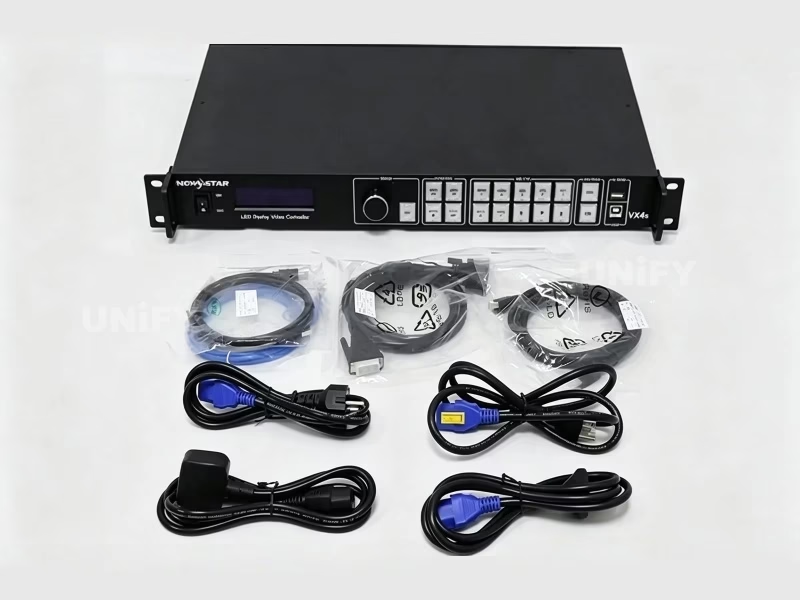
NovaStar VX600 All-in-One LED Controller product photo with packaging

ENHANCE YOUR ARSENAL — NovaStar All-in-One Video Controllers Official Lineup

VX600 Technical Specifications

Based on NovaStar official documentation V1.5.0.

Video Input

Connector Qty Max Resolution Notes
HDMI 1.3 2 1920×1200@60Hz HDCP 1.4 · Custom EDID (max 3840×2784) · HDMI 1 loop through
DVI 1 1920×1200@60Hz HDCP 1.4 · Custom EDID · Loop through
3G-SDI 1 1920×1080@60Hz ST-424/ST-292/ST-259 · Loop through · Deinterlacing
OPT 1 (Fiber) 1 1×4K×1K@60Hz or 2×2K×1K@60Hz Self-adaptive input/output · LC connector

Output & Control

Connector Qty Details
Ethernet 6 Gigabit · 3.9M px total · 659,722 per port (8-bit@60Hz) · Max 10,240×8,192
HDMI 1.3 1 Monitor/video output · Resolution adjustable
OPT 1 / OPT 2 2 Single-mode 10km / Multi-mode 300m · Hot backup
ETHERNET / USB 1+2 Control PC · Type-B cascade input · Type-A cascade output
GENLOCK IN-LOOP 1 External sync signal · Frame-accurate multi-unit sync
LIGHT SENSOR 1 Auto brightness based on ambient light · Night mode supported

Physical

Dimensions 483.6 × 351.2 × 50.1 mm (1U)
Net Weight 4.0 kg
Power Consumption 28 W (AC 100–240V 50/60Hz, 1.5A)
Operating Temp -10°C to 45°C
Certifications CE · CB · UL · FCC · IC · RCM · UKCA · KC · EAC

Processing

Engine SuperView III
Layers 3 (Main + PIP 1 + PIP 2) · Adjustable opacity
Scaling Stepless output scaling · One-click full screen
Latency As low as 1 frame (Bypass + low latency + sync)
Presets 10 user-defined · One-button recall

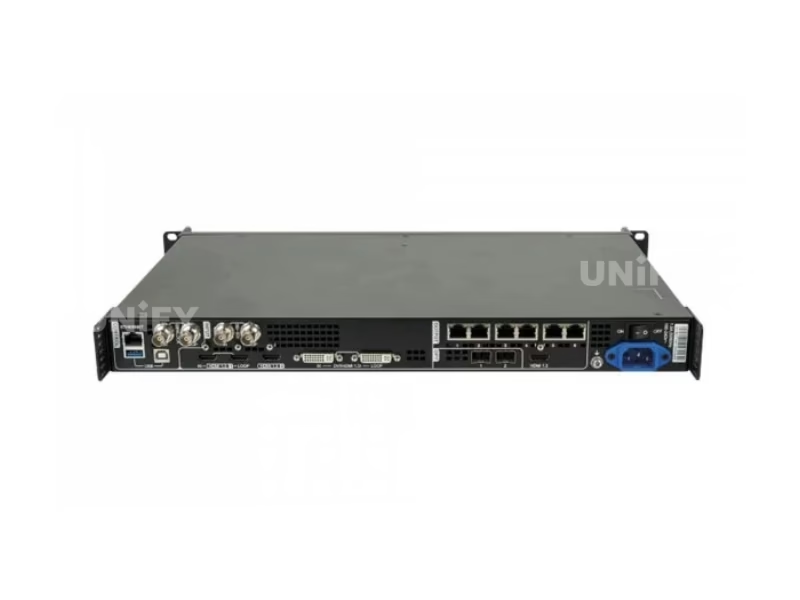
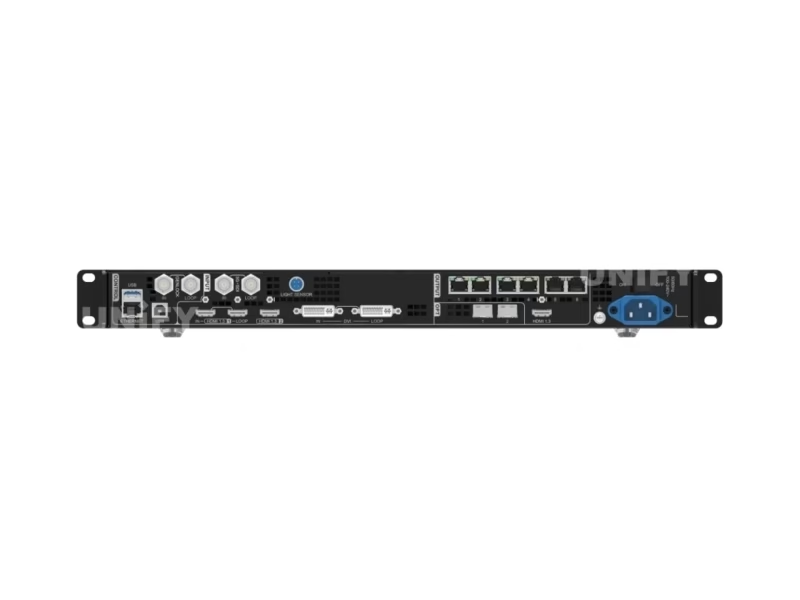
NovaStar VX600 rear panel — input/output connector layout with labels

Core Features of the VX600

Each evaluated from an integrator and production environment perspective.

🎯

3.9M Pixels Across 6 Ports

Six Gigabit Ethernet ports each deliver 659,722 pixels at 8-bit 60Hz — 3.9M total. Maximum output: 10,240 px wide, 8,192 px tall. At 120Hz refresh, per-port capacity halves to 329,861 pixels. The 10/12-bit path drops to 329,861 per port. Use our refresh rate guide for capacity planning.

🔄

Three Working Modes

No other controller in this price range offers three operational modes. Video Controller for full processing. Bypass for pixel-to-pixel with 1-frame latency. Fiber Converter for 10km single-mode signal distribution. Switch from the front panel in seconds — no reboot, no firmware change needed.

3 Layers + SuperView III

Main layer + PIP 1 + PIP 2, each with independent size, position, priority, opacity, and input crop. SuperView III processing provides stepless scaling — no quantization artifacts when mapping non-native resolutions. One-click full screen via dedicated SCALE front-panel button.

🛡️

Multi-Level Hot Backup

Three levels of redundancy. Device backup: a second VX600 takes over on primary failure. Ethernet port backup: automatic failover to a spare port. Input source backup: HDMI 1 and HDMI 2 form a hot backup pair with primary-preferred return. Seamless failover — zero-frame blackout at any level.

Low Latency — 1 Frame

In Bypass mode with low latency and synchronization enabled, and data running vertically on screen, the VX600 reduces input-to-receiving-card delay to just 1 frame (~16.7ms at 60Hz). Critical for live IMAG where every frame of latency is visible. Genlock ensures multi-unit frame-accurate output.

💡

Light Sensor + Auto Brightness

Connect a light sensor (via dedicated port) and the VX600 automatically adjusts screen brightness based on ambient conditions. Configure brightness mapping and night mode caps via NovaLCT. Prevents over-illumination at night while maintaining daylight visibility — extending LED lifespan and reducing power consumption.

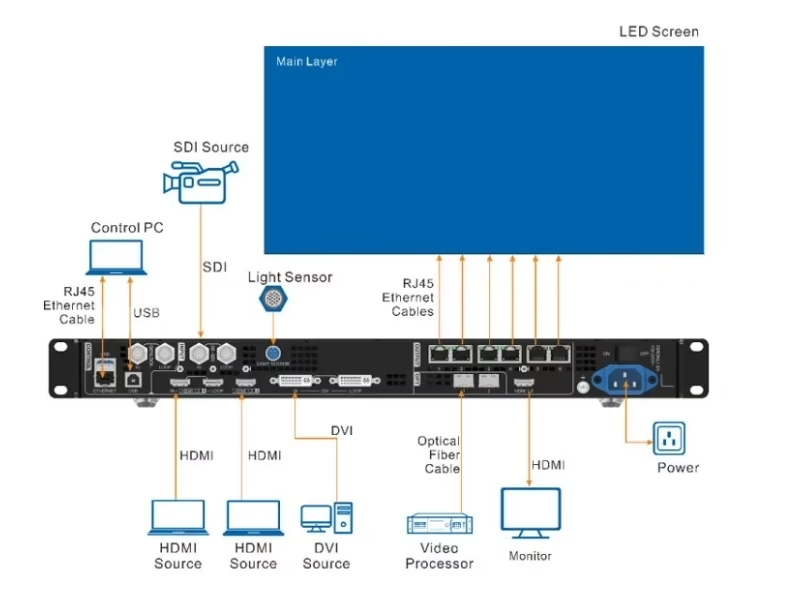
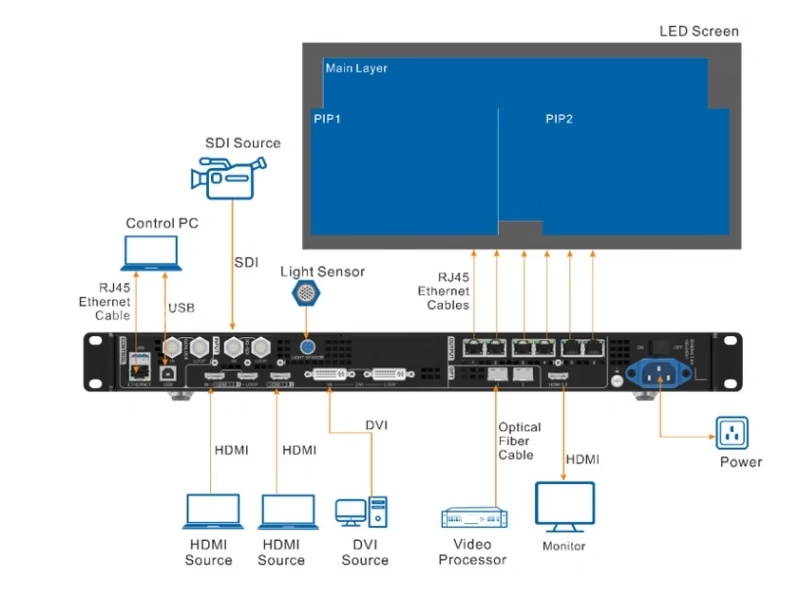
NovaStar VX600 signal workflow — input sources through SuperView III processing to 6 Ethernet outputs
NovaStar VX600 three working modes diagram — Video Controller, Bypass, Fiber Converter

Three Working Modes — VX600’s Defining Advantage

No other all-in-one controller at this price offers three distinct operational modes. Here’s what each one does and when to use it.

Video Controller Mode

Standard operating mode — full processing.

  • All 3 layers available (Main + PIP 1 + PIP 2)
  • Full menu access: layers, presets, input backup, sync, display control
  • SuperView III stepless scaling active
  • OPT 1 is self-adaptive — auto-detects connected device
  • HDMI output: fixed 1920×1080@60Hz monitoring
  • Best for: Stage shows, conferences, multi-source events

Bypass Mode

Pixel-to-pixel — zero processing overhead.

  • Only Main layer available (PIP 1 & 2 disabled)
  • No video processing — input signal passes through as-is
  • Latency: as low as 1 frame with low latency + sync enabled
  • Low latency & Genlock cannot be enabled simultaneously in this mode
  • Best for: IMAG, broadcast where latency is critical
🔗

Fiber Converter Mode

Long-distance signal receiver & distributor.

  • Both OPT 1 and OPT 2 used as inputs
  • All 6 Ethernet ports output data from OPT 1
  • OPT 2 as backup — seamless failover if OPT 1 loses signal
  • Single-mode fiber: up to 10km at 1310nm
  • Multi-mode fiber (OM3/OM4): up to 300m at 850nm
  • Only 3 menus accessible: Working Mode, Communication, Language
  • Best for: Stadiums, distributed displays, FOH-to-screen runs

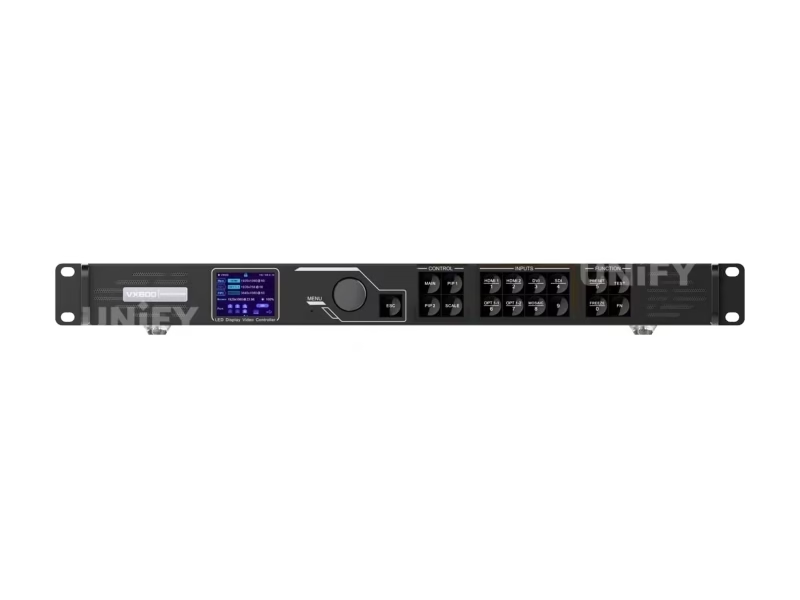
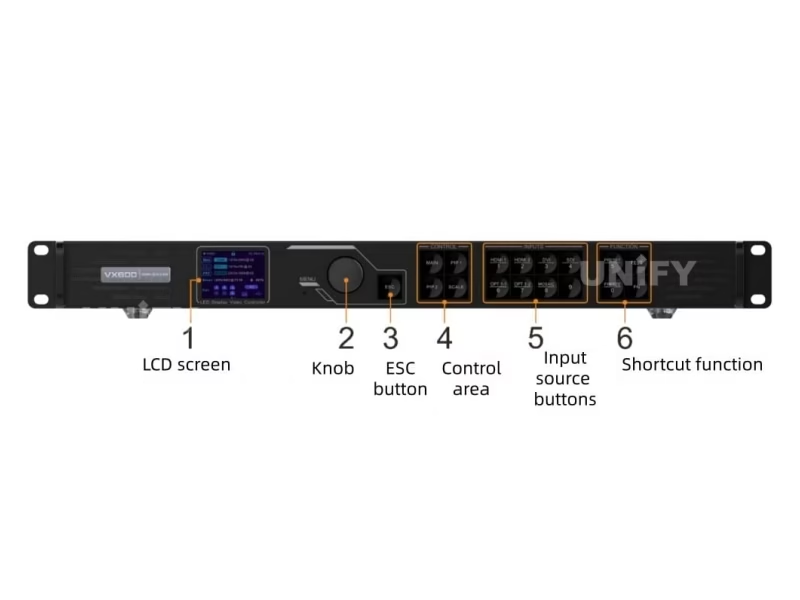
NovaStar VX600 front panel in rack-mount deployment

V-Can & NovaLCT Software Control

The VX600 supports the full NovaStar software ecosystem. Download NovaStar LED controller software for free.

V-Can (Windows/macOS)

  • 3-layer management: position, size, crop, opacity, priority
  • Preset save/load/copy/rename — 10 slots
  • Input source switching & backup configuration
  • Image mosaic for up to 4 cascaded VX600 units
  • Test pattern generator · Firmware update interface

NovaLCT (Windows)

  • Receiving card configuration & rcfgx management
  • Screen mapping & pixel pitch calibration
  • Light sensor auto-brightness curve configuration
  • Pixel-level brightness & chroma calibration via NovaCLB
  • Ethernet port backup configuration & testing

Basic Knowledge Of NovaStar Control System — NCE Training by NovaStar

VX600 Setup Guide

Key deployment steps. See LED screen installation guide for complete procedures.

1

Select Working Mode

From the front panel menu: Working Mode → choose Video Controller, Bypass, or Fiber Converter. This decision determines available features. For standard operation with full processing, select Video Controller.

2

Configure Screen & Input

In NovaLCT: set receiving card parameters, cabinet topology, and screen resolution. Set input source resolutions — custom EDID supported for HDMI/DVI up to 3840×2784. Enable EDID Compatibility mode for Mac sources if needed.

3

Layer & Preset Setup

Open V-Can. Configure 3 layers: Main + PIP 1 + PIP 2. Set input sources, dimensions (up to 10,240×8,192), positions, priorities, opacity, and input crop per layer. Save all configurations to 10 presets. Test one-button recall.

4

Backup & Production Check

Enable hot backup: device-level (second VX600), Ethernet port-level, and input source-level (HDMI 1↔2). Configure primary-preferred return. Verify all failover paths by simulating failures. Back up rcfgx files from every receiving card.

NovaLCT Basic Configuration — Official NCE Training by NovaStar

Where the VX600 Excels

Four scenarios where 3.9M pixels, 3 modes, and 28W efficiency prove decisive.

🎪

Stage & Live Events

10 presets per show segment. 3 independent layers for main content + PIP overlays. Hot backup on three levels ensures the screen stays live. For stage LED displays where continuity is non-negotiable.

🎬

Broadcast & IMAG

Bypass mode delivers 1-frame latency — critical for IMAG where camera-to-screen delay must stay minimal. 3G-SDI input with deinterlacing for studio cameras. Genlock for multi-camera frame-accurate switching.

🏟️

Stadiums & Large Venues

Fiber Converter mode distributes signal up to 10km from control room to screen. Auto-brightness via light sensor adjusts for day/night conditions. Cascade up to 4 VX600 units for ultra-wide scoreboards and perimeter displays.

🚚

Rental & Touring

4kg, 1U, 28W — fits any rack, draws minimal power on generator circuits. Three modes adapt to each venue’s needs without hardware changes. For rental LED display fleets: configure once, recall presets per venue.

Multiple NovaStar VX600 units deployed in professional rack configuration

VX600 vs. NovaStar VX Series

Feature VX600 VX400 VX1000 VX16s
Max Pixels 3,900,000 2,600,000 6,500,000 10,400,000
Ethernet Ports 6 4 10 16
Working Modes 3 1 1 1
Layers 3 2 3 3
Power 28W 25W 70W 70W
Price $999–$1,444 $700–$900 $1,500–$2,500 $2,700–$3,800

VX600 highlighted. The only VX-series controller with 3 working modes. Contact UnifyLED for factory-direct pricing.

Why Source Your VX600 from UnifyLED?

As a direct LED screen manufacturer and NovaStar partner.

💰

Factory-Direct Pricing

15–30% below distributor pricing ($999–$1,444 retail).

🔍

Pre-Shipment Testing

Every VX600 tested with a live LED screen. Our quality control process catches issues before they leave our LED display factory.

🔗

Integrated Ecosystem

LED cabinets + VX600 + receiving cards — pre-configured. Compatible with COB LED display systems.

🌍

Global Logistics

80+ countries. CE/CB/UL/FCC documentation included. Ships with all cables and accessories.

Frequently Asked Questions

Q: How many pixels can one VX600 drive?

3,900,000 pixels across 6 Gigabit Ethernet ports at 8-bit 60Hz. Per port: 659,722 pixels. Maximum dimensions: 10,240 px wide × 8,192 px tall. At 120Hz: per-port capacity halves to 329,861. Cascade up to 4 units for larger screens.

Q: What are the three working modes and when to use each?

Video Controller: full processing with all 3 layers — standard mode. Bypass: pixel-to-pixel pass-through with 1-frame latency — IMAG and broadcast. Fiber Converter: long-distance signal receiver/distributor up to 10km — stadiums and distributed displays. Switch from the front panel.

Q: How does hot backup work on the VX600?

Three levels: device-to-device (second VX600 takes over), Ethernet port-to-port (automatic failover), and input source-to-source (HDMI 1↔2 hot backup pair with primary-preferred return). All levels provide seamless failover with zero-frame blackout.

Q: What is the lowest latency achievable?

1 frame (~16.7ms at 60Hz) from input to receiving card. Requires: Bypass mode + low latency enabled + synchronization enabled + data running vertically on screen. Low latency and Genlock cannot be used simultaneously in Bypass mode.

Q: Can the VX600 automatically adjust screen brightness?

Yes. Connect a light sensor to the dedicated LIGHT SENSOR port. Configure brightness mapping curves and night mode caps via NovaLCT. The VX600 adjusts screen brightness in real-time based on ambient light conditions.

Q: What’s the difference between VX600 and VX600 Pro?

The VX600 Pro is the newer generation replacement with enhanced processing capabilities. The original VX600 remains in production and is the more cost-effective option for projects that don’t require the Pro’s additional features. Both are available from UnifyLED.

Q: What certifications does VX600 carry?

CE, CB, UL, CMIM, EAC, FCC, IC, RCM, UKCA, and KC — covering Europe, North America, Australia, Russia, Morocco, South Korea, and the UK.

NovaStar VX600 — The Complete B2B Buyer’s Guide

Published July 2026 · UnifyLED Engineering Team · 13 min read

1. Why the VX600 Hits the Sweet Spot — 3.9M Pixels, 3 Modes, 28W

The NovaStar VX600 All-in-One LED Controller occupies a unique position in NovaStar’s lineup: it is the only VX-series controller with three distinct working modes. For B2B buyers, this means one hardware purchase covers three deployment scenarios — full video processing for stage LED displays, latency-critical Bypass mode for IMAG and broadcast, and Fiber Converter mode for long-distance signal distribution up to 10km. At 28W and 4kg, it is also the most power-efficient multi-mode controller in NovaStar’s catalog.

2. Working Mode 1 — Video Controller: Full Processing Power

Video Controller is the standard operating mode and the one you’ll use for 90% of deployments. In this mode, the VX600 functions as a complete all-in-one: video processor, sending card, and screen configurator. All 3 layers (Main + PIP 1 + PIP 2) are available with independent size, position, priority, opacity, and input crop controls. SuperView III processing provides stepless output scaling — unlike step-based scalers that produce visible artifacts at non-integer ratios, the VX600 smoothly maps any input resolution to any output size. The OPT 1 port is self-adaptive: connect a fiber converter and it becomes an output; connect a video processor and it becomes an input. HDMI output is fixed at 1920×1080@60Hz for monitoring — do not change this resolution manually as it will affect Ethernet port output.

3. Working Mode 2 — Bypass: When Every Millisecond Counts

Bypass mode turns the VX600 into a pure pixel-to-pixel pass-through device. No processing is applied — the input signal goes directly to the LED screen exactly as received. The trade-off: only the Main layer is available; PIP 1 and PIP 2 are disabled. The benefit: when low latency and synchronization are both enabled and data runs vertically on screen, end-to-end latency drops to as low as 1 frame (~16.7ms at 60Hz). This is the mode for IMAG (Image Magnification) where a camera captures a speaker on stage and displays them on screen — every frame of latency creates visible lip-sync drift. Important: low latency and Genlock cannot be used simultaneously in this mode. Choose based on your priority — minimum latency or frame-accurate multi-camera sync.

4. Working Mode 3 — Fiber Converter: 10km Signal Distribution

In Fiber Converter mode, the VX600 acts as a dedicated optical receiver and Ethernet distributor. Both OPT 1 and OPT 2 become input-only. All 6 Ethernet ports output the data received from OPT 1. If OPT 2 carries different data, it serves as a hot backup — seamless failover if the OPT 1 signal is lost, with automatic return when OPT 1 recovers. Transmission specs: single-mode fiber (OS1/OS2) at 1310nm reaches 10km; multi-mode fiber (OM3/OM4) at 850nm reaches 300m. Only three menus are accessible in this mode: Working Mode, Communication Settings, and Language. This is the mode for stadiums, distributed campus displays, and any installation where the control room is hundreds of meters from the screen. For LED screen installation at scale, Fiber Converter mode eliminates the need for separate fiber-to-Ethernet media converters.

5. Multi-Level Hot Backup — Three Layers of Insurance

The VX600’s backup architecture is unusually comprehensive for its price. Level 1: device-to-device — a second VX600 configured identically takes over on primary failure. Level 2: Ethernet port-to-port — automatic failover within the 6-port group. Level 3: input source-to-source — HDMI 1 and HDMI 2 form a hot backup pair. With “primary source preferred” enabled, the system automatically returns to the primary source when it resumes. This is critical for broadcast and live events where a single point of failure cannot be permitted. Setup is managed through NovaLCT or V-Can, and backup status is displayed on the front-panel OLED.

6. Light Sensor & Auto Brightness — Set It and Forget It

The dedicated LIGHT SENSOR port on the rear panel connects to an ambient light sensor. Through NovaLCT, you configure a brightness mapping curve: at 0 lux (night) → set screen to 20% brightness; at 50,000 lux (direct sunlight) → set to 100%. Night mode adds a time-based cap — prevent the screen from exceeding a maximum brightness during specified hours regardless of sensor readings. This feature extends LED display lifespan by reducing unnecessary brightness during dark hours and cuts power consumption by an average of 40-60% during nighttime operation.

7. Pixel-Level Calibration & SuperView III

Working with NovaCLB software, the VX600 supports per-pixel brightness and chroma calibration. The calibration pipeline: measure each LED pixel at multiple brightness levels with a supported colorimeter, compute per-pixel correction coefficients targeting D65/6500K, upload to receiving card memory for hardware-level correction. SuperView III processing then applies stepless scaling on top of the calibrated image — the result is uniform color and brightness across the entire screen regardless of individual LED variance. For fine-pitch LED displays, this calibration capability is the difference between a visibly uniform image and one with perceptible color patches.

8. Total Cost of Ownership — VX600 at 5 Years

Separate Components: Video processor ($500-$800) + sending card ($200-$400) + light sensor controller ($100-$200) + media converter for fiber ($150-$300) = $950-$1,700, plus the complexity of 4 separate devices.

VX600: Single device at $999-$1,444. 5-year electricity at 28W × 8h/day × $0.12/kWh ≈ $49. The integrated approach eliminates inter-device cabling and provides a single point of configuration. With 10 global certifications, the VX600 meets compliance requirements for most markets without additional testing or documentation.

9. Sourcing Strategy — Factory Direct vs. Distributor

B2B buyers choose between regional distributors (local stock, $999-$1,444) and factory-direct from a LED screen manufacturer that is also a NovaStar partner (15-30% lower, pre-shipment configuration with live LED screen testing, integrated ecosystem support). Key evaluation questions: Does the supplier test each VX600 with a real LED screen before shipping? Can they provide the complete system pre-configured? Our quality control process documentation details our testing — we encourage direct comparison.

10. Conclusion — Is the VX600 Right for Your Project?

The NovaStar VX600 All-in-One LED Controller is the most operationally flexible controller in NovaStar’s VX family — the only one with three working modes. For B2B buyers deploying 3-4MP LED screens who need the adaptability to switch between full processing, ultra-low latency, and fiber distribution from a single hardware platform, the VX600 delivers capability that no other controller at its price point matches. When evaluating, look beyond pixel counts: ask about working modes, backup architecture, and per-port capacity at your target refresh rate. At UnifyLED, we answer these questions with specific, verifiable data from each unit’s pre-shipment test report.

Ready to Deploy the VX600?

Factory-direct pricing, pre-shipment testing with live LED screen, integrated technical support. Send your specifications — we respond within 24 hours.

Get Factory Quote

Explore the Complete NovaStar Controller Range

From Taurus multimedia players to VX all-in-one controllers and MCTRL sending boxes.

Download VX600 Resources

Official NovaStar VX600 specifications, user manuals, and quick start guide.


Contact Us!

Order LED Screen? Please feel free to contact us at any time, and we will respond to you within 24 hours.