
VDWALL 615 Family · SDI + DisplayPort In · 3840-Wide Custom Output · WiFi + App Control
VDWALL LVP615S LED Video Processor
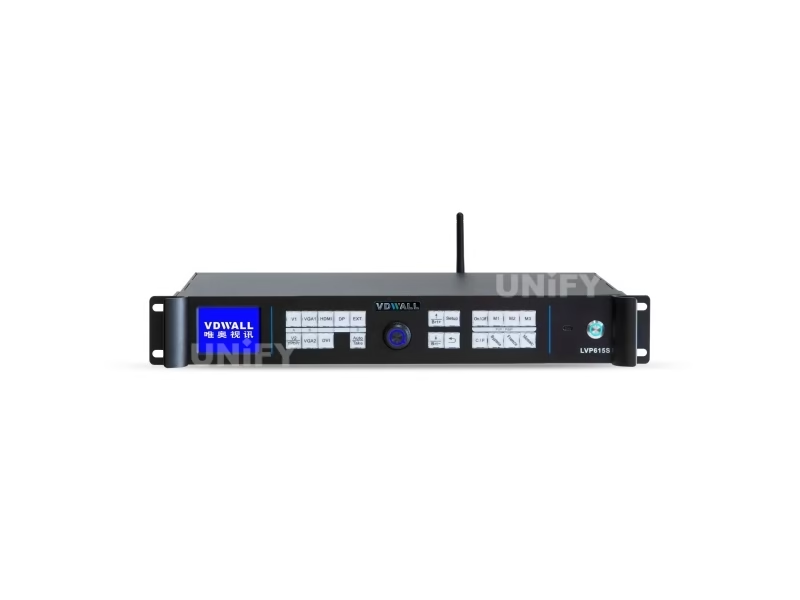
The VDWALL LVP615S LED Video Processor is the SDI-equipped member of VDWALL’s 615 generation — a broadcast-minded successor to the LVP605 that adds DisplayPort input, Pre.+Take switching, WiFi and app control, and a custom output canvas up to 3840 pixels wide or 1920 tall.
Short answer
The VDWALL LVP615S is an 8-input LED video processor with built-in SDI/HD-SDI/3G-SDI and DisplayPort, a custom output that reaches 3840 pixels wide or 1920 tall (about 2.65 million pixels at 60 Hz), and five ways to control it — front panel, infrared remote, RS232, USB, LAN and WiFi with a phone app. It switches sources broadcast-style with Pre.+Take or one-key cut/fade/blend, runs frame-synced mosaic with unlimited DVI-loop cascading, and takes two internal sending cards. Choose it over the LVP605 when your rack needs SDI, DP, remote control or a wider-than-2304 canvas.
What Is the VDWALL LVP615S LED Video Processor?
The VDWALL LVP615S is a hardware LED video processor from Shenzhen VDWALL Co., Ltd. that scales any of its eight video inputs onto the exact pixel grid of an LED screen and hands the result to up to two internal LED sending cards. VDWALL documents it across three official files — an 85-page user manual (V1.2, April 2019), a quick use guide (V1.0, May 2017) and a product overview (V1.1, June 2018) — and the overview names the image engine openly: 10+ bit Faroudja DCDI Cinema Processing with Real Color and TrueLife enhancement, a claim the S-model paperwork carries as a factory specification.
Generation-wise, the 615 family sits above the ten-channel LVP605 LED video processor we reviewed separately. Where the 605 stacked analog inputs, the 615S trims to eight and modernizes: DisplayPort 1.1 appears on a VDWALL processor for the first time in this class, SDI moves from an optional module to the built-in extension port, and the control surface grows from panel-plus-RS232 to five independent paths, including a WiFi module your phone can join.
The output story changes too. Instead of a fixed preset ladder, the 615S accepts a custom format up to 3840 pixels horizontal or 1920 vertical — and per VDWALL’s Amazon listing, a wall that misses the pixel budget at 60 Hz can trade frame rate for resolution below 60 Hz. The practical ceiling lands near 2.65 million pixels per unit.
Which Inputs and Outputs Does the LVP615S LED Video Processor Support?
All rows below come from the official user manual V1.2; where a reseller table disagrees, the manual figure stands and the conflict is noted.
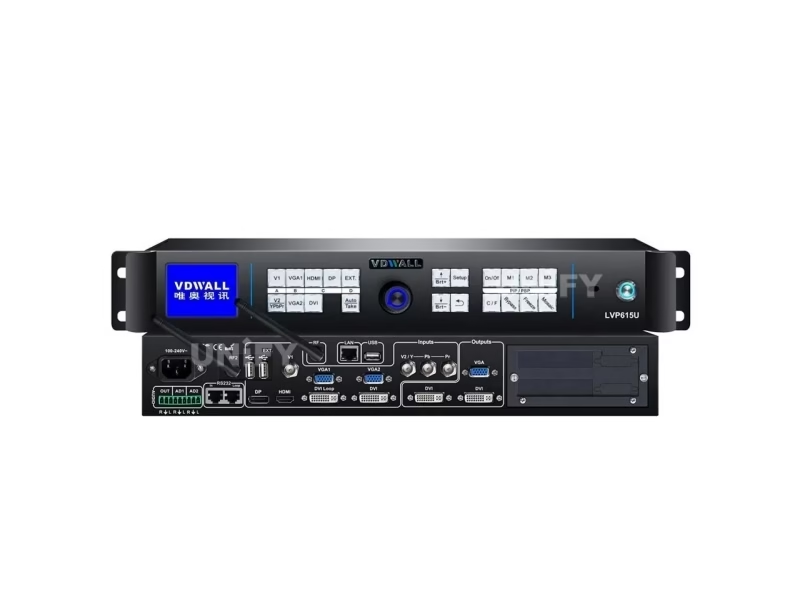
Inputs — Eight Channels, Two of Them New for the Class
| Port | Signal | Format ceiling |
|---|---|---|
| V1 | Composite video (BNC) | PAL/NTSC |
| V2 / YPbPr | Shared port — composite OR analog component, set in menu 2.5 | YPbPr ≤1920×1080p @60 |
| VGA1 / VGA2 | 2× PC analog (15-pin D-Sub) | ≤2048×1152 @60 |
| DVI | PC digital (24+1 DVI-D) | ≤2304×1152 @60 |
| HDMI | HD digital, HDCP 1.3 (type A) | PC ≤1920×1080 @60 · CEA-861 ≤1080p60 |
| DP | DisplayPort 1.1 digital | ≤1920×1080 @60 |
| EXT. (SDI) | SDI/HD-SDI/3G-SDI (BNC, 75 Ω) + SDI loop out | 480i, 576i, 720p, 1080i, 1080p (SMPTE 259M-C/292M/274M/296M/424M/425M) |
The shared V2/YPbPr port is the one detail that trips new owners: there is one physical connector and one button for both signals, and the processor decides which one it is listening to based on menu item 2.5. If a component camera feeds nothing, check that menu before suspecting the cable.
Outputs, Audio and the Chassis
| Block | Specification |
|---|---|
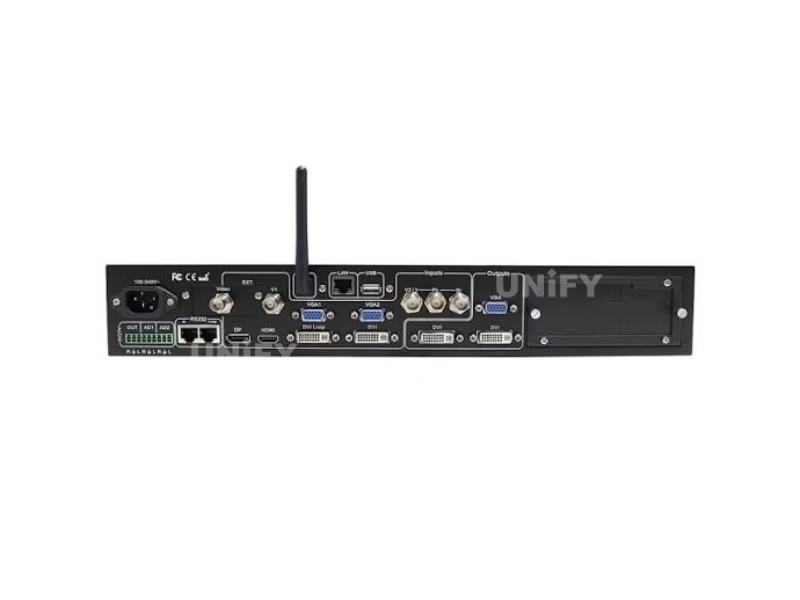
| Video outputs | 1× VGA OUT (local monitor, recommended during setup), 2× DVI OUT with identical content (OUT1 = 24+5 DVI-I, OUT2 = 24+1 DVI-D) for two sending cards or sending boxes, 1× DVI Loop OUT |
| Output formats | 16 presets (1024×768 through 2304×1152 and 2560×816, plus 1536×1536, 1080×1920 portrait, 1200×1600) + custom format (width ≤3840 or height ≤1920) |
| Audio | 5 stereo channels switched in sync with video — 3 embedded (HDMI/DP) + external AD1/AD2, each mapped to any input in menu 5; AD1/AD2 cannot share one input |
| Control ports | RS232 IN + RS232 LOOP (RJ45 daisy-chain), USB, LAN (TCP/IP), WiFi antenna connector (RF), infrared remote receiver and transmitter windows |
| Sending cards | 2 internal slots on a slide-out tray (cards optional, 4×RJ45-port types supported); tray ships with the baffle and +5 V power cable |
| Power / environment | 100–240 VAC 50/60 Hz, ≤25 W; 0–45 °C, 15–85% humidity — a wider temperature window than the LVP605’s 5–40 °C |
| Mechanical | 483 × 274 × 66.6 mm (19-inch rack width); net 4.2 kg, gross 5.7 kg; package 520×350×130 mm |
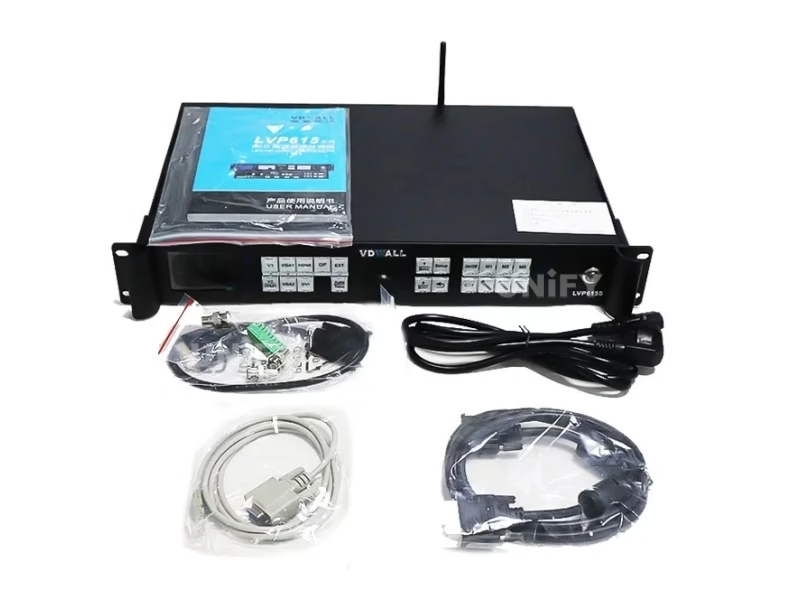
| In the box | Power cord (1.5 m), DVI cables (1.5 m and 0.5 m), USB cable (1.5 m), audio connector, 3× BNC-RCA adapters, sending-card baffle + power cable, user manual, CD |
How Far Can the LVP615S Stretch Its Custom Output Resolution?
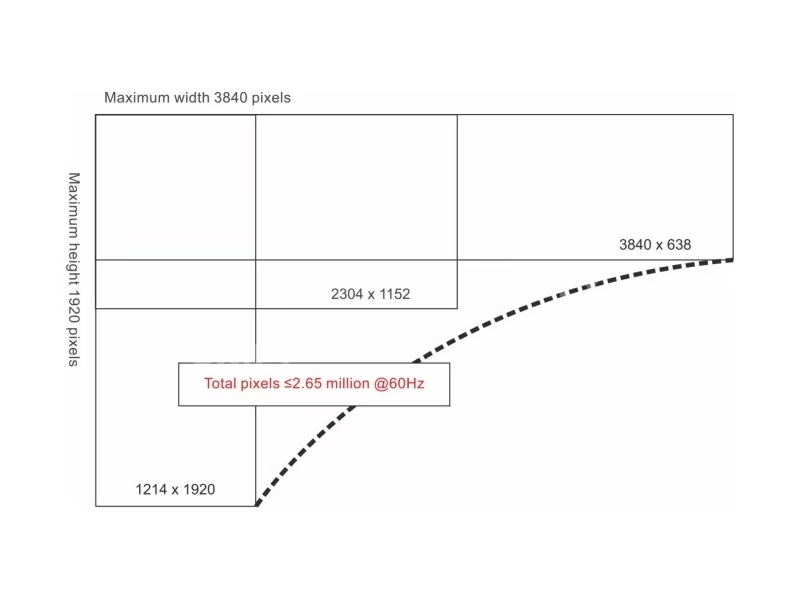
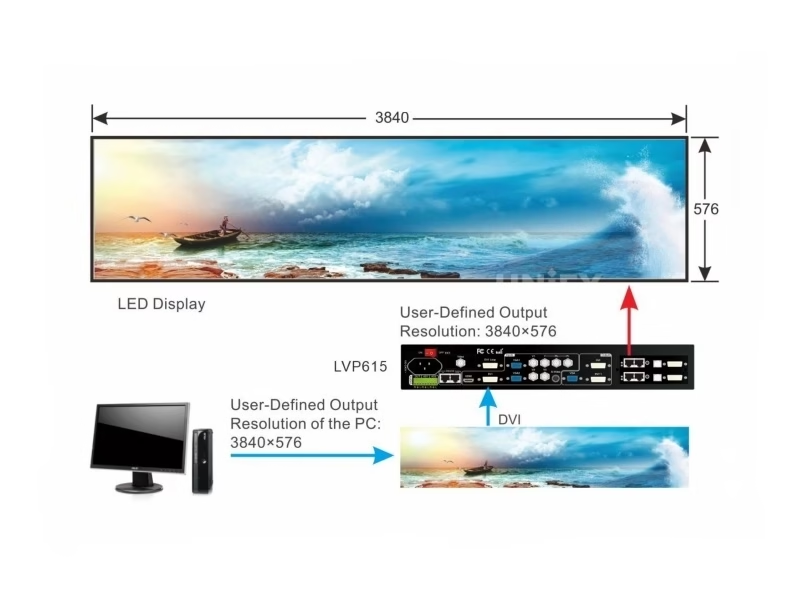
The 16 preset formats cover every standard from 1024×768 to 2304×1152. The interesting setting is the custom format: VDWALL caps it at 3840 horizontal or 1920 vertical pixels, which is the headroom ultra-wide stage backdrops and tall totem screens need before a second processor enters the conversation.
The pixel budget governs both directions at once. VDWALL’s Amazon listing states the operating envelope plainly: up to 3840 or 1920 pixels at a 60 Hz frame rate, with the option to set a higher output by dropping the frame rate below 60 Hz, and a maximum output of about 2.65 million pixels. Read that against real walls and the 615S covers more single-unit ground than its 605-series predecessor: a 3072×768 ribbon (2.36 million pixels) fits on one box, as does a 2560×960 canvas, while a 3840×1080 wall needs the two-unit cascade described in the mosaic section.
Pixel-perfect work needs the input side to agree. The 615S carries a custom DVI EDID — 16 fixed EDID entries plus a fully custom width/height/field-frequency entry — so the source PC sees the wall’s true geometry and sends it unscaled. Pair menu 2.1 (EDID) with menu 1.1 (custom resolution), apply, and the chain runs 1:1 with no driver-side scaling fight.
Turn any wall plan into exact pixel numbers first with our LED screen calculator, then check the result against the 2.65-million-pixel budget.
LVP615 vs LVP615S vs LVP615U: Which Model of the 615 Family Fits Your Rack?
The 615 generation splits into four variants that share the chassis and the processing engine. The letter is a promise about the extension port:
| Model | EXT. port carries | What that buys you |
|---|---|---|
| LVP615 | 1× composite video | The base processor; everything else about the generation is intact |
| LVP615S (this page) | SDI/HD-SDI/3G-SDI in + SDI loop out | Broadcast cameras and long BNC runs; loop-out feeds downstream gear |
| LVP615U | 2× USB + WiFi module | A media player in the rack: USB playback of MKV, TS, AVI, RMVB, MPEG, MPG, VOB and MOV files, picture and PPT playback, laser-pen page flip, phone/PC screen casting over WiFi, even Android apps on the unit (ledscreenparts description) |
| LVP615D | Digital extension (DVI/HDMI class) | A third digital source channel; listed by resellers alongside the other three |
3 key differences that decide the letter:
- Where your extra source lives. SDI rack → S. A USB stick or phone that must play directly on the wall → U. A spare digital input → D. Analog camera → base 615.
- The S is the only broadcast-safe variant. SDI loop output exists solely on the 615S, because only it processes an SDI input to loop.
- The U changes what the processor is. It stops being only a scaler-switcher and becomes the playback source too — the other three still need something feeding them.
How Does Pre.+Take Switching Change the LVP615S Operator Workflow?
This is the feature that separates the 615 generation from the 605 on show day. The LVP615S offers two switching modes, set in menu 2.6:
One-key switching is the default: press an input key, the switch happens. Fast, and exactly what small venues need.
Pre.+Take switching is the broadcast habit: the operator preselects the next source (the LCD shows current and preselected inputs side by side, with the preselect indicator blinking fast for a valid signal and slow for a dead one), confirms the shot is ready, and only then presses Take to execute the transition. Nothing moves on the wall until the operator commits — which is how churches avoid cutting to a laptop mid-update and how studios rehearse a transition before the audience sees it. VDWALL allows Pre.+Take only for seamless switching.
The rule that makes both modes predictable is the four-group seamless matrix. Inputs are grouped A (V1, V2), B (VGA1, VGA2), C (DVI, HDMI, DP) and D (EXT/SDI). Seamless switching, fade and blend work between groups, never inside one — preselect V2 while V1 is live and Take will not give you a seamless cut, because they share group A. YPbPr stands outside the matrix entirely: any switch to it shows a black flash by design. Building a source list around the groups — one playback machine in C, one camera in D, one laptop in B — is what makes every transition clean.
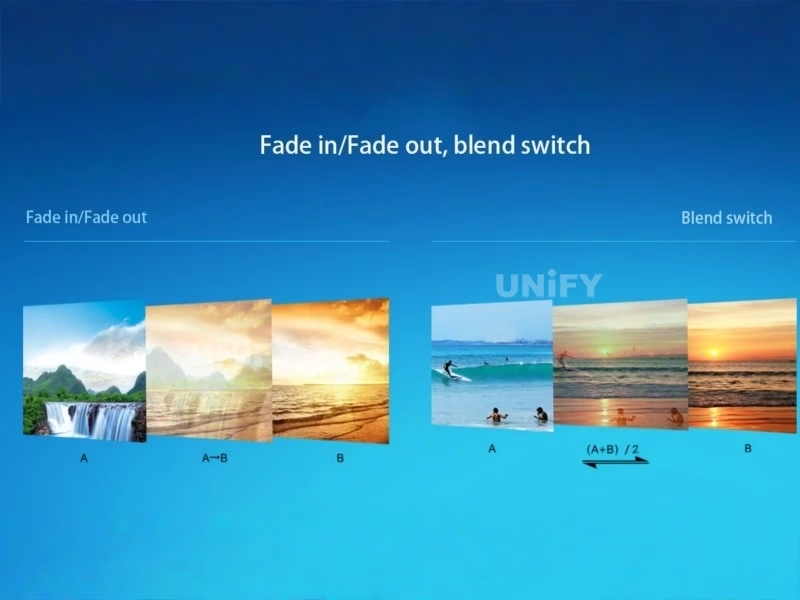
Transition timing stays under the C/F key: 0 s cut, 0.5 s, 1 s or 1.5 s fade, and blend for cross-dissolves. During a blend, only source switching is allowed — press C/F to exit before touching other settings.
What PIP, Text and Picture Tools Does the LVP615S Run Live?
🖼️ Three savable PIP/PBP layouts
The dual-picture engine takes its PIP signal from any other group or even the live input itself, sized and placed by eight parameters (D.1–D.8 in the menu). Three complete layouts store under M1–M3 for one-key recall. The AIAO (any in any out) phrasing in VDWALL’s overview describes the same crop-and-place freedom.
✍️ Text overlay with RGB keying
Menu 3 turns any second input into a text or logo layer over the live picture — build the caption in PowerPoint, feed it in, and key it with per-channel RGB thresholds (0–248) in lower-than or higher-than mode.
🎨 Per-channel color and brightness tools
Menu 4 adjusts color per input channel (V1, V2, HDMI, DVI, DP, EXT each get their own value), plus sharpness and a 32-level brightness scale. Menu 8.2 Bias (0–100, default 50) recovers dark-scene detail that low-gray-scale noise reduction would otherwise swallow. One boundary from the manual: color adjustment is invalid for RGB-format inputs, which includes VGA.
🧯 Hot spare and freeze
Three hot-spare pairs — V1/V2, VGA1/VGA2, HDMI/DVI — cut to the backup automatically when a live input dies. Freeze holds the frame while a source reboots. Both are one-key panel functions an operator can reach mid-show.
🧪 Test patterns and commissioning
Menu 1.6 generates 36 test patterns straight to the wall for mapping and color checks before any source is trusted. A valid input must be connected for patterns to output — a quirk worth knowing when a “dead” pattern output is really just an unplanned empty input.
⚙️ Two fault-fixing switches
8.4 De-Interlace removes the tremble when interlaced material (1080i) runs as a PIP window. 8.6 DVI Hotplug solves the stranger one: a few PCs misbehave when the processor’s hot-plug signal interrupts extended-desktop video playback — turning it off restores order. Both are menu toggles, no firmware involved.
How Does the LVP615S Cascade Into Unlimited Mosaic Walls?
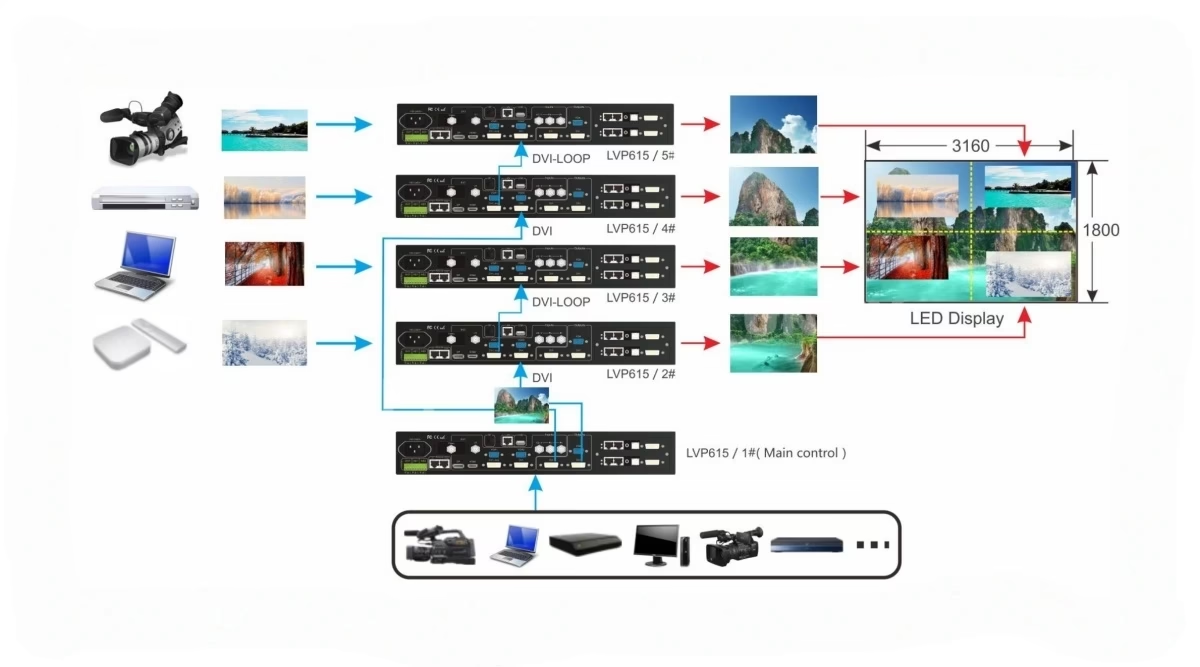
Above the single-unit budget, the 615S tiles the canvas. Multiple units run in frame-synchronized mosaic — VDWALL’s overview documents the intent as “unlimited cascade” through the DVI loop, with the frame-sync technology eliminating misalignment and delay between adjacent outputs. The manual’s worked example is the same geometry its predecessor used: a 3456×1920 wall split into four 1728×960 quadrants, a master unit distributing to two workers that loop onward to two more, each worker cropping its own rectangle and firing in Sync Mosaic mode.
What the 615S adds is configuration comfort and reach. The mosaic menu carries 16 entries — E.1–E.8 for automatic splicing (enter the wall’s total size and this unit’s tile position, press auto-calculate) and E.9–E.16 for fine adjustment if the seams need nudging. The Fast Mosaic screen in the Windows software computes every unit’s parameters from the tile layout and pushes them over the serial chain. And where the previous generation warned against long DVI-loop chains, this one states the loop is compatible with MacBook sources and unlimited in cascade — the practical ceiling becomes your signal engineering, not the manual’s caution.
Two discipline points survive the generation change: every worker must stay on DVI input with mosaic enabled (no source switching mid-mosaic), and picture settings — brightness, per-channel color, sharpness, bias — must match across all units, including the brightness level scale, which a device reset does not change.
For the unit-by-unit parameter table behind a 2×2 build, see the mosaic walkthrough on our LVP605 review — the geometry is shared across the family. Redundancy planning pairs well with our multi-sending-card backup and cascade guide.
How Do You Control the LVP615S: Panel, IR, RS232, USB, LAN or WiFi App?
Five control paths ship enabled, and they serve different rooms:
🎛️ Panel and infrared remote
The front panel and the bundled IR remote carry identical keys — including Take and the PIP mode keys — so a volunteer can run a show from across the room. VDWALL’s overview also lists the on-unit menu in five languages (Chinese, English, Spanish, Russian, Korean), while the manual’s language menu shows Chinese/English; treat the five-language claim as model-batch dependent.
💻 RS232, USB and LAN workstations
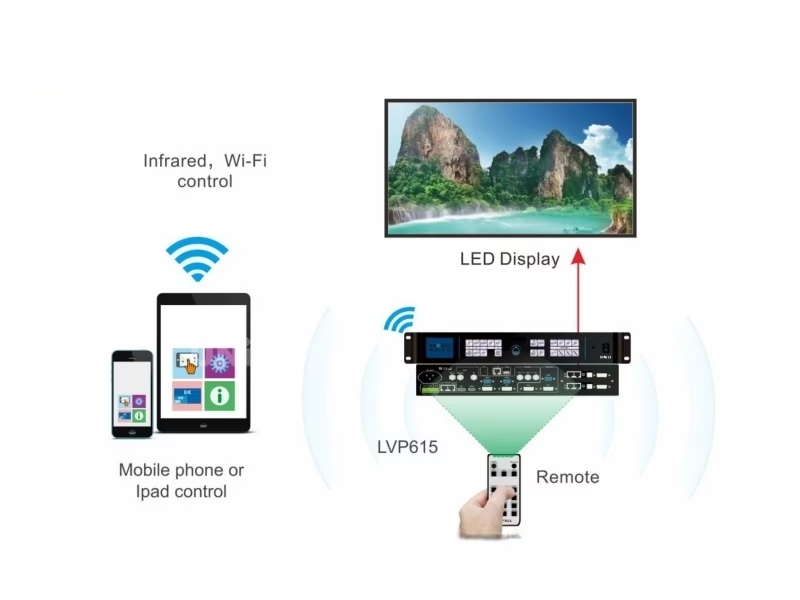
The Windows software connects over serial, USB, or the built-in network module (LAN defaults: IP 192.168.1.8, port 7). RS232 LOOP daisy-chains units so one PC drives a whole rack, and the network path turns any workstation on the LAN into a control seat. The software covers switching, PIP, text, timers (day/week/month/one-shot plans with auto-start on boot) and can set the output resolution itself — a job the previous generation’s software refused.
📱 WiFi app: the new default seat
A built-in WiFi module supports both modes: AP (the processor broadcasts its own network, SSID LVP615S, default password 88888888, gateway 192.168.7.1) and STA (it joins your router as a LAN workstation). The iOS/Android LVP615S app mirrors the panel — operation, settings and mosaic configuration — with Fast Mosaic’s auto-calculation included. VDWALL’s config tool (LVP615S Wi-Fi Config Tool.exe) renames the network, sets STA credentials and hardens the admin login; the manual’s serial-port note says keep the baud at 9600.
Connection trouble has a known sequence: confirm the antenna is installed (the manual’s own notice), try the AP hotspot first, and if the module misbehaves run menu 8.7 Wi-Fi Reset and reboot. That ordering fixes the large majority of “the app cannot find the processor” cases.
How Do You Set Up the LVP615S With a Sending Card and LED Screen?
The quick use guide sequences the install in ten steps; the five that decide the outcome:
1 — Seat the sending cards. Unscrew the baffle, pull the slide-out tray, fix the card, connect its +5 V lead, push the tray home. Two slots exist because one full-size canvas takes two cards.
2 — Wire the chain. Sources to inputs, DVI OUT to the sending cards, RJ45 from the cards to the wall’s first receiving card, VGA OUT to a local monitor for setup.
3 — Match the canvas. Menu 1.1 picks the preset or custom resolution (custom = width, height, V-frequency, then Apply — the unit restarts itself), then 1.2/1.3 trim Out Width/Height to the wall’s true pixel size.
4 — Align the PC. Set the graphics output to the same resolution in copy or extend mode so the desktop maps 1:1; the LCD reports what the PC is actually sending.
5 — Verify and tune. Bypass toggles part/full display for PC sources (part display is invalid when the input is smaller than the wall), a test pattern confirms edge-to-edge mapping, and 8.1 ADC calibration fixes analog color cast if needed.
The receiving-card side of the chain is system-specific — our sending card configuration guide and the sending card troubleshooting guide cover the pairing and detection steps brand by brand.
What Problems Do Real LVP615S Users Hit — and How Do You Fix Them?
Drawn from church-media group threads, reseller Q&A and the manual’s own fault menus:
📶 The app cannot find the processor
Run the checklist in order: antenna installed (the manual’s own notice), AP hotspot “LVP615S” visible with default password 88888888, WiFi reset via menu 8.7, reboot, then rejoin. For STA mode, prefer a manual IP over DHCP — the config tool’s own advice — so the address never drifts between services.
⛪ “Do I need multiple processors for a 3072×768 wall?”
A real question from a church-media group. The math: 3072 × 768 = 2.36 million pixels, under the 615S’s ~2.65-million-pixel envelope and within the 3840-wide custom format — so one unit drives it. The same question behind PowerPoint-on-the-wall workflows: feed the presentation PC over HDMI or DP (both live in seamless group C) and the wall becomes a second monitor, no extra hardware.
🔀 Take pressed — nothing switched
In Pre.+Take mode the preselect only executes cleanly across groups. V1 live + V2 preselected are both group A, so the seamless Take has nothing to hand over. Re-plan the source list so consecutive sources sit in different groups (A→C→D is a clean rotation), and leave YPbPr out of any transition path — it never participates in seamless switching.
🧩 One tile of a mosaic shines brighter
Brightness level (0–64 vs 0–100) is stored per unit and survives a device reset — menu 8.5, not a firmware issue. Set it identically on every unit along with per-channel color, sharpness and bias, then re-run the test pattern across the full wall to confirm the seams disappear.
Where Is the VDWALL LVP615S LED Video Processor Used?
The S model’s SDI input and five-seat control surface map onto rooms where the signal chain and the operator both matter:
⛪ Churches and auditoriums
The Facebook church-media threads asking about 3072×768 walls and full-screen PowerPoint describe this exact fit: presentation PC on HDMI or DP, lyric camera on SDI, lyrics keyed with text overlay, show run from the app at the sound desk. Our church LED screen guide covers the room design around it.
🎪 Rental stages and events
Ultra-wide backdrops inside the 3840-wide custom canvas, camera in group D, playback in group C, Pre.+Take for rehearsed transitions. The wider temperature window (0–45 °C) suits outdoor-night load-ins better than the previous generation’s 5–40 °C. See our stage LED backdrop and event LED screen guides.
📺 Studios and control rooms
SDI in with SDI loop out feeds downstream monitors; LAN control makes any gallery workstation a seat; timer plans handle unattended hours. Wall planning for control-room environments follows our control room LED display overview.
How Much Does the VDWALL LVP615S LED Video Processor Cost?
VDWALL prices through distribution, so published street listings are the honest band:
Range across LVP615 / LVP615S / LVP615S WiFi / LVP615U variants, in stock; listing updated 2025-11-07.
LVP615S with SDI port listed with 30-day returns — the retail benchmark against B2B quotes.
VDWALL LVP909 at $843 and Novastar VX4S at $1,499, same retailer — the band the 615S undercuts.
Volume orders move the number, and the sending cards belong in the same budget. Send the wall size and source list — the quote comes back as one chain.
LVP615S vs LVP605 vs Novastar and Colorlight: Is the Upgrade Worth It?
Three comparisons decide most purchases: against VDWALL’s own previous generation, against the 615U sibling, and against the all-in-one controllers from other brands.
| Dimension | VDWALL LVP615S (this page) | VDWALL LVP605 |
|---|---|---|
| Input strategy | 8 channels, SDI built in, DisplayPort 1.1 added | 10 channels, analog-heavy; SDI only on the 605S variant module |
| Custom output | Width ≤3840 or height ≤1920; ~2.65M pixels @60 Hz; lower frame rate buys more | Width ≤3840 / height ≤1920 under a bandwidth formula; presets to 2304×1152 |
| Switching workflow | One-key and Pre.+Take across a four-group seamless matrix | Cut / fade / blend only |
| Control | Panel, IR remote, RS232, USB, LAN, WiFi AP/STA + iOS/Android app | Panel + RS232 + Windows software |
| Cascade | DVI loop unlimited, MacBook-compatible; auto-splice menu + Fast Mosaic | Frame-sync mosaic with a loop-length caution |
| Power / temp | ≤25 W, 0–45 °C | ≤20 W, 5–40 °C |
3 key differences that justify the move to the 615S:
- SDI and DP stop being modules. They are on the board, with loop-out — one chassis instead of a module purchase.
- The operator seat moves off the rack. IR remote and the WiFi app mean the person switching is not the person cabled to the processor.
- Ultra-wide walls land on one box. The 3840-wide custom format plus a friendlier pixel budget absorbs canvases that pushed the 605 into cascade.
One rung higher, the LVP909 LED video processor trades the app seat for four bindable outputs, a built-in preview monitor and multi-window composition — the step when a show outgrows two outputs.
A rung below, the LVP100 economy processor (now discontinued in favor of the LVP100U) covers the smallest four-source rooms at the family’s floor price.
Against other brands, the 615S competes in the same 2K-class all-in-one bracket our Novastar controller, Colorlight controller, Huidu controller and Mooncell controller hubs map: its street band ($519–659) undercuts the Novastar VX4S ($1,499) while carrying SDI the VX4U class does not standardize. If your wall outgrows 2.65 million pixels per unit, the 4K multi-window tier begins — compare architectures in our video processor vs video splicer and switcher vs processor explainers, and our sync vs async control guide for where processors sit in the system stack.
VDWALL LVP615S LED Video Processor: Frequently Asked Questions
What is the VDWALL LVP615S LED video processor?
An 8-input LED video processor with built-in SDI/HD-SDI/3G-SDI and DisplayPort 1.1, a custom output up to 3840 pixels wide or 1920 tall (~2.65 million pixels at 60 Hz), five control paths including WiFi and a phone app, and two internal sending-card slots. It is the broadcast-leaning member of VDWALL’s 615 generation.
How big an LED screen can one LVP615S drive?
Roughly 2.65 million pixels per unit at 60 Hz — for example 3072×768, 2560×960 or 2304×1152. The custom format reaches 3840 wide or 1920 tall, and VDWALL notes a higher output can be set by dropping the frame rate below 60 Hz. Larger walls cascade several units in frame-synced mosaic.
Do I need multiple processors for a 3072×768 video wall?
No — 3072 × 768 is about 2.36 million pixels, inside the single-unit envelope and within the 3840-wide custom format. One LVP615S with one or two sending cards drives that wall directly.
What is the LVP615S WiFi password and how do I connect the app?
The processor’s own hotspot broadcasts as “LVP615S” with default password 88888888 (gateway 192.168.7.1). Install the LVP615S app on iOS or Android, join that network, and connect. For router mode (STA), configure credentials with the Wi-Fi Config Tool and prefer a manual IP. If the module misbehaves, run menu 8.7 Wi-Fi Reset and reboot — and confirm the antenna is installed first.
Why did my Pre.+Take switch not execute cleanly?
Seamless switching works between the four input groups — A (V1, V2), B (VGA1, VGA2), C (DVI, HDMI, DP), D (EXT/SDI) — never within one group, and YPbPr never participates at all. Preselect a source from a different group and Take will cut cleanly; plan consecutive sources across groups A→C→D.
Why does my component camera show nothing on V2/YPbPr?
The two signals share one physical port and one button. Menu item 2.5 (“V2 or YPbPr”) decides what the port listens to — default is V2 composite. Switch it to YPbPr and the component feed appears.
Which sending cards fit the LVP615S?
Two internal slots on a slide-out tray; cards are optional and 4×RJ45-port sending cards are supported. Match the card to your wall’s receiving-card family — identify the receivers first on second-hand walls, then buy the matching sender.
Does the LVP615S switch audio with the video?
Yes — five stereo channels follow the selected video: three embedded (HDMI/DP) plus external AD1 and AD2, each mapped to any input in menu 5 and switched in sync with the picture. AD1 and AD2 cannot bind to the same input, and if an HDMI/DP input has an external source mapped, the external audio takes priority.
LVP615S or LVP615U — which 615 variant should I buy?
Decide by the extension port: SDI chain → 615S (with loop-out, the only broadcast-safe variant); USB media playback, PPT and screen casting → 615U; spare digital input → 615D; plain analog → base 615. The processing engine is shared across all four.
How is the LVP615S different from the LVP605?
The 615S adds SDI and DisplayPort as standard, Pre.+Take switching across the four-group matrix, WiFi/IR/USB/LAN control with a phone app, a friendlier custom-output envelope with 2.65M-pixel class performance, MacBook-compatible unlimited DVI-loop cascade, and software-side output resolution changes. The LVP605 keeps ten inputs and a lower price — our LVP605 review details when that is enough.
How much does the VDWALL LVP615S cost?
Published listings run $519–659 across the 615 family variants (ledscreenparts.com, updated November 2025), with Amazon retailing the LVP615S SDI unit directly. For reference, the same retailer lists the VDWALL LVP909 at $843 and the Novastar VX4S at $1,499.
What documents ship with the unit?
The box includes the 1.5 m power cord, two DVI cables, a USB cable, the sending-card baffle and power cable, an audio connector, three BNC-RCA adapters, the printed manual and a CD. All three official documents — user manual V1.2, quick use guide V1.0 and product overview V1.1 — are downloadable at the foot of this page.
Quote the Full LVP615S Chain — Processor, Cards, Cabling
Send the wall’s pixel grid and source list; we return a matched package from a LED screen manufacturer that ships worldwide.
📞 / WhatsApp: +86-191-18802497 · Shenzhen, China · GMT+8
VDWALL LVP615S LED Video Processor: The Complete Buying Guide (2026)
Chapter 1 — The 2.65-Million-Pixel Budget: Planning Walls the 615S Drives Alone
Budget arithmetic beats brochure arithmetic. The 615S’s operating envelope — 3840 horizontal or 1920 vertical, about 2.65 million pixels at 60 Hz — covers a family of walls that surprises buyers who assume “2K processor” means 1920 columns: a 3072×768 wayfinding ribbon, a 2560×960 stage backdrop, a 2304×1152 conference wall all sit inside one chassis. The frame-rate lever extends the envelope for static content: VDWALL’s own listing notes a higher output can be set by trading frame rate below 60 Hz, which suits schedule boards and signage walls where nothing moves fast but the canvas is wide. When the wall’s math clears the budget with margin, the buying question shifts from “which processor” to “which sending cards” — and when it fails, the cascade architecture in Chapter 4 takes over instead of a bigger scaler.
Chapter 2 — Eight Inputs, Chosen on Purpose: The 615S Source Philosophy
The 615S carries fewer inputs than its ten-channel predecessor, and that is a design statement rather than a cut. The eight that remain are the eight a modern rack actually connects: two analog (V1 composite plus the shared V2/YPbPr port), two VGA for legacy PCs, and four digital paths — DVI, HDMI, DP and SDI. The shared port is the only trap, and menu 2.5 resolves it in seconds once you know it exists. The practical planning exercise is to list every source that will ever plug in, mark the two that must cut cleanly between each other, and place them in different groups of the A/B/C/D matrix — playback in C, camera in D, backup laptop in B. Do that on paper before the rack is wired and the 615S behaves like a much larger switcher; skip it and the group rules in Chapter 3 will feel like a limitation instead of a system.
Chapter 3 — Pre.+Take: Why Broadcast Habits Belong on a Church Wall
One-key switching fails in a specific, predictable way: the operator presses the wrong key and the wrong source is now live, on a wall everyone is watching. Pre.+Take converts that single accident into two deliberate steps — preselect, verify, commit — and the LCD’s split display (current input and preselect status side by side, with the preselect indicator blinking fast for valid and slow for dead signals) turns verification into a glance. The four-group seamless matrix is what makes the commit trustworthy: a Take across groups A→C is a frame-accurate cut, a Take inside group A is not seamless at all, and YPbPr sits outside the system entirely with a designed black flash. Rooms that adopted this workflow — the church-media threads about PowerPoint walls describe the pattern — report the same result: transitions stop being events the audience notices.
Chapter 4 — Unlimited Cascade: Tiling Walls Past 2.65 Million Pixels
Frame-synced mosaic across units is shared technology in this family, but the 615S generation removes the two old friction points. First, the DVI loop is documented as unlimited in cascade and MacBook-compatible — the topology can grow with the wall instead of hitting a loop-length warning. Second, configuration moved from arithmetic to menus: enter the wall’s total size and each unit’s tile position (E.1–E.6), toggle Sync Mosaic (E.7), press auto-calculate (E.8), and fine-trim with E.9–E.16 only if a seam demands it. The Fast Mosaic screen in the software does the same across a whole rack at once. The discipline that survives from the previous generation is behavioral, not technical: workers stay on DVI input, picture settings match across every unit including the brightness-level scale, and the master unit is the only one that ever switches sources. A two-unit 3840×1080 build configured this way behaves as one screen from the audience’s side of the room.
Chapter 5 — Five Control Paths on the LVP615S: Matching the Seat to the Room
Control is where the 615S most visibly leaves the previous generation behind, and each path serves a different seat. The panel remains the commissioning surface — setup menus, calibration, test patterns. The IR remote hands a volunteer the show keys from across the room. RS232 with LOOP chaining remains the rack-builder’s backbone, now joined by USB for laptops without serial ports. LAN turns every workstation on the network into a control seat at IP 192.168.1.8. And WiFi — AP hotspot for ad-hoc shows, STA station mode for installed venues — puts the full panel, including Fast Mosaic, on a phone through the iOS/Android app. The security note matters for permanent installs: the hotspot’s factory password (88888888) and the module’s admin/admin login are both in the documentation, and the config tool exists precisely to change them. Rooms that change the defaults on install day never appear in the “app cannot find the processor” threads.
Chapter 6 — The LVP615U Variant: When the Processor Becomes the Player
The LVP615U answers a question the other variants cannot: what plays the content when there is no PC? Its extension port carries two USB inputs and the WiFi module, which turns the chassis into a media player — USB playback across MKV, TS, AVI, RMVB, MPEG, MPG, VOB and MOV containers, picture and PPT playback, laser-pen page flip for presenters, phone and PC screen casting, and per the reseller documentation even Android applications running on the unit. For a signage wall or a small venue that wants zero external computers, the U collapses processor and player into one rack unit. For any show with a live camera or an SDI chain, the S remains the correct letter — playback convenience does not substitute for a broadcast input, and the two models exist because those are different jobs.
Chapter 7 — Migrating From the LVP605: What Carries Over and What Changes
Crews moving from the 605 keep most of their muscle memory: the menu-and-knob grammar, the cut/fade/blend timings, the two-slot sending-card architecture, the frame-sync mosaic concept and the Bypass/Freeze keys all carry over. What changes is the perimeter. SDI and DP are on the board, so the module question disappears. The source list gets audited against the A/B/C/D groups instead of ten flat inputs. The operator may no longer sit at the rack at all — IR remote and the app move the seat into the audience or the gallery. Custom canvases get planned against the pixel budget rather than a bandwidth formula, with the frame-rate lever as a new option. And the software gains a job it refused before: setting the output resolution remotely, which turns re-rigging a wall for a different show format into a two-minute task instead of a menu session at the box.
Chapter 8 — Price, Documents and the Buying Checklist
Sourced pricing brackets the 615 family at $519–659 across variants (ledscreenparts.com, updated November 2025), with Amazon retailing the LVP615S directly — a band that undercuts the Novastar VX4S ($1,499) and the VDWALL LVP909 ($843) at the same retailer. Before ordering, run the checklist: the wall’s pixel math against the 2.65-million-pixel envelope (and the frame-rate lever if it is close); the source inventory placed into the A/B/C/D seamless groups; the letter chosen — S for SDI, U for USB playback, D for digital extension; sending cards for the receiving-card family actually in the wall, two of them for a full-size canvas; the control seat decided — panel, remote, workstation or phone — with the WiFi defaults changed on install day; and the cascade question, because a wall that will grow next year should reserve the rack units now. All three official documents (user manual V1.2, quick guide V1.0, overview V1.1) download below, and the quote request returns the complete chain: processor, cards, cabling.
Which LED Video Processors Should You Explore Next?
VDWALL Video Processor Family
Novastar LED Controllers
Colorlight, Huidu, Mooncell and RGBlink Processors
Colorlight X16 · Huidu VP620 · Mooncell M40 · RGBlink switchers
Where Can You Download LVP615S Resources?
📕 LVP615S User Manual V1.2 (85 pages)
⚡ LVP615 Series Quick Use Guide V1.0 (7 pages)
🏭 Overview of LVP615S V1.1 (5 pages)
VDWALL LED Video Processor: Hub, Family & Guides
Family: VDWALL LED video processor hub (full catalog) · LVP100/100U · LVP605 · LVP615S · LVP909
Guides: How to Choose · VDWALL vs Novastar · Family Comparison · Church Setup · 2026 Price Guide · Troubleshooting
System: LED video processor overview · sending card configuration · multi-card backup · screen calculator