
How to Choose a NovaStar Receiving Card: 12 Models Compared (2026)
How to choose a NovaStar receiving card comes down to four questions: how many pixels the card must load, which connector the LED modules use, whether the site needs backup redundancy, and what image quality the project demands. The receiving card is the last device in the control chain — it sits inside each cabinet, receives Ethernet data from the sending controller, and drives the LED modules row by row. This guide compares all 12 receiving cards Unify LED stocks, with loading figures taken from the official NovaStar specification sheets, so you can match a card to your cabinet design instead of guessing. As an LED screen manufacturer, Unify LED pre-programs each card with your module configuration before shipping.
What Does a NovaStar Receiving Card Do, and Why Does the Choice Matter?
In the signal chain covered in our MCTRL300 vs MCTRL660 and MCTRL vs VX vs TB comparisons, the receiving card is the piece that turns network data back into pixels. It receives the Ethernet stream from the sending controller, buffers the rows and columns assigned to it, and drives each module through its output connectors. Picking the wrong card produces real failures: a card that loads fewer pixels than its cabinet needs shows a dead section of screen; a card whose connector does not match the module cannot be wired at all; and a screen without backup redundancy goes dark the moment one card fails.
Physically, the card mounts on a hub board inside the cabinet, between the power supply and the module ribbon cables. It carries two Ethernet ports — one in, one out — so cabinets daisy-chain into long strings from a single sending controller port. The card’s position in that string is what NovaLCT reads back during configuration, and it is why a card swap must be followed by a configuration read-back: the new card needs the same rows, columns, and data flow as the old one or the cabinet shows garbage.
How Do the 12 NovaStar Receiving Card Models Compare?
| Model | Max loading | Module connectors | RGB data groups | Backup features |
|---|---|---|---|---|
| A5s Plus | 512×384@60Hz (8-bit); 256×384 (10/12-bit); 384×384 (common IC) | High-density | 32 parallel / 64 serial (up to 128) | Dual card backup |
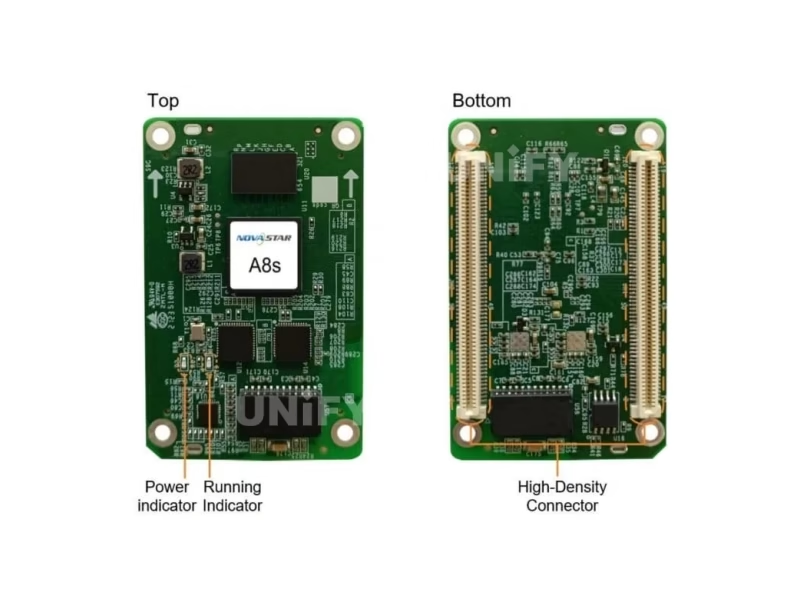
| A8s | 512×384 | High-density | 32 parallel / 64 serial (up to 128) | — |
| AT20 | 256×256 | High-density | 24 parallel / 64 serial | Dual configuration backup |
| AT30 | 512×256 | High-density | 32 parallel / 64 serial | Dual card backup |
| DH7508-S | 192×256 (PWM IC); 176×256 (common IC) | 8× HUB75E | 16 parallel | Loop backup + dual config + dual program |
| DH7512-S | 512×512 | 12× HUB75 | 24 parallel | Loop backup + dual config + dual program |
| DH7516-S | 512×384 (PWM IC); 384×384 (common IC) | 16× HUB75E | 32 parallel | Loop backup + dual config + dual program |
| MRV208-1 | 256×256 | 8× HUB75 | 16 parallel | Loop backup + dual config |
| MRV328 | 256×256@60Hz | 8× HUB75E | 16 parallel | Loop backup + dual program |
| MRV336 | 256×256@60Hz | 12× HUB75E | 24 parallel | Loop backup + status monitoring |
| MRV412 | 512×512@60Hz (PWM IC); 512×384 (common IC) | 12× HUB75E | 24 parallel | Loop backup + dual config + dual program |
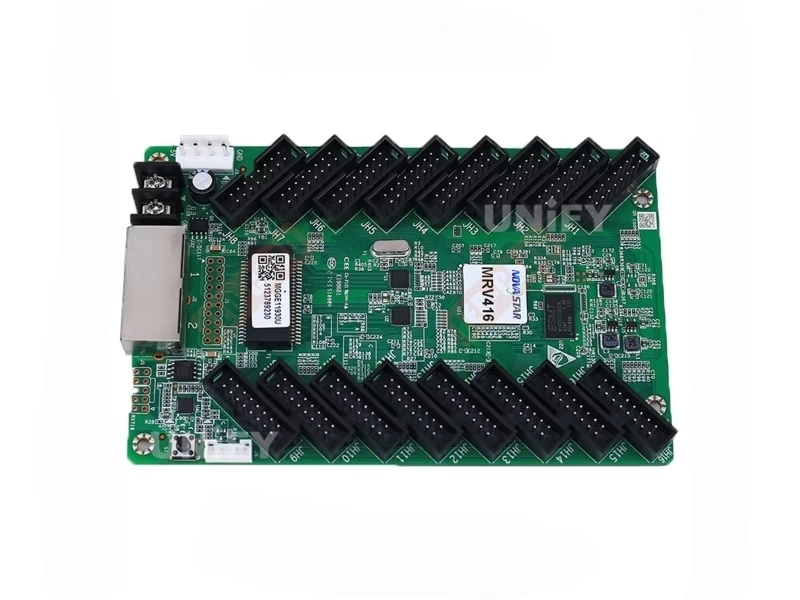
| MRV416 | 512×512@60Hz (PWM IC); 512×384 (common IC) | 16× HUB75E | 32 parallel | Loop backup + dual config + dual program |
Note the two loading figures on the DH and MRV cards: PWM driver ICs load more pixels than common driver ICs because the driver chip itself does part of the work. Check which IC your modules use before finalizing the count. One more column worth reading before ordering: the RGB data groups. A module built around a 16-group driver chain needs a card with at least 16 parallel groups — the DH7508-S and MRV208-1 stop at 16 groups, which is why they pair with entry modules, while the DH7516-S and MRV416 carry 32 groups for high-density module layouts.
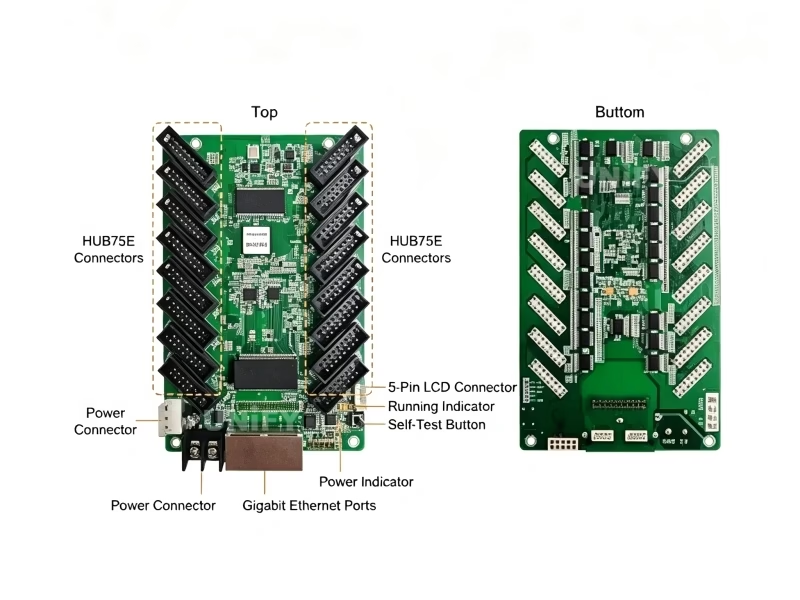
What Are the Four Series: Armor, DH, MRV, and AT?
Armor (A series). The A5s Plus loads 512×384@60Hz at 8-bit with 32 parallel RGB groups and supports dual card backup; the A8s adds 16-bit precise grayscale, 22bit+ grayscale boost (64×), and HDR support when paired with an HDR-capable controller. Both use high-density board-to-board connectors and sit in fine-pitch and high-end cabinets where a HUB75E pin header would not fit or would not carry enough signal quality.
DH series. The DH7508-S (8× HUB75E), DH7512-S (12× HUB75), and DH7516-S (16× HUB75E) are the standard-connector workhorses. All three carry loop backup, dual configuration backup, and dual program backup — the full protection stack at standard-connector prices.
MRV series. Five models — MRV208-1, MRV328, MRV336, MRV412, and MRV416 — span 256×256 to 512×512 with 8 to 16 HUB75E outputs. The MRV line adds real-time monitoring of temperature, voltage, and Ethernet communication, which is why control rooms standardize on it.
AT series. The AT20 (256×256) and AT30 (512×256) are the cost-effective pair: high-density connectors, EMC Class B compliance, and bit error rate monitoring at entry prices. They fit retail and small fixed installs where the protection stack of the DH series is more than the project needs.
How Many Pixels Does Each Card Load? A Working Calculation
The loading capacity in the table is the whole card’s ceiling — it is not a per-connector number, and it is not the number of cabinets you must wire. Two rules make the calculation simple:
Rule 1: divide, do not multiply. Card width ÷ cabinet width = cabinets across; card height ÷ cabinet height = cabinets down. A DH7516-S loads 512×384, so a P3.91 128×128 rental cabinet divides to 4 across and 3 down — 12 cabinets per card on paper. A P2.6 192×192 cabinet divides to 2 across and 2 down — 4 cabinets per DH7516-S.
Rule 2: modularity overrides capacity. Rental cabinets carry one card each regardless of the math, because a rental company rebuilds different wall shapes every week and a faulty cabinet must swap out in minutes. The capacity rule applies to fixed installs where cabinets are wired once and never moved — a 5 m × 3 m P2.6 wall is 60 cabinets of 192×192, and one card per 4 cabinets means 15 DH7516-S cards instead of 60.
Fine-pitch check. A P1.86 500×500 mm cabinet is 256×256 pixels. One A8s (512×384) drives 2 of those cabinets across and 1 down — 2 cabinets per card — which is why fine-pitch walls carry more cards per square meter than coarse-pitch walls of the same size. The pitch math itself is in our LED pixel pitch article.
What Connector Does Your Module Use? HUB75E vs HUB320 vs High-Density
The module interface decides the card family before any other parameter, because a card cannot drive a module its connector does not match.
HUB75E is the 16-pin standard used by the DH7508-S, DH7516-S, and the MRV line. It is the default on rental and mainstream fixed modules, and it carries power, data, clock, latch, and enable lines in one header. HUB320 is the 20-pin standard appearing on fine-pitch and common-cathode modules; cards built for HUB320 use compact high-density connectors rather than pin headers. In our lineup, the Armor A series and the AT pair use high-density connectors — the same board-to-board class — so the connector question is really: standard HUB75E modules pick a DH or MRV card, high-density or fine-pitch modules pick an A-series or AT card. If your module datasheet names HUB320, contact us with the module model and we confirm the card match before you order.
When Do You Need Dual-Backup Redundancy?
Every card in the table carries some backup function — dual configuration backup, dual program backup, or both. The levels that matter in practice are two:
Loop backup (DH and MRV series): the cabinets are wired in a ring, and if one Ethernet link fails, the data reaches every card from the other direction. This protects against cable damage, the most common failure on site.
Dual card backup (A5s Plus, AT30, and MRV configurations with a hub board): two cards sit on one hub board, and the backup card takes over the moment the primary fails. This is the level control rooms, airports, and 24/7 corporate lobbies pay for. The broader redundancy design is covered in our LED display redundancy article.
When a card does fail, field replacement takes minutes — the swap procedure is the same for every series:
How Do Receiving Card Parameters Affect Image Quality?
The card is where three image parameters get their final say. Grayscale depth — the A8s corrects 65,536 levels (16-bit) and boosts grayscale by 64 times, which removes banding in dark gradients; the A5s Plus and the MRV412/MRV416 boost by 4 times. Refresh rate — the card must match the driver IC’s refresh behavior, or camera flicker appears; the basics are in our LED display refresh rate and grayscale articles. Calibration data — the card stores the per-pixel brightness and chroma coefficients from NovaCLB; losing that file means re-calibrating the wall, which is why the backup and restore of hardware settings matters. Mapping functions on the A series and MRV208-1 also let the card re-route data to crooked or mirrored module layouts without re-cabling.
How Do You Install and Program a NovaStar Receiving Card?
Installation is mechanical: mount the card on the hub board, connect the module ribbon cables in order, connect power, and connect the Ethernet daisy chain to the next cabinet. Programming is software: open NovaLCT, detect the cards, push the correct .rcfgx configuration file for your module and driver IC, then read the parameters back to confirm. The read-back step catches half of all field mistakes before the screen is ever switched on:
First-time configuration of the sending side is covered in our how to configure an LED sending card guide, and detection problems in NovaLCT cannot detect sending card.
What Do Buyers Frequently Ask About NovaStar Receiving Cards?
Is 512×384 per connector or for the whole card? The whole card. The loading figure is the total canvas the card drives across all of its connectors combined.
Can I mix different card models in one screen? Yes — unlike mixing controllers, different receiving card models can share a screen as long as each card is loaded within its own capacity and carries the correct configuration file for its section.
Which card replaces the A5s Plus for an HDR wall? The A8s, paired with an HDR-capable controller such as the MCTRL4K. The A5s Plus is not an HDR card.
Does one card equal one cabinet? In rental, yes by convention. In fixed installs, no — one card can drive several cabinets when the total pixels stay within the card’s loading ceiling.
Do these cards work with MCTRL, VX, and TB controllers? Yes. All 12 cards are driven by every controller family — the sending side decides the content, the card only needs its own configuration.
What is the “-S” suffix on the DH models? The DH7508-S, DH7512-S, and DH7516-S are the current revisions NovaStar ships; specifications in the table are taken from their official spec sheets.
How do I check which card is already in my cabinet? Open NovaLCT, read the cabinet parameters, and check the receiving card model field — or read the silkscreen label on the card itself. The read-back also tells you the firmware version, which matters when a screen mixes old and new cabinets: firmware gaps between cards can cause color shifts between sections, and a quick read-back finds the outliers before they show on the wall.
Which NovaStar Receiving Card Should You Buy? Final Verdict
How to choose a NovaStar receiving card, in one pass: read the module’s connector first — HUB75E means DH7508-S, DH7512-S, DH7516-S, or the MRV line; high-density means A-series or AT. Then divide the card’s loading ceiling by the cabinet resolution to count cards per screen, add loop backup for any site where a cable fault must not kill the wall, and add dual card backup for 24/7 operation. Image quality is the last filter: the A8s for fine-pitch HDR work, the A5s Plus or MRV412/MRV416 for everything in between, the AT20 and AT30 where cost rules.
Send your module datasheet and cabinet count through the Unify LED contact page, and we will return the exact card model, count, and configuration file for the project.