
Novastar MRV336 LED Receiver Card
NovaStar’s 12-port legacy receiving card — now out of production. 256×256@60Hz loading (official V1.2.0 correction), 12 HUB75E connectors, up to 24 groups of parallel RGB data, up to 1/32 scan support, and the only EMC Class B card in the MRV family. Same-profile replacement: the DH7512-S.
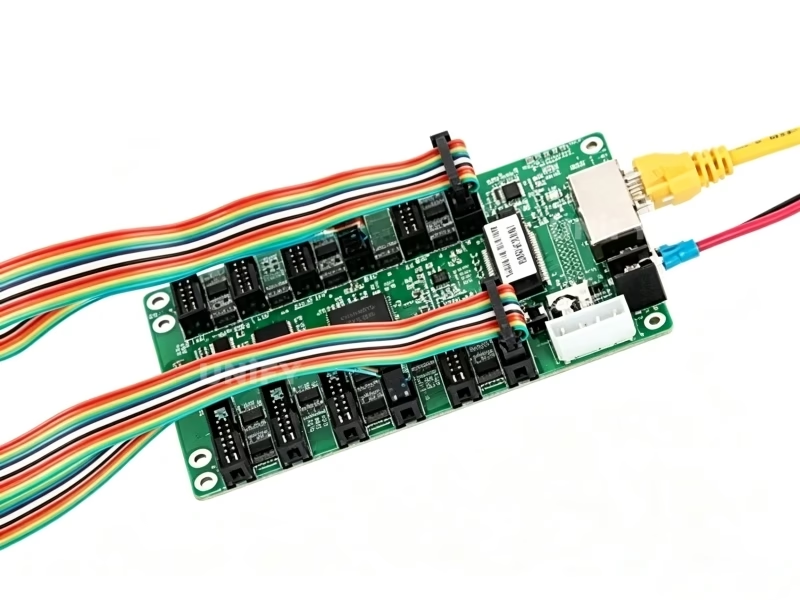
What Is the Novastar MRV336 LED Receiver Card?
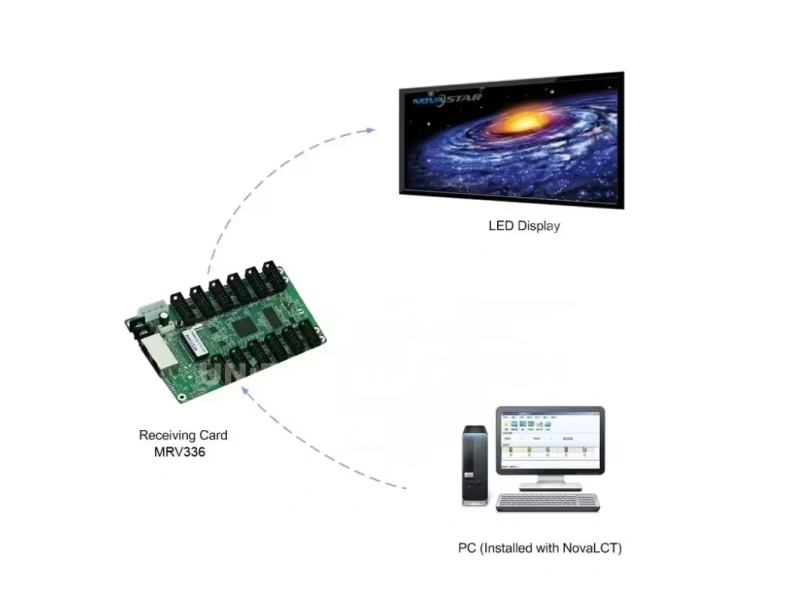
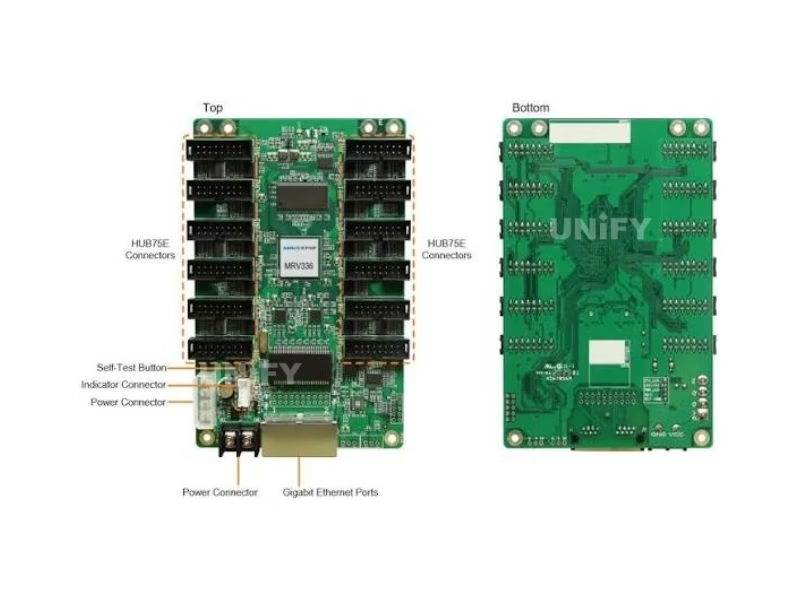
The Novastar MRV336 LED Receiver Card is a general receiving card from NovaStar’s M3 series that powered mid-size indoor and outdoor LED walls of the 2016–2022 era. A single card supports resolutions up to 256×256@60Hz and drives modules through 12 standard HUB75E connectors with up to 24 groups of parallel RGB data — the 12-port class of the MRV family. It supports up to 1/32 scan, pixel-level brightness and chroma calibration, pre-stored startup images, configuration parameter readback, and on-card monitoring of temperature, Ethernet cable communication status and power supply voltage. For the receiving card’s role in the control chain, see synchronous vs asynchronous LED control.
2024 official correction — 256×226 vs 256×256: The official NovaStar specification V1.2.0 (2024-05-28) corrected the MRV336’s maximum resolution from 256×226 to 256×256@60Hz. Many listings and third-party databases still publish the old 256×226 figure — if a quote or datasheet you received says 256×226, it predates the correction.
EMC Class B — the only one in the MRV family: Every other MRV and DH receiving card carries EMC Class A (industrial environment). The MRV336 is certified EMC Class B — the stricter residential-grade standard. For installations in shopping malls, airports, hotels and mixed-use buildings where consumer electronics share the electrical environment, Class B is the meaningful certification to have.
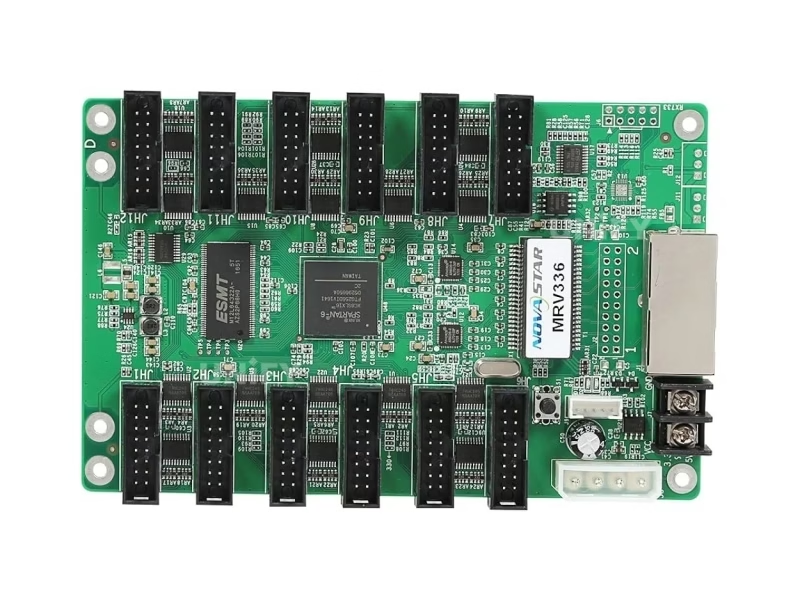
Novastar MRV336 LED Receiver Card Technical Specifications
All data from the official NovaStar MRV336 specification V1.2.0 (2024-05-28) — the final revision, including the corrected loading figure.
Loading & Connectivity
Electrical, Physical & Environment
At 2.5W rated power the card runs with passive cooling only. See LED display power consumption to size your system power budget.
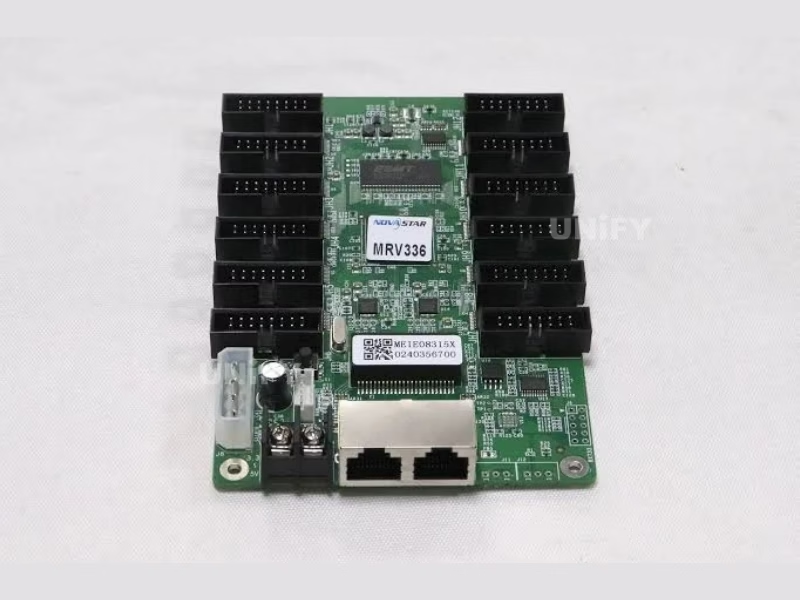
Key Features of the Novastar MRV336 LED Receiver Card
The official V1.2.0 feature list — we state it exactly as NovaStar documents it, without the series-generic claims other listings copy across models:
Up to 1/32 Scan Support
Drives high-scan modules up to 1/32 — the scan class of the era’s outdoor and economy indoor modules, via the module’s RCFG configuration file.
Pixel-Level Brightness & Chroma Calibration
Calibrates brightness and chroma per pixel with NovaStar’s high-precision calibration system, removing brightness and color differences across modules.
Pre-Stored Image Setting
A custom image can be set as the startup screen, or displayed when the Ethernet cable is disconnected or no video signal is present — the screen never goes black.
Configuration Parameter Readback
Configuration parameters read back and saved locally — copy a working card’s settings to a replacement without re-entering values by hand.
Temperature Monitoring
Card temperature monitored without extra peripherals — check readings in NovaLCT to catch cooling problems before failures.
Ethernet Cable Communication Status Monitoring
The card detects and reports Ethernet cable communication status — network faults surface in NovaLCT instead of as a mystery blackout.
Power Supply Voltage Monitoring
Input voltage monitored in real time — drifting power supplies are flagged before they damage cards or cause display flicker.
J9 Indicator Connector & Self-Test
Dedicated J9 connector for status/power LEDs and test key; the self-test button displays test patterns on the module when Ethernet is disconnected.
Honest note: the official V1.2.0 feature list does not include 3D output, the Mapping function, or a cabinet LCD — those appear on the current-generation DH7512-S and siblings. We flag this because listings that copy series-generic copy across models overstate what this card does.
Novastar MRV336 LED Receiver Card Discontinued: Replacement Matrix & Migration Guide
The MRV336 is out of production. The replacement decision runs on one number: the card’s interface profile — 12 HUB75E ports and 24 RGB data groups. The DH7512-S carries exactly the same profile, which makes it the natural same-profile successor:
Three replacement directions, one decision rule: (1) same-profile upgrade — the DH7512-S keeps the 12/24 wiring plan while adding 4× loading, 18bit+ grayscale, 3D, rotation and RGB gamma; (2) budget like-for-like — the MRV208-1 (8 ports/16 groups) loads the same 256×256 class at the lowest card cost where module counts allow; (3) loading upgrade — the DH7508-S doubles loading to 512×512. Every path requires the module supplier’s RCFG file for the destination card — MRV336 RCFGs do not load on current-generation cards.
NovaStar Official — Gear Up: Troubleshooting H Series – MVR Card Problem
How to Configure the Novastar MRV336 LED Receiver Card in NovaLCT (RCFG Guide)
Five steps to first light:
Wire the card
Connect the card to the module via HUB75E ribbon cables and to the sending controller via Gigabit Ethernet (either port works as input or output for cascading).
Install NovaLCT
Download NovaLCT software, connect your PC to the controller, and let NovaLCT detect the screen.
Load the correct RCFG file
Load the module’s RCFG/RCFGX configuration file from the module supplier — it defines driver IC type, scan mode and data routing. When migrating to a replacement card, obtain that card’s RCFG version; MRV336 files do not load on current-generation cards. See LED display configuration and system debugging.
Send configuration to the card
Push the configuration to all receiving cards. Controller side: how to configure an LED sending card.
Verify with the self-test button
Disconnect the Ethernet cable, press the self-test button twice — the card displays a test pattern. If NovaLCT cannot detect the card, see NovaLCT cannot detect sending card: troubleshooting guide.
NovaStar Official — NovaLCT Performance Settings and Receiving Card Configuration Files tutorial
Novastar MRV336 LED Receiver Card vs MRV328, MRV208-1 & DH7512-S Comparison
The 12-port class in context — where the MRV336 sits among its legacy sibling, its budget replacement and its same-profile successor. The MRV336 column is highlighted.
Reading the table: the MRV336’s 12-port profile is what makes the DH7512-S its natural successor — same wiring plan, four times the loading, current-generation features. Where budget rules, the MRV208-1 loads the same 256×256 class with 8 ports. And note the EMC row: the MRV336’s Class B is the strictest certification in the entire receiving card line.
How to Install & Replace the Novastar MRV336 LED Receiver Card
The card mounts onto the module or cabinet with GND-enabled mounting holes. Replacing a failed MRV336 takes under 5 minutes:
Read back the old card’s parameters
In NovaLCT, read back the configuration parameters of the card being replaced and save them locally. See backup and restore LED display hardware settings.
Power down and swap the card
Unplug power and the HUB75E cables, remove the screws, and mount the replacement. Both power connectors are equivalent.
Load the RCFG and configuration
Send the module’s RCFG file and the saved configuration to the replacement card. If the replacement is a DH7512-S or MRV208-1, use that card’s own RCFG version.
Verify via indicator lights
The green running indicator confirms status at a glance — see the diagnostic table below. Full wall-level guidance in LED screen installation and LED screen maintenance.
Running Indicator Diagnostic Table
For cable-related faults on installed walls, see LED display signal cable troubleshooting.
Novastar MRV336 LED Receiver Card Applications
The 12-port MRV336 powered mid-size walls of the 2016–2022 era — these are the deployments you are most likely maintaining today:
Malls & Mixed-Use Buildings
The MRV336’s EMC Class B made it the era’s card of choice for shopping malls, hotels and airports where consumer electronics share the electrical environment. See shopping mall LED display.
Outdoor Advertising
1/32 scan support served high-scan outdoor modules; –20°C to +70°C range covered cabinets in harsh climates. See outdoor LED billboard.
Events & Rental Staging
Parameter readback kept rental crews swapping cards quickly between gigs; many rental fleets still hold MRV336 spares. See LED screen for events.
Control Rooms & CCTV
Loop backup (per the official indicator table) and voltage monitoring kept mission-critical walls alive. See control room LED display.
Why Source the Novastar MRV336 LED Receiver Card From an LED Display Factory
Discontinued cards attract counterfeiters precisely because buyers are time-pressed — and the MRV336 adds a twist: its 2024 spec correction means many “datasheets” in circulation still carry the old 256×226 figure, which counterfeit sellers exploit to blur the difference between genuine and relabeled stock. Our remaining MRV336 stock comes from NovaStar’s authorized channel, in original antistatic-bag and foam packaging, 100 cards per factory box, with verifiable serial numbers and batch records.
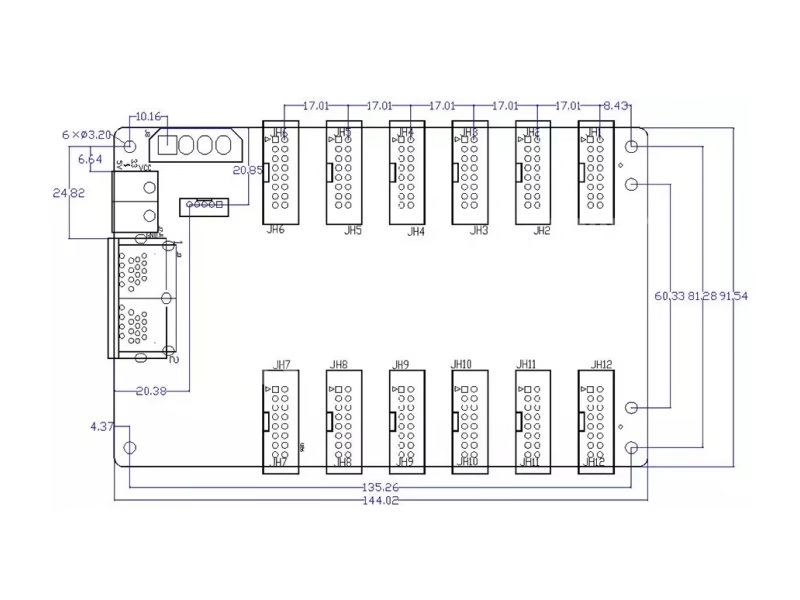
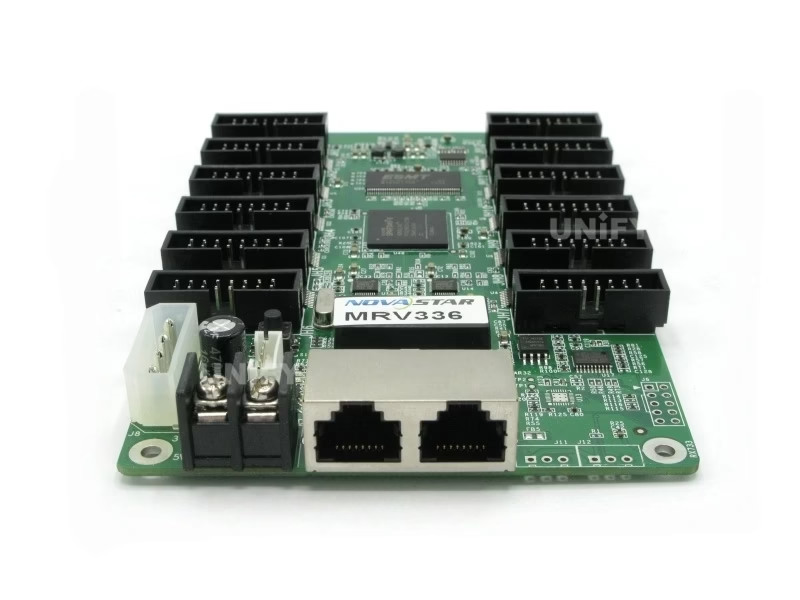
Three counterfeit checks for remaining stock: (1) original antistatic bag, foam and factory carton labeling; (2) PCB silk screen and chip marking quality under magnification; (3) the 12 HUB75E connector row on the 145.6 × 95.3 mm board — a card sold as MRV336 with 8 or 16 connectors is a relabeled sibling model.
As a full-line LED screen manufacturer, we test every batch on live modules before shipping and support your migration to the DH7512-S or MRV208-1. Visit our LED display factory and quality control of LED display pages.
Novastar MRV336 LED Receiver Card Price & Remaining Stock
Marketplace prices for remaining MRV336 stock currently run $10–$16 per card as channel inventory shrinks. Our remaining-stock pricing is tiered and every batch ships with factory records:
Remaining stock ships in original NovaStar packaging with a 2-year warranty and NovaLCT support. For quantity planning: our engineers will help you decide between topping up spares and migrating the section to the DH7512-S or MRV208-1. Source from a verified LED screen manufacturer to avoid relabeled stock. Pair the card with the MCTRL300, MCTRL660 PRO, or VX16s sending controller.
Novastar MRV336 LED Receiver Card FAQ
Novastar MRV336 LED Receiver Card Certifications
Every batch ships with NovaStar original packaging and full compliance documentation.
Ready to Source the Novastar MRV336 LED Receiver Card?
Remaining stock, migration planning, DH7512-S replacement advice.
unifyledscreen@gmail.com | +86-191-18802497
Novastar MRV336 LED Receiver Card Discontinued: 12-Port Legacy Replacement & Migration Guide
Published: August 2026 | 12 min read | UnifyLED Engineering Team
The MRV336 occupies a specific niche in the receiving card ecosystem: it was the 12-port card of NovaStar’s M3 era — the mid-size wall specialist between the 8-port MRV328 and larger cards. If your wall runs MRV336 cards, two facts now define your maintenance future: the card is out of production, and its official specification was corrected in May 2024 — the loading figure you may have planned around for years changed from 256×226 to 256×256@60Hz. This guide walks the full decision: what the MRV336 actually is, what the 2024 correction means for your wall math, and how to migrate to the current generation without downtime or visible seams.
Chapter 1 — Identifying the MRV336: The 12-Port Profile
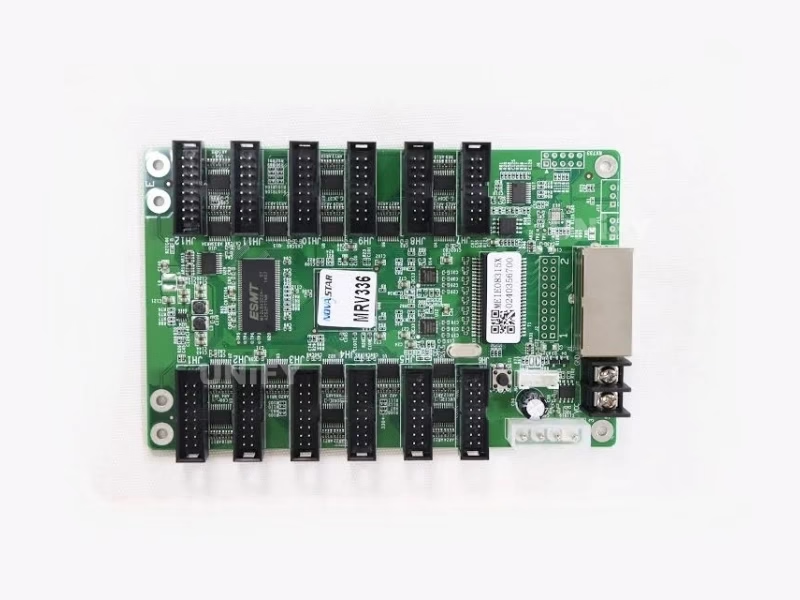
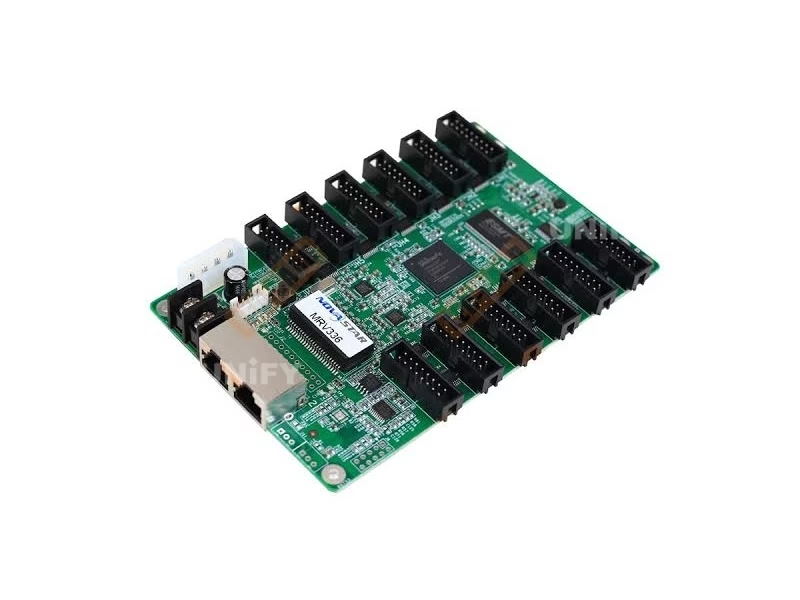
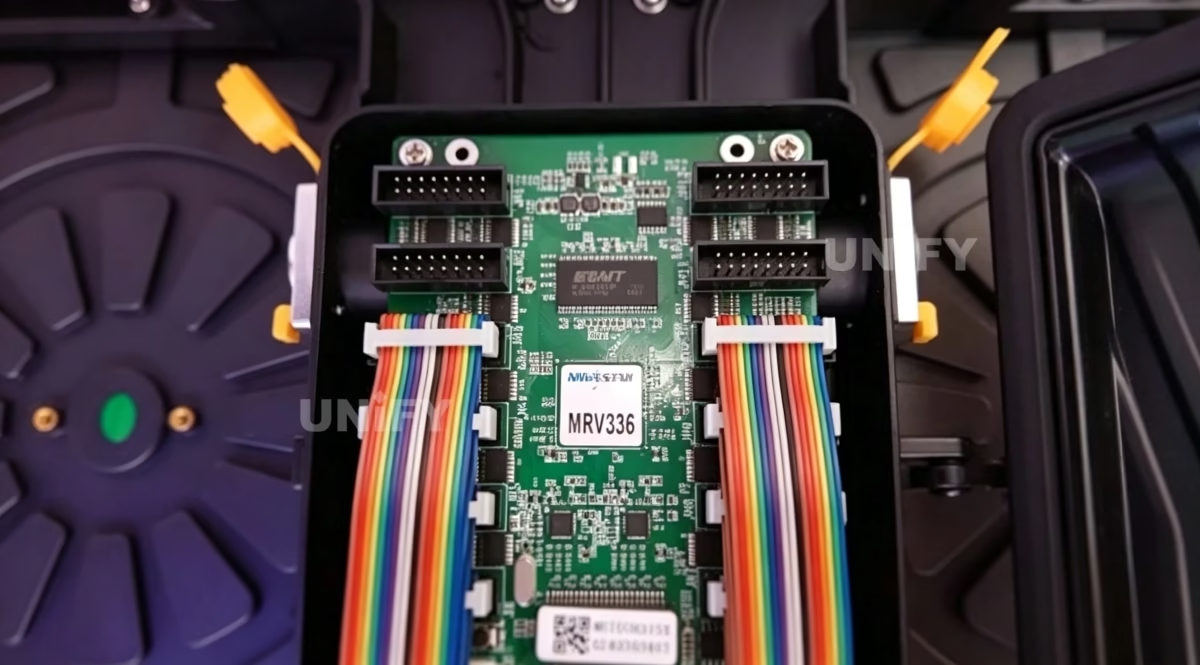
The MRV336 is visually unambiguous once you know what to look for: a 145.6 × 95.3 mm board carrying a single row of 12 HUB75E connectors, two Gigabit Ethernet ports, two power connectors, a self-test button, and a J9 indicator connector instead of the 5-pin LCD connector found on later cards. The 12-connector row is the identification shortcut — the MRV328 carries 8, the MRV208-1 carries 8, and only the DH7512-S among current-generation cards carries the same 12-port profile. If your cabinets show 8 connectors in a row, you are looking at a different card.
The functional profile matters more than the physical one: 12 HUB75E ports and up to 24 parallel RGB data groups mean the card attaches 12 standard modules and services twice the data groups of an 8-port card. On module-dense walls this made the MRV336 the economical choice of its era — fewer cards per square meter than its 8-port siblings. That same profile is the key to the replacement decision later in this guide.
Chapter 2 — The 2024 Correction: Why Half the Datasheets Are Wrong
For most of its service life, the MRV336’s documented maximum loading was 256×226 pixels. The official specification V1.2.0, dated May 28, 2024, corrected this to 256×256@60Hz — a 13% increase in usable capacity. The correction matters for two reasons. First, for planning: a wall previously calculated at 226 lines per card may now fit on fewer cards, which changes migration math. Second, for purchasing: listings, databases and even printed datasheets that still show 256×226 predate the correction, and sellers of relabeled stock use the outdated figure to blur authenticity. When a quote arrives, check the spec version reference — V1.2.0 is the final revision and the only one with the correct number.
The same 2024 document confirms what the card is not: no 3D output, no Mapping function, no cabinet LCD, no bit error detection, no firmware readback. The official feature list is seven items — scan support, calibration, pre-stored image, parameter readback, and three monitoring channels. Listings that describe MRV336 3D or mapping capabilities are copying series-generic copy across models. Trust the V1.2.0 feature list, and treat anything beyond it as marketing noise.
How to verify any MRV336 document in the field: check the change history table on the specification’s second page. V1.2.0 is dated 2024-05-28 with the entry “Updated load capacity information.” Earlier revisions — V1.1.5 (2022), V1.1.4 (2022), V1.1.3 (2021) and their predecessors — all carry the old figure. The version number is the fastest authenticity and accuracy check available, and it costs nothing to ask for: any supplier quoting MRV336 specs should be able to state the specification version their data comes from.
Chapter 3 — The Stock Audit and the Spare-Ratio Rule
The audit starts with counting: wall resolution divided by 256×256 gives the theoretical card count, and the physical count should match within the redundancy margin. A 1536×1024 wall runs 24 MRV336 cards at full utilization; a typical 6m×3m P5 wall runs around 30. Field failure data for the MRV generation mirrors the family average: 1–3% per year on outdoor walls after year five, clustered around surges and humidity. The practical spare rule is 5% of card count with a minimum of 2 — so a 30-card wall holds 2 spares — and the runway math from the MRV328 guide applies unchanged: with 1.5% annual failure on 30 cards, 2 spares buy roughly 2.2 years before the wall is depending on discontinued-card purchases.
The MRV336 adds one audit item the other legacy cards do not: EMC documentation. Because the card carries Class B certification — the only one in the family — some installations were specified around that certification. If the wall serves a mall, airport, hotel or mixed-use building where the Class B compliance was part of the original approval, note it in the audit record; it becomes a factor in the replacement decision, because no current NovaStar receiving card carries Class B.
Chapter 4 — Choosing the Replacement: The Same-Profile Logic
The cleanest way to choose a replacement is to match the interface profile. The MRV336’s 12 HUB75E ports and 24 data groups line up exactly with the DH7512-S — same connector count, same data-group count, same wiring plan inside the cabinet. What the DH7512-S adds on top is the current generation: 512×512@60Hz loading (four times the pixels), 18bit+ grayscale, 3D, 90° rotation and individual RGB gamma. For a wall whose cabinets were wired around 12 modules per card, the DH7512-S drops into the same wiring with no re-cabling — the modules simply get a card that can do much more. Where budget is the binding constraint, the MRV208-1 loads the same 256×256 class at the lowest card cost, with 8 ports requiring minor cable re-planning. And where the wall’s pixel count is the real problem, the DH7508-S doubles loading with an 8-port profile.
The EMC footnote: no current NovaStar receiving card matches the MRV336’s Class B. In practice this is almost never a blocker — Class A cards are used in malls and airports worldwide — but if a contract or local approval explicitly requires Class B receiving cards, document the requirement and raise it with the client before the migration, rather than discovering it during the compliance audit afterward. The honest position is to flag the difference up front.
A worked example anchors the decision. Take a 1536×1024 wall (1,572,864 pixels) wired around the MRV336’s 12-module profile. With the corrected 256×256 loading, the wall needs 24 cards; with the old 256×226 figure some planners would have bought 28 — the 2024 correction saves four cards on this wall alone. Migrating to the DH7512-S at 512×512 drops the count to 6 cards with the same 12-port cabinet wiring, cutting the failure surface by 75% and the cascade points accordingly. Migrating to the MRV208-1 keeps the 24-card count at 8 ports, which means re-planning ribbon routes in every cabinet — the hidden labor cost that makes the same-profile DH7512-S the default choice unless budget absolutely rules.
Chapter 5 — The Migration Workflow: Readback First, Always
The MRV336’s official feature list includes configuration parameter readback — and it is the anchor of every migration. Before touching hardware, read back the parameters of every card in the section and store the files. Then obtain the module supplier’s RCFG for the destination card; the MRV336 RCFG does not load on the DH7512-S or MRV208-1, and this single mistake produces the classic post-migration symptom of garbled images. Then swap per section, push the configuration, and verify with the self-test button and the indicator table. The readback-and-update workflow, demonstrated officially:
NovaStar Official — SmartLCT Readback and Update of Receiving Card Parameters and Firmware
Two field habits keep the migration boring. First, run the 30-minute white/grey frame test after each section and walk the boundary between migrated and untouched sections — coefficient mismatches between generations surface there first. Second, archive everything: section configurations, the RCFG files used, serial numbers, and the EMC documentation note. The archive turns the next maintenance event from a project into a routine. See backup and restore LED display hardware settings for the full procedure.
Chapter 6 — The Mixed-Generation Rule and Calibration Continuity
Replace per wall or per complete section — never one card at a time. The MRV336’s calibration coefficients live in a legacy format; the DH7512-S applies current-generation correction curves. A single new card in a legacy wall displays content correctly, but the brightness boundary around it becomes visible within weeks as the two correction systems diverge — on white and grey content first, which is what corporate walls display most. The boundary is not a defect; it is two generations of physics disagreeing about what “uniform” means. Section replacement keeps the disagreement at the section seam, where a planned coefficient adjustment resolves it during the same maintenance window.
Calibration continuity also argues for documenting the wall’s calibration history. If the wall was calibrated with NovaCLB at commissioning, the calibration coefficients belong to the module population, not the cards — which is exactly why readback matters: it carries the coefficient state to the replacement. Where the readback files are lost, the wall needs a fresh calibration pass after migration, an after-hours job that typically costs more than the cards. Archive the readbacks before the wall needs them.
Section sizing deserves the same discipline as section replacement. The practical rule is one maintenance window per section — a crew can reliably swap, configure and verify 8–12 cards per visit including the white/grey frame walk. For a 24-card wall that means three windows; for a 30-card outdoor wall, four. Attempting more per window trades the boundary risk for fatigue errors: misseated ribbon cables, skipped readbacks, and the worst failure of all — a section left dark because the last card swap ran past the permitted working hours. Slow sections, done completely, migrate faster than ambitious ones that need revisits.
Chapter 7 — Buying: Remaining Stock vs Migration
Remaining MRV336 stock still trades at $10–$16 per card, and the discontinued-card counterfeit premium applies with an extra twist: the 2024 correction gives sellers of relabeled stock a plausible story. A “datasheet” showing 256×226 is not proof of authenticity — it is proof the seller has not updated their documentation in years, which is itself information. The mechanical checks remain decisive: antistatic-bag and foam packaging in the 100-card factory carton, clean silk screen and chip markings, and the 12-connector row on the 145.6 × 95.3 mm board. A card with 8 or 16 connectors is a relabeled sibling, full stop.
The buy-vs-migrate decision reduces to the wall’s remaining service life. Under two years: bridge with remaining stock and let the wall retire. Over three years: migrate to the DH7512-S or MRV208-1 and stop paying the discontinued premium — the current-generation cards are cheaper per unit, still in production, and their spares remain available. The math that settles it is total cost over the remaining life, not the per-card sticker, and the migration path wins on any wall with real time left. For the full-system picture, LED screen maintenance covers the modules, power and controller layers sharing the same maintenance windows.
Channel discipline closes the loop. Whether buying remaining MRV336 stock or migration cards, the channel matters more than the price delta: a factory partner batch-tests on live modules, provides the RCFG files matched to your actual module model, keeps serial-number records, and answers the phone when a wall is down. A marketplace reseller ships what it bought, and its “datasheet” may be the same outdated 256×226 PDF it has hosted for five years. On a 24-card migration the channel difference is worth the entire hardware budget — and it costs nothing to check the specification version before ordering.
Conclusion
The Novastar MRV336 LED Receiver Card closes its service life with a final official correction — 256×256@60Hz, twelve ports, twenty-four data groups, and a Class B certification its successors never carried. The walls it drives remain profitable assets, and their future is a planning exercise: audit the cabinets, apply the corrected loading math, and choose between bridging with remaining stock and migrating to the same-profile DH7512-S. Teams that migrate by section, with readbacks archived and boundaries verified, keep their walls seamless through the transition; teams that wait until the last spare fails inherit the discontinued premium, the counterfeit risk, and a dark wall. The cards change — the discipline does not.
Explore the Complete Novastar LED Receiving Card & Controller Range
From legacy MRV cards and their replacements to DH and A series, AT entry cards, sending controllers and software resources.
Download Novastar MRV336 LED Receiver Card Resources
Official NovaStar MRV336 receiving card specifications — final revision V1.2.0.