
Novastar DH7516-S LED Receiving Card
NovaStar’s connectivity champion in the DH series — 16 HUB75E connectors, up to 32 groups of parallel RGB data, 512×384@60Hz loading with PWM driver ICs, pixel-level brightness and chroma calibration, 3D support, 90° image rotation, loop backup and dual program backup. The receiving card of choice for LED walls built from large numbers of standard modules.
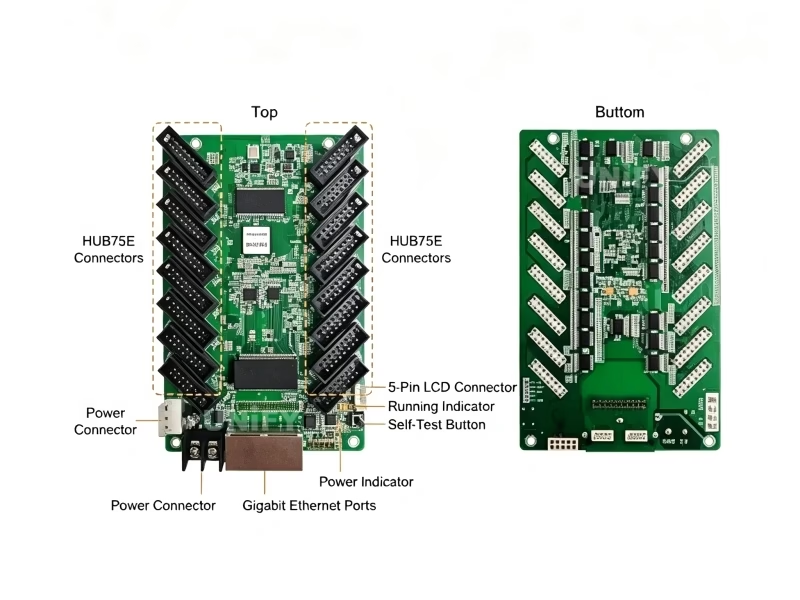
What Is the Novastar DH7516-S LED Receiving Card?
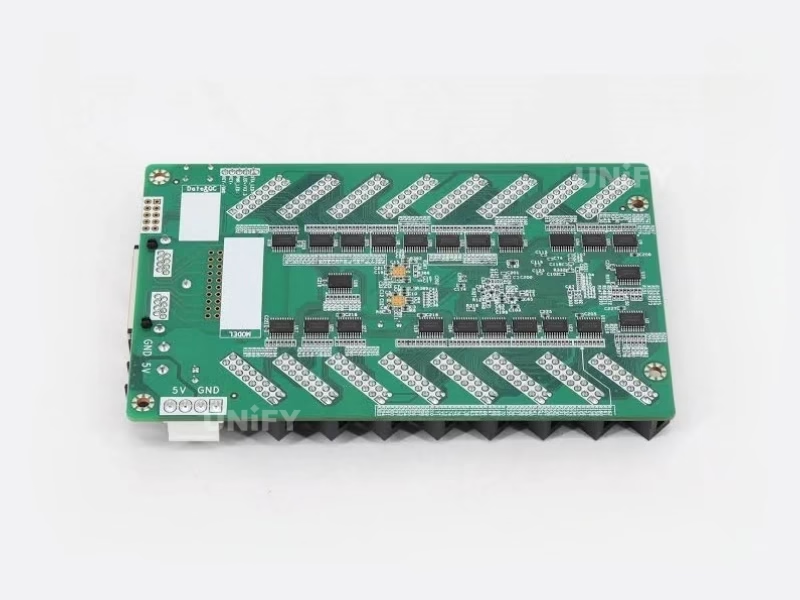
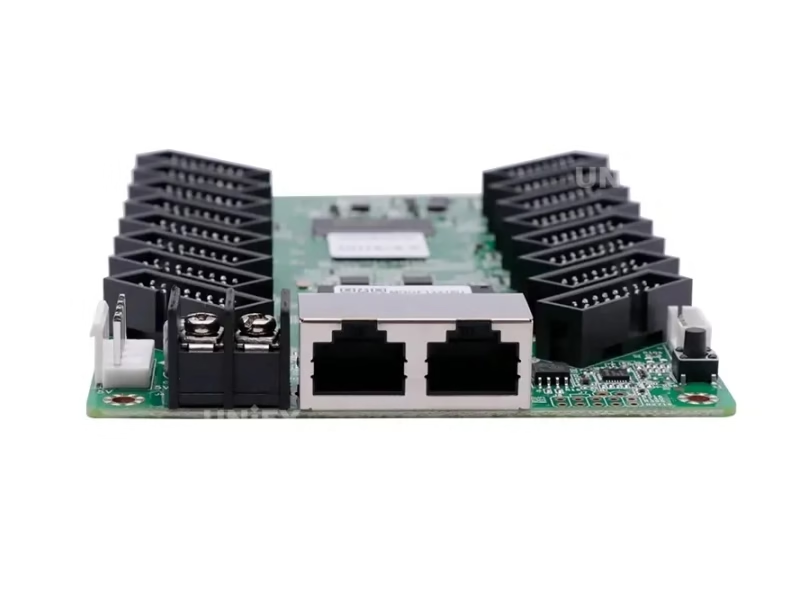
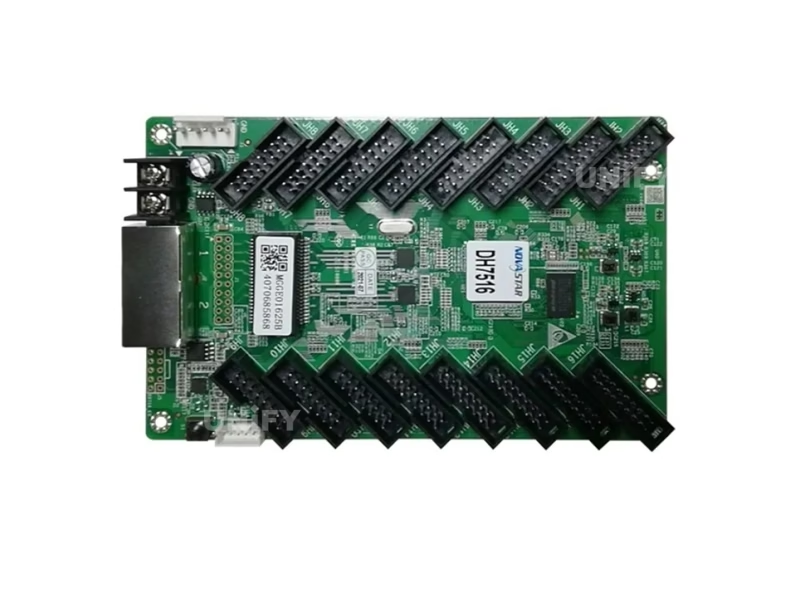
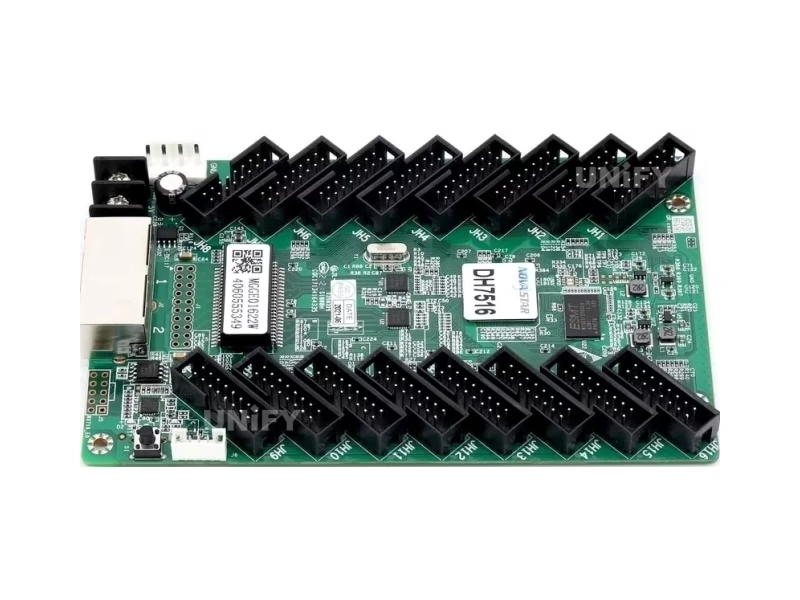
The Novastar DH7516-S LED Receiving Card is a general-purpose receiving card developed by Xi’an NovaStar Tech Co., Ltd. A single card loads up to 512×384 pixels at 60Hz with PWM driver ICs (384×384@60Hz with common driver ICs) and drives them through 16 standard HUB75E connectors — the highest connector count in the DH series. It supports up to 32 groups of parallel RGB data, which is what makes the card especially suitable for LED screens assembled from a large number of standard modules: more ports and more data groups mean fewer cards per wall and simpler cabling. Beyond raw connectivity, the DH7516-S carries NovaStar’s full calibration stack — pixel-level brightness and chroma calibration with NovaLCT and NovaCLB, quick adjustment of dark or bright lines, individual RGB gamma adjustment, 3D output, image rotation in 90° increments, Mapping 1.1, real-time temperature and voltage monitoring, and dual program backup. For how receiving cards fit into the overall control chain, see synchronous vs asynchronous LED control.
Data accuracy note: Many marketplace listings copy the DH7512-S specification onto the DH7516-S — claiming 512×512 loading and EMC Class B. The official NovaStar specification (V1.0.3) for the DH7516-S is 512×384@60Hz with PWM driver ICs (384×384@60Hz with common ICs) and EMC Class A certification. If a quote lists “512×512” for a DH7516-S, verify which card you are actually being offered.
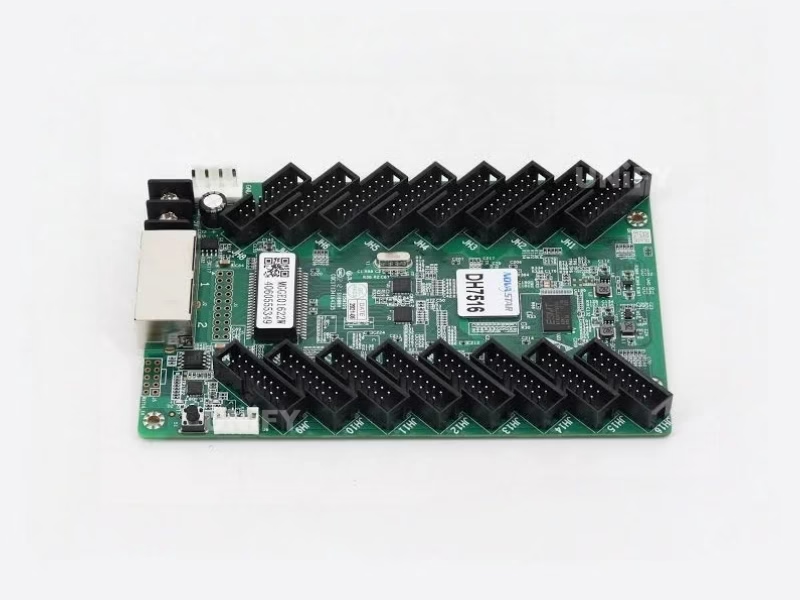
Novastar DH7516-S LED Receiving Card Technical Specifications
Loading & Connectivity
Electrical, Physical & Environment
All figures above are taken from the official NovaStar DH7516-S specification V1.0.3. At 2.5W rated power the card runs cool with passive cooling only — no fan to fail. See LED display power consumption to size your system power budget.
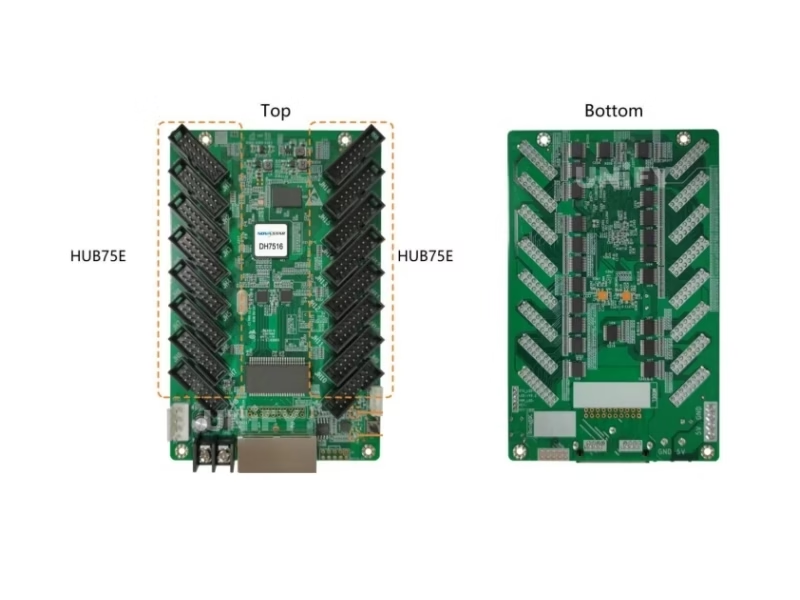
Key Features of the Novastar DH7516-S LED Receiving Card
Pixel-Level Brightness & Chroma Calibration
Works with NovaStar’s high-precision calibration system (NovaCLB) to calibrate the brightness and chroma of each pixel, removing brightness differences across modules and achieving high brightness consistency on the finished wall.
Quick Adjustment of Dark or Bright Lines
The dark or bright lines caused by module and cabinet splicing can be adjusted on-site — the change takes effect immediately, cleaning up seams without re-calibration of the whole screen.
3D Image Output
Working with a 3D-capable LED controller, the card enables 3D image output (loading capacity is halved in 3D mode) — the foundation of glasses-based 3D LED installations.
Image Rotation in 90° Increments
The displayed image can be rotated 0°/90°/180°/270° in hardware — a must for creative installations, portrait screens and floor displays where module orientation varies.
Loop Backup
The receiving card and LED controller form a loop via main and backup line connections. If a cable fails anywhere in the loop, the screen keeps displaying normally. See LED display system redundancy.
Mapping 1.1
Cabinets display the LED controller number, receiving card number and Ethernet port information — technicians locate any card and read the whole connection topology at a glance.
Monitoring & Bit Error Detection
Temperature and voltage are monitored in real time without extra peripherals — the cabinet LCD can display them plus run time. Ethernet port communication quality is monitored and erroneous packets recorded to troubleshoot network problems.
Dual Program Backup & Readback
Two firmware copies are stored at the factory, so a failed update never bricks the card. Firmware programs and configuration parameters can be read back to your computer — copy a working card’s settings to a replacement in seconds.
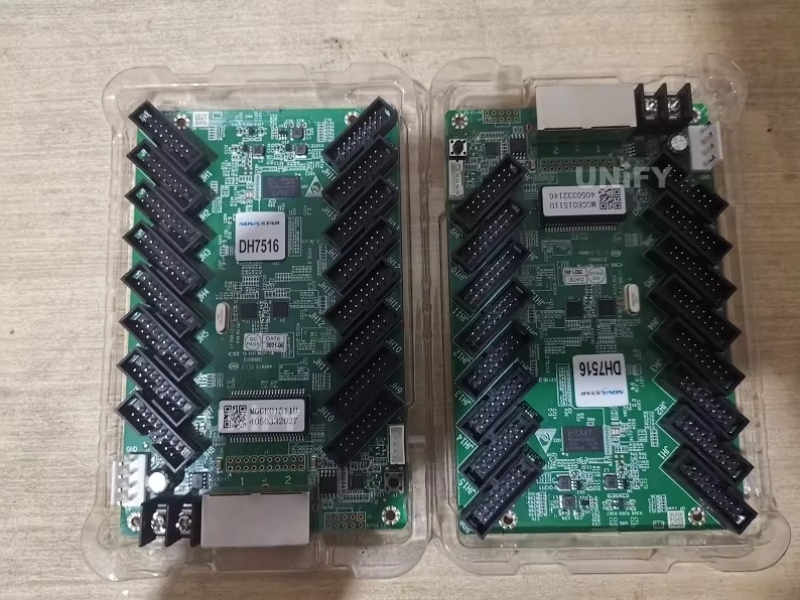
How to Configure the Novastar DH7516-S LED Receiving Card in NovaLCT
The DH7516-S is configured through NovaLCT V5.3.0 or later. Five steps, ten minutes:
Wire the card
Connect the card to the LED module via HUB75E ribbon cables and to the sending controller via Gigabit Ethernet (either port — each works as input or output for cascading).
Install NovaLCT
Download NovaLCT software (V5.3.0 or later), connect your PC to the controller, and let NovaLCT detect the screen.
Load the RCFG file
Load the configuration file (.rcfgx) matching your module from the module supplier — this defines driver IC type, scan mode and data routing. Follow the LED display configuration and system debugging guide if detection fails.
Send configuration to the card
Push the configuration to all receiving cards. Enable loop backup and set monitoring parameters in the same dialog. See how to configure an LED sending card for the controller side.
Verify with the self-test button
Disconnect the Ethernet cable and press the self-test button twice — the card displays a test pattern on the module. Press again to cycle patterns. If NovaLCT cannot detect the card at all, see NovaLCT cannot detect sending card: troubleshooting guide.
NovaStar Official — NovaLCT Performance Settings and Receiving Card Configuration Files tutorial
Novastar DH7508-S vs DH7512-S vs DH7516-S LED Receiving Card Comparison
Three cards, one family — each optimized for a different wall profile. The DH7516-S column is highlighted.
How to read this table: the DH7512-S is the pixel-load champion with 18bit+ grayscale — the strongest match for fine-pitch, high-resolution walls. The DH7508-S is the compact entry card for small and medium screens. The DH7516-S is the connectivity champion: 16 HUB75E ports and 32 RGB data groups drive more modules per card than any other DH model — the right choice when your wall is built from a large number of standard modules and port count, not raw pixel count, is the bottleneck.
How to Install & Replace the Novastar DH7516-S LED Receiving Card
The DH7516-S mounts directly onto the module or cabinet with screws (GND-enabled mounting holes). Replacement takes under 2 minutes with the card’s dual program backup and readback functions:
Read back the old card’s parameters
In NovaLCT, read back the firmware program and configuration parameters of the card being replaced and save them locally. See backup and restore LED display hardware settings.
Power down and swap the card
Unplug power and the HUB75E cables, remove the four screws, and mount the new card. Both power connectors are equivalent — connect whichever is more convenient.
Load the saved configuration
Send the saved firmware and configuration to the new card — it resumes exactly where the old card left off, calibration coefficients included.
Verify via indicator lights
The green running indicator confirms status at a glance — see the diagnostic table below. Full wall-level guidance in LED screen installation and LED screen maintenance.
UnifyLED — How to replace a receiving card of Ehonor series indoor LED screen
Running Indicator Diagnostic Table
For cable-related faults on installed walls, see LED display signal cable troubleshooting.
Novastar DH7516-S LED Receiving Card Applications
Retail & Shopping Malls
Mall screens and storefront walls are typically built from dozens of standard modules — exactly the profile where 16 HUB75E ports reduce card count and cabling cost. See shopping mall LED display.
Control Rooms & CCTV
Loop backup keeps mission-critical walls displaying even when a cable fails; real-time temperature, voltage and bit error monitoring feed your NOC. See control room LED display.
Events & Rental Staging
Fast readback and configuration push mean rental crews swap cards and restore settings in minutes between gigs; 90° rotation supports creative stage layouts. See LED screen for events.
Outdoor Advertising & Clubs
–20°C to +70°C operating range covers outdoor cabinets in harsh climates; dual program backup survives interrupted firmware updates on poles. See club and bar LED display.
Why Source the Novastar DH7516-S LED Receiving Card From an LED Display Factory
Receiving cards are the most counterfeited component in the LED display supply chain. A refinished or cloned card may pass visual inspection but fail calibration, loop backup or firmware updates — typically after the screen is installed. We source DH7516-S cards directly from NovaStar’s authorized channel and ship them in original blister packaging, 100 cards per factory box, serial numbers verifiable with NovaStar.
Three counterfeit checks: (1) Original blister pack + factory carton labeling; (2) PCB silk screen and chip marking quality under magnification; (3) firmware version reporting V5.0.2.0 in NovaLCT. If a “DH7516-S” reports 512×512 loading or EMC Class B, it is either a mislabeled DH7512-S or a clone.
As a full-line LED screen manufacturer, we test every card batch on live modules before shipping and support your team through NovaLCT configuration, calibration and after-sales troubleshooting. Visit our LED display factory and quality control of LED display pages.
Novastar DH7516-S LED Receiving Card Price & Sourcing
Online marketplace prices for the DH7516-S range from $9 to $16 per card depending on volume, channel and authenticity. As a factory-direct supplier we offer tiered pricing with genuine NovaStar stock and full after-sales support:
Cards ship in original NovaStar packaging (blister pack, 100 pcs per box) and are covered by a 2-year warranty with remote NovaLCT support. Typical dispatch is 1–3 working days from Shenzhen stock. Source from a verified LED screen manufacturer to avoid refinished clones. Need a controller too? Pair the card with the MCTRL300, MCTRL660 PRO, or VX16s.
Novastar DH7516-S LED Receiving Card FAQ
Novastar DH7516-S LED Receiving Card Certifications & Authorizations
Every DH7516-S batch ships with NovaStar original packaging and full compliance documentation.
Ready to Source the Novastar DH7516-S LED Receiving Card?
Factory-direct pricing, genuine NovaStar stock, NovaLCT configuration support.
unifyledscreen@gmail.com | +86-191-18802497
Novastar DH7516-S LED Receiving Card Selection Guide: DH7508-S vs DH7512-S vs DH7516-S Explained
Published: August 2026 | 12 min read | UnifyLED Engineering Team
The receiving card is the least glamorous and most failure-prone component in a synchronous LED display system. It sits inside every cabinet, translating the controller’s gigabit data stream into the parallel RGB signals that drive each LED module. Choose the wrong card — or the wrong number of cards — and the project overruns on cost, the wall shows visible banding, or a single cable failure takes the whole screen dark. This guide explains exactly how to choose among NovaStar’s DH series receiving cards — the DH7508-S, the DH7512-S, and the DH7516-S — using the three variables that actually matter: pixel budget, module count, and driver IC type.
Chapter 1 — What a Receiving Card Actually Does
Every synchronous LED display has the same chain: video source → sending controller → receiving card → LED module. The sending controller (an MCTRL300, MCTRL4K or VX-series unit) receives the video signal and divides it across its Ethernet ports, each carrying up to about 650,000 pixels. The receiving card receives that stream, buffers the portion of the frame assigned to it, and drives the modules connected to its HUB75E connectors by clocking out parallel RGB data through the driver ICs on the module. Because the whole chain is deterministic and clock-synchronized, this is called synchronous vs asynchronous LED control in the synchronous category — versus asynchronous players that store content locally.
Three hardware limits define a receiving card’s envelope. First, its pixel loading capacity — how many pixels of the frame it can buffer and clock out per second at 60Hz. Second, its connector count — how many modules it can physically attach to. Third, its data group count — how many parallel RGB channels it can drive simultaneously, which determines how many driver ICs it can service per connector. A card is a good match for a wall only when none of these three limits is exceeded. This is why three cards with near-identical specs on paper behave very differently in the field.
The DH series also matters because it is the replacement path for NovaStar’s legacy lineup. The older DH418, DH426 and MRV-series cards (MRV308, MRV316, MRV336, MRV366) have been discontinued, and integrators upgrading those walls need a current-generation card that drops into the same HUB75E wiring and works with the same sending controllers — the VX series, MCTRL series and Taurus players. All three DH -S cards satisfy that requirement, but note one caveat that applies to every brand: do not mix card generations on the same wall. Calibration coefficients and gamma behavior differ between generations, and a wall half-stocked with old MRV cards and half with new DH cards will show visible brightness bands at the boundary. Replace per wall or per complete section, never one card at a time as a long-term strategy.
Chapter 2 — The DH Series at a Glance
NovaStar’s DH series is the current mainstream receiving card family, replacing the earlier DH and MRV generations. All three -S models share the same core feature set: pixel-level brightness and chroma calibration with NovaLCT and NovaCLB, quick adjustment of dark or bright lines, individual RGB gamma adjustment, 3D output, image rotation in 90° increments, Mapping 1.1, temperature and voltage monitoring, bit error detection, firmware and configuration readback, loop backup, and dual program backup. All are RoHS certified with EMC Class A compliance, all run at 2.5W rated power with passive cooling, and all use standard HUB75E connectors.
The differences are in the three envelope limits. The DH7508-S is the compact card: 8 HUB75E connectors, 16 RGB data groups, and — counterintuitively for the smallest card — the same 512×512@60Hz PWM-IC loading as the DH7512-S. The DH7512-S is the pixel and grayscale flagship: 12 connectors, 24 data groups, 512×512@60Hz loading, and 18bit+ grayscale (262,144+ levels per RGB channel) that eliminates banding on fine-pitch screens. The DH7516-S is the connectivity champion: 16 HUB75E connectors and 32 RGB data groups — the most of any DH card — with 512×384@60Hz loading on PWM ICs and 384×384@60Hz on common ICs. Understanding which limit your wall hits first tells you which card to buy.
Chapter 3 — Choosing by Pixel Budget: The Loading Capacity Math
The first selection filter is always pixel count. Calculate your wall’s total resolution from its physical size and LED pixel pitch — a 4.8m × 2.7m wall at P2.5 is 1920×1080, exactly 2,073,600 pixels. Divide by each card’s realistic loading to get the card count. For that wall on PWM modules: the DH7516-S loads 512×384 = 196,608 pixels per card, so the wall needs 2,073,600 ÷ 196,608 ≈ 10.5 → 11 cards; the DH7512-S loads 512×512 = 262,144 pixels, so the same wall needs 7.9 → 8 cards. That’s three fewer cards, three fewer Ethernet jumps, and roughly $30–45 less in hardware — before counting the grayscale advantage. For a large 4K wall (3840×2160 = 8.29M pixels), the gap widens: 42 cards for the DH7516-S versus 32 for the DH7512-S. On pixel budget alone, the DH7512-S wins almost every time it is an option. For the full picture on resolution planning, see LED screen resolution.
So why does the DH7516-S exist — and when is it the right card? Because on many real walls, the binding constraint is not pixels but ports.
Two adjustments apply to the math before you finalize a card count. First, 3D mode: all DH -S cards halve their loading capacity when driving 3D content, because the card must clock out left-eye and right-eye frames. A 3D wall budgeted at 512×384 per card needs double the cards in practice — size for 2D, then re-run the count for 3D before procurement. Second, cascade topology: each card’s two Gigabit Ethernet ports are interchangeable as input and output, so cards can be daisy-chained port-to-port rather than each needing a home-run cable back to the controller. Long chains work, but the Ethernet stream is shared along the chain, so plan the cascade order in NovaLCT so that the highest-resolution sections sit closest to the controller — this avoids bandwidth starvation on the last card in a long chain. Both of these are exactly the kind of detail that separates a paper spec match from a wall that runs flawlessly at 60Hz on every module.
Chapter 4 — Choosing by Module Count: When Ports Beat Pixels
A standard 320×160mm module commonly carries 128×64 pixels (at P2.5) on one HUB75E connection. A card’s connector count therefore caps how many modules it can attach: the DH7516-S with 16 ports can attach 16 such modules (128×64 × 16 = 131,072 pixels — well under its 196,608-pixel loading ceiling), while the DH7512-S with 12 ports attaches 12 (98,304 pixels) and the DH7508-S with 8 ports attaches 8 (65,536 pixels). Notice what happens: on module-dense walls built from small standard modules, the card’s pixel-loading ceiling is never reached — the port count binds first. A wall assembled from many small modules needs more cards, more power wiring, and more Ethernet cascading, even though the total pixel count is modest.
This is the DH7516-S’s territory. Its 16 ports attach 33% more modules per card than the DH7512-S and 100% more than the DH7508-S, and its 32 RGB data groups service the highest driver-IC density per port in the series. For retail walls, mall installations, club and bar screens, and rental staging built from large quantities of standard modules, the DH7516-S typically delivers the lowest card count per square meter of any DH card — and fewer cards means fewer potential failure points, simpler cabinet wiring, and lower installation labor. The card that loads more pixels is not always the card that builds the cheaper wall; calculate both constraints before deciding.
Chapter 5 — Driver IC Compatibility: PWM vs Common ICs
The second envelope limit is the module’s driver IC type, set by the module’s RCFG configuration file. PWM driver ICs (like MBI5153, ICN2153, and their successors) modulate each LED’s brightness with high-frequency pulse-width modulation — the standard for modern indoor fine-pitch and rental modules, delivering high LED display refresh rate and camera-friendly performance. Common driver ICs are the simpler, lower-cost parts used in many outdoor and economy modules. The DH7516-S loads 512×384@60Hz with PWM ICs but only 384×384@60Hz with common ICs — a 33% penalty. Always confirm which IC family your modules use (it is in the module’s RCFG documentation) and apply the correct loading figure; using the PWM number for a common-IC wall over-commits the card and produces visible tearing or partial display loss on bright content.
Grayscale capability is a third, subtler compatibility dimension. The DH7512-S’s 18bit+ grayscale matters on fine-pitch screens showing smooth gradients — sky, skin tones, brand-colored backgrounds — where 14–16bit cards show visible banding in dark areas. If your content profile is full-screen gradients on a P2.5 or finer wall, that difference alone often justifies the DH7512-S. For more on this, see LED display grayscale.
One more field variable worth understanding before you commit: scan mode. The RCFG file encodes the module’s scan ratio — how many rows the driver ICs light at once. A 1/32-scan module refreshes the same physical pixel 32 times less frequently than a 1/8-scan module of the same pitch, which is why scan mode and LED display refresh rate are joined at the hip on outdoor screens. Receiving cards are scan-agnostic — they simply clock data at whatever pattern the RCFG defines — but scan mode determines how hard the card’s data-group capacity is worked. High-scan modules (1/32 and above) push more rows through fewer ICs, which is exactly the profile where the DH7516-S’s 32 data groups earn their keep, while low-scan outdoor modules rarely stress any DH card’s group capacity. If your integrator hands you a wall spec without the scan mode and IC type, ask for the module’s RCFG datasheet before you order cards — those two numbers change the card count as much as the pixel pitch does.
Chapter 6 — Reliability Engineering: Loop Backup, Dual Programs, and Indicators
All three DH -S cards carry the same reliability stack, and it is worth insisting on: loop backup connects the cards and the controller in a ring, so any single cable break leaves every card reachable through the other path — the screen keeps running during the failure. Dual program backup stores two firmware copies at the factory; a power loss during a firmware update can therefore never brick a card, because the card falls back to the intact copy automatically. Firmware and configuration readback let a technician copy a working card’s exact state to a replacement — calibration coefficients included — so a swap restores the wall to its exact calibrated state in minutes rather than requiring a full recalibration. For the system-level view, see LED display system redundancy and multi sending card backup cascade LED wall.
The green running indicator is a free on-site diagnostic tool. Flashing once per second means normal operation. Once every 3 seconds: Ethernet cable abnormal. Three quick flashes: Ethernet fine, no video input. Once every 0.2s: the card failed to load its application program and is running the backup — replace or re-flash at next maintenance. Eight quick flashes: a redundancy switchover just occurred — your loop backup saved the show; find the broken cable. Train installation crews to read these five patterns and most field faults become phone-diagnosable, which is where LED screen maintenance cost is actually saved.
Chapter 7 — Configuration Workflow: RCFG, Readback, and First Light
Configuration always starts with the module’s RCFG file, supplied by the module manufacturer. It encodes the driver IC type, scan mode, data routing and calibration coefficients for that exact module model — using the wrong RCFG is the number-one cause of garbled images, wrong colors and “card works but screen shows garbage” calls. In NovaLCT, the workflow is: detect the controller, load the RCFG, assign it to the receiving cards, send the configuration, then verify with the self-test button. If the controller does not appear in NovaLCT at all, work through NovaLCT cannot detect sending card: troubleshooting guide before touching hardware. A quick demonstration of the readback workflow:
UnifyLED — How to Read Back and Update Receiving Card Program tutorial video
For walls that will be serviced by third-party crews, make readback part of the handover: have the integrator read back every card’s firmware and configuration and store the files with the project documentation. A card replacement then becomes a five-minute mechanical job — the full procedure is covered in our backup and restore LED display hardware settings guide and the broader LED display configuration and system debugging walkthrough.
Chapter 8 — Buying: Genuine vs Counterfeit, Pricing, and Warranty
Receiving cards are a high-margin counterfeit target because they are small, commodity-priced, and buried inside cabinets where nobody looks. A cloned card typically fails in one of three ways: it cannot load the genuine RCFG file, it bricks on the first firmware update, or it drifts on calibration — the wall develops bright or dark patches weeks after commissioning. Market prices cluster at $9–16 per card; any offer substantially below that for “new genuine NovaStar” deserves suspicion. Buy from NovaStar’s authorized channel or a factory partner that ships original blister packaging and verifiable serial numbers.
On warranty and longevity: receiving cards are solid-state, run at 2.5W, and carry no moving parts, so their failure rate is dominated by manufacturing defects and installation damage rather than wear. A 2-year warranty covering both defects and NovaLCT support is the practical standard — expect a well-installed card to outlive the LED modules it drives, with LED screen lifespan driven by the modules, not the electronics. For the controller side of the purchase, the same logic applies: a LED video processor or sending box from a verified source, sized to the wall, prevents the classic mistake of over-buying the card and under-buying the controller.
Finally, judge the supplier the way you would judge a bearing supplier, not a gadget shop: ask what the packing looks like, what the RMA flow is, and who answers configuration questions when your crew is on a lift at midnight. Genuine NovaStar cards ship in individual blister packs inside a 100-card factory carton with labeling that references the production batch. A supplier that ships loose cards in bubble wrap has already told you everything you need to know. The same test applies to after-sales: a factory partner that also builds LED screens can test your RCFG on live modules before dispatch and debug loop-backup topologies over a screen share — capabilities that a pure card reseller simply does not have. For the controller side of the same project, sizing and sourcing guidance is in our how to configure an LED sending card walkthrough.
Conclusion
The DH series decision is a three-filter funnel, and the Novastar DH7516-S LED Receiving Card sits at the end of one very common funnel: pixel budget first, module count second, driver IC third. When your wall is pixel-heavy and fine-pitch, the DH7512-S’s 512×512 loading and 18bit+ grayscale win. When it is small and simple, the DH7508-S costs least per card. When it is assembled from a large number of standard modules — the profile of most retail, mall, club and rental walls — the DH7516-S’s 16 HUB75E ports and 32 RGB data groups drive more modules per card than anything else in the family, and that connectivity advantage compounds into fewer failure points, simpler wiring and lower installation cost. Run all three filters on every project, keep the RCFG files and readbacks in the handover package, and the receiving card layer — the most common source of field failures — becomes the most boring layer of your LED wall. That is exactly how it should be.
Explore the Complete Novastar LED Receiving Card & Controller Range
From DH and A series receiving cards to AT entry cards, sending controllers and software resources.
Download Novastar DH7516-S LED Receiving Card Resources
Official NovaStar DH7516-S specifications — free download.