
VDWALL 4-Output Class · Switcher + Splicer + Preview In One Box · 14400×6400 Sync Zoom
VDWALL LVP909 LED Video Processor
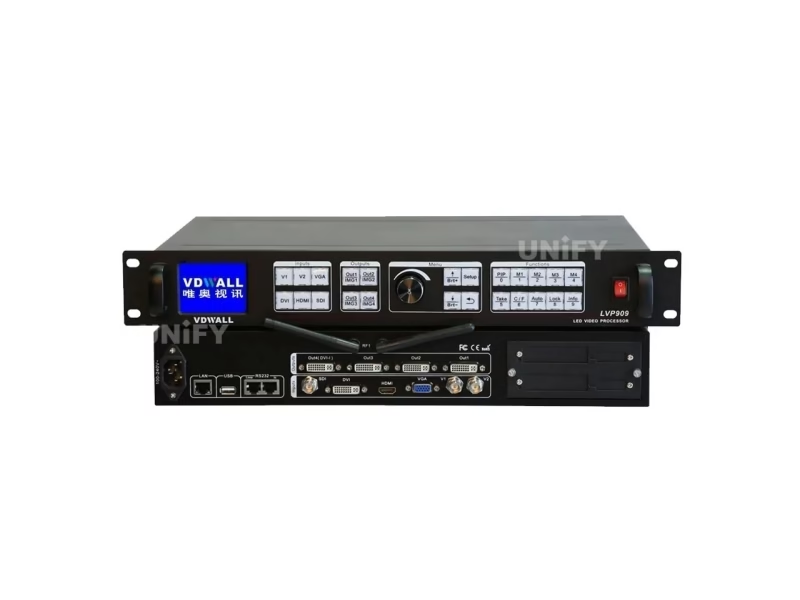
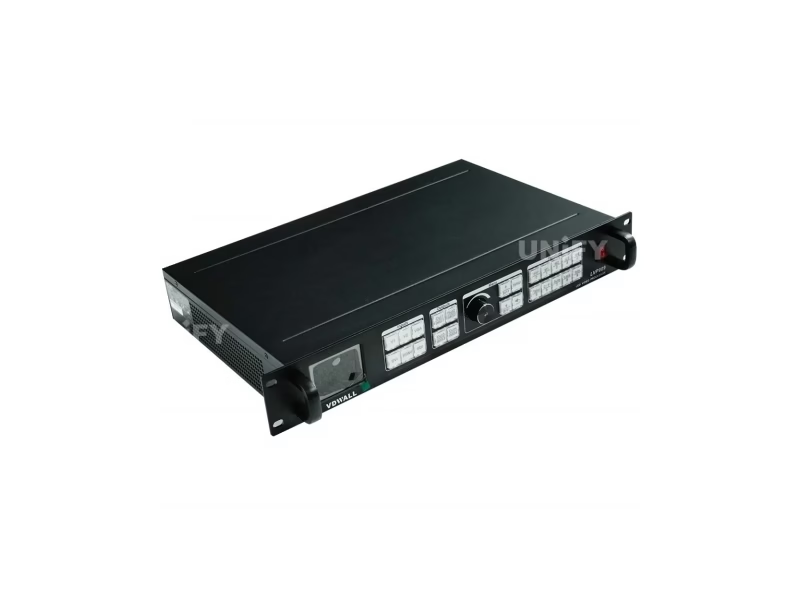
The VDWALL LVP909 LED Video Processor is the four-output flagship of VDWALL’s processor line — a switcher, splicer and preview monitor in one chassis. Six inputs feed four DVI outputs (each up to 1920×1200), six application modes re-wire the box for switching, 2/3/4-way splicing or 3/4-picture multi-window shows, and a synced zoom canvas reaches 14400 pixels wide or 6400 tall.
Short answer
The VDWALL LVP909 is a six-input, four-output LED video processor that replaces three rack units — a switcher, a splicer and a preview monitor — with one box. Its six application modes reconfigure the four DVI outputs for single-screen switching (with a live preview window on Out4), 2/3/4-way mosaic splicing of ultra-wide walls, or 3/4-picture multi-window layouts with colored borders. Each output carries up to 1920×1200 at 60 Hz, and the four ports zoom together to a 14400×6400-pixel canvas. SDI is on board, control spans panel, RS232, USB, LAN and WiFi with video return, and the front panel locks for public-facing shows.
What Is the VDWALL LVP909 LED Video Processor?
The VDWALL LVP909 is a hardware LED video processor from Shenzhen VDWALL Co., Ltd. that routes any of six inputs to four DVI outputs, and reshapes what those outputs do through six selectable application modes. Shenzhen VDWALL documents it in a 57-page user manual (dated November 2016) and a product overview at V1.2 (November 2018, which added the ultra-wide output presets) — the two files together describe a machine aimed at the tier above the LVP615S and the LVP605: rental shows with a director’s seat, ultra-wide stage canvases, and control-room walls that show several sources at once.
The architecture explains the “4K-class” folder it lives in on distributor sites. A single output port tops out at 1920×1200 — but there are four of them, and the machine’s internal matrix can bind two, three or all four into one synchronized canvas. That is how the overview arrives at its headline figures: a standalone unit zooms in sync up to 14400 pixels horizontally or 6400 vertically, and each port independently accepts dedicated sending cards. One chassis, four walls’ worth of pixels, with every transition and window handled internally.
The second headline is the preview path. Out4 doubles as a program/preview monitor — in switcher mode it splits into a dual screen showing the live signal and the preselected signal side by side, which is the job an operator would otherwise solve with a separate broadcast monitor. On a show where the LED wall is the only display in the room, that single feature changes who can run the desk.
Which Inputs and Outputs Does the LVP909 LED Video Processor Support?
Figures below come from the official user manual and the V1.2 overview; where reseller listings phrase the output ceiling differently, the discrepancy is called out in the FAQ.
| Block | Specification |
|---|---|
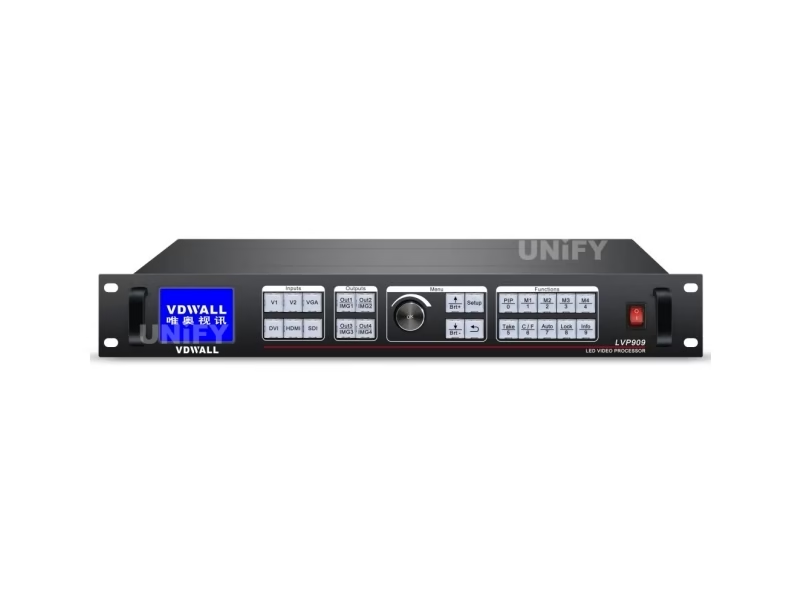
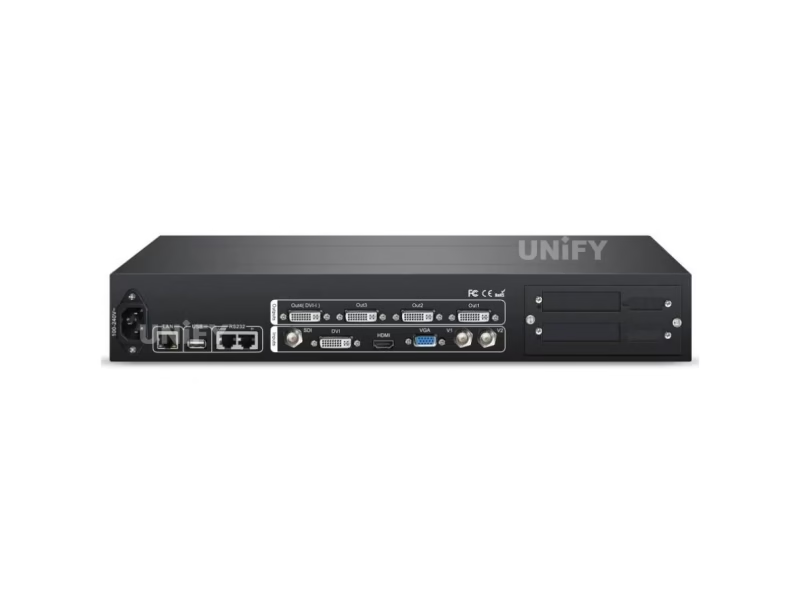
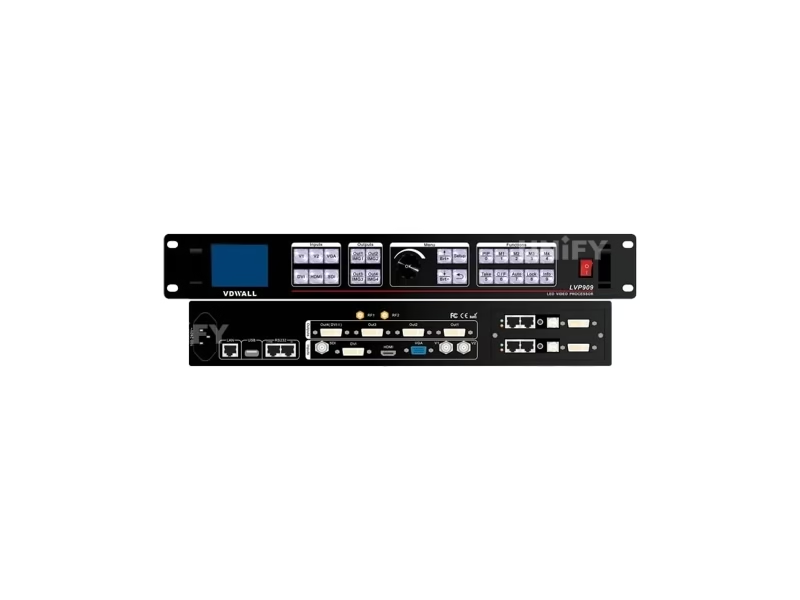
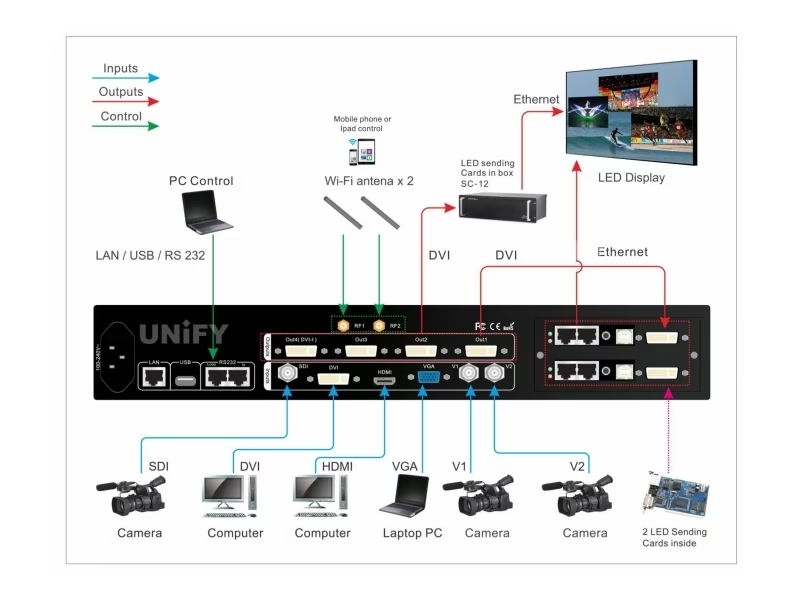
| Video inputs (6) | 2× composite video (BNC, PAL/NTSC), 1× VGA (15-pin D-Sub, ≤2048×1152 @60), 1× DVI (24+1, ≤1920×1200 @60), 1× HDMI (type A, ≤1920×1200 PC / 1080p60 CEA-861), 1× SDI/HD-SDI/3G-SDI (BNC, 75 Ω — 480i, 576i, 720p, 1080i, 1080p per SMPTE 259M-C/292M/274M/296M/424M/425M) |
| Video outputs | 4× DVI (24+5 DVI-I; Out4 carries the VGA monitor output too); each port up to 1920×1200 @60 Hz or 1440×1440 @60 Hz; ports bind into 2-, 3- or 4-way synchronized splicing |
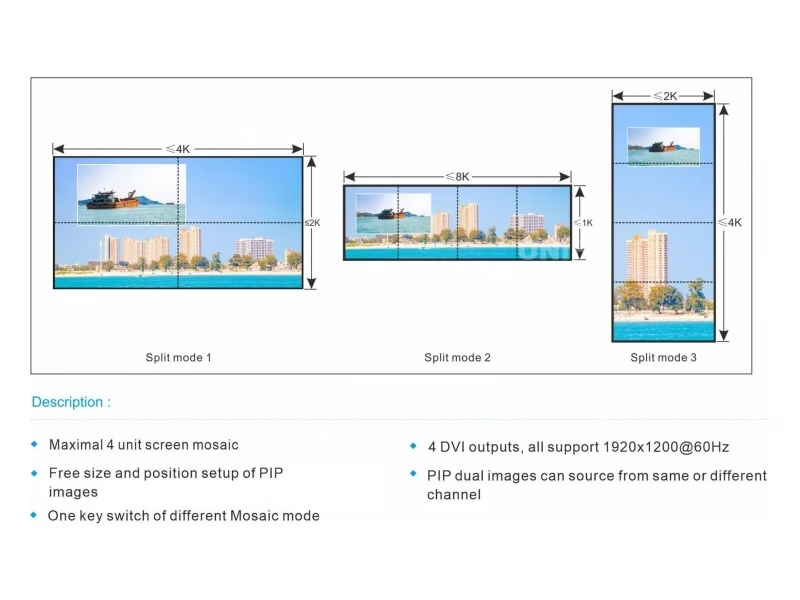
| Output presets | 1024×768, 1280×1024, 1440×1440, 1920×1080_50/60, 1920×1200 (manual) — the V1.2 overview adds the ultra-wide set: 2560×816, 2880×800, 3072×720, 3600×600, 1200×1600, 1600×1344 |
| Sync zoom ceiling | 14400 pixels horizontal or 6400 pixels vertical on the bound multi-port canvas (overview V1.2) |
| Preview | Out4 runs program + preview side by side in switcher mode; in 3-way mosaic it follows the switch mode (current signal under one-key, preselect under Pre.+Take); its resolution can be set independently (menu 7.3, e.g. 1280×720_60) except in 4-way mosaic where the port is splicing |
| Control | Front panel, RS232 IN + LOOP (daisy-chain), USB, LAN (default 192.168.1.8), WiFi on dual RF antenna connectors — control plus video return for wireless monitoring |
| Panel security | Lock key freezes the whole panel (press three times to unlock); incoming remote-control commands automatically put the panel into lock state so the two control surfaces never fight |
| Power / environment | 100–240 VAC 50/60 Hz, ≤45 W; 0–45 °C, 15–85% humidity |
| Mechanical | 483 × 274 × 66.6 mm (19-inch rack); net 4.2 kg, gross 5.5 kg; package 520×350×130 mm |
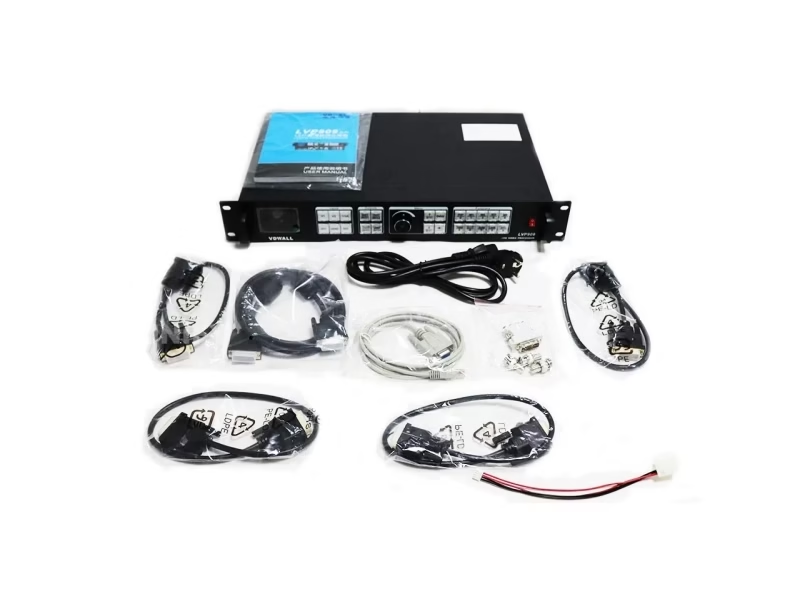
| In the box | Power cord, one 1.5 m DVI cable plus four 0.5 m DVI cables (one per output port), RS232-RJ45 adapter cable, operation CD, 3× BNC-RCA adapters, DVI-I to VGA adapter, audio PCB connector, user manual — sending cards optional |
How Far Can the LVP909 Zoom: The 14400×6400 Sync Canvas?
The per-port ceiling is modest — 1920×1200 — and that is the point: the LVP909 scales by binding ports, not by pushing one port past its clock. In the mosaic application modes, two, three or four DVI outputs carry one synchronized image, and the overview states the resulting envelope: up to 14400 pixels wide or 6400 pixels tall from a standalone unit.
The ultra-wide presets added in overview V1.2 show where the engineering aimed: 2560×816, 2880×800, 3072×720 and 3600×600 — ribbon canvases for stage side-panels, exhibition fascias and broadcast-style set pieces, none of which match a standard video format. A 3600×600 fascia, for example, spans three ports at 1200×600 each, and every port’s crop and scale is computed by the unit’s auto-calculation rather than by hand.
Plan the canvas before the purchase: our LED screen calculator turns cabinet counts into the pixel grid, and our pixel pitch guide confirms the viewing geometry that decides whether those 14400 columns need to exist at all.
What Are the Six LVP909 Application Modes and When Do You Use Each?
The application mode (AppM, set in menu 1.2) is the LVP909’s core idea: one chassis, six wirings. The mode re-assigns what each output port does, so the box matches the show instead of the show matching the box:
| Mode | Output wiring | Built for |
|---|---|---|
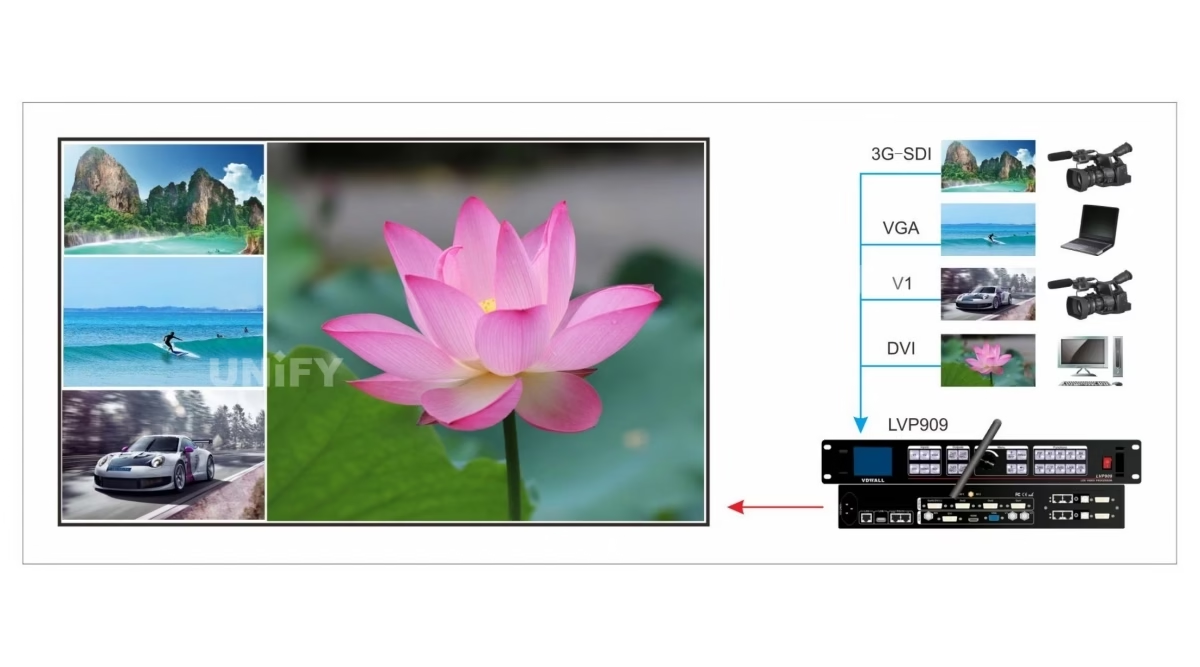
| AppM1 — Switcher | Out1 = Out2 = program; Out3 idle; Out4 = preview + sync monitoring dual screen | Classic live switching with a director’s preview, plus PIP dual-picture layouts |
| AppM2 — 2 mosaic | Out1 + Out2 splice the program; Out4 = preview + sync | Two-port ultra-wide walls that still need clean source transitions |
| AppM3 — 3 mosaic | Out1–Out3 splice; Out4 = monitor (current or preselect, per switch mode) | Three-port fascias and side panels with monitoring kept alive |
| AppM4 — 4 mosaic | All four ports splice one canvas | Maximum canvas: the 14400×6400 class zoom |
| AppM5 — 4 image | Out1 = Out2 = four-picture layout; Out4 = sync monitoring of the composite | Multi-source walls: four windows, each with its own source, size, position and border |
| AppM6 — 3 image | Out1 = Out2 = three-picture layout; Out4 = triple split-screen monitoring | Main-picture shows where image 3 keeps full resolution as the background layer |
3 key differences that decide the mode:
- Ports are shared on purpose. Switcher and multi-window modes duplicate the program to Out1/Out2 for two walls; mosaic modes spend every port on one canvas. You choose between a second screen and more pixels per show.
- Out4 is a shape-shifter. Preview monitor, splice member or triple split-screen — its job follows the mode, with one exception: in AppM4 it must splice, so menu 7.3’s independent Out4 resolution is locked out there.
- Mode changes restart the unit. The confirmation dialog warns data resets on apply — set the mode at load-in, not mid-show.
How Does the LVP909 Preview Monitor Replace a Dedicated Screen?
Broadcast desks assume a preview monitor; rental desks rarely have one. The LVP909 closes that gap with Out4. In AppM1 the port splits into a left/right dual picture: the live program on one side, and on the other either the sync monitoring image or — under Pre.+Take switching — the preselected source before it goes live. The LCD confirms the same state in text (current input, preselect input, output position and size, switch mode and time).
The operator workflow mirrors a vision mixer’s: preselect the next source, glance at Out4 to confirm it is the right feed and that signal is present (the preselect indicator blinks fast with signal, very slowly without), then press Take to commit. One-key switching remains the default for simpler shows, and both modes live in menu 3.1.
Out4’s own resolution is adjustable — menu 7.3 offers 1280×720_60 as an alternative to mirroring the main output — which matters when the preview feeds a small field monitor rather than a second LED wall. In AppM3 the port shows either the current or the preselected signal depending on the switch mode; in AppM4 it is a splice member and loses monitor duty.
What Switching Effects Can the LVP909 Run: Cut, Fade or Slip?
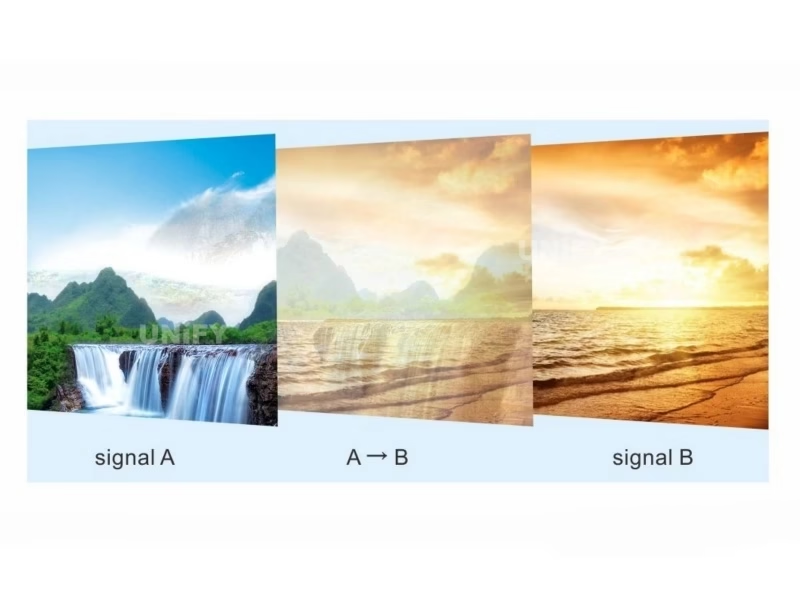
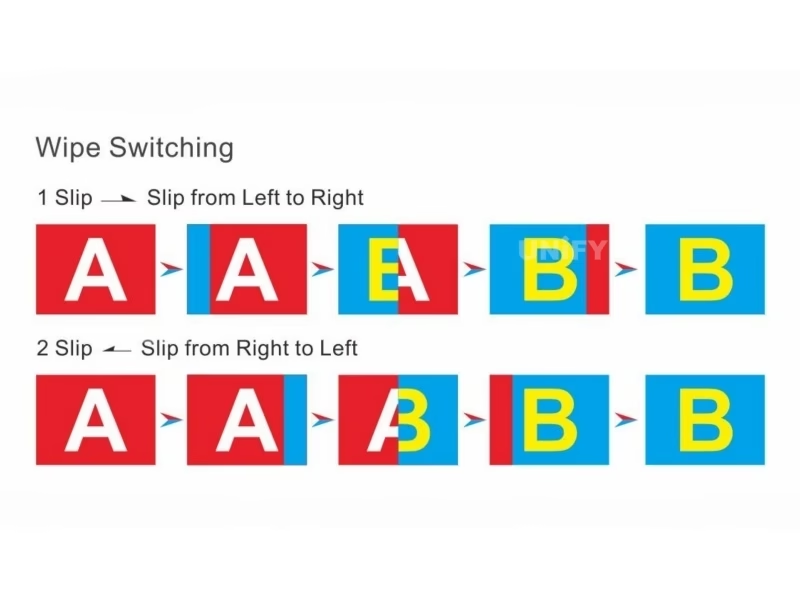
The C/F key cycles the transition menu, and the LVP909’s list goes one step beyond its siblings. Alongside the hard cut and the timed fade, the manual documents Slip — a wipe that sweeps the new picture across the old one — in three directions: right-to-left, left-to-right, and lower-left to upper-right. Transition time is settable per effect, and in the picture-in-picture and multi-window modes the C/F key instead governs the overlay fade between windows: 0 s (instant), 1 s or 2 s.
One boundary from the manual matters on show day: the C/F transition menu is only available outside mosaic modes — a spliced canvas is one image by definition, so effects apply to source switching in AppM1 and to window overlays in the multi-window modes, not to the mosaic canvas itself.
Underneath the transitions, the overview credits an interlaced motion-adaptive processing engine — its stated job is removing the movement trails and saw-tooth edges that interlaced sources leave on LED walls, which is where older camera feeds gain their second life on a modern canvas.
How Do the LVP909 Multi-Window Modes Build 3 and 4 Picture Layouts?
AppM5 and AppM6 turn the wall into a composition surface. Up to four windows — each bound to any of the six inputs — carry their own position, size and stacking order, and four complete layouts pre-store under the M1–M4 keys for one-key recall between show segments. The IMG1–IMG4 keys restack the windows live: press IMG2 and window two jumps to the top of the pile (the default order stacks 4 over 3 over 2 over 1).
Two details separate this from a plain PIP engine. First, per-window borders: each window can draw its own frame with independent red, green and blue values and an adjustable thickness (menu 2.5–2.9) — the difference between four gray boxes floating on a wall and a readable multi-feed layout where each source is identifiable at a glance. Second, AppM6 treats the third window as a first-class background: the manual notes image 3 keeps higher resolution and displays cleanly as the backing picture, which is exactly the geometry for a center program feed flanked by two smaller side sources.
Out4 keeps the operator honest in these modes too — AppM6 renders a triple split-screen of the monitoring feeds, switchable through the Out4 key, so every window’s source is verifiable without leaving the desk.
How Does the LVP909 Splice Outputs Into Ultra-Wide LED Walls?
In the mosaic modes the four ports stop being independent outputs and start carrying one canvas. Configuration follows the same grammar as the rest of the family — the manual’s worked example binds four ports into a 3840×2160 wall — with the parameters living in menu 2: the wall’s total size (2.1–2.2), each port’s tile size and start position (2.4–2.7), an auto-calculation apply (2.8), and a manual trim range (2.9–2.16) for input crops and output windows when a seam needs a nudge.
Four parameter sets pre-store under M1–M4, so a rental rack that plays a wide show one night and a split-wall show the next calls the geometry back with one key. The Out1–Out4 keys double as inspection buttons in mosaic mode: press one and the LCD reports that port’s output position and size — the fastest way to find the tile that is one pixel off.
Each output feeds its own sending card, and the shipping carton reflects the four-port design: one long DVI cable for the source side and four half-meter DVI cables, one per output. Card selection still follows the wall’s receiver family — our sending card configuration guide and multi-sending-card backup and cascade walkthrough cover the pairing and the redundancy wiring. For the unit-by-unit parameter table behind multi-processor walls, the mosaic walkthrough on our LVP605 review applies unchanged.
How Do You Control the LVP909: Panel, RS232, USB, LAN or WiFi Monitor?
🎛️ LVP909 panel with a lock key
Input keys, four output keys, four image keys, mode keys and the Take button cover every operation from the front. The Lock key freezes the entire panel — press it three times without stopping to unlock — and the manual adds a behavior worth knowing: any command from the remote-control surfaces puts the panel into lock automatically, so a volunteer at the rack and a software seat can never fight over the box.
💻 RS232, USB and LAN seats
The serial path with its RJ45 LOOP port daisy-chains units under one PC; USB serves laptops without serial ports; the LAN interface (default IP 192.168.1.8, with mask, gateway and device ID in menu 5) makes any workstation on the network a control seat. The Info key reports model, firmware, network settings, resolution and manufacture date on the LCD.
📡 WiFi control with video return
Two RF antenna connectors back a WiFi channel that does more than carry commands — the overview and reseller documentation describe wireless video feedback, the program picture returning over WiFi to a monitoring device. That is the LVP909’s take on remote monitoring: no phone app (its 615S sibling carries that), but a wireless feed of what the wall is showing, alongside the wired preview path on Out4.
System-level planning — where a synchronous processor sits against media players and cloud control — is mapped in our sync vs async LED control guide.
How Do You Set Up the LVP909 With Sending Cards and an LED Screen?
The manual sequences the install directly; the five steps that decide the outcome:
Pick the LVP909 application mode first
Menu 1.2 sets the application mode; applying it restarts the unit and resets unsaved data. Switcher for a program-plus-preview show, a mosaic mode for a bound canvas, a multi-window mode for composed layouts.
Set the output resolution
Menu 1.1 chooses the format — from the standard 1920×1200 to the ultra-wide 3600×600 presets — at or above the wall’s real resolution; the four half-meter DVI cables in the carton land one per active port.
Bind and calculate the canvas
In mosaic modes, menu 2 takes the wall’s total width and height, assigns each port’s tile position, then 2.8 auto-calculation fills the crop and scale values; the 2.9–2.16 range trims by hand if a seam shows.
Wire the Out4 preview
Out4’s monitor output goes to the operator’s screen — its independent resolution (menu 7.3) matches that display, e.g. 1280×720 — and Pre.+Take is enabled in menu 3.1 for rehearsal-style switching.
Verify and lock
Confirm sources, run the Info readout, set brightness (32-level scale) and color per the content, then press Lock before doors — the panel freezes, the network seats stay live, and remote commands auto-relock.
Analog sources drifting off-color after a venue swap are fixed with the ADC calibration routine (menu 7.1, valid for V1/V2/VGA), which re-trims white balance against the live input.
What Problems Do Real LVP909 Users Hit — and How Do You Fix Them?
🖥️ “The 909 does 3840×2400, so why won’t one port take it?”
Reseller listings quote an aggregate figure — four ports of 1920×1200 bound together. Per port the manual caps at 1920×1200 (or 1440×1440). A 3840-wide canvas is a two-port mosaic bind in AppM2, not a single-cable output; plan the sending cards and the wall’s receiver cabling around the tile split, not the headline number.
🔲 Out4 went dark after a mode change
Out4’s job follows the application mode: monitor in AppM1–M3 and the multi-window modes, splice member in AppM4. If a screen that used to show preview is now dark, the mode probably changed to 4-way mosaic — and menu 7.3’s independent Out4 resolution is intentionally locked out there. Switch back or accept the port as pixels.
🎚️ Brightness numbers look wrong next to other VDWALL units
The LVP909 uses a 32-level brightness scale (0–32, default 32); the LVP605 and LVP615S run 0–64 or 0–100 scales. Identical numeric settings across mixed models therefore mean different output — when a 909 shares a canvas with other units, match by eye against a test pattern rather than by the number.
🔒 The panel stopped responding mid-show
Usually the Lock state, not a fault: the manual documents that remote-control commands automatically engage the panel lock, so a software or network command can look like a frozen front panel. Press the Lock key three times without stopping to release, and keep one wired seat (RS232/USB/LAN) authoritative during the show.
Where Is the VDWALL LVP909 LED Video Processor Used?
The four-output architecture maps to rooms where several signals share one wall — or one canvas outgrows one port:
🎤 Concert side screens and IMAG
AppM1 turns the box into a director’s switcher: camera on SDI, playback on DVI/HDMI, preview on Out4, Slip transitions timed to the music. The rental case for the event LED screen stack.
🏛️ Exhibition fascias and ultra-wide ribbons
The 2560×816 through 3600×600 presets exist for exactly these canvases — booth fascias, hall banners, set pieces that no standard format fits, bound across two or three ports with auto-calculated tiles. Geometry planning starts at our jumbotron screen and stage backdrop guides.
🖥️ Control rooms and broadcast walls
AppM5’s four windows with colored borders — one color per feed — mirror a control-room layout on a single wall, with Out4 as the supervisor’s split-screen. Our control room LED display overview covers the room around it, and the video processor vs video splicer explainer positions this class against dedicated splicers.
How Much Does the VDWALL LVP909 LED Video Processor Cost?
VDWALL sells through distribution; the published street band:
Discounted from a $1,099 list, in stock — the reference street price.
Factory listing, MOQ 1 piece, rated 5.0 — the volume tier.
Novastar VX4S at $1,499 and the J6 splicing processor at $3,600 (same retailer) — the bracket the 909 undercuts while carrying its own preview path.
The sending cards ride in the same budget — up to four of them on a full four-port build. Send the wall size and the show format; the quote returns as one chain.
LVP909 vs LVP615S vs LVP605: Which VDWALL Processor Fits Your Show?
The three processors we have reviewed in depth form a ladder — same manufacturer grammar, three different jobs:
| Dimension | LVP909 (this page) | LVP615S | LVP605 |
|---|---|---|---|
| Class | Switcher + splicer + preview | Broadcast-leaning scaler-switcher | 2K workhorse scaler-switcher |
| Outputs | 4× DVI, bindable 2/3/4-way; 14400×6400 sync zoom | 2× DVI; custom ≤3840 wide / ≤1920 tall; ~2.65M px @60 | 2× DVI; 2304×1152 presets + formula-gated custom |
| Signature features | 6 app modes, Out4 program/preview, Slip wipes, colored window borders, panel Lock | Pre.+Take with A/B/C/D seamless groups, WiFi app, DP input | 10 inputs, hot spare pairs, lowest price |
| Control | Panel / RS232 / USB / LAN / WiFi + video return, Lock | Panel / IR / RS232 / USB / LAN / WiFi + iOS & Android app | Panel / RS232 / Windows software |
| Brightness scale | 0–32 (32 steps) | 0–64 or 0–100 | 0–64 or 0–100 |
| Street price | $843 (ledscreenparts) | $519–659 (family band) | $577.70–759 |
3 key differences that pick the box:
- Canvas math. Walls past one port’s 1920×1200 stay inside one LVP909 through port binding; on the 615S they mean a second unit; on the 605 they mean cascade plus a formula check.
- Operator model. The 909 gives the desk a preview screen and a lockable panel; the 615S moves the seat to a phone; the 605 keeps one operator at the box.
- Window count. Four composed, bordered windows on one wall is 909 territory — the siblings cap at PIP-style dual pictures.
At the family’s floor, the LVP100 economy processor (discontinued, succeeded by the LVP100U) covers the smallest rooms — the ladder above it is what this review maps.
Against other brands, the 909 overlaps the multi-window tier our Novastar, Colorlight, Huidu, Mooncell and RGBlink hubs map — per-model loading arithmetic in the VX4S-N, X16, VP620 and M40 reviews, and the switcher boundary in our switcher vs processor comparison.
VDWALL LVP909 LED Video Processor: Frequently Asked Questions
What is the VDWALL LVP909 LED video processor?
A six-input, four-output LED video processor that combines a live switcher, a 2/3/4-way output splicer and a program/preview monitor in one rack unit. Six application modes reconfigure its four DVI outputs, each port carries up to 1920×1200 at 60 Hz, and the bound canvas zooms in sync up to 14400×6400 pixels.
How big an LED wall can one LVP909 drive?
Per output port: up to 1920×1200 (or 1440×1440) at 60 Hz. Bound across ports, the overview’s ceiling is 14400 pixels wide or 6400 tall. Reseller listings quoting “3840×2400” describe the four-port aggregate — a mosaic bind, not a single-cable output.
What are the six application modes on the LVP909?
AppM1 switcher (program on Out1/Out2, preview on Out4), AppM2/AppM3/AppM4 two-, three- and four-port mosaic, AppM5 four-picture multi-window, AppM6 three-picture with a full-resolution background window. The mode is set in menu 1.2 and applying it restarts the unit.
Does the LVP909 need a separate preview monitor?
No — Out4 does the job. In switcher mode it splits into a dual screen showing the live program and the preselected source side by side; in three-port mosaic it monitors the current or preselected signal depending on the switch mode; its resolution is independently settable (e.g. 1280×720_60) except in four-port mosaic where the port is splicing.
What is Slip switching on the LVP909?
A wipe transition that sweeps the incoming picture across the outgoing one — documented in three directions: right-to-left, left-to-right and lower-left to upper-right. It sits alongside cut and timed fade in the C/F menu, which is available outside mosaic modes; in PIP and multi-window modes C/F instead sets the window overlay fade (0/1/2 s).
How many sources can the LVP909 show on one wall at once?
Four, in AppM5 — each window bound to any of the six inputs with its own position, size, stacking order and optional colored border (independent RGB and thickness). AppM6 runs three windows with the third as a full-resolution background. Four layout presets recall under the M1–M4 keys.
Can I lock the LVP909 front panel during a show?
Yes — the Lock key freezes all panel buttons (press three times without stopping to unlock). LAN, RS232 and USB control stay live, and the manual notes that incoming remote commands automatically re-engage the panel lock, so panel and network seats never conflict.
Does the LVP909 support WiFi control?
Yes — dual RF antenna connectors back a WiFi channel used for control and for wireless video return, the program picture fed back to a monitoring device. It has no phone app (that is the LVP615S’s territory); the wireless monitor plus the wired Out4 preview are its remote-eyes paths.
Which sending cards fit the LVP909?
Cards are optional and one attaches to each active DVI output — up to four on a full mosaic build. Match each card to the wall’s receiving-card family; the carton ships four half-meter DVI cables, one per port, alongside the long source-side cable.
How is the LVP909 different from the LVP615S and LVP605?
The 909 adds the four-output architecture, the six application modes, the built-in preview path, Slip wipes, multi-window borders and the panel lock — the director-tier features. The 615S carries SDI/DP plus WiFi app control for broadcast-leaning single-screen shows; the 605 remains the ten-input budget workhorse. All three share the VDWALL menu grammar.
How much does the VDWALL LVP909 cost?
$843 at ledscreenparts.com (discounted from $1,099 list, in stock) and $846–1,150 on Made-in-China factory listings (MOQ 1). Reference points at the same retailer: Novastar VX4S $1,499, Novastar J6 splicer $3,600. Volume pricing depends on the sending cards in the package.
Why does the LVP909 brightness only go to 32?
The unit runs a 32-step brightness scale (0–32, default 32) rather than the 0–64/0–100 scales of the LVP605 and LVP615S. The number is a step count, not a cap — but when a 909 shares a canvas with those models, match output by eye against a test pattern instead of by numeric value.
Plan the Show — We’ll Quote the LVP909 With Its Cards
Canvas size, sources and show format in, one matched package out — from a LED screen manufacturer that ships worldwide.
📞 / WhatsApp: +86-191-18802497 · Shenzhen, China · GMT+8
VDWALL LVP909 LED Video Processor: The Complete Buying Guide (2026)
Chapter 1 — Reading the LVP909’s Pixel Budget Correctly
The most misread number on this processor’s spec sheet is the aggregate one. Distributor listings quote figures like 3840×2400, which describe what four bound ports deliver together — not what any single cable carries. The honest planning unit is the port: 1920×1200 (or 1440×1440) each, two to four of them bindable into one synchronized canvas, with the overview’s ceiling at 14400 columns or 6400 rows. Run the wall through that lens and the buying question becomes concrete: a 3840×1200 stage backdrop is a two-port bind with two sending cards; a 3840×2160 main screen is the manual’s own four-port example; a 3600×600 fascia is a three-port ribbon on a preset added specifically for that shape. The screen calculator gives the pixel grid; the mode table in the review above tells you how many ports it will cost.
Chapter 2 — Six LVP909 Application Modes: A Decision Tree for Show Design
Application modes are the LVP909’s answer to a question most processors never ask: what is this box doing tonight? The decision tree runs on two axes. First, how many canvases? One wall running one program points at AppM1; a wall plus a mirror points at AppM1 as well (Out1/Out2 duplicate the program); a canvas wider than one port pushes toward AppM2–M4. Second, how many simultaneous sources on the glass? One program with occasional overlays is AppM1 with its PIP layouts; three or four permanent feeds — a program, two cameras, a scoreboard — is AppM5 or AppM6 territory. The mode is set once at load-in and applying it restarts the unit, so the tree gets walked on the production plan, not on stage. Rooms that treat the mode table as part of show design — the same discipline a vision-mixer rack applies — get six processors’ worth of flexibility out of one rack unit.
Chapter 3 — The LVP909 Preview Path: Why Out4 Changes Who Can Run the Desk
Every processor in the VDWALL line can switch sources; very few can show the operator what is about to happen. Out4’s dual-screen monitor — program on one side, preselected source on the other — imports the core habit of broadcast switching into rooms that have never owned a preview monitor: the church volunteer, the hotel AV tech, the rental stagehand handed the desk. Combined with Pre.+Take (preselect, verify on Out4, commit) and the LCD’s plain-text status line, the failure mode of one-key switching — wrong source live, everyone watching — gets a checkpoint in front of it. The path has boundaries worth memorizing: Out4 is a splice member in four-port mosaic and loses monitor duty there, its resolution is independently settable elsewhere, and in AppM6 it becomes a triple split-screen so all three window feeds stay verifiable. One port, three jobs, all of them about trust.
Chapter 4 — Cut, Fade, Slip: Transition Grammar for LED Walls
Transitions are a language, and the LVP909 speaks a wider one than its siblings. Cut is the news grammar — instant, authoritative. Fade is the concert grammar — the 0.5–1.5 s cross-dissolve that breathes with the show. Slip is the one that gets gasps: a directional wipe in three bearings that reads as deliberate choreography when it lands on a beat. The C/F menu also governs the second transition layer most operators miss — the window overlay fade in PIP and multi-window modes, at 0, 1 or 2 seconds, which decides whether a popped-in scoreboard snaps or melts onto the wall. The boundary to respect is architectural: none of these effects apply inside a spliced canvas, because a bound mosaic is by definition one picture. Shows that plan their transition grammar per segment — cut for speakers, fade for music, Slip for reveal moments — extract a production value from the 909 that its price bracket has no right to.
Chapter 5 — Borders, Stacking and the Information Design of Multi-Window Walls
A four-feed wall fails as decoration and works as information design, and the difference is three settings the LVP909 exposes per window. Borders — independent RGB color and adjustable thickness per window — turn anonymous rectangles into labeled feeds: camera one in white, playback in blue, the scoreboard in amber. Stacking order, restacked live from the IMG keys, decides which feed wins when windows overlap; the default pile (4 over 3 over 2 over 1) is a starting point, not a rule. And AppM6’s full-resolution third window acknowledges the composition that actually occurs in venues: one main program that deserves its pixels, flanked by secondary feeds that do not. Four layout presets under M1–M4 store these compositions so the pre-show state is one keypress, and Out4’s split-screen monitoring keeps every feed honest from the desk.
Chapter 6 — Ultra-Wide Canvases: Engineering the Ribbons Other Formats Skip
The presets added in overview V1.2 — 2560×816, 2880×800, 3072×720, 3600×600 — are a product decision disguised as a spec sheet: they are the shapes of fascias, banners and set pieces that no broadcast standard has ever covered, and the venues that build them were previously forced into custom-geometry workarounds. Bound across two or three ports with tiles auto-calculated in menu 2, these canvases behave like one image, with the same transition grammar as any other output. The engineering that remains human is the sending-card plan — one card per active port, matched to the wall’s receiver family, with the redundancy patterns from our multi-sending-card guide — and the content plan, because a 3600-column ribbon wants motion designed for its aspect ratio, not stretched into it. The seam-check workflow is built in: press any Out key in mosaic mode and the LCD reports that tile’s position and size, which finds the one-pixel offender faster than any visual sweep.
Chapter 7 — Choosing Inside the VDWALL Ladder: 605, 615S or 909
The three processors share a manufacturer, a menu grammar and a sending-card architecture, which makes the choice unusually clean. The LVP605 remains the entry: ten inputs, the lowest price, no preview path, no WiFi — right for walls inside its 2.65-million-pixel class where one operator stands at the box. The LVP615S moves the seat: SDI and DisplayPort on board, Pre.+Take across its four-group seamless matrix, and WiFi with a phone app for the operator who is not at the rack. The LVP909 changes the shape of the system itself: four bindable outputs, six application modes, a built-in program/preview monitor, multi-window composition and the lockable panel for public-facing desks. Price follows the ladder — a $519–659 family band for the 615 generation, $843 street for the 909 — and so does the show: pick by canvas shape and operator model first, features second.
Chapter 8 — LVP909 Price, Documents and the Buying Checklist
Sourced pricing brackets the LVP909 at $843 street (ledscreenparts.com, discounted from $1,099 list) and $846–1,150 on Made-in-China factory listings (MOQ 1) — under the Novastar VX4S at $1,499 and far under the J6 splicing processor at $3,600, while carrying a preview path and four-port binding those comparators treat as separate purchases. Before ordering, walk the list: the wall’s pixel grid expressed in ports (the calculator gives the grid, the mode table prices it in cards); the show’s source count and whether feeds are permanent (multi-window modes) or switched (AppM1); the operator’s seat and whether Out4’s preview replaces a monitor already budgeted; the WiFi return question — is a wireless program feed needed at the desk; and the show-day controls, Lock engaged and one wired seat authoritative. The official user manual and V1.2 overview download below, and the quote request returns the complete chain: processor, cards per port, cabling.
Which LED Video Processors Should You Explore Next?
VDWALL Video Processor Family
LVP605 (2K workhorse) · LVP615S (SDI + WiFi app) · VDWALL hub
Novastar LED Controllers
Colorlight, Huidu, Mooncell and RGBlink Processors
Colorlight X16 · Huidu VP620 · Mooncell M40 · RGBlink switchers
Where Can You Download LVP909 Resources?
📕 LVP909 User Manual (57 pages, 2016-11)
🏭 Overview of LVP909 V1.2 (5 pages, 2018-11)
VDWALL LED Video Processor: Hub, Family & Guides
Family: VDWALL LED video processor hub (full catalog) · LVP100/100U · LVP605 · LVP615S · LVP909
Guides: How to Choose · VDWALL vs Novastar · Family Comparison · Church Setup · 2026 Price Guide · Troubleshooting
System: LED video processor overview · sending card configuration · multi-card backup · screen calculator