
Huidu W0X Series · Wi-Fi Single-dual Color Controller
HD-W00 Single-dual Color LED Controller
The HD-W00 Single-dual Color LED Controller is Huidu’s entry-level Wi-Fi sending card for door lintel screens and storefront signs: a built-in Wi-Fi hotspot that removes all wiring between the phone and the display, a loading capacity of 320×32 or 640×16 pixels per card, 1 MB Flash for up to 1,000 programs and a 3 W power draw — configured with the free LedArt app, HD2018 or HD2020 software.
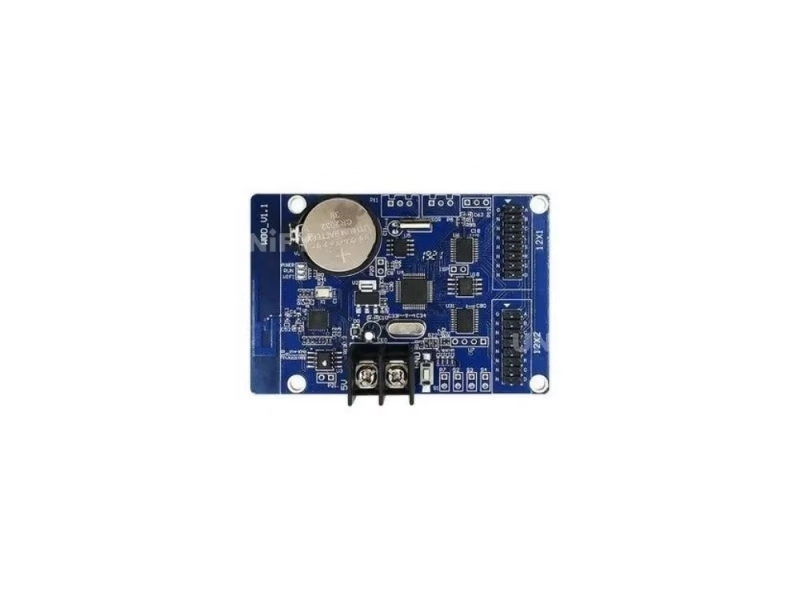
Product Overview
What Is the HD-W00 Single-dual Color LED Controller?
The HD-W00 Single-dual Color LED Controller is a low-cost Wi-Fi control card made by Shenzhen Huidu Technology: a small board that converts program data from your phone or laptop into the HUB12 signals a single-color or dual-color LED module needs. In the W0X family it is the entry model — it loads 320×32 pixels (or 640×16), one quarter of the W04’s 768×64, at roughly the lowest price in the series, which makes it the most specified controller for door lintel screens, storefront running-text signs and indoor message boards.
Short answer: The HD-W00 is a single-dual color Wi-Fi LED controller that drives up to 320×32 or 640×16 pixels over two HUB12 ports, stores up to 1,000 programs in 1 MB Flash across 20 display areas, runs on a 4.2–5.5 V supply at under 3 W, operates from -40°C to +80°C, and is programmed wirelessly with the LedArt app or the HD2018/HD2020 PC software.
The controller is the playback side of an asynchronous system — the synchronous vs asynchronous LED control guide explains when a Wi-Fi card like this one is the right architecture instead of a LED video processor. This page uses the official Huidu HD-W00 Specification V4.1 and V7.0.2 (both verified identical) as its data source and corrects the spec errors circulating on marketplace listings — see the correction table below.
Specifications
What Are the HD-W00 Single-dual Color LED Controller Specifications?
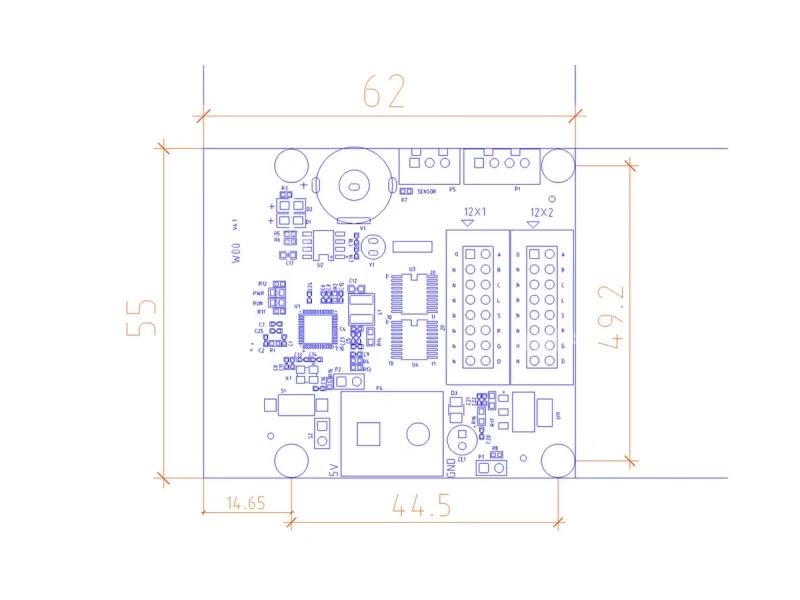
Specifications from the official Huidu HD-W00 Specification V4.1 and V7.0.2 (both documents verified page-by-page; the two versions agree on every parameter). Physical values follow the official document; weight is not published by Huidu — a verified distributor datasheet lists 45 g.
Core Specifications (Official Document)
Software: HD2018, HD2020 (PC) and LedArt (mobile app). The official download page for the whole Huidu system is mirrored on this site: Huidu system software downloads.
Spec Correction — Exclusive
Where Do Marketplace Listings Get the HD-W00 Specs Wrong?
We compared the top-ranking HD-W00 listings against the official Huidu specification document (V4.1 and V7.0.2, both verified). Three errors appear again and again — check your supplier’s page before ordering:
W0X Series Comparison
HD-W00 vs HD-W02 vs HD-W03 vs HD-W04: Which HD-W00 LED Controller Size Fits Your Screen?
All four W0X members share the same Wi-Fi architecture, the same 1,000-program engine, the same 20-area layout and the same 3 W envelope. They differ only in how many pixels they can load:
Three decisions, in order:
- Door lintel up to 3.2 m wide (P10, one or two rows)? Choose the HD-W00 — it is the cheapest card that drives that exact size.
- Single row wider than 6.4 m, or 512-pixel-wide single-row? Step up to the HD-W02.
- Two-row 768×32 or taller, or double-color signs? The HD-W03 and HD-W04 add the loading you need — the W00 tops out at 320×32.
The numbered differences above come straight from the official W0X series matrix on huidu.cn, cross-checked with the W00 specification document. For the software layer behind all four models, see our guide to control system software and hardware.
Core Features
What Does the HD-W00 Single-dual Color LED Controller Do?
Six functions from the official document define how the W00 behaves in the field:
📶 Wi-Fi on board, no wiring
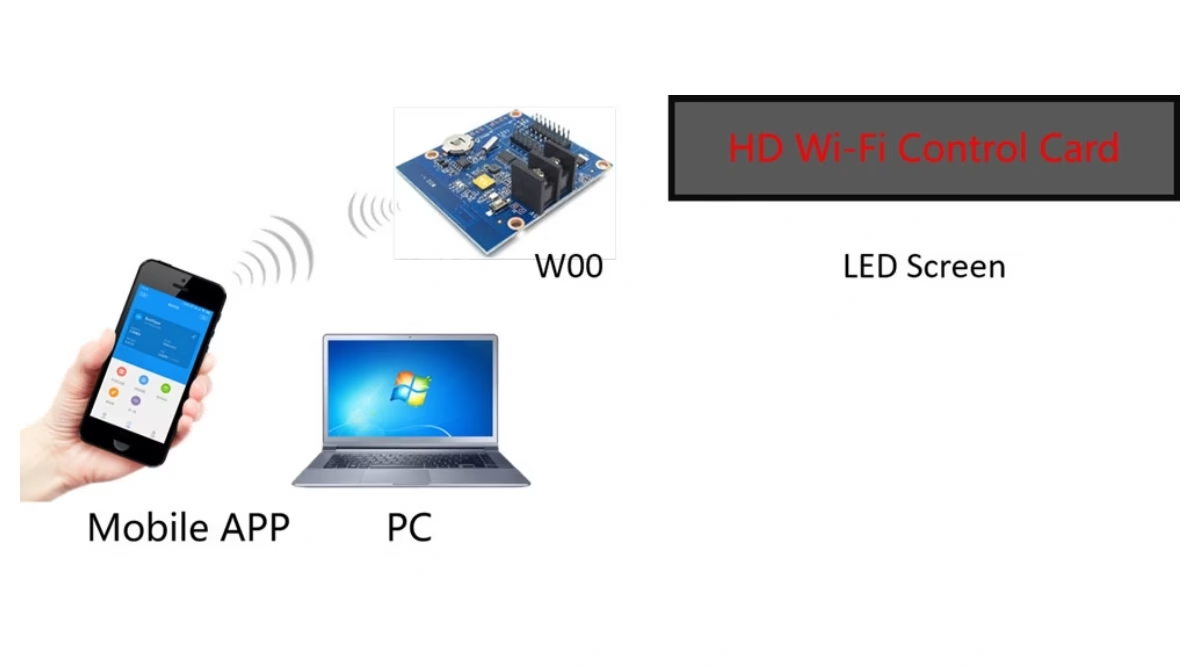
The card broadcasts its own hotspot. Phone or laptop connects to it directly — no router, no cable, no network configuration.
🔲 Program, area and custom borders
Each of the 20 areas gets its own border style — shaped frames and user-defined borders included, not just a plain rectangle.
🎬 20+ text effects and simple animation
Scrolling, flashing, cascading and more — plus simple animated words, with a variety of action display modes.
🌡️ Temperature, humidity, IR remote
P5 port takes a temperature/humidity sensor, P7 takes a photosensitive sensor; IR remote control is supported out of the box.
⏰ Timer on/off and 3-level dimming
Schedule the screen to power on at opening time and off at closing time; brightness adjusts in three modes — manual, automatic and time-based.
🕐 Digital, dial and lunar clock
Font, size, color and position are freely adjustable; multiple time zones are supported — useful for signs that must show home and local time.
Interface
Which Ports Are on the HD-W00 Control Card?
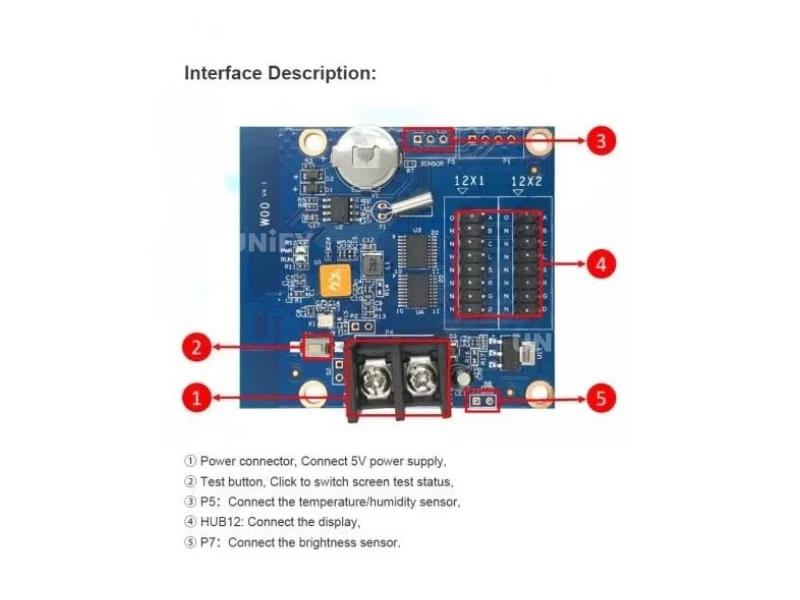
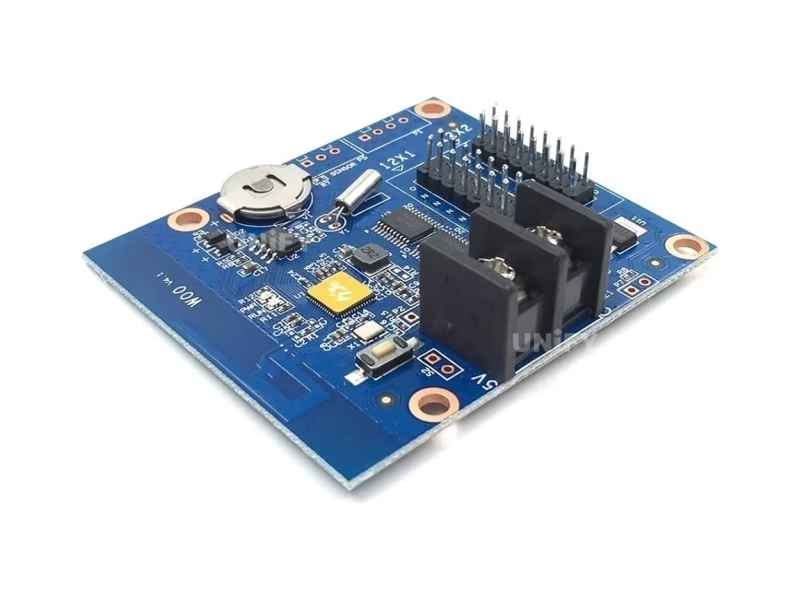
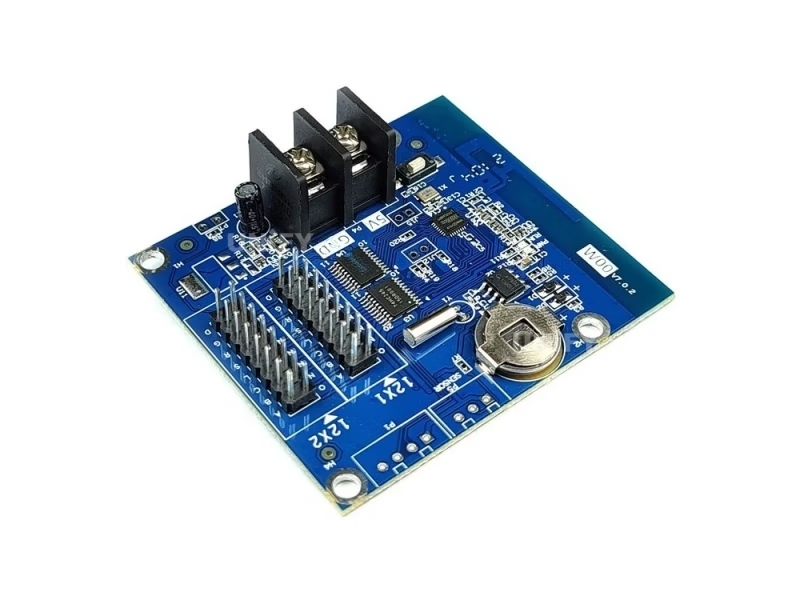
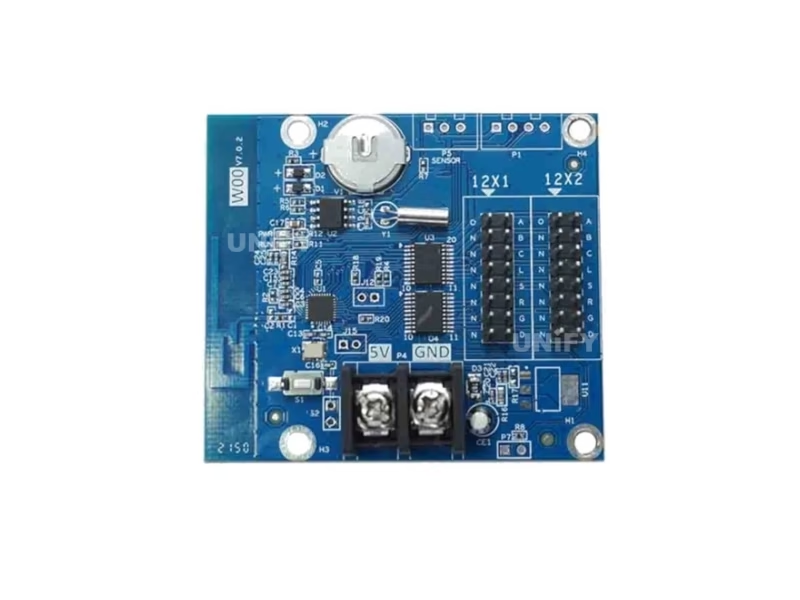
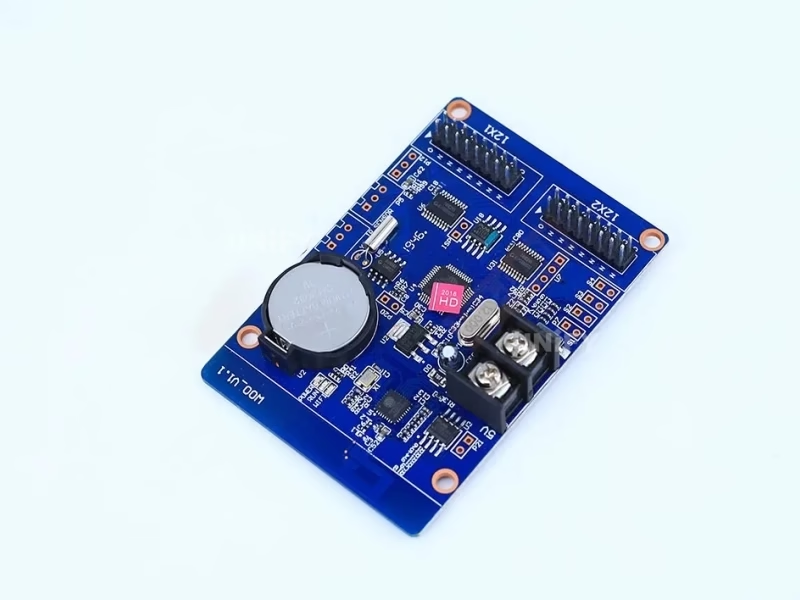
Five connection points, numbered exactly as in the official interface description:
- Power connector — 5 V supply input. Use a standard 5 V power supply; the rated range is 4.2–5.5 V.
- Test button — click to cycle the screen through test states when commissioning.
- P5 port — connects the temperature/humidity sensor (DS18B20 family).
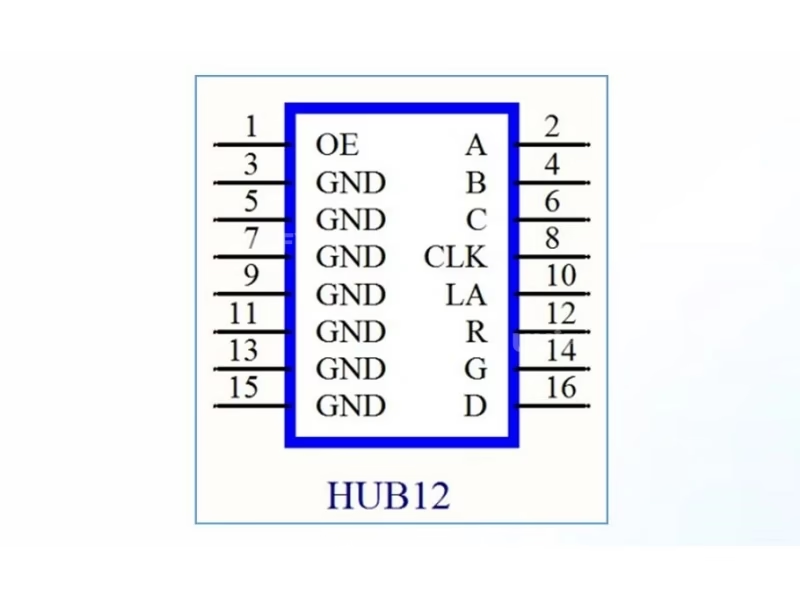
- HUB12 ports ×2 — connect the LED module(s). Two 12-pin HUB outputs drive up to 320×32 or 640×16 pixels.
- P7 port — connects the photosensitive (brightness) sensor for automatic dimming.
HUB12 is the standard single/dual-color module interface — the same port found on Huidu’s U6, E6 and W6 series cards, which is why a W00 can be swapped in as a drop-in replacement on existing P10 LED modules.
Loading Capacity
How Many LED Modules Can the HD-W00 Controller Drive?
The official figure is 320×32 or 640×16 pixels. Translated into real modules — the official Huidu tutorial video itself states the conversion:
Any combination of modules whose total pixels stay within 320×32 or 640×16 works — the limit is pixels, not module count. If your sign needs more width, the asynchronous LED media player range covers larger canvases, or step up within the W0X series (see the comparison above).
Huidu Official — HD-W0 WiFi card with Qiangli P10 single color module demo
Setup Tutorial
How to Set Up the HD-W00 LED Controller with the LedArt App?
The whole point of the W00 is a five-minute install. The full workflow:
- Wire the power. Connect a standard 5 V supply to the power connector (4.2–5.5 V rated). Keep the card battery tight, as the official precautions note.
- Plug the module cable. Connect the HUB12 ribbon cable from the card to your LED module(s). Use the test button to confirm the screen displays its test pattern.
- Join the card’s Wi-Fi. Open the phone’s Wi-Fi list — the card broadcasts its own hotspot; connect to it.
- Open LedArt and auto-search. The app finds the controller automatically — no IP configuration. (PC users run HD2018/HD2020 instead.)
- Build the program and send it. Add text, time or sensor areas, set effects and borders, then send. Up to 1,000 programs fit in the 1 MB Flash.
For the wiring and mounting side of the physical screen, our LED screen installation guide covers cabinets, brackets and routing; the LED sending card configuration page explains the signal path for larger synchronous systems.
Huidu Official — HD-W00 install and program P10 running text controller tutorial
Applications
Where Do Customers Use the HD-W00 Single-dual Color LED Controller?
The official document names two targets — door lintel screens and store screens. Field installations add three more common uses:
- Door lintel / running-text signs — the classic 3.2 m P10 sign above a shop door; the Wi-Fi card removes the cable-run cost entirely.
- Storefront and counter signs — price, offer and opening-hours text updated from the phone without touching the wall.
- Bank, hotel and lobby indicators — time/temperature combined with notice text, thanks to the clock and sensor ports.
- Vehicle-mounted message boards — 4.2–5.5 V operation and 3 W draw suit vehicle DC supplies.
- Indoor queue and info displays — count-up/count-down and lunar calendar content built into the card.
These are the same mounting environments covered in our indoor LED display screen and LED signage for outdoor advertising guides — the controller is one part of the signal chain, and the screen physics are the rest.
Factory & Quality Control
How Is the HD-W00 LED Screen Controller Supplied and Guaranteed?
Unify LED is a direct LED display manufacturer — we buy Huidu control cards at factory level, test them before shipment and back them with a 2-year warranty:
- Factory-direct pricing — no distributor markup between Huidu’s factory and your order; bulk discounts apply from 10 pcs.
- 100% functional test before dispatch — every card is powered and screen-tested; the -40°C to +80°C rating means the card survives the shipping leg.
- 2-year warranty — free replacement for manufacturing defects; our LED display maintenance guide covers the field side of keeping a sign alive for its full LED screen lifespan.
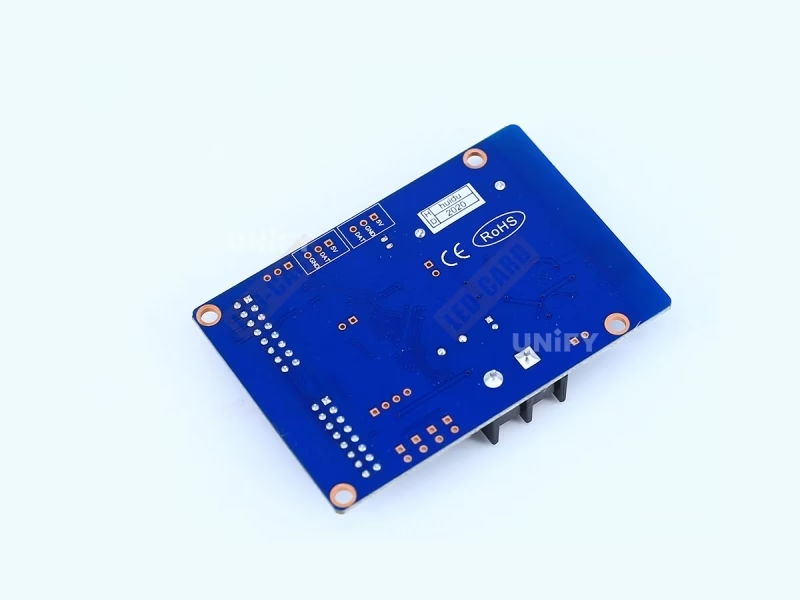
- CE, FCC and RoHS certificates — issued by Huidu, verified by us, available on request.
Pricing
How Much Does the HD-W00 LED Controller Cost?
Published street prices for the W00 sit in a narrow band — that is what the SERP shows in August 2026:
At these prices the W00 is an expendable part — the cost that actually matters is the display it drives, and the recent industry-wide LED display price increases hit modules harder than controllers. Factory-direct pricing from Unify LED is typically below the listed street prices at 10+ pcs; request a quote for your exact quantity and destination. Power cost is trivial — at 3 W the controller consumes less LED display power than a phone charger.
FAQ
HD-W00 Single-dual Color LED Controller: Frequently Asked Questions
Q1. Is the HD-W00 single color or dual color? The HD-W00 is a single-dual color controller: the HUB12 ports drive single-color modules (red or single color, up to 320×32 / 640×16) and dual-color modules (red+green) of the same pixel dimensions. The official document markets it as a single-color card; the same hardware is the entry of Huidu’s single-dual color Wi-Fi family.
Q2. How big a screen can one HD-W00 drive? 320×32 or 640×16 pixels — in P10 modules that is 10 modules in two rows (3.2 m × 0.32 m) or 20 modules in one row (6.4 m × 0.16 m). P6 and P4.75 modules scale proportionally (see the loading table above).
Q3. How far does the built-in Wi-Fi reach? Huidu does not publish a range figure. Field practice: the card’s hotspot reliably covers a shop interior (roughly 15 m line of sight); for longer distances, connect the card to a router and update over the LAN instead.
Q4. How many programs fit in the 1 MB Flash? Up to 1,000 programs across 20 display areas, each with its own effects and borders. Real capacity depends on text length — plain text programs are tiny; image backgrounds consume more.
Q5. What power supply does the HD-W00 need? A standard 5 V supply (rated 4.2–5.5 V). The card draws under 3 W. Use a regulated 5 V supply — the official precautions warn that a standard 5 V voltage is required for long-term stable operation.
Q6. I forgot the Wi-Fi password — can I reset it? Yes. The official reset procedure is a 75-second video below: power the card, reset the Wi-Fi settings, and rejoin with the default hotspot credentials.
More controller questions are answered in our LED display FAQ and warranty terms.
Huidu Official — reset WiFi password for single/dual color LED controller
Certifications
Which Certificates Does the HD-W00 LED Controller Carry?
The official specification lists three certificates: CE, FCC and RoHS. Environmental ratings from the same document: operating temperature -40°C to +80°C, storage -40°C to +105°C, humidity 0–95%. For importers this means the W00 clears EU, US and most global market requirements without extra paperwork.
Get HD-W00 Bulk Pricing from the Factory
Genuine Huidu cards, 100% pre-tested, 2-year warranty, shipped worldwide. Tell us your module type, quantity and destination — quote within 24 hours.
Deep Blog
HD-W00 Single-dual Color LED Controller: The Complete Buying Guide (2026)
The HD-W00 Single-dual Color LED Controller is the most installed Wi-Fi control card in the door-sign market, and most of what is written about it online is copied from the same three distributor listings — including the wrong figures. This guide rebuilds the W00 from the official Huidu specification document (V4.1, July 2020 and V7.0.2, July 2021 — both verified page by page, identical on every parameter), then answers the questions every buyer actually asks: what it drives, how to install it, what it costs and where the catch is.
Chapter 1 — The W0X Family: Where the HD-W00 Sits
Huidu’s W0X series is a four-model ladder of Wi-Fi control cards that share one architecture — same Wi-Fi, same 1,000-program engine, same 20-area layout, same 3 W budget — and differ only in pixel loading. The HD-W00 loads 320×32 or 640×16. The HD-W02 doubles width (512×32, 1024×16). The HD-W03 adds height (512×48, 768×32, 1280×16). The HD-W04 tops the family (768×64, 1024×48, 1536×32). Every model in the series carries the same certificates (CE, FCC, RoHS) and the same environmental ratings (-40°C to +80°C working).
The naming confusion starts here: Huidu’s English site files the whole series under “Single-color Controller,” yet the cards drive dual-color (red+green) modules just as easily, and resellers market them as “single-dual color.” Neither label is wrong — the HUB12 port accepts both. The practical reading: if your screen is red-only or red-green two-color, the W0X cards handle it; full-color RGB modules need a different card class entirely.
Chapter 2 — What the HD-W00 Actually Drives: HUB12 and Single/Dual Color
The W00’s business end is a pair of HUB12 (12-pin) outputs. HUB12 is the standard single/dual-color module interface in the industry — the same connector used across Huidu’s U6, E6 and W6 series cards — so a W00 slots into a screen originally built for a different controller without rewiring. The card sends data for one or two module rows through these ports; the 12-pin allocation covers R, G (for dual color), A/B scan lines, clock, latch and OE, which is why the W00 supports 1/1 through 1/4 scan modules.
What “single-dual color” means in practice: a single-color module has one LED color per pixel (typically red), a dual-color module has two (red + green, which combine into amber, orange and yellow on screen). Both connect through the same HUB12 cable and both run on the same W00 — the card detects the module type during configuration in LedArt. Full-color RGB modules (HUB75, 3-in-1 chips) belong to a different card class entirely, so do not size an RGB project against this controller.
Scan ratio matters when choosing modules: the official document does not limit scan explicitly, but the 320×32 / 640×16 pixel budget is the binding constraint. A P10 32×16 module in 1/4 scan is the reference configuration in Huidu’s own tutorial — that combination is the safe, documented baseline for any installation.
Chapter 3 — Loading Capacity in Real Modules
Buyers always ask the capacity question in modules, not pixels. The official document says 320×32 or 640×16; Huidu’s own tutorial video translates it into P10 modules: 10 pieces of P10 in two rows (3.2 m × 0.32 m) or 20 pieces in one row (6.4 m × 0.16 m). For P6 modules (32×16 px each), the same pixel budget gives 1.92 m × 0.192 m (two rows) or 3.84 m × 0.096 m (one row); for P4.75, 1.52 m × 0.152 m or 3.04 m × 0.076 m.
The limit is pixels, not module count or meter length. Two rows of 10 P10 modules (640×16 equivalent in a different arrangement) do not fit where the document says 320×32 — height and width both cap out. When a sign outgrows the W00, the upgrade path is mechanical: the W02/W03/W04 use the same HUB12 wiring, so the swap is a card replacement, not a rewire.
A worked example makes the rule concrete. A typical shop door lintel is 3.2 m wide. P10 modules are 320 mm wide, so the sign takes 10 modules in a row. One row of 10 P10 = 320×16 pixels — inside the W00’s budget. Add a second row (two-row P10 signs are the classic red/amber storefront look) and the total becomes 320×32 — exactly the documented maximum, still on one card. Push the same sign to 16 modules (5.12 m) and the width alone exceeds 320, so the W00 is out: the W02 (512×32) becomes the correct choice. This is why the conversion table above is the piece of information most buyer questions are really asking for.
Chapter 4 — Wi-Fi Setup: Phone to Screen in Five Steps
The W00’s core promise is the removal of the installation cable run. The card broadcasts its own Wi-Fi hotspot; a phone or laptop joins it directly and updates programs through the LedArt app (Android/iOS) or the HD2018/HD2020 PC software. The official connection demo shows exactly this: no router, no switch, no IP entry.
The five-step install: (1) connect a standard 5 V supply to the power connector — the rated range is 4.2–5.5 V and the official precautions insist on a standard 5 V supply for long-term stability; (2) plug the HUB12 ribbon cable into the module(s); (3) use the test button to confirm the test pattern before configuring; (4) join the card’s Wi-Fi hotspot from the phone; (5) open LedArt, let it auto-search the controller, build the program and send it. The whole sequence takes five minutes on a first install — the official video below walks through it module by module.
Two installation details the official demo does not spell out. First, the antenna orientation: the W00’s Wi-Fi antenna is printed on the board, so mount the card with the antenna edge exposed rather than pressed against metal — a steel cabinet can cut the hotspot range to a few meters. Second, the test button is your commissioning tool: press it once for a full-on test pattern, press again to step through color bars, and the sign either works or isolates the fault to the module/cable side before any software is involved. Reversing the HUB12 cable is the most common first-install mistake — the ribbon connector has a keyed pin 1, and both Huidu and module makers print the pin-1 triangle on the header.
Huidu Official — LedArt app new functions for single color WiFi controller
Chapter 5 — Software: LedArt, HD2018 and HD2020
Three applications cover the W00. LedArt is the mobile app for day-to-day edits from the shop floor — text, time, temperature areas, effects, borders, brightness. HD2018 and HD2020 are the PC programs for batch work, calendar scheduling and the deeper layout controls. All three are free; the official software is mirrored on our Huidu system downloads page so buyers behind restricted networks can still get the installers.
The 1 MB Flash holds up to 1,000 programs across 20 areas, each area with independent effects and borders. A plain-text storefront rotation — offer, hours, contact, temperature — uses a fraction of a megabyte; the capacity discussion only gets real when you pack image backgrounds into every program. Program scheduling covers time-section playback (morning text, afternoon text) and button-triggered switching.
Which desktop program should a buyer standardize on? HD2018 is the older editor, HD2020 the current one — Huidu distributes HD2020 V1.3.1.3 as the live release, and its project format is the one the newer firmware expects. For a fleet of screens, keep one PC on HD2020 and treat HD2018 as the migration tool for legacy projects. On the phone side, LedArt (published by Huidu as “cn.huidu.hdscapp” on the Google Play store) is the app the official tutorials demonstrate, and it is the same app used by the newer HD-W0 card, so staff trained on a W00 can operate an upgraded fleet without retraining.
The text-rotation option is worth knowing before the first program is designed: the W00 rotates text 90°, 180° and 270°, which lets one physical installation serve vertical door frames and wide-format lintels from the same card. Overlapping regions are supported too — a temperature readout can sit inside a scrolling text area without being split into separate zones.
Chapter 6 — Clock, Sensors and the Small Details
Three hardware details separate the W00 from generic cheap cards. First, the clock: digital, dial and lunar displays with free font/size/color/position control and multiple time-zone support — a genuine requirement for signs that show home time in a foreign market. Second, the sensors: the P5 port takes a temperature/humidity module (DS18B20 family) and the P7 port a photosensitive sensor, feeding live values into text areas — a bank or pharmacy lobby sign shows temperature and humidity without any extra controller. Third, the automation: timer on/off switching plus three brightness modes (manual, automatic and time-based) cover the energy-management story that facility managers ask about.
Sensor wiring is simple but easy to get wrong. The temperature/humidity sensor plugs into the P5 port only — the P7 port is for the photosensitive (light) sensor, and the two are not interchangeable; swapping them produces a blank sensor area that reads fine in software but stays at zero on the screen. The official document lists the sensor family as part of “extended equipment” rather than a bundled accessory, so order the sensors as an option when buying the card. With the photosensitive sensor installed, the automatic dimming mode adjusts brightness to ambient light — the same behavior facility managers expect from premium signage, at a controller price that makes it affordable on every sign in a chain.
The three brightness modes deserve a decision rule. Manual mode fixes the brightness level you set — right for screens facing controlled indoor light. Automatic mode reads the P7 sensor continuously — right for storefronts whose daylight changes through the day. Time-based mode switches between a day level and a night level on the internal clock — right for signs near residences where brightness after 10 p.m. is a complaint risk. Most chains end up running time-based mode with automatic as the fallback; all three are configured in LedArt under the display settings tab.
Chapter 7 — Troubleshooting the Common Failures
Four failures cover nearly every support ticket on this card. Forgotten Wi-Fi password: reset the card’s Wi-Fi settings and rejoin with the default hotspot credentials — the official 75-second video demonstrates the exact sequence. No picture after wiring: cycle the test button; a correct test pattern isolates module faults from controller faults. Screen flickers under load: almost always the power supply — the 4.2–5.5 V window is tight and a worn 5 V unit dips under current draw; replace the supply before suspecting the card. Sensor area shows dashes: check the P5/P7 sensor is seated on the correct port and the sensor type matches the software setting.
Two less common failures complete the picture. The phone cannot find the hotspot: the W00 broadcasts in 2.4 GHz only — a phone forced onto 5 GHz Wi-Fi will not see it; disable the 5 GHz band or connect within the card’s default SSID list. If other 2.4 GHz devices flood the band in a busy shop (many signs, many routers), the hotspot can be starved — power-cycle the card and try again. Programs vanish after a power cut: programs live in the 1 MB Flash, so they survive power loss by design; if content disappears, the card has been reset to factory state, which also wipes the Wi-Fi password — re-pair with the default credentials and resend the program batch from HD2020.
Firmware updates come from Huidu directly and are applied through HD2020; the current family release is the one the official download page serves. Update one card first and verify the test pattern before rolling out to a fleet — a routine precaution that prevents 20 signs sharing the same bad flash.
For deeper signal-path problems, the LED display troubleshooting guide walks through module, cable and controller diagnostics in order; power-side issues are covered in our power supply diagnostics article.
Chapter 8 — Price, Warranty and Factory Buying
Street prices for the W00 cluster between USD 5 and USD 8 (verified August 2026: USD 6.00 at led-estore.com, ₹423–700 in India, ~USD 2.5–3 at Indonesian resellers before shipping). At that price point the controller is the cheapest component in a door-sign system — the module, cabinet and power supply dominate the bill. Buying from a factory direct channel still matters for three reasons: authenticity (counterfeit W00 cards circulate in the sub-$4 range), testing (every card we ship is powered and screen-tested) and warranty (2 years versus the 1 year typical of resellers).
Unify LED is an LED screen manufacturer in Changsha, China, supplying modules, cabinets, power supplies and control systems together — the W00 ships bundled with the modules it is specified against, tested as one assembly before dispatch. Ordering the card alone works the same way: same-day dispatch, 2-year warranty, CE/FCC/RoHS documentation included. For the complete context of the control-system market and prices, our 2026 price report covers the supply-chain picture.
A final buying checklist, in the order a procurement email should ask: (1) confirm the exact module model and pixel pitch the card will drive, and let the supplier verify the 320×32 / 640×16 budget against it; (2) ask whether the listed price includes the temperature/humidity and photosensitive sensors — many street listings quote the bare card; (3) verify the certificate copies (CE, FCC, RoHS) arrive with the shipment, because customs in several markets now asks for them at entry; (4) confirm the Wi-Fi band story for your country — 2.4 GHz is universal, but a 5 GHz-only office environment is the one place this card cannot reach; (5) order one spare card per ten installed — at the W00’s price point, the spare is cheaper than the service call that a failure without a spare causes.
Conclusion. The HD-W00 Single-dual Color LED Controller is the right part when the job is a single/dual-color screen up to 320×32 or 640×16 pixels, the installer wants zero data wiring, and the budget is a handful of dollars per card. Match the loading to your module plan, feed it from a clean 5 V supply, and the W00 will run for the life of the sign it drives — at 3 W, with CE/FCC/RoHS behind it and a 2-year factory warranty in front of it.
LED Control System Range
Which LED Controllers Should You Explore Next?
Colorlight and Novastar control products, receiving card guides and free software resources on UnifyLED.
Novastar Sending Controllers
Guides & Resources
Where Can You Download HD-W00 Resources?
The official Huidu HD-W00 Specification V4.1 and V7.0.2 — the data source for every figure on this page.
Related: browse the full Huidu LED controller catalog — 12 models across four product lines, free HDSet / HDPlayer / HD Show software, cloud remote control without a subscription, and factory-direct pricing.