
Colorlight Z6 PRO-G2 LED Video Controller
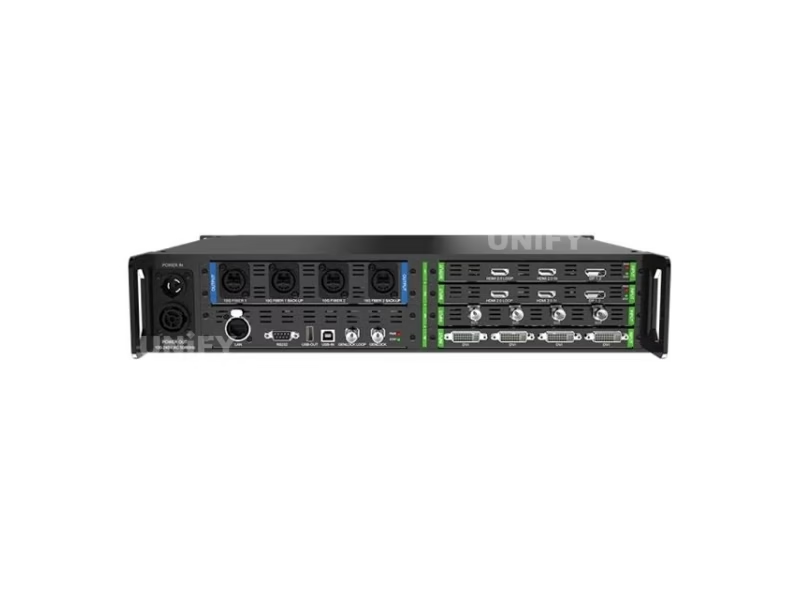
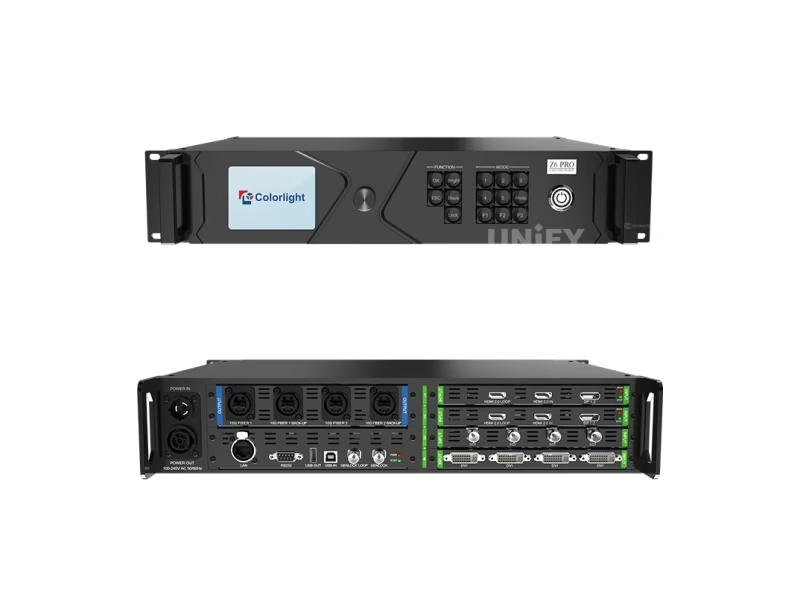
The Colorlight Z6 PRO-G2 LED Video Controller is Colorlight’s new-generation super controller: video splicing, processing and sending in one 2.5U chassis, with four 4K input card slots (HDMI 2.0 / DP 1.2 / 12G-SDI), four 10G fiber outputs, a 13.1-million-pixel loading capacity, HDR10 + HLG wide-gamut display, 3D-LUT cinematic color tools and Frame Multiplexing for XR virtual production.
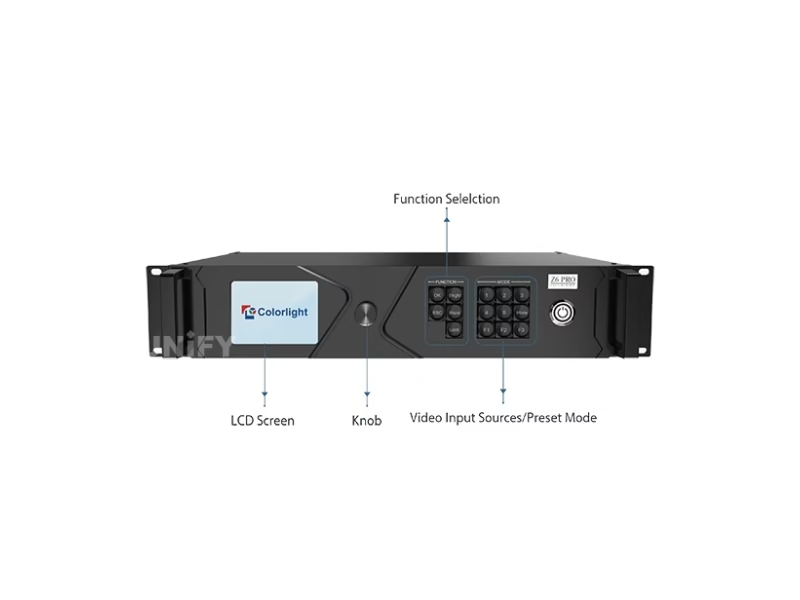
What Is the Colorlight Z6 PRO-G2 LED Video Controller?
The Colorlight Z6 PRO-G2 LED Video Controller is a new-generation professional LED display controller that combines video splicing, video processing and sending functions in one 2.5U chassis — and adds the cinematic color tools (3D-LUT, Color Magic, Color Curve) that previously required a rack of external LUT boxes, format converters and sync generators. The G2 is the current generation of the Z6 Pro family: four 4K input card slots, four 10G fiber outputs, HDR10 + HLG display, and Frame Multiplexing built for XR virtual production and film shooting. For the processor category context, see LED video processor.
Short answer: The Colorlight Z6 PRO-G2 is a 2.5U super controller with four 4K input slots (HDMI 2.0 / DP 1.2 / 12G-SDI cards, 4096×2160@60Hz each, 8/10-bit, 23.98–240Hz), four 10G fiber outputs (two main, two backup, 2 km single-mode), a 13.1-million-pixel total loading capacity with an 8192×8192 canvas, four-window display, HDR10 + HLG, 3D-LUT cinematic color, Frame Multiplexing for multi-camera XR shooting, and Genlock input with loop output. The previous generation Z6 Pro (8.85M pixels, 16 layers) circulates under the same name — see the comparison section.
Colorlight’s official Z6 Pro family introduction:
Colorlight Official — Z6 Pro super controller introduction video
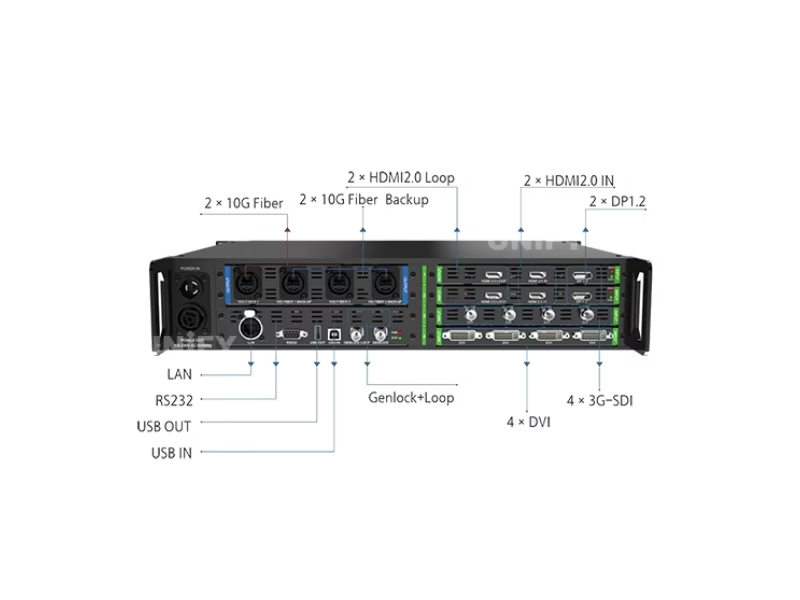
What Are the Colorlight Z6 PRO-G2 LED Video Controller Specifications?
All data from the official Colorlight Z6 PRO-G2 Specification V1.4.
Inputs — 4 Card Slots, 3 Card Types (Official V1.4)
Outputs & Processing (Official V1.4)
Physical & Electrical (Official V1.4)
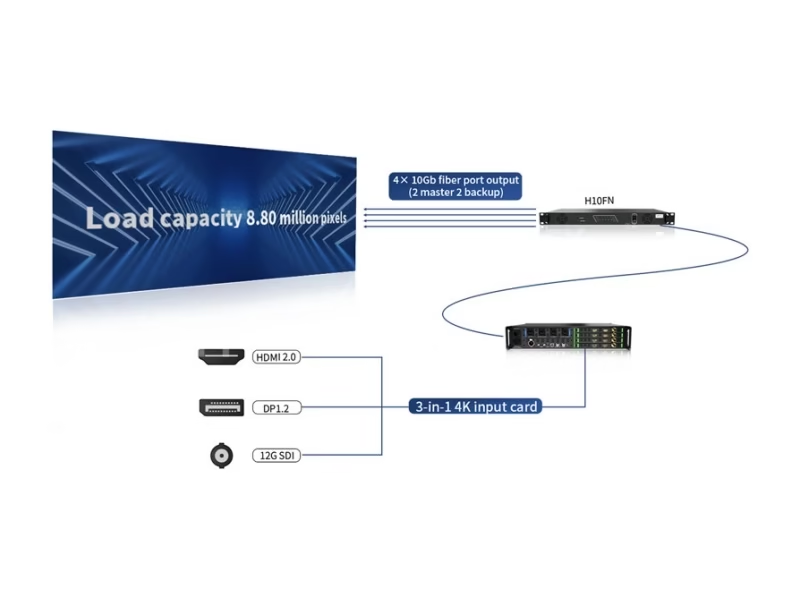
Why Does the Official Z6 PRO-G2 Spec Sheet Contain Two Loading Figures?
The official Z6 PRO-G2 Specification V1.4 itself contains two capacity figures — 8.80M pixels in the overview section and 13.10M pixels in the fiber output section. We verified both passages and present the reconciliation honestly, because the distinction decides processor count on large walls:
The second recurring confusion: the 8192×8192 canvas. That coordinate space would hold 67.1M pixels at full density — the canvas bound is about aspect and geometry (ultra-wide strips, portrait towers, unusual shapes), not about pixel volume. Total loading stays capped at the capacity figure above regardless of how the 8192×8192 space is used.
The procurement rule: size the wall against 13.10M pixels as the planning ceiling, verify the figure against Specification V1.4’s fiber output section, and keep the 8192 dimension limit as a geometry check. A supplier who cannot explain the 8.80M/13.10M difference has not read the document they are quoting.
How Does the Colorlight Z6 PRO-G2 Compare to the Original Z6 Pro?
Two generations share the “Z6 Pro” name in the marketplace. The G2 is the current platform — the generation the Specification V1.4 document describes:
The decision in three numbered differences:
- Capacity. 8.85M versus 13.10M — the G2 loads 48% more pixels, enough to change processor count on large volumes and stadium boards.
- Color science. The G2’s 3D-LUT / Color Magic / Color Curve replace external LUT boxes — the difference between a controller and a color pipeline for film and XR work.
- Virtual production. Frame Multiplexing and 12G-SDI inputs are G2-era features built for multi-camera XR shooting; the original predates them.
For the X series tiers below this class, the chain starts at the X2 and runs through X4, X8m and X16.
How Do the 3D-LUT, Color Magic and Color Curve Work on the Colorlight Z6 PRO-G2 LED Display Processor?
Three color tools on the G2 do the work of a rack of external boxes — this is the feature set that puts the Z6 PRO-G2 in film and XR production, not just events:
3D-LUT — cinematic color grading on the controller
A 3D lookup table maps the wall’s color response to the production’s grading pipeline, with an adjustment-strength setting. In practice: the colorist’s LUT loads directly onto the G2, and the wall renders the graded look instead of a shifted approximation — the function that previously required an external LUT box between the media server and the wall.
Color Magic — HSV-model multi-color transformation
Works in the HSV color model to transform specific colors — shift the costume blue without touching skin tones, retune a brand color across a wall network. Hue-targeted adjustment is what a plain RGB correction cannot do.
Color Curve — per-grayscale-level RGB and brightness
Adjusts RGB and overall brightness at each grayscale level independently — shadow detail, highlight roll-off and mid-tone balance tuned point by point. Combined with precise color temperature control and individual RGB adjustment, the three tools cover the color pipeline end to end.
Colorlight’s sibling-flagship walkthrough of the professional color feature set:
Colorlight Official — Z8t LED Video Processor Highlights EP01 video
How Does HDR10 and HLG Work on the Colorlight Z6 PRO-G2 LED Video Controller?
The G2 displays HDR10 and HLG with wide-gamut support — a class difference from the X series transport controllers below it, which explicitly do not support HDR. The practical meaning in three points:
🎬 HDR10
Static-metadata HDR for pre-mastered film and premium content — deep blacks and bright highlights preserved on the wall.
📺 HLG
Broadcast-native HDR with standard dynamic range compatibility — the format live television uses, backward-compatible with SDR displays.
🎨 Wide Gamut
Wide-gamut HDR display alongside the 3D-LUT pipeline — the HDR signal lands on a color-managed wall, not just a brighter one.
The tier boundary matters at procurement: every X series controller below the G2 lists HDR as unsupported in its official documentation, while the G2 lists HDR10 and HLG as headline features. If HDR content is part of the project brief, this is the first Colorlight tier that satisfies it natively — compare the broader HDR controller category at 4K60 HDCP HDR LED controllers.
Colorlight’s official HDR comparison:
Colorlight Official — HDR vs normal effect comparison video
How Does Frame Multiplexing Make the Z6 PRO-G2 Fit for XR Shooting?
Frame Multiplexing is the G2’s signature virtual-production feature: it fuses multiple video signals for multi-camera shooting of virtual backgrounds. In an XR volume, each camera position needs its own perspective-correct background — the G2 multiplexes the per-camera views into the wall’s output so several cameras shoot the same LED volume simultaneously, each seeing its correct virtual scene.
Frame rate multiplication completes the pipeline: automatic or custom multiplication up to 6× takes a lower-rate source and outputs higher-rate frames — the film-shooting workflow that matches the camera’s shutter to the wall’s refresh without visible scan artifacts. Combined with Genlock IN/LOOP and the 12G-SDI input cards, the G2 replaces the standalone sync generator and format converter in the XR rack.
Low latency, per signal: one selected signal can enable the low-latency function (at least one frame) — the camera-feed signal gets the fast path while background sources run the standard pipeline. The selectable approach avoids spending latency budget on signals that do not need it.
Colorlight’s sibling-flagship feature walkthrough:
Colorlight Official — Z8t LED Video Processor Highlights EP02 video
How Do the 10G Fiber Outputs Change the Rental Workflow on the Z6 PRO-G2?
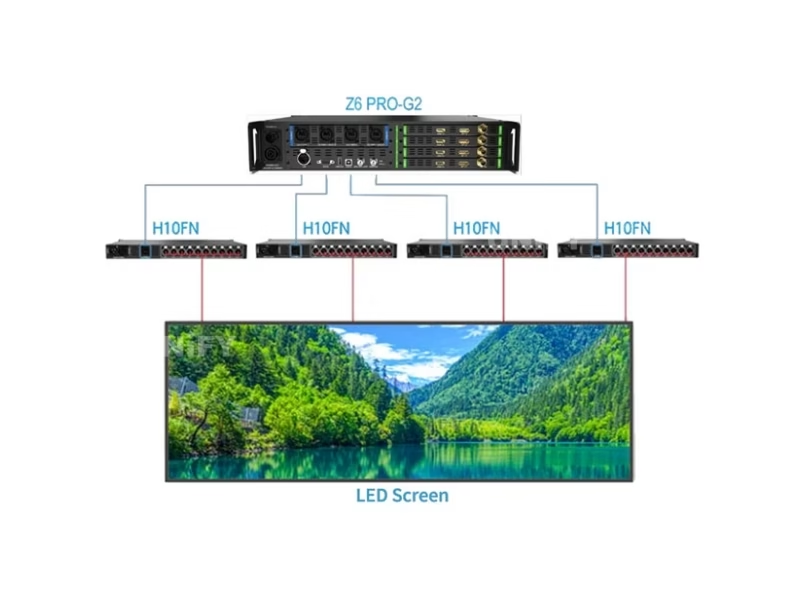
Four 10G fiber outputs — two main, two automatic backup — replace copper Ethernet runs with single-mode fiber across the venue:
📡 2 km Reach
Single-mode 1310nm fiber carries the wall signal 2 kilometers — FOH-to-stage runs without extenders, stadium boards fed from the control room.
🛟 2 Main + 2 Backup
The backup pair mirrors FIBER 1/2 with automatic switching — a cut cable on a live show fails over instead of blacking out.
🔌 Touring Connectors
Neutrik opticalCON DUO for stage-grade locking fiber plus LC-LC — the connector set rental crews already carry.
⚡ Cascade Power
Neutrik POWER OUT (4A) feeds the next unit — daisy-chained G2 racks share one power feed, one less cable in the flight case.
Colorlight’s official Z6 Pro rental-platform overview:
Colorlight Official — Super controller for the rental area video, Z6 Pro platform
How Do You Operate the Front Panel of the Colorlight Z6 PRO-G2 LED Video Controller?
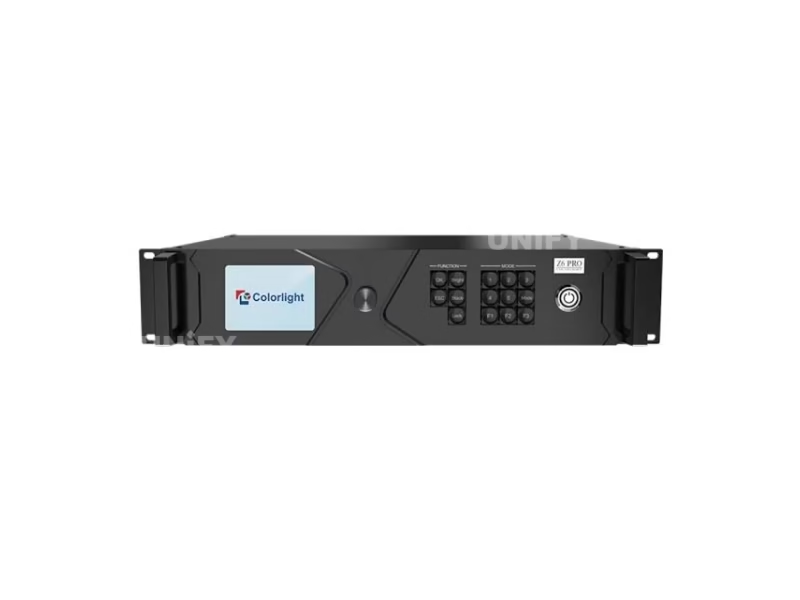
The G2’s front panel is built for show-floor speed — beyond the LCD, knob and OK/ESC/Bright/Black/Lock keys shared with the X series flagships, it adds three operator-grade controls:
🔢 Preset keys 1–5
Five direct preset buttons — one key per show state, no menu scrolling.
🎛 MODE key
Cycles preset modes — the walk-up interface for rental crews.
⚡ F1 / F2 / F3 shortcuts
F1: main interface · F2: signal list · F3: signal selection — three jumps that replace menu navigation in live operation.
🔒 LOCK + Power
Lock protects the panel in public spaces; the dedicated power button sits at the panel edge.
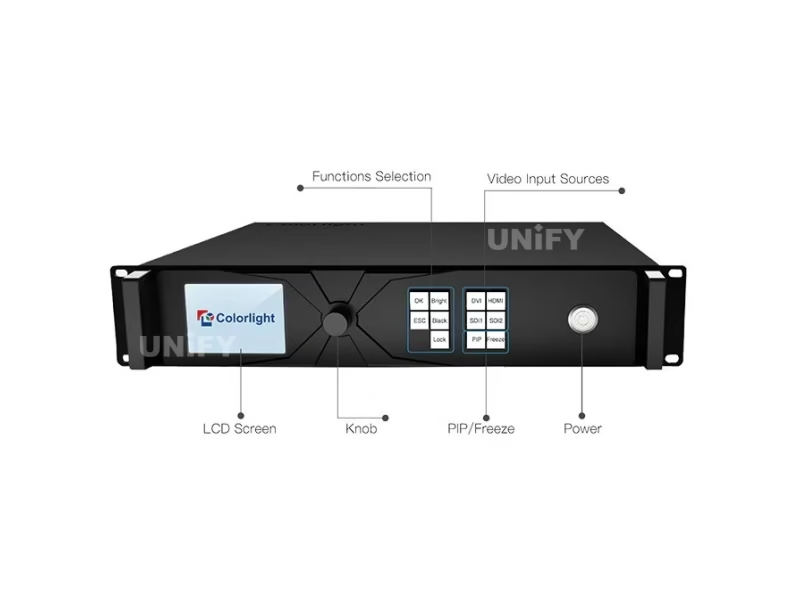
How Does Genlock and Low Latency Work on the Colorlight Z6 PRO-G2?
Genlock IN + LOOP. The G2 accepts bi-level or tri-level sync on GENLOCK IN and passes it onward through GENLOCK LOOP — the same studio-sync architecture as the X16 flagship, here paired with XR-grade tools. Multi-controller chains share one clock; camera-facing walls render on the camera’s timing; LED volumes hold frame agreement with the render engine.
Low latency, applied where it matters. Any single signal can enable the low-latency function — at least one frame — while the other sources run the standard pipeline. The design choice is deliberate: the camera feed gets the fast path in XR volumes; playback and graphics keep the standard processing budget. No global latency toggle, no wasted pipeline.
Where Is the Colorlight Z6 PRO-G2 LED Video Controller Used?
XR Virtual Production
Frame Multiplexing for multi-camera volumes, Genlock IN/LOOP for camera-render sync, 12G-SDI cards for camera feeds — the G2’s native territory.
Film & Movie Shooting
3D-LUT loads the colorist’s grade directly onto the wall; frame rate multiplication matches camera shutter; HDR10 for premium content.
High-End Stage Rental
2 km fiber runs FOH-to-stage, backup outputs for live shows, opticalCON touring connectors, preset keys for walk-up operation. See LED screen for events.
Broadcast & Sports
HLG for live television, 12G-SDI broadcast feeds, 13.1M pixels for stadium-scale boards, backup fiber for on-air reliability.
Why Buy the Colorlight Z6 PRO-G2 LED Video Controller From an LED Display Factory?
At super-controller prices, the generation question decides everything — and it is exactly the question unverified channels get wrong. Buying through a full-line LED screen manufacturer changes the purchase in three ways:
1. The G2, verified as the G2. Every unit we ship comes from Colorlight’s authorized channel with serial-number traceability and the V1.4 specification — not an original Z6 Pro sold under the G2’s search terms, and not a unit whose spec version the supplier cannot state.
2. Commissioning that finishes the color pipeline. Our engineers configure the G2 end to end — the input card plan, the fiber port map, the Genlock chain, the LUT loading workflow and the presets — against your actual wall and receiving cards. Our quality control of LED display process applies the same rigor to every batch.
3. Lifecycle economics. The control layer typically outlives the LED modules it drives — LED screen lifespan is set by the modules, not the electronics. We back the G2 with a 2-year warranty and keep spares for the project’s operating life.
How Much Does the Colorlight Z6 PRO-G2 LED Video Controller Cost?
Price transparency, stated plainly: the original Z6 Pro generation traded around $15,950–$18,000 in marketplace listings we reviewed, and the G2 — with its 13.1M capacity and cinematic color tools — positions at or above that band depending on input-card configuration. The card mix changes the price materially: 12G-SDI cards cost differently from HDMI 2.0 cards, and four slots multiply the difference. Factory-direct tiers for B2B buyers:
For context: the LED display control system market reached US$659 million in 2025, projected at 13.6% CAGR to US$1.59 billion by 2032 (QYResearch, Global LED Display Control System Market Report 2026). Ask for a factory-direct quote with your exact card configuration — the card mix is the price, and a quote without it is a guess.
What Do Buyers Ask About the Colorlight Z6 PRO-G2 LED Video Controller?
What Certifications Does the Colorlight Z6 PRO-G2 LED Video Controller Carry?
Certifications per the official Specification V1.4, with Colorlight original packaging on every batch.
Ready to Source the Colorlight Z6 PRO-G2 LED Video Controller?
Factory-direct pricing, genuine G2 stock with your card configuration, LUT pipeline support and 2-year warranty.
unifyledscreen@gmail.com | +86-191-18802497
What Should Engineers Know Before Buying the Colorlight Z6 PRO-G2 LED Video Controller?
Published: August 2026 | 14 min read | UnifyLED Engineering Team
The Colorlight Z6 PRO-G2 LED Video Controller is the model where Colorlight’s line crosses from controllers into production tools — and where two generations sharing one name turn the procurement step into a verification exercise. The official specification contains two different loading figures; the marketplace mixes the G2’s specs with its predecessor’s; and the features that justify the price (3D-LUT, Frame Multiplexing, HDR10) appear on almost no listing in detail. This guide resolves all of it against the official Z6 PRO-G2 Specification V1.4.
Short answer: The Colorlight Z6 PRO-G2 is a 2.5U super controller combining splicing, processing and sending: four 4K input slots (HDMI 2.0 / DP 1.2 / 12G-SDI cards), four 10G fiber outputs (two main, two backup, 2 km), a 13.10M-pixel total loading capacity, four windows, HDR10 + HLG, 3D-LUT / Color Magic / Color Curve color tools, Frame Multiplexing for multi-camera XR shooting, and Genlock IN/LOOP. The original Z6 Pro (8.85M, 16 layers) circulates under the same name at $15,950–$18,000 market prices — the comparison section below separates the generations.
Chapter 1 — Definition: A Production Tool, Not Just a Controller
The Colorlight Z6 PRO-G2 LED Video Controller is a new-generation professional LED display controller that combines video splicing, video processing and sending functions in one chassis — and adds cinematic color tools that previously lived in external hardware. In an XR or film rack, the G2 replaces the LUT box, the format converter and the sync generator; in a rental rack, it replaces the processor plus the copper Ethernet infrastructure. The official specification’s own application list makes the positioning explicit: high-end stage leasing, XR virtual shooting, and movie shooting.
The architecture that supports the positioning: four input-card slots accept HDMI 2.0, DP 1.2 or 12G-SDI cards — each up to 4096×2160@60Hz at 8 or 10 bits, with frame rates from 23.98 to 240Hz — and the four 10G fiber outputs carry the processed canvas up to 2 kilometers on single-mode fiber. For the category mechanics behind a device of this class, the LED video processor page covers where super controllers sit in the chain.
Chapter 2 — Loading: The Two Official Figures, Explained
The Z6 PRO-G2’s own specification contains two capacity figures, and understanding the distinction is the first procurement skill for this product. The overview section of Specification V1.4 states a maximum capacity of 8.80 million pixels; the fiber output hardware section states a total load capacity of 13.10 million pixels. We verified both passages in the official document.
The honest reading: the 8.80M figure in the overview text is an earlier-revision number that the document update did not fully harmonize, while the 13.10M figure sits in the hardware section that defines what the fiber outputs actually drive. For procurement, treat 13.10M as the planning ceiling and verify against the fiber section of V1.4. The practical difference is a processor count on large projects — a 12M-pixel wall is one G2 under the hardware-section figure and two units under the overview figure. When quotes disagree with your math, ask the supplier to state which passage of V1.4 they are quoting.
The second number that needs context is the 8192×8192 canvas. That coordinate space would hold 67.1M pixels at full density — it is a geometry bound, not a pixel volume. Ultra-wide strips, portrait towers and unusual shapes stay legal as long as total loading respects the capacity ceiling. The canvas figure governs what the wall can look like; the capacity figure governs how much wall there is.
The fiber-side math follows the same discipline. The four 10G outputs pair as two main channels with two automatic backups — the backup pair mirrors the main pair’s signal, so the working capacity flows through two fiber paths, not four. That architecture is the reliability story behind the capacity story: a cut fiber on a live show fails over automatically, and the spec’s backup design is what makes a 13M-pixel wall survivable in a touring environment where cables take abuse nightly.
Chapter 3 — The Color Trilogy: 3D-LUT, Color Magic, Color Curve
Three color tools on the G2 do the work of a rack of external boxes, and each solves a different problem:
3D-LUT is the colorist’s handshake. A three-dimensional lookup table maps the wall’s color response to the production’s grading pipeline, with an adjustment-strength setting. The colorist’s LUT loads directly onto the G2 and the wall renders the graded look — the function that previously required an external LUT box between the media server and the wall. For film work, this single feature is the difference between the wall showing the approved grade and showing an approximation.
Color Magic works in the HSV model to transform specific colors — shift a costume blue without touching skin tones, retune a brand color across a wall network. Hue-targeted adjustment is what plain RGB correction cannot do.
Color Curve adjusts RGB and brightness per grayscale level — shadow detail, highlight roll-off and mid-tone balance tuned point by point. Combined with precise color temperature control, individual RGB adjustment and per-Ethernet-port-group brightness, the three tools cover the color pipeline end to end.
Chapter 4 — Frame Multiplexing and the XR Workflow
Frame Multiplexing is the G2’s signature virtual-production feature: it fuses multiple video signals so several cameras shoot the same LED volume simultaneously, each seeing its own perspective-correct virtual background. In a multi-camera XR volume, that capability replaces per-camera walls or sequential shooting — the reason the feature is called out by name in the official specification’s application positioning.
The supporting cast matters as much as the headline. Frame rate multiplication — automatic or custom, up to 6× — matches the camera’s shutter to the wall’s refresh without visible scan artifacts. Genlock IN with LOOP keeps the wall, the camera and the render engine on one clock. The 12G-SDI input cards accept SMPTE 2082 signals with deinterlacing — the camera feed path a broadcast crew already knows. And the per-signal low-latency function (at least one frame) puts the camera feed on the fast path while background sources run the standard pipeline. Together these five capabilities replace the sync generator, format converter and part of the media-server chain in the XR rack.
The frame-rate range deserves a specification note for film crews. Inputs accept 23.98Hz through 240Hz — the 23.98 cinema rate that feature production lives on, up through high-frame-rate capture — and the output side matches the same span. A wall that must run at the camera’s exact shutter timing, whatever the production chooses, is a G2-class requirement; the transport controllers below it stop at 60Hz. For projects that never touch 120Hz or above, that margin is wasted; for film and sports work, it is the reason this tier exists.
Chapter 5 — G2 vs the Original Z6 Pro: The Generation Check
Two generations share the “Z6 Pro” name in the marketplace, and the differences are procurement-critical:
- Capacity. 8.85M pixels (2D 8-bit) on the original versus 13.10M on the G2 — a 48% difference that changes processor counts.
- Windows versus layers. The original lists 16 PIP layers; the G2 lists four windows plus Frame Multiplexing — the G2 trades window count for the multi-camera fusion the film market pays for.
- Input generation. HDMI/DP, DVI×4 and SDI×4 cards on the original versus HDMI 2.0, DP 1.2 and 12G-SDI on the G2 — the 12G-SDI card alone identifies the current platform.
- Color science and frame rates. 3D-LUT / Color Magic / Color Curve, 23.98–240Hz inputs and 6× frame multiplication are G2-era features.
The verification habit: ask the supplier to state the specification version (V1.4 identifies the G2) and the input-card configuration. A quote that cannot name both is describing hardware the seller has not verified — and at super-controller prices, that is the entire purchase risk. For the tiers below this class, the X series chain runs from the X2 through X4, X8m and X16.
Chapter 6 — The Fiber Architecture: What 2 km Changes
The G2’s four 10G fiber outputs — two main, two automatic backup — replace copper Ethernet with single-mode fiber across the venue. The numbers: 1310nm wavelength, 2-kilometer reach, Neutrik opticalCON DUO touring connectors plus LC-LC, and automatic failover from the backup pair when a main run fails. For a rental company, that is the FOH-to-stage run without extenders and a live show that survives a cut cable. For a stadium or broadcast install, it is the control-room-to-board run on infrastructure fiber that already exists.
The power design completes the touring story: Neutrik NAC3PX-TOP power connectors with a 4A power output for cascading the next unit — daisy-chained G2 racks share one feed. Combined with USB cascade for control, a multi-controller G2 rig reduces to fiber, power and USB, with the Genlock loop keeping every unit on one clock.
Chapter 7 — Price and Total Cost of Ownership in 2026
The original Z6 Pro generation traded around $15,950–$18,000 in marketplace listings we reviewed, and the G2 positions at or above that band depending on input-card configuration — 12G-SDI cards cost differently from HDMI 2.0 cards, and four slots multiply the difference. The practical consequence: a quote without a card configuration is a guess, and a “Z6 Pro” quote without a generation check may describe the older platform at the newer platform’s price.
The market context: the LED display control system market reached US$659 million in 2025, projected at a 13.6% CAGR to US$1.59 billion by 2032 (QYResearch, Global LED Display Control System Market Report 2026). Within the video wall controller segment, Futuresource Consulting measured US$316 million in 2024 growing at 17% annually toward US$693 million by 2029 — with third-party controllers holding 84.5% of market value and Novastar and Colorlight together commanding roughly three-quarters of that third-party segment. Super-controller hardware inside that duopoly keeps firmware updates, card stock and LUT workflow support alive for the wall’s whole life. The total-cost math favors the control layer for the same reason at every tier: it outlives the modules it drives, and its purchase price is the smallest durable line on a production BOM.
Chapter 8 — When the G2 Beats the Novastar Processor Tier
At the super-controller tier, the mirror-side comparison is Novastar’s processor line — the NovaPro UHD Jr documents the closest class. The G2’s structural arguments: the 3D-LUT / Color Magic / Color Curve pipeline for film and XR work, Frame Multiplexing for multi-camera volumes, and the 2 km fiber architecture with automatic backup — the feature set that replaced a rack of external boxes in Colorlight’s own positioning.
The ecosystem rule applies unchanged at the top of the range: the super controller follows the receiving cards. If the project’s cards, spares and technicians speak Colorlight, the G2 is the flagship of that ecosystem; if they speak Novastar, the Novastar LED display controller range is the mirror decision. Mixing chains is unsupported by both vendors — and at this price point, the decision compounds faster than anywhere else in the catalog.
Where the G2 sits in the broader processor-series evolution, from Colorlight’s official overview:
Colorlight Official — ISLE 2025 Professional Processor Series video
Conclusion
The Colorlight Z6 PRO-G2 LED Video Controller marks the point where Colorlight’s line becomes a production tool: 13.10M pixels over four backup-protected 10G fiber outputs, HDR10 + HLG wide-gamut display, a 3D-LUT color pipeline, and Frame Multiplexing for multi-camera XR volumes — all in a 2.5U chassis that replaces a rack of external boxes. Specify it with the verification discipline this tier demands: the fiber-section capacity figure, the specification version that identifies the G2, and the input-card configuration that defines the price. Buy it through a verified LED screen manufacturer that tests hardware on live modules and commissions the fiber plan, Genlock chain and LUT workflow against your actual wall. Choose it when the project is a volume, a film set, a stadium — anything where color and synchronization are the product — and the super controller becomes the part of the production nobody thinks about, which is exactly what it is for.
Which LED Video Processors Should You Compare With the Colorlight Z6 PRO-G2?
The complete Colorlight ladder from X2 to Z6 PRO-G2, plus Novastar processor-tier comparisons on UnifyLED.
Colorlight Series Ladder
Novastar Processor Tier
Guides & Resources
Where Can You Download Colorlight Z6 PRO-G2 LED Video Controller Resources?
The official Z6 PRO-G2 Specification V1.4 — the data source for every figure on this page — plus the official Colorlight site.