
How to Choose the Right Asynchronous LED Media Player — A Step-by-Step Selection Guide
Choosing the right asynchronous LED media player requires answering four questions in sequence: what is your screen’s total pixel count, how will content be updated, does the screen need to operate outdoors without wired internet, and what receiving cards are already installed. Answer these four questions correctly, and the right media player model selects itself.
What Are the Four Questions to Choose the Right Asynchronous LED Media Player?
| # | Question | Why It Matters |
|---|---|---|
| 1 | What is the screen’s total pixel count? (Width × Height) | Determines the minimum player tier. Under 650K = TB1. Under 1.3M = TB2/TB30. Under 2.3M = TB40. Under 4.1M = TB60. |
| 2 | How often will content change, and from where? | Weekly + on-site = USB is fine (TB1/TB2). Daily + remote = cloud required (TB30+). Multiple screens = batch publish via cloud. |
| 3 | Is the screen outdoors without wired internet? | Yes → you need 4G connectivity. NovaStar requires USB dongle; Colorlight i-series has it built-in. |
| 4 | What receiving cards are in the cabinets? | This overrides all other questions. NovaStar receivers → NovaStar player. Colorlight receivers → Colorlight player. Swapping receivers costs more than any player price difference. |
How to Choose the Right Asynchronous LED Media Player — Decision Path Based on Your Answers
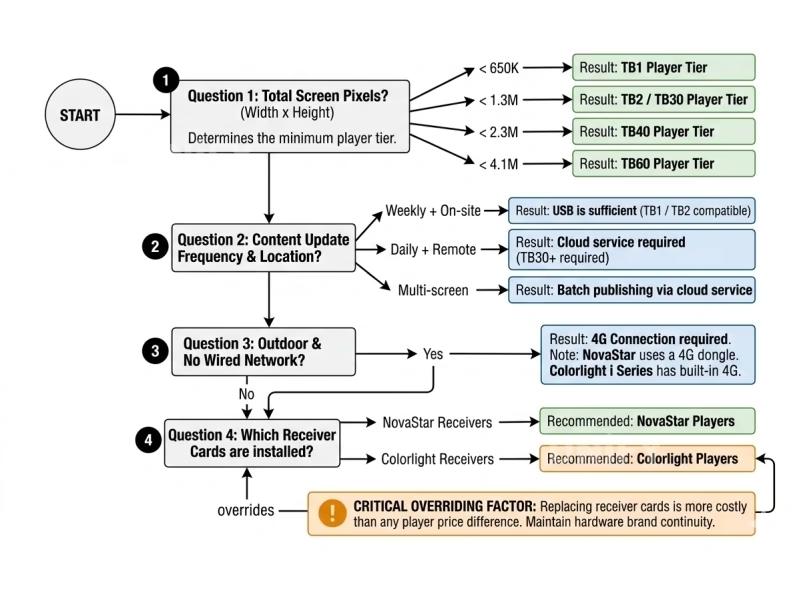
Q1: Pixels?
< 650K → TB1 — cheapest, simplest, single-cabinet signs
< 1.3M → go to Q2
< 2.3M → TB40 / Colorlight C5
< 4.1M → TB60 — largest async capacity available
Q2: Update method?
USB only, on-site → TB2
Cloud remote → TB30 / TB40
Q3: Outdoor without wired internet?
Yes → TB40 with 4G dongle or Colorlight i-series (built-in 4G)
No → proceed with Q1/Q2 recommendation
Q4: Receiving cards?
NovaStar → stay in NovaStar ecosystem
Colorlight → use Colorlight player
Unknown → check with your LED screen manufacturer
How Do Real Businesses Choose the Right Asynchronous LED Media Player? Three Examples
Church announcement screen, 1920×1080 (2.07M pixels), updated weekly from the church office: Q1 → > 1.3M so TB2 insufficient. Q2 → on-site update, USB is fine. Q3 → indoor with Wi-Fi. Q4 → NovaStar receivers. Result: TB40 — handles the pixel count, can use Wi-Fi for convenience even if updates are weekly.
Outdoor billboard, 1280×768 (0.98M pixels), updated remotely from ad agency across town: Q1 → < 1.3M, TB2 could handle it. Q2 → remote cloud required → TB2 insufficient. Q3 → outdoor, no wired internet → needs 4G. Q4 → NovaStar. Result: TB40 with 4G dongle — cloud + 4G combination requires TB30 minimum.
Mac-based design team, retail window display, 960×640 (0.61M pixels), updated daily: Q1 → < 650K, TB1 capacity. Q2 → daily updates. Q3 → indoor with Wi-Fi. Q4 → new installation, can choose either brand. Result: Colorlight C5 — LEDVISION runs natively on macOS; NovaStar ViPlex Express is Windows-only. For this team, macOS compatibility outweighs brand preference.
Which Asynchronous LED Media Player Should You Choose? Quick Selection Guide
| Scenario | Pick |
|---|---|
| Small indoor sign, USB updates | TB1 or TB2 |
| Professional signage, cloud-managed | TB40 |
| Large outdoor billboard, 4G | TB60 + 4G dongle |
| Mac-based team, any size | Colorlight C5/C7 |
| Budget single screen | Huidu HD-D16 |
For the detailed brand comparison behind these recommendations, see asynchronous LED media players compared.
Why Choosing the Right Asynchronous LED Media Player Matters for Your LED Display
Choosing the right asynchronous LED media player is a four-question decision: pixel count sets the minimum tier, update frequency determines whether cloud is needed, outdoor location determines whether 4G is needed, and existing receiving cards determine the brand. Answer these in order, and the correct model emerges from the constraints. The most expensive mistake is choosing a player incompatible with your receiving cards — always check Q4 before buying.