
Huidu W6X Series · Wi-Fi + U-Disk Single-dual Color Controller
HD-W62 Single-dual Color LED Controller
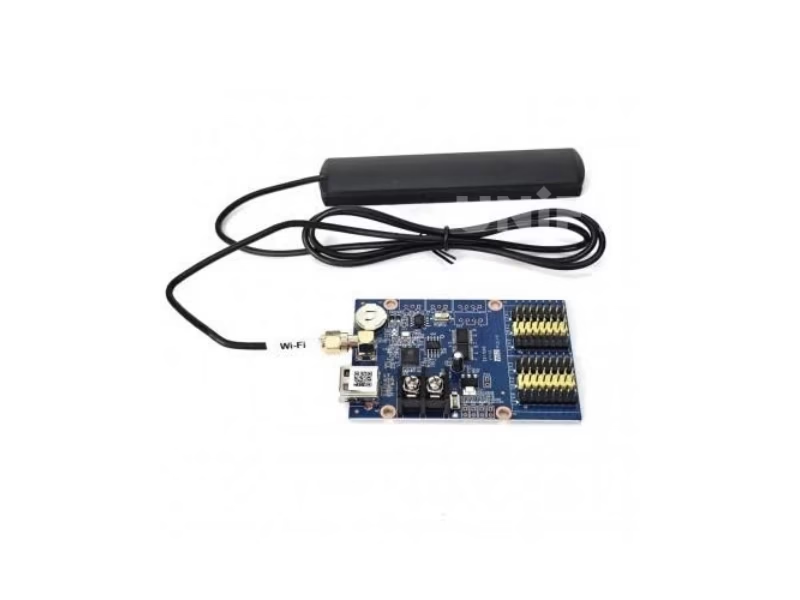
The HD-W62 Single-dual Color LED Controller is Huidu’s mid-range Wi-Fi + USB control card for taller single-dual color signs: a loading capacity of 1024×64 pixels (single color) or 512×64 (dual color), six HUB outputs for direct module connection, an external antenna connector for stronger Wi-Fi, and a published 3 W power draw — configured with HDSign (HD2020) or the LedArt app.
Product Overview
What Is the HD-W62 Single-dual Color LED Controller?
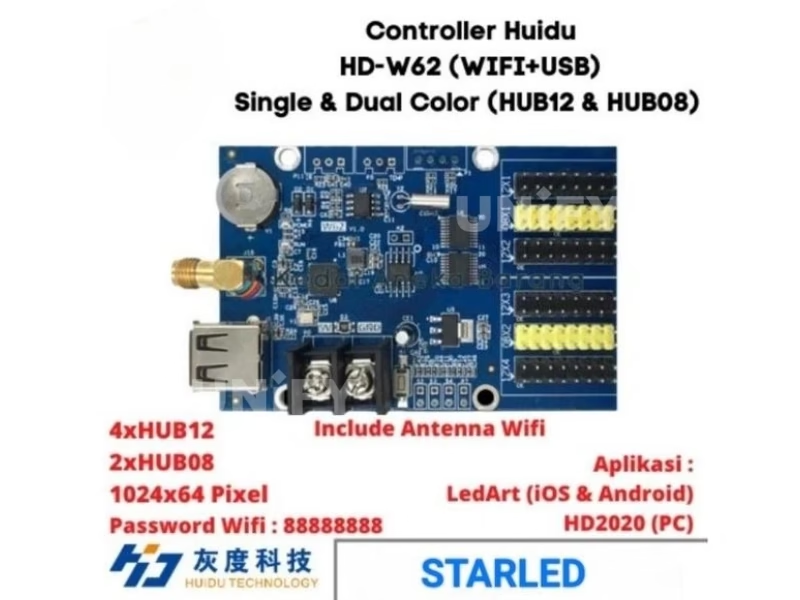
The HD-W62 Single-dual Color LED Controller is a Wi-Fi plus U-disk control card from Shenzhen Huidu Technology, built for single-color and dual-color LED signs that need twice the height of the W60: 1024×64 pixels in single color (512×64 dual color), 4 MB Flash, six HUB outputs and an external antenna connector on the board. In the W6X family it sits between the W60 and the W63, and it is the card most specified for four-row P10 signs, tall pharmacy and bank boards, and venue scoreboards.
Short answer: The HD-W62 is a single-dual color LED controller that drives up to 1024×64 (single color) or 512×64 (dual color) pixels across six HUB outputs (4×HUB12 + 2×HUB08), stores up to 1,000 programs in 4 MB Flash (1 MB practical) across 20 areas, updates by Wi-Fi or U-disk, carries an external antenna connector for stronger signal, draws 3 W per the official document, and runs on 4.2–5.5 V.
The W62 is the natural upgrade from the HD-W60 Single-dual Color LED Controller when the sign grows taller, and from the HD-W00 Single-dual Color LED Controller when width and height both outgrow the entry card. All three pages on this site are written as one selection set. The W62 remains an asynchronous playback device — the synchronous vs asynchronous LED control guide covers when that architecture fits, and projects needing live PC input belong to a LED video processor. Data source: the official Huidu HD-W62 Specification V7.1, with the marketplace errors corrected below.
Huidu Official — Single-dual LED control card HD-W62 product video
Specifications
What Are the HD-W62 Single-dual Color LED Controller Specifications?
Specifications from the official Huidu HD-W62 Specification V7.1, cross-checked against the W6X series matrix on huidu.cn. Note the certificate line: the V7.1 document does not list certificates — request them with your order.
Core Specifications (Official Document)
Software: HDSign (HD2020) on PC; LedArt and LedArt lite on mobile. Official downloads mirrored on our Huidu system software downloads page.
Spec Correction — Exclusive
Where Do Marketplace Listings Get the HD-W62 Specs Wrong?
We compared the top-ranking HD-W62 listings against the official V7.1 document. Three recurring errors:
Comparison
HD-W62 vs HD-W60 vs HD-W00: Which Single-dual Color Controller Do You Need?
Three Huidu cards cover the single-dual color range up to 10 m wide. The six differences that decide between them:
The full W6X family above the W62:
Three decisions, in order:
- Sign up to 10.24 m wide and 32 px tall? The HD-W60 covers it at the lower price.
- Need four rows (64 px tall), mixed HUB12/HUB08 modules, or long-distance Wi-Fi? The HD-W62 adds the height, the six HUB outputs and the antenna connector.
- Small door lintel under 3.2 m? The HD-W00 stays the cheapest entry.
Family data from the official W6X matrix on huidu.cn. Software behind all three: our guide to control system software and hardware.
Core Features
What Does the HD-W62 Single-dual Color LED Controller Do?
Six functions from the official document define how the W62 behaves in the field:
🔌 Six HUB outputs, one card
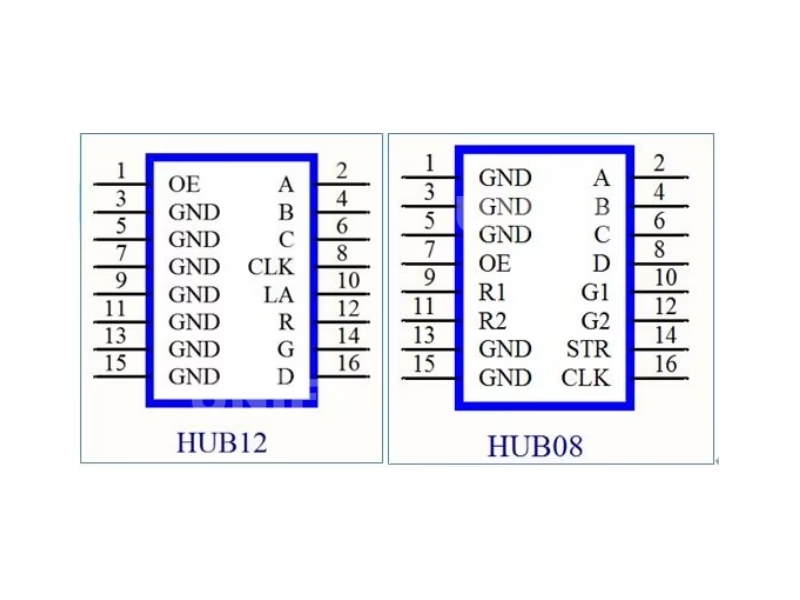
4×HUB12 + 2×HUB08 drive up to 64 px of height directly — mixed HUB12/HUB08 signs run from a single board with no cascading.
📡 External antenna connector
A dedicated Wi-Fi antenna port boosts signal for steel cabinets and long shop floors — the only W6X member with this connector.
📶 Wi-Fi + U-disk dual channel
Hotspot updates from phone or laptop, USB flash drive updates where Wi-Fi cannot reach — the documented pair of channels.
🖥️ Animated, 3D and Excel content
Animated characters, 3D text, SWF graphics and Excel tables load directly into 20 areas with independent effects and borders.
🔘 S1–S4 buttons and IR remote
S1 cycles the test pattern; S2/S3/S4 point switches change programs and run countdown/count-up timing; P11 adds IR control.
⚡ 3 W published power
The official document publishes 3 W working power — an exact figure for power-budget planning that the W60 does not provide.
Interface
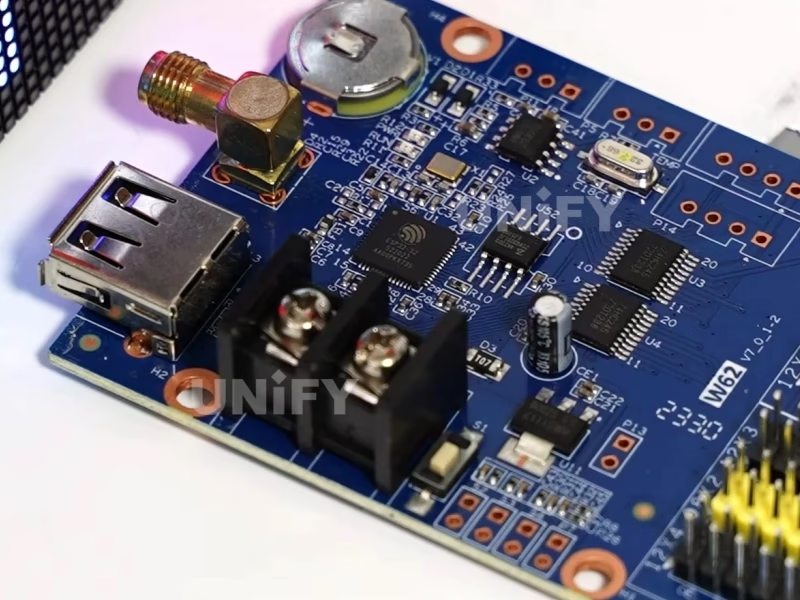
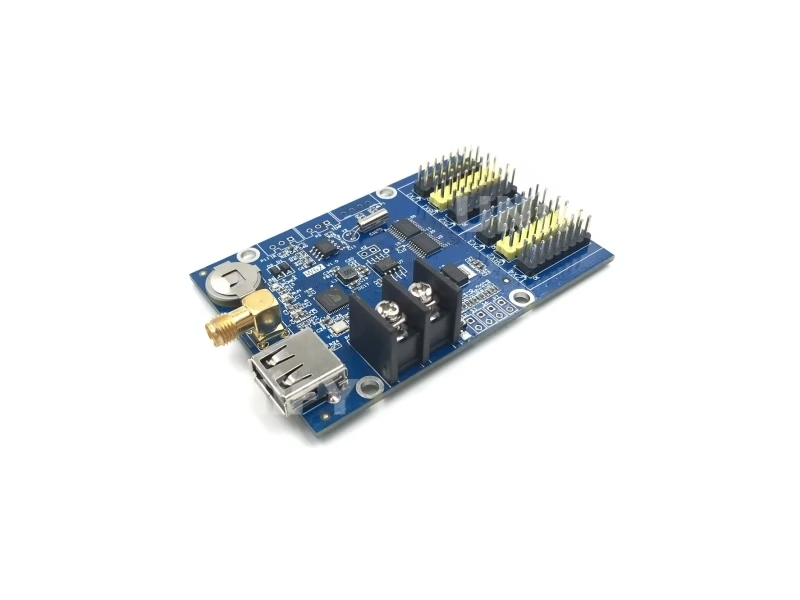
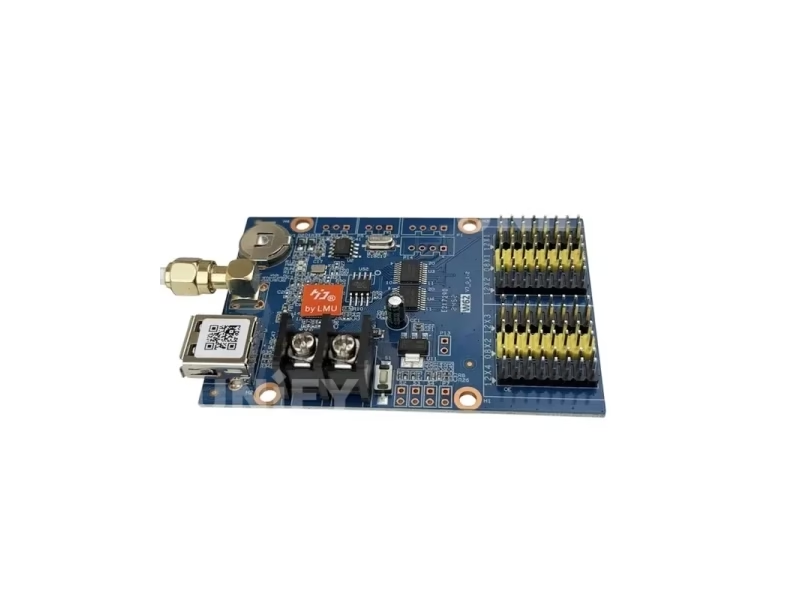
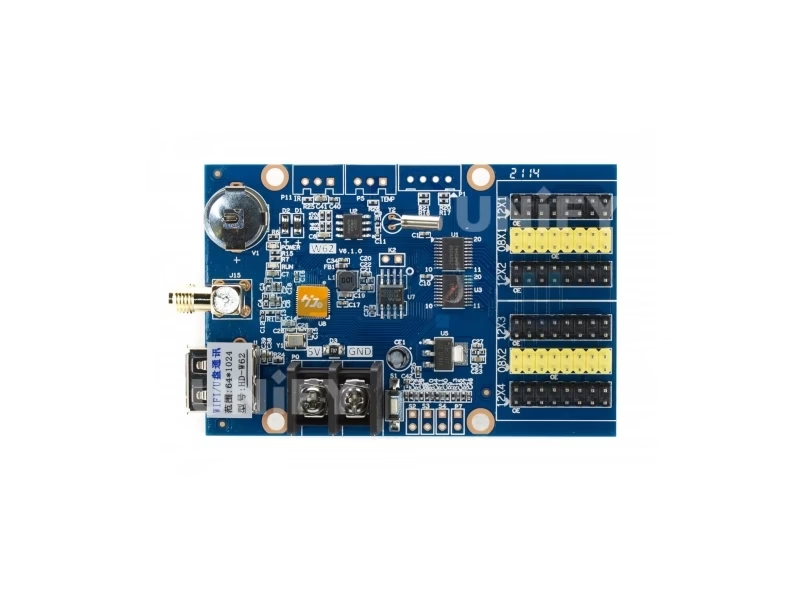
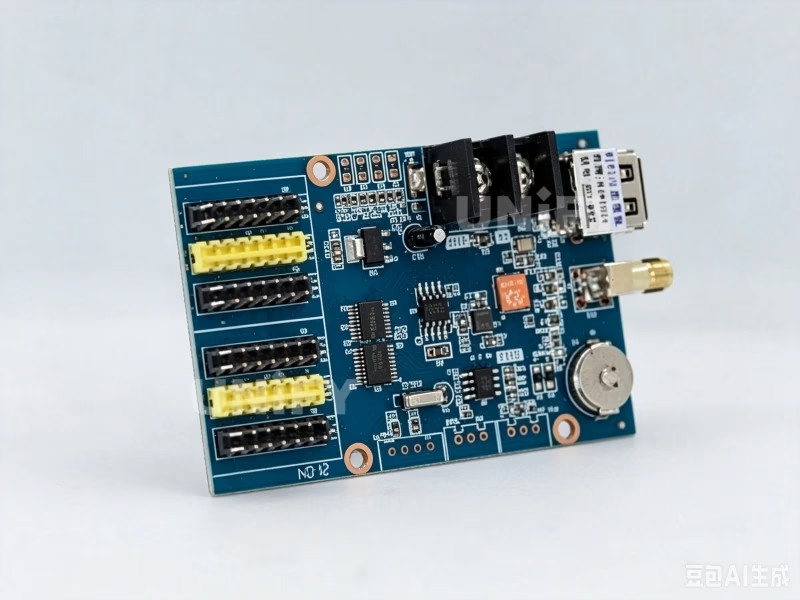
Which Ports Are on the HD-W62 Control Card?
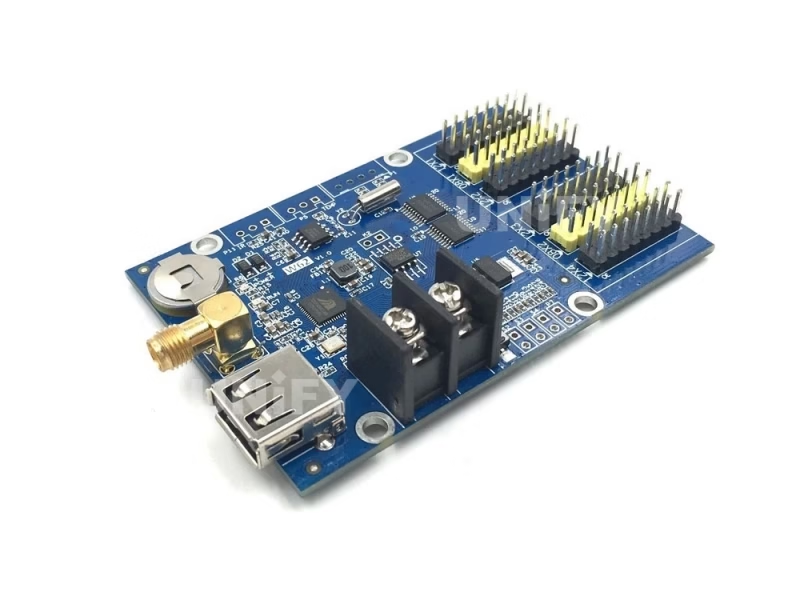
Nine connection points from the official interface description:
- USB port — U-disk program updates.
- Power input — 5 V DC supply (4.2–5.5 V rated).
- S1 test button — cycles the screen test status.
- S2 / S3 / S4 point-switch ports — next program + count up, previous program + count down, program control + pause + count reset.
- P7 port — brightness sensor for automatic dimming.
- HUB ports: 4× HUB12 + 2× HUB08 — connect the display; six outputs cover tall and mixed-interface signs.
- P5 port — temperature/humidity sensor.
- P11 port — IR receiver for remote control.
- Wi-Fi antenna port — external antenna connector to strengthen the signal.
Module-side basics: most P10 modules use HUB12 and older P4.75 dual-color modules use HUB08 — see our P10 LED modules guide for interface details.
Loading Capacity
How Many LED Modules Can the HD-W62 Controller Drive?
The official budget is 1024×64 pixels (single color) or 512×64 (dual color). Translated into real modules:
That is the W62’s signature configuration: a 10.24 m fascia four rows tall — the case where the W60 stops at two rows (64 px vs 32 px of height). Wider than 10.24 m, the W63 (widest 2048) or the W64A (widest 4096) takes over; for larger canvases the asynchronous LED media player range is the tier above.
Setup Tutorial
How to Set Up the HD-W62 LED Controller with Wi-Fi, a Router or a USB Drive?
Three update paths, in order of convenience. Channel A — direct hotspot: wire 5 V, plug the HUB cables, press S1 to test, join the card’s Wi-Fi hotspot, build and send programs in HDSign (HD2020) or LedArt. Channel A2 — router mode: connect the W62 to an existing Wi-Fi router — with the external antenna fitted, the link reaches across long shop floors and through cabinets the built-in antenna cannot pass; the official 52-second video below shows the router pairing. Channel B — U-disk: export the program batch to a fat32 flash drive, insert it in the USB port, and the card loads it at power-up — the path for underground or shielded sites.
The antenna detail worth knowing before mounting: fit the external antenna and keep it clear of the steel cabinet wall — the W62’s antenna port is the difference between a card that updates at the front door and one you must climb a ladder to reach with a phone. Full mounting context is in our LED screen installation guide.
Huidu Official — connect Huidu controllers to WiFi router wirelessly
Applications
Where Do Customers Use the HD-W62 Single-dual Color LED Controller?
- Four-row storefront fascias — the 10.24 m × 0.64 m P10 configuration that one W62 card drives outright.
- Pharmacy, clinic and bank boards — dual-color content with temperature/humidity areas and schedule tables from Excel.
- Sports scoreboards — S2/S3/S4 buttons run count-up/count-down timing at the venue.
- Remote and multi-site signage — router mode with the external antenna reaches Wi-Fi across long floors; U-disk covers the rest.
- School and factory boards — animated characters and 3D text for announcements, timetables in Excel.
Mounting environments match the indoor LED display screen and LED signage for outdoor advertising guides.
Factory & Quality Control
How Is the HD-W62 LED Screen Controller Supplied and Guaranteed?
Unify LED buys Huidu control cards at factory level, tests each card before dispatch and backs them with a 2-year warranty:
- Factory-direct pricing — no distributor markup; bulk discounts from 10 pcs.
- 100% functional test before dispatch — every card powered and screen-tested; the -40°C to +80°C rating covers transit.
- 2-year warranty — free replacement for manufacturing defects; field care in our LED display maintenance guide.
- Certificate copies on request — the V7.1 document does not list certificates, so we supply the W6X series CE/FCC/RoHS documentation with every order.
Pricing
How Much Does the HD-W62 LED Controller Cost?
Published prices verified in August 2026:
Positioned between the HD-W60 and the W63, the W62 prices above the entry cards for the height and antenna capability. Factory-direct pricing from Unify LED applies from single units; request a quote for your quantity and destination. At the published 3 W the controller adds almost nothing to the LED display power bill. Market context: our 2026 price report tracks industry trends.
FAQ
HD-W62 Single-dual Color LED Controller: Frequently Asked Questions
Q1. What is the difference between the HD-W62 and the HD-W60? Twice the height (1024×64 vs 1024×32 single color; 512×64 vs 512×32 dual color), six HUB outputs instead of three, an external antenna connector, and a published 3 W power figure. Both share the Wi-Fi + U-disk channels, 1,000-program engine and 20-area layout.
Q2. What are the six HUB outputs for? 4×HUB12 plus 2×HUB08 let one W62 drive up to 64 px of module height directly — including mixed signs where some modules use HUB12 and others HUB08 — without cascading a second card.
Q3. How do I use the external antenna? Connect the antenna to the dedicated Wi-Fi port and keep it clear of the cabinet wall. It strengthens the hotspot and router link for long shop floors and steel enclosures — the W62 is the only W6X member with this connector.
Q4. Is the Flash 4 MB or 1 MB? The official document says 4M Byte with a note of 1 MB practical usage for user programs. Budget content as roughly 1 MB of actual program space — the 4 MB figure is the chip rating, not the usable capacity.
Q5. How big a screen can one HD-W62 drive? 1024×64 single color (512×64 dual color). In P10 modules that is 32 modules wide × 4 rows — 10.24 m × 0.64 m; P6 and P4.75 scale proportionally.
Q6. How much power does the HD-W62 draw? 3 W, published in the official V7.1 document — an exact planning figure. It runs from a standard 5 V supply (4.2–5.5 V rated).
More controller questions: our LED display FAQ and warranty terms.
Certifications
Which Certificates Does the HD-W62 LED Controller Carry?
The official V7.1 document does not list certificates; the W6X series carries CE, FCC and RoHS per Huidu’s series documentation, and we supply copies with every order — request them explicitly. Environmental ratings from the same document: working temperature -40°C to +80°C, storage -40°C to +105°C, humidity 0–95%.
Get HD-W62 Bulk Pricing from the Factory
Genuine Huidu cards, 100% pre-tested, 2-year warranty, shipped worldwide. Tell us your module type, quantity and destination — quote within 24 hours.
Deep Blog
HD-W62 Single-dual Color LED Controller: The Complete Buying Guide (2026)
The HD-W62 Single-dual Color LED Controller is the W6X member buyers reach for when a sign grows taller than two module rows, and it is also the card with the most misunderstood spec sheet in the family — listings merge the whole W6X range into one SKU, and the 4 MB Flash figure hides a 1 MB practical limit. This guide rebuilds the W62 from the official Huidu specification document V7.1, then answers what the six HUB outputs mean, why the antenna connector matters, how large a screen the pixel budget covers and where the listings go wrong.
Chapter 1 — The W6X Ladder: Where the HD-W62 Sits
Huidu’s W6X series runs six models — W60, W6B, W62, W63, W64A, W66 — on one architecture: Wi-Fi hotspot plus U-disk updates, 1,000 programs, 20 areas. The W62 loads 1024×64 single color (512×64 dual color) with six HUB outputs and an antenna connector. Below it, the W60 covers 1024×32 with three HUB ports and no antenna; the W6B splits the difference at 1024×48. Above it, the W63 (1024×128, widest 2048), the W64A (1024×256, widest 4096, 8 MB Flash) and the W66 (2048×512) carry the biggest boards.
Read together with the HD-W60 and HD-W00 pages on this site, the W62 completes the selection set for signs up to 10 m wide: the W00 for small lintels, the W60 for single-row length, the W62 for height.
Chapter 2 — Six HUB Outputs: What the Ports Actually Change
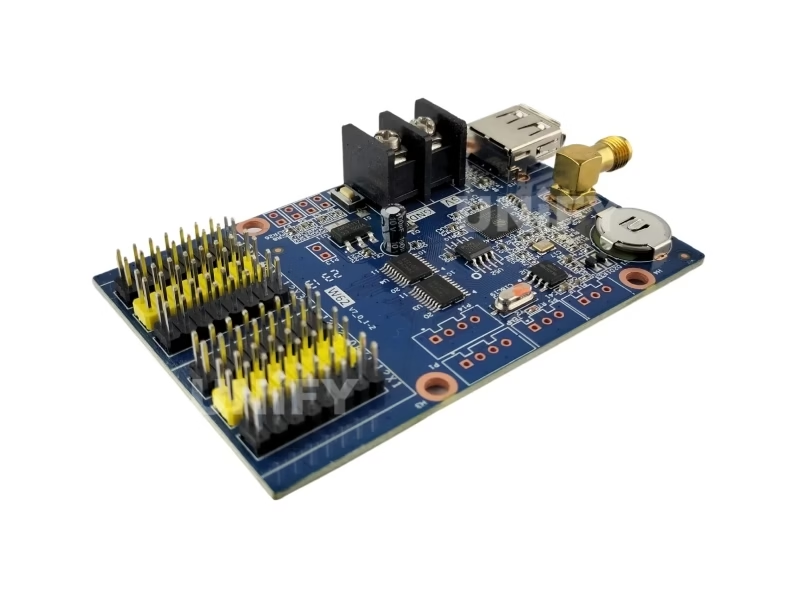
The W62’s 4×HUB12 + 2×HUB08 outputs are the mechanical reason it drives 64 px of height. HUB12 is the standard 12-pin single/dual-color interface; HUB08 is the 08-pin variant found on older P4.75 dual-color modules and some narrow-pitch boards. A card with two HUB12 ports tops out at two module rows; six ports arranged across the height of the sign mean the W62 addresses four rows directly, and mixed-interface signs — a HUB12 main field with a HUB08 edge — run from one board instead of two.
The wiring rule stays the same as every HUB card: each output feeds a defined column of modules, the ribbon cable is keyed with pin-1 triangles on both ends, and the S1 test button confirms the pattern before software is involved. For module-side details, the P10 LED modules guide covers interfaces and scanning.
How the six outputs map to a real 32-wide four-row screen: the W62 splits the 1024-pixel width across its HUB channels, each channel driving a column of four modules. The HUB08 pair takes the modules whose connectors are 08-pin — typically the dual-color P4.75 boards — while the HUB12 quartet feeds the P10 field. On a single-interface sign the ports share the load evenly; on a mixed sign the assignment follows the module type per column. Either way, the card addresses the full 1024×64 budget without a second controller, which is the practical difference buyers feel as fewer enclosures, fewer power taps and one set of software to manage.
Chapter 3 — The Antenna Connector: The W62’s Quiet Selling Point
Among the six W6X models, only the W62 carries a dedicated Wi-Fi antenna port. Every Wi-Fi control card in this class broadcasts 2.4 GHz from a printed PCB antenna, and the practical range inside a steel cabinet or a long shop floor is a few meters. The W62’s antenna connector changes the physics: an external antenna mounted clear of the metal turns the same hotspot into a link that reaches across the store, and in router mode it keeps the card connected to the shop’s Wi-Fi at distances the built-in antenna cannot hold.
The buying consequence: if the sign cabinet is steel, the phone must reach the card through a door, or the site runs multiple cards on one router — the W62 is the member to specify, because the antenna upgrade is impossible on the W60/W6B. If the sign sits behind glass with the card exposed, the antenna advantage matters less and the W60 saves money.
Two installation notes from field rollouts. First, antenna placement: an antenna bolted flat against the steel back plate performs barely better than the PCB trace it replaces — the connector is only as good as the mount, so run the antenna out through the cabinet grommet and fix it to the frame. Second, band behavior: the W62 broadcasts 2.4 GHz only, like every card in the class, so a phone locked to 5 GHz will not see the hotspot; in router mode the W62 joins the site’s 2.4 GHz SSID, and the antenna helps exactly in the dead zones where a single wall-mounted router fades.
Chapter 4 — The 4 MB / 1 MB Flash Truth
The official V7.1 states: “FLASH Capacity: 4M Byte (Practical usage 1M Byte).” That parenthetical is the part listings omit. The 4 MB figure is the chip capacity; the firmware and system data take the rest, leaving about 1 MB for user programs. In practice, 1,000 programs of text, clock and sensor areas fit comfortably — a full storefront rotation of offers, hours and temperature uses a fraction of a megabyte. The limit bites when every program carries image backgrounds or SWF animations; plan those against the 1 MB budget rather than 4 MB and the capacity math stays honest.
A concrete budget example: a pharmacy fascia running six programs — three text rotations, one clock area, one temperature/humidity area and one Excel schedule — uses roughly 60 KB of the practical 1 MB, leaving headroom for months of seasonal programs without pruning. The same sign redesigned with a full-width background image in every program crosses 200 KB per program, and the 1 MB budget runs out near program forty. The rule of thumb we give installers: text and sensor areas are nearly free, images cost their resolution in memory, and the 1,000-program ceiling is reachable only with lean content.
Chapter 5 — Loading Capacity in Real Modules
1024×64 pixels is the four-row fascia: 32 P10 modules wide by 4 rows tall — 10.24 m × 0.64 m, 128 modules on one card. Dual color halves the width to 512×64 (16 wide × 4 rows, 5.12 m × 0.64 m) because each pixel carries two color channels down the same data lines. The same budget on P6 gives 6.14 m × 0.384 m; on P4.75, 4.86 m × 0.304 m.
A worked comparison seals the three-card decision: the W00 covers 3.2 m × 0.32 m; the W60 covers 10.24 m × 0.32 m (or 5.12 m two-row); the W62 covers 10.24 m × 0.64 m four-row. Height, not width, is what the W62 buys — and height is exactly what pharmacy boards, school timetable walls and venue scoreboards need. Signs beyond 10.24 m wide step to the W63/W64A; larger canvases move to the asynchronous LED media player class.
The pixel-count check for the email: total modules × 512 pixels per P10 module must not exceed 65,536 (1024×64) in single color, or 32,768 (512×64) in dual color. A 32-wide four-row P10 plan is exactly 128 modules — inside the budget with zero headroom for a taller fifth row; if the design calls for five rows, the W63’s 128-pixel height is the honest answer rather than stretching a W62 past its document limit.
Chapter 6 — Setup: Hotspot, Router and U-Disk
The W62 ships with three update paths. Direct hotspot: wire 5 V (4.2–5.5 V rated; the official precautions insist on standard 5 V), plug the HUB cables, press S1 for the test pattern, join the card’s hotspot, and send programs from HDSign (HD2020) or LedArt. Router mode: pair the card with the site Wi-Fi — with the external antenna fitted this is the long-distance path, and the official 52-second video shows the pairing flow. U-disk: export the batch to a fat32 flash drive, insert, and the card loads it at power-up for shielded sites.
The software split worth knowing: HDSign is the PC editor (HD2020 family), LedArt is the mobile app, and LedArt lite is the lightweight variant for simple text boards — the W62’s V7.1 document lists all three. For a franchise running forty simple text signs, LedArt lite keeps the operator workflow to one screen; for boards with Excel tables, 3D text and scheduled programs, the full HDSign editor is the right tool, and the official HDSign basics video below shows the layout workflow start to finish. For wiring and mounting context, the LED screen installation guide covers the cabinet side.
Huidu Official — w6x WiFi card series deep tutorial
The 14-minute W6X series tutorial above is worth watching before the purchase email goes out: it walks the whole family — W60 through W66 — with the same screens the W62 will run, and it shows the program-area workflow in the order an installer will actually use it.
Huidu Official — HDSign basic operations tutorial
Chapter 7 — Buttons, Timing and the Scoreboard Use Case
S2/S3/S4 point switches give the W62 its scoreboard personality: S2 switches to the next program and starts the count-up timer, S3 switches back and counts down, S4 pauses timing and resets the count. Wired to a handheld button box at a venue desk, the operator runs the match clock without touching a phone — the same function set that makes Huidu cards the default for club and school scoreboards. The clock suite on the display side covers digital, dial and lunar formats with multiple time zones and free font/position control.
The IR remote adds the second control layer: the P11 port takes an IR receiver, and the remote switches programs from the shop floor or the venue stand — useful when the button box is not wired yet or when a second operator needs program control without walking to the cabinet. Between the buttons, the remote and the phone app, the W62 offers three independent control paths, which matters on sites where a phone is not allowed on the floor or where the cabinet sits out of reach.
Chapter 8 — Price, Warranty and a Buying Checklist
Verified August 2026 pricing: USD 15.50 at led-estore.com (in stock), ₹1,500–1,900 at Koshi Electronics in India, factory-direct on request from China. The W62 prices between the W60 and the W63 — the premium over the W60 buys the height, the six HUB ports and the antenna, which is the correct trade for the four-row class of sign.
Unify LED is an LED screen manufacturer in Changsha, China, supplying modules, cabinets, power supplies and controllers as one assembly — the W62 ships tested against the modules it is specified for, with a 2-year warranty and certificate copies on request. Final checklist for the procurement email: (1) confirm the module interface mix — HUB12, HUB08 or both — so the six outputs are wired correctly; (2) state single-color vs dual-color so the 1024×64 / 512×64 budget is verified against the module plan; (3) ask for the W6X CE/FCC/RoHS copies explicitly, since V7.1 omits them; (4) confirm the antenna is included or order one separately; (5) order one spare per ten installed — the card is the cheapest component in the system and the spare beats the service call.
Conclusion. The HD-W62 Single-dual Color LED Controller is the right part when the sign needs height: up to 10.24 m of four-row single-color P10 or 5.12 m of dual-color, driven from six HUB outputs, updated by Wi-Fi, router or U-disk, with an external antenna for long-distance links and a published 3 W draw. Match the module plan to the 1024×64 budget, budget content against the 1 MB practical Flash, and the W62 carries the tall-sign project on one card.
LED Control System Range
Which LED Controllers Should You Explore Next?
Huidu, Colorlight and Novastar control products, receiving card guides and free software resources on UnifyLED.
Huidu Controllers
Novastar Sending Controllers
Guides & Resources
Where Can You Download HD-W62 Resources?
The official Huidu HD-W62 Specification V7.1 — the data source for every figure on this page.
Related: browse the full Huidu LED controller catalog — 12 models across four product lines, free HDSet / HDPlayer / HD Show software, cloud remote control without a subscription, and factory-direct pricing.