
Huidu W6X Series · Wi-Fi + U-Disk Single-dual Color Controller
HD-W60 Single-dual Color LED Controller
The HD-W60 Single-dual Color LED Controller is Huidu’s Wi-Fi + USB control card for larger single-dual color signs: a loading capacity of 1024×32 pixels (single color) or 512×32 (dual color), 4 MB Flash for up to 1,000 programs, updates by Wi-Fi or U-disk, and a 7-color display mode on full-color modules — configured with the free HD2020 software or the LedArt app.
Product Overview
What Is the HD-W60 Single-dual Color LED Controller?
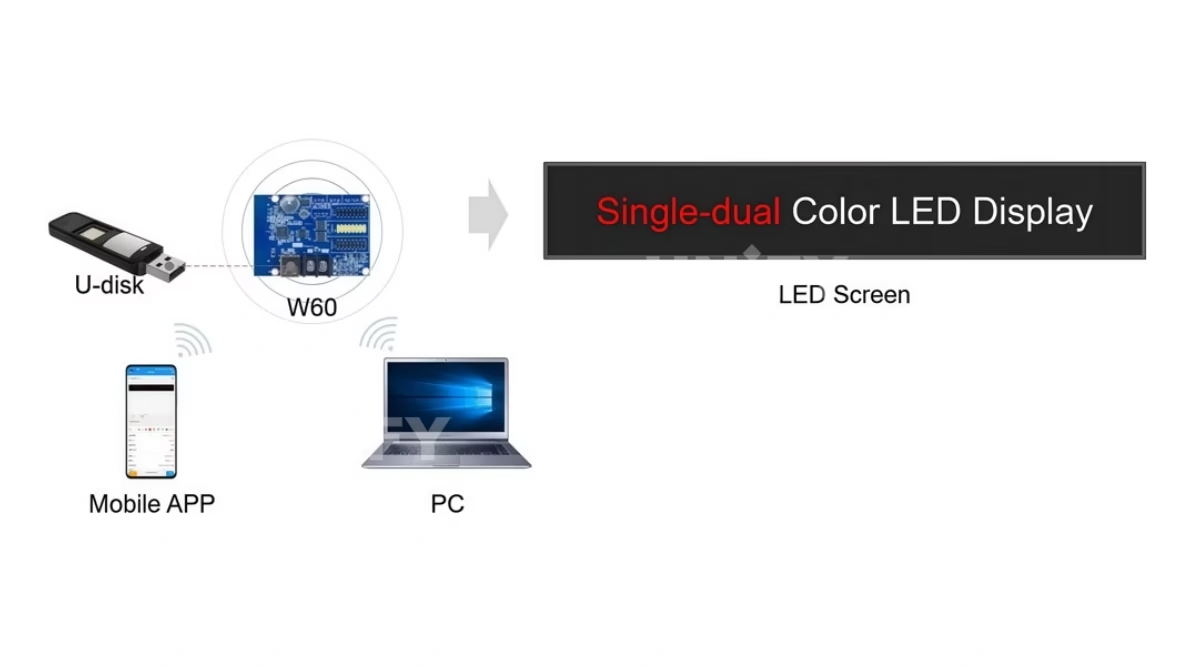
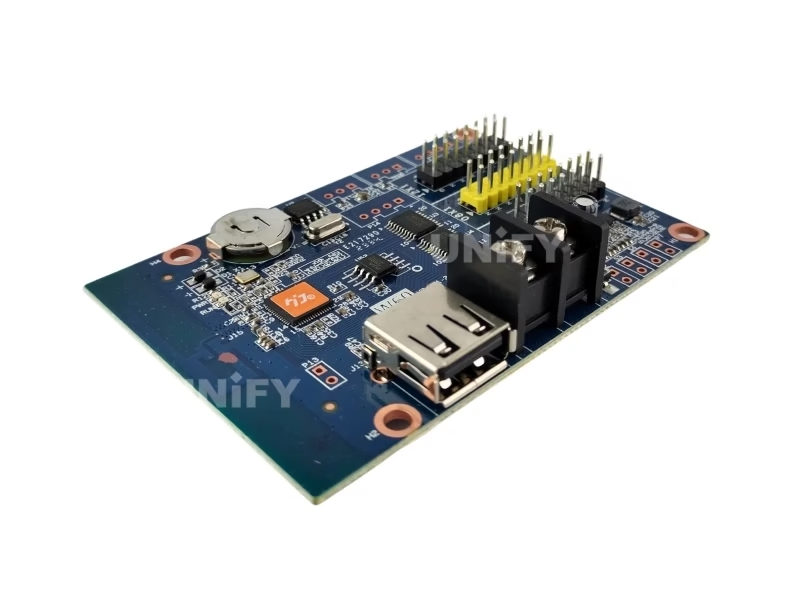
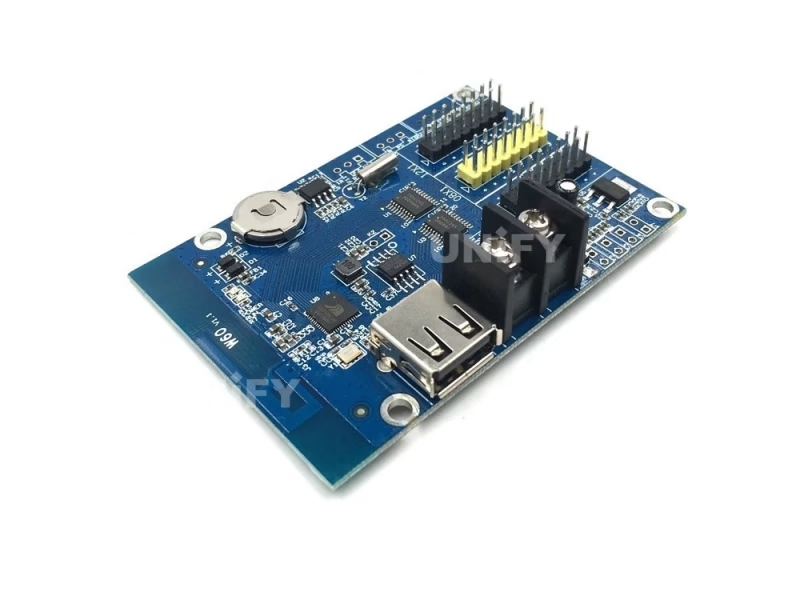
The HD-W60 Single-dual Color LED Controller is a Wi-Fi plus USB control card from Shenzhen Huidu Technology, built for single-color and dual-color LED signs larger than the entry W00 can drive. It loads 1024×32 pixels in single color (512×32 in dual color), stores programs in 4 MB Flash, and receives updates two ways — over the card’s own Wi-Fi hotspot or from a USB flash drive plugged into the onboard port. In the W6X family it is the entry model, one step below the W6B and W62, and it is the most specified card for long door lintels, pharmacy and bank message boards and sports scoreboards.
Short answer: The HD-W60 is a single-dual color LED controller that drives up to 1024×32 (single color) or 512×32 (dual color) pixels over two HUB12 ports and one HUB08 port, stores up to 1,000 programs in 4 MB Flash across 20 display areas, updates by Wi-Fi or U-disk, displays 7 colors on full-color modules, and runs on 4.2–5.5 V with CE, FCC and RoHS certification.
The W60 is the natural upgrade path from the HD-W00 Single-dual Color LED Controller we cover separately — four times the pixel budget and a second update channel. It remains an asynchronous playback device, so the synchronous vs asynchronous LED control decision still applies before purchase, and projects needing live PC input belong to a LED video processor. This page uses the official Huidu HD-W60 Specification V1.1 as its data source and corrects the spec errors on marketplace listings — see the correction table below.
Specifications
What Are the HD-W60 Single-dual Color LED Controller Specifications?
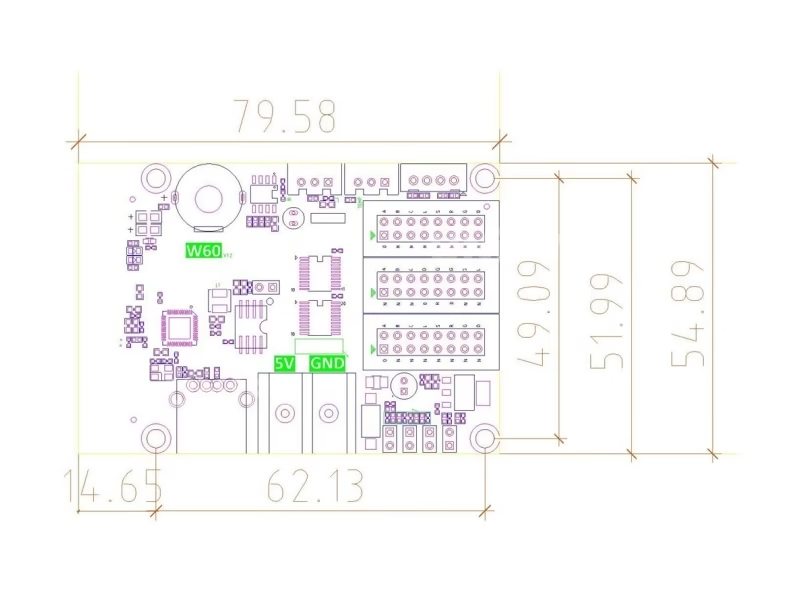
Specifications from the official Huidu HD-W60 Specification V1.1 (December 2020), cross-checked against the W6X series matrix on huidu.cn. Power consumption is not published in the official document — see the correction table for what to ignore.
Core Specifications (Official Document)
Software: HD2020 (PC) and LedArt (mobile app). Official downloads are mirrored on our Huidu system software downloads page.
Spec Correction — Exclusive
Where Do Marketplace Listings Get the HD-W60 Specs Wrong?
We compared the top-ranking HD-W60 listings against the official Huidu specification document V1.1. Three errors appear on the leading reseller pages — check before you order:
Comparison
HD-W60 vs HD-W00 vs HD-W62: Which Single-dual Color Controller Do You Need?
The first comparison buyers make is against the entry card. Six differences decide it:
The full W6X family adds two higher tiers above the W60 — same Wi-Fi + U-disk architecture, more loading:
Three decisions, in order:
- Sign up to 10.24 m wide, one or two rows? The HD-W60 covers the full length in single color — the biggest screen one W6X card handles before stepping up.
- Need two rows taller than 32 px, or dual-color wider than 512? Move to the HD-W6B (48 high) or HD-W62 (64 high).
- Small door lintel under 3.2 m and minimal budget? The HD-W00 remains the cheaper entry — compare the six differences in the table above before buying either.
Family data from the official W6X matrix on huidu.cn. For the software layer behind all of them, see our guide to control system software and hardware.
Core Features
What Does the HD-W60 Single-dual Color LED Controller Do?
Six functions from the official document define how the W60 behaves in the field:
📶 Two update channels
Wi-Fi hotspot for phone/laptop updates, plus a USB port that accepts a U-disk — content loads even where Wi-Fi cannot reach.
🌈 7-color display mode
Full-color modules driven through the HUB12/HUB08 ports show red, green, blue, yellow, purple and white — a 7-color palette impossible on the W0X cards.
📊 3D text, SWF animation and Excel
Display content goes beyond running text: 3D-styled text, SWF animations and Excel tables added directly into program areas.
🔘 S2/S3/S4 buttons and IR remote
Point switches on the card change programs, run countdown/count-up timing and reset counters; the P11 port adds IR remote control.
⏱️ Countdown, count-up and multi-timezone clock
Digital, dial and lunar clocks plus button-triggered countdown/count-up timing — the reason scoreboards pick this card.
🔲 40+ effects, stroke fonts, area backgrounds
Outline and stroke fonts, region background settings, custom borders and more than 40 text effects per area across 20 regions.
Interface
Which Ports Are on the HD-W60 Control Card?
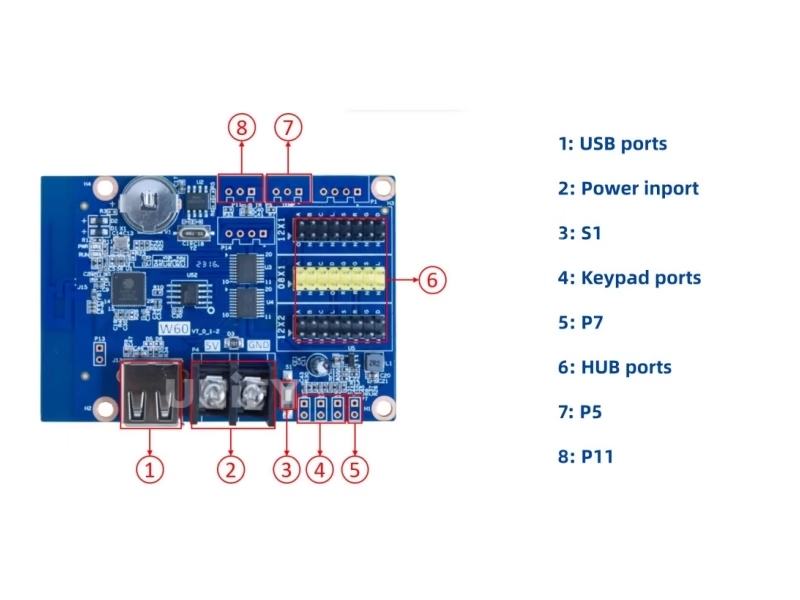
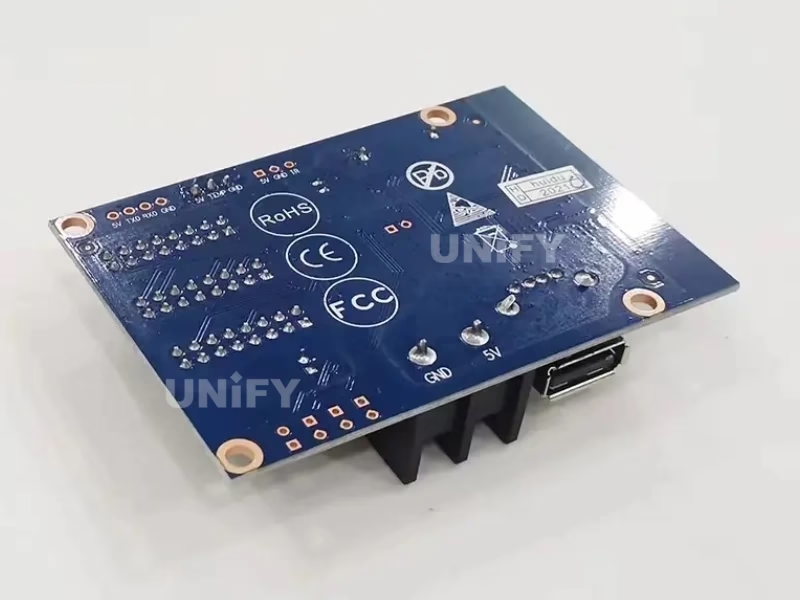
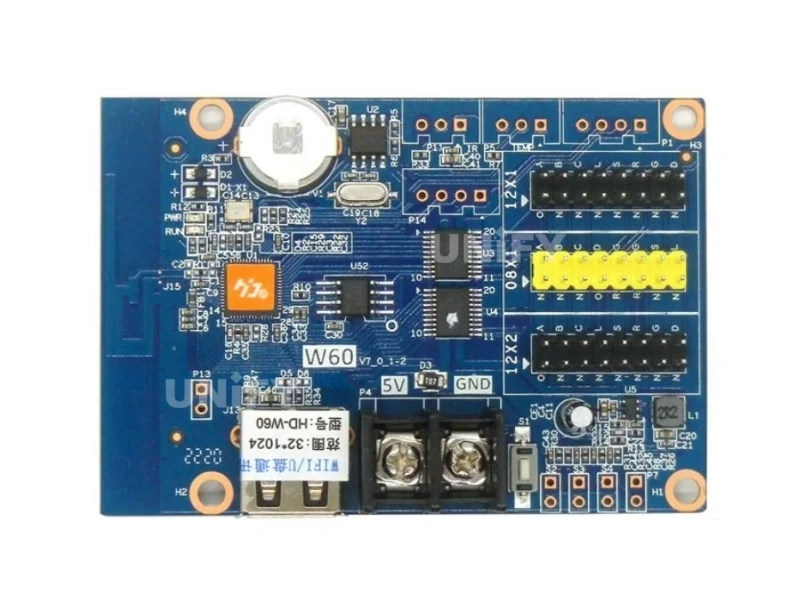
Eight connection points, numbered as in the official appearance description:
- USB port — update programs from a U-disk (fat32-formatted flash drive works directly).
- Power connector — 5 V supply; rated 4.2–5.5 V.
- Test button — cycles the screen test pattern when commissioning.
- S2 / S3 / S4 point switches — S2 next program + count up, S3 previous program + count down, S4 program control + pause + count reset.
- P7 port — photosensitive (brightness) sensor.
- 2× HUB12 + 1× HUB08 — connect the display; the HUB08 port covers 08-pin single/dual-color modules that HUB12-only cards cannot drive.
- P5 port — temperature/humidity sensor.
- P11 port — IR receiver for remote control.
The dual HUB12 + HUB08 combination matters for module choice: most P10 modules use HUB12, older P4.75 dual-color modules use HUB08, and a mixed-interface sign can run both from one W60. Module-side basics are covered in our P10 LED modules guide.
Huidu Official — setting S2 S3 button functions on Huidu controller
Loading Capacity
How Many LED Modules Can the HD-W60 Controller Drive?
The official budget is 1024×32 pixels (single color) or 512×32 (dual color). Translated into real modules:
That is the practical ceiling: a 10-meter-long storefront fascia in a single row — the classic case where the W00’s 320-pixel budget forces a second card and the W60 does not. Signs wider than 10.24 m need the W62’s 1024×64 in two rows, or two W60 cards. For larger canvases the asynchronous LED media player range is the next step up.
Setup Tutorial
How to Set Up the HD-W60 LED Controller with Wi-Fi or a USB Drive?
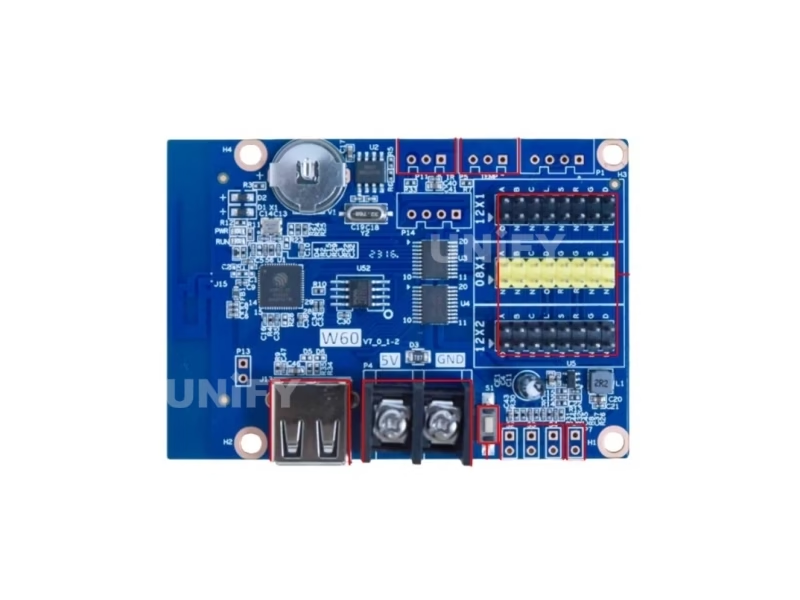
The W60 gives you two independent update paths. Channel A — Wi-Fi (same five steps as the entry card): wire 5 V, plug HUB12/HUB08 cables, press the test button, join the card’s hotspot, then build and send programs in LedArt or HD2020. Channel B — U-disk for sites where Wi-Fi cannot reach:
- Export the program batch in HD2020 to a fat32-formatted USB flash drive.
- Insert the drive into the card’s USB port — the card reads it on power-up.
- Wait for the update to finish and remove the drive; the screen switches to the new content automatically.
The U-disk path is the one to plan for underground parking, steel-clad rooms and remote roadside signs where a phone hotspot is unreliable. Full installation context — cabinets, brackets and power routing — is in our LED screen installation guide.
Huidu Official — how to use U disk to update an LED display
Applications
Where Do Customers Use the HD-W60 Single-dual Color LED Controller?
- Long door lintels and storefront fascias — the 10.24 m single-row P10 configuration is the W60’s home turf.
- Pharmacy, clinic and bank message boards — dual-color (red+green) content with temperature/humidity areas from the P5 sensor.
- Sports scoreboards — the S2/S3/S4 buttons run count-up/count-down timing at the venue, no phone needed.
- Underground and remote signs — the U-disk channel updates content where Wi-Fi is blocked or absent.
- School and factory notice boards — Excel schedules and 3D-text announcements load directly.
These mounting environments match the indoor LED display screen and LED signage for outdoor advertising guides — the controller is one layer of the signal chain.
Factory & Quality Control
How Is the HD-W60 LED Screen Controller Supplied and Guaranteed?
Unify LED buys Huidu control cards at factory level, tests each card before dispatch and backs them with a 2-year warranty:
- Factory-direct pricing — no distributor markup; bulk discounts from 10 pcs.
- 100% functional test before dispatch — every card is powered and screen-tested; the -40°C to +80°C rating covers transit.
- 2-year warranty — free replacement for manufacturing defects; field care is covered in our LED display maintenance guide.
- CE, FCC and RoHS certificates — issued by Huidu, verified by us, available on request.
Pricing
How Much Does the HD-W60 LED Controller Cost?
Published pricing for the W60 is thin — the one verified retail listing in August 2026 is the Indian market:
Huidu does not publish a retail guide price, so compare the card against its class: the W60 costs modestly more than the HD-W00 (street $5–8) while quadrupling the pixel budget and adding the USB channel and 7-color mode. Factory-direct pricing from Unify LED applies from single units; request a quote for your quantity and destination. At roughly 3 W-class draw the operating cost stays trivial — the LED display power question is decided by the modules, not the card. Broader price context: our 2026 price report tracks the industry trends.
FAQ
HD-W60 Single-dual Color LED Controller: Frequently Asked Questions
Q1. What is the 7-color display mode on the HD-W60? When driven with full-color RGB modules, the W60’s HUB12/HUB08 outputs show seven color combinations — red, green, blue, yellow, purple and white. It is not full-color video: each pixel switches between these fixed colors rather than millions of shades, which is why the card still belongs to the single-dual color class.
Q2. What is the difference between the HD-W60 and the HD-W00? Four times the single-color loading (1024×32 vs 320×32), 4 MB vs 1 MB Flash, a U-disk update channel alongside Wi-Fi, tricolor module support with 7-color display, and an extra HUB08 output. The W00 remains the cheaper option for small door lintels.
Q3. How do I update the HD-W60 without Wi-Fi? Export the program batch in HD2020 to a fat32 USB flash drive, insert it in the card’s USB port and power up — the card loads the new content automatically. This is the documented U-disk channel for underground, shielded or remote sites.
Q4. How big a screen can one HD-W60 drive? 1024×32 pixels single color (512×32 dual color). In P10 modules that is 32 modules in one row (10.24 m × 0.16 m) or 16 modules in two rows (5.12 m × 0.32 m); P6 and P4.75 scale proportionally.
Q5. How much power does the HD-W60 draw? Huidu does not publish a W60 wattage — the official document and matrix leave the cell blank. At the W64A the published figure is 3 W, and the W60 sits in the same class; treat any exact number on reseller pages as distributor data, not official.
Q6. I need to reset the HD-W60 — how? The official reset procedure covers the W60 along with the U62/U63/W62/W63/W64 family (video below): power the card, trigger the reset sequence, then re-pair with default credentials and resend programs from HD2020.
More controller questions are answered in our LED display FAQ and warranty terms.
Huidu Official — how to reset Huidu controller W60 W62 W63 W64
Certifications
Which Certificates Does the HD-W60 LED Controller Carry?
The official specification lists CE, FCC and RoHS. Environmental ratings: operating temperature -40°C to +80°C, storage -40°C to +105°C, humidity 0–95%.
Get HD-W60 Bulk Pricing from the Factory
Genuine Huidu cards, 100% pre-tested, 2-year warranty, shipped worldwide. Tell us your module type, quantity and destination — quote within 24 hours.
Deep Blog
HD-W60 Single-dual Color LED Controller: The Complete Buying Guide (2026)
The HD-W60 Single-dual Color LED Controller fills the gap between Huidu’s entry W00 and the taller W6X members, and it is the card most spec’d for the single-row signs that outgrow a 3.2 m lintel. This guide rebuilds the W60 from the official Huidu specification document V1.1, then answers the questions buyers actually send us: what the 7-color mode means, how the U-disk channel works, how large a screen the pixel budget covers and where the marketplace listings get it wrong.
Chapter 1 — The W6X Family: Where the HD-W60 Sits
Huidu’s W6X series is a six-model ladder of Wi-Fi + U-disk control cards: HD-W60, W6B, W62, W63, W64A and W66. All six share the same architecture — Wi-Fi hotspot plus USB U-disk updates, 1,000-program engine, 20 display areas, CE/FCC/RoHS — and differ in pixel loading. The W60 loads 1024×32 single color (512×32 dual color) and 4 MB Flash. The W6B adds height (1024×48), the W62 doubles it (1024×64), the W63 opens the wide format (up to 2048 wide), the W64A adds an 8 MB Flash and the W66 reaches 2048×512.
Positioning matters when buyers ask “W60 or W00?”: the entry HD-W00 Single-dual Color LED Controller drives 320×32 for a few dollars less; the W60 quadruples the width, adds the USB channel, tricolor support and 7-color display. Our HD-W00 page carries the full entry-card treatment — the two pages are written to be read as a pair.
Chapter 2 — The 7-Color Display Mode, Explained
The official spec line reads: “Full-color module can display red, green, blue, yellow, purple, white.” What this means in practice: the W60 drives RGB (3-in-1) modules through its HUB12/HUB08 outputs, but instead of 24-bit color, each pixel snaps between seven fixed states. Red, green and blue come from the three chip channels; yellow = R+G, purple = R+B, and white = R+G+B. Seven colors, zero grayscale processing — which keeps the W60 a single-dual color card in cost and complexity while letting a storefront run a green-red-white palette on stock RGB modules.
The buying consequence: do not read “7 colors” as full-color video. If the project needs photo-like images or video playback, the card class changes to an asynchronous RGB player. If it needs colored text and shapes on a sign that already uses RGB modules, the 7-color mode is exactly the right price/performance point.
The cost arithmetic explains why the mode exists. A true full-color card needs grayscale processing, more memory per pixel and a higher data rate to the module; the W60 keeps the single-dual color data path and maps each pixel to one of seven fixed states, which is why it prices where it does while still running RGB modules a distributor may already have in stock. For signage that is mostly text in brand colors — a pharmacy chain’s green-and-white fascia, a bank’s blue-and-red rates board — the seven-color palette covers the design system without paying for full-color processing. The one limit to design around: gradients and photographic content are not possible, because intermediate shades do not exist in a 7-color framebuffer.
Chapter 3 — Two Update Channels: Wi-Fi and U-Disk
The W60’s dual-channel design is its strongest field argument. The Wi-Fi hotspot works exactly like the W00: the phone or laptop joins the card’s own network and sends programs through LedArt (mobile) or HD2020 (PC). The second channel is a physical USB port that accepts a fat32 flash drive: HD2020 exports the program batch to the drive, the drive goes into the card, and the card loads it at power-up.
Field scenarios where the U-disk wins: underground parking signage where no phone signal and no Wi-Fi reach the card; steel-clad industrial rooms that absorb 2.4 GHz; roadside signs maintained by a driver who carries one USB stick instead of a laptop; and multi-site updates where a technician prepares all program files at the office and loads them card by card on site. The official 3:24 tutorial below walks through the export-and-load flow end to end.
Operational notes from field rollouts. Label the drive by site and keep one master file per project in HD2020’s project folder — when a franchise runs forty signs, the technician updates each card from the matching folder and avoids the classic error of loading the wrong site’s content onto a screen. The card reads the drive at power-up, so the sequence is insert, power, wait for the load, verify, remove; leaving the drive in place is harmless but exposes the USB port to dust in outdoor cabinets. For content that changes daily, keep the Wi-Fi path as the primary and use the U-disk as the fallback — the two channels are complementary, not either/or.
Huidu Official — how to choose HUIDU LED display controllers course
Chapter 4 — Loading Capacity in Real Modules
1024×32 pixels translates to a ten-meter sign. With P10 modules (32×16 px), a single row runs 32 modules end to end — 10.24 m of fascia — and two rows run 16 modules (5.12 m × 0.32 m). The same budget on P6 gives 6.14 m single row; on P4.75, 4.86 m. Dual-color mode halves the width (512×32) because the module electronics consume twice the data per pixel — the classic trade-off buyers should price before selecting modules.
A worked comparison against the W00: the entry card covers 3.2 m of P10 in two rows. The W60 covers 10.24 m in one row or 5.12 m in two — a 2.5× to 3.2× jump in sign area on the same board footprint. Signs beyond 10.24 m move to the W62 (1024×64) or to two W60 cards; the asynchronous LED media player guide covers the tier above.
Why dual color halves the width: a dual-color module carries red and green data per pixel, and the HUB12/HUB08 data lines must carry both channels, so the effective pixel budget divides by two. The same 4 MB Flash and 1,000-program engine stay unchanged — only the frame buffer halves. If the project is green-only or red-only, single-color mode wins back the full 1024 width; if red+green is non-negotiable, size the screen to 512×32 and check that the module plan fits before ordering cable lengths. The 2× HUB12 + 1× HUB08 output also matters here: a mixed sign with a HUB12 section and a HUB08 section runs both from one card instead of two.
Chapter 5 — Setup: Wiring, Test Button and First Program
Installation follows the W00 pattern with two extra steps. Wire the 5 V supply (4.2–5.5 V rated; the official precautions insist on a standard 5 V unit), plug the HUB12 and/or HUB08 cables, then press the test button to confirm the test pattern. Join the card’s Wi-Fi hotspot and open LedArt — the app auto-discovers the controller. Build the first program with one text area and one clock area, send it, and the sign is live.
The extra steps belong to the buttons: S2/S3/S4 point switches are wired to external push buttons that change programs and run the timing functions. For a scoreboard, S2 = next program + count up, S3 = previous program + count down, S4 = pause and reset — the official 57-second S2/S3 tutorial in the interface section shows the exact configuration screen in HD2020.
Chapter 6 — Content: 3D Text, SWF, Excel and the Clock Suite
Beyond running text, the W60 accepts picture areas, 3D-styled text, SWF animations and Excel tables added directly into program regions. For a pharmacy, the schedule table renders from an .xls export; for a school, the bell timetable does the same. Forty-plus text effects, stroke/outline fonts, region background settings and custom borders apply per area across all 20 regions.
The clock suite is where the W60 separates from generic cards: digital, dial and lunar displays with free font/size/color/position control, multiple time zones, plus countdown/count-up timing driven by the S2/S3/S4 buttons. Temperature and humidity text areas come from the P5 sensor, brightness dimming from the P7 photosensitive sensor, and remote switching from the P11 IR receiver.
Chapter 7 — Troubleshooting the Common Failures
The failures we see on W60 installs cluster in four places. U-disk not loading: reformat the drive to fat32 and re-export from HD2020 — exFAT and NTFS drives are not read. No picture after wiring: press the test button; a clean test pattern isolates module/cable faults from card faults, and a reversed HUB ribbon is the most common cause. Flicker under load: power supply, almost always — the 4.2–5.5 V window is tight and a tired 5 V unit dips under draw; see our power supply diagnostics guide. Controller needs a full reset: the official procedure covers the W60 in the U62/W62 family batch (video in the FAQ section) — reset, re-pair with default credentials, resend programs.
Wi-Fi range follows the same physics as every card in this class: 2.4 GHz only, roughly 15 m line of sight indoors, less through steel. When the hotspot is unreachable, the U-disk channel becomes the maintenance path rather than a failure — that is the design intent of the dual-channel architecture.
Diagnosing “phone cannot find the card” follows a fixed order: confirm the phone is on 2.4 GHz (a 5 GHz-only phone will never see the hotspot); move the phone within a few meters of the card for the first pairing; check that no other 2.4 GHz router in the shop is broadcasting the same SSID the card is configured for; then power-cycle the card and retry. If the card was previously paired to a router in LAN mode, the hotspot may be disabled entirely — reset per the official video and reconfigure in HD2020. Nine of ten “dead card” reports on this model turn out to be one of these configuration states, which is why the reset procedure above is the first thing our support team sends.
Chapter 8 — Price, Warranty and a Buying Checklist
The verified retail reference in August 2026 is ₹699 + 18% GST (≈ ₹825) at the Indian reseller hubtronics — currently out of stock, which tells the real story: W60 supply at retail is thin, and factory-direct channels carry the inventory. Huidu publishes no W60 guide price, so treat any quoted wattage or price on reseller pages as distributor data until confirmed.
Unify LED is an LED screen manufacturer in Changsha, China, supplying modules, cabinets, power supplies and controllers as one assembly — the W60 ships tested against the modules it is specified for, with a 2-year warranty and CE/FCC/RoHS documentation. A final checklist for the procurement email: (1) confirm module interface — HUB12, HUB08 or mixed — so the supplier verifies the W60’s dual-output wiring; (2) state single-color vs dual-color so the 1024×32 / 512×32 budget is checked against the module plan; (3) ask whether the price includes sensors and IR remote; (4) verify certificate copies ship with the order; (5) order one spare per ten installed — at this price point the spare is cheaper than the service call.
Conclusion. The HD-W60 Single-dual Color LED Controller is the right part when the sign runs past the entry-card ceiling: up to 10.24 m of single-color P10 or 5.12 m of dual-color, updated by Wi-Fi or by U-disk, with tricolor modules, 7-color display and button-driven timing on board. Match the module interfaces to the two HUB12 plus HUB08 outputs, feed it from a clean 5 V supply, and the W60 carries the project from a storefront fascia to a venue scoreboard on one card.
LED Control System Range
Which LED Controllers Should You Explore Next?
Huidu, Colorlight and Novastar control products, receiving card guides and free software resources on UnifyLED.
Huidu Controllers
Novastar Sending Controllers
Guides & Resources
Where Can You Download HD-W60 Resources?
The official Huidu HD-W60 Specification V1.1 — the data source for every figure on this page.
Related: browse the full Huidu LED controller catalog — 12 models across four product lines, free HDSet / HDPlayer / HD Show software, cloud remote control without a subscription, and factory-direct pricing.