
Huidu A-Series Flagship · Multimedia Player · 2.6M Pixels · HDMI Splicing
Huidu HD-A6L Dual Mode LED screen Player
The Huidu HD-A6L Dual Mode LED screen Player is the L-series flagship: asynchronous playback, synchronous HDMI input and HDMI splicing in one Android 11 box — 2.6 million pixels across four Gigabit outputs, up to six 1080P windows at once, dual-band Wi-Fi, wireless screen casting and 5G cloud management.
Product Overview
What Is the Huidu HD-A6L Dual Mode LED screen Player?
The HD-A6L is a multimedia player that combines asynchronous playback, synchronous HDMI input and HDMI splicing in one Android 11 box, per Huidu Specification V1.4. It drives up to 2.6 million pixels across four Gigabit outputs, plays up to six 1080P video windows at once, decodes H.265 and VP9 to 4K@60, and manages fleets over the XiaoHui cloud with optional 4G/5G — the flagship of the L-series that tops the HD-A5 Dual Mode Player and the HD-A3 Async Control Player below it.
Short answer: The Huidu HD-A6L is the L-series flagship dual-mode multimedia player: 2.6 million pixels across four Gigabit outputs (the exact arithmetic of 4 × 655,360), asynchronous playback from 16 GB storage with H.265/VP9 decoding to 4K@60, synchronous HDMI input with adaptive scaling, HDMI splicing for multi-screen walls, up to 6×1080P video windows at once, dual-band Wi-Fi with wireless screen casting, optional 4G/5G cloud management, sensors up to wind speed and CO₂, 18 W, working temperature -40°C to +70°C, IP20 — configured through the free HDPlayer software with a 36-page official user manual.
The three playback modes are the A6L’s identity: asynchronous (stored programs, no PC at the wall), synchronous (HDMI input auto-scaled), and HDMI splicing (multiple screens chained into one canvas) — the widest capability set in the A-series, positioned in the async player and sync vs async guides. Unify LED is an LED screen manufacturer supplying Huidu control systems at factory level — this page uses the official HD-A6L Specification V1.4 and the 36-page AxL user manual as its data sources, with marketplace confusion corrected below.
Huidu Official — introduction of LED display multimedia player HD-A6L
Specifications
What Are the HD-A6L Dual Mode Player Specifications?
Specifications from the official Huidu HD-A6L Specification V1.4 (13 pages) and the AxL-series User Manual (36 pages).
Core Specifications (Official V1.4)
Software: HDPlayer (Windows), free — mirrored on our Huidu system software downloads page. The 36-page official user manual is linked at the bottom of this page.
Spec Correction — Exclusive
Where Do HD-A6L Listings Get the Specs Wrong?
The A6L confusion has a documented cause: the official version history itself. V1.1 updated the loading to 2.6M, V1.2 refined the casting description, and V1.3 raised the max width to 65,536 — but many listings still carry the pre-update figures, which are the A5L’s numbers. The map:
The habit we recommend: when an A6L listing disagrees with another A6L listing, check which one matches V1.4 — the version history in the official document explains where the older numbers came from.
Comparison
Which LED Player Fits: HD-A6L, HD-A5, HD-A3 or a VP Processor?
The A-series ladder and the wider class, official specs:
Table A — The A-Series Ladder (Official Specs)
Table B — Three-Way Positioning
Selection guide: one screen, pure scheduled — HD-A3; one screen with occasional live — HD-A5; multiple screens, spliced walls, or six-window content — the HD-A6L; live multi-input walls — the VP210 and up. The async player comparison covers the class.
Core Features
What Does the HD-A6L Dual Mode Player Do?
Six capabilities from the official V1.4 define how the A6L behaves in the field:
🧩 Three playback modes
Async playback, synchronous HDMI input and HDMI splicing in one Android 11 box — the widest capability set in the A-series.
🪟 Six-window content
Up to 2×4K, 6×1080P, 10×720P or 20×360P windows at once — a wall full of live and stored sources on one canvas.
🔗 HDMI splicing
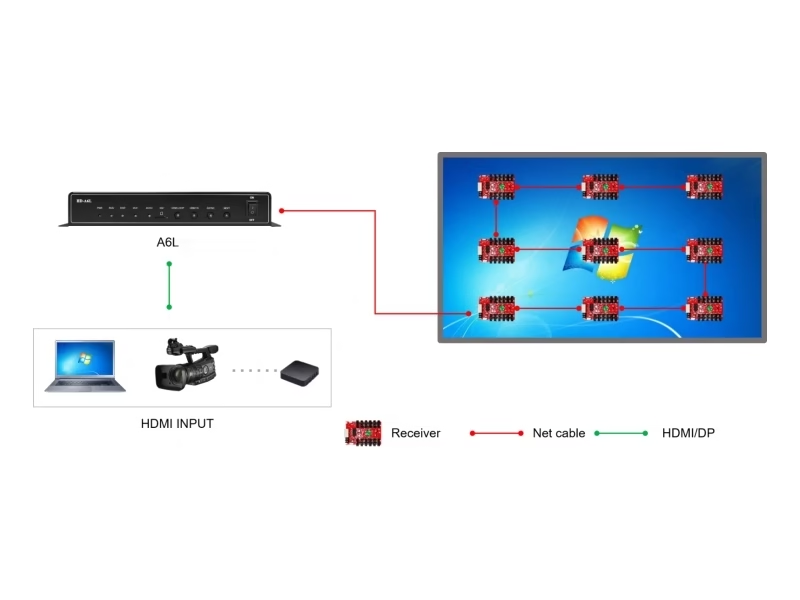
Chain multiple screens with HDMI LOOP and the content auto-splices into one overall picture — advertising machines become one wall.
📡 Dual-band Wi-Fi + casting
2.4/5 GHz standard with STA mode; optional wireless screen casting from phones, tablets and computers — content from any device, wirelessly.
☁️ 5G cloud management
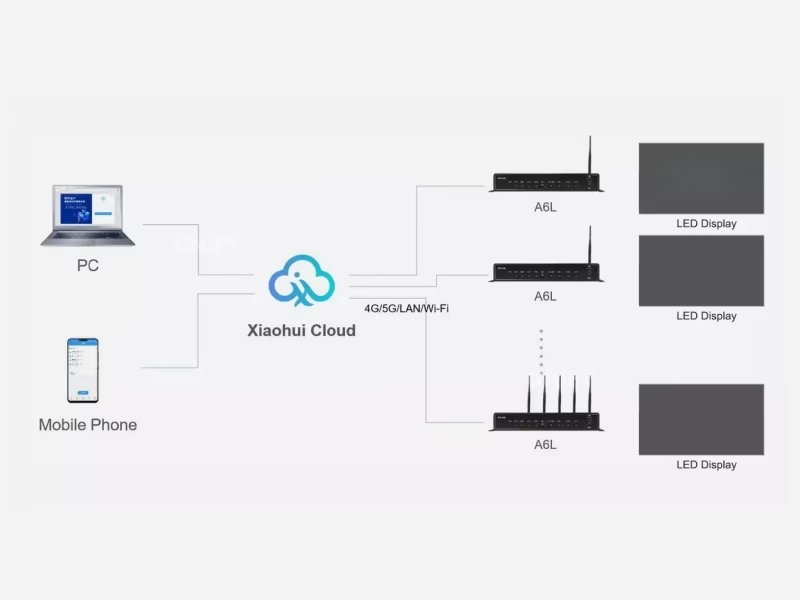
XiaoHui Cloud with optional 4G/5G (4G one antenna, 5G four) — fleets managed from anywhere, no IP configuration, auto-detected by ID.
🌡️ Environment sensors
Temperature, humidity, brightness, wind speed, wind direction, noise, PM2.5, PM10 and CO₂ — a display that reports its environment.
Interface
Which Ports Are on the HD-A6L Dual Mode Player?
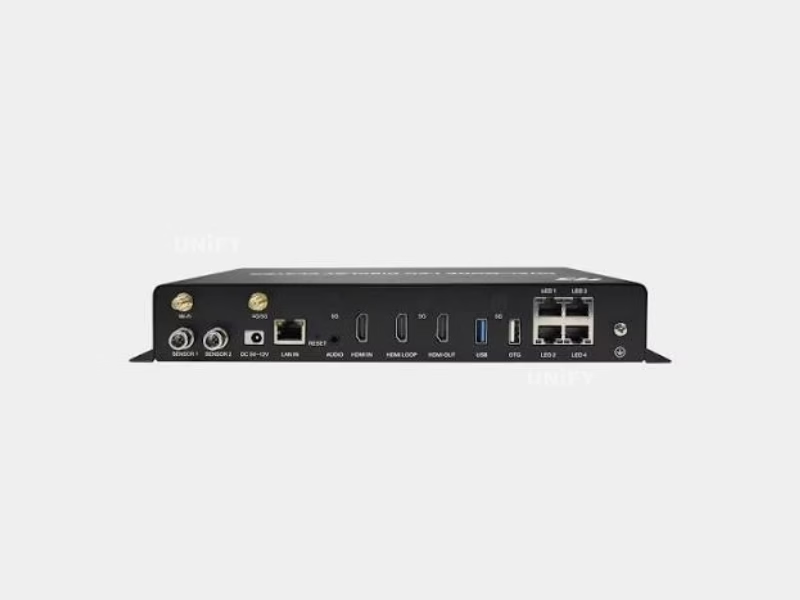
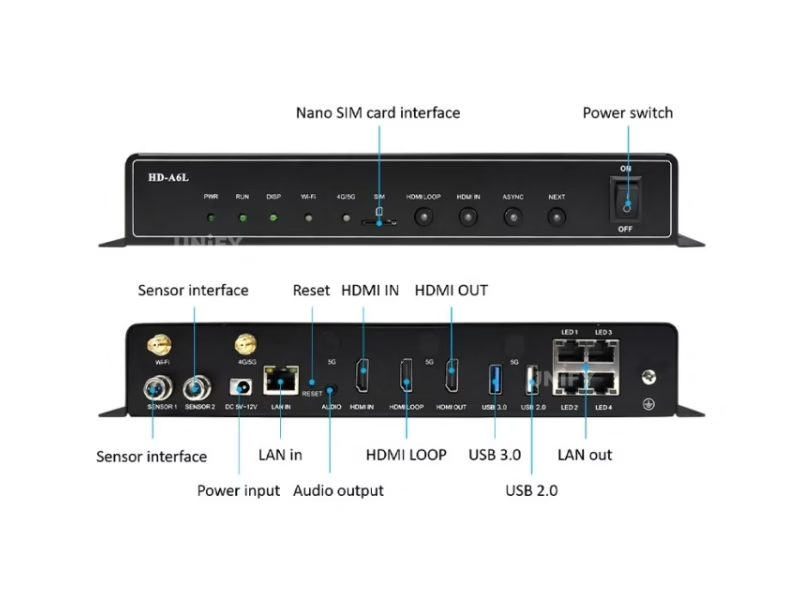
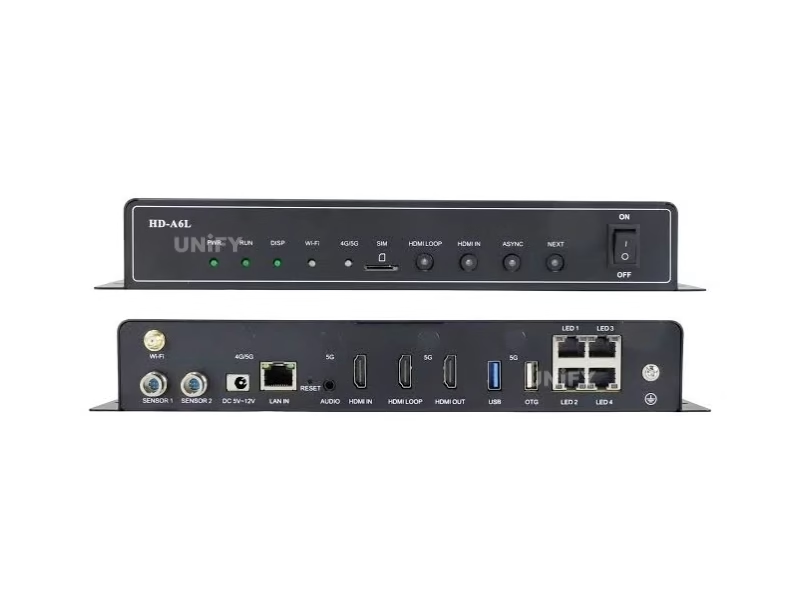
Front panel, rear panel and indicators from the official V1.4:
Front Panel
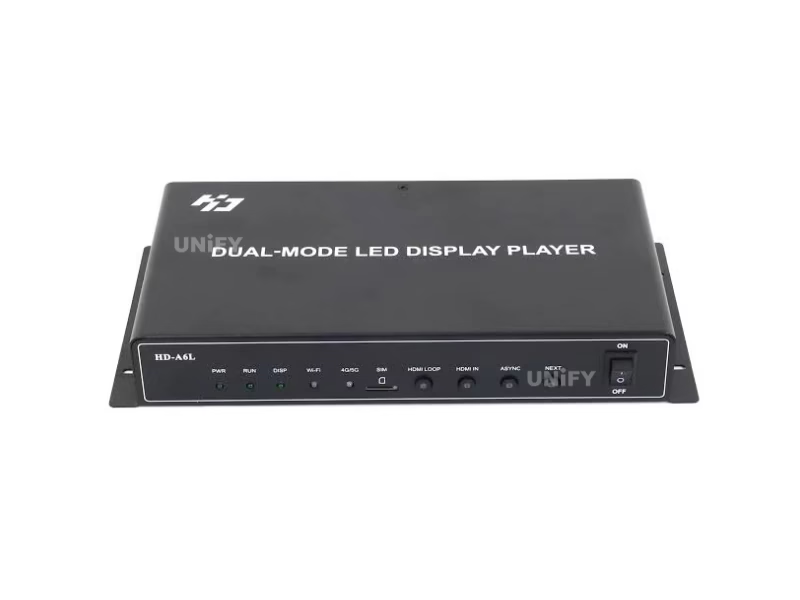
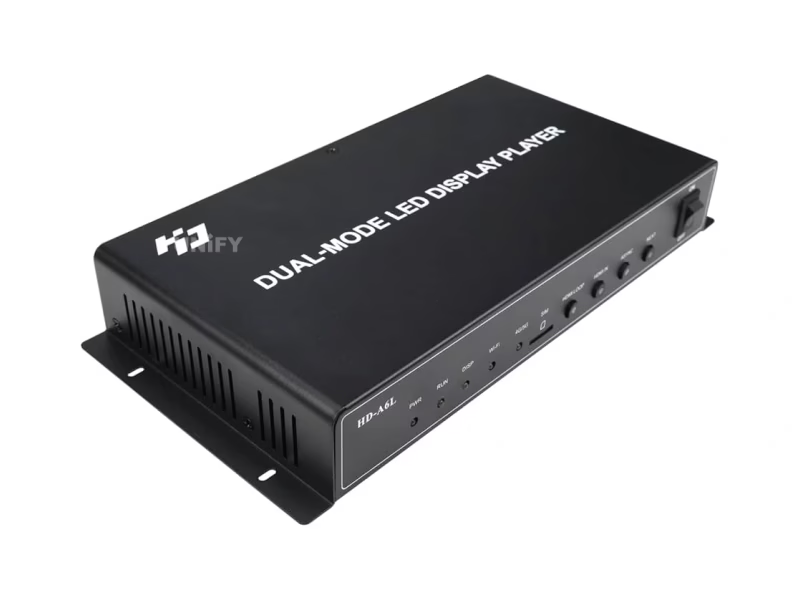
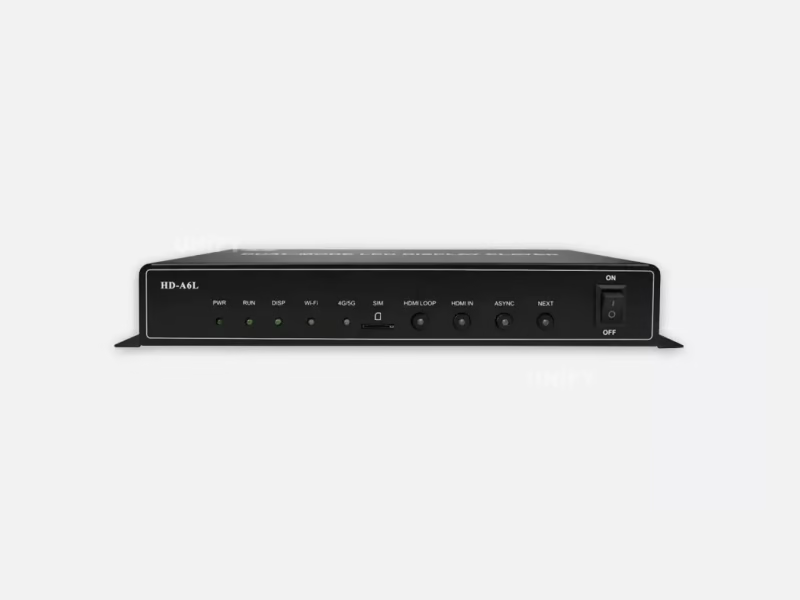
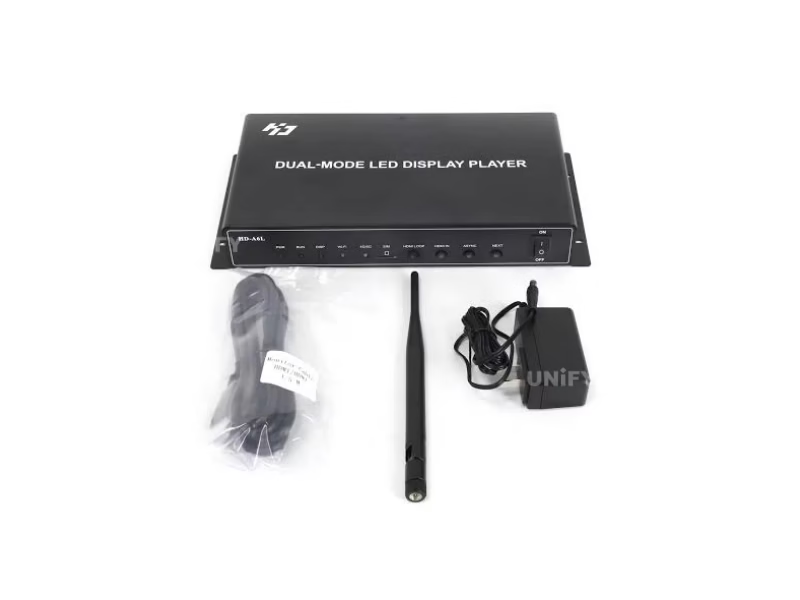
- Indicator LEDs — PWR (power), RUN (system), DISP (FPGA), Wi-Fi (AP/STA states), 4G/5G (cloud connection states) — each with a full color/state legend in the manual.
- SIM card slot — Micro SIM for 4G/5G (optional module).
- Function keys — HDMI LOOP (splicing mode), HDMI IN (sync playback), ASYNC (async mode), NEXT (program switch).
- Power switch — ON/OFF.
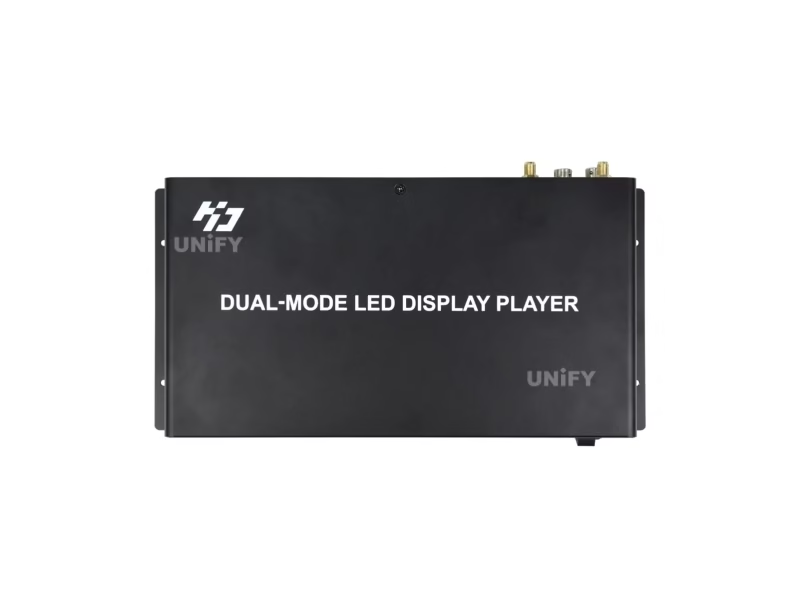
Rear Panel
- Wi-Fi antenna — strengthens the dual-band signal.
- Sensor port — temperature, humidity, brightness, wind, noise, PM2.5/PM10, CO₂.
- 4G/5G antenna — 4G one antenna, 5G four (optional).
- Power — 5 V 3 A or 12 V 1.5 A.
- Input RJ45 — Gigabit, computer debug and program release.
- Reset pinhole — factory restore.
- Audio output — TRS 3.5 mm stereo.
- HDMI IN / LOOP / OUT — sync input, splicing input, monitoring output (HDMI 1.4).
- USB 3.0 + OTG — program updates, capacity expansion, firmware (OTG factory-configurable).
- Output RJ45 × 4 — four Gigabit chains to HD-R receiving cards.
- Ground wire port.
Loading Capacity
How Big a Screen Can the HD-A6L Dual Mode Player Drive?
2.6 million pixels is exactly four port-loads: 4 × 655,360 = 2,621,440, the same per-port figure across every Huidu document on this site. The width limit follows the same ladder: 65,536 = 4 × 16,384, and 65,536 × 40 = 2,621,440 exactly. A typical plan lands on 2560 × 1024 (also exactly 2,621,440). Translated into real screens (UnifyLED conversion):
The extreme shape uses the width limit: a 65,536-pixel fascia at P4 is 262 m wide × 0.16 m tall — an ultra-long roadside banner no other A-series player drives from one box. Multi-screen splicing extends this further: chain A6L units with HDMI LOOP and the canvas grows across machines.
The per-port arithmetic, seven documents running. We derived 655,360 pixels per Gigabit port on the HD-VP210 page; the HD-VP620, HD-VP830, HD-A3 and HD-A5 documents all print it; the A6L’s 2.6M is four of those port-loads. Every Huidu document on this site tells the same story.
Screen power planning belongs to our LED display power consumption guide.
Setup Tutorial
How Do You Set Up the Huidu HD-A6L Dual Mode Player?
The 36-page official manual breaks the A6L into a clear workflow; the setup video below covers the controller side:
Channel A — the async path. Install HDPlayer, run the smart-setting wizard (auto-detected by ID, no IP configuration), edit programs and send them by U-disk, LAN, Wi-Fi or the cloud. The front-panel NEXT key switches programs without a computer.
Huidu Official — dual-mode LED display player new controller A6L setup
Channel B — the sync path. Press HDMI IN or plug the source into the HDMI input; the picture auto-scales to the wall — the same adaptive scaling as the A5.
Channel C — HDMI splicing. Press HDMI LOOP and chain the next screen’s HDMI IN; the A6L auto-splices multiple screens into one overall picture — the official 3:57 video below shows the multi-screen splicing playback. This is the function that turns a row of advertising machines into one wall.
Huidu Official — how to realize multi-screen splicing playback
Channel D — multi-window content. The A6L plays up to 2×4K, 6×1080P, 10×720P or 20×360P windows on one canvas — a window budget that covers live corners, tickers and stored loops together.
Channel E — wireless casting. With the optional casting function, phones, tablets and computers project onto the screen wirelessly — the official 1:04 tutorial and the 1:08 mirroring video below show the two paths.
Huidu Official — A6L controller wireless screen-cast operation tutorial
Huidu Official — how to use the screen mirroring function of the A6L
Full mounting and network context: our LED screen installation guide, plus the playlists and schedules guide for the program side.
Applications
Where Is the HD-A6L Dual Mode Player Used?
The A6L serves the sites where one player must do more than play:
- Advertising machine networks — HDMI splicing chains a row of poster screens into one wall; the cloud manages the fleet by ID.
- Shopping malls and atriums — six-window content runs promos, wayfinding, weather and live feeds on one canvas.
- Exhibition halls — wireless casting puts a phone or tablet on the big screen in seconds for booth demos.
- Outdoor information screens — 5G cloud management and the sensor line (wind, PM10, CO₂) turn a display into a reporting station.
- Retail and signage chains — one operator, many screens, dual-band Wi-Fi for dense venues, no IP records.
Huidu Official — A6L supports multiple button switching programs
Factory & Quality Control
How Is the HD-A6L Dual Mode Player Supplied and Guaranteed?
Unify LED buys Huidu control systems at factory level, tests each unit before dispatch and backs them with a 2-year warranty:
- Factory-direct pricing — no distributor markup; bulk discounts from 10 pcs.
- 100% functional test before dispatch — every unit powered and run in all three modes against a test panel before packing.
- 2-year warranty — free replacement for manufacturing defects; field care in our LED screen maintenance guide.
- Certificate included — FCC, CE, ETL and RoHS are listed in the official V1.4; the certificate ships in the box.
Pricing
How Much Does the Huidu HD-A6L Dual Mode Player Cost?
Published prices verified 2026-08-26:
The flagship economics: the A6L (USD 259–329) prices close to the HD-A5 (USD 218–278) for double the pixels, four ports, splicing, six-window content, dual-band Wi-Fi and casting — the best value-per-capability in the A-series. Compared with a spliced wall built from VP processors, the A6L chain is an order of magnitude cheaper per screen. Our 2026 LED display price report tracks the wider market.
Factory-direct pricing from Unify LED applies from single units; request a quote for your quantity and destination.
FAQ
HD-A6L Dual Mode Player: Frequently Asked Questions
Q1. What is the HD-A6L? The L-series flagship multimedia player: asynchronous playback, synchronous HDMI input and HDMI splicing in one Android 11 box — 2.6M pixels, four Gigabit outputs, multi-window content, dual-band Wi-Fi, casting and 5G cloud management.
Q2. How many pixels can the HD-A6L drive? 2.6M per official V1.4: four Gigabit outputs × 655,360 pixels per port = 2,621,440. Width max 65,536 (4 × 16,384), height max 8,192 — both divide exactly.
Q3. What is HDMI splicing? Chain multiple screens with the HDMI LOOP port and the A6L auto-splices them into one overall picture — a row of advertising machines becomes a single wall, with the content distributed across the chain automatically.
Q4. How many videos can the HD-A6L play at once? Up to 2×4K, 6×1080P, 10×720P or 20×360P windows simultaneously — a wall full of live and stored sources on one canvas, with H.265/VP9 decoding to 4K@60.
Q5. Does the HD-A6L support wireless screen casting? Yes — with the optional casting function, phones, tablets and computers project onto the screen wirelessly (the official tutorials cover both casting and mirroring). Dual-band 2.4/5 GHz Wi-Fi is standard.
Q6. What is the difference between HD-A6L and HD-A5? Double the pixels (2.6M vs 1.3M), four ports instead of two, HDMI splicing, six-window content instead of dual, dual-band Wi-Fi, wireless casting, 16 GB storage and 5G support. The A5 is the dual-mode entry; the A6L is the flagship.
More player questions: our async playback troubleshooting guide and LED display FAQ.
Certifications
Which Certificates Does the HD-A6L Dual Mode Player Carry?
The official V1.4 lists FCC, CE, ETL and RoHS; the certificate ships in the box per the official packaging list. Warranty terms in our warranty guide.
Get HD-A6L Bulk Pricing from the Factory
Genuine Huidu multimedia players, 100% pre-tested, 2-year warranty, shipped worldwide. Tell us your pixel budget, screen count and destination — quote within 24 hours.
Deep Blog
Huidu HD-A6L Dual Mode LED screen Player: The Complete Buying Guide (2026)
The Huidu HD-A6L Dual Mode LED screen Player is the flagship of the L-series and the most capable player Huidu builds: asynchronous playback, synchronous HDMI input and HDMI splicing in one Android 11 box, with 2.6 million pixels across four Gigabit outputs and up to six simultaneous 1080P windows. It is also the A-series model with the most confused listings — because the official version history itself changed the headline numbers (V1.1 raised loading to 2.6M, V1.3 raised width to 65,536) and the pre-update figures still circulate. This guide rebuilds the A6L from Specification V1.4 and the 36-page user manual, explains the arithmetic, the three playback modes and the window budget, and positions it against the A5, the A3, the Novastar TB range and the VP processors on this site.
Chapter 1 — The L-Series Flagship: Where the A6L Sits
The L-series is Huidu’s current generation of multimedia players: the HD-A3 at 655,360 pixels (pure async), the HD-A5 at 1.3M (dual mode), and the HD-A6L at 2.6M (multimedia flagship) — each step doubles the port count and adds capability. The A6L’s four Gigabit outputs, 16 GB storage and Android 11 platform put it at the top of the family, with the 4K-class A7/A8 above it in Huidu’s wider catalog. For the class map, the async player selection guide and the comparison cover the wider field.
The rung choice is a capability question as much as a pixel question. A single screen running scheduled content fits the A3; a screen with occasional live input fits the A5; a network of screens, a spliced wall or a six-window canvas fits the A6L — even when the pixel count of any one screen would fit a smaller box. The A6L’s three playback modes and its window budget are the features that justify the flagship price, and the fleet-management layer (cloud by ID, 5G optional) is what makes multi-site operators standardize on it. Budget by the network, not by the single screen.
Chapter 2 — The Version History Explains the Confusion
Official V1.4 carries a version history that reads like a roadmap of the listing errors: V1.1 updated the loading capacity to 2.6 million pixels, V1.2 refined the wireless-casting description, and V1.3 updated the maximum width to 65,536 pixels. Every marketplace that copied the pre-V1.1 datasheet still quotes 1.3M and 16,384 — which are the A5L’s figures — and the 8 GB storage figure predates the 16 GB of V1.4. The practical habit: when two A6L listings disagree, the one that matches V1.4 wins, and the version history explains where the other numbers came from. The same discipline applies to the working temperature (official -40°C to +70°C; the -40°C to 80°C figure is the storage range) and the Wi-Fi (dual-band 2.4/5 GHz standard, not single-band).
The version habit also protects the order itself. Because the A6L ships with firmware tied to its specification revision, the procurement email should state the required version behavior — 2.6M loading and the 65,536 width — so the warehouse confirms the unit carries the V1.1+ firmware before dispatch. A unit flashed with pre-update firmware would behave like the older listings: 1.3M loading, 16,384 width. The spec sheet and the firmware must match, and the version history is the checklist for both.
Chapter 3 — The Arithmetic: 2.6M, Four Ports, 65,536 Wide
The A6L’s numbers extend the per-port arithmetic that anchors every Huidu document on this site. Four Gigabit outputs × 655,360 pixels per port = 2,621,440, the official 2.6M. The width limit is the same ladder: 65,536 = 4 × 16,384, and 65,536 × 40 = 2,621,440 exactly. The 2560 × 1024 standard configuration is 2,621,440 exactly. We derived the 655,360 per-port figure on the HD-VP210 page; the HD-VP620, HD-VP830, HD-A3 and HD-A5 documents all print it; the A6L’s 2.6M is four of those port-loads. In meters: 10.24 m × 4.10 m at P4, 25.60 m × 10.24 m at P10, or a 262 m ultra-long banner at the 65,536-pixel width limit.
The width figure also settles a quoting question that trips up new integrators: a 60 m roadside banner at P4 is 15,000 pixels — inside the A6L’s 65,536 limit with room to spare, so a single box drives it, where the A5 (16,384 wide) would be at the edge and the A3 (4,096 wide) would need a multi-box setup. On long-format signage, the width limit is often the binding constraint before the pixel count ever is; quoting width first avoids the re-engineering call after the cabinet order.
Chapter 4 — HDMI Splicing: The Function the L-Series Owns
The A6L’s signature capability is HDMI splicing. The rear panel carries three HDMI ports — IN (sync input, adaptive scaling), LOOP (sync input or splicing input) and OUT (monitoring) — and the front panel has a dedicated HDMI LOOP key. Chain screen A’s LOOP to screen B’s IN, and the A6L auto-splices the row into one overall picture: content drawn across the full chain, each screen showing its slice. That turns a row of advertising machines, a column of poster screens or a lobby of vertical displays into one canvas without a video processor or a server. The official 3:57 video on multi-screen splicing playback demonstrates the workflow; the poster-splicing tutorial on the B6 controller shows the same family behavior on Huidu’s poster line.
Chapter 5 — The Window Budget: 6×1080P on One Canvas
Multi-window playback is the A6L’s content engine: up to 2×4K, 6×1080P, 10×720P or 20×360P windows at once, decoded in hardware (H.264, H.265/HEVC, VP9 and MVC all reach 4096×2304@60, with H.265 up to 100 Mbps). The window budget is the practical planning tool: a mall wall running 6×1080P keeps promos, wayfinding, weather, live camera and ticker feeds as separate windows on one canvas, each independently updated through HDPlayer or the cloud. The 36-page manual documents the window workflow in detail; the window arithmetic is the same discipline as the pixel budget — plan the canvas before you fill it.
The window budget has a practical ceiling that planners should respect: six 1080P windows at full resolution need six decode channels and the canvas to hold them. On a 2560×1024 canvas, six windows of 853×341 pixels each is a six-column layout — readable for tickers and product feeds, tight for full video. The honest pattern we give operators: run one or two large video windows (promo, live feed) and fill the rest with smaller windows (ticker, clock, weather, logo) — the 20×360P tier exists precisely for that fill role. Budget the window sizes against the canvas the way you budget modules against a cabinet plan.
Huidu Official — A6L dual mode player new function demo
Chapter 6 — Dual-Band Wi-Fi and Wireless Casting
The A6L ships with dual-band 2.4/5 GHz Wi-Fi as standard — the first in the A-series — with STA mode so the box joins the venue network, plus the LedArt mobile app for control. The optional wireless casting function puts phones, tablets and computers onto the screen without cables: a booth demo, a meeting agenda, a live phone feed. The official tutorials cover both casting (1:04) and mirroring (1:08). For exhibition halls and retail spaces where “put my phone on the big screen” is a daily request, the casting option is the difference between a demo that takes seconds and a demo that needs a laptop and a cable run.
Two field notes on the wireless layer. First, antenna discipline: fit the included Wi-Fi glue-stick antenna and keep it clear of the steel cabinet — dual-band helps in dense venues, but only if the antenna can actually radiate. Second, the STA mode matters for management: in STA mode the A6L joins the venue network as a client, which is what lets the LedArt app and the cloud reach it without a dedicated access point; the AP mode is the fallback for sites with no network at all. The manual’s Wi-Fi section documents both states, and the front-panel indicator colors (green blinking = AP, green solid = STA) tell the installer which mode is live at a glance.
Chapter 7 — 5G Cloud, Sensors and the Fleet View
The A6L manages fleets the way the L-series does everywhere: auto-registered by controller ID, no IP configuration, XiaoHui Cloud over the internet with optional 4G/5G (the 5G module uses four antennas; 4G uses one). The sensor line is the widest in the series — temperature, humidity, brightness, wind speed, wind direction, noise, PM2.5, PM10 and CO₂ — turning an outdoor information screen into an environment-reporting station. For an advertising network across cities, the combination of 5G cloud management and sensor feedback is the difference between dispatching a technician and reading a dashboard.
The 5G note deserves precision at order time: the 5G module uses four antennas, the 4G module one — the antenna kit ships with the module, so the quote should state which generation is being supplied. And because the SIM slot is a Micro SIM, the fleet operator should order the SIMs with the units rather than discovering the form factor on site. The sensor line has the same precision requirement: wind speed, wind direction, PM10 and CO₂ are options within the sensor family, so the procurement email should name the exact sensors — the official V1.4 lists the full family, and the sensor box ships to match.
Chapter 8 — Price, Warranty and the Buying Checklist
Verified August 2026 pricing: USD 259 at eager-led/ledcontrollercard (from 321), USD 295–329 at reiled, USD 315 at lvphub, factory-direct on request. The A6L prices close to the HD-A5 for double the pixels and the full multimedia capability set — the best value-per-capability in the A-series, and an order of magnitude cheaper per screen than a spliced wall built from VP processors. Unify LED is an LED screen manufacturer in Changsha, China, supplying control systems alongside modules, cabinets and power supplies as one assembly — the A6L ships tested in all three modes against the receiving cards it is specified for, with a 2-year warranty and the certificate (FCC/CE/ETL/RoHS) in the box.
Final checklist for the procurement email: (1) state the pixel budget and shape — 2.6M at 2560×1024 with the 65,536-wide limit decides the A6L vs the A7/A8 tier; (2) confirm whether HDMI splicing is required and how many screens chain; (3) state the window count — 6×1080P is the practical ceiling to plan content against; (4) confirm the casting option and the 4G/5G module with antenna count; (5) list any sensors (wind, PM10, CO₂) so the sensor box ships with the order; (6) ask for the certificate copies explicitly; (7) order one spare per ten installed — the player is the cheapest component in the signal chain and the spare beats the site visit.
Conclusion. The Huidu HD-A6L Dual Mode LED screen Player is the flagship of Huidu’s L-series: 2.6 million pixels across four Gigabit outputs — four port-loads of the 655,360 arithmetic that anchors every Huidu document on this site — asynchronous, synchronous and HDMI-splicing playback in one Android 11 box, up to six 1080P windows, dual-band Wi-Fi with casting, and 5G cloud management. Trust V1.4 over the older listings, plan the window budget against the canvas, and the A6L carries the multimedia wall on one box.
LED Control System Range
Which LED Controllers Should You Explore Next?
Huidu, Colorlight and Novastar control products, media player guides and free software resources on UnifyLED.
Colorlight Controllers
Guides & Resources
Where Can You Download HD-A6L Resources?
The official Huidu HD-A6L Specification V1.4 and the 36-page AxL-series User Manual — the data sources for every figure on this page.
Related: browse the full Huidu LED controller catalog — 12 models across four product lines, free HDSet / HDPlayer / HD Show software, cloud remote control without a subscription, and factory-direct pricing.