
Huidu VP Series · 3-in-1 Video Processor + Sending Card + USB Player
Huidu HD-VP210 Three-in-one LED Video Processor
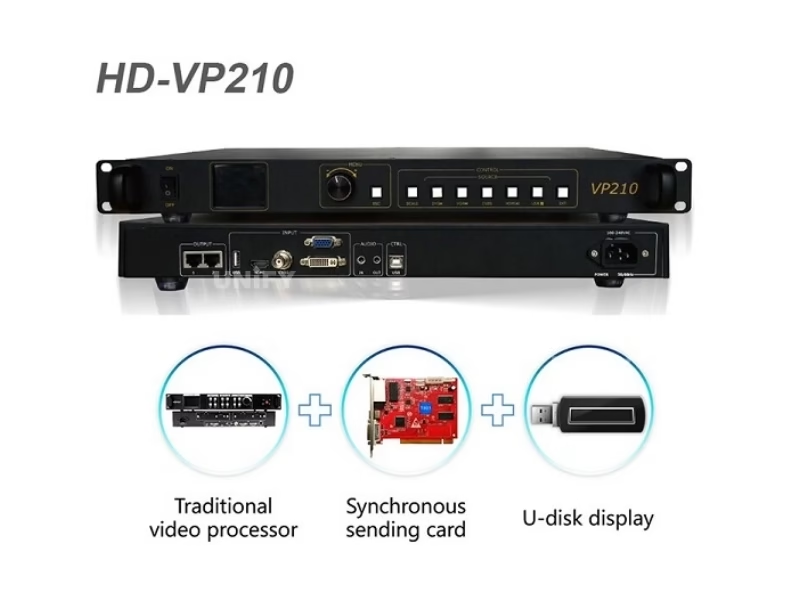
The Huidu HD-VP210 Three-in-one LED Video Processor combines a single-picture video processor, a sending card and a USB media player in one 1U chassis: five input channels, a 1280×1024 pixel loading budget, two Gigabit network outputs and seven user templates — configured with the free HDSet software for Windows.
Product Overview
What Is the Huidu HD-VP210 Three-in-one LED Video Processor?
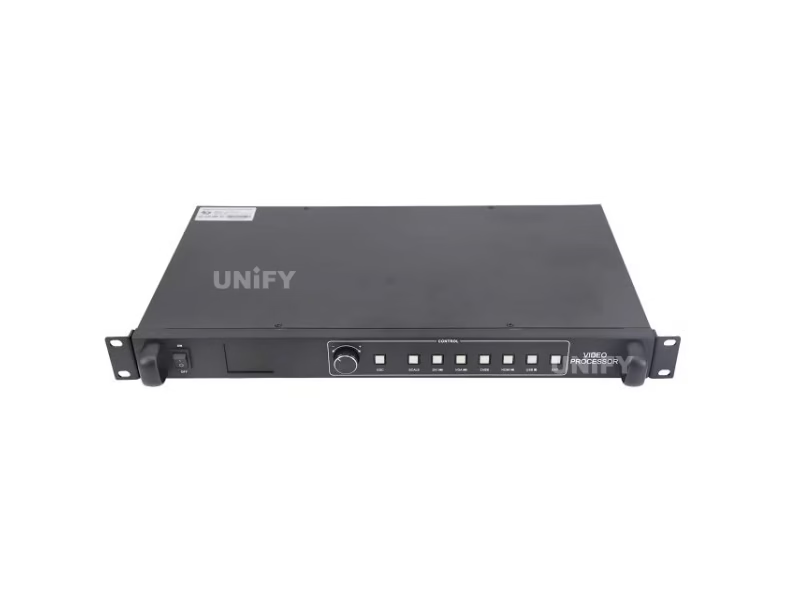
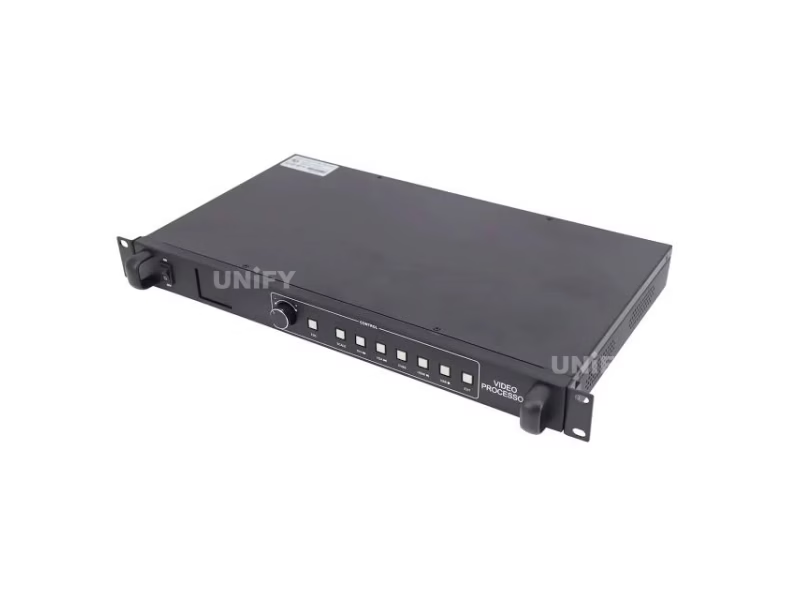
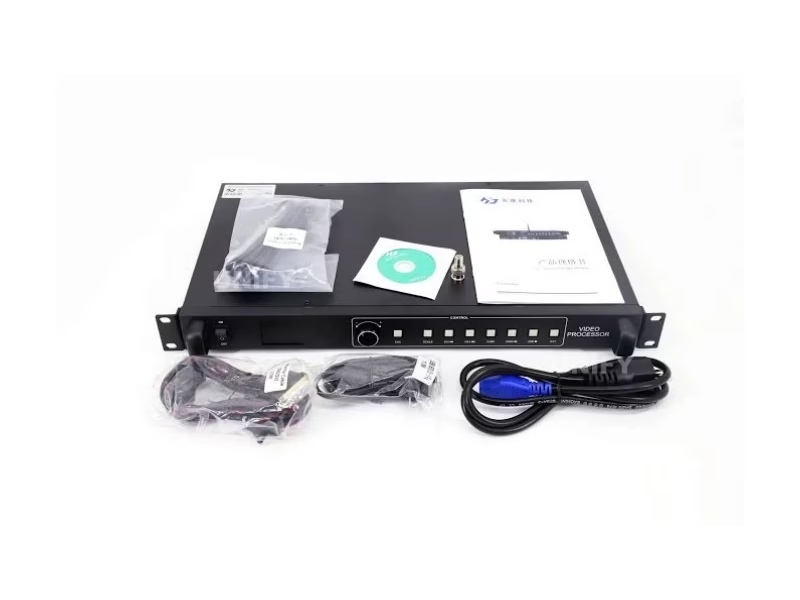
The HD-VP210 is a 3-in-1 LED controller from Shenzhen Huidu Technology that integrates a single-picture video processor, one sending card and a USB media player in a single 1U chassis, per the official Huidu Specification V1.0. It drives up to 1280×1024 pixels (1,310,720 pixels), accepts five inputs — HDMI, DVI, VGA, CVBS and USB Type A — and outputs to receiving cards over two Gigabit ports, with the front-panel LCD and rotary knob handling switching, zoom and picture-quality control on site.
Short answer: The Huidu HD-VP210 is a three-in-one LED video processor, sending card and USB player in one box: 1280×1024 max loading (widest 3840, highest 1920), five input channels with seamless switching, two Gigabit LAN outputs to receiving cards, seven user templates, key lock, and direct USB playback of jpg/png images and mp4/avi/mkv/rmvb video from a flash drive — powered from 110–240 VAC and set up through the free HDSet software for Windows.
The VP210 is a synchronous controller: it processes live input in real time rather than playing stored programs, which is the difference explained in our synchronous vs asynchronous LED control guide. As the entry model of Huidu’s VP series, it sits below the HD-VP410 (1920×1200, four Gigabit ports) and is the natural complement to the HD-W62 asynchronous card family — and it competes head-on with the Colorlight X2 and Novastar MCTRL300. Data on this page: the official Huidu HD-VP210 Specification V1.0 (20190227) and User Manual, with marketplace errors corrected below.
Huidu Official — HD-VP210 three-in-one LED processor synchronous controller product video
Specifications
What Are the HD-VP210 Three-in-one LED Video Processor Specifications?
Specifications from the official Huidu HD-VP210 Specification V1.0 and User Manual (20190227). Note the honest rows: the official document does not publish weight, power draw, retail price or a certificate list — we state that rather than copying marketplace numbers.
Core Specifications (Official Document)
Spec Correction — Exclusive
Where Do Marketplace Listings Get the HD-VP210 Video Processor Specs Wrong?
We compared the top-ranking HD-VP210 listings against the official V1.0 document. Four recurring errors:
Comparison
Which Huidu 3-in-1 LED Video Processor Fits: HD-VP210, VP210A, VP210C, VP210H or VP410?
Two tables settle the VP210 purchase. Table A is official — both processors read straight from Huidu’s spec documents. Table B is cross-verified from marketplace listings, which we flag rather than pass off as official.
Table A — HD-VP210 vs HD-VP410 (Official Spec V1.0 both)
Marketplace sites quote “2.6M pixels” for the VP410 — that number is the theoretical port bandwidth (4 ports × ~650k), not the official loading budget. Official VP410 Spec V1.0 (20191118) states 1920×1200 = 2,304,000 pixels.
Huidu Official — HD-VP210 and HD-VP410 live LED wall controller comparison video
Table B — VP210 Family Variants (marketplace cross-verified, not official)
Variant data cross-verified from marketplace listings (indiamart, koshielectronics, reiled, leemanleddisplay, lvphub), captured 2026-08-25 — not from a Huidu official document. Firmware updates cover the A variant, per Huidu’s official video below.
Huidu Official — new all-in-one VP210C and VP410C controller release video
Three-line selection guide: choose the VP210 for a screen up to 1280×1024 with the most documented configuration path; the VP210A when the sign needs more height than 1024 rows; the VP210H when you need dual HDMI plus Wi-Fi management; the VP410 when pixel count crosses 1.3M toward 2.3M. Cross-brand alternatives on this site: Colorlight X8m, Novastar VX1000.
Core Features
What Does the HD-VP210 Three-in-one LED Video Processor Do?
Six functions from the official V1.0 define how the VP210 behaves on a live wall:
🧩 3-in-1 integration
Video processor + sending card + USB player in one chassis — one box replaces the two or three devices a split setup needs.
🔄 5-channel seamless switching
HDMI, DVI, VGA, CVBS and USB switch at the press of the SOURCE key or via the knob menu — no black-screen gaps.
💾 7 user templates
Save source, window position, zoom mode, audio and U-disk settings into seven named templates and reload any show layout in seconds.
📐 Full-screen zoom + point-to-point
Adaptive full-screen scaling, or unscaled point-to-point display with horizontal and vertical offset to pick the exact window on the input.
🎚️ Nine-step picture quality
Brightness, contrast, saturation, hue and sharpness plus color temperature and restore-default — adjusted live on the panel.
🔒 Key lock
Lock the front panel so a passer-by cannot change the source or reset the show on a permanent installation.
Interface
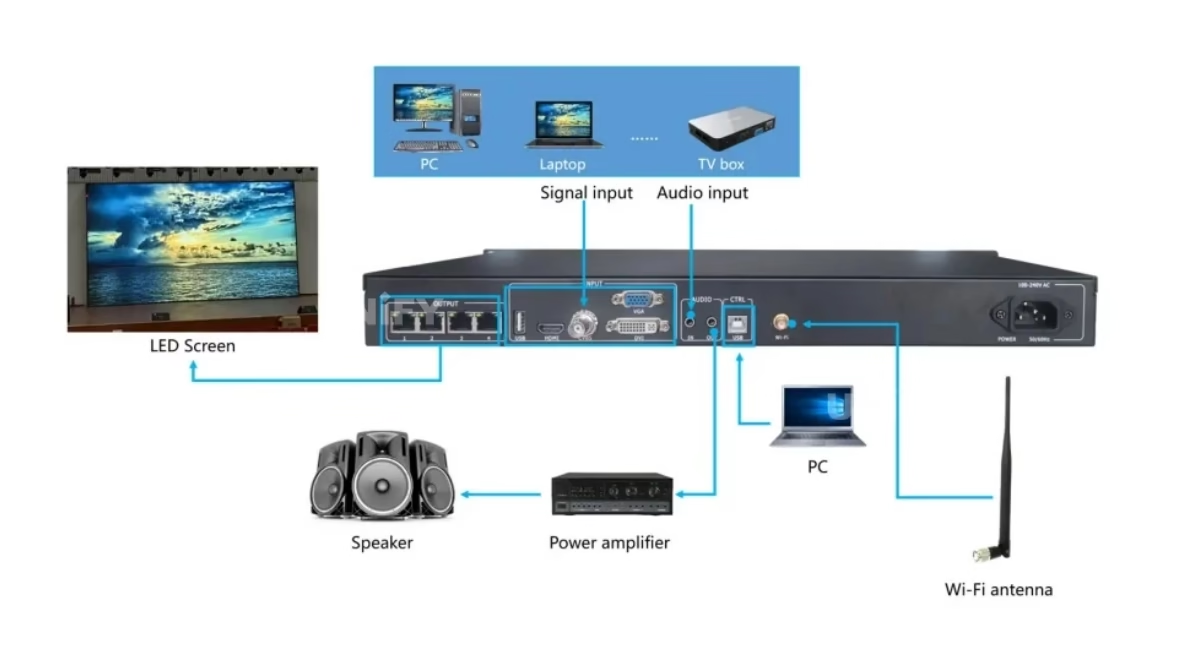
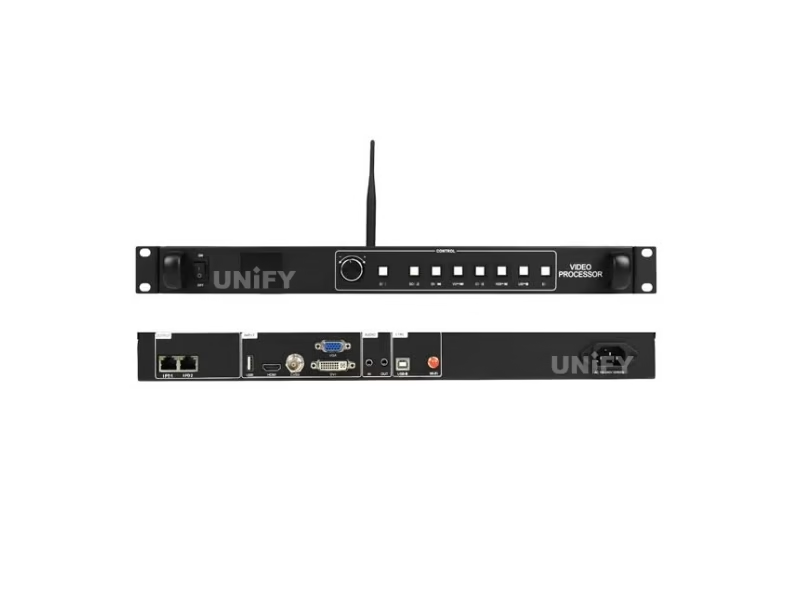
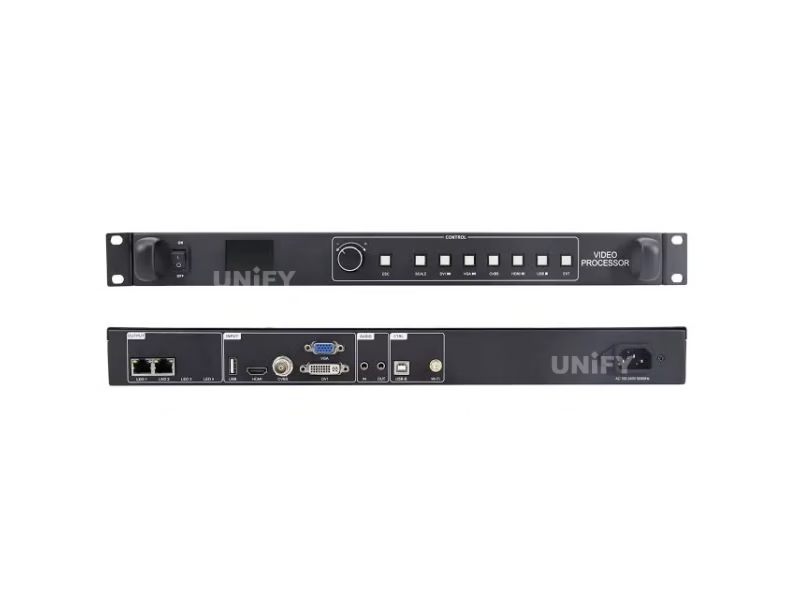
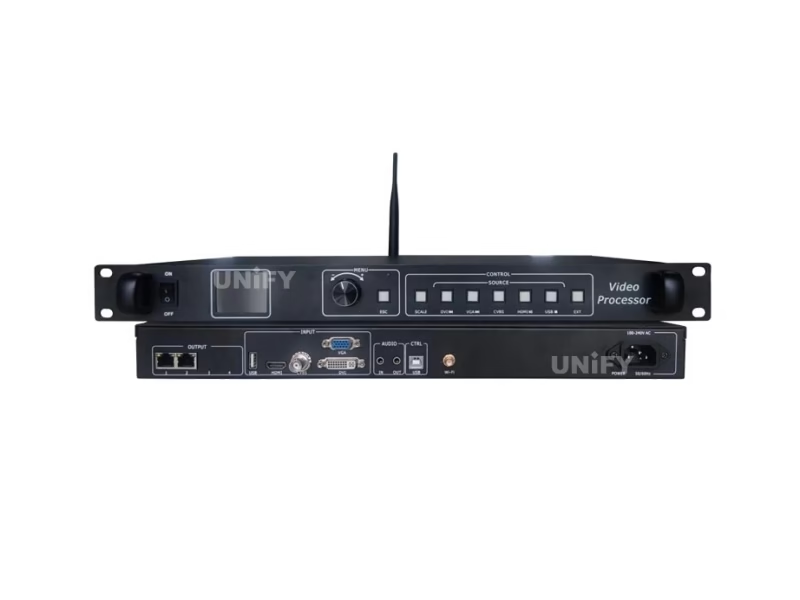
Which Ports Are on the HD-VP210 Three-in-one LED Video Processor?
Front and rear panel layout from the official manual:
Front Panel
- Power button — device power switch.
- LCD screen — displays the device menu.
- Rotary button — rotate to select menu items, press to confirm.
- Return key — exits the current menu or operation.
- SCALE key — full-screen zoom shortcut.
- Input source keys — quick switching; in USB playback mode DVI/VGA/HDMI/USB become previous / next / play-pause / stop.
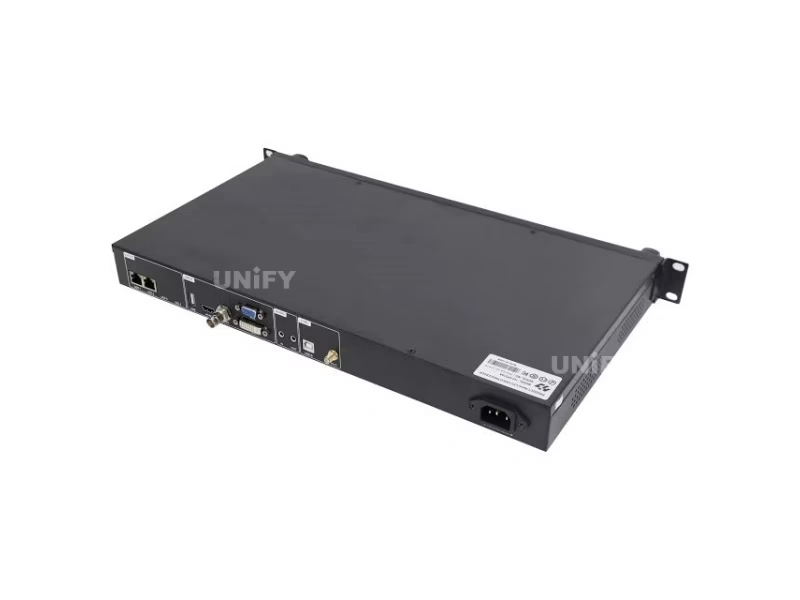
Rear Panel
- USB Type A — direct playback of videos and pictures.
- HDMI / DVI / VGA / CVBS — four video inputs (see spec table).
- AUDIO × 2 — audio input and output (TRS 3.5 mm).
- LAN × 2 — Gigabit outputs to receiving cards.
- USB Type B — connect a computer to set screen parameters.
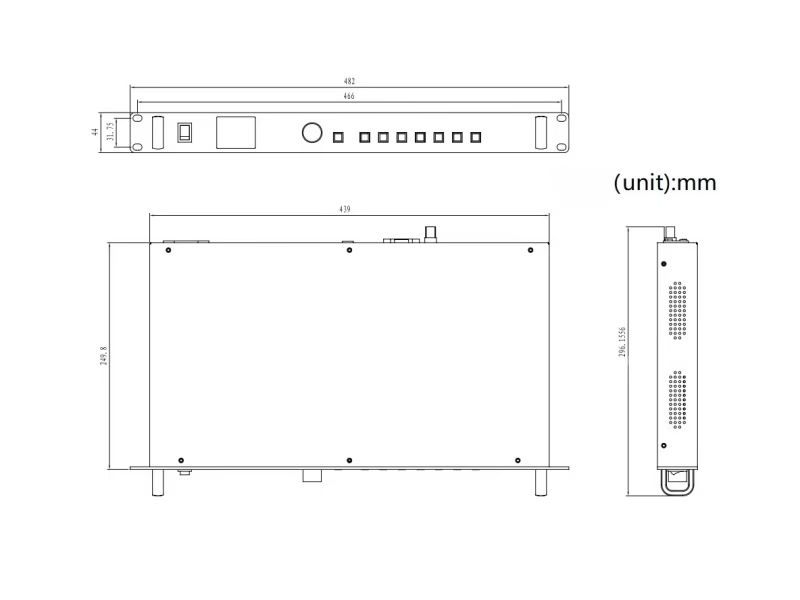
- Power inlet — 110–240 VAC, 50/60 Hz.
Loading Capacity
How Big a Screen Can the HD-VP210 LED Video Processor Drive?
The official budget is 1280×1024 = 1,310,720 pixels. Translated into real screens (UnifyLED conversion, based on pixel pitch × pixel count):
The official limits “widest 3840, highest 1920” allow two extreme shapes the same pixel budget cannot make square:
Why the limit is exactly 1,310,720: 1,310,720 ÷ 2 Gigabit ports = 655,360 pixels per port — the industry-standard practical ceiling for one Gigabit port to a receiving-card chain. The VP210’s loading budget is the hardware result of its two ports, not a marketing number. The VP410 breaks that pattern because its processor caps at 1920×1200 = 2,304,000 while its four ports could carry more — the processor, not the ports, is the VP410 ceiling. (UnifyLED analysis based on the official specs.)
Screen power planning belongs to our LED display power consumption guide.
Setup Tutorial
How Do You Set Up the Huidu HD-VP210 LED Video Processor?
The official manual’s three startup steps: (1) connect the display power to the screen, (2) connect a playable input source to the HD-VP210, (3) connect the USB serial port to a computer and set the screen parameters. From there, four daily operations:
Channel A — input switching and resolution. Press the SOURCE key on the front panel for a quick switch, or use the knob: Input Settings → Input Source, turn to select, press to confirm. Resolution follows the same path: Input Settings → Input Resolution, with a custom-resolution option when the source is non-standard. HDSet handles the same settings over the USB-B link, which the official 10-minute software tutorial below demonstrates end to end.
Channel B — zoom and rotation. From the main menu, Zoom Mode offers full-screen (adaptive) or local scaling; point-to-point displays without scaling and lets you set a horizontal or vertical offset to view exactly the area you want from the input. The rotation setting shown in the official video below handles screens mounted at an angle.
Huidu Official — how to set up rotation when using the HD-VP210 synchronous controller
Channel C — picture quality, nine steps. Screen Settings → Quality Adjustment: adjust brightness, contrast, saturation, hue and sharpness (watch the wall while turning the knob — the manual notes there is no reference value), then color temperature, then Restore Default if needed. Every value applies live.
Channel D — templates. Template Settings saves the current source, window, zoom, audio and U-disk state to one of seven slots with Save / Load / Delete. A stage show with three sources and a fixed window layout becomes a two-second recall per scene.
Huidu Official — how to setup Huidu software with the HD-VP210 controller
Full cabling and mounting context: our LED screen installation guide, plus the sending card configuration guide for the parameter side.
USB Playback & Applications
Where Is the HD-VP210 Three-in-one LED Video Processor Used?
The USB Type A port plays files directly — no laptop needed at the wall. The complete official format list (no other listing publishes it in full):
- Images: jpg / jpeg / png / bmp.
- Video: mp4 / avi / mpg / mkv / mov / vob / rmvb.
- Encodings: MPEG4 (MP4), MPEG_SD/HD, H.264 (AVI, MKV), FLV.
- Playback control: front-panel keys re-map in USB mode — DVI ◀ previous, VGA ▶ next, HDMI ▶◀ play/pause, USB ■ stop; loop modes single or list, with picture effects and switch interval for image shows.
Five places customers put a VP210 (with the official P4 indoor wall video below as proof):
- Storefront and lobby video walls — a single HDMI source switching to USB promos at off-hours.
- Meeting rooms and auditoriums — laptop DVI/VGA/HDMI without re-cabling, seamless switching between presenters.
- Live event and broadcast walls — the real-time processing the indoor LED display screen guide describes.
- Bar and club signage — USB playback of looped promos without a PC.
- Fascia and outdoor billboards — up to 12.8 m × 10.24 m at P10 with the wide-shape budget.
Huidu Official — P4 indoor live video wall done with HD-VP210
Factory & Quality Control
How Is the HD-VP210 LED Video Processor Supplied and Guaranteed?
Unify LED buys Huidu processors at factory level, tests each unit before dispatch and backs them with a 2-year warranty:
- Factory-direct pricing — no distributor markup; bulk discounts from 5 pcs.
- 100% functional test before dispatch — every unit powered and run against a test panel through both Gigabit ports.
- 2-year warranty — free replacement for manufacturing defects; field care in our LED screen maintenance guide.
- Certificate copies on request — the V1.0 document does not list certificates, so we supply the VP series CE/FCC/RoHS documentation with every order.
Pricing
How Much Does the Huidu HD-VP210 LED Video Processor Cost?
Published prices verified 2026-08-25:
What the 3-in-1 design saves: a split setup of a separate video processor (USD 200–500 market range) plus a separate sending card (USD 100–300) lands between USD 300 and USD 800; the all-in-one VP210 family lists between USD 68 and USD 155. The split-device prices are market ranges, not official pricing — the point is the order of magnitude: one box, one power cable, one software package. Our 2026 LED display price report tracks the wider market.
Factory-direct pricing from Unify LED applies from single units; request a quote for your quantity and destination.
FAQ
HD-VP210 Three-in-one LED Video Processor: Frequently Asked Questions
Q1. What does “three-in-one” mean on the HD-VP210? It integrates a single-picture video processor, a sending card and a USB media player in one chassis. One box replaces the two or three devices of a split setup, sharing one power cable and one software package.
Q2. How many pixels can the HD-VP210 drive? 1280×1024 = 1,310,720 pixels, widest 3840, highest 1920. That is exactly 655,360 pixels per Gigabit port — the practical ceiling of one port, so the loading budget is the hardware result of the two ports.
Q3. Which video formats does the HD-VP210 USB port play? Images jpg/jpeg/png/bmp; video mp4/avi/mpg/mkv/mov/vob/rmvb; encodings MPEG4, MPEG_SD/HD, H.264 and FLV. Front keys become play controls in USB mode: DVI previous, VGA next, HDMI play/pause, USB stop.
Q4. What is the difference between the HD-VP210 and the HD-VP410? Loading budget 1,280×1,024 (1.3M) vs 1,920×1,200 (2.3M) per the official specs, and two vs four Gigabit outputs. Inputs, templates and the 3-in-1 architecture are identical. The “2.6M” figure quoted for the VP410 is port bandwidth, not the official loading budget.
Q5. Does the HD-VP210 have Wi-Fi? No — the base VP210 has no Wi-Fi module in the official V1.0. Wi-Fi is a VP210H variant feature (with dual HDMI and RS232). Some listings and even video titles blur this; treat “Wi-Fi VP210” as the H variant.
Q6. How much does the HD-VP210 weigh? The official V1.0 does not publish weight, and marketplace figures conflict (3.5 kg vs 7 kg). Ask us for the packed weight with your quote — we ship them worldwide.
More controller questions: our LED display FAQ and warranty terms.
Certifications
Which Certificates Does the HD-VP210 LED Video Processor Carry?
The official V1.0 document does not list certificates; the VP series carries CE, FCC and RoHS per Huidu’s series documentation, and we supply copies with every order — request them explicitly rather than assuming they ship automatically.
Get HD-VP210 Bulk Pricing from the Factory
Genuine Huidu processors, 100% pre-tested, 2-year warranty, shipped worldwide. Tell us your pixel budget, input sources and destination — quote within 24 hours.
Deep Blog
Huidu HD-VP210 Three-in-one LED Video Processor: The Complete Buying Guide (2026)
The Huidu HD-VP210 Three-in-one LED Video Processor is the entry model of Huidu’s VP series and the most misquoted: listings publish two conflicting weights, claim 4K input, merge the A/C/H variants into one SKU, and even attach the Wi-Fi feature of the VP210H to the base model. This guide rebuilds the VP210 from the official Huidu Specification V1.0 and User Manual — then answers what the 1.3M pixel ceiling really comes from, which variant fits which screen, how the manual’s six sections work in the field, and what the buying email should contain.
Chapter 1 — What the “3-in-1” Actually Combines
A conventional LED wall needs three boxes: a video processor to scale and switch inputs, a sending card to packetize pixels to the network, and often a media player for content without a live PC. The VP210 welds all three into one 1U chassis. The saving is not just cost — it is one power cable, one software package, one failure point to diagnose, and one device on the mounting rack. A split setup runs USD 300–800 (processor USD 200–500 plus sending card USD 100–300, market ranges); the VP210 family lists between USD 68 and USD 155. The trade-off is a single control room: a split setup lets you upgrade the processor without touching the sending card, while the VP210 upgrades as one unit.
The failure-mode math favours the 3-in-1 as well. A split chain has three boxes, three power supplies and three software packages between the source and the wall; when a show fails, the diagnosis has to walk all three. The VP210 reduces that walk to one device with a front-panel LCD that reports the live input state, and the USB-B link gives HDSet a single configuration surface for both processing and sending parameters. For a site that runs one wall from one input, that consolidation is the difference between a 10-minute recovery and a 40-minute ladder session.
Chapter 2 — Where the 1.3M Pixel Ceiling Comes From
1280×1024 = 1,310,720 pixels. Divide by the two Gigabit ports and each carries 655,360 pixels — the industry-standard practical ceiling for one Gigabit link feeding a receiving-card chain. The VP210’s loading budget is the hardware result of its two ports, not a marketing figure. The VP410 breaks the pattern: its processor caps at 1920×1200 = 2,304,000 pixels while four ports could in theory carry more — so the VP410’s ceiling is the processor, and the VP210’s is the port. That is why the “2.6M” figure circulating for the VP410 is wrong: it is the port-bandwidth number (4 × 650k), not the official loading budget. The practical consequence for a buyer: a 1.3M budget is a 5.12 m × 4.10 m P4 wall or a 12.80 m × 10.24 m P10 fascia; crossing that means the VP410 or a higher-tier processor.
On a real wall the budget feels different at every pitch: at P2.5 the VP210 covers 3.20 m × 2.56 m — a lobby panel; at P3.91, 5.00 m × 4.00 m; at P5, 6.40 m × 5.12 m, the typical mid-size stage screen; at P10 the same pixels span a 12.80 m × 10.24 m fascia. One budget, four very different products — which is why the pixel count, not the square-metre figure, is the number to compare against the screen plan. And the shape matters as much as the total: a 3840×341 ultra-wide fascia and a 682×1920 portrait tower both fit inside 1.3M pixels, so the widest/highest limits are where unusual sign shapes live.
Chapter 3 — The Five Variants, Decided
The VP210 family splits five ways, and the marketplace blurs them. VP210 (this page): base model, 1280×1024, five inputs, 7 templates — the documented path, USD 115. VP210A: same inputs, max height 2500 — for tall portrait walls, USD 95. VP210C: base specs with key lock, USD 68 on promo. VP210H: dual HDMI plus Wi-Fi and RS232, max height 2500, USD 89–150 — this is the device behind “Wi-Fi VP210” listings. VP210S: successor to the C. Decision rule: pick the base VP210 unless the screen needs more height (A), Wi-Fi management (H), or a locked panel on a permanent install (C). Firmware updates cover the A variant per Huidu’s official channel.
The price spread across the variants is narrow — USD 68 to USD 150 across the family on verified listings — so the decision should not ride on price; it should ride on the physical limits. A portrait tower taller than 1024 pixel rows cannot use the base VP210 at any price, and a site whose only reliable management path is Wi-Fi is better served by the H variant than by bolting an access point onto a base unit. Lock the feature the screen needs first, then compare price inside that variant class.
Chapter 4 — Operating the Official Manual’s Six Sections
The manual’s six sections are the field playbook. Input switching: SOURCE key for speed, knob menu (Input Settings → Input Source) for confirmation; resolution follows the same path with a custom option. Zoom: full-screen adaptive, or point-to-point unscaled with horizontal/vertical offset — the offset trick is how installers center a source that does not match the wall. USB playback: five formats listed, four encodings supported, keys re-map to transport controls. Picture quality: nine steps, live-adjusted, no reference values per the manual — watch the wall while turning. Templates: seven slots, Save/Load/Delete, capturing source, window, zoom, audio and U-disk state — the reload shortcut for multi-scene shows. Key lock: the anti-tamper layer for permanent walls. The official 10-minute video below walks the full setup in the order an installer actually uses it.
The template workflow deserves its own note because it is the fastest win for multi-scene sites. After a show is tuned — source selected, window placed, audio level set — the manual’s Template Settings screen offers Save, Load and Delete against seven numbered slots. A venue with three recurring layouts (conference, ceremony, break) saves one slot per layout and reloads between events in two knob presses instead of rebuilding window and offset settings each time. Replacing a slot overwrites its previous content, so keep one slot empty for on-the-day experiments.
Huidu Official — do you know how to set up the HD-VP210 full tutorial
Chapter 5 — USB Playback in Practice
Format support is wider than most listings admit: images jpg/jpeg/png/bmp; video mp4/avi/mpg/mkv/mov/vob/rmvb; encodings MPEG4, MPEG_SD/HD, H.264 and FLV. The transport keys live on the front panel: DVI ◀ previous, VGA ▶ next, HDMI play/pause, USB ■ stop, with single or list loop modes and a picture-switch interval for image shows. A practical pattern: a retail wall runs HDMI from a media server during the day, then switches to the USB source for an after-hours promo loop — one source change, no laptop, no network.
Two USB details trip up first-time operators. First, media type must be chosen before browsing: the manual’s U-disk menu asks for Media Type (video or picture) first, then File Browse reads the playlist of that type. Second, for picture shows the Picture Effects toggle and the switching interval live in the same menu — an image rotation without the interval set stays frozen on the first frame. Loop behaviour splits into single loop (one file repeats) and list loop (the playlist repeats), which is the difference between a kiosk demo and a content rotation.
Chapter 6 — Fault Diagnosis and the Data-Group Swap
Most VP210 field faults are cabling, not hardware: a dark column is usually a loose ribbon or a dead receiving card, a garbled quadrant is often a data-group mismatch in the receiving-card settings. Huidu’s official channel demonstrates the data-group exchange that resolves HUB-port faults — a two-minute fix that sends some installers hunting for a new processor. Check, in order: screen power, source signal (switch via SOURCE), USB-B parameter link, then the receiving-card data-group setting before touching the processor itself.
The order matters because each step is cheap and reversible. Screen power first — a processor with no sync signal shows nothing and looks dead. Then the source: the SOURCE key cycles the five inputs and the LCD shows which one is live, so a dark screen with a lit input indicator points at cabling, not the processor. Then the USB-B parameter link: a misconfigured resolution here produces a blank or scrambled wall even with a good source. Only then the receiving-card settings, where the data-group exchange resolves HUB-port faults. Processors in this class fail rarely; the configuration between the processor and the cards fails often.
Huidu Official — data group exchange to resolve the HUB port faulty problem
Chapter 7 — The VP210 Against the Site’s Other Controllers
The VP210 competes in the 1.3M synchronous class. The Colorlight X2 covers the same class from the Colorlight side; the Novastar MCTRL300 is the Novastar equivalent. Where the VP210 stands out is the 3-in-1 packaging and the documented panel workflow. On the asynchronous side, the HD-W00, HD-W60 and HD-W62 cards play stored programs for fascia signage without live input — the sync vs async guide draws the line. For the processor-only knowledge base, the LED video processor page sits behind every comparison.
On the Novastar side, the MCTRL300 anchors the same 1.3M class with a different philosophy: it is a sending box with processor-style scaling, and its ecosystem assumes NovaStar receiving cards and the NovaLCT software family. The VP210 is a 3-in-1 appliance with front-panel control and USB playback built in — no laptop needed to change source or run a promo. Both drive the same class of wall; the choice usually follows the receiving-card ecosystem already on site, which is why integrators standardise on one brand rather than mix.
Chapter 8 — Price, Warranty and the Buying Checklist
Verified August 2026 pricing: USD 118 at lvphub.com, ₹12,000 at koshielectronics (India), ৳18,500 (Bangladesh), factory-direct on request. Unify LED is an LED screen manufacturer in Changsha, China, supplying processors alongside modules, cabinets, power supplies and controllers as one assembly — the VP210 ships tested against the receiving cards it is specified for, with a 2-year warranty and certificate copies on request. Final checklist for the procurement email: (1) state the pixel budget and shape — the 1280×1024 / widest-3840 rules decide VP210 vs VP410; (2) list the input sources — HDMI, DVI, VGA or USB playback; (3) confirm the variant — base, A (height), H (Wi-Fi), C (key lock); (4) ask for the VP series CE/FCC/RoHS copies explicitly, since V1.0 omits them; (5) order one spare per ten installed — the processor is the cheapest component in the signal chain and the spare beats the site visit.
Two checklist items deserve expansion. On the variant question: if the order form says “VP210” and the requirement says “Wi-Fi”, the parts do not match — write the variant letter explicitly (VP210H for Wi-Fi, VP210A for height beyond 1024 rows) so the warehouse ships the right board. On the spare: the processor is the single point where one failure stops a whole wall, and a spare at USD 68–155 is the cheapest insurance in the signal path — the alternative is a site visit, a diagnosis session and a shipping wait while the wall stays dark.
Conclusion. The Huidu HD-VP210 Three-in-one LED Video Processor is the documented entry point to synchronous LED control: 1,310,720 pixels across two Gigabit ports, five inputs with seamless switching, seven templates, direct USB playback, and a panel workflow the manual explains in six sections. Match the pixel budget to the shape, pick the right variant, and the VP210 carries the 1.3M class on one box.
LED Control System Range
Which LED Controllers Should You Explore Next?
Huidu, Colorlight and Novastar control products, receiving card guides and free software resources on UnifyLED.
Huidu Controllers
Novastar Sending Controllers
Colorlight Controllers
Guides & Resources
Where Can You Download HD-VP210 Resources?
The official Huidu HD-VP210 Specification V1.0 and User Manual — the data source for every figure on this page.
Related: browse the full Huidu LED controller catalog — 12 models across four product lines, free HDSet / HDPlayer / HD Show software, cloud remote control without a subscription, and factory-direct pricing.