
Huidu A-Series · Full Color Async Player · Android Platform
Huidu HD-A3 LED Screen Async Control Player
The Huidu HD-A3 LED Screen Async Control Player is an Android-based full-color asynchronous playback box from Shenzhen Huidu Technology: 655,360 pixels of loading, 8 GB of storage, hardware decoding of 17 video formats, and cloud-based management of multiple screens over the internet or LAN — no PC at the wall, no IP configuration.
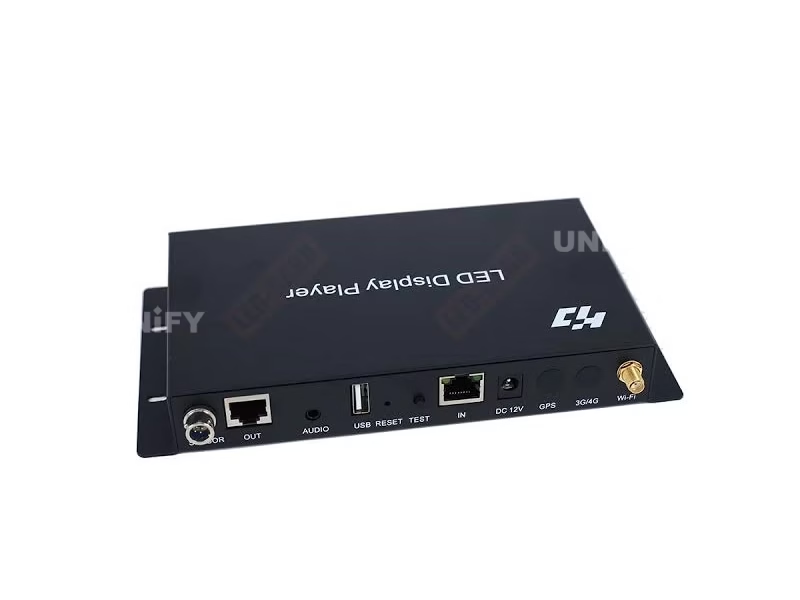
Product Overview
What Is the Huidu HD-A3 LED Screen Async Control Player?
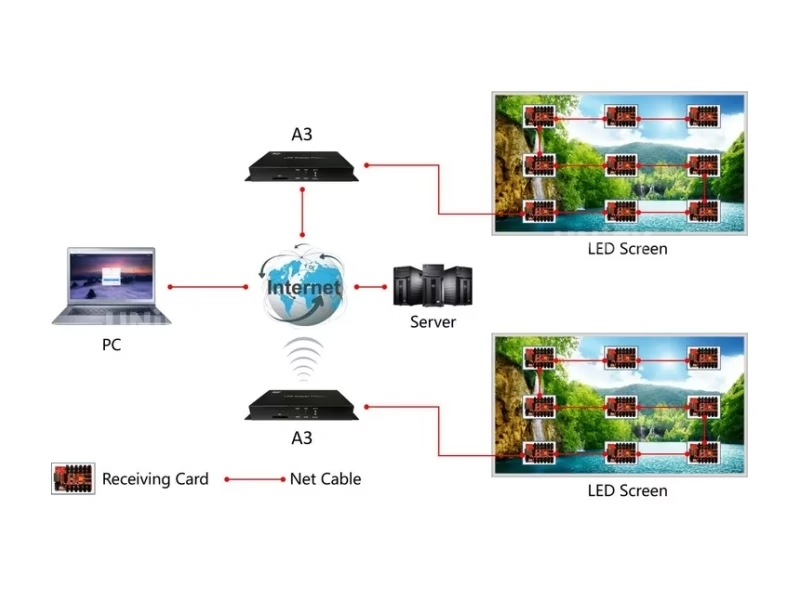
The HD-A3 is a full-color asynchronous LED controller that plays pre-stored programs from an Android playback box, per Huidu Specification V3.0 (20211009). It drives up to 655,360 pixels (1280×512), stores programs in 8 GB of flash, hardware-decodes 17 video formats at 60 Hz, and manages multiple screens over the internet or LAN — the system combines the HD-A3 sending box, an R-series receiving card and the HDPlayer software.
Short answer: The Huidu HD-A3 is an Android-based async control player for full-color LED screens: 655,360 pixels (1280×512, widest 4096), 8 GB storage expandable by U-disk, 17 video formats hardware-decoded at 60 Hz, grayscale 256–65,536, Wi-Fi plus optional 4G with SIM slot, cloud and LAN management with no IP configuration, sensor support (temperature, humidity, brightness, PM2.5), 18 W power draw, working temperature -40°C to +70°C, certificates CCC/CE/FCC/RoHS/BIS — configured through the free HDPlayer software for Windows.
The async architecture is the point: the A3 plays stored programs — no PC, no live input, no operator at the wall. That is the opposite of the HD-VP210 and the rest of the VP processor family, which process real-time sources; the synchronous vs asynchronous LED control guide draws the line in full, and the asynchronous LED media player guide positions it in the class. Unify LED is an LED screen manufacturer supplying Huidu control systems at factory level — this page uses the official HD-A3 Specification V3.0 as its data source, with marketplace confusion corrected below.
Huidu Official — HD-A3 asynchronous sending box product video
Specifications
What Are the HD-A3 Async Control Player Specifications?
Specifications from the official Huidu HD-A3 Specification V3.0 (20211009).
Core Specifications (Official V3.0)
Software: HDPlayer (Windows 7–11), free — mirrored on our Huidu system software downloads page.
Spec Correction — Exclusive
Where Do HD-A3 Listings Get the Specs Wrong?
We compared the top-ranking HD-A3 listings against the official V3.0 document. Four recurring differences:
Comparison
Which LED Media Player Fits: HD-A3, Novastar TB Series or a Sync Processor?
Three comparison angles settle the HD-A3 purchase:
Table A — HD-A3 vs Novastar TB Series (this site’s async player pages)
Table B — Async vs Sync Architecture (this page vs the VP series)
Three-line selection guide: advertising, information and vehicle screens that run scheduled content — the HD-A3 (or a higher A-series model for more pixels); live-input walls — the HD-VP210 / HD-VP410; Novastar-ecosystem sites — the TB30 through TB60 range. The async media player comparison guide covers the class.
Core Features
What Does the HD-A3 Async Control Player Do?
Six capabilities from the official V3.0 define how the A3 behaves in the field:
🤖 Android offline playback
Pre-stored programs play from the box itself — no PC, no live input, no operator at the wall, 24/7.
🎞️ 17-format hardware decoding
AVI, WMV, RMVB, MP4, MKV, MOV, TS, WEBM and more decode in hardware at 60 Hz — full-HD playback without a PC-class processor.
☁️ Cloud + LAN cluster management
Manage many screens over the internet (4G optional with SIM) or LAN — no IP configuration, devices auto-detected by ID.
📶 Wi-Fi + APP + U-disk updates
Three update paths: Wi-Fi with the mobile app, USB flash drive plug-and-play, or the network cable — choose per site.
🌡️ Sensor ecosystem
IR remote, temperature, humidity, brightness (timed or light-sensor dimming), PM2.5 and noise sensors on one port.
❄️ -40°C rating, 18 W
Working temperature -40°C to +70°C with 18 W draw — outdoor, vehicle and solar/battery installations run it comfortably.
Interface
Which Ports Are on the HD-A3 Async Control Player?
Front panel, rear panel and indicators from the official V3.0:
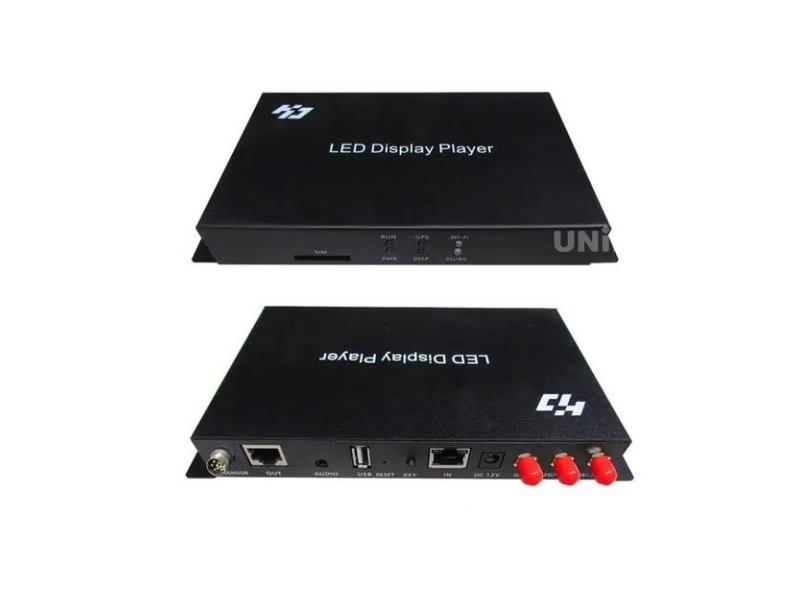
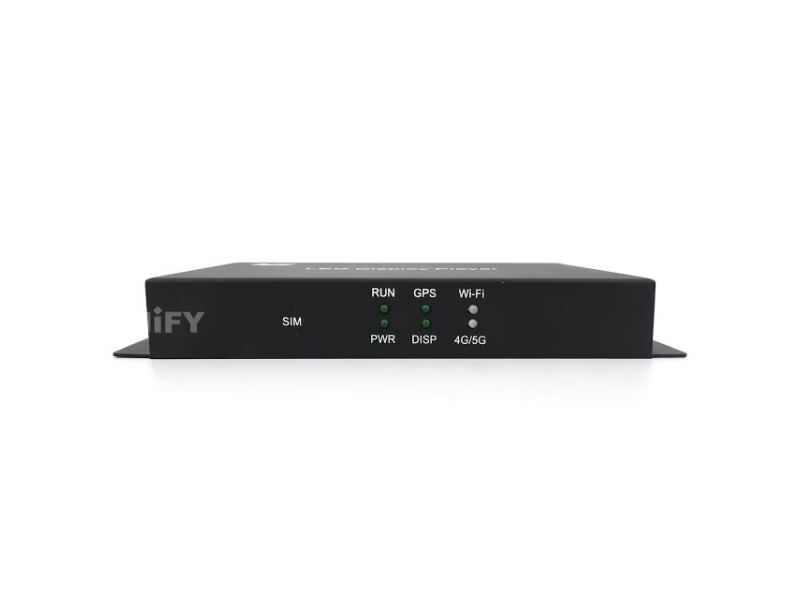
Front Panel
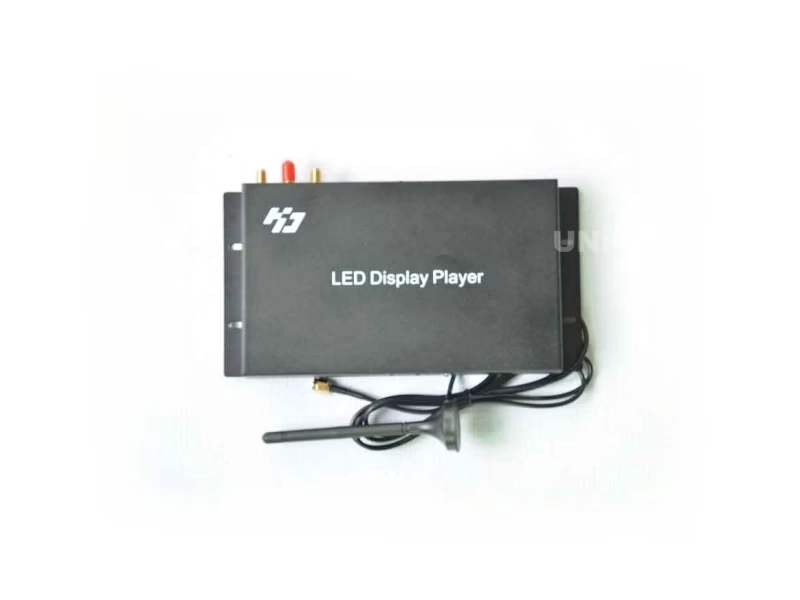
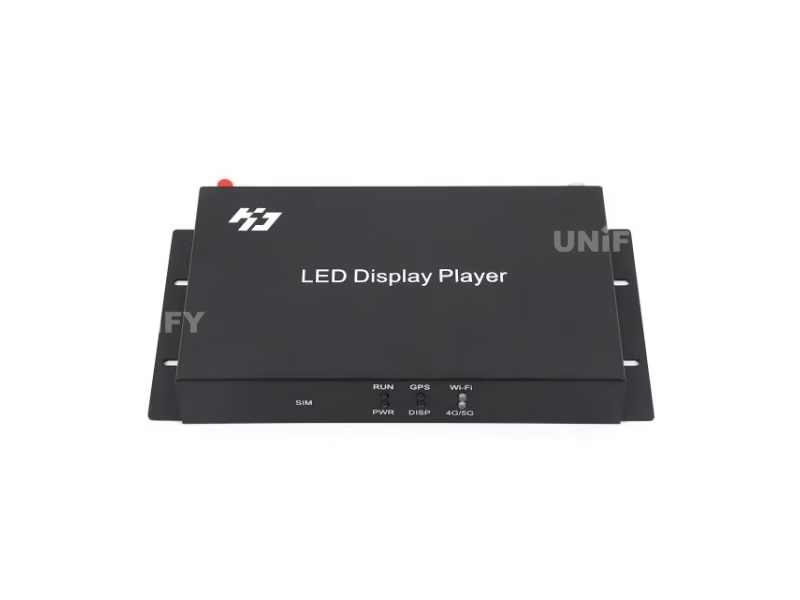
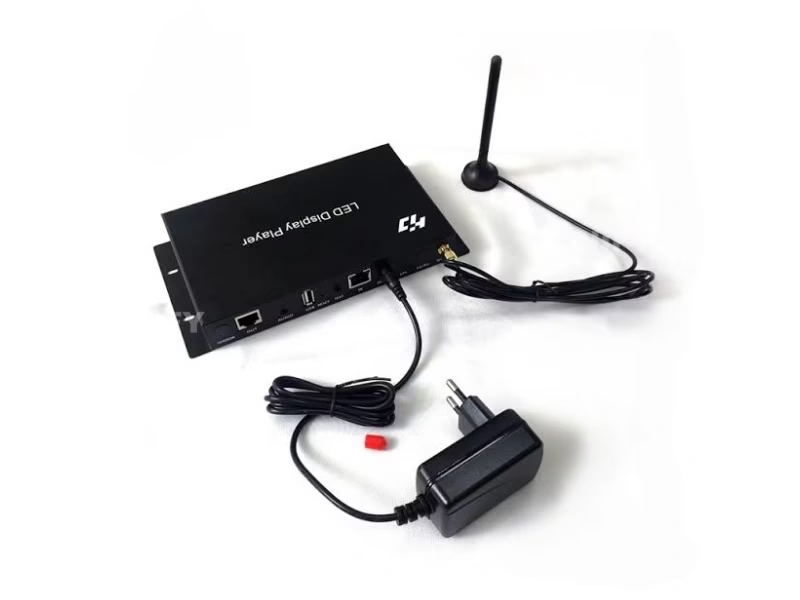
- SIM card slot — 4G connectivity (optional).
- Indicator LEDs — PWR (power), RUN (blinks when working), GPS (optional), DISP (display running), Wi-Fi, 3G/4G (optional).
Rear Panel
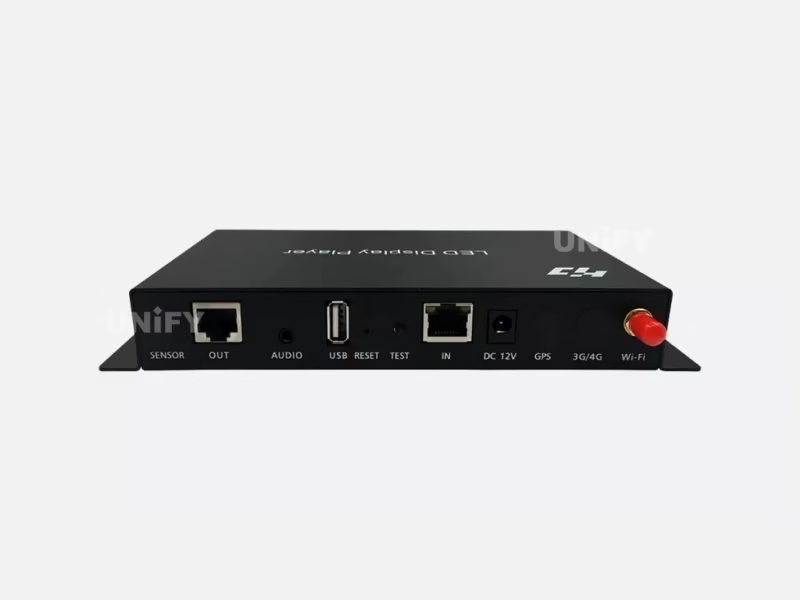
- Sensor port — temperature, humidity, brightness, PM2.5, noise sensors.
- 1 Gbps RJ45 output — the single chain to receiving cards.
- Audio output — standard stereo (3.5 mm).
- USB 2.0 — U-disk or mobile hard disk for program updates and storage expansion.
- Reset button — factory restore.
- Test button — cycles red, green, blue, white and shaded test lines after smart setting.
- 1 Gbps RJ45 input — connect to the computer network.
- Power ports — 12 V DC and 5 V DC (use one or the other).
- 4G antenna port (optional) and Wi-Fi antenna port.
- GPS port — location tracking for vehicle screens (optional).
Loading Capacity
How Big a Screen Can the HD-A3 Async Player Drive?
The official budget is 655,360 pixels in a 1280×512 configuration, widest 4096, highest 2048. The 4096-wide limit divides exactly: 4096 × 160 = 655,360. Translated into real screens (UnifyLED conversion):
The 4096-wide extreme shape at P4 is a 16.38 m × 0.64 m ultra-wide fascia. A taller portrait (e.g. 800×819, a typical 3:1 info pillar at 655,360) also fits the same budget.
The 655,360 figure — the same per-port number across the whole site. The HD-A3’s official V3.0 prints 655,360 pixels, the exact figure we derived for one Gigabit port on the HD-VP210 page and that the HD-VP620 and HD-VP830 documents confirm. An async player with one output port therefore carries exactly one port’s worth of pixels — the arithmetic is consistent across every Huidu document on this site.
Screen power planning belongs to our LED display power consumption guide.
Setup Tutorial
How Do You Set Up the Huidu HD-A3 Async Control Player?
The official workflow has three stages: (1) install HDPlayer on a Windows PC (7–11), (2) run the smart-setting wizard — the A3 is auto-detected by controller ID, no IP configuration needed — (3) edit programs and send them. Four update channels after that:
Channel A — U-disk. Export the program batch to a USB flash drive, plug it in, and the A3 loads it at power-up — the path for sites with no network.
Channel B — LAN cluster. Connect the A3 to the site network; HDPlayer finds every box by ID and sends programs to the whole cluster in one pass — the standard for multi-screen retail networks.
Channel C — Wi-Fi and app. The onboard Wi-Fi with the antenna fitted pairs to the LEDART mobile app for on-the-floor updates.
Channel D — cloud. With a 4G SIM (optional) or an internet-connected network, the XiaoHui cloud platform manages screens remotely — no subscription fee for basic management, per Huidu’s positioning. The official 8-minute cloud video below shows the D-series workflow, the same platform family.
Huidu Official — configuration tutorial of HD-A3 and receiving card in HDPlayer
Huidu Official — how to use XiaoHui cloud platform to remotely send programs
Full mounting and network context: our LED screen installation guide, plus the playlists and schedules guide for the program side.
Applications & Sensors
Where Is the HD-A3 Async Control Player Used?
The A3 is built for screens that run scheduled content without an operator (official V3.0: small-pitch advertising screens):
- Advertising machines and storefront screens — the official shop-window case below shows a 0:27 install; scheduled promos rotate 24/7 with zero staff.
- Community and information screens — weather, notices and schedules with the sensor port feeding live temperature and PM2.5.
- Advertising vehicles — 18 W draw plus GPS and 4G options fit mobile builds; -40°C rating covers cold climates.
- Outdoor information pillars — the 4096-wide budget runs ultra-wide fascias; the 655,360 budget runs 3:1 portrait pillars.
- Small and medium commercial signage — stores, banks, clinics running Office-scheduled content.
The sensor ecosystem turns a passive display into an environment-aware one: the IR remote controls it from the floor, and the sensor port takes temperature, humidity, brightness and PM2.5/noise sensors — timed or sensor-driven dimming keeps the wall readable day and night. The official 5:38 sensor-box tutorial below shows the pairing.
Huidu Official — shop window LED screen controller HD-A3 application case
Huidu Official — how to use the sensor box with the Huidu A3 player controller
Factory & Quality Control
How Is the HD-A3 Async Control Player Supplied and Guaranteed?
Unify LED buys Huidu control systems at factory level, tests each unit before dispatch and backs them with a 2-year warranty:
- Factory-direct pricing — no distributor markup; bulk discounts from 10 pcs.
- 100% functional test before dispatch — every unit powered and run against a test panel before packing.
- 2-year warranty — free replacement for manufacturing defects; field care in our LED screen maintenance guide.
- Certificates included — CCC, CE, FCC, RoHS and BIS are listed in the official V3.0; copies ship with the order.
Pricing
How Much Does the Huidu HD-A3 Async Player Cost?
Published prices verified 2026-08-26:
The async economics: at USD 135 the A3 is an order of magnitude below the VP processors (USD 115 is the VP210, but a sync install also needs a live source and often a media server). An async advertising screen runs on the box alone — plus receiving cards and the free HDPlayer software — with no PC, no server and no recurring cloud fee for basic management. For a network of 20 advertising screens, that is the difference between a fleet that manages itself and a fleet that needs an operator. Our 2026 LED display price report tracks the wider market.
Factory-direct pricing from Unify LED applies from single units; request a quote for your quantity and destination.
FAQ
HD-A3 Async Control Player: Frequently Asked Questions
Q1. What is an async control player? An asynchronous player is a box that plays pre-stored programs on an LED screen — no PC and no live input at the wall. The HD-A3 is Huidu’s Android-based full-color async player, managed from the free HDPlayer software or the cloud.
Q2. How many pixels can the HD-A3 drive? 655,360 pixels (1280×512), widest 4096, highest 2048 — the exact per-port figure that appears across Huidu’s V2.1/V3.0 documents and our VP-series pages.
Q3. Which video formats does the HD-A3 play? Seventeen formats hardware-decoded at 60 Hz: AVI, WMV, RMVB, MP4, 3GP, ASF, MPG, FLV, F4V, MKV, MOV, DAT, VOB, TRP, TS, WEBM and more — plus 10 image formats and Office 2007 documents (DOC/DOCX, XLS/XLSX, PPT/PPTX).
Q4. Does the HD-A3 work with non-Huidu receiving cards? The official system pairs the A3 with Huidu R-series cards (R500/R501); Huidu’s own channel demonstrates it driving LINSN RV908M32 receivers as well. Confirm compatibility with your receiving-card model when ordering.
Q5. How do I update programs remotely? Four paths: USB flash drive, LAN cluster (HDPlayer finds every box by ID), Wi-Fi with the mobile app, or the cloud platform over 4G (SIM, optional) or the internet — no IP configuration needed on any path.
Q6. Is the HD-A3 discontinued? The official V3.0 document makes no discontinuation note. Huidu’s A-series has grown (A3L, and the A4/A5/A6 dual-mode players) — ask us for current availability and the right model for your pixel budget.
More async questions: our async playback troubleshooting guide and LED display FAQ.
Certifications
Which Certificates Does the HD-A3 Async Player Carry?
The official V3.0 document lists five certificates directly: CCC, CE, FCC, RoHS and BIS — the BIS mark matters for Indian-market imports. Copies ship with every order; warranty terms in our warranty guide.
Get HD-A3 Bulk Pricing from the Factory
Genuine Huidu players, 100% pre-tested, 2-year warranty, shipped worldwide. Tell us your pixel budget, screen count and destination — quote within 24 hours.
Deep Blog
Huidu HD-A3 LED Screen Async Control Player: The Complete Buying Guide (2026)
The Huidu HD-A3 LED Screen Async Control Player is the entry point to asynchronous LED control — and the model whose listings most often disagree with the official document: some describe four Gigabit outputs where V3.0 lists one, and a weight of 1.5 kg where the official figure is 0.529 kg. This guide rebuilds the A3 from Huidu Specification V3.0, explains the async architecture and its economics, walks the HDPlayer workflow, and positions the A3 against the Novastar TB players and the sync VP series on this site.
Chapter 1 — Async vs Sync: Why the Architecture Matters
An asynchronous player stores programs and plays them from the box; a synchronous processor displays a live input in real time. The A3 is firmly in the first camp: an Android playback box with 8 GB of storage that runs scheduled content 24/7 with no PC, no operator and no live signal. The practical consequences are economic: an async advertising screen needs the box, receiving cards and the free HDPlayer software — nothing else. A sync install needs a processor, a live source and often a media server, which is why the HD-VP210 and its siblings serve live walls while the A3 serves scheduled walls. The sync vs async guide covers the full decision; this page covers the A3 in its class.
The fleet view sharpens the economics. One operator can manage 50 A3 boxes from one HDPlayer seat or the cloud, because every box auto-registers by ID — no per-site IP records, no technician visits for content changes. A sync network of the same size needs 50 live sources and someone to keep them fed. That is why advertising networks, retail groups and city information systems standardize on async boxes: the operating cost scales with the content, not with the fleet. The async player comparison on this site walks the class; the A3 is the Huidu entry point to it.
Chapter 2 — The Spec Sheet, Rebuilt from V3.0
The official V3.0 (20211009) defines the A3 in one paragraph: a full-color asynchronous controller with 655,360 pixels (1280×512, widest 4096, highest 2048), 8 GB flash, 17-format hardware video decoding at 60 Hz, grayscale 256–65,536, and internet/LAN management with no IP configuration. The listing errors that survive across marketplaces: “four Gigabit outputs” (V3.0 lists one — the A3 is a single-chain player, each port daisy-chaining its receiving cards), “1.5 kg” (official 0.529 kg), and temperature figures that range from -20°C to 80°C across sellers (official basic parameters: working -40°C to +70°C, storage -40°C to +105°C). When a spec sheet disagrees with V3.0, V3.0 wins.
The HDMI claim deserves a note of its own. Some listings add an HDMI output to the A3’s port list; the official V3.0 rear-panel description has no HDMI — the outputs are one Gigabit RJ45 to the receiving cards and one stereo audio jack. If a project needs an HDMI monitor output for local preview, confirm with the supplier which A-series revision supports it; the A3’s documented outputs are the LED chain and the audio path. The same discipline applies to the 4G claim: 4G is optional on the A3 (SIM slot and antenna), not standard — order the option explicitly if the fleet depends on cellular management.
Chapter 3 — 655,360 Pixels: The Same Number Everywhere
655,360 is the loading figure of the A3 — and it is the same number that anchors every Huidu document on this site. We derived 655,360 pixels per Gigabit port on the HD-VP210 page; the HD-VP620 V2.1 prints 650,000 per port, the HD-VP830 V2.0 prints 655,360, and the A3 V3.0 prints 655,360 again — because one output port carries exactly one port’s worth of pixels. The 4096-wide limit divides cleanly: 4096 × 160 = 655,360. What the budget means in meters: 5.12 m × 2.05 m at P4, 6.40 m × 2.56 m at P5, or a 16.38 m ultra-wide fascia at 4096 pixels of width. Screens bigger than that step to the A-series dual-mode players or the VP processors.
Chapter 4 — The HDPlayer Workflow
HDPlayer is the Windows editor (7–11) that sets screen parameters, edits programs and sends them. The workflow that installers actually run: install HDPlayer, connect the A3, run the smart-setting wizard — the box is auto-detected by controller ID, so there is no IP configuration step — verify the screen with the test button (red, green, blue, white, shaded lines in sequence), then build programs and send them by U-disk, LAN, Wi-Fi or the cloud. The official 9-minute operation video and the 2:44 program-sending tutorial below cover the whole flow; the configuration tutorial with a receiving card is the most-watched Huidu HD-A3 video on the channel at 73,000+ views — the single best reference for a first install.
Three field habits separate a smooth rollout from a service call. First, power discipline: the official note insists on a standard 5 V or 12 V adapter — under-rated adapters cause random reboots that look like firmware faults. Second, the test button: after smart setting, one press cycles red, green, blue, white and shaded test lines — run it before loading content, it isolates a cabling fault from a content fault in seconds. Third, the 5-second factory reset: hold the reset button to restore defaults when a box arrives with a previous project’s parameters — the standard first step on refurbished or reused units.
Huidu Official — HD-A3 controller software HDPlayer operation
Huidu Official — how to send program with HDPlayer
Chapter 5 — Managing a Fleet: Cloud, 4G and No IP
The A3’s management story is the reason advertising networks standardize on it. Every box auto-registers by controller ID, so a fleet of 50 screens appears in HDPlayer or the cloud platform without anyone configuring IP addresses. Updates flow four ways: U-disk for isolated sites, LAN cluster for one-pass fleet sends, Wi-Fi with the mobile app for on-the-floor changes, and the cloud platform over 4G (SIM slot, optional antenna) or an internet-connected network for true remote management — Huidu positions the basic cloud tier with no recurring subscription. The official 8-minute cloud video below shows the D-series remote-send workflow, the same platform family as the A3. For an operator running screens across cities, that is the difference between dispatching a technician and sending a program from a phone.
Chapter 6 — Formats, Sensors and the Environment Layer
The A3 hardware-decodes 17 video formats at 60 Hz — AVI, WMV, RMVB, MP4, 3GP, ASF, MPG, FLV, F4V, MKV, MOV, DAT, VOB, TRP, TS, WEBM and more — plus 10 image formats and Office 2007 documents (Word, Excel, PowerPoint), clocks with image backgrounds, and 3D text. On the environment side, the sensor port takes temperature, humidity, brightness and PM2.5/noise sensors, so an information screen can display live readings and dim itself by schedule or light level; the IR remote covers floor-level control; GPS (optional) serves vehicle fleets. The official sensor-box tutorial below shows the pairing. The 18 W draw at 12 V — or the 5 V port — makes solar or battery installations feasible, and the -40°C working rating covers cold-climate deployments.
The offline capability is the quiet hero of the format story: the A3 keeps playing everything already stored even when every network path goes down, because playback never depends on a live connection. That is what the official LINSN compatibility demo illustrates from the other side — the A3 driving RV908M32 receivers offline — the box is a player first and a network device second.
Chapter 7 — The A3 Against the Alternatives
The async class on this site spans the Novastar TB2 through TB60 range and the async player selection guide. The A3’s edge is the Huidu ecosystem: HDPlayer, the R-series receiving cards, the cloud platform, the sensor line and the dual-mode A4/A5/A6 family as a growth path — and Huidu’s own channel demonstrates the A3 driving LINSN RV908M32 receivers, so the box is not locked to one card brand. Sites already standardized on Novastar will find the TB range the natural read; sites buying the whole control chain from one vendor will find the A3 the cheaper and simpler box.
The compatibility question deserves the honest answer: the official pairing is Huidu R-series cards, and Huidu’s own channel demonstrates the A3 driving LINSN RV908M32 receivers — a concrete cross-brand proof, embedded below. The rule we give integrators: confirm the receiving-card model at order time, and the A3 ships configured for it; on-site, the smart-setting wizard detects the card chain and the test button verifies the signal path before any content is sent. The cross-brand demo is the difference between “should work” and “Huidu showed it working”.
Huidu Official — async offline display with HD-A3 and LINSN RV908M32 receivers
Chapter 8 — Price, Warranty and the Buying Checklist
Verified August 2026 pricing: USD 135 at cnledsourcing.com, retail listings at led-estore, factory-direct on request. At that price the A3 is the cheapest path to a full-color async screen in the Huidu line — and the economics multiply across a fleet, because the cloud tier carries no subscription and the box needs no PC at each site. Unify LED is an LED screen manufacturer in Changsha, China, supplying control systems alongside modules, cabinets and power supplies as one assembly — the A3 ships tested against the receiving cards it is specified for, with a 2-year warranty and certificate copies (CCC/CE/FCC/RoHS/BIS) with every order.
Final checklist for the procurement email: (1) state the pixel budget and shape — 655,360 at 1280×512 with the 4096-wide limit decides the A3 vs the A-series dual-mode models; (2) list the receiving-card model so compatibility is confirmed before dispatch; (3) state the update paths — U-disk, LAN, Wi-Fi or 4G/cloud — and whether the 4G SIM option is required; (4) list any sensors — temperature, humidity, brightness, PM2.5 — so the sensor box ships with the order; (5) confirm the fleet size for the cloud-management plan; (6) ask for the certificate copies explicitly, CCC/CE/FCC/RoHS/BIS; (7) order one spare per ten installed — the player is the cheapest component in the signal chain and the spare beats the site visit.
The spare logic is simple on an async fleet: one failed player blacks out one screen, and at USD 135 the spare is the cheapest component in the whole chain — swap it in ten minutes and the advertising schedule never misses a beat. For a 20-screen network, two spares and a bench test on arrival is the standard operating procedure we recommend.
Conclusion. The Huidu HD-A3 LED Screen Async Control Player is the documented entry point to asynchronous LED control: 655,360 pixels from one output port — the exact figure Huidu prints across the VP series — 8 GB of storage, 17-format hardware decoding, cloud and LAN management with no IP configuration, sensors, and a -40°C rating, all at a price an order of magnitude below sync systems. Trust V3.0 over the four-port listings, plan the fleet for scheduled content, and the A3 runs the advertising wall on its own.
LED Control System Range
Which LED Controllers Should You Explore Next?
Huidu, Colorlight and Novastar control products, media player guides and free software resources on UnifyLED.
Colorlight Controllers
Guides & Resources
Where Can You Download HD-A3 Resources?
The official Huidu HD-A3 Specification V3.0 — the data source for every figure on this page.
Related: browse the full Huidu LED controller catalog — 12 models across four product lines, free HDSet / HDPlayer / HD Show software, cloud remote control without a subscription, and factory-direct pricing.