
NovaStar Taurus Series
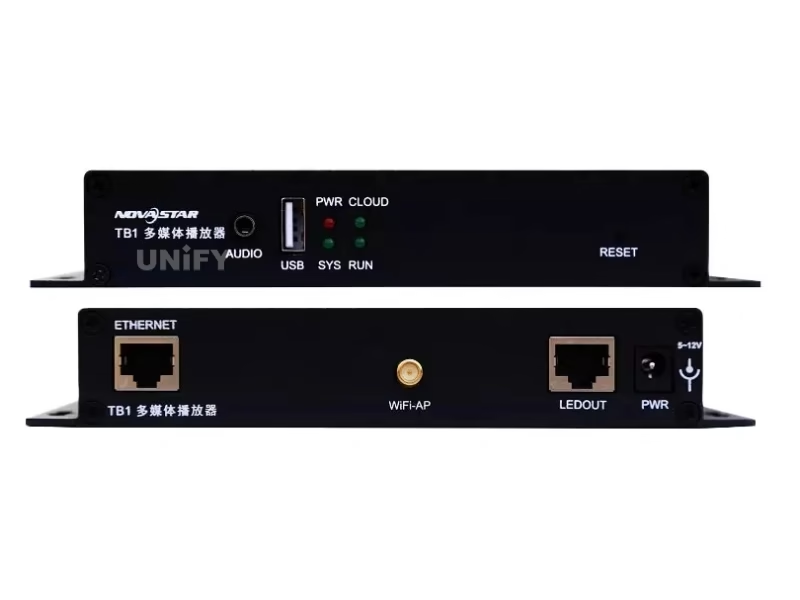
Novastar TB1 LED Screen Video Controller Box
Second-generation Taurus multimedia player with built-in Wi-Fi, optional 4G, USB playback, and cloud-based VNNOX management — replacing the PC for small to medium LED displays.
Product Overview
What Is the Novastar TB1 Taurus Multimedia Player?
A compact Android-based multimedia player that replaces the PC for LED display content playback and management — built-in Wi-Fi, optional 4G, USB playback, and cloud control via VNNOX.
The Novastar TB1 LED Screen Video Controller Box is NovaStar’s second-generation Taurus multimedia player for full-color LED displays. Unlike traditional synchronous LED control systems that require a dedicated PC, the TB1 integrates content playback and sending card functions into a single 301g device. It supports 650,000 pixels at up to 1920×1080 resolution across one Gigabit Ethernet port.
Four ways to control: PC via Ethernet · Mobile/tablet via built-in Wi-Fi hotspot · USB flash drive for offline playback · VNNOX cloud platform for cross-regional cluster management. No dedicated PC required for daily operation.
▶ The Taurus Multimedia Player — Official NovaStar Product Video
Specifications
Technical Specifications
Source: NovaStar official datasheet V2.1.0.
Hardware & Performance
| Parameter | Specification |
|---|---|
| Processor | Quad-core @1.2 GHz |
| RAM / Storage | 1 GB / 32 GB internal |
| OS | Android (third-party apps not supported) |
| Video Decoding | Hardware 1080p · H.264/H.265 · MP4/AVI/MOV/WMV/MKV |
| Image Support | JPG/BMP/GIF/PNG/WEBP up to 4096×2160 |
Output & Connectivity
| Connector | Qty | Details |
|---|---|---|
| LED OUT (Ethernet) | 1 | Gigabit Ethernet · 650K px · Max 1920×1080 |
| AUDIO | 1 | 3.5mm stereo audio output |
| USB 2.0 (Type A) | 1 | USB playback · FAT32, max 4GB single file |
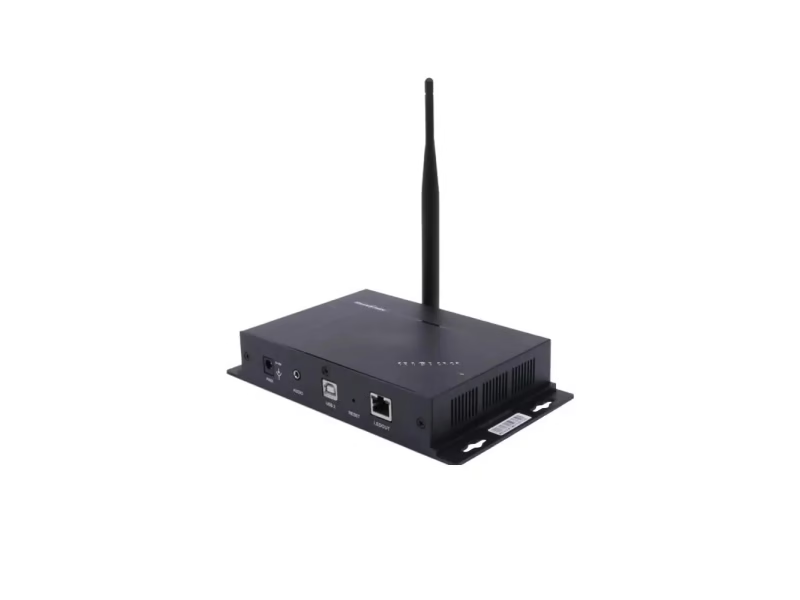
| USB (Type B) | 1 | PC connection for config & content publishing |
| ETHERNET | 1 | Fast Ethernet · Network or control PC connection |
| Wi-Fi | 1 | 2.4 GHz · AP mode + STA mode |
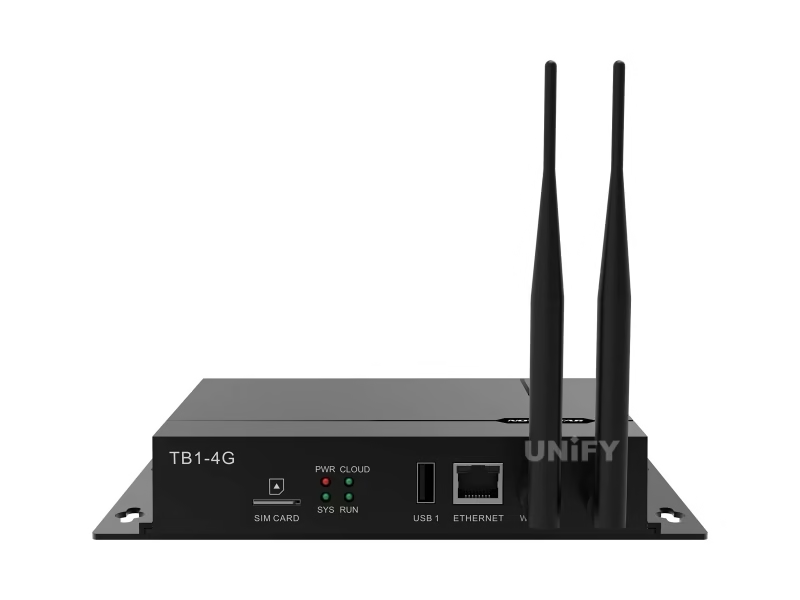
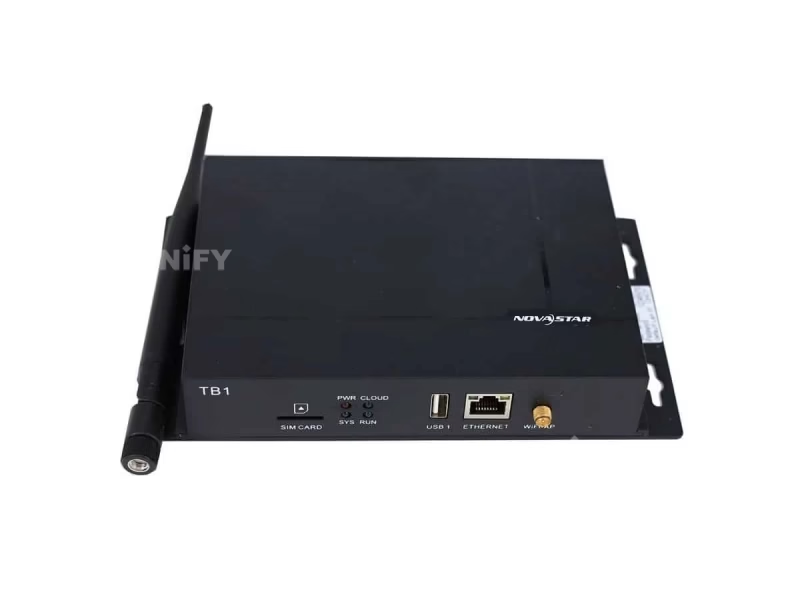
| SIM / 4G | 1 | SIM card slot · 4G module optional (sold separately) |
Physical & Power
| Parameter | Specification |
|---|---|
| Dimensions | 196.0 × 115.5 × 34.0 mm |
| Net Weight | 301.8 g |
| Power Input | DC 5V–12V · Max 18W · Recommended 25W supply |
| Operating Temp | –20°C to +60°C |
| IP Rating | IP20 (indoor use) |
| Certifications | CQC · SRRC |
Key Features
Why the TB1 Replaces the PC for LED Displays
Four capabilities that make a dedicated PC unnecessary for small to medium LED installations.
☁
Cloud-Based Management (VNNOX)
Publish content, control screens, and monitor status from anywhere via NovaStar’s VNNOX cloud platform. Manage multiple TB1 units across regions from a single dashboard — ideal for chain stores, digital signage networks, and distributed displays. Terminal authentication and player verification keep playback secure.
📶
USB Plug-and-Play
Load content onto a USB flash drive (FAT32), insert into the TB1, and it plays automatically — no PC, no network, no configuration required. Supports JPG, BMP, GIF, PNG, WEBP images up to 4096×2160 and 1080p video via hardware decoding. Perfect for standalone displays in remote locations.
📱
Wi-Fi AP + STA Dual Mode
In AP mode, the TB1 creates its own Wi-Fi hotspot — connect your phone or tablet directly without any network infrastructure. In STA mode, connect the TB1 to an existing Wi-Fi network for internet access and cloud management. Switch between modes as needed for each deployment scenario.
📡
Optional 4G Connectivity
Add a 4G module (sold separately) for cellular connectivity where Wi-Fi and Ethernet are unavailable — lamp-post displays, roadside signage, vehicle-mounted screens. Wired network takes priority over 4G; the TB1 automatically switches based on signal availability. SIM card slot with anti-reverse insertion design.
Software & Cloud
VNNOX Cloud Platform & ViPlex Software
The TB1 is managed through NovaStar’s software ecosystem — ViPlex Express for local content publishing and VNNOX for cloud-based remote management.
VNNOX Cloud Platform
Cross-regional cluster management. Publish content to hundreds of TB1 units simultaneously. Monitor playback status, screen brightness, and device health from any browser. Role-based access control for multi-user teams. Automatic device registration and firmware OTA updates.
ViPlex Express (Local)
Windows-based content publishing software. Create playlists, schedule playback, configure screen parameters, and manage media files. Connect to TB1 via USB Type-B or Ethernet. Free download from novastar.tech. Download NovaStar software from our resource center.
▶ NovaStar Cloud-Based Display Management System
Setup Guide
TB1 Quick Setup & Content Playback
Four ways to get content onto the screen, from simplest to most advanced.
USB Plug-and-Play
Format USB drive as FAT32. Copy media files (images, videos) to the root directory. Insert into TB1 USB port — playback starts automatically. No configuration, no network, no software. Best for simple standalone displays with fixed content.
Wi-Fi Direct (Mobile/Tablet)
Power on TB1 — it creates Wi-Fi hotspot (SSID: AP + last 8 digits of SN). Connect phone/tablet to this hotspot. Use NovaStar’s mobile app to publish content, adjust brightness, and manage playback. Default Wi-Fi password printed on device label. Best for displays where running Ethernet cable is inconvenient.
PC via Ethernet/USB
Connect TB1 to PC via USB Type-B or Ethernet. Launch ViPlex Express. Configure screen parameters (resolution, pixel pitch, cabinet layout). Create playlists with schedules. Publish content directly. Best for initial setup and complex content scheduling.
Cloud Management (VNNOX)
Register TB1 on VNNOX platform. Connect via Ethernet, Wi-Fi STA, or 4G. Publish content, monitor status, and manage firmware OTA from any browser. Cross-regional cluster management for hundreds of units. Best for chain stores, digital signage networks, and managed service providers.
▶ USB Playback Solutions — NovaStar Official Tutorial
Applications
Where the TB1 Excels
Purpose-built for small to medium LED displays that need reliable playback without a dedicated PC.
💡
Lamp-Post & Street Displays
4G connectivity + compact 301g form factor. No PC cabinet needed at the pole base. Cloud-managed content updates for municipal information displays.
Content Management
Video Source & Playlist Settings
Configure video input sources, create playback playlists, set transition effects, and schedule content for different time slots.
▶ Taurus Media Player Video Source Settings
Setup Guide
TB1 Quick Setup & Content Playback
Four ways to get content onto the screen, from simplest to most advanced.
🏪
Chain Store & Retail Signage
Cross-regional management via VNNOX. Push promotions to hundreds of stores from one dashboard. Wi-Fi AP mode for stores without Ethernet wiring.
🚗
Vehicle-Mounted Displays
DC 5V–12V power compatible with vehicle electrical systems. 4G keeps content updated on the move. 301g weight — minimal mounting requirements.
🏨
Door-Head & Mirror Displays
USB plug-and-play — no network setup required. Compact 34mm height fits behind thin displays. Stereo audio output for multimedia content with sound.
TB1 vs. Taurus Series
Understanding the TB1 position in NovaStar’s Taurus multimedia player lineup.
| Feature | TB1-4G | TB2 | TB3 | TB4 |
|---|---|---|---|---|
| Pixel Capacity | 650,000 | 1,300,000 | 2,300,000 | 3,900,000 |
| Max Resolution | 1920×1080 | 1920×1080 | 1920×1080 | 3840×2160 |
| RAM / Storage | 1GB / 32GB | 2GB / 16GB | 2GB / 16GB | 4GB / 32GB |
| Wi-Fi | 2.4GHz AP+STA | 2.4GHz AP+STA | 2.4GHz AP+STA | 2.4/5GHz AP+STA |
| Market Price | ~$100–$200 | ~$200–$300 | ~$300–$400 | ~$500–$700 |
TB1-4G highlighted. Best value for single-screen deployments under 650K pixels.
Why Source Your TB1 from UnifyLED?
As a direct LED screen manufacturer and NovaStar partner, factory-direct pricing with pre-shipment testing.
💰
Factory-Direct Pricing
15–30% below distributor. TB1 starts at factory-direct pricing well under $200 retail benchmarks.
🔍
Pre-Shipment Testing
Every TB1 powered on and tested with a live LED screen. QC process catches issues before shipping.
🔗
Integrated Ecosystem
LED screen + TB1 player — pre-configured. Single warranty, single support contact. Android + NovaStar FPGA tested together.
🌎
Global Logistics
80+ countries. Includes Wi-Fi antenna, power adapter, quick start guide. CQC/SRRC documentation.
Frequently Asked Questions
Related Resources
Synchronous vs. Asynchronous LED Control
Understand when TB1 async playback beats PC sync
LED Video Processor Guide
Compare processors, controllers, and multimedia players
LED Screen Resolution Guide
650K pixels — what screen size does it support?
NovaStar Software Download
Free ViPlex Express, VNNOX, firmware
Novastar TB1 Taurus — The Complete B2B Buyer’s Guide
Published July 2026 · UnifyLED Engineering Team · 12 min read
1. Why the TB1 Exists — The PC Replacement Thesis
The Novastar TB1 LED Screen Video Controller Box addresses a specific operational problem: small to medium LED displays deployed in locations where running a dedicated PC is impractical, expensive, or insecure. A PC requires an operating system license, antivirus software, physical space, AC power, and periodic maintenance — overkill for a door-head display showing a menu, a lamp-post screen displaying municipal information, or a retail store window running a 30-second video loop. The TB1 replaces all of that with a 301g Android device drawing 18W max that mounts behind the screen and runs 24/7 without user intervention.
This is fundamentally an asynchronous LED control architecture — content is pre-loaded or pushed to the device, which plays it independently — versus synchronous systems that require a continuous live video feed from a PC. The operational cost difference is significant: no PC hardware (~$300–$600), no Windows license (~$139), no ongoing IT maintenance. For a chain store operator with 50 locations, eliminating 50 PCs saves $22,000–$37,000 in hardware alone before accounting for reduced failure points and simplified content management via VNNOX cloud.
2. Hardware Architecture — What 650K Pixels Means in Practice
The TB1’s single Gigabit Ethernet output port drives up to 650,000 pixels. At a standard 16:9 aspect ratio, this translates to a maximum resolution of 1920×1080 (2.07MP). However, 650K is less than 2.07MP — so at 1920×1080, the pixel budget is fully consumed. Alternative configurations: a 960×540 screen uses only 518K pixels, leaving 20% headroom; a 1280×720 screen uses 922K pixels — exceeding the TB1’s capacity. The practical sweet spot is P3–P5 LED modules in smaller screen sizes: a P4 screen at 2.56m×1.44m (640×360 pixels) uses only 230K pixels, well within the TB1’s budget.
Internally, the quad-core 1.2GHz processor with 1GB RAM and 32GB storage is sufficient for 1080p hardware decoding. The 32GB internal storage can hold hundreds of images or dozens of short video clips. USB 2.0 (Type A) supports FAT32-formatted drives — note the 4GB single-file limit inherent to FAT32. For deployments requiring larger video files, push content via Ethernet or Wi-Fi instead of USB. See LED screen resolution for detailed pixel budget calculations.
3. Four Control Methods — Operational Flexibility
USB Plug-and-Play: The simplest mode. Format a USB drive as FAT32, load media files, insert. The TB1 auto-plays content. Zero configuration. Ideal for fixed-content displays that rarely change — restaurant menus, price boards, welcome signs.
Wi-Fi AP Mode: The TB1 broadcasts its own Wi-Fi hotspot (SSID: AP + device serial). Connect a phone or tablet directly — no router, no internet, no infrastructure. Use NovaStar’s mobile app to upload content and adjust settings. Perfect for displays in locations without network cabling.
Wi-Fi STA + Ethernet: Connect the TB1 to an existing network. ViPlex Express (Windows) manages content publishing, playlist scheduling, and screen configuration. Best for initial setup and displays with structured content calendars.
VNNOX Cloud: Register the TB1 on NovaStar’s cloud platform. Push content, monitor status, and manage firmware OTA across hundreds of units from any browser. Role-based access control for multi-user teams. For commercial display solutions at scale, VNNOX reduces per-location operational costs to near zero.
4. TB1 vs. Sending Card — When Async Beats Sync
A synchronous LED video processor like NovaStar’s MCTRL or VX series provides real-time video processing — essential for live events, broadcast, and applications where the display mirrors a source in real time. But many LED displays do not need real-time video. A door-head sign showing a store logo, a lamp-post display cycling through municipal announcements, a retail window running a product video on loop — these are playback applications, not live video applications. The TB1 serves this use case at roughly half to one-third the hardware cost of a synchronous controller + PC combination.
5. 4G Connectivity — When There Is No Network
The TB1’s SIM card slot accepts an optional 4G module (not included). When no Ethernet or Wi-Fi is available — roadside signage, rural lamp-post displays, vehicle-mounted screens — 4G provides the data connection for cloud management and content updates. Network priority: wired > 4G. If both Ethernet and 4G are connected, the TB1 uses Ethernet and falls back to 4G only if Ethernet fails. The anti-reverse SIM slot prevents incorrect insertion, and the COM antenna connector supports external 4G antennas for signal-challenged locations.
6. Indicator Diagnostics — What the Lights Tell You
The TB1’s front panel has four LED indicators providing at-a-glance diagnostics. PWR (Red): Solid = power OK. SYS (Green): Flash every 2s = OS normal; solid or off = OS fault. CLOUD (Green): Solid = internet connected; flash every 2s = VNNOX connected; flash every 1s = OS upgrading; flash every 0.5s = copying upgrade package. RUN (Green): Flash every 2s = FPGA has no video source; flash every 0.5s = FPGA normal; solid or off = FPGA loading abnormal. This diagnostic set allows field technicians to identify issues without connecting a PC or logging into any software — critical for remote deployments. See our LED screen maintenance guide for troubleshooting workflows.
7. Media Format Support — What You Can Actually Play
The TB1 is not a general-purpose media player — it is an LED display playback device. Image support: JPG, JPEG, BMP, GIF, PNG, WEBP — all up to 4096×2160 pixels. Video support: 1080p hardware decoding, H.264 and H.265 codecs, MP4/AVI/MOV/WMV/MKV containers. Audio support: MP3, WMA, WAV, OGG, FLAC, AAC, AMR — stereo output via 3.5mm jack. A critical constraint: the output data format is YUV420 semi-planar (YUV400 monochrome also supported for H.264). This is the internal format the FPGA uses to drive the LED display — transparent to most users, but relevant if you’re encoding custom video content.
8. Sourcing Strategy — Factory Direct for Volume Deployments
B2B buyers deploying TB1 units at scale — 50+ for a chain store rollout, 20+ for a municipal smart city project — benefit significantly from factory-direct sourcing. Regional distributors charge $100–$200 per unit. Factory-direct from a LED screen manufacturer that is also a NovaStar partner provides 15–30% lower unit pricing, pre-configuration (Wi-Fi SSID, VNNOX registration, content pre-load), and integrated support across the full system — LED screen + TB1 player — from a single vendor.
9. Conclusion
The Novastar TB1 LED Screen Video Controller Box is not a flagship controller — it is a purpose-built tool for a specific job: replacing the PC in small to medium LED display deployments where content is pre-produced rather than live. At 650K pixels, 1080p video, and four control methods from USB to cloud, it covers the vast majority of commercial display, digital signage, and smart city applications without the cost, complexity, and failure modes of a PC-based architecture. When evaluating, look beyond the spec sheet: ask about content update workflows, cloud management capabilities, and what happens when a USB drive fails at a remote site. At UnifyLED, we pre-configure and test every TB1 before shipment so you deploy with confidence.
Ready to Deploy the TB1?
Factory-direct pricing, pre-configuration with your content and Wi-Fi settings, integrated support. Quote in 24h.
Explore the Complete NovaStar Controller Range
From Taurus multimedia players to VX all-in-one controllers and MCTRL sending boxes.
VX All-in-One
Resources
Download TB1 Resources
Official NovaStar TB1 specifications and quick start guide.