
Mooncell · MTB Series · Sending Controller
Mooncell MTB400E Master Controller
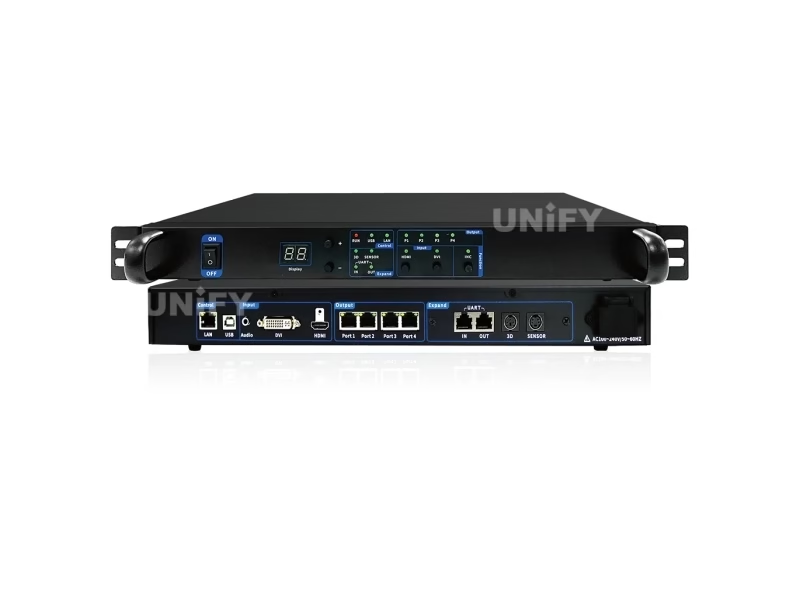
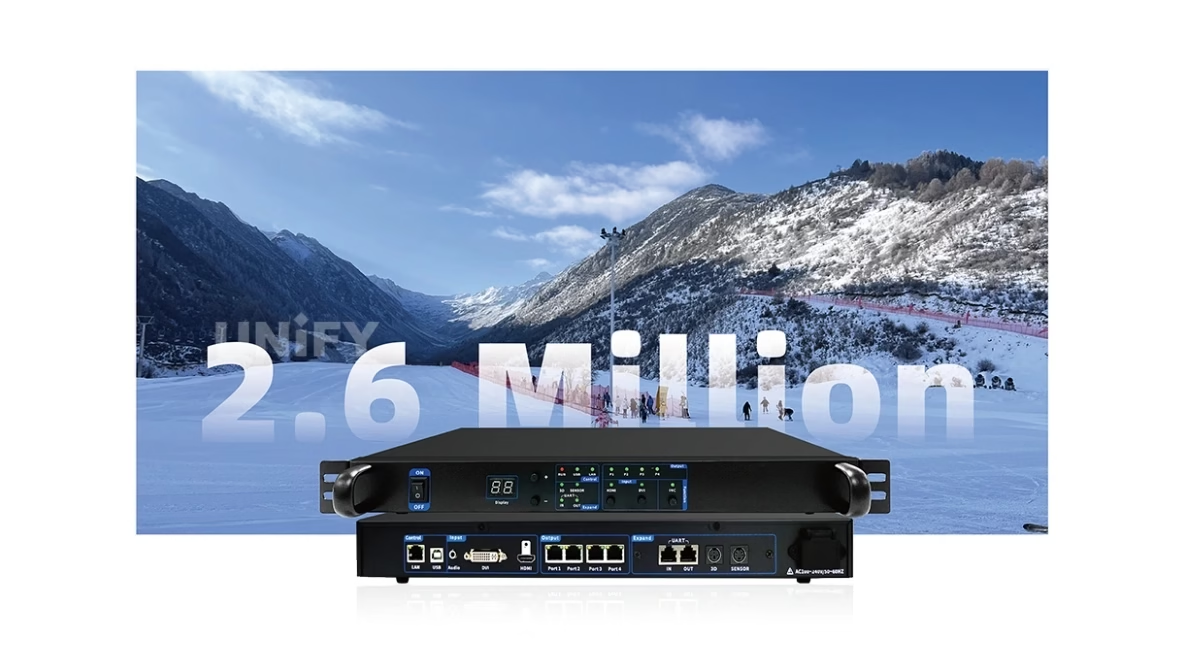
The Mooncell MTB400E Master Controller is the 4-port sending controller of Mooncell’s MTB series: a 2.6-million-pixel load across four Gigabit Ethernet ports, HDMI and DVI input, audio over the network cable, EDID management and loop plus dual-master backup.
Product Overview
What Is the Mooncell MTB400E Master Controller?
The Mooncell MTB400E Master Controller is a sending controller from Mooncell’s MTB master-control series: it takes HDMI and DVI video input, applies processing and EDID management, and drives LED receiving cards through 4 Gigabit Ethernet ports with a combined load of up to 2.6 million pixels. Audio travels over the network cable, frame rates run to 120 Hz, and loop plus dual-master backup protect the signal path. Mooncell’s official page titles it the MTB400E Sending Controller; the market sells it as a Master Controller — both names describe this unit, and this page uses the official MTB400E Specification V4.0 (July 2025) as its data source.
Short answer: The Mooncell MTB400E is a 4-port sending controller loading 2.6 million pixels (4 × 655,360), with HDMI 1.4 (4K30) and DVI (1920×1200@60) input, audio transmission over the network cable (via the P1 output), EDID management, 30/50/60/120 Hz frame rates, Ethernet loop and dual-master backup, host-software monitoring and an optional ST_EXT extension board for cascaded brightness and automatic light-sensor adjustment. It lists at $195 in distributor stock, cascades from one PC for 5.2M–10.4M+ walls, and sits between the 1.3M V30 Pro/MTB200S and the 6-port MTB600E in the MTB ladder.
Three Mooncell names collide in search results, and separating them is worth a paragraph. MTB400E (this page) is the sending controller — 2.6M, four Gigabit ports, about $195. MTB400S is a different product: a basic standalone main controller loading 26,000 pixels, listed near $264. MB400S is the Mooncell MB400S Creative LED Controller — a networked player with Android and cloud management. A quote for one of the three is not a quote for the others; the loading number settles every confusion.
In the Mooncell control chain the MTB400E is the pure sending stage: a PC or media server feeds HDMI/DVI, and the four Gigabit outputs drive Mooncell receiving cards inside the cabinets — the A712 (HUB75E) or A10X (120-pin). Where the MVB4S Pro combines processing and sending in one 2-in-1 unit, the MTB400E is the sending-only rung for PC-driven walls.
Specifications
What Are the Mooncell MTB400E Master Controller Specifications?
Data from the official Mooncell MTB400E Sending Controller Specification V4.0 (first release July 19, 2025; hardware ST40 V4.0.0).
Loading, Input & Output
Backup, Front Panel & Physical
Data Verification
Where Do Published Mooncell MTB400E Specs Disagree — and What Does V4.0 Say?
The MTB400E is documented inconsistently between channels. Three conflicts matter, and all three are resolved below:
Mooncell’s official page titles the unit MTB400E Sending Controller; the market sells it as a Master Controller. Same hardware — the sending role is the technical one, the master-controller name is the channel’s. Both appear on this page.
A distributor spec table lists −20°C to 70°C at 480×250.8×44 mm and 2.7 kg. The V4.0 sheet lists −20°C to 60°C, 480.05×285.9×53 mm and 2.83 kg. Cabinet and environmental planning should use the sheet.
The hub table and the V4.0 sheet agree on 2.6M across 4 ports: 4 × 655,360 = 2,621,440. Unlike other series pages, the MTB ladder has no port-vs-load conflict — the math holds.
The V4.0 sheet is the reference for every number on this page; where a distributor table disagrees, the sheet wins.
Model Selection
Which Mooncell MTB400E Do You Need: V30 Pro, MTB200S, MTB400E or MTB600E?
Mooncell’s MTB master-control series is a four-rung ladder documented on its V30 Pro/MTB200S/MTB400E/MTB600E hub. The MTB400E sits on the third rung — the step where HDMI input and USB/LAN control arrive:
All four rungs share independent Gamma adjustment, multi-device splicing, audio transmission and loop backup. The deciding variables are the pixel budget, the port count and whether HDMI input is required — 1.3M walls work on V30 Pro/MTB200S; 2.6M with HDMI moves to the MTB400E; six-port layouts take the MTB600E. All four cap at 4096×4096 per canvas, which is what the cascade math below exploits.
Cascading
How Do You Cascade Mooncell MTB400E Controllers for Bigger Walls?
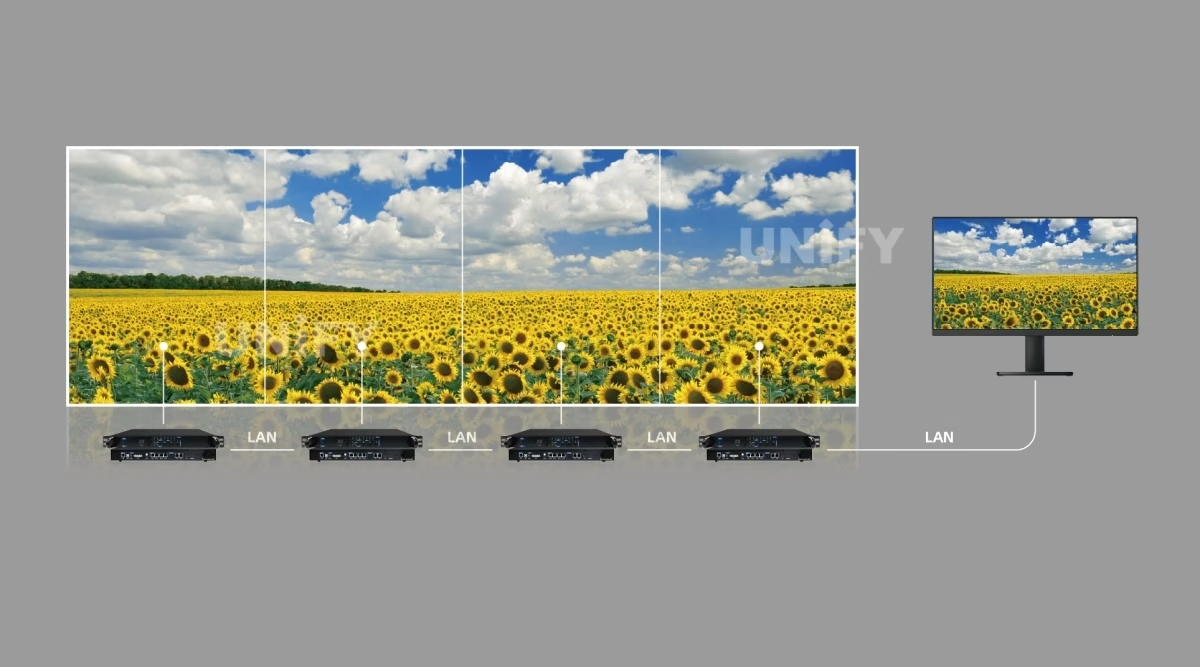
The USB connection is the cascade key: a single PC controls multiple sending controllers, each unit keeping its own 2.6M load and 4096×4096 canvas ceiling. The ladder grows cleanly:
Each unit stays inside the 4096×4096 width/height limit per canvas — the cascade adds canvases under one PC, it does not extend a single canvas beyond the ceiling. The sending-side planning guide covers the port math in the same units: how to configure an LED sending card.
Signal & Sync
How Do Audio, EDID and 120 Hz Work on the Mooncell MTB400E?
Three signal-path details separate the MTB400E from a bare sending card, and one of them is a wiring constraint worth knowing before the rack is built:
The 3.5 mm audio input travels over the network cable — and the V4.0 sheet states it plainly: audio transmission is supported only via the P1 output port. Wire the audio-bearing chain from P1 and the receiving side decodes sound with the video.
EDID management tells the source what the wall expects — a PC or media server outputs the wall’s exact resolution instead of its own desktop default, keeping pixel-to-pixel mapping clean at any source.
Four input frame rates cover PAL and NTSC regions, 60 Hz signage and the 120 Hz path used by 3D and high-refresh content — presets from 1024×768 to 2560×960 plus user-defined resolutions.
The audio-over-network detail is the same family story as the MVB20E-G and the B1200S: one cable carries pixels and sound to the wall.
Brightness Control
How Does the ST_EXT Extension Board Control Brightness on the Mooncell MTB400E?
Brightness on the MTB400E is a three-layer story — the front panel, the extension board and the light sensor:
The front panel shows the current brightness value on a digital display — a rack technician reads the wall’s brightness state without software, a detail most sending cards skip.
The optional ST_EXT board enables cascaded brightness control across controllers and automatic brightness adjustment — one policy for a multi-controller wall.
The SENSOR light-sensor interface feeds ambient light into the automatic adjustment — the same family capability documented on the receiving-card pages, now at the sending stage.
Specify the ST_EXT board and the light sensor at order time — both are options, and a brightness-policy retrofit on a finished install is the wrong time to discover them.
Redundancy & Monitoring
How Does the Mooncell MTB400E Keep the Signal Path Alive?
A sending controller sits between the source and every pixel on the wall — its failure modes are the most expensive ones in the chain. The MTB400E answers with standard backup plus continuous monitoring:
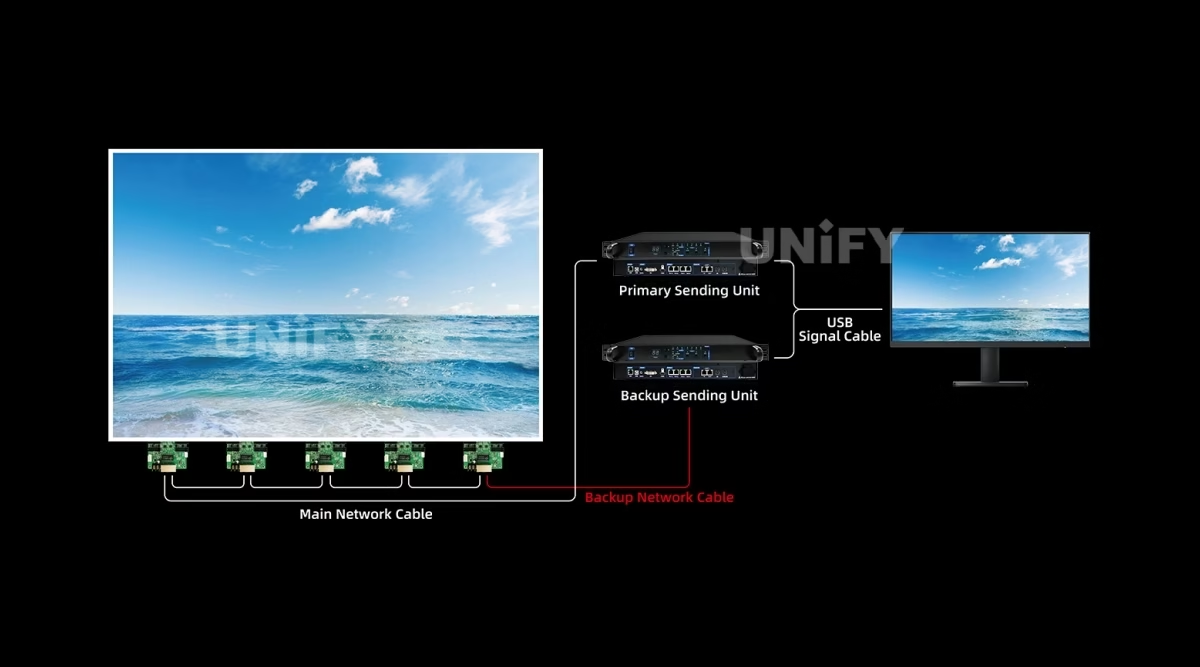
Network-port loop backup between the outputs — a failed series line keeps the wall alive, the same gigabit loop protection used across the family.
A second MTB400E stands by as the backup master — the same dual-master mechanism documented on the B1200S page, applied to the sending tier.
Host software watches sending-card operating parameters and status; configuration readback saves the exact setup; Gigabit error-rate detection flags a marginal cable before it becomes a dark section.
For the system-level redundancy picture — backup sending hardware, cascade failover, spare discipline — see the LED display system redundancy & backup guide.
Core Features
What Does the Mooncell MTB400E Master Controller Bring to a Wall?
Six capabilities define the MTB400E for professional installations — the load first, then the signal path, then the reliability layer.
Four Gigabit ports at 655,360 pixels each — 2,621,440 total — with 1280×512 per port and arbitrary tiling for any wall layout.
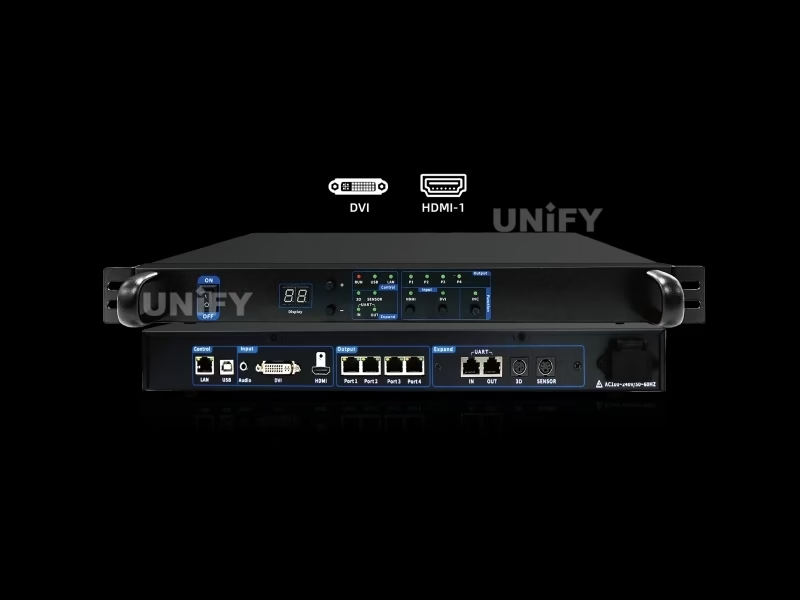
HDMI 1.4 to 4K30 and DVI to 1920×1200@60 — the two input families that cover every professional source, with EDID management on both.
3.5 mm audio transmitted synchronously over the network cable via the P1 output — pixels and sound in one cable run.
Ethernet loop backup between ports and dual-master controller backup — the sending tier keeps running when a link or a unit fails.
One PC controls multiple sending controllers over USB — 2 units reach 5.2M, 3 units 7.8M, 4 units 10.4M+ from a single seat.
Digital brightness display on the panel, cascaded brightness control and light-sensor auto adjustment via the optional ST_EXT board.
Software & Commissioning
How Do You Configure the Mooncell MTB400E?
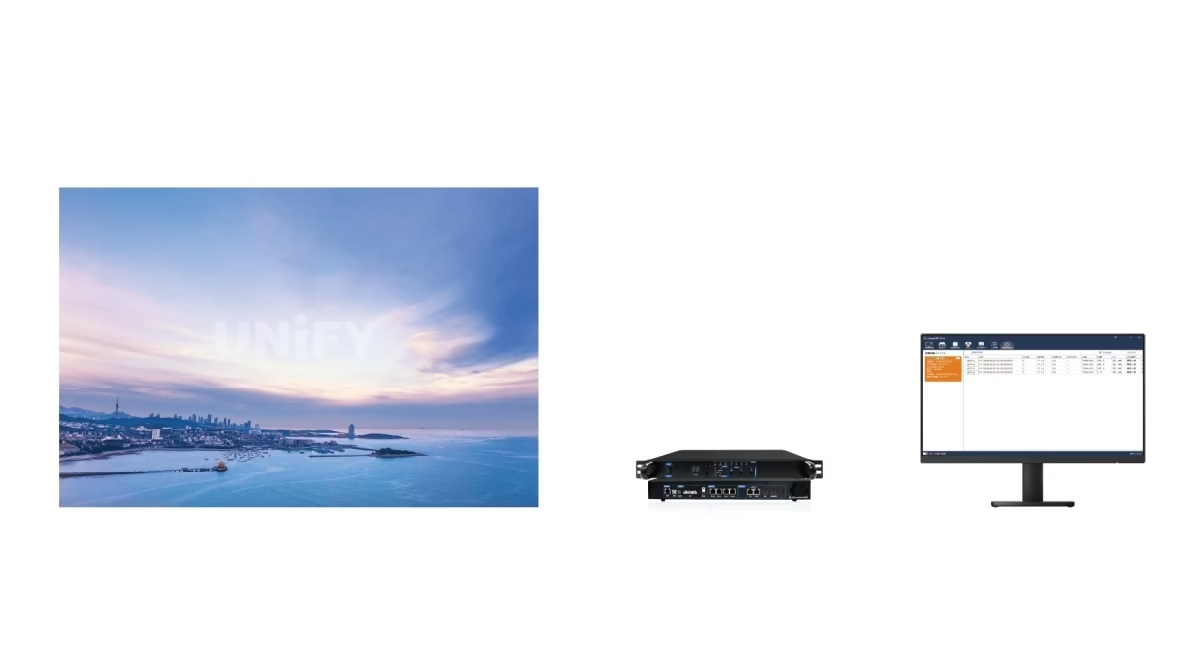
Configuration runs in AutoLED, Mooncell’s single software across the family — and the resolution preset list on the MTB400E covers most commissioning without custom math:
1024×768, 1280×1024, 1366×768, 1600×1200, 1920×1080, 2048×1152 and 2560×960 presets, plus user-defined resolution — most walls load a preset and adjust from there.
The same AutoLED workflow maps standard and irregular modules — the triangle-module tutorial below shows the mapping process end to end.
Multiple controllers connect to one PC over USB; each unit’s canvas is set within its 4096×4096 ceiling, and the host software manages them as one wall.
Official Mooncell tutorial — mapping a triangle module in AutoLED (13 min).
The full commissioning sequence — wiring, network mapping, module configuration, correction — is covered step by step in the LED display configuration and system debugging guide.
On-Site Operation
How Do You Read the Mooncell MTB400E Front Panel?
The MTB400E’s front panel is a full diagnostic surface — and one LED semantic differs from the receiving-card pages, which is worth knowing before a night call:
When the panel says the controller is healthy but a wall section is dark, work through the LED display signal cable troubleshooting guide before swapping hardware.
Applications
Where Does the Mooncell MTB400E Master Controller Fit Best?
The MTB400E answers the PC-driven wall: a source that is always on, a wall that must not blink, and a rack that benefits from sending-only hardware. Four application classes cover most of the demand:
Live HDMI sources with 120 Hz input and dual-master backup for show-critical rigs
EDID-managed sources and preset resolutions for meeting rooms and booths
Cascade from one PC, loop backup between ports, configuration readback for fast re-rigs
Small-pixel-pitch installations where per-port loading discipline matters most
Official Mooncell case presentation — KTV rooms and bars.
For event and staging contexts around these walls, the LED screen for events guide covers the deployment planning around the display itself.
System Matching
What Pairs with the Mooncell MTB400E Master Controller?
The MTB400E is the sending-only rung of a family that offers three ways to drive a wall. The choice is architectural:
Mooncell receiving cards pair inside the cabinets — the A712 (12× HUB75E) for standard modules or the A10X (120-pin) for compact frames.
Where processing and sending belong in one chassis, the MVB4S Pro (2.6M, 4 ports) covers the same load with windowing built in — the MTB400E is the pure-sending choice for PC-driven walls.
Where the wall plays its own programs, the MB400S combines playback and sending with cloud management — no PC in the signal path at all.
The complete Mooncell control chain maps on the LED video processor category page.
Pricing
How Much Does a Mooncell MTB400E Cost?
Price transparency, stated plainly: the MTB400E appears in distributor listings at $195.00 (LEDScreenParts, in stock, reviewed September 2026). Same-channel reference points: the Mooncell A308 receiving card at $14.99, the MVB20E 2-in-1 processor at $1,242 and the Novastar VX4S at $1,499 — the MTB400E sits at the value end of the professional sending tier. Factory-direct tiers for B2B buyers:
A per-wall budget is the honest math: a 2.6M wall at $195 runs to about $200 in sending hardware, before receiving cards — see the LED display warranty page for what to hold the supplier to on spares. Ask for a factory-direct quote at your quantity — we are the LED screen manufacturer behind unifyled.com.
FAQ
What Do Buyers Ask About the Mooncell MTB400E Master Controller?
What Assurance Comes With the Mooncell MTB400E Master Controller?
Every MTB400E ships with Mooncell original packaging and compliance documentation.
Ready to Specify the Mooncell MTB400E Master Controller?
Factory-direct pricing, genuine Mooncell stock, cascade pre-configuration and 2-year warranty.
unifyledscreen@gmail.com | +86-191-18802497
Technical Deep-Dive
What Should Engineers Know Before Buying the Mooncell MTB400E Master Controller?
Published: September 2026 | 12 min read | UnifyLED Engineering Team
The Mooncell MTB400E Master Controller is the sending stage behind professional LED walls that run from a PC — the box that takes HDMI and DVI, applies EDID and frame-rate discipline, and pushes 2.6 million pixels out of four Gigabit ports. This guide is written for engineers and procurement teams specifying the 2.6M sending tier in 2026, using the official Mooncell MTB400E Sending Controller Specification V4.0 (July 2025) as the data source, with the load math, the cascade story and the naming traps that distributor pages get wrong.
Short answer: The Mooncell MTB400E is a 4-port sending controller loading 2.6 million pixels (4 × 655,360), with HDMI 1.4 (4K30) and DVI (1920×1200@60) input, audio over the network cable via the P1 output, EDID management, 30/50/60/120 Hz frame rates, Ethernet loop and dual-master backup, host-software monitoring and an optional ST_EXT board for cascaded brightness. It lists at $195, cascades from one PC for 5.2M–10.4M+ walls, and sits between the 1.3M V30 Pro/MTB200S and the 6-port MTB600E.
Chapter 1 — Definition and the Three-Name Trap
The Mooncell MTB400E Master Controller is a sending controller: it receives video over HDMI or DVI, manages the source’s EDID expectations, and drives LED receiving cards through 4 Gigabit Ethernet ports with a 2.6-million-pixel load. It is the pure sending stage of the synchronous vs asynchronous LED control split — live PC video in, composed rows and columns out. Mooncell’s official page calls it the MTB400E Sending Controller; the market calls it a Master Controller; both describe this unit.
The three-name trap is real and expensive. MTB400E (this page): sending controller, 2.6M, 4 ports, about $195. MTB400S: a basic standalone main controller loading 26,000 pixels, listed near $264 — a different product sharing three letters. MB400S: the networked player with Android and cloud management, also a different product. When a search returns all three, the loading number settles every confusion — and a quote for one is not a quote for the others. The hardware behind the MTB400E is platform ST40, revision V4.0.0, on the V4.0 sheet first released July 19, 2025.
Chapter 2 — Loading: 2.6 Million, Verified
The loading math is clean: 4 ports × 655,360 pixels = 2,621,440 — the 2.6 million figure on the sheet, at 1280×512 per port. The loading range is 128–4096 pixels wide and 64–4096 high, with an offset range of 0–4095 in both axes, and the MTB hub table agrees on every one of these numbers — unlike other series pages on this site, the MTB ladder has no port-vs-load conflict; the math holds across both sources.
The cascade is where the 2.6M becomes a system story. The USB connection lets a single PC control multiple sending controllers: two MTB400E units reach about 5.2M, three about 7.8M — the same class as the MVB12E — and four about 10.4M+, each unit staying inside the 4096×4096 width/height limit per canvas. The cascade adds canvases under one PC; it does not extend a single canvas beyond the ceiling. Practical formats: a 1920×1080 wall (2.07M) fits one unit with headroom; a 2560×960 super-wide (2.46M) fits; a 3840×2160 4K wall (8.29M) needs four units. The sending-side planning guide covers port math in the same units: how to configure an LED sending card.
The cascade deserves a procurement reading, because it changes how a multi-wall venue is quoted. Each MTB400E is a 2.6M, 4-port unit; a venue with one 2.6M stage wall and two 1.3M lobby walls buys three units — one per canvas — and runs all three from the same PC over USB, with each canvas configured independently inside its 4096×4096 ceiling. Compare that with the 2-in-1 family, where the same three canvases might suggest an MVB4S Pro per wall at a higher unit price with windowing built in. The sending-only MTB400E is the lower-cost path when the sources are PC-driven and no processing is required; the 2-in-1 path wins when windowing, scaling and switching are part of the show. The decision is per project, and the loading math is the same in both families.
Chapter 3 — The Signal Path: Audio, EDID and Frame Rates
Three signal-path details separate the MTB400E from a bare sending card. Audio: the 3.5 mm input travels over the network cable, and the V4.0 sheet states the wiring constraint plainly — audio transmission is supported only via the P1 output port. Wire the audio-bearing chain from P1 and the receiving side decodes sound with the video; wire it from P2–P4 and the audio stays in the rack. This is the same audio-over-network family story as the MVB20E-G and the B1200S.
EDID management tells the source what the wall expects — a PC or media server outputs the wall’s exact resolution instead of its own desktop default, which is the difference between crisp pixel-to-pixel mapping and a scaled mess on a fine-pitch wall. Frame rates cover 30/50/60/120 Hz, and the preset list — 1024×768, 1280×1024, 1366×768, 1600×1200, 1920×1080, 2048×1152, 2560×960 — plus user-defined resolution covers most commissioning without custom math. Inputs are HDMI 1.4 to 4K30 and DVI to 1920×1200@60, the two families that cover every professional source.
Chapter 4 — Reliability: Backup and the Digital Brightness Display
A sending controller sits between the source and every pixel — its failure modes are the most expensive in the chain — and the MTB400E answers with standard backup plus continuous monitoring. Ethernet loop backup runs between the network ports, so a failed series line keeps the wall alive; dual-master backup stands a second unit by, the same mechanism documented on the B1200S page. Host software watches sending-card operating parameters and status; configuration readback saves the exact setup; Gigabit error-rate detection flags a marginal cable before it becomes a dark section. The system-level picture is in the LED display system redundancy & backup guide.
Brightness is a three-layer story. The front panel shows the current brightness value on a digital display — a rack technician reads the wall’s brightness state without software, a detail most sending cards skip. The optional ST_EXT expansion board enables cascaded brightness control across controllers and automatic brightness adjustment, fed by the SENSOR light-sensor interface — the same family capability documented on the receiving-card pages, now at the sending stage. Specify the board and the sensor at order time; a brightness-policy retrofit on a finished install is the wrong time to discover them.
A word on the monitoring layer, because it is easy to under-buy: host-software monitoring reports sending-card operating parameters and status continuously, configuration readback stores the exact setup for a replacement unit, and Gigabit error-rate detection measures each cable’s signal quality. On a rental wall that re-rigs weekly, those three features turn a 30-minute fault hunt into a 5-minute check; on a fixed fine-pitch wall, the error-rate trend is the early warning that a cable is aging before it fails mid-show. The same discipline applies at the receiving tier — the A712 and A10X cards expose the same state through AutoLED — so a fully monitored wall is a Mooncell-native configuration, not a special build.
Chapter 5 — The Four-Rung MTB Ladder
Mooncell’s MTB master-control series is a four-rung ladder: V30 Pro (1.3M, 2 ports, DVI, USB), MTB200S (1.3M, 2 ports, DVI, USB), MTB400E (2.6M, 4 ports, HDMI+DVI, USB/LAN — this page) and MTB600E (2.6M, 6 ports, HDMI+DVI, USB/LAN). All four share independent Gamma, multi-device splicing, audio transmission and loop backup, and all four cap at 4096×4096 per canvas. The deciding variables: pixel budget, port count, and whether HDMI input is required — the MTB400E is the rung where HDMI arrives. Where the wall needs processing and windowing rather than pure sending, the MVB4S Pro covers the same 2.6M in the 2-in-1 form; where the wall plays its own programs, the MB400S player takes the PC out of the path entirely.
Sizing detail for the spec sheet: the MTB400E runs on AC 100–240 V at a rated 16 W, works from −20°C to 60°C at 10–90% RH non-condensing, stores at −20°C to 70°C, measures 480.05 × 285.9 × 53 mm at 2.83 kg net (3.94 kg gross), ships three units per carton, and includes the power cord, USB, DVI and HDMI cables plus the certificate in the box. At 16 W the annual electricity cost for 24/7 operation is a rounding error on a project budget — the sending tier is not where power spend lives. Those are the V4.0 sheet figures; a distributor table that quotes different temperature and dimension values should be reconciled against the sheet before cabinet drawings are cut.
Chapter 6 — Commissioning and the Front Panel
Configuration runs in AutoLED, Mooncell’s single software across the family. The workflow: install AutoLED and connect over USB; select the source (HDMI or DVI via the front-panel button); load the preset resolution or set a user-defined canvas within the 4096×4096 ceiling; map the modules — the official triangle-module tutorial shows the mapping process end to end, and the same editor handles standard boxes; then read the configuration back and save it locally. For cascades, each unit’s canvas is set individually and the host software manages them as one wall. The complete sequence is covered in the LED display configuration and system debugging guide.
The front panel is a full diagnostic surface, and one LED semantic is worth knowing before a night call: the P1–P4 output LEDs flash steadily when Gigabit communication is normal and stay on when a port is not connected — inverted versus the receiving-card status LEDs, where slow flash means idle. Reading the wrong convention sends a technician hunting a fault that does not exist. The DVI/HDMI input LEDs show which source is live, RUN/USB/LAN cover power and control links, the 3D/SENSOR/UART indicators confirm optional hardware, and the INC key runs inspection.
Official Mooncell tutorial — MCLEDPlayer software basics.
Official Mooncell case sharing — interactive floor LED with master control.
Chapter 7 — What the MTB400E Costs, Honestly
The MTB400E lists at $195.00 in distributor stock (LEDScreenParts, reviewed September 2026) — the value end of the professional sending tier. The same channel prices the Mooncell A308 receiving card at $14.99, the MVB20E 2-in-1 processor at $1,242 and the Novastar VX4S at $1,499, which is the honest frame: this is a sending-only box, priced like one, and the per-wall budget is card count plus receiving cards. One distributor table lists different environmental and physical figures — −20°C to 70°C, 480×250.8×44 mm, 2.7 kg — against the V4.0 sheet’s −20°C to 60°C, 480.05×285.9×53 mm and 2.83 kg; cabinet and environmental planning should use the sheet. Factory-direct tiers shift the price with volume, cascade pre-configuration and ST_EXT/sensor bundles; ask for a quote at your unit count.
Conclusion
The Mooncell MTB400E Master Controller is the 4-port sending stage for PC-driven professional walls: 2.6 million pixels of verified load, HDMI and DVI input with EDID management, audio over the network cable via P1, 120 Hz frame rates, loop and dual-master backup, continuous monitoring and the digital brightness display — at a $195 street price. It is the unit to specify when the wall runs from a PC and the rack wants sending-only hardware, and the V4.0 sheet is the reference to pin to it.
Buying in bulk? Talk to us — we are the LED screen manufacturer behind unifyled.com, and sending controllers ship from stock with 2-year warranty and cascade engineering support.
Related Pages
Explore the Mooncell Control Ecosystem
Mooncell B1200S Creative LED Controller
Mooncell A10X LED Receiving Card
Mooncell A712 LED Receiving Card
Mooncell C2 LED display control system
Mooncell MVB4S Pro 2-in-1 LED Video Processor
Mooncell MVB12E 2-in-1 LED Video Processor
Mooncell MVB20E-G 2-in-1 LED Video Processor
Mooncell M40 2-in-1 LED Video Processor
11 pages · English · first release July 19, 2025 · hardware ST40 V4.0.0