
Mooncell · MBS Series · Networked Player
Mooncell MB400S Creative LED Controller
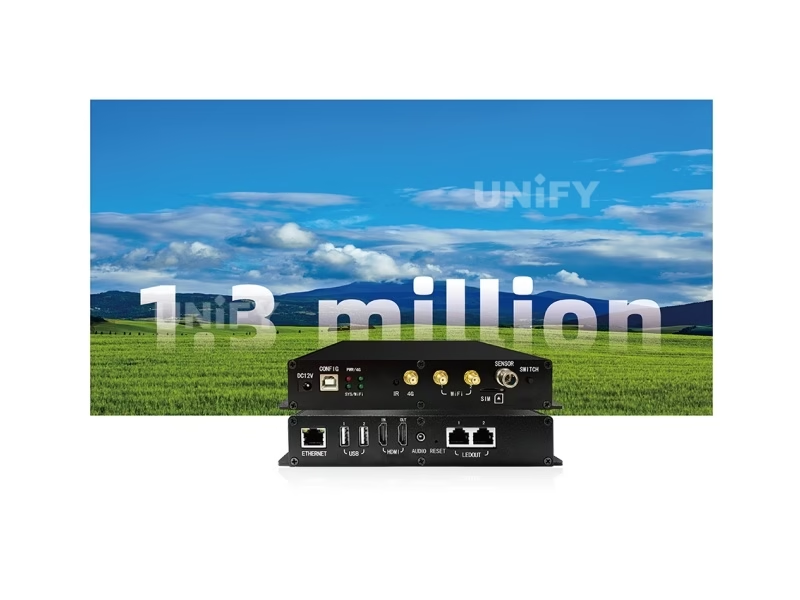
The Mooncell MB400S Creative LED Controller is the networked player for irregular LED displays: an 8-core Android 7.1 unit with H.265 4K decoding, dual Gigabit output loading 1.3 million pixels, synchronous/asynchronous dual mode, HDMI loop-out and cloud cluster management.
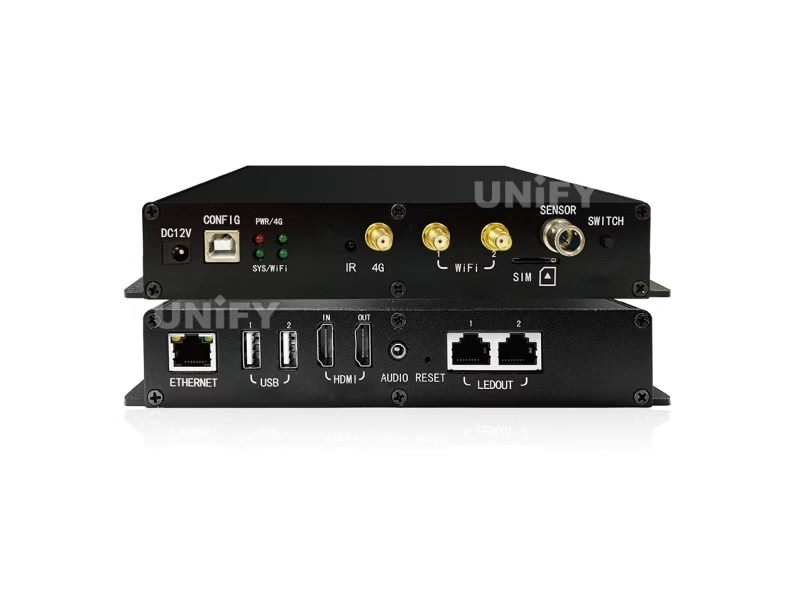
Product Overview
What Is the Mooncell MB400S Creative LED Controller?
The Mooncell MB400S Creative LED Controller is a custom-designed networked player from Mooncell’s MBS Series: it combines an 8-core Android 7.1 media player and a sending card in one 193×139×33 mm unit, drives irregular LED displays through 2 Gigabit Ethernet ports with a 1.3-million-pixel load, decodes H.265 4K in hardware, switches between synchronous and asynchronous modes, and deploys programs through a cloud cluster without on-site debugging. Mooncell documents it as a Commercial LED Display Controller for sphere screens, circular screens and rings, and this page uses the official MB400S Specification V4.0 (August 2025) as its data source.
Short answer: The Mooncell MB400S is a networked player for irregular LED displays: 8-core CPU, 2GB DDR3, 8GB eMMC, Android 7.1, H.265 4K hardware decoding, dual Gigabit Ethernet output loading 1.3 million pixels (max 3840×2160), synchronous/asynchronous switching, HDMI input with loop-out, up to 12 playback windows, cloud cluster management, Wi-Fi/4G options and an RS485 light-sensor interface — in a 15 W, 0.56 kg box. A reseller estimate places it in the $350–500 range; quotes are project-based.
Three names need separating before the spec sheet, because they collide in search results. MB400S (this page) is the networked player. MTB400S is a different product — a basic standalone main controller loading 26,000 pixels, listed near $264 by retailers. MB4 is the hardware platform version behind the MB400S (V4.0 sheet, hardware MB4 V1.4). When a quote says “MB400S,” the spec sheet on this page is the reference.
In the Mooncell creative family the MB400S plays the light role next to the Mooncell B1200S Creative LED Controller: the B1200S is the 12-port, 7.8M main controller for large spheres and domes; the MB400S is the self-contained player for 1.3M-class creative walls, with the media playback and cloud management built in. Receiving cards pair inside the cabinets — the A712 (HUB75E) or A10X (120-pin).
Specifications
What Are the Mooncell MB400S Creative LED Controller Specifications?
Data from the official Mooncell MB400S Commercial LED Display Controller Series Specification V4.0 (first release August 1, 2025; hardware MB4 V1.4).
Processing, Playback & Loading
Interfaces, Electrical & Physical
Data Verification
Where Do Published Mooncell MB400S Specs Disagree — and What Does V4.0 Say?
The MB400S is documented inconsistently even on Mooncell’s own channels. Four conflicts matter, and all four are resolved below:
The MBS-Series hub page says “4 Network Ports.” The V4.0 sheet’s rear-panel diagram lists 2× Gigabit LEDOUT plus a 100M ETHERNET — the “4 ports” count mixes in the network-access channels. Design on the V4.0 figure: 2 Gigabit outputs.
The hub table lists max resolution 1920×1080@60; the V4.0 sheet lists max width 3840 / max height 2160 with H.265 4K decoding. The 1080p figure reflects an early input-resource table; the 4K processing path is documented.
The same hub table lists the MB100S at 6.5M pixels on a single LED output — physically inconsistent with the 655,360-pixel-per-port class. Treat that cell as an unverified hub value; this page’s MB400S numbers come from the V4.0 sheet.
Different products: the MB400S loads 1.3M as a player; the MTB400S main controller loads 26,000 pixels and retails near $264. Search results mix them — a quote for one is not a quote for the other.
Reseller pages that reuse hub-table numbers should not drive design math. The V4.0 sheet is the reference for loading, ports and resolution.
Dual Mode
How Does Synchronous/Asynchronous Dual Mode Work on the Mooncell MB400S?
The MB400S is the first Mooncell player page on this site to carry the dual-mode switch — the same architecture family as the synchronous vs asynchronous LED control split, but inside one 15 W box:
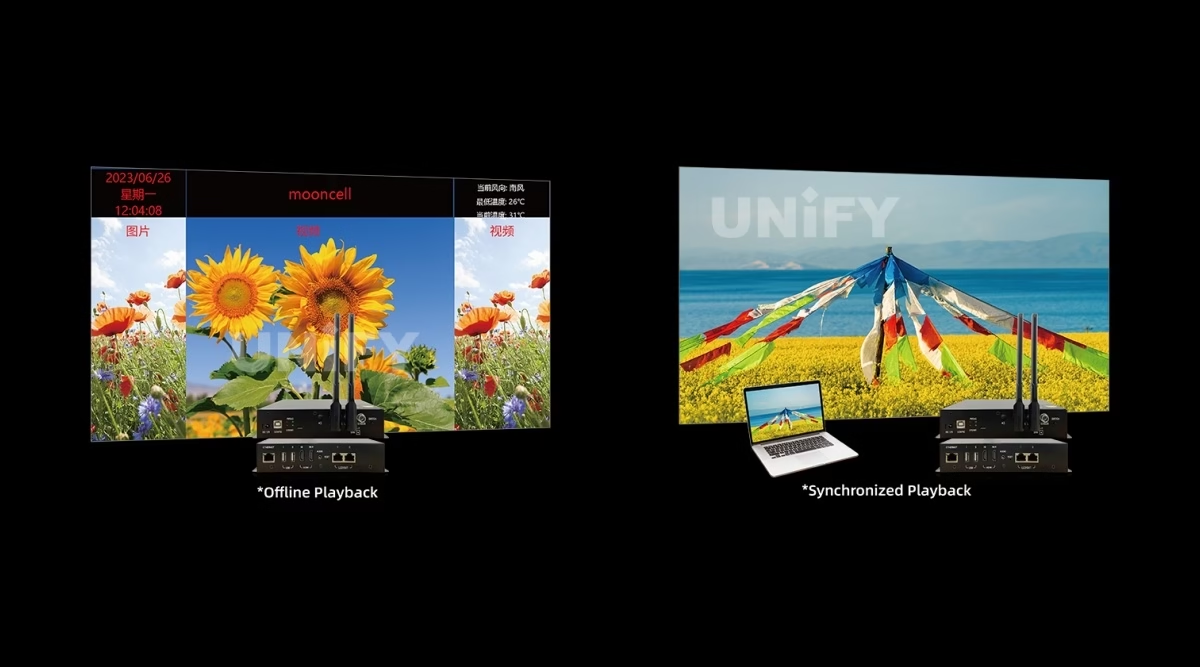
Live video from the HDMI input is processed and sent to the wall in real time — the mode for stage events, live feeds and camera-facing content where latency matters.
Standalone playback from the 8GB storage — programs uploaded via USB, LAN, Wi-Fi or 4G run on schedule with no computer attached. The daily commercial mode for malls, museums and signage.
The HDMI input loops out to the next device — daisy-chain a second display, a confidence monitor or a processor without a splitter. A feature the MB100S does not carry.
The switch lives in the controller — no external switcher, no cable re-patch between a show and a signage day. For the wider playback ecosystem, the asynchronous LED media player selection guide compares this class across brands.
Playback Capability
What Can the Mooncell MB400S Play, and How Many Windows?
The playback matrix is the commercial heart of the MB400S — the V4.0 sheet and the MBS hub together define it:
Playback windows with free size, position and overlay — video, images, scrolling captions, logos, date/time — partitioned arbitrarily across the canvas (MBS hub figure).
Hardware decoding of H.265 4K video at roughly half the bitrate of H.264 — smoother playback on less bandwidth, with MP4/MPG/MKV/MOV/3GP/WEBM containers.
True-color OSD at any position with transparent, semi-transparent and opaque effects; video, image and text can play together with captions superposed on video.
Real-time clock display and management; HD video, images, text, weather and clock content; single/static/multi-line TXT — the signage content set out of the box.
Official Mooncell tutorial — MCLEDPlayer playback software.
Cloud & Scheduling
How Does Cloud Cluster Management Cut On-Site Work for the Mooncell MB400S?
For a chain of creative displays — the same sphere in five malls, rings across a venue network — the MB400S’s cloud layer replaces site visits:
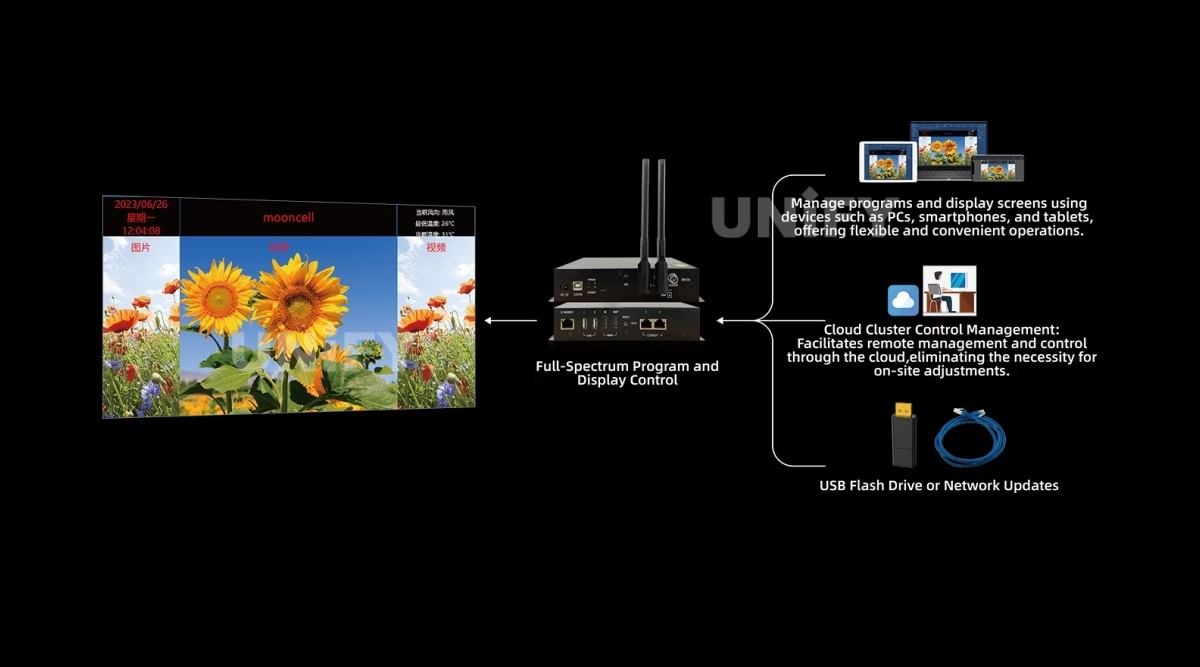
Cloud cluster management deploys programs to many controllers at once — cluster management, program management, real-time monitoring, intelligent control and timed management in one console.
NTP precise timing keeps multi-screen playback synchronized; scheduled programs and timed power on/off run the wall on a calendar, not an operator.
Android/iOS apps plus PC manage programs and parameters — brightness, display switch, playback control and program transmission from a phone.
USB flash drives update programs plug-and-play; the RS485 sensor interface monitors temperature, humidity and brightness, with automatic or scheduled brightness adjustment.
Connectivity & Irregular Screens
How Does the Mooncell MB400S Connect, and What Shapes Can It Drive?
Connectivity is a four-lane story — the MB400S reaches the network any way a site provides it:
Connects to the site network as a station, or serves its own Wi-Fi hotspot for direct phone control — installs without Ethernet infrastructure work.
The optional 4G module with antenna and mount puts a remote creative display on the cloud with zero site network dependency — the classic billboard connectivity story.
100M Ethernet for management; USB 2.0 ×4 (2 front + 2 rear) for storage and plug-and-play program updates.
Sphere screens, circular screens and rings per the official spec — with rotation, mirroring and independent Gamma for creative layouts.
The irregular-screen geometry itself — module cropping, pixel extraction and the mapping — is handled in AutoLED, covered in the configuration section below. Standard modules arranged in creative shapes are the norm: the creativity lives in the controller and the software.
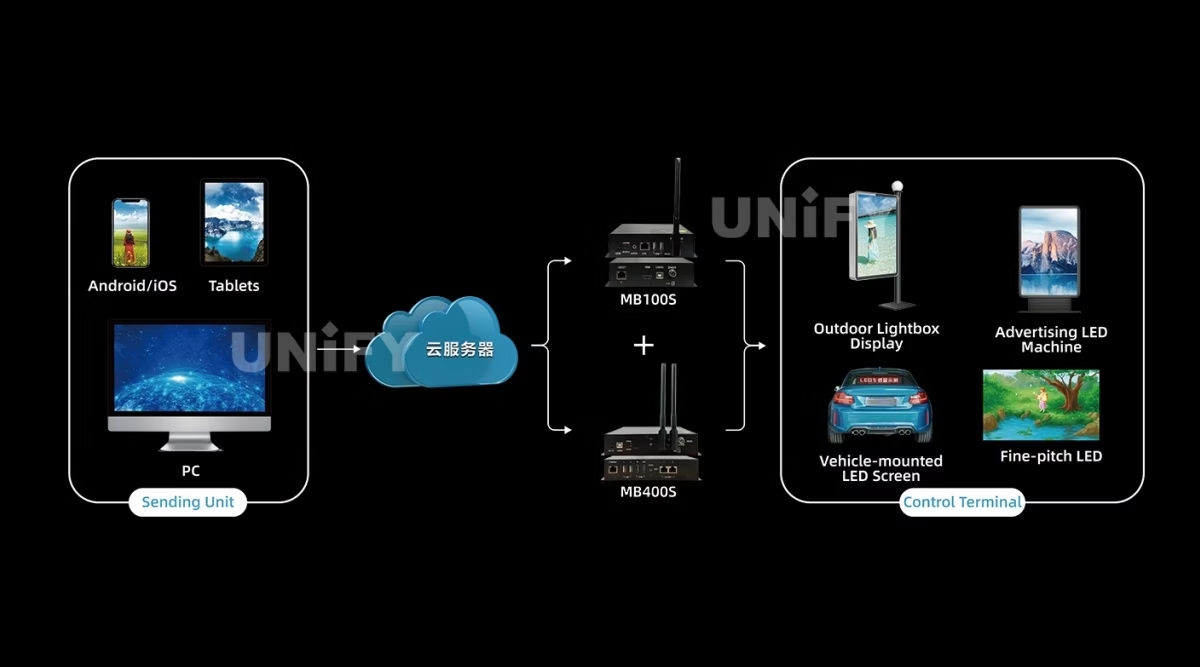
Model Selection
Which Mooncell MB400S Do You Need: MB100S or MB400S?
Mooncell’s MBS Series has two networked players, documented on the MBS hub. The MB400S is the upgraded rung — the one where dual-mode, HDMI input and loop backup join the party:
Both rungs share multi-window playback, rotation, independent Gamma, audio transmission, Wi-Fi control and 4G options. *The MB100S hub figure of 6.5M on a single LED output is inconsistent with the per-port class of the family — verify against the MB100S sheet before relying on it. The upgrade logic: need live HDMI input, loop-out or dual-mode switching — the MB400S is the rung.
Core Features
What Does the Mooncell MB400S Creative LED Controller Bring to a Project?
Six capabilities define the MB400S for creative commercial projects — the playback engine first, then the connectivity, then the management layer.
One box switches between live HDMI input and standalone scheduled playback — the show day and the signage day without re-patching.
Hardware decoding of 4K H.265 at roughly half the bitrate of H.264 — smooth playback on less bandwidth, on an 8-core Android 7.1 platform.
Programs deploy to many controllers from one console — cluster, program, monitoring, intelligent and timed management, no on-site debugging.
Up to 12 windows with free size, position and overlay; true-color OSD; video, image, caption, logo and clock content partitioned arbitrarily.
HDMI input loops to the next device; 3.5mm audio output with MP3/AAC — daisy-chain installs and synchronized audio without a splitter.
RS485 sensor interface for temperature, humidity and brightness; automatic or scheduled brightness adjustment — the wall runs its own display policy.
Software & Commissioning
How Do You Configure the Mooncell MB400S for an Irregular Screen?
The MB400S shares the Mooncell software ecosystem, and the irregular geometry is where the configuration differs from a rectangular wall:
Sphere, ring and dome layouts are built in AutoLED’s irregular-screen workflow — module count, arrangement pattern and pixel coordinates, with module cropping for edge pixels.
The USB Type-B CONFIG port sets display parameters from a PC — the wired path for initial commissioning before the network takes over.
Official Mooncell tutorial — MB series asynchronous controllers.
The full commissioning sequence — wiring, network mapping, module configuration, correction — is covered step by step in the LED display configuration and system debugging guide.
Installation
How Do You Install and Self-Check the Mooncell MB400S on Site?
The install is a four-step job, and the front panel self-checks without a laptop:
Connect the 12V DC adapter (5.5×2.5mm). The PWR indicator stays lit; SYS flashes while the Android OS runs normally.
Wire LEDOUT 1 & 2 (Gigabit) to the receiving-card chains; connect ETHERNET to the site LAN; attach the Wi-Fi antenna and optional 4G module.
Connect HDMI input from a media player, PC or camera; use HDMI OUT to daisy-chain or feed a confidence monitor.
Connect CONFIG USB-B to a PC, launch AutoLED, set display parameters and upload the configuration. RESET restores factory settings.
The four indicators — 4G (module health), PWR (power), WIFI (hotspot health), SYS (OS running) — give a field technician a PC-free status read. When a section of wall is dark, work through the LED display signal cable troubleshooting guide before swapping hardware.
Applications
Where Does the Mooncell MB400S Creative LED Controller Fit Best?
The MB400S answers the 1.3M-class creative wall that needs its own player — the shapes below are the official application set plus the creative-cabinet forms they imply:
Retail atriums, museums and exhibition centers — the sphere shape named in the official spec
Suspended rings for stages, TV studios and events — circular content mapping with rotation and mirroring
Planetarium and immersive ceilings where scheduled playback and NTP sync run the show on repeat
Six-sided retail and trade-show cubes synchronized from a single controller
Official Mooncell tutorial — playing all file types in MCLEDPlayer.
For event and staging contexts around these shapes, the LED screen for events guide covers the deployment planning around the display itself.
Creative-Family Comparison
How Does the Mooncell MB400S Compare with the Mooncell B1200S?
Mooncell’s two creative controllers answer different questions. The honest comparison is role, not size:
Three numbered differences decide between them:
- Playback vs source. The MB400S plays its own programs on a schedule with no computer; the B1200S takes a live 4K source and maps it — a sphere that runs signage all day points to the MB400S, a sphere that runs live events to the B1200S.
- Scale. 1.3M / 2 ports covers small-to-mid creative walls; 7.8M / 12 ports covers large spheres and domes. Above ~1.3M the B1200S is the rung.
- Management model. Cloud cluster and phone control are built into the MB400S; the B1200S pairs with host-software monitoring and, for productions, 3D/Genlock. Choose by who operates the wall day to day.
Pricing
How Much Does a Mooncell MB400S Cost?
Price transparency, stated plainly: the MB400S is project hardware. A reseller estimate reviewed September 2026 places the unit in the $350–500 range (reseller estimate, not an official price), and the basic MTB400S main controller trades near $264 at retail — the two names should never be price-compared as one product. Factory-direct tiers for B2B buyers:
Send us the wall geometry and screen count — the quote includes pre-configuration and cloud account setup. The LED display warranty page explains what to hold the supplier to, and we are the LED screen manufacturer behind unifyled.com.
FAQ
What Do Buyers Ask About the Mooncell MB400S Creative LED Controller?
What Assurance Comes With the Mooncell MB400S Creative LED Controller?
Every MB400S ships with Mooncell original packaging and compliance documentation.
Ready to Specify the Mooncell MB400S Creative LED Controller?
Project-based pricing, genuine Mooncell stock, geometry pre-configuration and 2-year warranty.
unifyledscreen@gmail.com | +86-191-18802497
Technical Deep-Dive
What Should Engineers Know Before Buying the Mooncell MB400S Creative LED Controller?
Published: September 2026 | 12 min read | UnifyLED Engineering Team
The Mooncell MB400S Creative LED Controller is the player-side answer to creative LED displays: a sphere that runs signage all day, a ring that runs scheduled content, a dome that runs the same show on repeat — each one previously needing a sending card plus a computer or media player, now handled by one 15 W box. This guide is written for engineers and project managers specifying 1.3M-class creative walls in 2026, using the official Mooncell MB400S Specification V4.0 (August 2025) as the data source, with the dual-mode logic, the cloud story and the naming traps that project documentation gets wrong.
Short answer: The Mooncell MB400S is a networked player for irregular LED displays: 8-core CPU, Android 7.1, 2GB DDR3, 8GB eMMC, H.265 4K hardware decoding, dual Gigabit Ethernet output loading 1.3 million pixels (max 3840×2160), synchronous/asynchronous dual mode, HDMI input with loop-out, up to 12 playback windows, cloud cluster management, Wi-Fi/4G options and an RS485 light-sensor interface — in a 15 W, 0.56 kg box. A reseller estimate places it in the $350–500 range; quotes are project-based.
Chapter 1 — Definition and the Naming Traps
The Mooncell MB400S Creative LED Controller is a custom-designed networked player in Mooncell’s MBS Series: it combines the sending card and a media player in one unit, decodes H.265 4K video in hardware, and drives Mooncell receiving cards through 2 Gigabit Ethernet ports with a 1.3-million-pixel load. It is the playback side of the synchronous vs asynchronous LED control split for creative geometry — standalone programs on a schedule, or live HDMI in real time, in the same box.
Two naming traps will cost a buyer money if left unchecked. First, MB400S versus MTB400S: the MTB400S is a basic standalone main controller loading 26,000 pixels and retailing near $264 — a different product that shares the initials. When a search returns both, check the loading number before anything else. Second, MB4: that is the hardware platform version in the V4.0 sheet (hardware MB4 V1.4), not a separate model. The specification used on this page is MB400S V4.0, first released August 1, 2025.
Chapter 2 — Loading: 1.3 Million, Verified
The MB400S loads 1.3 million pixels across 2 Gigabit outputs, within a maximum width of 3840 and height of 2160. The per-port math follows the family class (655,360 pixels per Gigabit port), which is why the MBS hub’s “4 Network Ports” figure is a mixed count — the V4.0 rear-panel diagram shows 2× Gigabit LEDOUT plus a 100M ETHERNET, and design math should use the 2-port figure. Practical formats: a 1920×1080 wall maps to 2.07M — above the MB400S ceiling — so a Full HD creative wall needs either a reduced canvas or the next rung; a 1536×864 canvas (1.33M) sits just under the load; a 1280×1024 ring (1.31M) fits with headroom. For walls above 1.3M, the B1200S is the 7.8M rung of the family.
The hub table’s max resolution of 1920×1080@60 sits beside the V4.0 sheet’s 3840×2160 processing claim with no reconciliation — the 1080p figure reflects an early input-resource table, while the H.265 4K decoding path is documented in the same sheet. For canvas planning use the V4.0 loading range; for input planning, verify the source resolution against the actual HDMI input behavior with the vendor before freezing a media workflow.
One loading nuance separates the MB400S from the rectangular players of the family: on an irregular canvas the bounding rectangle overstates the load, because pole regions on a sphere and the inner edge of a ring carry fewer physical pixels than the mapped area. A sphere built from 240 flexible modules at P2.5, for example, maps a canvas that a rectangular planner would size above the 1.3M ceiling, while the physical LED count lands under it. The practical rule: size the MB400S on the physical module count and the per-port distribution — LEDOUT 1 and LEDOUT 2 each take a receiving-card chain, commonly split by hemisphere or by ring segment — and let AutoLED’s irregular-screen workflow validate the map before the structure is frozen.
Chapter 3 — Dual Mode: The Show Day and the Signage Day
The dual-mode switch is the MB400S’s defining trick, and it maps directly to how a creative display is used. Synchronous mode takes live video from the HDMI input and sends it to the wall in real time — the mode for stage events, live feeds and camera-facing content where latency matters. Asynchronous mode plays stored programs independently: content uploaded via USB, LAN, Wi-Fi or 4G runs on schedule from the 8GB storage with no computer attached — the daily commercial mode for malls, museums and signage. The switch lives in the controller: no external switcher, no cable re-patch between a show and a signage day.
Around the switch sits the playback engine: H.265 4K hardware decoding at roughly half the bitrate of H.264; up to 12 playback windows with free size, position and overlay (MBS hub figure); true-color OSD at any position with transparent, semi-transparent and opaque effects; MP4/MPG/MKV/MOV/3GP/WEBM video, MPEG-1 Layer III/AAC audio, JPG/PNG/GIF images, single/static/multi-line TXT, plus weather and clock content. The HDMI loop-out chains the input to a second display or a confidence monitor without a splitter. For the wider playback ecosystem, the asynchronous LED media player selection guide compares this class across brands.
Chapter 4 — Cloud Cluster Management and the Remote Wall
For a chain of creative displays — the same sphere in five malls, rings across a venue network — the MB400S’s cloud layer replaces site visits. Cloud cluster management deploys programs to many controllers at once: cluster management, program management, real-time monitoring, intelligent control and timed management live in one console, and the deployment runs without on-site debugging. NTP precise timing keeps multi-screen playback synchronized, scheduled programs and timed power on/off run the wall on a calendar, and Android/iOS apps plus PC manage programs, brightness, display switch and playback control from a phone.
Connectivity covers every site reality: 100M Ethernet, Wi-Fi as station or as its own hotspot (the latter lets a technician control the wall with a phone where no network exists), and the optional 4G module with antenna and mount for remote displays with zero site-network dependency. The RS485 sensor interface monitors temperature, humidity and brightness, with automatic or scheduled brightness adjustment — the wall runs its own display policy, which matters for a sphere in a glass atrium that dims at noon and holds contrast at night.
The operating reality behind the cloud layer is worth stating plainly: a creative display is a permanent fixture with a changing content calendar, and the MB400S is built so the calendar changes without a ladder. Program updates arrive three ways — USB flash drive plug-and-play for the on-site technician, network transmission for the LAN/Wi-Fi path, and the cloud platform for the fleet operator — and every update lands on the same playback engine. Timed power on/off pairs with scheduled programs, so a mall sphere powers up with the building and the first program of the day; the RS485 sensor interface adds temperature, humidity and brightness awareness, and automatic or scheduled brightness adjustment keeps the wall legible across a day of changing light. For a network of creative displays, that combination is the difference between a content calendar and a content crisis.
Chapter 5 — The MB400S in the Creative Family
The MB400S sits in a three-layer family picture. Above it, the B1200S is the main controller for large spheres and domes — 12 ports, 7.8M, 3D and Genlock, audio over the network cable — but it takes an external source and needs the host software for management. Below it in the MBS series, the MB100S covers simpler networked playback without dual mode, HDMI input or loop-out; its hub-table loading figure (6.5M on one output) is inconsistent with the family’s per-port class and should be verified against its own sheet. Around it, receiving cards live inside the cabinets — the A712 (12× HUB75E) for standard modules or the A10X (120-pin) for compact frames — and the creative capability lives in the controller and the software, not in special modules.
Procurement detail, in the same honest tone as the rest of this page: the MB400S ships with a Wi-Fi antenna, a 12V adapter, a USB cable and a certificate; the 4G module — module, antenna and antenna mount — is the option to budget when a site has no network path. Mounting is cabinet or rack; at 193×139×33 mm and 0.56 kg the unit tucks beside the receiving-card chains, and the wide -20°C to 60°C operating range covers semi-outdoor and ventilated enclosures that consumer Android players cannot survive. The V4.0 sheet is the reference for every number on this page; where the MBS hub table disagrees — the port count, the resolution, the MB100S loading cell — the sheet wins.
Chapter 6 — Configuring and Installing the MB400S
The install is a four-step job. Power: 12V DC (5.5×2.5mm), PWR indicator lit, SYS flashing while Android runs. Network: LEDOUT 1 & 2 wired to the receiving-card chains, ETHERNET to the LAN, Wi-Fi antenna attached, optional 4G module mounted. Video: HDMI input from a media player, PC or camera, with HDMI OUT for daisy-chain or a confidence monitor. Configure: CONFIG USB-B to a PC, AutoLED sets display parameters — for an irregular screen, the sphere/ring layout is built in the irregular-screen workflow with module count, arrangement pattern and pixel coordinates, and module cropping trims edge pixels. Then content deploys via LAN, Wi-Fi, USB or the cloud, with NTP syncing multi-screen playback. The four indicators — 4G, PWR, WIFI, SYS — give a field technician a PC-free status read, and RESET restores factory settings. The complete sequence is covered in the LED display configuration and system debugging guide.
Official Mooncell tutorial — loading files in MCLEDPlayer.
Chapter 7 — What the MB400S Costs, Honestly
The MB400S is project hardware with no official street price. A reseller estimate reviewed September 2026 places the unit in the $350–500 range — a figure to treat as a planning number, not a quote — and the basic MTB400S main controller trades near $264 at retail, which is the wrong comparison when someone quotes the “MTB” name against this page. The honest cost frame is the system, not the box: a creative wall that previously needed a sending card plus an external media player/PC now runs on one 15 W unit — 0.56 kg, cabinet or rack placement, about $15–20 a year in electricity for 24/7 operation at the rated draw. Quotes depend on the 4G option, pre-configuration and project scope; send the geometry and screen count, and the quote comes back with the configuration validated.
Conclusion
The Mooncell MB400S Creative LED Controller is the all-in-one player for the 1.3M-class creative wall: dual Gigabit output, H.265 4K decoding on an 8-core Android platform, synchronous/asynchronous dual mode, HDMI loop-out, 12-window playback, cloud cluster management and light-sensor brightness — in a 15 W box that mounts in a cabinet or a rack. It is the unit to specify when a sphere, ring or dome runs its own programs, and the V4.0 sheet — not the hub table, not the MTB search results — is the reference to pin to it.
Planning a creative LED project? Talk to us — we are the LED screen manufacturer behind unifyled.com, and creative controller projects ship geometry pre-configured with 2-year warranty and cloud account setup.
Related Pages
Explore the Mooncell Control Ecosystem
Mooncell A10X LED Receiving Card
Mooncell A712 LED Receiving Card
Mooncell C2 LED display control system
Mooncell MVB4S Pro 2-in-1 LED Video Processor
Mooncell MVB12E 2-in-1 LED Video Processor
Mooncell MVB20E-G 2-in-1 LED Video Processor
Mooncell M40 2-in-1 LED Video Processor
11 pages · English · first release August 1, 2025 · hardware MB4 V1.4