
What Is a Video Wall? The Complete Guide to LED and LCD Video Walls
A video wall is a large display built from multiple panels that work as one canvas. The difference between a wall that reads as one screen and a grid of televisions is the processor, the panel type, the pixel budget, and the service plan behind the glass. This guide answers what is a video wall for the people who specify one: AV integrators, facility managers, church technical directors, and buyers comparing LCD with direct-view LED.
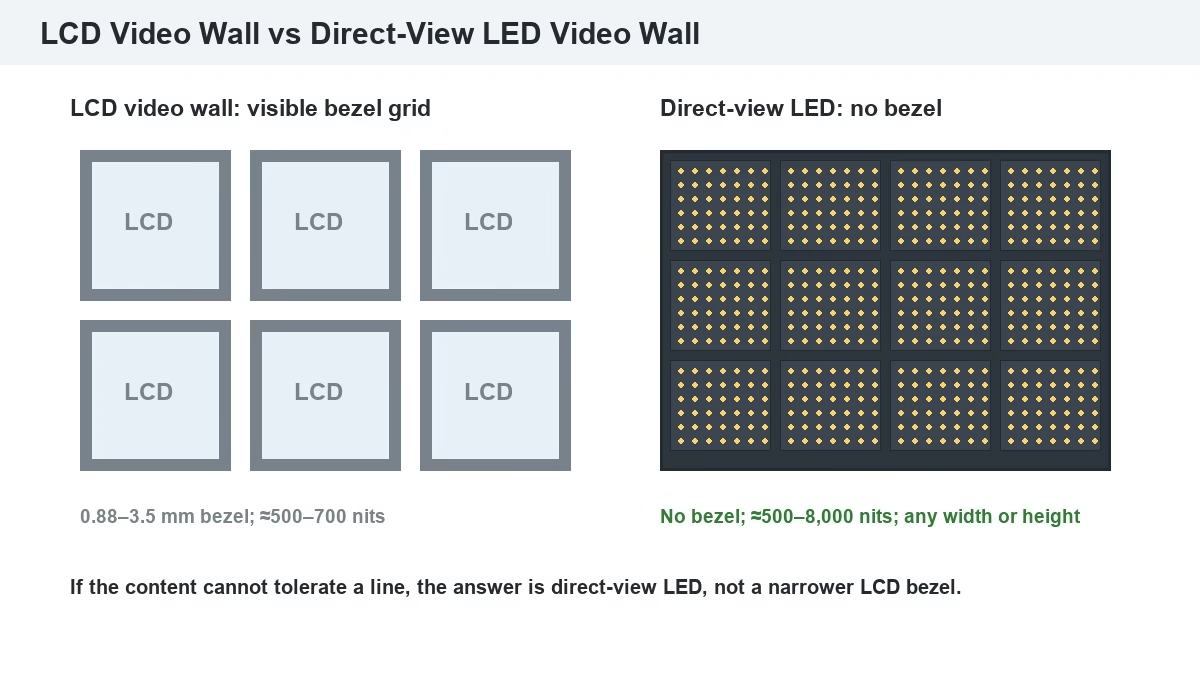
Short answer: A video wall is a large display made from multiple LCD, LED, or projection panels tiled together and driven as one canvas. A video wall processor splits and scales sources across the tiles, and a sending card plus receiving cards carry the signal into each cabinet. LCD walls use narrow-bezel panels measured at 0.88–3.5 mm and are cost-effective indoors. Direct-view LED walls have no bezel, run brighter, and scale to any size. The right choice depends on viewing distance, room light, content, and service access — not on panel count alone.
1. What Is a Video Wall and How Is It Different From a Large TV?
A video wall is a display system that tiles several panels into one logical canvas and controls them through a video wall processor. The panels can be LCD, direct-view LED, or projection cubes. The processor maps one source across many tiles, or several sources into zones, instead of treating each panel as a separate television.
A large TV is one panel with one native resolution and one input. A video wall is a matrix of panels with a combined resolution, a combined aspect ratio, and a signal chain that has to be planned. That difference shows up in source count, resolution math, mounting structure, and service access.
Grand View Research estimates the global video wall market at USD 10.23 billion in 2024 and projects an 11.7% CAGR from 2025 to 2030. The growth is in panel sales, processors, content systems, and integration. Start any LED screen manufacturer conversation with the room, the viewing distance, and the content.
2. What Are the Different Types of Video Wall?
A video wall can be built from four panel families that differ in tile joint, brightness, and resolution density.
What Is an LCD Video Wall?
An LCD video wall is a matrix of commercial LCD panels with narrow bezels, driven by a video wall processor or a splicing controller. Each panel has a native resolution, usually 1920×1080 or 3840×2160, and the wall’s total is panel resolution × rows × columns. Bezel-to-bezel widths of 0.88 mm, 1.7 mm, and 3.5 mm are common in commercial models (Samsung display datasheet; Uniview, 2026).
What Is a Direct-View LED Video Wall?
A direct-view LED video wall is a matrix of LED cabinets whose modules meet edge to edge, so the image has no bezel gap. Each cabinet carries modules, receiving cards, and power supplies and locks together to any width and height. LED walls run from about 500 nits indoors to 8,000 nits outdoors, with pitch chosen for the viewing distance. A fine-pitch P1.86 indoor fine-pitch LED display suits a boardroom, while a P2.5 indoor LED display fits a church or a lobby with a longer viewing distance.
What Is a Projection Cube Video Wall?
A projection cube video wall is a matrix of rear-projection cubes, each with its own projector and screen. The cube hides the projection path but keeps a visible seam and a deep cabinet. Projection cubes are still found in older control rooms; new projects usually compare them with fine-pitch LED and choose LED for brightness and service life.
| Type | Tile joint | Brightness | Best use | Main limit |
| LCD video wall | 0.88–3.5 mm bezel | ≈500–700 nits | Control rooms, meeting rooms, retail | Visible grid; panel count limits scale |
| Direct-view LED | No bezel | ≈500–8,000 nits | Lobbies, churches, stages, facades | Higher entry cost; pitch must match distance |
| Projection cube | Thin but visible seam | ≈300–800 nits | Legacy control rooms, dark rooms | Deep cabinets; color drift; lamp service |
Four key differences decide the shortlist:
- Tile joint: LCD leaves a bezel grid; direct-view LED has no bezel and produces a continuous image.
- Brightness: LED wins in daylight and in large halls; LCD is limited to controlled indoor light.
- Scale: LED grows by adding cabinets in any ratio; LCD grows in whole panels and inherits the panel aspect ratio.
- Service: LED modules and receiving cards are field-replaceable; LCD panels are replaced as complete units.
3. How Does a Video Wall Work From Source to Screen?
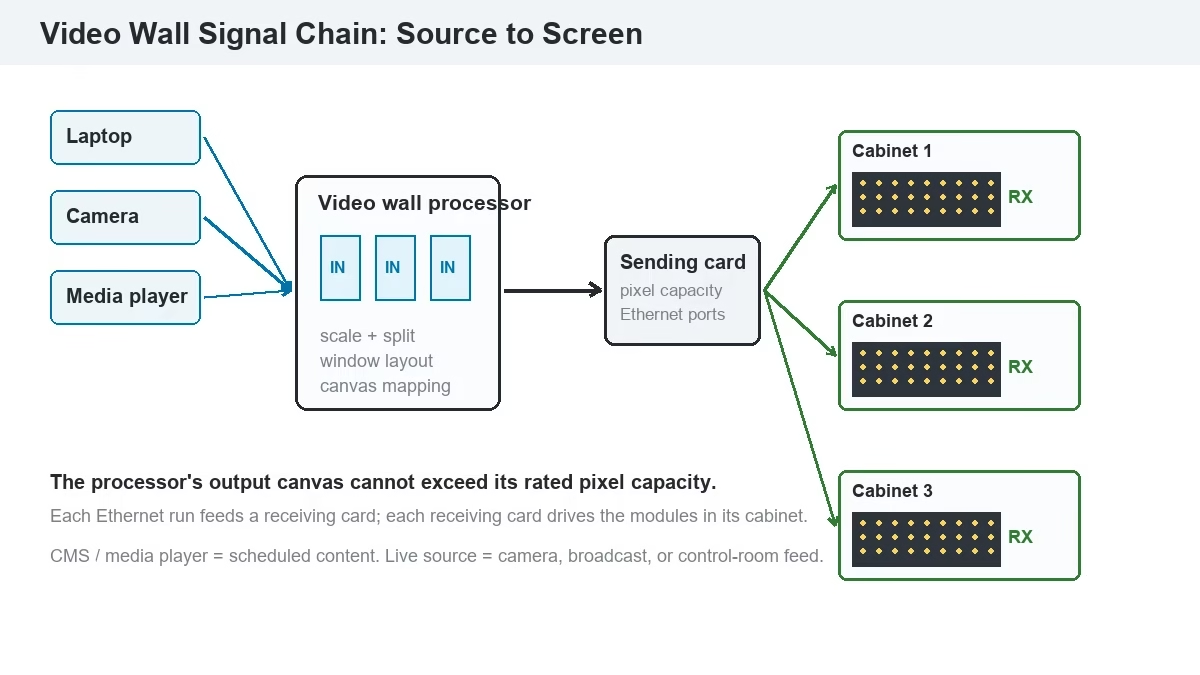
A video wall works through a signal chain: a source feeds a video wall processor, the processor outputs to a sending card, the sending card distributes data over Ethernet to receiving cards, and each receiving card drives the LED modules or LCD panels in its cabinet. On an LCD wall, the processor or splicing controller may drive the panels directly over HDMI or DisplayPort; on an LED wall, the sending and receiving cards are part of the LED control system. The full stage-by-stage explanation is in how does a video wall work.
What Does a Video Wall Processor Do?
A video wall processor is the device that accepts multiple sources, scales them, and maps them onto the wall’s canvas. It decides which source fills the whole wall, which source sits in a window, and how the image is split across tiles. Processor capacity is measured in pixels: the output canvas cannot exceed the processor’s rated pixel count. A 10.4-million-pixel processor can drive a 4K UHD canvas (8.29 million pixels), but not an 8K canvas. The LED video processor guide covers input cards, scaling, and multi-window layouts.
What Is a Video Wall Sending Card?
A sending card is the output stage that converts the processor’s video into a serial data stream for the LED cabinets. It sits in the processor or in a separate controller box, and it distributes the image across Ethernet outputs to the receiving cards. Its pixel capacity and Ethernet port count set the maximum wall size and the number of cabinets per port. The LED screen display control system guide explains the signal chain; the NovaStar LED display controller catalog lists current models.
What Is Video Wall Live?
“Video wall live” usually means the wall is showing a live source — a camera, a broadcast feed, a video conference, or a control-room signal — rather than a scheduled file. A live wall needs enough input cards for every source, a clean switching path, and a control interface the operator can reach. It also needs a fallback source and a test pattern, because a live wall cannot wait for a content re-upload.
The video shows a direct-view LED wall rendering fine detail on moving content.
4. How Do You Calculate Video Wall Resolution and Canvas Size?
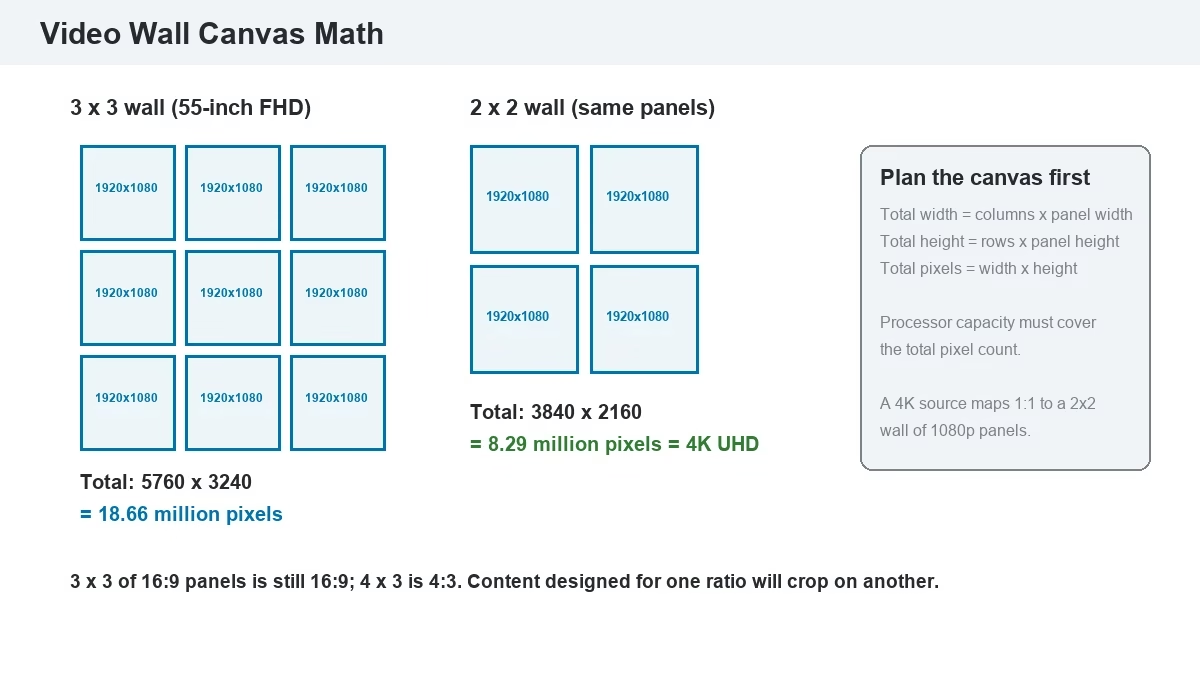
A video wall resolution is the sum of the panel resolutions in the matrix. Total width = columns × panel width; total height = rows × panel height; total pixels = width × height. For a 3×3 wall of 55-inch 1920×1080 panels, the canvas is 5760×3240, or 18.66 million pixels. A 2×2 wall of the same panels is 3840×2160, which is exactly 4K UHD (8.29 million pixels).
Content, processors, and sending cards all work in pixels. A 4K UHD source maps one-to-one onto a 2×2 wall of 1080p panels but must be scaled for a 3×3 wall, which softens detail. A 10.4-million-pixel processor drives the 2×2 canvas directly; the 3×3 canvas needs more capacity. Plan the canvas before the content.
The aspect ratio follows the same math: a 3×3 wall of 16:9 panels is still 16:9, a 4×3 wall is 4:3, and a 7×3 wall is wider than 21:9. The 16:9 vs 4:3 vs 21:9 LED video wall guide covers the content implications; the LED screen size guide and LED screen calculator handle dimensions and pixel count.
5. Which Video Wall Is Better — LCD or Direct-View LED?
A video wall choice between LCD and direct-view LED comes down to the room and content: LCD wins on entry cost and pixel density per dollar at small sizes; LED wins on brightness, scale, bezel-free image, and service life.
| Factor | LCD video wall | Direct-view LED video wall |
| Image continuity | Visible bezel grid | No bezel; continuous image |
| Brightness | ≈500–700 nits | ≈500–8,000 nits |
| Size | Grows in whole 46–55-inch panels | Grows in cabinets to any width or height |
| Resolution | High pixel density per dollar | Pitch-dependent; fine pitch costs more |
| Lifespan | Panel backlight aging; 24/7 models needed | 60,000–100,000 hours (Unilumin 2024) |
| Service | Replace complete panel | Replace module, receiving card, or power supply |
| Best use | Control rooms, meeting rooms, budget-limited indoor | Churches, lobbies, stages, retail, facades |
Five key differences decide the choice:
- Bezel: LCD always shows a grid; LED does not.
- Brightness: LED stays readable in a bright hall or near a window; LCD needs light control.
- Scale: LED can fill a wall or a facade; LCD is limited by panel sizes and aspect ratios.
- Service: LED repairs are modular; LCD repairs are panel-level.
- Cost: LCD has the lower entry price; LED has the lower long-term cost in large, bright, or 24/7 installations.
Which Video Wall Bezel Width Is Acceptable?
A video wall bezel is the physical border around each LCD panel. A 3.5 mm bezel-to-bezel gap is visible as a line at normal viewing distance; 1.7 mm is less visible; 0.88 mm reads as a thin seam. A data wall with separate windows tolerates a wider bezel; a full-screen video wall needs the narrowest panel. If the content cannot tolerate any line, use direct-view LED.
6. What Pixel Pitch and Viewing Distance Does Your Video Wall Need?
A video wall pixel pitch is the center-to-center distance between pixels, measured in millimeters. As a working rule, 1 mm of pitch per 1 m of closest viewing distance is a conservative starting point; 1.5–2 mm per meter is comfortable for a mixed audience.
- Boardroom / control room: P1.25–P1.86, 2–5 m, 600–1,000 nits.
- Church / lobby: P2.5–P4, 5–10 m, 1,000–2,500 nits.
- Stage / rental: P2.6–P3.9, 5–15 m, 4,500–5,500 nits.
- Outdoor / facade: P4–P10, 15 m and beyond, 5,500–8,000 nits.
Brightness is the second half of the pitch decision. A fine-pitch wall in a room with windows needs more nits than the same wall in a darkened control room, and an outdoor wall needs enough brightness to overcome direct sun. The LED display refresh rate guide covers the camera-facing side: a wall that will be filmed needs a high refresh rate and a test with the actual camera. The LED display power consumption guide covers the electrical budget that comes with the brightness choice.
7. How Much Does a Video Wall Cost in 2026?
A video wall cost is the sum of six line items: panels or cabinets, the processor, sending and receiving hardware, the mounting structure, installation and commissioning, and content or CMS. A quote that lists only the panel price is not a project budget. The 2026 cost breakdown by pitch, installation, and running cost is in how much does a video wall cost.
| Line item | What drives the number | Budget note |
| LCD panels or LED cabinets | Panel count, pitch, brightness, cabinet size | LED walls start around $10,000 (Unilumin 2024) |
| Video wall processor | Input count, output canvas, window layout | A 4K canvas needs a processor rated above 8.29M pixels |
| Sending / receiving hardware | Cabinet count, port count, redundancy | Include a spare receiving card and power supply |
| Mounting structure | Wall type, floor stand, hanging frame, recess | Engineer the load before ordering panels |
| Installation and commissioning | Access, height, site hours, calibration | Do not treat this as a contingency line |
| Content and CMS | Canvas design, scheduling, live sources | A wall without planned content is an unfinished wall |
An LCD wall has the lower entry price because the panels are mass-produced and the processor can be a splicing controller. On a direct-view LED wall, the cabinet and pitch dominate the price, and installation and structure take a larger share. Rental pricing averages around $1,200 per event, rising with size and duration (Unilumin 2024). The P3.91 indoor rental LED display and LED screen size guide show how cabinet size and pitch change the material count.
8. How Is a Video Wall Installed and Commissioned?
A video wall installation starts with a survey, not a drill. The site team checks the wall structure, load path, power capacity, heat load, viewing distance, and service access. A wall mounted tight to a finished surface with no rear access becomes a maintenance problem the first time a receiving card fails.
How Do You Plan Video Wall Service Access?
A video wall service plan defines how a failed module, panel, receiving card, or power supply is reached. Front-service LED cabinets allow removal from the audience side; rear-service cabinets need a walkway or removable wall panel. LCD panels usually need front access with a suction tool or hinged mount. Put the access method in the structural drawing, not in a verbal handover note.
The sequence is: survey and load check, install the structure, mount the cabinets or panels, route power and signal, line up the tiles, run test patterns, calibrate brightness and color, test every source and window layout, and hand over spares and documentation. LED cabinet alignment is checked at the frame; LCD bezel alignment is checked at the panel joints. The video below shows an indoor LED cabinet assembly, including the lock and alignment steps that keep the wall flat.
Commissioning includes pixel mapping, source switching, EDID checks, brightness and color calibration, and a burn-in period with a test pattern. The LED screen maintenance guide covers the service routine, and the LED display warranty page sets the terms for spare parts and labor.
9. Why Does Video Wall Content Look Wrong — and How Do You Fix It?
A video wall can be installed correctly and still look wrong because the content was designed for a single screen. Five fixes cover most cases: match the content to the wall’s exact pixel dimensions and aspect ratio; feed the native canvas instead of scaling a 1080p source; control ambient light for dark scenes; run white, grey, and solid-color fields after installation to catch seams and uniformity; and choose a high refresh rate when cameras will film the wall. The screen aspect ratio guide, LED display burn-in guide, and LED display refresh rate guide cover each fix in detail.
10. What Should a Video Wall Quote Include?
A video wall quote should be a specification, not a price on a single line. Require these items in writing:
- Panel or cabinet: brand, model, pitch, brightness, refresh, cabinet size.
- Processor: model, input count, output pixel capacity, window layout.
- Control hardware: sending and receiving cards, spare modules, spare power supply.
- Structure and installation: mounting method, load calculation, service access, commissioning, training.
- Warranty: years, response time, spare-part lead time, labor coverage.
Which Video Wall Questions Should You Ask a Supplier?
A video wall supplier should answer five questions without a follow-up: What is the canvas resolution and aspect ratio? Which processor drives it, and what is its pixel capacity? How is a failed module reached? What is the spare-part lead time? Which content resolution should the client deliver? If any answer is “we will confirm later,” the quote is not ready to sign.
11. What Are the Most Common Video Wall Questions?
What is a video wall used for? Advertising, control rooms, churches, lobbies, stages, and any space that needs one canvas or several sources in one view.
How many panels does a video wall need? No fixed number; a 2×2 wall is the smallest common LCD layout, while LED walls grow cabinet by cabinet.
Can a video wall use normal TVs? A consumer TV matrix can work for temporary signage, but TVs are not rated for 24/7 operation and lack the processor and service access of a commercial wall.
What is the difference between a video wall and digital signage? Digital signage is a content and scheduling system; a video wall is a display architecture. A video wall can be part of a digital signage network.
How much does a video wall cost? An LCD wall can start under $10,000 for a small matrix; a direct-view LED wall starts around $10,000 and rises with pitch, size, processor, structure, and installation.
12. References & Sourced From: Video Wall Technology and Market Data
Sources checked 2026-11-09:
- Grand View Research — Video Wall Market: USD 10.23 billion in 2024, 11.7% CAGR to 2030.
- Unilumin — LED Video Walls (2024): from around $10,000, rental around $1,200, lifespan 60,000–100,000 hours.
- Samsung — Video Wall Displays Brochure: 0.88 mm bezel-to-bezel option.
- Uniview — LCD Video Wall: 1.7 mm and 3.5 mm bezel options for 46–55-inch commercial panels.
- Kramer — What is a video wall? (2024): AVSM vs. AVoIP signal transport and use cases.
- UnifyLED — LED Video Processor Guide: processor functions, input scaling, and multi-window layouts.
13. Conclusion: What Is a Video Wall — and Which One Fits Your Project?
A video wall is a tiled display system driven as one canvas. The wall is only as good as the processor, the pixel plan, the mounting structure, and the service access behind it. For a controlled indoor room on a tight budget, a narrow-bezel LCD video wall is practical. For a bright hall, church, lobby, stage, or facade, a direct-view LED video wall gives the continuous image, brightness, and scale that LCD cannot.
Send the room dimensions, the viewing distance, the content sources, and a photo of the mounting wall to unifyledscreen@gmail.com, or work with the LED screen manufacturer team to size the wall and the processor together. The LED display FAQ answers the first-round questions, and the church LED screen solutions page shows a common video wall configuration in a live room.