
Colorlight X Series · Professional Sending Controller
Colorlight X2 LED Video Controller
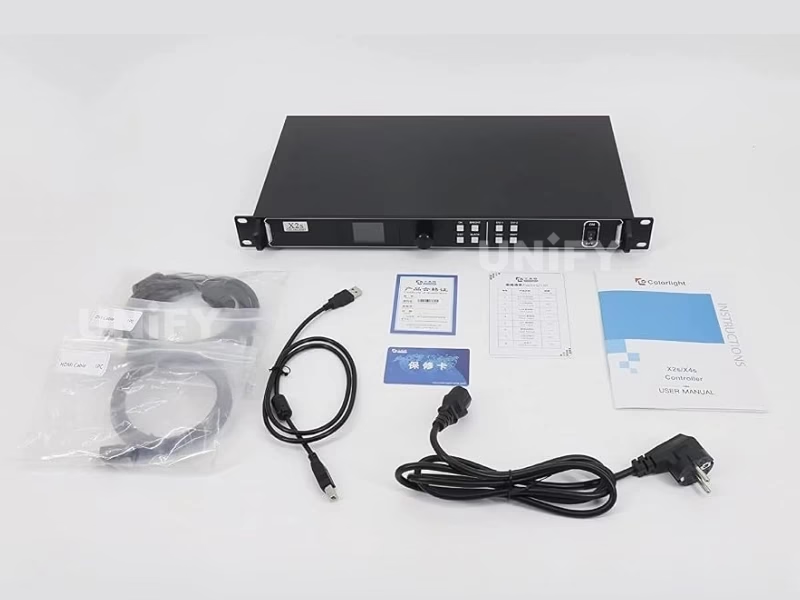
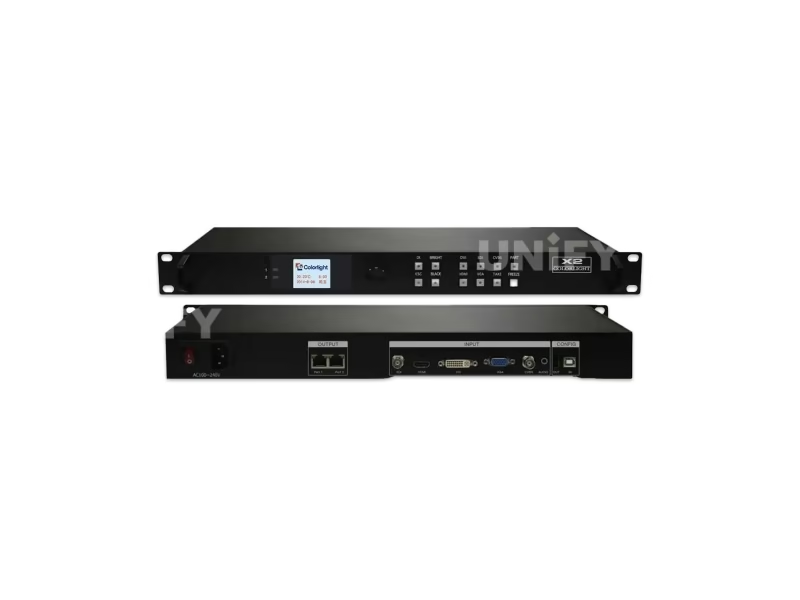
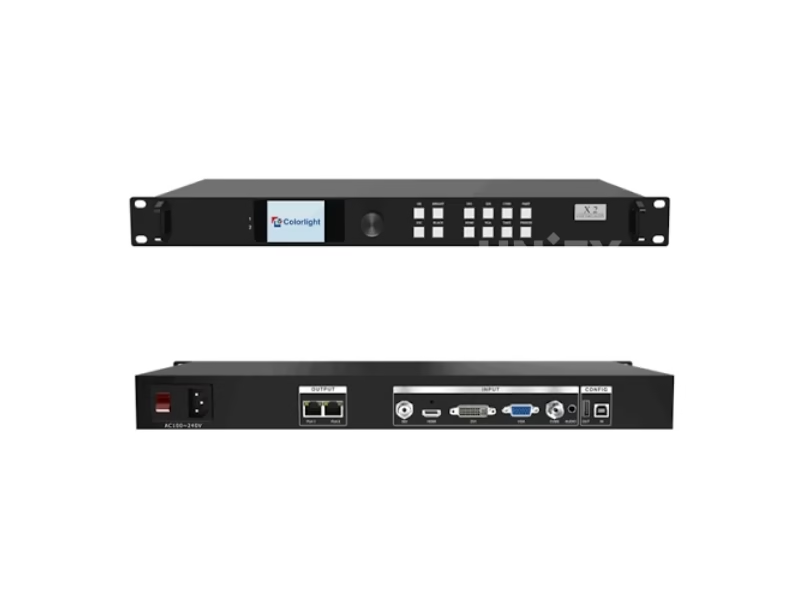
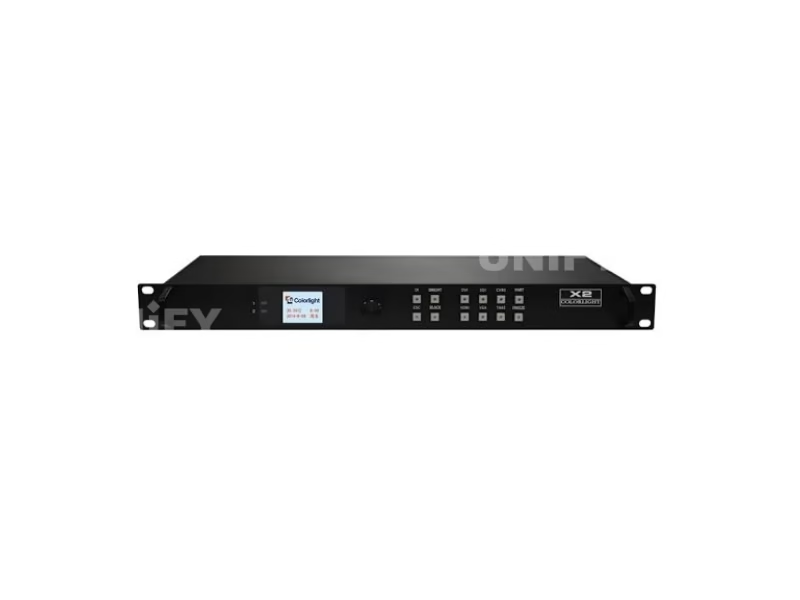
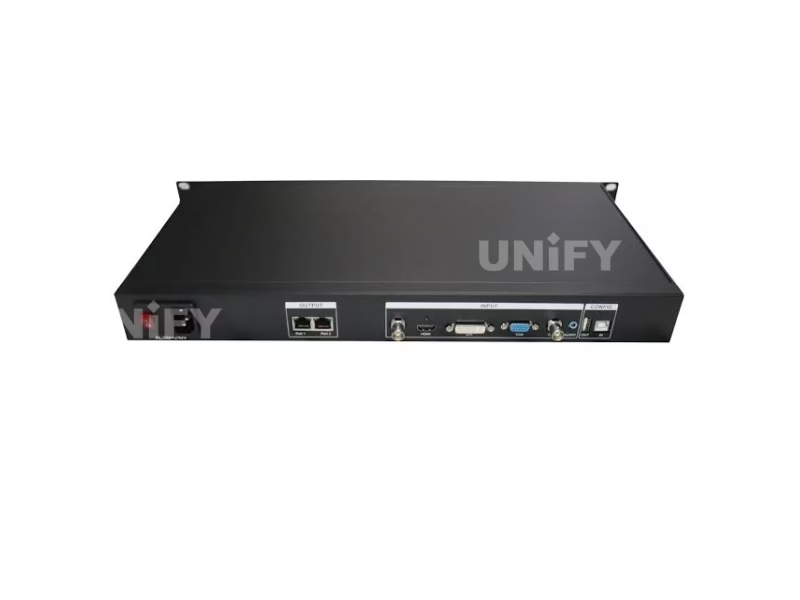
The Colorlight X2 LED Video Controller is the X series workhorse: five independent video inputs (SDI, HDMI, DVI, VGA, CVBS), a 1.3-million-pixel loading capacity, two Gigabit Ethernet outputs and a 1.8-inch LCD front panel with full knob control — all in a 1U rack chassis, configured with the free LEDVISION software.
Product Overview
What Is the Colorlight X2 LED Video Screen Controller?
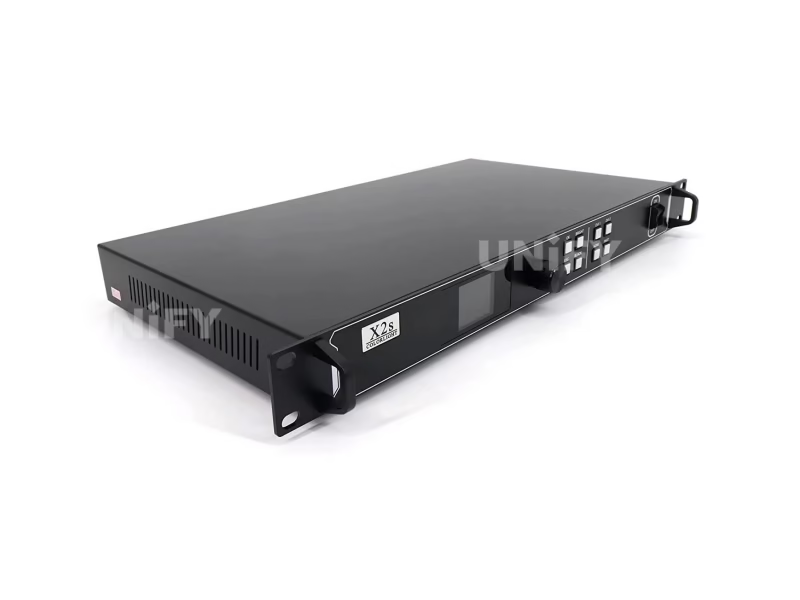
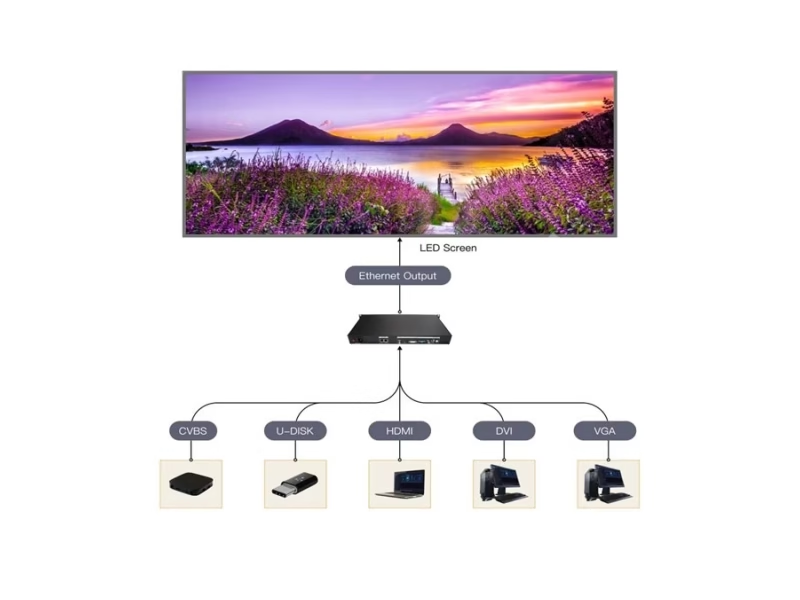
The Colorlight X2 LED Video Controller is a professional LED display sending controller: a 1U rack-mountable device that converts video signals into Gigabit Ethernet data for Colorlight receiving cards, turning a PC, camera or media player output into a driven LED wall. In the X series lineup it sits one step above the entry X1 (0.65 million pixels) and below the 4-port X4 (2.3 million pixels) — roughly twice the X1’s pixel capacity at a fraction of the X4’s cost, which is why the X2 is the most common controller specified for mid-size commercial LED projects.
Short answer: The Colorlight X2 is a 1U LED display controller with 5 video inputs (SDI, HDMI, DVI, VGA, CVBS), a maximum input resolution of 1920×1200@60Hz, a loading capacity of 1.3 million pixels and 2 Gigabit Ethernet outputs that each drive up to 2560 pixels in width or height. It is configured with the free LEDVISION software and is compatible with every Colorlight receiving card, multifunction card and optical fiber transceiver.
Its signal chain role: the X2 is the sending side of a synchronous control system — the synchronous vs asynchronous LED control distinction decides whether you need this class of device at all. For projects that also need scaling, PIP or 4K processing on top of transport, a LED video processor is the complementary layer. This page uses the official Colorlight X2 User Manual V1.0 as its data source and corrects the spec errors that circulate on marketplace listings — see the correction table below.
Specifications
What Are the Colorlight X2 LED Video Display Controller Specifications?
Signal, processing and interface data from the official Colorlight X2 User Manual V1.0. Physical values follow Colorlight product documentation and distributor spec sheets — see the correction table for the discrepancies between sources.
Video I/O & Processing (Official Manual)
Physical, Electrical & Environment
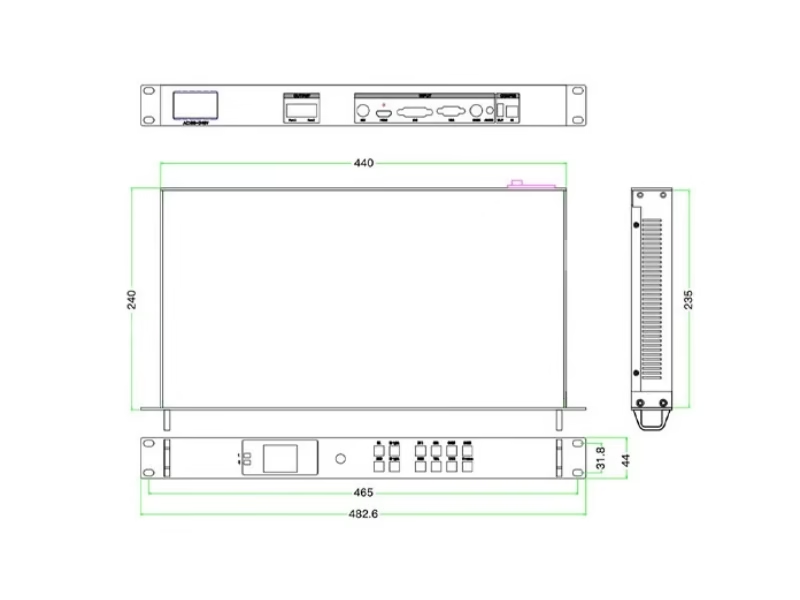
The official user manual documents operation and configuration rather than physical dimensions — which is exactly where marketplace listings diverge. The next section separates the official values from the errors.
Exclusive — Data Verification
Why Do Colorlight X2 LED Wall Controller Spec Sheets Disagree?
We checked the top marketplace and distributor listings for the X2 in August 2026 against the official Colorlight X2 User Manual V1.0. Four recurring errors circulate — each can change a purchasing or system-design decision:
Why these errors cost money: A wall planned around “4 outputs” is re-cabled at site; a wall sized to a 4096-pixel width falls 1536 pixels short on one X2 and needs a second unit. Verify against the official manual — or ask your supplier to state the manual revision they quote. Every figure on this page is cross-checked against Colorlight X2 User Manual V1.0.
Model Selection
How Does the Colorlight X2 LED Video Controller Compare to the X2S and X4?
The three mid-range X series models divide on inputs, loading class and HDCP level. Official X2 data from the user manual; X2S and X4 figures from Colorlight distributor specification sheets.
The decision in four numbered differences:
- Input suite. The X2 keeps SDI, VGA and CVBS; the X2S drops all three. Broadcast feeds, legacy sources or camera SDI without a converter rule out the X2S.
- HDCP level. 1.4 on the X2 and X4 versus 1.1 on the X2S — a difference that matters for protected playback content on HDMI/DVI.
- Loading class. 1.3M on the X2 versus 2.3M and a 4096-pixel width on the X4. Walls wider than 2560 pixels or above 1.3M pixels belong to the X4 class.
- Front panel. The X2 and X4 carry the 1.8-inch LCD with knob; the X2S is software-only. On-site operation without a laptop is an X2 advantage.
Rule of thumb: buy the X2 for mixed-source projects up to 1.3M pixels; step to the X4 only when the wall exceeds 2560 pixels in one dimension or crosses 1.3M pixels total; consider the X2S only for single-source, software-managed installs. For the transport layer the controller feeds, see the receiving card selection guide — the same logic applies to the Colorlight receiving card side.
Engineering Advantages
What Are the 6 Core Capabilities of the Colorlight X2 LED Module Controller?
Five Independent Video Inputs
SDI (1080P), HDMI, DVI, VGA and CVBS on one chassis — broadcast cameras, PCs and legacy analog sources connect without external converters.
1.3M Pixels, Two Gigabit Ports
1.3 million pixels per controller with a 2560-pixel width/height ceiling per output — one unit runs most mid-size walls, two cascade for bigger ones.
On-Device Control Panel
1.8-inch LCD, knob, source keys and dedicated FREEZE / TAKE / BLACK / PART / BRIGHT keys — daily operation without a PC.
Low-Brightness Grayscale Improvement
The “Better Gray” mode improves grayscale rendering at low brightness — visible on indoor walls dimmed for conference or broadcast environments.
Multi-Controller Cascading & Splicing
USB_OUT daisy-chains controllers with strict frame-level synchronization — multiple X2 units splice into one larger, frame-synced wall.
HDCP 1.4 + Full Ecosystem Compatibility
HDCP 1.4 on HDMI/DVI protects playback content, and the X2 drives every Colorlight receiving card, multifunction card and fiber transceiver. See 4K60 HDCP HDR controllers if the project needs more.
On-Device Operation
How Do You Operate the Colorlight X2 LED Controller Front Panel?
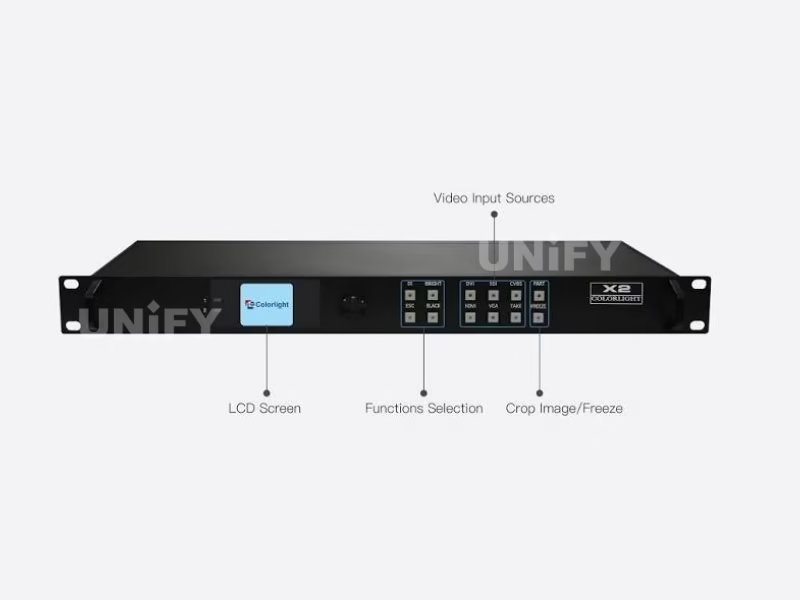
The front panel covers daily operation without a laptop. From the official user manual, the LCD main menu holds 8 functions; the knob selects, OK confirms, ESC exits — and adjusted parameters auto-save within one second.
Display Setting
Brightness, color temperature (CCT, default 6500), black screen, Better Gray, test mode, video-change mode (“By Take”).
EDID Setting
Set HDMI/DVI/VGA EDID: conventional resolutions or custom width, height and frame rate.
Input Setting
Enable/disable VGA/CVBS. Note: VGA and CVBS cannot be active signal sources at the same time.
Input Clip Setting
Clip any input (HDMI/DVI/SDI/VGA/CVBS) by X, Y, width and height — crop regions of the source image.
Output Setting
Adjust output X, Y, width and height — the image window position and scale on the wall.
Output Shift
Shift the whole image, or per-port X/Y — aligns the picture across port boundaries.
Language Setting
Switch the LCD menu language with one knob press.
System Setting
Date and time, factory reset, and current firmware information.
The function keys: FREEZE holds the current frame; TAKE switches the source after selection; BLACK blanks the wall instantly; PART clips the screen; BRIGHT opens the brightness control. The main LCD screen shows company name, image resolution, screen brightness and current signal source.
Official walkthrough of the X series front panel:
Colorlight Official — X Series Front Panel Setting tutorial video
Sizing Guide
How Big a Screen Can the Colorlight X2 LED Screen Controller Drive?
1.3 million pixels converts into real wall sizes per pixel pitch:
Two ceilings apply. The pixel ceiling: 1.3M total. The dimension ceiling: no single output drives more than 2560 pixels in width or height, so a 2560×512 strip is the widest format a single X2 runs. Full-HD 1080p walls are the classic two-controller job: two X2 units via USB_OUT cascade, each feeding one half of the wall with strict frame synchronization — no visible split at the seam.
Colorlight’s official course on pixel capacity limits:
Colorlight Official — Controller Pixel Capacity course video
Configuration
How Do You Set Up the Colorlight X2 LED Video Screen Controller in LEDVISION?
Seven steps from the official user manual take a wired X2 to a displaying wall:
Wire the hardware
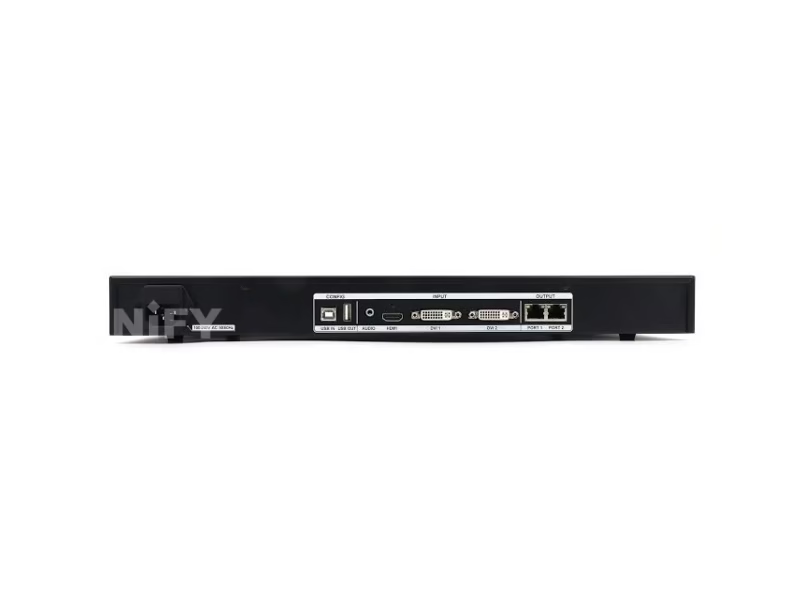
AC 100–240V power, the video source to its input, RJ45 Ethernet to the receiving cards (CAT5E or CAT6 only), and USB A/B from PC to USB_IN.
Install LEDVISION
Download the free installation package from Colorlight’s official site (colorlightinside.com) and complete the installer.
Detect the sender
Run LEDVISION → Control → Screen Control. In Sender Settings, click Detect Senders to find the X2.
Detect receiving cards
Select each net port and click Detect Receiver Cards — the software acquires the card count per port. Mismatched numbers point to a cable fault.
Set screen parameters
Sending device (output, EDID, advanced), then screen parameters: Load the module parameter file → Send → Save to Receiver.
Map the connection
Set Row Count / Col Count per port (for example 6×3) and draw the connection lines in the mapping area; the software auto-calculates each port’s control region.
Send & save to cards
After all parameters and connections are set, click Send, verify the wall displays, then Save to Receiver — the configuration survives power cycles.
Colorlight Official — LEDVision EP06 Sender and VideoSource Setting tutorial
Colorlight Official — LEDVision EP07 Configuration and Mapping tutorial
Deeper background on what each of these layers does: control system software and hardware.
Applications
Where Is the Colorlight X2 LED Video Display Controller Used?
Rental & Events
1U rack format fits flight cases; TAKE/FREEZE keys serve live show operation; USB cascading syncs multi-controller walls. See LED screen for events.
Fixed Indoor & Conference
Low-brightness grayscale improvement suits dimmed meeting-room walls; VGA/HDMI cover laptop sources without converters. See the indoor LED display buying guide.
Commercial Advertising
HDCP 1.4 handles protected commercial content; FREEZE holds a campaign frame during content changes; HDCP plus multi-source switching cover shopfront and mall walls.
Broadcast & Studio
The SDI input takes broadcast cameras natively; brightness and color-temperature control from the front panel match studio lighting on the fly.
Factory Strength
Why Buy the Colorlight X2 LED Video Controller From an LED Display Factory?
A controller purchase from a parts-only channel ends at the box. Buying through a full-line LED screen manufacturer adds the three things B2B buyers actually pay for:
1. Verified hardware, not mixed stock. Every X2 we ship comes from Colorlight’s authorized channel, is tested on live LED modules before dispatch, and carries serial-number traceability. The spec errors documented above are what happens when hardware passes through unverified listing channels.
2. Installation support that finishes the job. Our engineers commission the full chain — X2, receiving cards and modules — with LEDVISION, including screen parameters, connection mapping and the module files matched to your actual cabinets. That is the difference between a controller that arrives and a wall that displays. Our quality control of LED display process covers the same rigor for every batch.
3. Lifecycle economics. The X2 is a solid-state 20W device with passive cooling — its realistic service life outlasts the modules it drives, which is why LED screen lifespan calculations treat the control layer as a fixed cost. We back it with a 2-year warranty and stock spares for the project’s operating life, so a failed unit is replaced, not debated.
B2B Procurement
How Much Does the Colorlight X2 LED Video Controller Cost?
Price transparency, stated plainly: in August 2026 listings we reviewed, the X2 traded from $145 (cnledsourcing.com family listing) through $235 (led-estore.com, in stock) with integrator quotes running up to $350. The spread reflects channel margin and volume tier, not hardware differences — the same controller sits at both ends. Factory-direct tiers for B2B buyers:
For context on why controller pricing stays competitive: the LED display control system market reached US$659 million in 2025 and is projected to grow at 13.6% CAGR to US$1.59 billion by 2032 (QYResearch, Global LED Display Control System Market Report). Volume scales through LED video processor and controller categories alike — ask for a factory-direct quote at your quantity.
FAQ
What Do Buyers Ask About the Colorlight X2 LED Video Controller?
What Certifications Does the Colorlight X2 LED Video Controller Carry?
Every batch ships with Colorlight original packaging and compliance documentation.
Ready to Source the Colorlight X2 LED Video Controller?
Factory-direct pricing, genuine stock, LEDVISION commissioning support and 2-year warranty.
unifyledscreen@gmail.com | +86-191-18802497
Technical Deep-Dive
What Should Engineers Know Before Buying the Colorlight X2 LED Video Controller?
Published: August 2026 | 14 min read | UnifyLED Engineering Team
The Colorlight X2 LED Video Controller shows up in more project BOMs than any other X series model, and for a measurable reason: it is the only controller in its price class that combines five independent video inputs with a 1.3-million-pixel loading capacity and a front panel you can operate without a laptop. This guide is written for engineers and procurement teams who need to specify, verify and buy the X2 in 2026 — using the official Colorlight X2 User Manual V1.0 as the data source, because marketplace listings for this product carry a surprising number of wrong numbers.
Short answer: The Colorlight X2 is a 1U professional LED display controller with 5 video inputs, 1920×1200@60Hz maximum input, a 1.3-million-pixel loading capacity, 2 Gigabit Ethernet outputs and a 2560-pixel width/height ceiling. It costs roughly $145–$350 depending on channel and volume, is configured with the free LEDVISION software, and fits any wall up to 1.3M pixels with sources that include SDI broadcast cameras. If your wall is a 1080p full-HD canvas or wider than 2560 pixels in one dimension, you need two cascaded X2 units or an X4-class controller.
Chapter 1 — Definition: What the X2 Is and What It Does
The Colorlight X2 LED Video Controller is a synchronous sending controller: a device that takes a video signal — SDI, HDMI, DVI, VGA or CVBS — processes it, and transmits the result over Gigabit Ethernet to the receiving cards attached to the LED modules. Synchronous means the wall displays exactly what the source delivers, frame by frame, which is why this class of hardware is mandatory for video walls and optional for simple text-and-image signage. If your project runs scheduled content without live video, the synchronous vs asynchronous LED control comparison tells you whether you need a controller at all.
In the Colorlight ecosystem the X2 occupies the middle of the X series. The X1 below it loads 0.65 million pixels and serves entry walls. The X4 above it loads 2.3 million pixels across four Gigabit outputs. The X2 splits the difference: roughly twice the X1’s capacity at a substantially lower cost than the X4 — the position that made it the default controller for mid-size commercial projects in the series’ decade on the market. Colorlight positions the X series as its professional line for “manufacture and engineering” applications, and the X2’s feature list — five inputs, HDCP 1.4, multi-controller splicing, low-brightness grayscale improvement — reads like a checklist of what integrators asked for after the X1.
Two structural facts matter for procurement. First, the X2 is a pure transport-and-switching controller: it does not do PIP, cropping presets or 4K scaling — those live one class up or in a dedicated LED video processor. Second, the X2 only drives the Colorlight ecosystem: Colorlight receiving cards, multifunction cards and optical fiber transceivers. Mixing brands across the control chain is not supported, which makes the controller decision a chain decision, not a component decision.
Chapter 2 — Loading: What 1.3 Million Pixels Buys
The X2’s loading capacity is 1.3 million pixels, with a second ceiling of 2560 pixels in maximum width or height per unit. Both ceilings bind. The pixel ceiling limits total area; the dimension ceiling limits aspect — a wall 3000 pixels wide but only 1000 pixels tall (3.0M pixels, wait — 3000×1000 is 3M pixels, so it fails both ceilings anyway; the cleaner example is a 2560×512 strip at 1.31M pixels, which passes). The practical formats the X2 handles alone: any wall up to 1.3M pixels whose long side stays at or under 2560 pixels — 720p panels, wide strips, and roughly an 8 m² P2.5 wall or an 11 m² P3 wall.
Full-HD deserves a correction from most listing copy: 1920×1080 is 2,073,600 pixels — 60% above one X2’s capacity. A 1080p wall therefore needs two cascaded X2 units, one per half, linked through the USB_OUT/USB_IN daisy-chain. The official manual states that multiple controllers “splice and cascade with synchronization strictly,” which is the engineering claim that matters: the seam between the two halves stays frame-locked, with no visible tear at the boundary. The same cascade scales further — three units cover a 2.7M-pixel design, and the X series architecture treats each controller as one slice of a larger synchronized wall.
The cabling detail that fails more projects than the pixel math: the X2’s Ethernet outputs are Gigabit, and the manual is explicit that the cable must be CAT5E or CAT6. A CAT5 run on a 1.3M-pixel wall produces intermittent frame drops that look like a faulty receiving card. If your supplier quotes the controller without asking about your cable plant, they have not installed one.
For the full capacity framework — how sending capacity, receiving card loading and cabinet wiring interact — Colorlight’s own course explains the topic in depth:
Colorlight Official — X Series Video Processor full course video
Chapter 3 — The Five Inputs, One by One
The input suite is the X2’s main argument over the X2S and the X1. Each port has a defined spec and a defined job:
SDI is the broadcast input. It accepts 1080P, which covers studio cameras, switchers and playback decks. SDI also carries embedded audio and survives cable runs that HDMI does not. The X2 is the least expensive Colorlight controller with SDI, and that single port is why the X2 appears in broadcast studios and virtual production volumes where the X1 and X2S do not.
HDMI is the playback and conference input. EIA/CEA-861 standard, up to 1920×1200@60Hz, with HDCP 1.4 for protected content. For rental and event work, HDMI from a media server or laptop is the daily driver; the HDCP support decides whether encrypted commercial content plays or shows a blank wall.
DVI is the control-room and legacy-PC input. VESA standard at the same 1920×1200@60Hz, with HDCP. DVI’s advantage is mechanical: the screw-locked connector survives vibration in fixed installations and touring racks where HDMI cables walk out of sockets.
VGA is the retrofit input. Up to 1920×1200@60Hz from VESA-standard sources. Old conference-room PCs, signage players and industrial machines speak VGA, and the X2 keeps them usable without a converter. The manual notes one constraint: VGA and CVBS cannot be active signal sources simultaneously — the Input Setting menu chooses which the port prefers.
CVBS is the analog-video input. PAL/NTSC composite — security cameras, legacy A/V distribution and older broadcast infrastructure. Together the five ports mean one X2 replaces a rack of converters, and arbitrary switching between inputs with free zoom keeps multi-source shows on one device.
A sixth connector, the AUDIO input, feeds audio to the multifunction card for walls with speakers — a detail most listings omit entirely.
Chapter 4 — X2 vs X2S vs X4: The Numbered Differences
The comparison table above shows the full grid; these are the four differences that change a decision:
- Input suite. X2: SDI + HDMI + DVI + VGA + CVBS. X2S: HDMI + 2× DVI. X4: the full five inputs. Any SDI, VGA or CVBS source eliminates the X2S immediately.
- HDCP level. X2 and X4: HDCP 1.4. X2S: HDCP 1.1. Where protected content is part of the program, 1.1 is a real risk boundary.
- Loading class. X2 and X2S: ~1.3M pixels, 2 outputs, 2560-pixel ceiling. X4: 2.3M pixels, 4 outputs, 4096-pixel width. The X4’s ceiling is the reason walls above 1.3M pixels should not be forced onto two X2 units unless the seam position is planned.
- Front panel. X2 and X4: 1.8-inch LCD with knob and function keys. X2S: none. If technicians will operate the wall without a PC — brightness calls during a show, source fails at 9 PM — the LCD pays for itself the first time it prevents a laptop hunt.
The honest reading of the lineup: the X2S exists for single-source, software-managed installs where every dollar matters; the X4 exists for capacity; the X2 is the generalist — and generalist is the role most commercial LED projects actually occupy.
Chapter 5 — The Spec Errors That Cost Money
In August 2026 we checked the top marketplace and distributor listings for the X2 against the official manual and found four recurring errors. They are not cosmetic — each one can change a design or a purchase:
“4 RJ45 outputs.” The X2 has two Gigabit Ethernet outputs, per the official manual. The four-port figure belongs to the X4 class. A wall cabled for four X2 outputs is re-cabled at site — or worse, the project buys the wrong controller believing the X2 matches the design.
“4096 pixels max width/height.” The X2’s ceiling is 2560 pixels. 4096 is the X4-class width limit. A wall specified at 3000×800 against a “4096” X2 datasheet exceeds the real ceiling by 440 pixels and needs a second unit nobody budgeted.
Weight figures of 7 kg or 10 kg. The X2 is a 1U chassis weighing roughly 2 kg. The inflated figures are store-database shipping weights. Freight quotes built on 10 kg per unit over-order the shipping budget by a factor of five on multi-unit orders.
“655,360 pixels” loading capacity. That is the X1’s figure. One Colorlight-branded page even lists both numbers on the same page. The X2’s official capacity is 1.3 million pixels — the difference between specifying one controller and two.
The pattern behind all four: listing authors copy the X series family datasheet and assign figures to whichever model the URL mentions. The buyer-side countermeasure is simple — verify against the official Colorlight X2 User Manual V1.0, or ask the supplier to state the manual revision they quote. A supplier who cannot answer in seconds is sourcing blind.
Chapter 6 — Commissioning: The LEDVISION Path and the Front Panel
The X2 commissions in two phases. First-time configuration happens in LEDVISION, Colorlight’s free control software: detect the sender, detect the receiving cards per net port, load the screen parameters, map the connection, send and save. The seven-step sequence in the configuration section above follows the official manual’s order — the sequence matters, because saving before sending leaves cards holding stale parameters.
Day-to-day operation then moves to the front panel, which is the X2’s least-marketed advantage. The 1.8-inch LCD holds eight menus — Display, EDID, Input, Input Clip, Output, Output Shift, Language and System — and the knob edits every parameter with auto-save within one second. The dedicated keys cover the show-critical actions: FREEZE holds the current frame when a source drops, BLACK blanks the wall before embarrassing content reaches it, TAKE switches sources cleanly, PART clips on the fly, BRIGHT pulls up the brightness control. An operator who knows those five keys can run a show wall without a laptop, a network, or LEDVISION installed.
One configuration habit prevents most field problems: after every commissioning or change, read the configuration back and store the file with the project documentation. Controller swaps, power events and firmware updates all reset state in their own ways, and a stored configuration turns a “reconfigure from memory” into “load the file.” See control system software and hardware for what else belongs in that documentation set.
Chapter 7 — Price and Total Cost of Ownership in 2026
The X2’s street price in August 2026 listings spans $145 to $235, with integrator quotes reaching $350 — and the spread is channel economics, not hardware differences. The same controller sits at every point of that range. What changes is what comes with it: test reports, pre-loaded configurations, commissioning support, warranty handling and spare-stock access. Procurement math that compares controller price alone is comparing the smallest line on the BOM.
The market context supports that view. The LED display control system market reached US$659 million in 2025 and is projected to grow at a 13.6% CAGR to US$1.59 billion by 2032 (QYResearch, Global LED Display Control System Market Report 2026). Within the video wall controller segment, Futuresource Consulting measured a US$316 million market in 2024 growing at 17% annually toward US$693 million by 2029 — with third-party controllers holding 84.5% of market value and Novastar and Colorlight together commanding roughly three-quarters of that third-party segment. In other words: the X2 sits in the duopoly that defines the standard, which is exactly what keeps spare cards, receiving cards and software support available for the wall’s whole life.
Lifecycle costs are where the X2 earns its reputation. A solid-state 20W design with passive cooling has no wear parts: controllers in this class typically outlive the LED modules they drive, and LED screen lifespan is set by the modules, not the electronics. A 2-year warranty with genuine-channel stock means the realistic failure path — a defective unit discovered at commissioning — resolves in days, not months.
Chapter 8 — When Colorlight Beats Novastar for the Chain
Colorlight and Novastar define the third-party LED controller market together, and most integrators work in both ecosystems. The X2’s case for Colorlight rests on three structural differences:
First, the front panel. The X2’s LCD-and-knob design is a Colorlight X series signature; the comparable Novastar units in the same tier are primarily software-driven. If the wall will be operated by non-technical staff — a church, a school, a retail chain — the front panel is a training cost reduction.
Second, the SDI story at the entry of the professional line. The X2 is the least expensive Colorlight controller carrying native SDI; in Novastar’s lineup, SDI tends to arrive at a higher tier. Broadcast and camera-fed projects price differently in the two ecosystems at this capacity class.
Third, the installed base. If the project’s receiving cards, spare stock or maintenance team already sit in one ecosystem, the sending controller follows — mixing chains is unsupported by both vendors. For teams already standardized on Novastar, the comparison flips: see the Novastar LED display controller range, the MCTRL300 page and the Novastar receiving card selection guide for the mirror decision.
The ecosystem decision is a one-time cost that compounds. Pick the ecosystem your receiving cards, technicians and spares already speak — and buy the controller that matches, from a channel that verifies hardware instead of relisting it. That is the difference between a BOM line and an installed system.
Conclusion
The Colorlight X2 LED Video Controller remains the default mid-range controller in 2026 for one reason that survives all the marketing copy: it is the least expensive device that combines five video inputs, a 1.3-million-pixel loading capacity, HDCP 1.4 and a front panel that runs a wall without a laptop. Specify it with two numbers in hand — the 1.3M-pixel ceiling and the 2560-pixel dimension ceiling — verify the listing against the official manual, and pair it with the receiving cards and modules your project already standardizes on. Buy it through a verified LED screen manufacturer that tests hardware on live modules and supports LEDVISION commissioning, and the controller layer of the wall becomes the part of the project nobody thinks about again — which is exactly what a control chain is for.
LED Control System Range
Which LED Video Controllers and Receiving Cards Should You Explore Next?
Colorlight and Novastar control products, receiving card guides and free software resources on UnifyLED.
Novastar Sending Controllers
Guides & Resources
Where Can You Download Colorlight X2 LED Video Controller Resources?
The official Colorlight X2 User Manual V1.0 — the data source for every figure on this page — plus the free LEDVISION configuration software.