
How to Clean an LED LCD TV Screen Without Damaging It (2026 Guide)
An LED LCD TV is a television that uses a liquid-crystal display panel lit by LED backlights. The surface you are about to wipe is a coated optical stack, not a sheet of glass. The wrong cloth or cleaner can scratch the coating, push dust into the bezel, or leave a permanent haze. This guide gives the method display technicians use at home and on site.
Short answer: Turn the TV off and unplug it. Wipe the screen with a dry microfiber cloth first. For fingerprints, dampen a second microfiber cloth with distilled water, wring it out, wipe in one direction, then dry with a third clean cloth. Never spray liquid on the screen. Do not use Windex, ammonia, alcohol, acetone, vinegar, paper towels, or abrasive pads. Wait until the screen is completely dry before you plug the TV back in.
1. How to Clean an LED LCD TV Screen: The Short Answer
An LED LCD TV is an LCD panel with an LED backlight behind it. The image is formed by liquid crystals, and the LEDs only supply light. The vulnerable part is the front polarizer and its anti-glare coating, not the LEDs. A QLED TV is an LCD panel with a quantum-dot film in the backlight. An OLED TV is a self-emitting panel with no backlight. All three have soft coated fronts and follow the same rule: lift dust dry, add water only through a cloth, and never let liquid run.
The five-step version is enough for most screens:
- Power down and unplug. Let a warm panel cool for 10–15 minutes.
- Dust dry. Wipe top to bottom with a clean, dry microfiber cloth and light pressure.
- Dampen, do not spray. Use distilled water on a second microfiber cloth and wring it until it is barely damp.
- Wipe in one direction. Work in sections, then turn the cloth to a dry edge.
- Buff dry and wait. Finish with a dry microfiber cloth and let the TV sit for 10 minutes before powering on.
That routine handles dust, fingerprints, and light kitchen film. Stubborn marks need a different approach, covered in section 5. Commercial LED displays need a different service procedure, covered in section 8.
2. What Supplies Do You Need to Clean an LED LCD TV Screen?
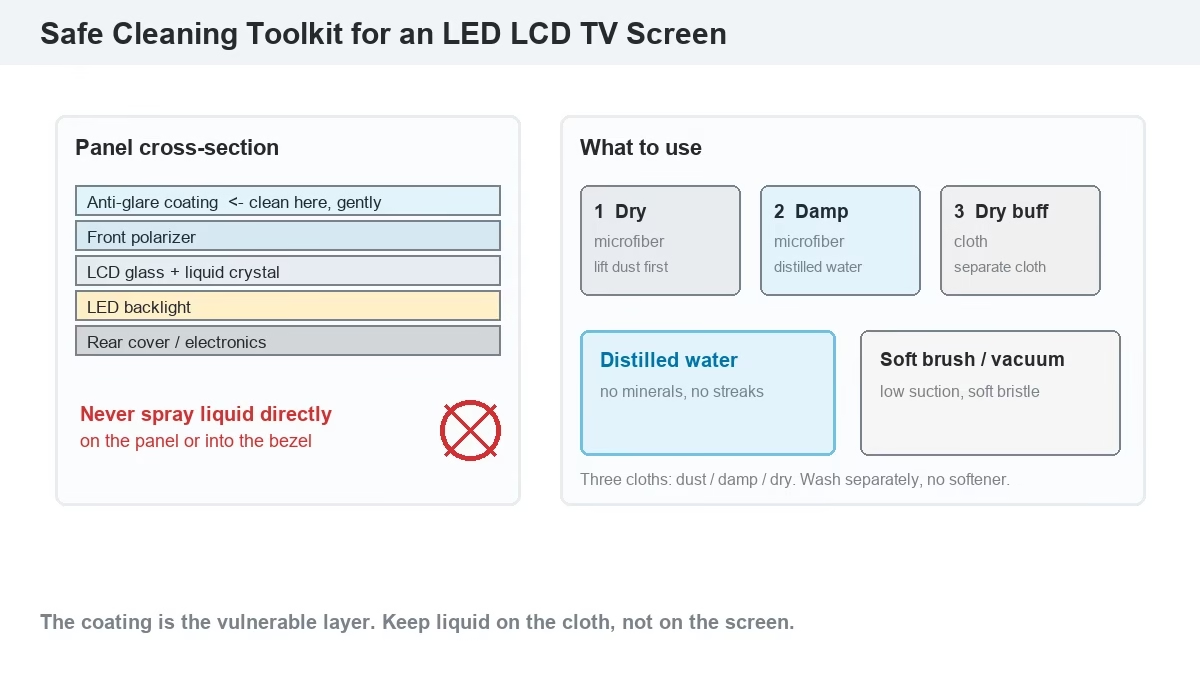
A TV screen cleaning kit is a small set of soft, lint-free tools, not a bottle of household spray. The Good Housekeeping Institute recommends a microfiber cloth, a pre-moistened electronics wipe, and optionally a vacuum soft-brush attachment or electrostatic duster (Good Housekeeping, 2026).
| Supply | What it does | What to look for | Cost |
| Microfiber cloths (3) | Lift dust, clean, and dry without lint | 120–300 gsm, no stiff edge, no fabric softener | $8–$20 |
| Distilled water | Dissolves fingerprints without minerals | Distilled or deionized, not tap water | $2–$5 |
| Screen cleaner | Optional for oily marks | Alcohol-free, ammonia-free, labeled for LCD/OLED | $10–$25 |
| Soft brush or vacuum | Clears vents and the frame | Soft bristle, low suction, no metal nozzle | $0–$15 |
Which Microfiber Cloth Works Best for an LED LCD TV Screen?
A microfiber cleaning cloth is a synthetic cloth with split fibers that trap dust and oil instead of pushing them across the panel. A 120–300 gsm cloth is soft enough for a coated screen and dense enough to hold dust. Avoid cloths washed with fabric softener, cloths with a stiff sewn edge, and pre-treated dusting cloths; Good Housekeeping notes that pre-treated cloths can leave an oily residue. Keep one cloth for dust, one for the damp pass, and one for drying.
Is Distilled Water Better Than Tap Water for an LED LCD TV Screen?
A distilled water is water with minerals and dissolved solids removed. Tap water leaves calcium and magnesium spots when it dries, and those spots look like permanent streaks on a dark screen. Distilled or deionized water carries no minerals, so it evaporates without a ring. Samsung and Sony both say no soap on the screen itself, so the safer choice is plain distilled water or a cleaner labeled for coated displays.
3. How Do You Clean an LED LCD TV Screen Step by Step?
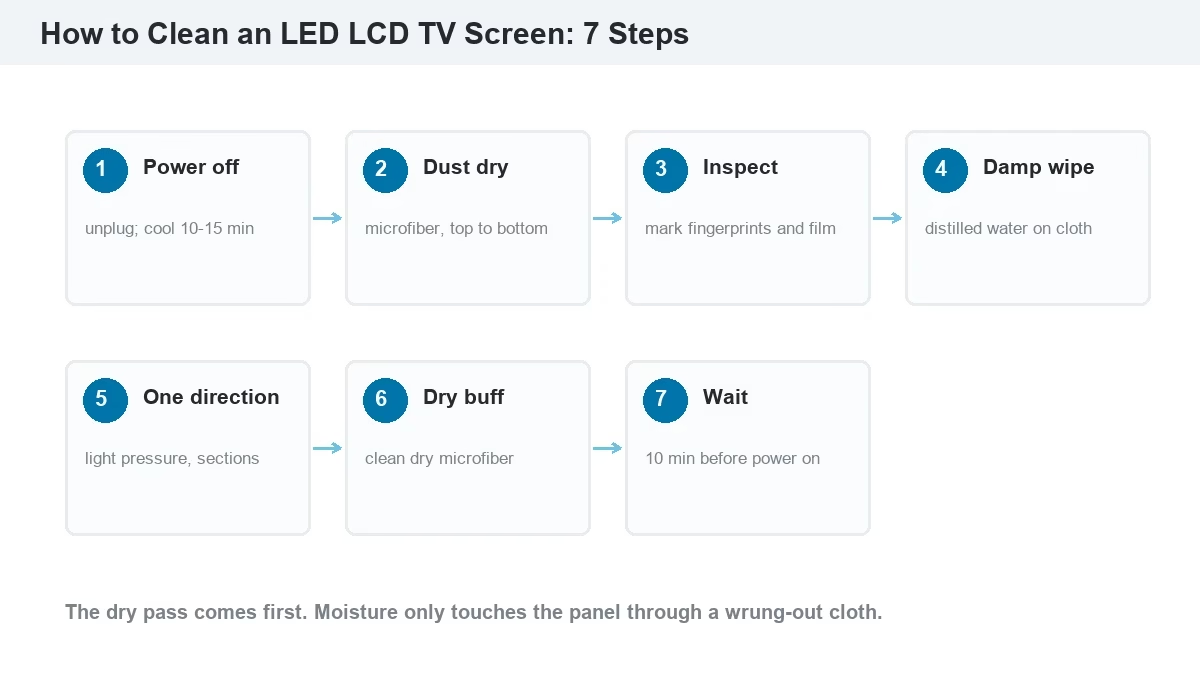
A safe TV cleaning routine removes loose dust before any moisture touches the panel. Samsung’s support guide puts the order simply: turn off and unplug, wipe with a soft dry cloth, then use a cloth wet with distilled water and finish dry (Samsung Support, 2026).
- Turn off and unplug the TV. A black screen shows dust and streaks clearly, and no power means no risk of a short if liquid reaches the edge.
- Let the panel cool. A warm screen evaporates moisture too fast and leaves streaks (Vijay Sales, 2026). Wait 10–15 minutes after switching off.
- Dust dry from top to bottom. Use a clean microfiber cloth with light pressure. Do not press the panel; LCD glass is thin and the bezel gap can collect dust.
- Inspect for fingerprints and film. Look at the screen from an angle with a light source behind you. Mark the areas that need moisture instead of wetting the whole panel.
- Wipe with a barely damp cloth. Dampen a second microfiber cloth with distilled water, wring it out, and wipe each marked area in one direction. Apply liquid to the cloth, never to the screen.
- Dry immediately with a clean cloth. Use a third dry microfiber cloth and light pressure. Change to a dry part of the cloth often; a wet cloth just moves water around.
- Wait before powering on. Give the panel and bezel 10 minutes to dry fully, then plug in and switch on. Check for streaks on a white or gray test image.
How Do You Remove Dust From an LED LCD TV Screen First?
A dry dust pass is the first cleaning step and the one that prevents most scratches. Wipe from the top of the screen to the bottom so dust falls away from the panel instead of across it. Use a clean, dry microfiber cloth and let the cloth do the work. If the room is dusty, vacuum the floor and the TV vents first; otherwise the screen collects new dust while you clean. Do not use compressed air directly on the panel, because it can drive dust into the bezel and the panel edge.
How Do You Wipe Fingerprints Off an LED LCD TV Screen?
A fingerprint is skin oil and salt pressed onto the coating. A dry cloth often spreads it. Dampen a microfiber cloth with distilled water, wring it until no water drips, and wipe the print in one direction with light pressure. Turn the cloth to a clean part and wipe again at a right angle to lift the oil. Finish with a dry cloth. For a print that has dried hard, hold the damp cloth on the spot for five seconds to soften it, then wipe; do not scrub.
4. What Should You Never Use to Clean an LED LCD TV Screen?
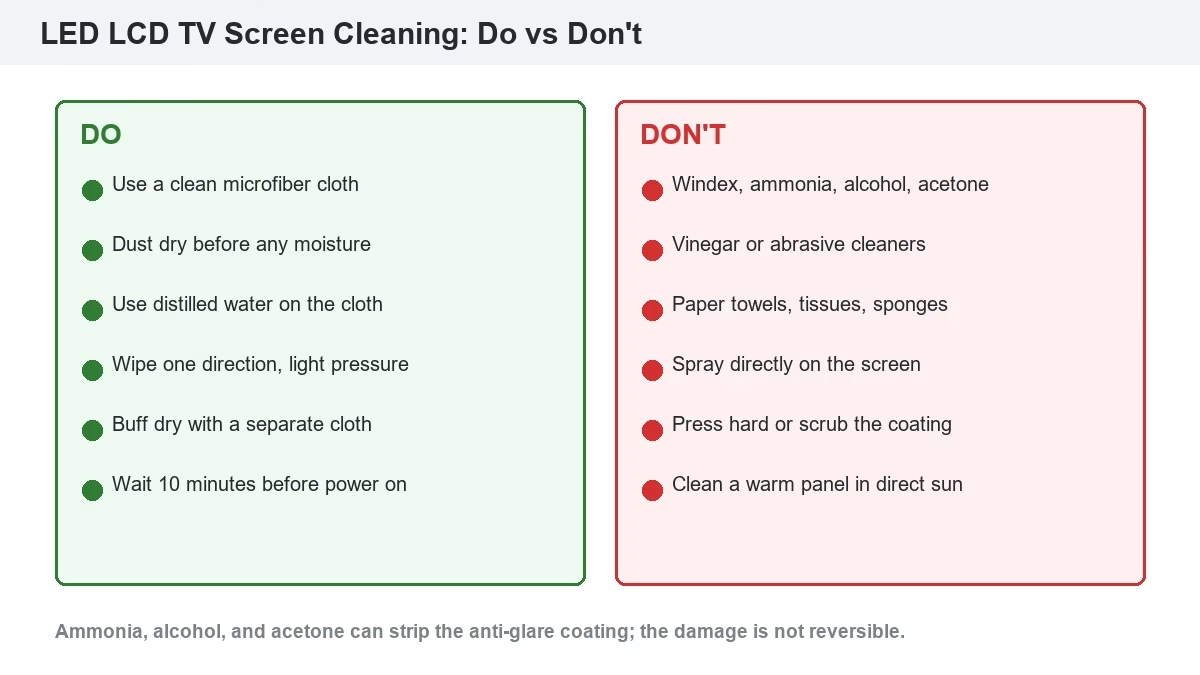
A screen-safe cleaner is one that does not attack the anti-glare coating, the polarizer, or the bezel plastic. Many household products fail that test. Good Housekeeping reports that ammonia, alcohol, bleach, or acetone can strip the protective anti-glare coating on modern TVs (Good Housekeeping, 2026). Samsung’s support page lists window cleaners, soap, cleaning powder, alcohol, benzene, and ammonia as products to avoid (Samsung Support, 2026).
| Product or tool | Why it is risky | Possible result |
| Windex and glass cleaners | Contain ammonia or alcohol | Coating haze, permanent streaks, discoloration |
| Rubbing alcohol / ethanol | Dissolves some coating layers | Cloudy patch, rainbow sheen, coating loss |
| Vinegar | Acidic; sources disagree on dilution | Etched coating, streaks; not worth the risk |
| Paper towels, tissues, sponges | Wood fiber and abrasive texture | Fine scratches, lint, dull area |
| Abrasive powders and pads | Mechanical grinding | Permanent matte patch or scratch |
| Spray applied directly to the screen | Liquid runs into the bezel and electronics | Water damage, short circuit, dead panel |
Can You Use Windex on an LED LCD TV Screen?
No. A glass cleaner is formulated for hard, uncoated glass, and it usually contains ammonia or alcohol. Both attack the anti-glare layer on a TV panel. The first wipe may look clean, but the coating can cloud over time, and the damage is not reversible. The same rule applies to multi-surface sprays, bathroom cleaners, and disinfectant sprays not labeled for electronics.
Can You Use Rubbing Alcohol or Vinegar on an LED LCD TV Screen?
Both are risky. Rubbing alcohol is a solvent; it can dissolve coating layers and leave a white haze. Samsung explicitly lists alcohol as a product to avoid. Vinegar is acidic, and published advice conflicts: some consumer guides allow a diluted white-vinegar mix, while BGR, CHOICE, and Vijay Sales warn that it can damage the protective layer (BGR, 2026; CHOICE, 2026; Vijay Sales, 2026). With conflicting guidance, the safe answer is distilled water. If a manufacturer’s manual specifically approves a small amount of alcohol for a severe stain, follow that manual, apply it to a cloth, and keep it away from the bezel.
5. How Do You Clean Stubborn Stains on an LED LCD TV Screen?
A stubborn screen stain is a mark that survives a dry dust pass and a distilled-water wipe. Match the method to the stain instead of increasing pressure. Pressure is the one variable that turns a cleanable mark into a permanent one.
| Stain | Method | Do not |
| Fingerprints and skin oil | Damp microfiber with distilled water; hold 5 seconds; wipe one direction; dry | Scrub or use alcohol |
| Kitchen grease film | Two passes with a fresh damp cloth; a drop of pH-neutral soap in distilled water on the cloth | Spray degreaser on the panel |
| Sticker or tape residue | Warm the residue with a dry cloth; lift with a damp cloth; repeat | Acetone, lighter fluid, or a scraper |
| Ink or marker | Damp cloth with the smallest amount of screen cleaner; blot, do not rub | Alcohol-based pen cleaner |
| Water spots | Distilled water on a clean cloth; dry immediately | Tap water or a stronger acid |
| Smoke film | Several light damp passes with a fresh cloth each time | One heavy wet pass; it spreads the film |
6. How Often Should You Clean an LED LCD TV Screen?
A cleaning frequency depends on air quality, kitchen proximity, pets, and how many hands touch the screen. Dust is the main issue in most homes; oil and smoke are the main issues near kitchens and in smoking rooms.
| Environment | Dust pass | Damp clean | Vents and frame |
| Living room, low dust | Weekly | Monthly | Monthly |
| Kitchen or open-plan cooking | Weekly | Every 2 weeks | Monthly |
| Pets or children | 2–3 times a week | Every 2 weeks | Monthly |
| Smoking room | Weekly | Every 2–4 weeks | Every 2 weeks |
| Commercial or public display | Daily or per shift | Weekly | Weekly |
Does Cleaning an LED LCD TV Screen Extend Its Lifespan?
Yes, within limits. A clean panel runs cooler because dust on the front and in the vents traps heat. Dust in the vents is the bigger issue: it forces the power supply and backlight driver to run hotter, and heat shortens electrolytic capacitor life. Cleaning the screen itself mainly protects the coating and the image quality. It does not repair dead pixels, and it will not fix a failing backlight. For panel life factors, see the LED screen lifespan guide. For a commercial LED display, dust on the module face and in the cabinet also affects brightness uniformity and service access, which is why the maintenance schedule is stricter.
7. Why Does Your LED LCD TV Screen Streak After Cleaning?
A cleaning streak is a line of residue left when liquid dries unevenly or a dirty cloth drags oil across the panel. It is usually not permanent. The five common causes are:
- Tap water minerals. Calcium and magnesium dry into white rings. Switch to distilled water.
- A dirty or overloaded cloth. The cloth holds dust and oil and redeposits it. Use a fresh cloth or a clean section.
- Too much water. A dripping cloth pushes liquid into the bezel and dries in lines. Wring the cloth until it is barely damp.
- Too much pressure. Pressure spreads the film and can scratch the coating. Let the cloth lift the mark.
- Cleaning a warm screen or in direct sun. Heat makes water evaporate before the dry pass. Clean a cool screen in indirect light.
If a streak stays after a distilled-water pass and a dry buff, the cause is likely cleaner film or coating damage. A rainbow or cloudy patch that does not move is coating damage, not dirt.
8. How Is Cleaning an LED LCD TV Screen Different From a Commercial LED Display?
A commercial LED display is a direct-view LED wall built from LED modules and cabinets, not an LCD panel. The pixels are individual LEDs on a module face, and the module is usually serviceable from the front or rear. There is no polarizer or anti-glare coating to protect in the same way, but there are LEDs, driver ICs, connectors, and a power supply that must stay dry.
| Factor | LED LCD TV | Commercial LED display |
| Front surface | Coated LCD panel | LED module face, mask, or GOB coating |
| Cleaning access | Whole front panel | Module by module; front or rear service |
| Water tolerance | None; keep liquid at the cloth | Depends on IP rating; IP65 outdoor only |
| Service check | Visual check for streaks | Dead-pixel and brightness test after cleaning |
Four key differences decide the cleaning method:
- Commercial LED displays are modular. A stained or damaged module can be removed and replaced; a TV panel cannot.
- Commercial displays have an IP rating. IP65 outdoor cabinets tolerate rain, but the rating does not make high-pressure washing safe around seals and connectors.
- Commercial displays carry live driver electronics behind the modules. Power must be off and locked out before any wet cleaning.
- Commercial cleaning ends with a test pattern. After cleaning, check for dead pixels, brightness uniformity, and moisture in the cabinet.
For a full commercial procedure, see the LED screen cleaning playbook, the LED screen maintenance guide, and the IP65 waterproofing guide. The video below shows how a front-maintenance module is removed and refitted.
Outdoor cabinets use a similar front-service path, but the seal and gasket require more care. The next video shows the sequence at the cabinet face.
9. Which LED LCD TV Screen Cleaning Mistakes Cause Permanent Damage?
A permanent cleaning defect is damage that survives a distilled-water pass and a dry buff. If a mark remains after a correct pass, compare it with the failure patterns in the LED display troubleshooting guide. The five most common cleaning causes are:
- Solvent on the coating. Ammonia, alcohol, acetone, or vinegar can cloud or strip the anti-glare layer; the patch cannot be polished out.
- Liquid into the bezel. Spraying directly or using a dripping cloth can send water to the driver and power board, causing a dead row or a short.
- Abrasive rubbing. Paper towels, sponges, and gritty cloths leave fine scratches that show as a dull haze.
- Pressure on the panel. Pressing hard can create mura (a permanent bright or dark patch) or damage the polarizer; a dark spot that is not dirt may be a dead pixel, covered in the dead pixel repair guide.
- Cleaning a hot panel. Heat plus moisture can leave a film that bonds to the coating.
Can Cleaning an LED LCD TV Screen Void the Warranty?
It can. A TV warranty usually excludes damage caused by liquid, unauthorized cleaners, or physical abuse. If a cleaner reaches the electronics and the service report notes liquid damage, the repair is likely chargeable. Read the manufacturer’s cleaning section before you use any product beyond a dry microfiber cloth. Samsung and Sony both publish cleaning guidance; following it is the simplest way to keep the warranty intact.
10. Conclusion: How to Clean an LED LCD TV Screen Without Damage
The safe method is boring, and that is the point: power off, dry dust, distilled water on a microfiber cloth, one-direction wipe, dry buff, and wait. The products that feel strongest, such as Windex and alcohol, are the ones that attack the coating. If you own a commercial LED wall instead of a TV, use the commercial LED screen cleaning procedure and check the cabinet IP rating before any liquid touches the modules. For spare modules, service access, and display specifications, the LED screen manufacturer team can confirm what your wall allows.
11. What Are the Most Common LED LCD TV Screen Cleaning Questions?
What is the best thing to clean an LED LCD TV screen with?
A dry microfiber cloth for dust, then a second microfiber cloth dampened with distilled water for fingerprints. Use a screen cleaner only if it is labeled alcohol-free and ammonia-free. Avoid paper towels and glass cleaners.
How do I remove fingerprints from an LED LCD TV screen?
Dampen a microfiber cloth with distilled water, wring it out, hold it on the print for five seconds, and wipe in one direction. Turn the cloth to a clean section and wipe at a right angle, then dry with a separate cloth.
How often should I clean an LED LCD TV screen?
Dust weekly in a normal living room, clean with distilled water monthly, and clean every two weeks in a kitchen, pet household, or smoking room. Commercial displays need a daily or per-shift dust pass because public areas load the screen faster.