
HDR vs SDR: What’s the Difference and Is HDR Worth It? (2026)
The HDR vs SDR difference is not about resolution or color temperature — it is about how much of the picture’s light and color information survives from the studio to your screen. SDR, the standard since the CRT era, compresses every image into a narrow, decades-old envelope. HDR widens that envelope by roughly a hundred times in brightness and a billion colors in bit depth. This article explains what each format actually carries, why some viewers still prefer SDR, which HDR formats matter, and what HDR means on LED walls specifically. As an LED screen manufacturer, Unify LED builds the display side of this equation — COB and fine-pitch walls that hold HDR’s brightness range where TV panels give up.
Short answer: HDR is worth it on a display that can actually show it — one with high peak brightness, good contrast, and 10-bit color. On a bright, capable screen, HDR adds highlight detail, shadow detail, and richer color that SDR cannot reproduce; on a dim or badly configured screen, HDR can look worse than SDR, which is exactly where the “SDR looks better” complaints come from. In 2026, nearly all premium TVs, gaming consoles, and commercial LED walls support HDR — so the real question is whether your specific screen’s hardware can deliver it.
How Do HDR vs SDR Compare at a Glance?
| Parameter | SDR | HDR |
|---|---|---|
| Color bit depth | 8-bit — 16.7 million colors | 10-bit — 1.07 billion colors (12-bit for Dolby Vision: 68.7 billion) |
| Mastered brightness | ~100 nits | 1,000–4,000 nits typical; specs go to 10,000 |
| Color space | BT.709 (Rec.709) | DCI-P3 in practice; BT.2020 as the spec ceiling |
| Luminance encoding | Relative — the viewer’s brightness control sets the whole picture | Absolute — each scene carries its own brightness instructions |
| Metadata | None | Static (HDR10) or scene-by-scene (HDR10+, Dolby Vision) |
| Backward compatibility | Universal | HDR10 base layer everywhere; HLG plays on SDR displays |
Five differences do most of the deciding:
- Brightness. SDR is mastered around 100 nits; HDR content carries 1,000–4,000 nits of highlight information — the difference between a flat picture and visible sunlight in a scene.
- Color. SDR’s 8-bit BT.709 palette holds 16.7 million colors; HDR’s 10-bit pipeline holds 1.07 billion and a wider gamut, so gradients stay smooth instead of banding.
- Control. SDR lets the viewer’s brightness setting change everything at once; HDR lets the content itself specify each scene’s brightness.
- Content. HDR requires HDR-mastered content; SDR content played on an HDR screen gains nothing automatically.
- Hardware. HDR only pays off on screens bright and accurate enough to render it — which is why the “SDR looks better” debate exists at the cheap end of the market.
What Do HDR and SDR Actually Mean?
SDR (Standard Dynamic Range) is a video standard that encodes images within a fixed, narrow brightness and color envelope inherited from the CRT era — roughly 100 nits of peak brightness and 8-bit color. It has worked for decades because every screen in the chain, from studio monitor to living-room TV, agreed on the same limits.
HDR (High Dynamic Range) is a family of video formats that expand that envelope in two directions at once: peak brightness rises to 1,000–10,000 nits, and color depth rises to 10 or 12 bits. The deeper difference is how brightness travels: SDR encodes luminance as a relative value the viewer’s TV scales up or down, while HDR encodes it in absolute terms, so a scene mastered at 100 nits stays 100 nits on every correctly calibrated display. HDR adds metadata — instructions created at mastering time — that tell each screen how to map the content onto its own capabilities, a process called tone mapping.
Why Do Some People Say SDR Looks Better Than HDR?
The “SDR looks better” posts are not wrong — they describe real failures, and knowing them is the fastest way to avoid buying a display that disappoints.
Dim hardware. A budget TV with “HDR support” on the box and 300 nits of real peak brightness cannot show what HDR mastered at 1,000–4,000 nits. The TV’s tone mapping crushes the whole picture darker to protect highlights, and the result looks worse than the same content in SDR — dim, muddy, and flat. HDR is a hardware promise, not a firmware checkbox. The brightness numbers behind that promise are in our LED screen brightness article.
Windows and desktop use. On a PC, SDR windows rendered through an HDR pipeline — the default Windows HDR behavior — often look washed out or gray. Gamers and office users who leave HDR on all day see exactly this, and it is the source of a large share of the complaints. The fix is per-app HDR or keeping the desktop in SDR and letting HDR games and movies take over.
Content mismatch. Playing SDR content on an HDR screen does nothing good; some screens stretch SDR into an artificial HDR look that annoys more than it impresses. HDR is only as good as the content and the calibration at both ends.
How Do HDR10, HDR10+, Dolby Vision, and HLG Compare?
| Format | Type | Bit depth | Peak brightness (spec) | Where it lives |
|---|---|---|---|---|
| HDR10 | Static metadata, open standard | 10-bit | Up to 4,000 nits | The default everywhere — 4K Blu-ray, consoles, streaming |
| HDR10+ | Scene-by-scene metadata, royalty-free | 10-bit | Up to 10,000 nits | Samsung ecosystem, Amazon Prime Video, some discs |
| Dolby Vision | Scene-by-scene metadata, licensed | Up to 12-bit | Up to 10,000 nits | Netflix, Disney+, Apple TV+, premium TVs — the widest premium support |
| HLG | Broadcast, backward-compatible | 10-bit | Up to 1,000 nits | Live TV and sports — plays correctly on both HDR and SDR screens |
NovaStar’s own 13-second explainer of the HDR10 baseline:
The practical hierarchy: HDR10 is the floor every HDR device supports; Dolby Vision is the premium layer with the most content support; HLG is the only format built for live broadcast. A device that does all three covers every source that matters.
How Much Difference Does 8-bit vs 10-bit Color Make?
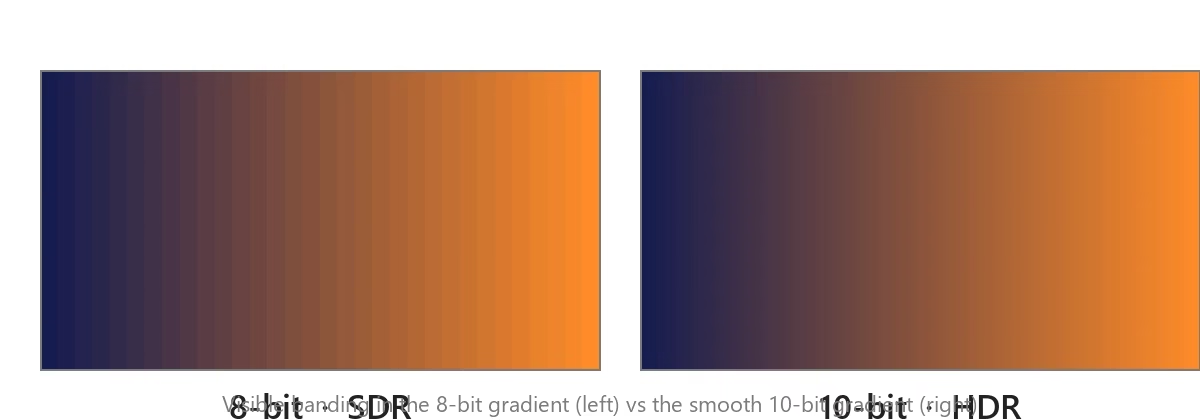
Bit depth decides how many steps exist between the darkest and brightest version of each color. SDR’s 8-bit pipeline offers 256 steps per color channel — 16.7 million combinations — which was enough for CRT-era content but banding shows in modern scenes: a sunset sky, a dark corridor, a studio wall lit by a gradient. HDR’s 10-bit pipeline offers 1,024 steps per channel, 1.07 billion combinations, and the banding largely disappears. Dolby Vision’s 12-bit path extends this to 68.7 billion combinations, which matters more in grading suites than in living rooms. The catch is the same as everywhere else in HDR: a 10-bit signal needs a panel that can render it — many budget TVs accept 10-bit input and display it on an 8-bit panel with dithering. The full depth story is in our LED display grayscale article, and the panel-technology side (why OLED, Mini LED, and Micro LED render HDR differently) is in Micro LED vs OLED.
How Does HDR Work on LED Walls and Commercial Displays?
LED walls start with the advantage HDR needs most: real brightness. Where a TV panel sustains a few hundred nits and peaks around 1,000–2,000 in highlights, commercial LED walls hold 1,000–3,000 nits across the entire surface — COB fine-pitch walls, our COB LED screen line included, reach higher still — so HDR content renders with the full highlight range instead of being tone-mapped down into TV territory. The chain has three requirements, covered in detail in our 4K@60Hz, HDCP 2.2 and HDR explained article: an HDR-capable controller such as the MCTRL4K (HDR10 and HLG), HDR-capable receiving cards in the cabinets, and a 10-bit HDR signal from the source. Two tuning details matter on the wall side: the MCTRL4K’s HDR10 mode accepts a Screen Peak Luma setting from 100 to 10,000 nits, and its HLG mode offers seven steps from HLG1 at 300 nits to HLG7 at 1,700 nits, matched to the wall’s measured peak brightness. NovaStar’s full HDR solution walkthrough:

Where Does HDR Content Actually Come From?
HDR needs HDR-mastered content, and by 2026 the supply is the easy part. Streaming: Netflix, Disney+, Apple TV+, and Amazon Prime Video release most major originals in HDR10 or Dolby Vision by default. Discs: 4K UHD Blu-ray carries HDR10 on every disc, with Dolby Vision or HDR10+ on most major releases, at bitrates well above streaming. Gaming: the PlayStation 5 and Xbox Series X|S output HDR10, and Microsoft’s Auto HDR upgrades many older SDR titles. Broadcast: HLG carries live HDR for sports and events, mainly in Europe and Japan. The one gap to know: if a source only offers SDR, no display setting will invent HDR information that was never mastered.
What Do You Need to Actually See HDR?
The HDR chain has four links, and any one of them can silently downgrade the result to SDR: an HDR-capable source (player, console, or PC with HDR output enabled), an HDR-rated cable — the bandwidth rules from our HDMI vs DisplayPort vs DVI article apply unchanged — a display whose panel can genuinely render the brightness and 10-bit color, and the right settings on both ends (HDR enabled in the source, picture mode set to the HDR mode on the display). The weakest link decides the result, and the most common failure is the cheapest link of all: HDR left off in the player settings while the customer blames the screen.
What Do Buyers Frequently Ask About HDR vs SDR?
Is HDR worth it? On a display with real HDR hardware — high peak brightness, good contrast, 10-bit color — yes, the difference is immediately visible. On a budget screen with HDR on the box but not in the panel, no: SDR will look better.
Why does HDR look too dark? The display’s peak brightness is lower than the content was mastered for, so tone mapping pulls the whole picture down. Bright rooms make it worse. Higher-performance hardware and correct picture settings fix it.
Is HDR better than 4K? They improve different things: 4K adds pixels, HDR adds brightness and color range per pixel. A 1080p HDR picture often impresses more than 4K SDR, which is why HDR matters more than resolution for most viewers.
Do I need new cables for HDR? HDMI 2.0a-class cables and ports carry HDR at 4K@60; HDMI 2.1 covers 4K@120. Older HDMI 1.4 chains cannot carry 4K HDR at full quality.
Does HDR help gaming? Yes — HDR10 on both consoles plus Auto HDR for older titles, and the highlight and shadow gains are visible in every modern game.
Is Dolby Vision better than HDR10? Dolby Vision carries scene-by-scene instructions and up to 12-bit color, so on capable hardware it tone-maps more precisely. HDR10 remains the universal baseline both are built on.
Can LED walls show HDR? Yes, with the three-part chain: HDR controller (MCTRL4K-class), HDR receiving cards (A8s/A10s Plus), and a 10-bit HDMI source. LED walls bring the brightness HDR is mastered for.
HDR vs SDR: Which One Should You Care About? Final Verdict
The HDR vs SDR question in 2026 is decided by hardware, not hype. On a screen that can genuinely render 1,000+ nits and 10-bit color, HDR is the single biggest picture-quality upgrade available — bigger than the jump from 1080p to 4K for most viewers. On a dim budget screen, SDR honestly looks better, and no amount of marketing changes the physics. The buying rule follows: if the display is premium, demand HDR10, Dolby Vision, and HLG support and verify the panel’s real peak brightness before purchase; if the display is cheap, buy it for what it is and leave the HDR label out of the decision. On the commercial side the answer is simpler — LED walls have the brightness HDR is mastered for, and the controller and receiving card chain from our HDR guide completes the picture.
For HDR-capable LED wall projects, send your content plan and environment through the Unify LED contact page and we will return the brightness, pitch, and HDR chain recommendation for the space.