
RGBlink · X Series · Modular Video Wall Processor
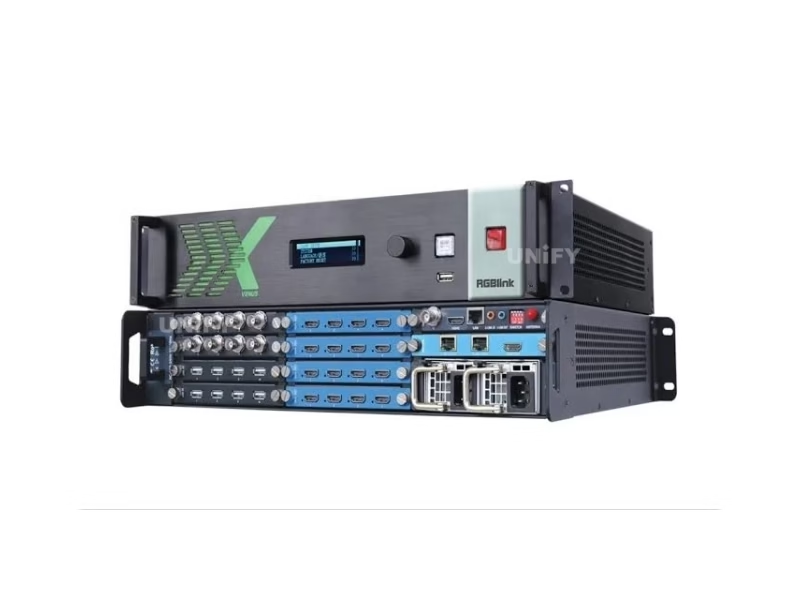
RGBlink X2 multiple output video processor
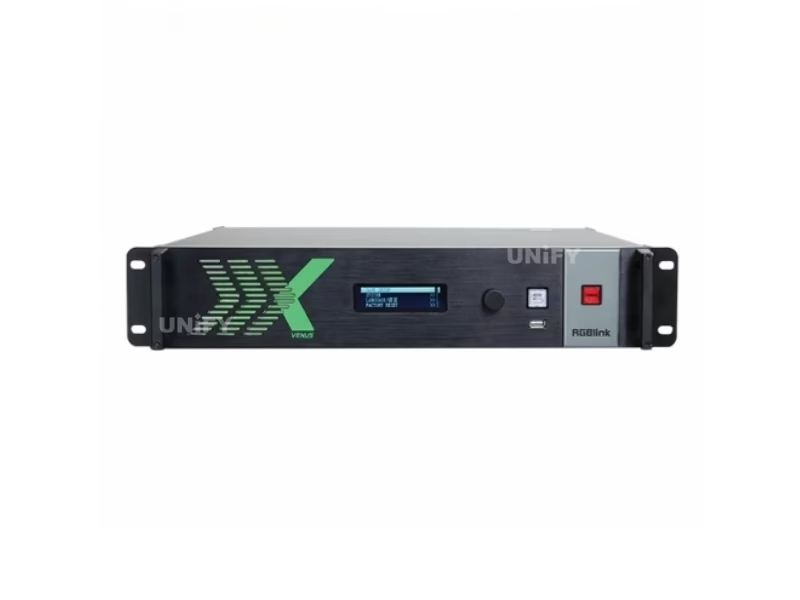
The RGBlink X2 multiple output video processor (order code 310-0002-01-0) is RGBlink’s 16×16 modular video wall processor: four input slots and four output slots in card-frame style, up to 16 scaled outputs driving 32K×1K displays, 16-layer multi-window compositing, genlock sync and XPOSE control — the mixed-signal wall engine for LED frontage and multi-screen venues.
Product Overview
What Is the RGBlink X2 multiple output video processor?
The RGBlink X2 multiple output video processor is RGBlink’s 16×16 modular video wall processor — a card-frame instrument whose four input slots and four output slots accept hot-configurable signal modules, scaling any mix of HDMI, SDI, VGA, CVBS, USB, HDBaseT, H.264 and 4K sources to up to 16 independent 2K outputs that drive a 32K×1K display canvas across LCD, LED and projector walls. It composites up to 16 layers in multi-window layouts, switches cleanly with fade and wipe transitions, rotates outputs in 90-degree increments, compensates color uniformity across a wall, keeps every output synchronized through genlock and ULink cascading, and configures over RGBlink’s XPOSE platform with an open API. Official data on this page comes from the X2 Specification V1.9 (March 2022), User Manual V1.9 (February 2023) and Product Brochure V1.5 — the current documents on RGBlink’s own product page.
Short answer: The RGBlink X2 (order code 310-0002-01-0) is a 16×16 modular video wall processor: four input slots take quad modules for up to 16×2K inputs (or 4× 4K@30), four output slots take quad modules for up to 16×2K outputs over HDMI, 3G-SDI, HDBaseT or H.264/IP; the engine composites 16 layers in multi-window layouts across a 32K×1K spliced canvas, rotates outputs in 90° steps, applies color-uniformity compensation and EDID management, locks all outputs with genlock plus ULink cascading between units, runs in video-wall, presentation or dynamic-routing modes, streams an H.264 preview to XPOSE as standard, and takes a redundant hot-swap power supply option — 12 kg, 200 W, 484 × 413 × 91 mm, at about $3,429 street. It is the multi-output rung of RGBlink’s X processing series, above the X1 Gen2 single-processor class and below the X3 and X14 wall processors.
Position in the family is a question of outputs. The RGBlink X1 Gen2 ($500) is a single-canvas broadcast processor with dual DVI outputs for one LED control chain; the VSP 628PRO ($2,840) hosts a sender card for direct wall drive; the X2 ($3,429) is the wall-scale instrument — 16 independent outputs that feed many screens, one canvas, or a mix, which is the processor class a multi-screen LED frontage, a control room or a stadium ring buys. Above it sit the X3 (8 outputs, HDR) and the X14 (52 inputs, 40 outputs, 165 megapixels) in RGBlink’s X-series scaling story.
The X2 carries a long field record under its former name — some distributors still list it as the VENUS X2, the brand RGBlink used through the X-series’ early years — while the current documentation and firmware keep it a listed, supported product. A buyer comparing listings will meet both names for the same 310-0002-01-0 hardware; this page uses the current X2 name and the current V1.9 documents throughout.
Official RGBlink video — X2 product introduction.
Specifications
What Are the RGBlink X2 multiple output video processor Specifications?
Data from the official RGBlink X2 Specification V1.9 (March 2022) and product page.
Wall Processing & Control
Official Data Check
What Do Official X2 Documents Say That Distributor Pages Get Wrong?
Four points deserve the official-document treatment on the X2. First, the name: distributors still list the same 310-0002-01-0 hardware as the VENUS X2, the X-series brand of earlier years; RGBlink’s current product page and the V1.9 documents call it the X2, and this page follows the current name — the hardware is identical, so the listing name should not change a quote. Second, the configuration: the X2 ships as a chassis whose module kit is specified at order — the standard build and the module variants (input and output choices from the 190-0002 family, single or redundant 200 W PSU) determine both the connector count and the price, which is why reseller listings name the power-supply configuration explicitly.
Third, the output ceiling: the X2’s 16 outputs are 2K-class — the spec table runs to 2048×1152@60 on the HDMI side with the wide-band 2560×816 formats available — and the spliced canvas reaches 16K×2K (with the 32K×1K drive figure for linear wall strips); it is a 2K-per-output wall processor, not a 4K-per-output machine, and a 4K output requirement belongs with the X3 class or higher. Fourth, the product state: firmware V4.06 dates from 2021 and the documents settled by 2023, which reads to some buyers as abandonment — the official product page still lists the X2 as current with current certification, and the maturity of the platform is the installed-system argument this page states plainly rather than dressing the unit as a new release.
Modular System
How Do the 16×16 Modular Slots of the X2 Work?
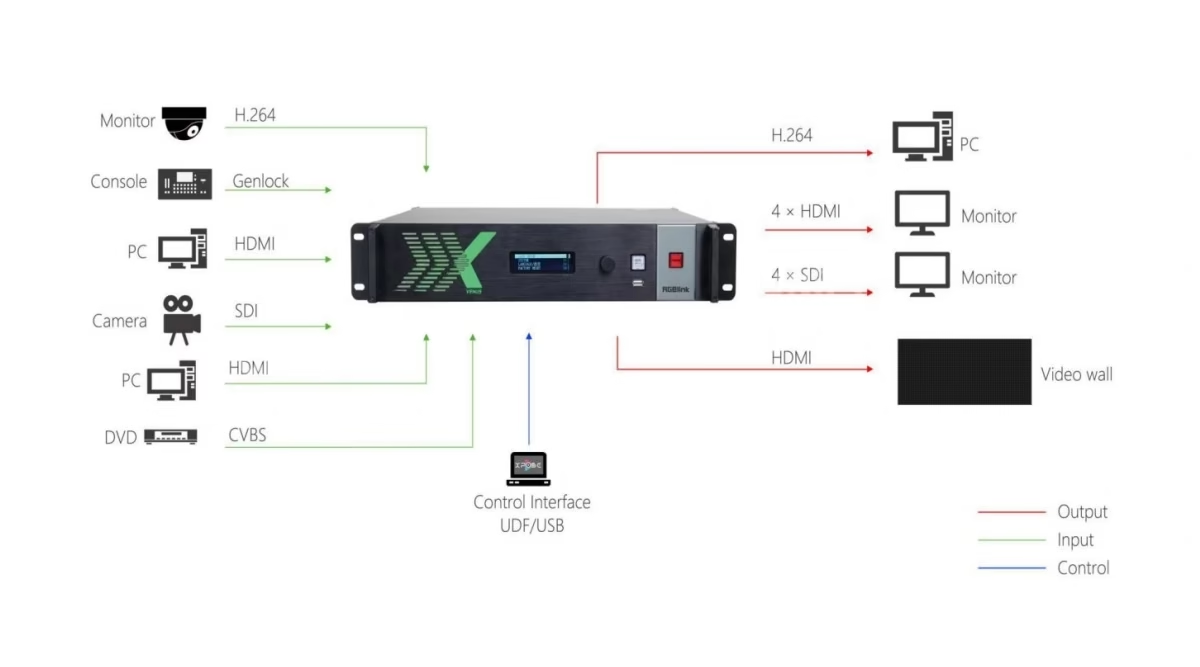
The X2’s four-plus-four slot architecture is a configuration system, not a fixed I/O list. Each of the four input slots takes a quad module — four HDMI, four 3G-SDI, four CVBS, four USB, four HDBaseT or four H.264-over-RJ45 ports — so four quad slots reach 16× 2K inputs; a 4K@30 module occupies a slot with one HDMI 1.4 and one DisplayPort 1.1a input, both with loop-through, trading four 2K inputs for two 4K inputs per slot. The four output slots mirror the choice: quad HDMI 1.3, quad 3G-SDI or quad HDBaseT modules fill sixteen 2K outputs, an H.264/IP module streams program over the network, and the dedicated preview module — standard with HDMI and H.264 — gives the operator its own output.
The engineering reading of the math: a wall processor’s value is in the mix, not the maximum. A control room with twelve SDI camera feeds and four computer sources fills input slots with quad SDI and quad HDMI modules and drives eight wall displays plus eight auxiliary screens from output slots; a stadium ring with long cable runs fills outputs with HDBaseT modules and inputs with a 4K media server plus SDI cameras. The module family (order codes 190-0002-xx) is the spares-and-upgrade story too: a venue reconfigures an input slot when its source fleet changes, without replacing the processor — the same hot-configuration logic this site documented on the modular RGBlink M1 NDI, scaled to sixteen by sixteen.
Official RGBlink video — configuring the X2 with a 4K@30 input module.
Wall Engine
How Does the X2 Composite a 16-Layer Wall Across 16 Outputs?
The compositing engine is where the X2 earns the “broadcasting quality” description. Sixteen layers arrange in multi-window layouts anywhere across the spliced output canvas — one full-wall program, a grid of sources, a hero window with supporting feeds around it — and each layer scales independently with clean switching, fade and wipe transitions between takes. The spliced canvas reaches 16K×2K across the outputs, and for linear wall strips the drive figure extends to 32K×1K; user-defined output resolutions cover the wall geometries standard tables miss, and real-time resolution adaptation keeps sources mapping correctly as they change. Ten-bit gray-level processing carries the gradients, and the dedicated preview module shows the operator program, sources and layouts on its own HDMI or H.264 stream before anything goes to the wall.
Layer mathematics deserves the honest walkthrough, because it decides what a wall can show. Every window consumes layer budget and scaling bandwidth; the official X2 tutorial on layer availability demonstrates the arithmetic in practice — a wall running one full-canvas program plus several PiP windows spends layers faster than a single-image wall, and the planning rule is to count windows, not sources. Output rotation in 90-degree increments (90/180/270) handles portrait-mounted panels and unusual cabinet orientations; color uniformity compensation evens the brightness and hue drift between cabinets and modules that every large LED wall accumulates; and OSD plus DSK and chroma keying give the wall its text, logo and virtual-set layers. The per-output formats and the canvas math are what make a sixteen-screen frontage read as one picture.
Official RGBlink video — X2 layer availability.
Operating Modes
What Are the Three Operating Modes of the X2 Processor?
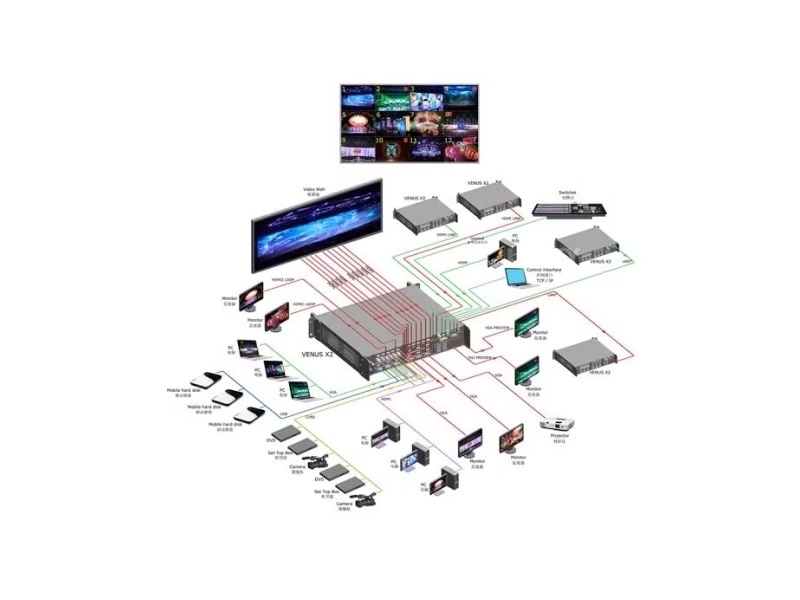
The X2 runs three modes from one chassis, which is how one processor serves a venue across its day. Video wall mode treats the sixteen outputs as one spliced canvas — the multi-window, multi-layer wall layout for LED frontage and control rooms. Presentation mode treats the unit as a presentation processor: sources switch cleanly to program with transitions, PiP and keying for stage and conference screens. Dynamic routing mode treats the X2 as a matrix — any input routed to any output independently, which turns a 16×16 wall processor into a 16×16 signal router between shows. A house of worship runs its Sunday wall in video-wall mode, its midweek conference in presentation mode and its campus distribution in routing mode, all on the same hardware and the same XPOSE workspace.
Sync & Redundancy
How Does the X2 Keep Every Output in Sync and On Air?
Synchronization is the wall processor’s reliability core, and the X2 carries two references: a genlock Y input locks the unit to a house sync signal, and an HDMI digital reference input provides a second sync source — both keeping every output frame-aligned so a spliced picture holds together at the seams. ULink, a dedicated link between X2 units, carries the sync and control chain when a wall outgrows one chassis, so multiple processors behave as one system rather than sixteen drifting outputs. On the power side, the X2 offers a redundant hot-swap PSU option: two 200 W supplies in the dual PSU slots with automatic failover keep the wall on air through a supply failure, and the hot-backup and auto-failover features extend the same logic to signal paths — the redundancy set a control room or broadcast venue specifies without thinking.
Preview & Control
How Does the X2 Preview and Configure Over XPOSE?
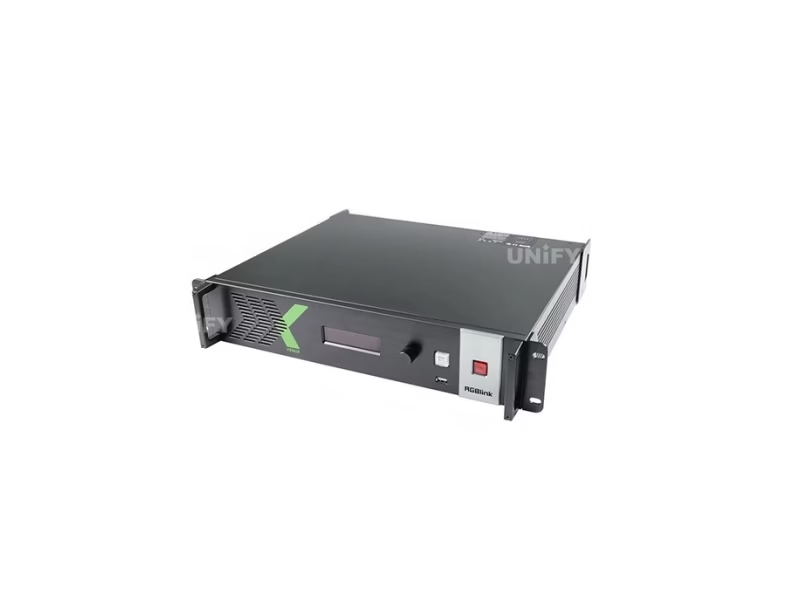
The X2 ships a dedicated preview module as standard — HDMI plus H.264 — so the operator sees program, sources and layout on a local monitor or, through the H.264 stream, on any machine running XPOSE or on an extended monitoring display. Configuration runs over the LAN: the front panel sets the IP address and reports status, then RGBlink’s XPOSE platform (Windows and macOS) performs the full dynamic configuration — layouts, layers, routing, output resolutions and EDID profiles — over the wire. The open API hands the same control to third-party systems, and the T Series console gives the operator a hardware control surface where a venue wants one. The preview-over-stream workflow is documented end to end in RGBlink’s own X2 PVW tutorial.
Official RGBlink video — X2 PVW streaming via XPOSE.
Setup & Operation
How Do You Install and Operate the RGBlink X2?
Installation is rack work with a plan: the X2 mounts in a 19-inch rack at 12 kg and 484 × 413 × 91 mm — a two-person lift and a ventilated position in the 0–40 °C envelope — drawing 200 W maximum from AC 100–240 V. Module configuration happens at order time and at upgrade time: input and output slots fill from the 190-0002 family to match the source fleet and the display topology, and the power-supply choice — single or redundant — is a chassis configuration named on the listing. Wiring follows the module map: sources into the input modules, displays into the output modules over HDMI, SDI, HDBaseT or the H.264/IP paths, genlock and the HDMI reference into their BNC and HDMI inputs, ULink between units for multi-chassis walls, and LAN for XPOSE.
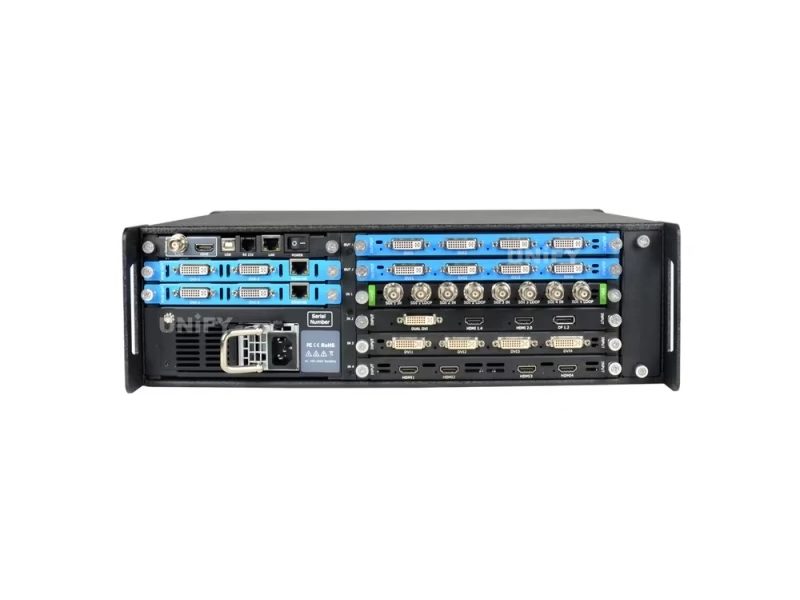
Operation is XPOSE-centric: layouts build on the software canvas, the preview stream verifies before program, and the modes swap the same hardware between wall, presentation and routing duties. The mature platform state deserves its place in the plan — firmware V4.06 and the V1.9 documents have been stable for years, which is the operating posture an installed wall wants, and RGBlink’s product page still lists the X2 current with certification. A multi-screen LED install in front of a wall like this is the site’s core business, and the related links below build the display half of the same chain.
Comparison
X2, X1 Gen2 or VSP 628PRO: Which RGBlink Processor Fits Your Wall Scale?
Above the X2, RGBlink’s X series scales to the X3 (up to 8 outputs, HDR studio class) and the X14 (52 inputs, 40 outputs, 165-megapixel class); below it, the VSP 628PRO hosts a sender card for single-chain direct drive and the portable mini line handles stream desks. The X2’s sixteen independent outputs are the step where a wall becomes a system.
Where It Works
Where Does the RGBlink X2 Fit in Multi-Screen and LED-Fronted Work?
A stage or expo frontage of several stage LED walls and rental LED screens run as one canvas or independent zones from the X2’s sixteen outputs — one processor, one XPOSE workspace for the whole frontage.
Many inputs, many displays, one clock: SDI cameras, computers and 4K sources through the modules, genlock-synced outputs, dual PSU redundancy and ULink expansion for walls beyond sixteen outputs — the control room LED scale this processor class exists for.
Sanctuary wall, overflow rooms and lobby displays from one processor in routing mode between services, video-wall mode on Sunday — the multi-screen church LED display story at campus scale.
Outdoor venue walls and LED screens for events where the signal grammar spans legacy and modern sources — the X2’s mixed-signal modules are the reason the “mixed signal” name is in the official title.
The processor is the canvas stage of the multi-screen LED chain this site documents — the display half, from LED video processor knowledge to the screens themselves, quotes together with the X2 at its head.
Pricing
How Much Does a RGBlink X2 multiple output video processor Cost?
Price transparency, stated plainly: the RGBlink X2 (310-0002-01-0) lists at about $3,429 at a European specialty reseller (September 2026, currency-adjusted), with B&H Photo Video carrying the X2 16×16 Universal Processor in single- and dual-power-supply configurations — the configuration named on the listing drives the price, because the module kit and the PSU choice are part of the order. The family frame: at $3,429 the X2 is the wall-scale step above the X1 Gen2 at $500 and the VSP 628PRO at $2,840, and well below the multi-hundred-thousand output scales of the X14 class. Factory-direct tiers for B2B buyers:
Budget the system, not the chassis: the module kit, the power-supply configuration and any ULink expansion units belong in the quote alongside the 310-0002-01-0 host — a fully populated 16×16 build prices above the bare listing, and the module choices are the difference between a generic quote and a working wall. Genuine unit, 2-year warranty and CE, FCC and RoHS certification ship with every order; ask for a factory-direct quote at your configuration — we are the LED screen manufacturer behind unifyled.com.
FAQ
What Do Buyers Ask About the RGBlink X2 multiple output video processor?
What Assurance Comes With the RGBlink X2 Processor?
Every X2 ships with RGBlink original packaging, the module kit specified on your order and compliance documentation.
Ready to Spec the X2 for Your Multi-Screen Wall?
Factory-direct pricing, genuine RGBlink stock, module kits configured to your wall and 2-year warranty.
unifyledscreen@gmail.com | +86-191-18802497
Technical Deep-Dive
What Should Engineers Know Before Buying the RGBlink X2 multiple output video processor?
Published: September 2026 | 12 min read | UnifyLED Engineering Team
The RGBlink X2 multiple output video processor is RGBlink’s 16×16 modular wall processor — the instrument that turns many sources and many displays into one synchronized system. This guide is written for engineers, integrators and procurement teams in 2026, using the official X2 Specification V1.9, User Manual V1.9 and Product Brochure V1.5 as data sources, with the module math, the layer arithmetic and the family decision that distributor pages skip.
Chapter 1 — Definition and the Family Position
The RGBlink X2 (order code 310-0002-01-0) is a multiple output video processor: four card-frame input slots and four output slots accept quad modules for up to sixteen 2K inputs and sixteen independent 2K outputs; the engine composites sixteen layers across a spliced canvas that reaches 16K×2K, with the linear drive figure extending to 32K×1K for wall strips; every output stays frame-locked through genlock, an HDMI digital reference and ULink cascading between units; and the unit runs video-wall, presentation and dynamic-routing modes from one chassis under RGBlink’s XPOSE control. It is the multi-output rung of the X processing series this site documents — above the X1 Gen2 single-chain class, beside the VSP 628PRO sender-card class, and below the X3 and X14 wall scales.
The naming note from the data check applies throughout: some listings still call this hardware the VENUS X2, the X-series brand of earlier years, and both names describe the same 310-0002-01-0 unit — the current RGBlink documentation and this page use X2. The product state is mature rather than new: firmware V4.06 settled in 2021 and the V1.9 documents by 2023, while RGBlink’s product page still lists the X2 as current — the stability argument an installed wall values, stated plainly on this page rather than dressed as a release story.
Why a venue chooses a wall processor over a stack of smaller units is worth stating before the specification details, because it decides the whole control-room architecture. Sixteen independent outputs from one chassis mean one canvas engine, one genlock domain and one control surface: a processor stack of separate units must synchronize its outputs across boxes, reconcile several software workspaces and duplicate spares; the X2 holds the wall in one frame-locked domain by construction, which is the architectural argument for the single large chassis wherever displays must behave as one picture. The ULink port extends that single domain to a second chassis when the wall outgrows sixteen outputs — the expansion path that keeps the architecture intact at stadium scale rather than starting over with a larger stack.
Chapter 2 — The Module Math: Sixteen by Sixteen, Your Way
The X2’s value is a configuration system, and the math starts with the quad module. Each input slot holds one module; the quad options carry four ports each — HDMI, 3G-SDI, CVBS, USB, HDBaseT or H.264 over RJ45 — so four slots reach sixteen 2K inputs; the 4K@30 module trades four 2K ports for one HDMI 1.4 and one DisplayPort 1.1a input with loops, for media servers and 4K sources. The output side mirrors it: quad HDMI 1.3, quad 3G-SDI and quad HDBaseT modules fill sixteen outputs, the H.264/IP module streams program, and the dedicated preview module — standard with HDMI and H.264 — gives the operator its own window.
Engineering planning follows the mix. A control room with twelve SDI cameras and four computers fills two input slots with quad SDI and one with quad HDMI, keeping a slot for expansion or a 4K module; a stadium ring runs quad HDBaseT outputs to remote displays. The module family (190-0002) is also the spares story: a venue reconfigures a slot when its source fleet changes and keeps a spare module on the shelf, without replacing the processor — the modular discipline this site documented on the M1 NDI, scaled by sixteen.
The ordering discipline follows the module math: a quote that says only “X2” is incomplete, because the chassis arrives with whatever module kit the order specifies — input and output modules, single or redundant 200 W PSU, and the preview module that ships standard. RGBlink’s order codes keep the kit straight (input modules 190-0002-02 through 11, output modules 190-0002-22 through 50, PSU 950-0001-00-0), and a configured price reflects the kit. Buyers comparing reseller listings should read the power-supply line as a configuration signal: single-PSU builds suit signage and church walls; redundant builds suit control rooms and broadcast venues where a supply failure during a live show is not an option.
Chapter 3 — The Wall Engine: Layers, Canvas and the Arithmetic of Windows
The compositing engine is the broadcast core. Sixteen layers arrange in multi-window layouts anywhere across the spliced canvas — a full-wall program, a grid of feeds, a hero window with supporting sources — each layer scaling independently with clean switching and fade and wipe transitions. The canvas reaches 16K×2K across the outputs and 32K×1K for linear strips; user-defined output resolutions cover nonstandard wall geometries; real-time resolution adaptation keeps sources mapped as they change; and ten-bit gray-level processing carries the gradients. Output rotation in 90-degree steps handles portrait panels, and color-uniformity compensation evens the drift between cabinets and modules that large LED walls accumulate — the compensation feature that makes a sixteen-screen frontage read as one image.
Layer arithmetic deserves the honest walkthrough, because it decides what a wall can show and it is where wall projects fail on paper. Every window consumes layer budget and scaling bandwidth; the official X2 tutorial on layer availability walks the calculation in practice — a wall running a full-canvas program plus several PiP windows spends its layers faster than a single-image wall, and the planning rule is to count windows, not sources or outputs. The lesson for procurement: quote the layer count against the show design before committing the canvas, and keep a layer in reserve for the last-minute insertion every live event brings.
Color and orientation engineering completes the picture-planning story. Output rotation in 90-degree increments handles portrait-mounted LED panels and signage towers whose cabinets sit vertically; color-uniformity compensation evens the brightness and hue drift between cabinets, modules and output paths that every large wall accumulates over temperature and age — the difference between a wall that looks uniform from the front row and one that shows its tile boundaries. EDID management on the module inputs keeps source devices negotiating the intended resolutions, user-defined output formats cover the wall geometries standard tables miss, and the isolated storage with frame-rate conversion lets mixed-rate sources coexist without tearing on the spliced canvas. Each of these is a listed feature; together they are what makes the X2 a wall processor rather than a big switcher.
Chapter 4 — Sync, Redundancy and the Three Modes
Synchronization is the reliability core of any wall processor, and the X2 carries two references: genlock Y locks to house sync, and an HDMI digital reference provides a second source — both keeping every output frame-aligned so the spliced picture holds at the seams. ULink links multiple X2 chassis so walls beyond sixteen outputs behave as one system. Redundancy follows the same discipline: a hot-swap dual-PSU option (two 200 W supplies with automatic failover) and signal hot-backup with auto-failover keep the wall on air through a supply or source failure — the specification a control room or broadcast venue writes without thinking.
The three operating modes make one chassis serve a venue across its day. Video wall mode treats the sixteen outputs as one spliced canvas; presentation mode switches sources cleanly for stage and conference screens; dynamic routing mode acts as a 16×16 matrix between shows. A house of worship runs its sanctuary wall in video-wall mode on Sunday, its midweek conference in presentation mode, and campus distribution in routing mode — one processor, one XPOSE workspace, three jobs. The dedicated preview module streams program and layout over H.264 to XPOSE or an extended monitor as standard, so the operator verifies before anything reaches the wall.
The preview path is worth engineering time, because it is the difference between operating a wall blind and operating it with eyes. The standard preview module outputs HDMI for a local operator monitor and H.264 for the network — XPOSE displays the preview on any desktop, and extended monitoring can carry it to a second screen or a remote operator position. A wall operator builds a layout on XPOSE, verifies it on the preview stream, and only then takes it to program; the same stream serves as a remote confidence check when the wall is unattended. The open API extends the same control to venue automation and master-control systems, and the T Series console provides hardware keys where an operator wants them — the control surface breadth that separates an installed wall processor from a bench switcher.
Chapter 5 — The Family Decision and the Buying Math
The family decision is a question of output count. A single LED chain with an existing control system buys the X1 Gen2 at $500; a wall that needs its sender inside the processor buys the VSP 628PRO at $2,840; a multi-screen frontage, control room or stadium ring buys the X2 at about $3,429; and per-output 4K or HDR requirements step to the X3 class. The X2 lists at about $3,429 at a European specialty reseller with B&H carrying the 16×16 Universal Processor in single- and dual-PSU builds — and the budget belongs with the system: module kit, PSU configuration and ULink expansion price alongside the host, because a fully populated 16×16 build quotes above the bare chassis.
Acceptance testing before a wall goes live is short and specific. Verify every input format the venue runs maps and scales correctly on its output; confirm the spliced canvas holds frame lock across all outputs with genlock on; count layers against the show design and check a reserve layer; exercise the failover by pulling the primary PSU and a hot-backup source; and save the wall layout in XPOSE for recall at every event. The display half of the same chain — the LED video processor knowledge, the rental and fixed screens this site sells — closes the quote, and the X2 is the canvas stage at its head.
Total cost of ownership closes the engineering case. The X2’s mature platform means a settled firmware base, documented workflows and a module ecosystem that has been orderable for years — the after-sales profile an installed wall wants, against newer platforms with shorter field records. The module design keeps upgrades incremental: adding a 4K input slot or an HDBaseT output quadrant is a module purchase, not a processor replacement. Power at 200 W for sixteen outputs is modest against per-output processor stacks, and the redundant-PSU option removes the single point of failure that a wall’s power entry would otherwise be. For a fleet of venues standardizing wall processing, the X2’s one-chassis-sixteen-output economy — one XPOSE workspace, one spares profile, one support contract — is the arithmetic that wins the tender, and the module kit is where the quote is won or lost.
Conclusion
The RGBlink X2 multiple output video processor is RGBlink’s 16×16 modular wall engine: four input and four output slots configuring up to sixteen 2K inputs and sixteen independent outputs over HDMI, 3G-SDI, HDBaseT, H.264 and IP; sixteen layers across a 32K×1K canvas with 90-degree rotation and color-uniformity compensation; genlock, HDMI reference and ULink keeping every output synchronized; dual-PSU redundancy; video-wall, presentation and routing modes under XPOSE with an H.264 preview as standard — 12 kg, 200 W, at about $3,429 street. It is the processor to specify where many screens must read as one wall.
Planning a multi-screen LED build around a 16×16 wall processor? Talk to us — we are the LED screen manufacturer behind unifyled.com, and processors, module kits and screens ship together with 2-year warranty and engineering support.
Related Pages
Build the LED Signal Chain End to End
RGBLINK VSP 628PRO LED Video Scaler
RGBlink M1 NDI Modular Production Switcher
RGBlink mini-ISO 10-Channel All-in-One Switcher
LED video processor
LED display for control room & CCTV
LED display configuration & debugging
500×500 rental LED screen
English · March 2022 · connectors, resolutions, modules and physical sheet · order code 310-0002-01-0
English · February 2023 · 76 pages · setup, wall modes, layers, modules, XPOSE workflows