
RGBlink · mini Series · Live Production Switcher
RGBlink mini-ISO 10-Channel All-in-One Switcher
The RGBlink mini-ISO 10-Channel All-in-One Switcher is a portable live production console: ten video inputs (four 4K60 HDMI 2.0, four 3G-SDI, one UVC, one NDI), an onboard 3.5-inch touchscreen, PTZ camera control, USB-C PD power and a 0.60 kg carry-on body for streaming, recording and LED-fronted event production.
Product Overview
What Is the RGBlink mini-ISO 10-Channel All-in-One Switcher?
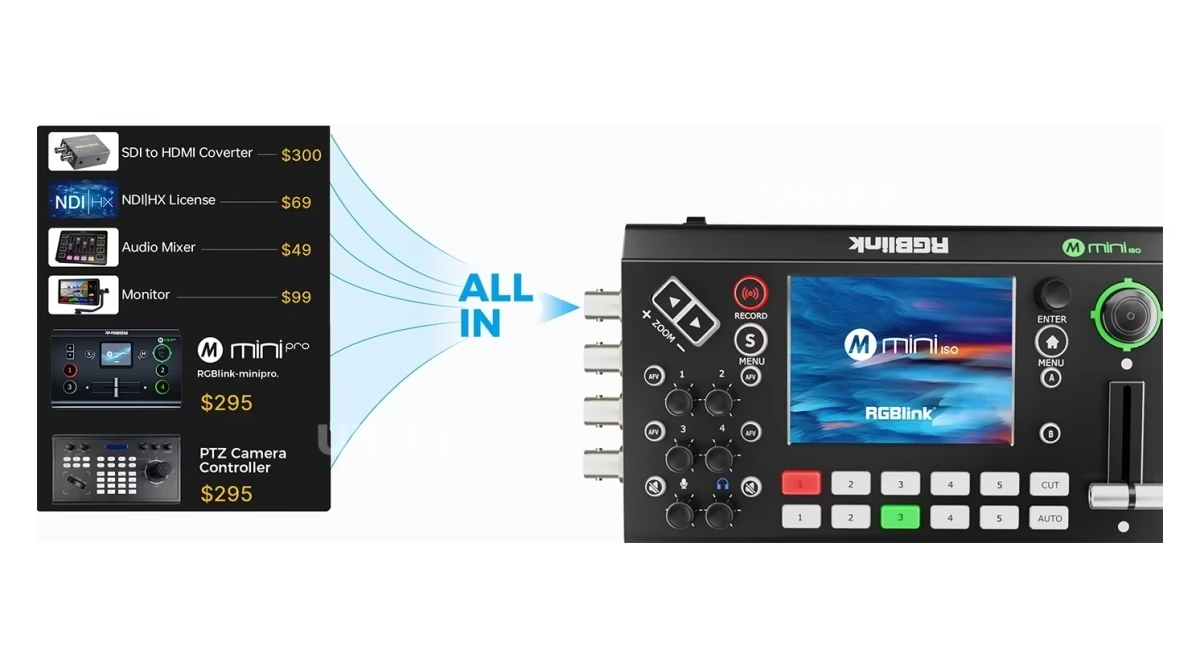
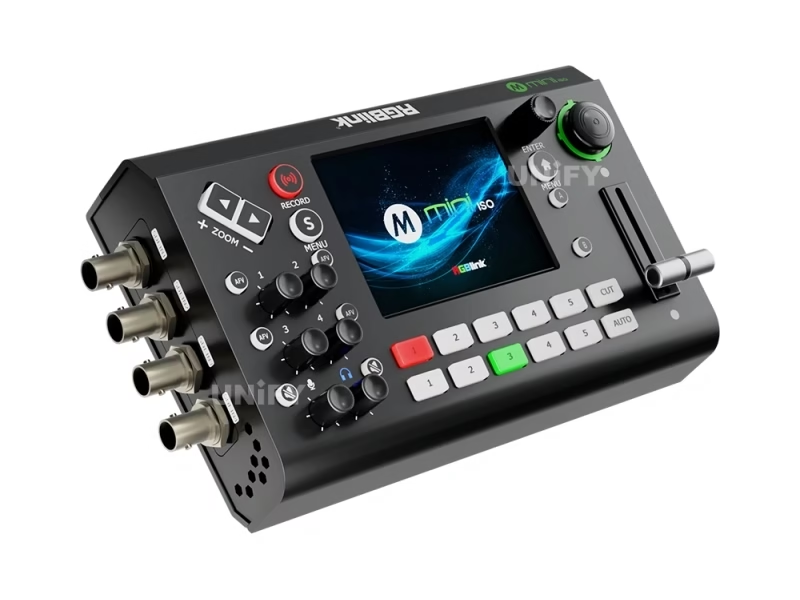
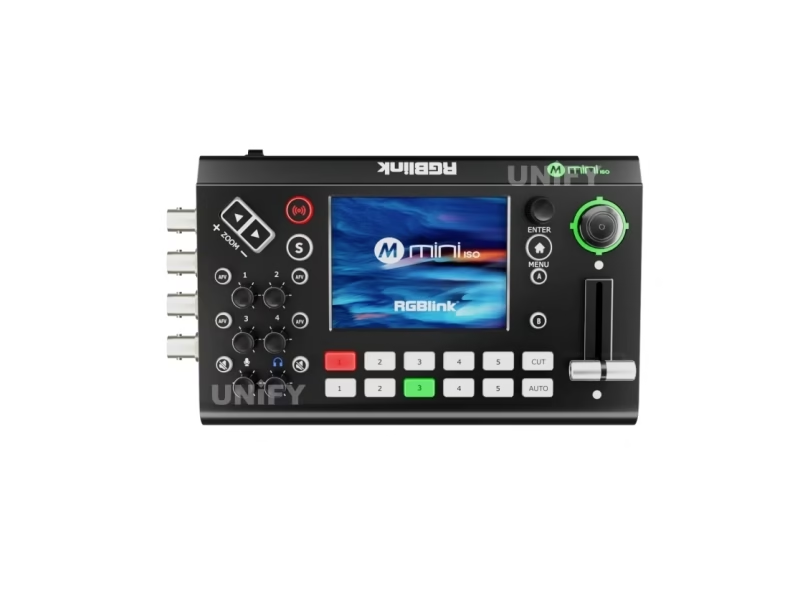
The RGBlink mini-ISO 10-Channel All-in-One Switcher is a portable live production console from RGBlink’s mini series of mixing and streaming products: a Linux-based unit that accepts ten video inputs — four HDMI 2.0 inputs up to 4K60 with HDCP 1.4, four 3G-SDI inputs, one UVC input and one NDI input — mixes them with eight audio sources, and drives program, preview, recording, streaming and NDI outputs from an onboard 3.5-inch touchscreen and full control keyboard. It records the program as MP4 to USB at up to 16 Mbps, streams over RTMP(S) to four platforms (or restreams to 32 through RGBlink’s TAO Cloud), presents itself to a laptop as a UVC webcam, controls up to five PTZ cameras over IP VISCA, and runs on USB-C Power Delivery — official data sources on this page are the mini-ISO Specification V1.1 (May 2026) and User Manual V1.10 (May 2026), the newest documents RGBlink publishes for the unit.
Short answer: The RGBlink mini-ISO is a 10-channel all-in-one video switcher: four 4K60 HDMI 2.0 inputs plus four 3G-SDI inputs plus one UVC and one NDI input; two HDMI 1.3 outputs for preview/program/test pattern (including 1080×1920 vertical), one USB webcam output for Zoom/OBS/Teams, one USB recording port (MP4 up to 16 Mbps, SSD to 2 TB), RTMP(S) streaming to four platforms, 15 transition effects, chroma and luma keying, two video layers plus background and graphic overlays, IP VISCA PTZ control of five cameras with eight scene presets, 3.5-inch touchscreen operation, NDI|HX2 encoding with license, USB-C PD 12 V/2.5 A power, 0.60 kg — listing at $599 in authorized distribution. One naming fact matters before purchase: the “ISO” in its name does not mean per-input ISO recording, which RGBlink’s manual states plainly is not supported.
The mini-ISO occupies a different rung of the production chain from the control hardware we normally discuss on this site. A Mooncell MB401 Networked Player is a single content source: one unit plays its own library out through HDMI. The mini-ISO is a live director’s console: it takes many cameras and computers in real time, switches, keys and mixes them, and sends the result to a program output that feeds a screen, a stream and a recorder at once. For an LED-fronted event, the chain is cameras and laptops into the mini-ISO, program out of the mini-ISO into an LED video processor, and the processor driving the wall — the switcher sits upstream of the display, which is why it serves church, stage and conference work where multi-camera coverage of a LED screen for events matters as much as the screen itself.
RGBlink positions the mini-ISO as the 10-channel flagship of its mini series of all-in-one switchers — below it sit the five-channel stage-focused mini-edge and the mini-mx production mixer, above it the 4K mini-max — and the family sells against Blackmagic’s ATEM line at the same price point with a different philosophy: no laptop required. This page covers the specifications from the official documents, the naming facts distributors get wrong, the recording and streaming math, and an honest price comparison with the ATEM Mini Pro ISO at $585.
Official RGBlink video — mini-ISO 10 video channels.
Specifications
What Are the RGBlink mini-ISO 10-Channel All-in-One Switcher Specifications?
Data from the official RGBlink mini-ISO Specification V1.1 (May 2026) and User Manual V1.10 (May 2026).
Video, Audio & Control
Official Data Check
What Do the Official mini-ISO Documents Say That Distributor Pages Get Wrong?
Three claims circulate around the mini-ISO on distributor and review sites, and the official documents settle each of them. First, the name: the “ISO” in mini-ISO leads some resellers — including staff answers on a major US dealer’s own Q&A page — to describe per-input isolated recording. RGBlink’s User Manual V1.10 states the fact in its feature list and again in its FAQ: “Does not support independent ISO recording for each input channel.” The USB recording port records the program output as a single MP4 stream; it does not record each camera separately. A buyer who needs true ISO recording with per-camera files should spec an ATEM Mini Pro ISO-class unit instead — details in the comparison section below.
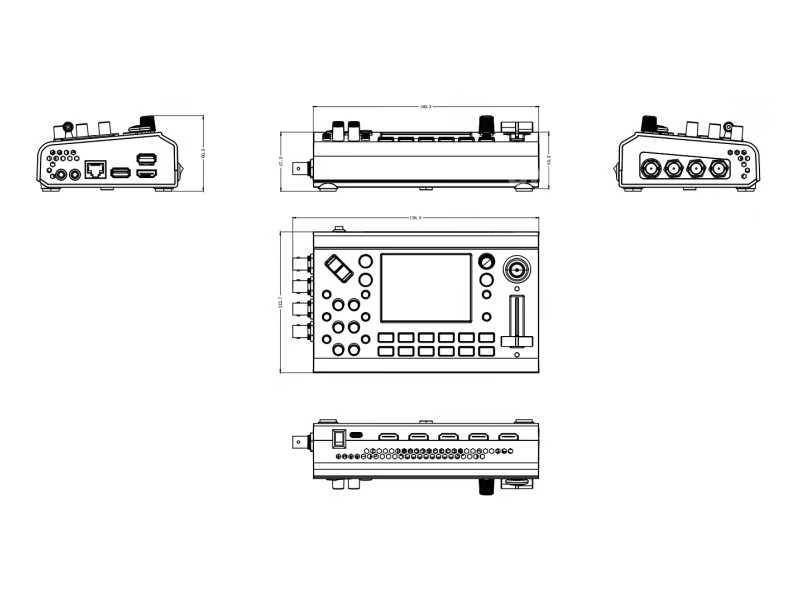
Second, dimensions: the official Specification V1.1 lists 197 × 113 × 60 mm net; the specification appendix inside an earlier manual revision printed 180.6 × 112.7 × 53 mm. The specification sheet is the controlling document, and travel cases and mounting should be planned to its 197 × 113 × 60 mm envelope. Third, power draw: the product brochure states ~30 W and the specification sheet lists 35 W maximum — both are consistent with a 12 V / 2.5 A PD supply that must deliver at least 30 W.
Input Architecture
How Do the 10 Input Channels of the RGBlink mini-ISO Switcher Work?
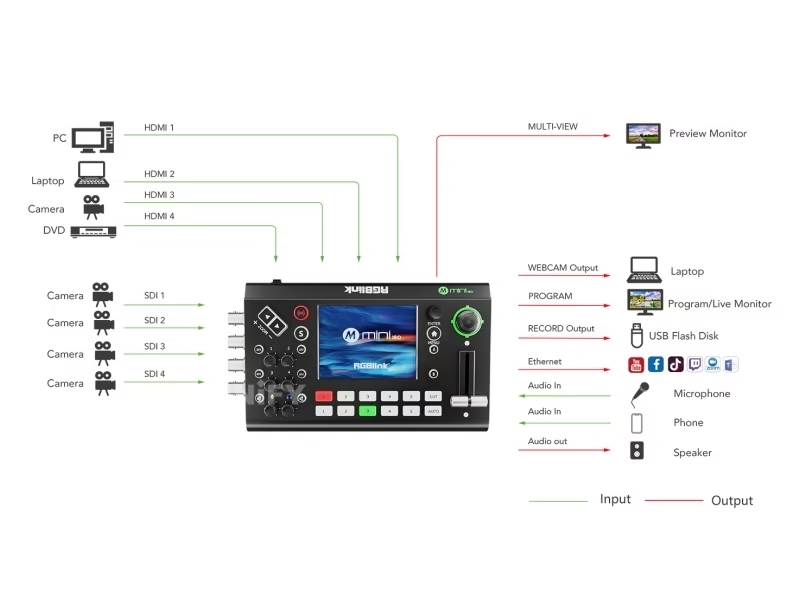
The ten inputs are four HDMI 2.0, four 3G-SDI, one UVC and one NDI — a mix most switchers at this size force you to choose between. The four HDMI 2.0 inputs accept computers, laptops and HDMI cameras at up to 4K60 with HDCP 1.4 compliance: a keynote laptop, a second presenter machine, a podium camera and a confidence monitor feed can all sit native without converters. The four 3G-SDI inputs on BNC take the cameras already cabled in a venue — RGBlink’s laboratory data rates 3G-SDI runs to 100 meters — and accept the broadcast frame rates (1080p23.98 through 1080p60) that HDMI-only switchers cannot.
The ninth and tenth inputs are the network-native pair. The UVC input over USB-A accepts a webcam or USB capture card; the NDI input over RJ45 decodes any NDI source on the local network — a laptop running NDI Tools, a second switcher, an NDI PTZ camera — while a second network role encodes the program as an NDI|HX2 source for other machines (NDI|HX2 requires a license RGBlink issues on application; the manual walks through authorization in a four-minute official video). Between the SDI and network sides, the mini-ISO is one of the few sub-$600 switchers that mixes all four signal families at once.
One architecture fact matters for 4K buyers: inputs are 4K60-capable, but the program engine and every output are 1080p. The mini-ISO is a 1080p60 production switcher with 4K input acceptance — a 4K camera or laptop is down-converted into the 1080p program. For 4K program output you move up the mini family to the mini-max, which is why the mini-ISO carries a 1080×1920 vertical output mode instead: the phone-first streaming platforms the unit targets are 1080p workflows anyway.
Official RGBlink video — mini-ISO input & output.
No-PC Operation
How Does the 3.5-Inch Touchscreen Make the RGBlink mini-ISO a No-PC Console?
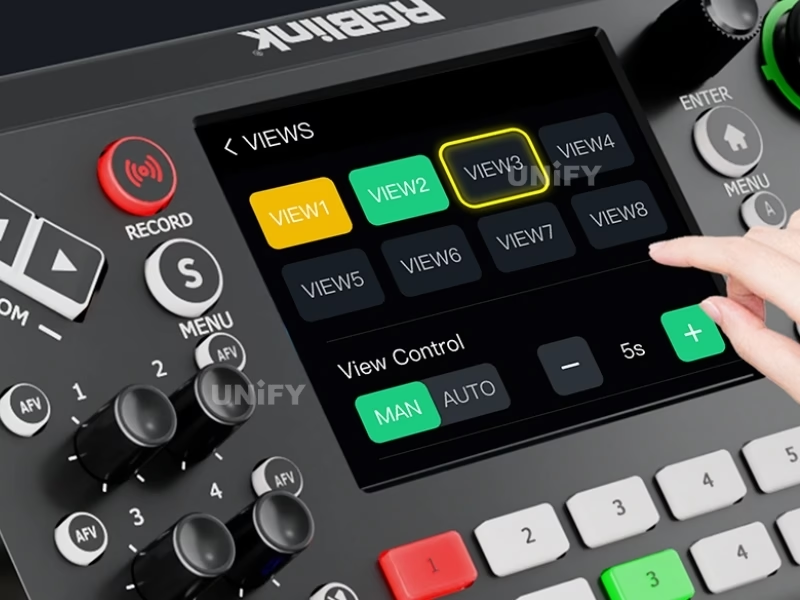
The mini-ISO is designed to run a live show without a laptop. The 3.5-inch TFT full-color touchscreen monitors all input channels and the output picture in real time, and doubles as the menu surface: source selection, transitions, keying, audio levels and recording status all operate from the glass, while the full-featured keyboard on the panel gives every function a hard button — a redundancy that matters mid-show when a finger on glass is slower than muscle memory on a key. RGBlink’s own operating guidance splits work cleanly between the two: touch for browsing sources and settings, keyboard for the actions you fire repeatedly.
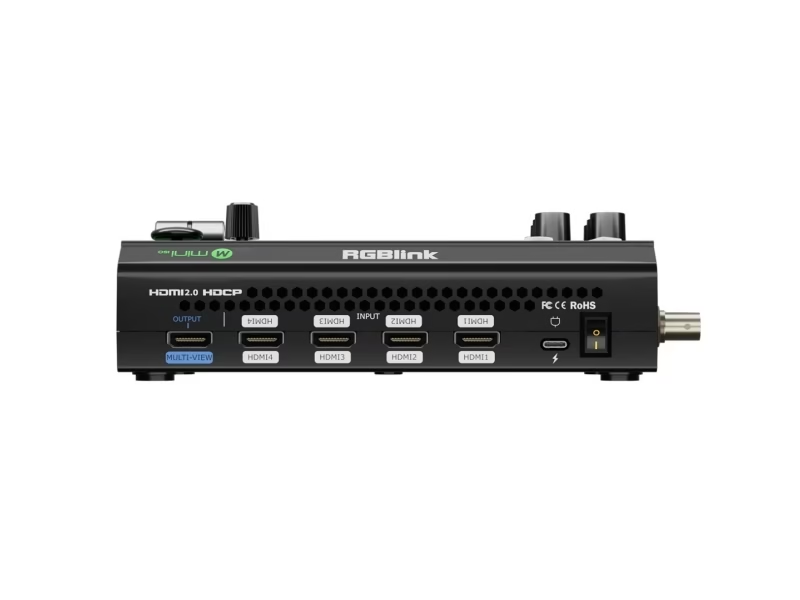
Two output monitors complete the director’s position: the dual HDMI 1.3 outputs carry the multi-view preview — every input plus program in one frame — and the program feed, or a test pattern, on independent screens. A director watches the multi-view on a field monitor, cuts on the keyboard or touchscreen, and sends program to the LED processor or projector. With the LED display for church and house-of-worship runs that dominate single-operator production, the no-PC console is what keeps the Sunday service on air with volunteers at the desk.
Production Depth
What Layer, Transition and Keying Power Does the RGBlink mini-ISO Switcher Offer?
Compositing on the mini-ISO runs two full video layers plus a background image plus two graphic overlays from the media pool. Each assignable video layer scales, positions and crops over the background; the media pool carries lower-thirds, branding logos and sting graphics that switch in as overlay layers — the classic talking-head frame is a background, a full-screen camera layer, a PiP window of the second camera and a lower-third name graphic, all live on one engine. RGBlink’s guidance on layer load is practical: open layer A and layer B separately when adding a logo or background, because stacking everything on one layer overloads the system and causes stuttering — a stated operating limit that belongs in the spec conversation before purchase.
Transition depth covers the director’s grammar: 15 DVE transition effects between preset and program, AUTO and WIPE switch modes, and a T-bar for manual speed control. Keying includes a one-click chroma key with green or blue selectable as the key color and tolerance refined on the touchscreen — a presenter in a green-screen virtual studio needs no external keyer — plus luma key for text and graphic insertion. Picture-in-picture runs two independently operating layers, letting a PiP window cut, transition and key on its own timeline from the main program. Video latency holds under three frames, which keeps confidence-monitor lip sync acceptable for sung and spoken content alike.
Official RGBlink video — chroma key on the mini-ISO.
Camera Control
How Does PTZ Camera Control Work on the RGBlink mini-ISO Switcher?
The mini-ISO puts PTZ control on the front panel instead of a separate camera controller: the 5-direction joystick and its toggle drive pan, tilt, zoom and focus for up to five PTZ cameras over industry-standard IP VISCA — no VISCA-to-RS232 converter box between the switcher and the cameras. The same joystick and toggle reassign in real time to scale, position and crop on video layers, so one physical control serves camera moves and DVE moves depending on the selected function.
Presets close the loop for one-operator shows: the mini-ISO saves up to eight complete scene presets — camera position, PTZ focus, source selection and the involved effects — and recalls them with one press through a smooth transition. A church service that cuts between lectern, worship band and congregation shots programs each camera angle as a preset and the volunteer operator presses recall instead of driving joysticks mid-service. NDI-connected PTZ cameras join the same control plane through the network port, which RGBlink covers in a dedicated NDI PTZ control video on the official channel.
Official RGBlink video — PTZ control on the mini-ISO.
Recording
What Can the RGBlink mini-ISO Switcher Actually Record?
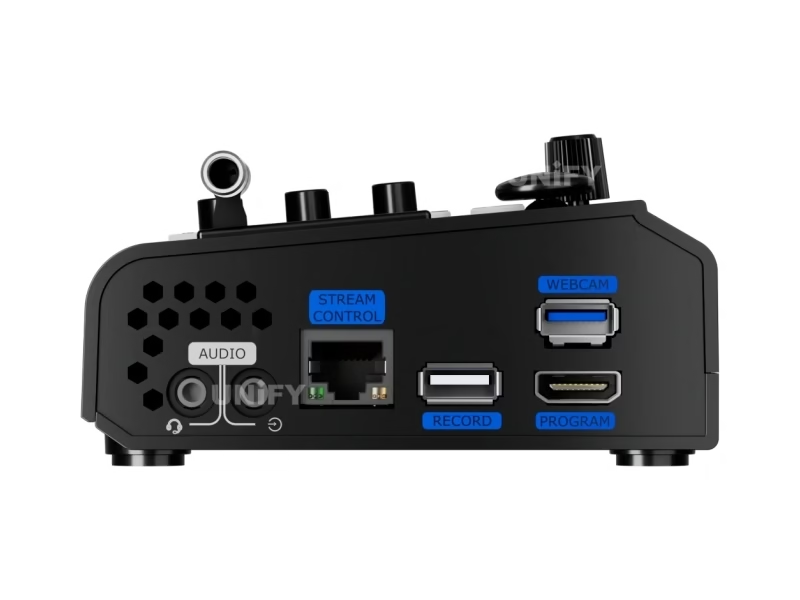
The recording story is the one most mini-ISO listings blur, so it deserves the exact mechanics. One USB 2.0 port — silk-screened RECORD on the panel — records the program output as a single MP4 stream. Four quality settings choose the bitrate: 2, 4, 8 or 16 Mbps. Media rules from the manual: an external SSD records up to 2 TB, a USB stick up to 64 GB, both in FAT32 or exFAT; the unit auto-segments files at 4 GB, which at 6 Mbps is roughly 60 minutes per segment. Media must be formatted before first use — the mini-ISO formats the drive from its Record menu — and the drive is only removed after recording completes. RGBlink’s official channel demonstrates reliable long-form recording to a Samsung T7 SSD on firmware V1.89, and one-key operation starts and stops from the panel without a laptop.
The boundary is the one repeated across this page: there is no independent ISO recording of each input channel — the manual states it as a feature-list note and the official FAQ answers it directly (“Independent recording of each HDMI/SDI input is currently not supported”). Buyers who need per-camera files for multi-cam editing — the workflow ATEM Mini Pro ISO users get, with a DaVinci Resolve project generated per show — will not find it here. What the mini-ISO records is the finished program, at broadcast-usable bitrates, onto cheap USB media, plus the streaming story below.
Streaming & Distribution
How Does the RGBlink mini-ISO Switcher Stream to Meetings, Platforms and Networks?
The mini-ISO reaches audiences through four pipes, each covering a different destination. First, the USB webcam output: the USB-A stream port presents the program to any laptop as a UVC camera in YUY2 or MJPEG at up to 1080p60 — connect one USB cable to a laptop or conference appliance and the switcher appears in Zoom, Teams, Meet, OBS or vMix as a camera, no capture card or driver install in the path. Second, direct RTMP(S): the unit pushes to up to four streaming platforms simultaneously — YouTube, Facebook, Twitch and a church’s own RTMP endpoint can all run at once. Third, vertical output: the 1080×1920@60 HDMI mode feeds phone-first platforms that want portrait video, and USB output mirrors the choice for short-form capture.
Fourth, the TAO Cloud layer: stream once to RGBlink’s TAO Cloud and the cloud restreams to up to 32 content platforms at the same time — the answer for organizations that need dozens of destinations without 32 separate RTMP connections. TAO Cloud is also the remote control plane: the mini-ISO web app runs on Windows, macOS, Android and iOS for switching and streaming from a phone or laptop on the same network, with an OpenAPI for integration into custom control systems. NDI closes the network story — encode the program as NDI|HX2 for other machines, decode NDI sources as inputs, and NDI|HX2 licensing follows RGBlink’s application flow documented in the manual.
A practical stream math: a hybrid conference with a conference LED display solution in the room sends the same program three ways — HDMI program to the LED wall through a processor, UVC to the Zoom room for remote attendees, MP4 to USB as the archive — from one console in one rack unit.
Portability & Power
How Portable Is the RGBlink mini-ISO Switcher for On-Location Production?
At 0.60 kg net and 197 × 113 × 60 mm — a body that fits in a laptop bag alongside the cameras — the mini-ISO is built for locations where rack gear never goes: a church overflow tent, a street event, a rented stage with no power plan yet. The carry story is reinforced by its power input, which is the least-expected feature on the sheet: the mini-ISO powers through USB-C Power Delivery at 12 V / 2.5 A (30 W typical, 35 W maximum), and PD acceptance means the official channel demonstrates the whole switcher running off a portable power bank. A 100 Wh power bank rated for PD 12 V keeps a mini-ISO cutting for a location set with no mains drop — the same battery that tops up the operator’s phone drives the production desk.
Standard USB-C PD laptop chargers double as the primary supply: any certified PD 12 V / 2.5 A adapter meets the requirement, and the manual advises replacing a failing adapter with a PD 12 V / 2.5 A-or-higher unit before suspecting the hardware — the LCD flashing at power-on is the manual’s first adapter test. In the box, RGBlink ships the power adapter, power cable, USB-A cable and audio cable, so the unit arrives ready to wire.
Official RGBlink video — mini-ISO running on a power bank.
Setup & Operation
How Do You Install and Operate the RGBlink mini-ISO Switcher?
Setup is a wired checklist, not an integration project. Power: USB-C PD adapter into the USB-C port. Sources: HDMI computers into the four HDMI-A inputs, cameras into the four BNC SDI inputs, webcam or capture card into the USB-A UVC input, network sources through the RJ45 LAN port. Outputs: HDMI 1.3 to the multi-view monitor and to the program destination — a projector, a monitor, or an LED video processor driving the wall; USB-A webcam to the streaming laptop; the RECORD-marked USB-A port takes the recording media. Audio follows the same pattern: embedded HDMI audio rides its video, the two 3.5 mm analog jacks take line and mic sources, and AFV switches audio with video automatically while per-source delay lines up cameras whose sound trails their picture.
Two operating facts deserve to be known before the first show. The mini-ISO runs Linux and takes one to two minutes to boot — the official FAQ compares it to a computer’s startup and calls it expected behavior — so power-on happens before call time, not at it. Firmware updates arrive over USB from RGBlink’s download page, and the unit’s update cadence is active: firmware V1.83 shipped August 2025 and V1.89 appeared in official demos by May 2026, alongside the User Manual V1.10 revision history that runs V1.8 (August 2025) to V1.10 (May 2026). The manual’s verified-device lists are the compatibility answer sheet: Mac Studio and M2 MacBook Pro/Air for UVC capture, SONY A7M4, Panasonic AW-HE40SKE, Sony FS7/A7S II, AVKANS NDI cameras and OBSBOT for camera and audio input.
Where It Works
Where Does the RGBlink mini-ISO Switcher Fit in LED-Fronted Event Production?
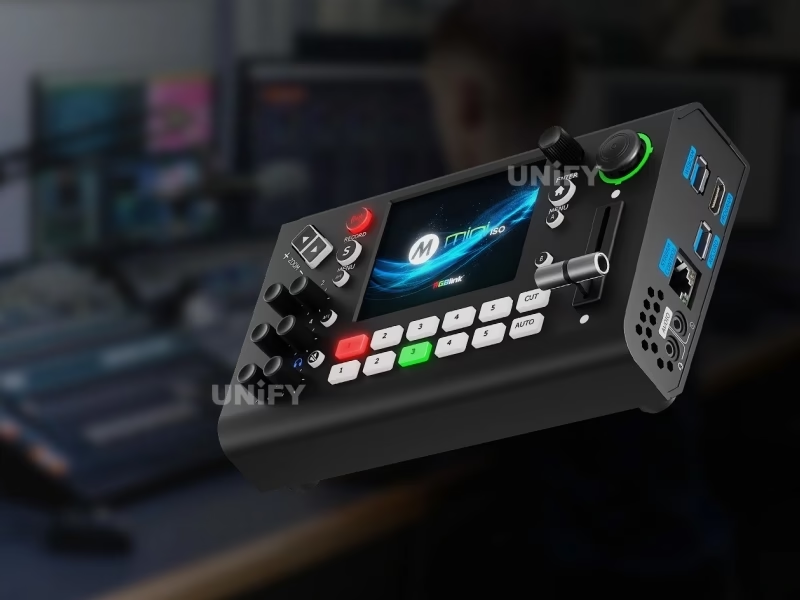
Two to five PTZ cameras, sermon graphics over the media pool, live to YouTube and the room’s LED display for church — a preset-driven console a volunteer runs. Real installs at this scale are covered in our UK church case study.
Rental crews carry one mini-ISO for camera switching in front of stage LED walls and rental LED screens — the 0.60 kg body and PD power suit a flypack that moves daily, and recording to SSD replaces a separate recorder in the chain.
Laptop slides, podium camera and a Zoom room in one UVC pipe, with the room screen fed by a conference LED display solution — no capture card, no second operator for the meeting platform.
Multi-camera product launches and internal broadcasts where the venue screen is a stage event display: keyed presenter over product footage, four-platform streaming, and an MP4 archive on SSD for post.
Comparison
How Does the RGBlink mini-ISO Compare With the ATEM Mini Pro ISO?
The comparison buyers actually make is not against another RGBlink — it is against the Blackmagic ATEM Mini Pro ISO, because the two names collide (both carry “ISO”) and the street prices sit within dollars of each other: $599 for the mini-ISO and $585 for the ATEM Mini Pro ISO at the same authorized dealer, September 2026. They are two philosophies at one price:
- Input count and type: the mini-ISO takes 4K HDMI, SDI, USB and NDI sources together — the ATEM Mini Pro ISO is HDMI-only and 1080p.
- Standalone operation: the mini-ISO cuts from its touchscreen and keyboard with no laptop; the ATEM requires software on a computer.
- ISO recording: the ATEM records each input for multi-cam post; the mini-ISO records the program only — the name is the only “ISO” the mini-ISO shares with it.
- Streaming reach: the mini-ISO pushes four RTMP targets natively and 32 via TAO Cloud; the ATEM streams two via software.
- Field power: the mini-ISO runs off USB-C PD and a power bank; the ATEM needs its mains adapter.
Where the mini-ISO Sits in the RGBlink mini Family
Inside RGBlink’s own mini series of mixing and streaming switchers, the mini-ISO is the 10-channel rung below the 4K mini-max. Channel prices from a US reseller holding stock across the family (September 2026) place it at the value peak of the ladder: the 5-channel mini-edge at $799–$999, the mini-mx production mixer at $1,499 and the 4K mini-max at $1,940 all cost more than the 10-channel mini-ISO at $599. The mini-ISO wins where the job is ten inputs at 1080p program; the mini-max earns its premium where 4K program output and 4K I/O capacity are the requirement. The mini-series position RGBlink advertises for the mini-ISO — broadcasting, leasing, worship, event, conference — is the same venue map as this page’s use cases, which is why the family pages will interlink as RGBlink’s catalog grows on this site.
Pricing
How Much Does an RGBlink mini-ISO 10-Channel All-in-One Switcher Cost?
Price transparency, stated plainly: the RGBlink mini-ISO lists at $599.00 at B&H Photo Video (authorized dealer, in stock, reviewed September 2026; order code 230-0007-01-0, EAN 6976965941082), with Amazon and Sweetwater carrying the same SKU. The comparison anchor on the same channel is the Blackmagic ATEM Mini Pro ISO at $585 — the ISO-recording rival whose per-input files the mini-ISO does not offer. Factory-direct tiers for B2B buyers:
A production budget is the honest frame: a switcher at $599 is the control end of an event video chain whose display end — the LED screen for events, the stage wall, the LED video processor feeding it and the cabinets behind it — carries the larger line items. Genuine unit, 2-year warranty, CE-LVD, CE-EMC, FCC-SDoC and RoHS certificates (RGBlink, April 2026), and RGBlink’s current firmware (V1.83 official release, V1.89 demonstrated May 2026) ship on the box; ask for a factory-direct quote at your fleet size — we are the LED screen manufacturer behind unifyled.com.
FAQ
What Do Buyers Ask About the RGBlink mini-ISO 10-Channel All-in-One Switcher?
What Assurance Comes With the RGBlink mini-ISO Switcher?
Every mini-ISO ships with RGBlink original packaging, the latest firmware and compliance documentation.
Ready to Specify the RGBlink mini-ISO Switcher for Your Next Event?
Factory-direct pricing, genuine RGBlink stock, current firmware pre-loaded and 2-year warranty.
unifyledscreen@gmail.com | +86-191-18802497
Technical Deep-Dive
What Should Engineers Know Before Buying the RGBlink mini-ISO 10-Channel All-in-One Switcher?
Published: September 2026 | 12 min read | UnifyLED Engineering Team
The RGBlink mini-ISO 10-Channel All-in-One Switcher is the switcher to know when an event brief names ten inputs, a touchscreen and a price under $600. This guide is written for engineers, integrators and procurement teams specifying live production gear in 2026, using the official mini-ISO Specification V1.1 (May 2026) and User Manual V1.10 (May 2026) as data sources, with the naming facts, the recording boundary and the price comparison that distributor pages skip.
Chapter 1 — Definition and Position
The RGBlink mini-ISO is a 10-channel all-in-one video switcher for live production: four HDMI 2.0 inputs at up to 4K60, four 3G-SDI inputs, one UVC input and one NDI input feed a Linux engine that mixes eight audio sources, keys two video layers over a background with graphic overlays, applies one of 15 transitions, and routes program to dual HDMI outputs, a USB webcam stream, an RTMP(S) stream, an NDI output and a USB recorder — all from a 3.5-inch touchscreen on a 0.60 kg body. It is the live-direction stage of a production chain: upstream of the display, downstream of the cameras.
Position matters for procurement because switchers, players and processors answer different questions. A Mooncell MB401 Networked Player plays scheduled content from its own library; an LED video processor scales one or more signals and drives a wall’s receiving cards; the mini-ISO creates the live program itself — multi-camera cutting, keying and streaming — and hands a finished 1080p signal downstream. A venue that owns a processor and a wall but no switcher cannot cut cameras live; a venue that owns a switcher and no wall cannot show the program at scale. The two halves of the quote belong together, which is why this page links the display half of the chain throughout.
Chapter 2 — The 4K-Input, 1080p-Program Architecture
The single most misread specification line on the mini-ISO is input resolution versus program resolution. The four HDMI 2.0 inputs accept 3840×2160p60 and DCI 4096×2160p60 — a 4K laptop or camera connects native with HDCP 1.4 compliance. The program engine and every output are 1080p: the dual HDMI 1.3 outputs deliver 720p or 1080p, the USB stream delivers up to 1080p60, and recording is a 1080p MP4. The mini-ISO is therefore a 1080p60 production switcher with 4K input acceptance and down-conversion — correct for 2026 workflows where cameras shoot 4K for latitude but stream and record at 1080p, and the reason the unit ships vertical 1080×1920 output for phone-first platforms.
SDI buyers should read the input list the same way. The four BNC inputs are 3G-SDI — 1080p60 class, not 12G 4K-SDI — carrying SMPTE 425M (level A and B), 424M, 292M and 259M-C plus DVB-ASI, with RGBlink’s laboratory data rating 3G-SDI runs to 100 meters. Every standard venue frame rate is present: 720p50/60, 1080i50/59.94/60 and 1080p23.98 through 1080p60. A buyer whose cameras output 4K over 12G-SDI needs the mini-max rung of the family, not the mini-ISO — a boundary the SDI vs HDMI guide helps frame before the quote.
Chapter 3 — The ISO Name, Settled by the Manual
Why does a unit called mini-ISO not record ISOs? The name descends from the ISO-recording concept broadcasters know — isolated recordings of every camera input — and the unit’s own literature leans on the production halo of that workflow. The hardware reality is program-only recording, and RGBlink documents it twice. The feature summary in User Manual V1.10 carries the line “Does not support independent ISO recording for each input channel,” and the manual’s FAQ answers the direct question: “Independent recording of each HDMI/SDI input is currently not supported.” The USB RECORD port saves the composed program as MP4 at selectable 2/4/8/16 Mbps.
The confusion is not buyer error — it is seller error. At least one major US dealer’s Q&A page carries a staff answer affirming isolated recordings, while another answer on the same page says the unit records one output at a time; the manual is the tiebreaker, and it lands on the second answer. For integrators the practical test is simple: if the client’s post workflow needs separate camera files or a Resolve timeline with multi-cam sync, the mini-ISO is the wrong box and the ATEM Mini Pro ISO is the right one; if the client records the finished broadcast and edits a single timeline, program recording covers the job and the mini-ISO’s other strengths — SDI plus NDI inputs, standalone touchscreen, PTZ panel — come into their own.
Chapter 4 — Recording Media, Segmenting and Endurance
Recording endurance is where field failures start, and the mini-ISO’s rules are specific. Media connects to the port silk-screened RECORD — a USB 2.0 port that is not the streaming port. SSD media records to 2 TB, USB sticks to 64 GB, in FAT32 or exFAT; media formats from the unit’s Record menu before first use. Files segment automatically at 4 GB — roughly 60 minutes per file at 6 Mbps — and the manual instructs removing media only after recording stops. Quality settings map to bitrates: Low 2 Mbps, Medium 4 Mbps, High 8 Mbps, Best 16 Mbps. RGBlink’s official channel demonstrates long-form recording to a Samsung T7 portable SSD on firmware V1.89 — the field pattern for marathon events is SSD media, Best quality, checked segments.
Two endurance details round out the picture. First, recording while the unit is on Ethernet can leave incorrect time information in the file — the manual flags the interplay, so archive files should be named and time-checked at segment boundaries on long shows. Second, the recording engine is the same one that streams: RTMP(S) out to four platforms and MP4 to disk run concurrently from the program engine, which is the split that lets a worship service stream live and archive at the same time. The physical envelope — 0–60 °C operating, 10–85% RH — suits field cases and flypacks rather than fixed outdoor racks.
Chapter 5 — The Standalone Console and the Laptop Question
The design bet of the mini-ISO is that a live show should not depend on a laptop. Operation runs from the 3.5-inch TFT touchscreen — source browsing, effects, audio, recording status and a live multi-view of every input — with a full-featured keyboard underneath for one-touch actions. The dual HDMI outputs put the multi-view on one monitor and program on another, or program on one and a test pattern on the second; the operator’s position is two field monitors, one console, no computer. The UVC streaming port keeps the laptop optional in the other direction: connect one USB cable and the switcher becomes the laptop’s webcam for Zoom, Teams, OBS or vMix — capture-card-free meeting production that fits a conference LED display solution where the room screen and the remote audience share one program.
The trade-off is worth stating for ATEM users who read “no laptop” as “less capable”: the ATEM’s software control surface is deeper in media and macro territory, while the mini-ISO trades that depth for physical control and portability. RGBlink covers the middle ground with TAO Cloud — the mini-ISO’s web app runs on Windows, macOS, Android and iOS for remote switching, monitoring and streaming, with an OpenAPI for integrators who want the console in their own control system. Firmware keeps the unit current: official release V1.83 (August 2025), V1.89 demonstrated in official videos by May 2026, and the User Manual’s revision history shows V1.8 (August 2025) to V1.10 (May 2026) — an update cadence that argues the product is being maintained, not orphaned.
Chapter 6 — NDI, TAO Cloud and the 32-Platform Reach
Network video is the mini-ISO’s differentiator inside its price band. NDI appears twice: as an input decoder, pulling any NDI source on the LAN into the switcher — a laptop running NDI Tools, an NDI PTZ camera, a second production machine — and as an encoder, publishing the program as an NDI|HX2 source for other machines to receive. NDI|HX2 encoding is license-gated: the buyer applies to RGBlink, receives authorization and imports it into the unit, a flow the official channel walks through in a dedicated video. PTZ joins the same network plane — IP VISCA over the LAN controls NDI-connected cameras alongside the HDMI and SDI ones, and RGBlink publishes a separate NDI PTZ control walkthrough.
Distribution reach stacks in three layers. Direct RTMP(S) covers four platforms from the unit. TAO Cloud adds the restream layer: stream once to RGBlink’s cloud and it redistributes to up to 32 content platforms simultaneously — a church that wants Facebook, YouTube and two language feeds, or an event with a dozen regional streaming partners, configures destinations in the cloud instead of multiplying RTMP keys on the panel. The USB webcam layer covers meetings and capture apps with no platform account at all. Vertical 1080×1920 output addresses the phone-first side of the same reach, which is where live shopping and short-form event coverage live.
Chapter 7 — PTZ, Presets and the Volunteer Operator
Single-operator production is the mini-ISO’s home turf, and PTZ is the reason. The front-panel joystick and toggle drive pan, tilt, zoom and focus on up to five IP VISCA cameras — most switchers at the price have no PTZ at all, and the ones that do route it through software. The joystick double-assigns to scale, position and crop on the video layers, so one control serves camera moves and DVE moves. Eight scene presets store the complete look — camera position, PTZ focus, source, effects — and recall in one press with a smooth transition: a service that rotates lectern, band and congregation angles programs the shots once and lets the operator press recall through the event.
The venue pattern this serves is the one our case work documents: houses of worship running multi-camera coverage in front of church LED displays — the Lagos church install and the UK historic church project both run screens that a switcher like this would feed from cameras on the same campus. For those crews the operator skill floor matters more than effect depth, and preset recall is the skill floor. Chroma key completes the volunteer picture: green-screen virtual sets key with one click and tolerance refinement on the touchscreen, no external keyer in the path.
Chapter 8 — Cost, Family and the Buying Decision
The mini-ISO lists at $599.00 at B&H Photo Video (authorized dealer, in stock, September 2026) — order code 230-0007-01-0, EAN 6976965941082 — with the same SKU on Amazon and Sweetwater. The honest reference set comes from two directions. Inside RGBlink’s mini family, the 5-channel mini-edge sells at $799–$999 and the 4K mini-max at $1,940 on a US reseller’s shelf, so the 10-channel mini-ISO at $599 is the value peak of the ladder — a price RGBlink can hold because the unit is 1080p program, not 4K. Across brands, the ATEM Mini Pro ISO at $585 is the same-money rival with true ISO recording and DaVinci integration; the mini-ISO answers with SDI and NDI inputs, standalone touchscreen control, PTZ on the panel, four-plus-platform streaming and power-bank operation. Buy the ATEM for per-camera post; buy the mini-ISO for field production that records the broadcast and needs no laptop.
Fleet math closes the tender: a rental house that carries four mini-ISO units at $599 runs about $2,400 in switcher hardware — cheaper than one 4K broadcast switcher — and the PD power and 0.60 kg bodies let the same cases fly as carry-on. Spares follow the price: one unit per four in the fleet covers realistic failure rates, and firmware updates arrive over USB without RMA. The official documents are the reference for every number on this page: Specification V1.1 for the electrical and physical sheet, User Manual V1.10 for the operating rules and the verified-device lists (Mac Studio and M2 MacBooks for UVC; SONY A7M4, Sony FS7/A7S II, Panasonic AW-HE40SKE, AVKANS NDI cameras and OBSBOT for input). Where a distributor page differs — the ISO claim, the dimensions, the power figure — the RGBlink documents win, and this page has followed them.
Conclusion
The RGBlink mini-ISO 10-Channel All-in-One Switcher is the 10-input, 1080p-program rung of RGBlink’s mini series: four 4K60 HDMI plus four 3G-SDI plus UVC and NDI inputs, a standalone touchscreen console with panel PTZ control of five cameras, 15 transitions, chroma and luma keying, MP4 program recording to SSD at up to 16 Mbps, streaming to four platforms and 32 via TAO Cloud — in a 0.60 kg, USB-C PD body at a $599 street price. It records the broadcast, not per-camera ISOs; the ATEM Mini Pro ISO covers that workflow at the same money. Specify the mini-ISO where the show is ten sources, one operator and no laptop.
Planning a live production build around an LED wall? Talk to us — we are the LED screen manufacturer behind unifyled.com, and switchers, processors and screens ship together with 2-year warranty and engineering support.
Related Pages
Build the Display Half of the Same Production Chain
LED screen for events
LED display for church
Conference LED display solution
Stage LED display R series
500×500 rental LED screen
SDI vs HDMI
Mooncell MB401 Networked Player
English · May 2026 · full connectors, performance, power and physical sheet · order code 230-0007-01-0
English · May 2026 · newest revision (V1.8 Aug 2025 → V1.10 May 2026) · 95 pages incl. FAQ and verified-device lists