
RGBlink · mini Series · SDI Live Production Switcher
RGBlink mini-edge SDI 10-Channel All-in-One Switcher
The RGBlink mini-edge SDI 10-Channel All-in-One Switcher is the SDI-equipped production console of RGBlink’s mini-edge line: ten input connectors (four 4K60 HDMI 2.0, four 3G-SDI, UVC and bidirectional NDI), a built-in 5.5-inch monitor, 16 scene presets, XLR microphone inputs with 48 V phantom power and fan-cooled 24/7 operation for rental and installed event production.
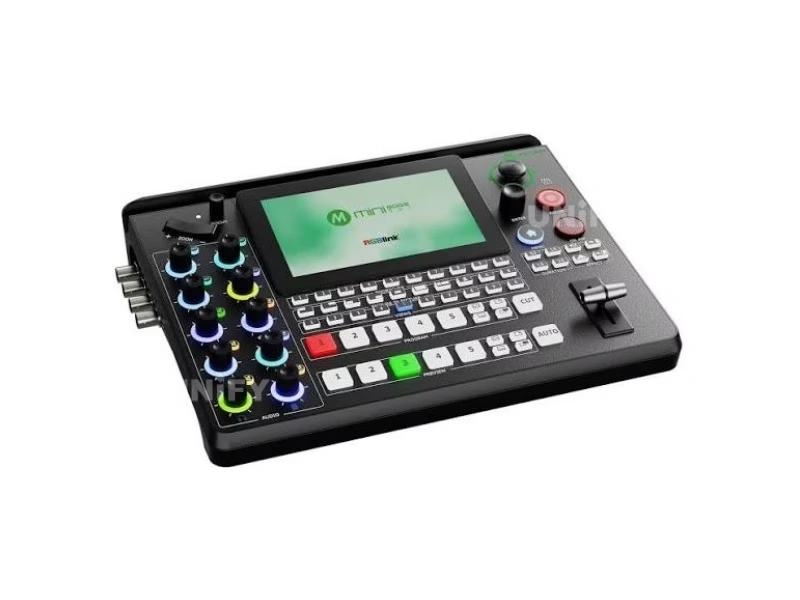
Product Overview
What Is the RGBlink mini-edge SDI 10-Channel All-in-One Switcher?
The RGBlink mini-edge SDI 10-Channel All-in-One Switcher is the SDI-capable member of RGBlink’s mini-edge line of all-in-one live production switchers: a unit that takes ten input connectors — four HDMI 2.0 inputs up to 4K60 with HDCP 2.2, four 3G-SDI inputs, one UVC input and one NDI input — mixes eight audio sources (XLR with 48 V phantom power, TRS line, Bluetooth and HDMI/SDI embedded), and drives program, preview, recording, UVC streaming and bidirectional NDI outputs from a built-in 5.5-inch monitor and a full broadcast-style panel with T-bar, cut/auto keys, a joystick and assignable buttons. It recalls 16 complete scene presets, records MP4 to USB media up to 2 TB while streaming, and runs fan-cooled for 24/7 use — official data sources on this page are the mini-edge SDI Specification V1.1 (March 2026 revision file date), Brochure V1.2 and User Manual V1.0, downloaded from RGBlink’s own product page.
Short answer: The RGBlink mini-edge SDI is a 10-connector all-in-one video switcher: four 4K60 HDMI 2.0 inputs, four 3G-SDI inputs, one UVC input and one NDI input (bidirectional); two HDMI outputs plus UVC webcam streaming, USB-C recording to 2 TB and NDI|HX2 with license; a built-in 5.5-inch monitor with a broadcast panel (T-bar, cut/auto, effects keys, joystick); 16 scene presets; XLR mic input with 48 V phantom power, TRS line, Bluetooth and embedded audio for eight-channel mixing; H.265 encoding; RTMP(S) streaming to four platforms and 32 through TAO Cloud; USB-C PD 12 V / 3.3 A (40 W) power; 1.48 kg fan-cooled body — listing at $729 in authorized distribution (promotional price off a $999 list). It is the SDI version of the five-channel mini-edge — same name family, four extra 3G-SDI inputs, bidirectional NDI and audio noise reduction — and RGBlink’s documents describe both, which is why this page states the two-generation naming difference up front.
The naming trap deserves the first paragraph of any mini-edge SDI purchase conversation, because the model name appears twice in the catalog: the original mini-edge is a 5-channel HDMI switcher (four HDMI 2.0 inputs plus one UVC input, order code 230-0006-01-0), while the mini-edge SDI reviewed on this page adds four 3G-SDI inputs, a bidirectional NDI port and audio noise reduction to reach its ten connectors (order code 230-0008-01-0). RGBlink’s own specification sheet carries the two models side by side in a comparison table, and distributor listings for the two units mix freely — one US reseller lists the 5-channel unit at $799 and the 10-channel SDI unit at $999, and B&H sells the SDI unit at a promotional $729. The older unit is covered by this page’s comparison section; the SDI unit is the subject of the page.
In the production chain the mini-edge SDI sits beside the RGBlink mini-ISO 10-Channel All-in-One Switcher we reviewed first: both take ten connectors, and the choice between them is an operating-philosophy decision — the mini-ISO runs on a 3.5-inch touchscreen in a 0.60 kg battery-friendly body, the mini-edge SDI runs on a 5.5-inch monitor with a T-bar panel in a 1.48 kg fan-cooled body. Either switcher sits upstream of the display: program out of the unit into an LED video processor, and the processor drives the wall’s receiving cards — the switcher cuts cameras and computers live, and the screen shows the result to the room.
Official RGBlink video — mini-edge SDI basic overview.
Specifications
What Are the RGBlink mini-edge SDI 10-Channel All-in-One Switcher Specifications?
Data from the official RGBlink mini-edge SDI Specification V1.1, Brochure V1.2 and User Manual V1.0.
Video, Audio & Control
Official Data Check
What Do Official mini-edge SDI Documents Say That Distributor Pages Get Wrong?
Five figures on distributor pages disagree with RGBlink’s own documents, and each one changes a buying decision. First, recording endurance: RGBlink’s brochure states that recording “of 160Mbps high-definition video can last 100 hours” — at 160 Mbps a 2 TB drive holds about 28 hours, not 100, and 100 hours across the 2 TB limit implies a 44 Mbps average. The honest reading is that the 100-hour figure assumes the unit’s typical bitrates, and a marathon recording plan should verify space per show rather than trust the headline; this page follows the capacity numbers on the specification sheet (FAT32 to 32 GB, exFAT 64 GB to 2 TB).
Second, power: the specification sheet lists USB-C PD 12 V / 3.3 A at 40 W maximum, while a leading dealer’s spec table prints 5 V / 3 A (15 W) — 15 W cannot drive this unit, and the 40 W PD figure is the one to plan power budgets around. Third, temperature: RGBlink rates the unit 0–45 °C; the same dealer page prints 0–60 °C. Fourth, weight: the sheet lists 1.48 kg net and 2.80 kg packaged, while the dealer page prints 0.6 kg — 0.6 kg is the mini-ISO’s weight, copied across model lines. Fifth, NDI generation: RGBlink’s page and specification say NDI|HX2, and some dealer copy writes NDI|HX3 — the transport on the unit is the HX2 profile, and the SDI vs HDMI framing applies to its inputs: 3G-SDI is the 1080p60 cable standard, not 12G 4K-SDI.
Input Architecture
How Do the 10 Input Connectors of the RGBlink mini-edge SDI Switcher Work?
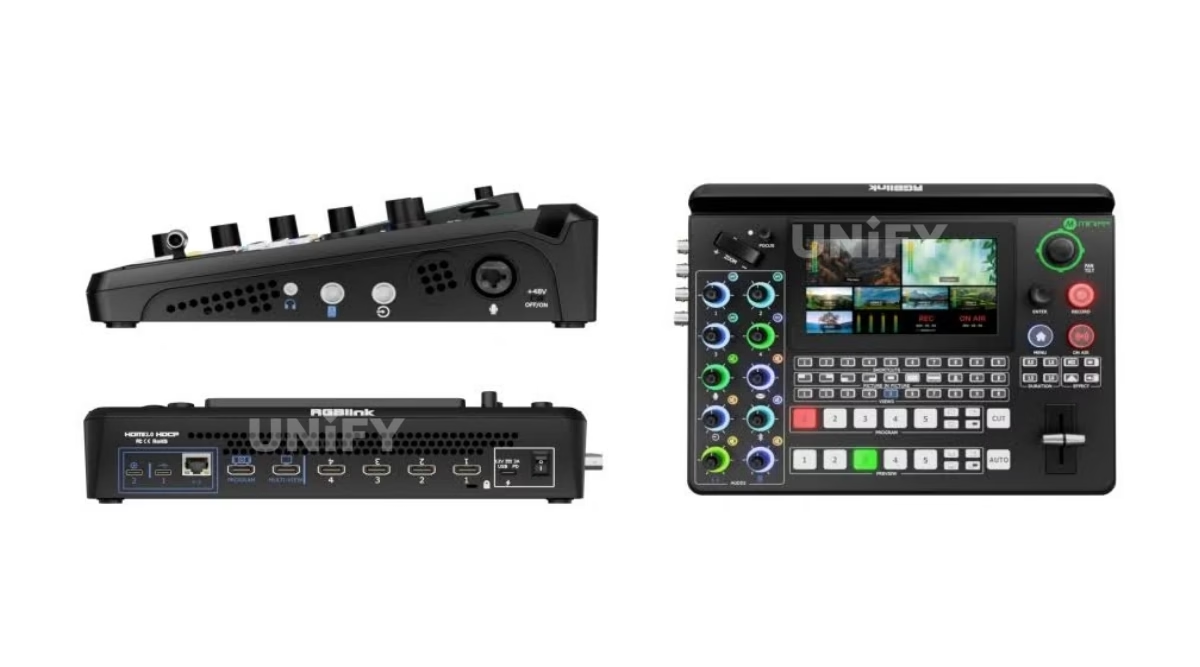
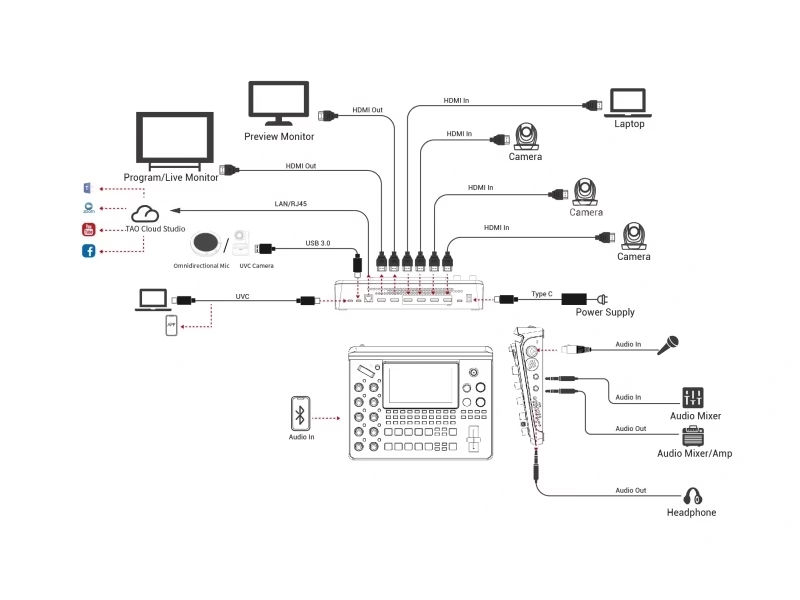
The ten connectors split into four families, and the SDI quartet is the reason this model exists. Four HDMI 2.0 inputs take computers, laptops and HDMI cameras at up to 4K60 with HDCP 2.2 — presentation machines, IMAG cameras and playback sources connect native. Four 3G-SDI inputs on BNC take the cameras already cabled in a venue at broadcast frame rates (720p50/60, 1080i50/59.94/60, 1080p23.98 through 1080p60): the mini-edge SDI is the cheapest RGBlink console that puts SDI on the panel, which is the argument against HDMI-only switchers when a house has run SDI to camera positions. The ninth connector is UVC over USB-C — a webcam, a camera, or RGBlink’s AI mini — and the tenth is NDI over RJ45, which works in both directions at once: decode any NDI source on the LAN as an input and encode the program as an NDI|HX2 source for other machines, after RGBlink’s license application flow.
RGBlink’s feature list adds “6-CH customizable video inputs,” and the practical translation lives in the unit’s input assignment: the four HDMI/SDI camera positions accept mixed formats and resolutions simultaneously — a 4K HDMI camera next to a 1080p SDI camera next to a laptop — the manual notes the unit accepts up to four sources of different formats and resolutions at the same time through the camera ports, and the front-panel buttons bind input signals 1–4 to the transport keys you use most. The processing note for 4K buyers matches the mini family: HDMI inputs accept 4K, the program and every output run 1080p — this is a 1080p60 production switcher with 4K input acceptance and down-conversion, which is correct for streams, records and LED walls that deliver 1080p program anyway.
Monitor & Panel
How Does the 5.5-Inch Monitor and Broadcast Panel Make the mini-edge SDI a Self-Contained Console?
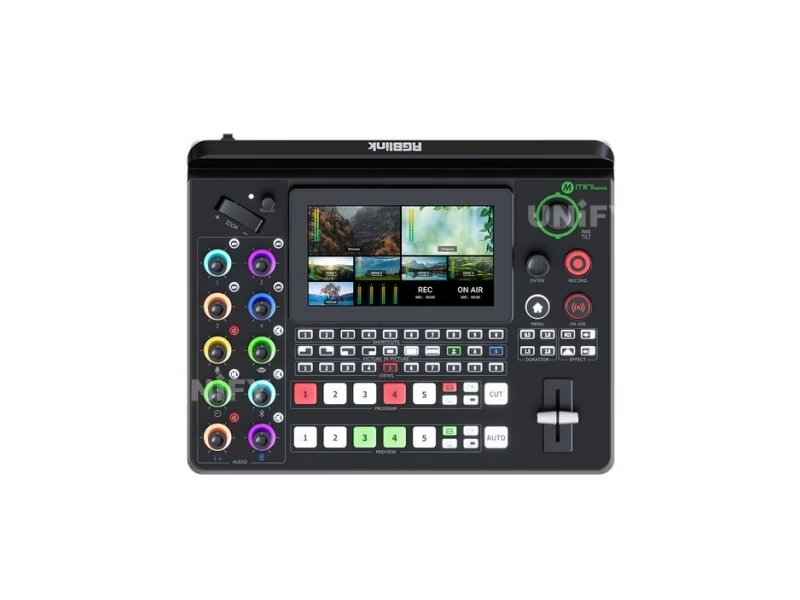
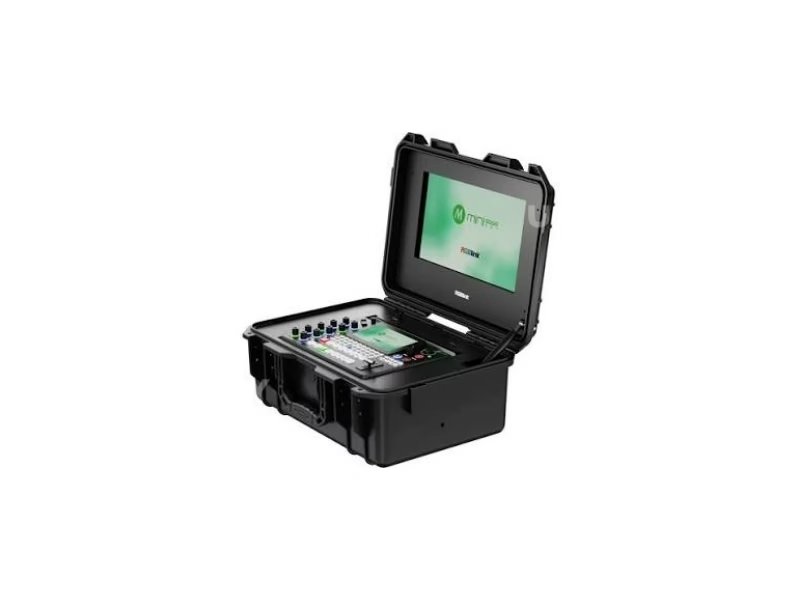
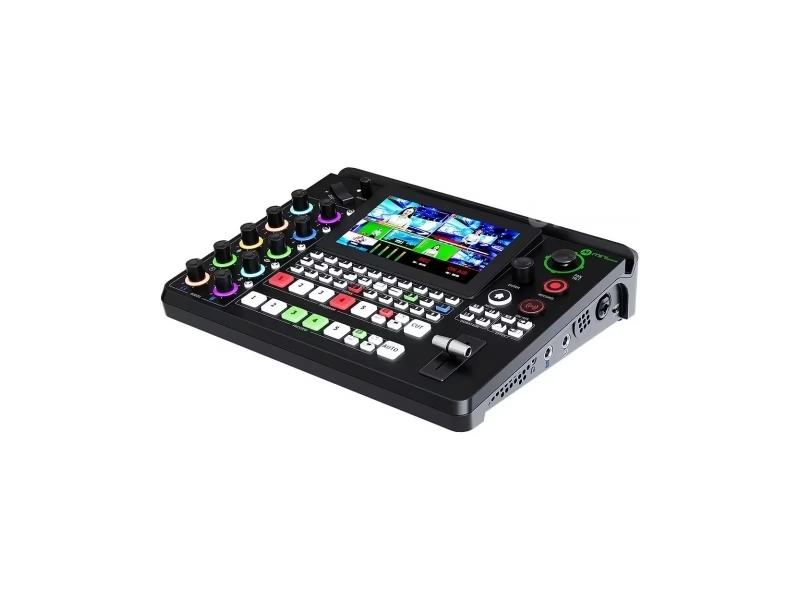
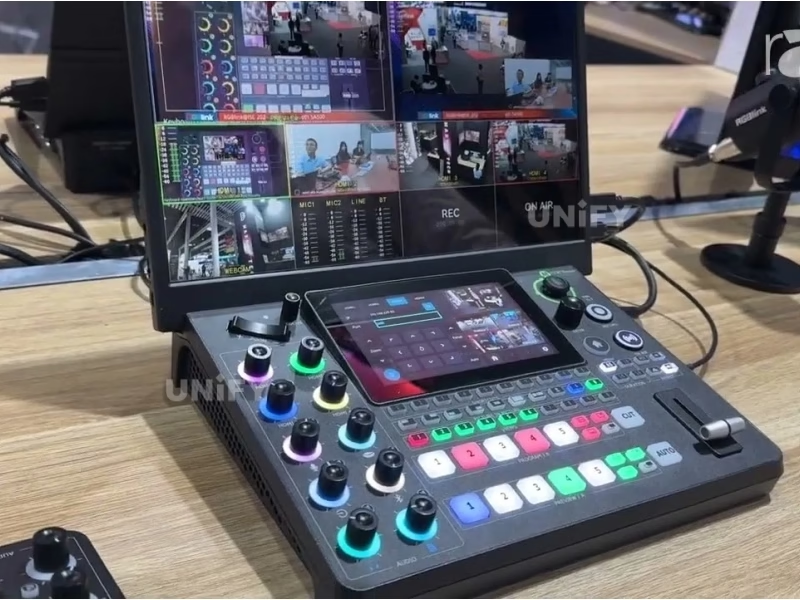
The mini-edge SDI is built to be operated without an external monitor or laptop. The embedded 5.5-inch full-color TFT screen shows every input channel and the output images in real time — a built-in multi-viewer that frees the two HDMI outputs for program and preview on venue screens — and doubles as the menu surface with full-screen preview of any source. The panel around it follows broadcast ergonomics rather than touchscreen logic: transport keys (RECORD, ON AIR, CUT, AUTO), transition control (EFFECTS, DURATION, T-bar), layer and camera sections, a five-direction joystick with zoom toggle and an external focus control, plus a row of shortcut and number buttons for source selection and preset recall.
The assignable-button layer is where the panel goes beyond basic switching — the manual documents binding any key to SIGSEC, PTZ signal, DSK (downstream key), input signal selection, fan speed or device sleep/power-on, so an operator builds a custom desk for the show. The 115-degree vertical slot on the body mounts an iPad, monitor or smartphone for extended monitoring or stream review — a dealer Q&A measures the slot at roughly 3/8 inch wide — and the same slot turns the unit into a two-screen console on location.
Presets & Camera Control
What Layer, Keying and Preset Power Does the RGBlink mini-edge SDI Switcher Offer?
Compositing on the mini-edge SDI runs two full video layers plus a background image and two graphic overlays from the media pool, each assignable layer scaled, positioned and cropped over the background. Chroma key handles green and blue on the unit — the web interface extends keying to six colors — luma key covers text and graphic insertion, picture-in-picture layers cut independently, and a library of DVE transitions moves preset to program; switching itself runs on the T-bar, CUT, AUTO and the effects and duration keys — the layout a broadcast operator expects, and the design difference from the touchscreen RGBlink mini-ISO.
Scene presets are the unit’s answer to one-operator shows: the mini-edge SDI stores 16 complete scenes (Views 1–16) — source selection, graphics, audio settings and even the PTZ camera’s position and focus — and recalls any of them in one press with a smooth transition between scenes. The thumbnails and icons on the panel make preset recall visual: an operator programs the lectern, band and congregation shots of a service once, then presses recall through the event instead of driving cameras and keys live. That is 16 scenes against the 8 on the mini-ISO and 10 on the original mini-edge — the deepest preset memory in the mini family.
PTZ control runs on industry-standard VISCA or NDI protocol for up to four cameras, with manual real-time control from the panel: the joystick drives pan, tilt, zoom and focus, an external focus control trims sharpness without menu diving, and PTZ preset and PTZ protect functions round out the camera layer. One limitation belongs in the spec conversation: the mini-edge SDI controls camera movement and lens functions over VISCA/NDI, but it does not dial in a camera’s shutter, white balance, ISO or iris — a dealer staff answer (February 2026) confirms those settings stay on the camera’s own software or web GUI. Cameras whose exposure must be re-mastered from the switcher need a different control plane.
Official RGBlink video — PTZ control on the mini-edge SDI.
Recording
What Can the RGBlink mini-edge SDI Switcher Record?
Recording on the mini-edge SDI is program-output recording to a USB-C 3.0 drive: MP4 files onto hard drives or flash media up to 2 TB, in FAT32 (up to 32 GB) or exFAT (64 GB to 2 TB), with the unit recording and streaming at the same time — a worship service or event records its archive while its live stream runs, from one engine. The one-key RECORD button on the panel starts and stops capture, and audio and video can be imported into a show simply by inserting a USB drive with media files. RGBlink’s brochure cites 100 hours of HD recording on 2 TB media; as the official-data check above notes, the endurance math depends on the bitrate in use, and the capacity rules on the specification sheet are the reliable planning reference.
The name question buyers bring from the mini-ISO applies here too: the mini-edge SDI records the finished program, and RGBlink does not market per-input ISO recording on this model — units that record every camera separately for multi-cam post are the ATEM Mini Pro ISO class, compared in the price section below. What the mini-edge SDI does that its touchscreen sibling does not is the 24/7 envelope: fan cooling with user-adjustable fan speed supports long-running rental and installed operation, and the 100-hour recording claim is aimed at marathon events rather than short captures.
Official RGBlink video — record function on the mini-edge SDI.
Audio Console
What Audio Capabilities Does the RGBlink mini-edge SDI Switcher Bring?
Audio is where the mini-edge SDI separates from the mini-ISO for live-music and worship work. The panel carries two insert audio ports accepting TRS quarter-inch jacks, with the MIC port supporting direct XLR connection and 48 V phantom power from the unit itself — a studio condenser microphone connects natively with no external DI box in the path. A separate TRS line input takes the house feed or a second source, Bluetooth accepts wireless audio, and a USB/UAC path brings in digital sources; four HDMI/SDI embedded audio channels complete an eight-channel mix with individual volume and sound-effect controls via the front knobs, one-key mute and monitoring, and mixed audio routed to one or all available outputs.
Sync and switching complete the audio story. AFV (audio-follow-video) switches embedded audio with its video source to preview and program automatically — a camera cut brings its mic with it. Per-source delay lines up audio behind its picture: the line input delays up to eight frames, which is how a distant camera or a Bluetooth source stays in sync with the program. RGBlink’s differentiation summary against the original mini-edge adds audio noise reduction to the SDI model’s list, which matters in venue feeds with hum and hiss.
Streaming & Network
How Does the RGBlink mini-edge SDI Switcher Stream Without a Laptop?
The mini-edge SDI streams by itself: RTMP(S) pushes to four platforms simultaneously directly over its Ethernet port — YouTube, Facebook, Twitch and a house RTMP endpoint run at once with no computer in the path — and RGBlink’s TAO Cloud layer restreams the same program to up to 32 platforms or connections. Encoding runs H.265 or H.264, and RGBlink’s own comparison material claims the H.265 side saves roughly half the bandwidth and half the storage of H.264 at comparable quality — the figure that matters for rental crews streaming from venue networks with limited uplinks. The USB-C stream port doubles as a UVC webcam output: connect one cable to a laptop or conference appliance and the program appears as a camera in Zoom, Teams, OBS or vMix.
Two network capabilities set the mini-edge SDI apart at its price. NDI works bidirectionally: the RJ45 port decodes NDI sources as inputs and encodes the program as NDI|HX2 simultaneously (NDI|HX2 runs under an RGBlink license; the manual documents authorization). Third-party control and integration ride on RGBlink’s free Central Control Protocol — integrators drive the switcher from their own control systems without paid middleware — alongside the webAPP/XPOSE browser control and TAO Cloud remote operation from phones and desktops. Vertical output covers phone-first platforms, and the unit’s USB-C port shares a 5G/4G smartphone’s network to a show location with no Wi-Fi — the tethering workflow is documented step by step in the manual.
Official RGBlink video — NDI function on the mini-edge SDI.
Official RGBlink video — live streaming on the mini-edge SDI.
Field Networking
How Do You Run a Show With the mini-edge SDI Where There Is No Wi-Fi?
Venue networks fail at the worst moment, so the mini-edge SDI carries its own connectivity story. The unit shares a smartphone’s cellular network over the USB-C port — the manual walks the full path: connect a standard phone cable to the USB-C port, enable Personal Hotspot with “Share Phone Network via USB” on the phone, and select the connection in the switcher’s settings — which puts a 5G/4G uplink on a show location with no Wi-Fi, no venue network permission and no additional hotspot hardware. A rental crew streaming a field event with a phone on the desk streams at the phone’s data rate instead of begging the venue for a port.
The same USB-C path feeds RGBlink’s device ecosystem: the bidirectional UVC port accepts USB disk recording media, wireless speakers and wireless microphones — RGBlink’s own material points the function at devices such as the RGBlink AI mini — and the Ethernet port with its NDI license keeps encoder and decoder running at the same time. For fixed installs the network side is equally complete: webAPP and XPOSE browser control, TAO Cloud remote operation and the free Central Control Protocol for third-party systems, all documented in the manual’s control chapters.
Setup & Operation
How Do You Install and Operate the RGBlink mini-edge SDI Switcher?
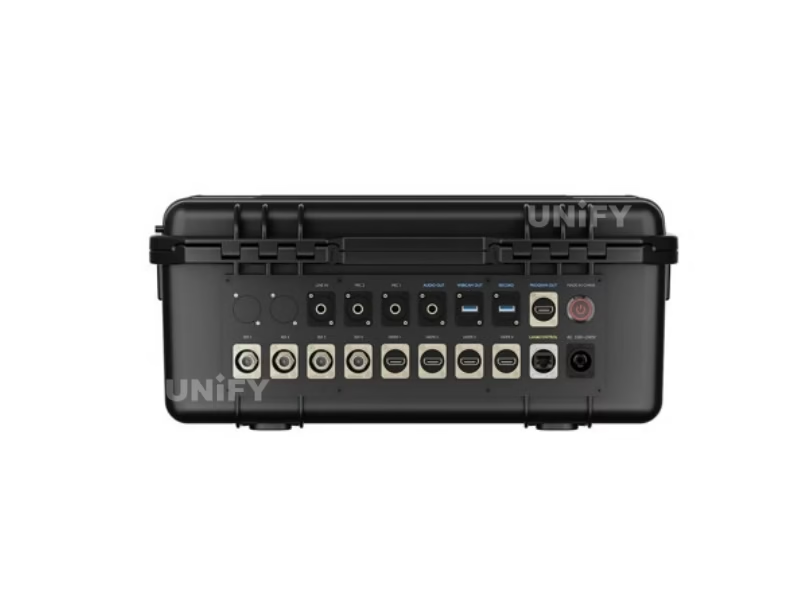
Setup follows the connector map: HDMI computers and cameras into the four HDMI-A inputs, venue cameras into the four BNC 3G-SDI inputs, webcam or capture device into the UVC USB-C port, network sources and outputs through the RJ45 LAN port. Outputs divide by role: two HDMI 1.3 ports carry the multi-view preview, program or a test pattern — one to the operator’s monitor, one to the venue screen chain, or both as you need them — the USB-C record port takes the drive, the USB-C stream port serves the laptop webcam role, and the audio console takes XLR or TRS microphone and line sources with 48 V phantom on the mic channel. The program HDMI feeds an LED video processor that scales and drives the wall’s receiving cards, or a projector or monitor directly — this switcher is the live-production stage upstream of the display, not a display controller.
Two operating facts deserve planning time. Cooling: the unit runs fan-cooled for 24/7 operation — the manual includes a fan speed setting among the assignable controls, so operators can tune noise against heat on long installs; the 0–45 °C operating envelope suits climate-controlled rooms and shaded production desks rather than direct-sun outdoor racks. Firmware: RGBlink published firmware 1.2.0 in June 2025 and the official channel still posted a new mini-edge SDI promotional video in January 2026 — a unit in active development, with online and USB upgrade paths documented in the manual’s upgrade chapter and a dedicated upgrade guide video on the official channel.
Comparison
Which RGBlink Switcher Fits Your Rack: mini-edge, mini-edge SDI or mini-ISO?
The mini-edge SDI answers two questions at once: what it adds to the five-channel mini-edge, and how it differs from the ten-connector RGBlink mini-ISO RGBlink sells alongside it. RGBlink’s own documents settle the generation question — the specification sheet carries both models in one table, and the product overview names the differences directly:
- Input family: the SDI model adds four 3G-SDI inputs to the HDMI quartet — cameras cabled over SDI connect without converters.
- Network video: the SDI model carries bidirectional NDI|HX2 with license; the original has no NDI port.
- Audio: the SDI model adds input noise reduction to the same XLR/TRS/Bluetooth console.
- Presets: 16 scenes on the SDI model against 10 on the original.
- Naming discipline: both units appear in listings as “mini-edge,” so quotes should pin the order code — 230-0006 for the 5-channel, 230-0008 for the SDI.
mini-edge SDI vs mini-ISO: Two Ten-Connector Philosophies
Against the RGBlink mini-ISO — same ten-connector count, different operating ideas — the deciding factors are the screen, the panel and the body. The mini-ISO runs from a 3.5-inch touchscreen in a 0.60 kg, power-bank-friendly body at $599; the mini-edge SDI runs from a 5.5-inch monitor with a T-bar broadcast panel, XLR phantom audio, 16 presets and fan-cooled 24/7 operation in a 1.48 kg body at $729 (promo). The mini-ISO wins flypack and battery workflows; the mini-edge SDI wins desk-operated rental, church and installed shows where SDI cameras, live microphones and long running hours are the job. Both run the same mini-family streaming stack — RTMP to four platforms, TAO Cloud to 32, UVC webcam out, NDI under license — so the platform decision does not force the hardware decision.
Where It Works
Where Does the RGBlink mini-edge SDI Switcher Fit in LED-Fronted Production?
SDI-cabled camera positions, fan-cooled 24/7 running and 16 presets per show make the mini-edge SDI a flypack switcher in front of 500×500 rental LED screens and stage LED walls — the SDI inputs take whatever cameras the venue trucks in.
XLR condenser mics with phantom power, multi-camera PTZ and 16 scene presets for a volunteer desk, streaming to the room’s church LED display and online — the pattern our UK church project and Lagos install document.
Lecture capture and sports filming with mixed HDMI and SDI sources; the no-laptop stream path and 5G/4G phone tethering cover campus networks and away venues with a LED screen for events on site.
Keynote laptops on HDMI, room cameras on SDI, one program to the conference LED display solution, the stream, and a USB archive — from a desk console that records while it streams.
The same program that feeds the venue screen is the program that streams: a mini-edge SDI in a church or rental context puts the LED video processor behind the wall, and the wall is the display half of a chain this page’s related links complete.
Pricing
How Much Does a RGBlink mini-edge SDI 10-Channel All-in-One Switcher Cost?
Price transparency, stated plainly: the RGBlink mini-edge SDI lists at $729.00 at B&H Photo Video (authorized dealer, in stock, September 2026) — a promotional price against its $999.00 list, order code 230-0008-01-0, EAN 6976965941112 — with the same SKU on Amazon. The honest frame is the three-way value band on one channel: the RGBlink mini-ISO at $599 (touchscreen, no SDI inputs), the Blackmagic ATEM Mini Pro ISO at $585 (true per-input ISO recording, HDMI-only) and the mini-edge SDI at $729 (promo). The SDI model costs more than both and earns it differently — four 3G-SDI inputs, a built-in 5.5-inch monitor, XLR phantom audio, 16 presets and 24/7 fan cooling are not features of either rival at these prices. Factory-direct tiers for B2B buyers:
A production budget is the honest frame: a switcher at $729 is the control end of a video chain whose display end — the LED screen for events, the LED video processor and the cabinets behind it — carries the larger line items. Genuine unit, 2-year warranty and factory support ship with every order; ask for a factory-direct quote at your fleet size — we are the LED screen manufacturer behind unifyled.com.
FAQ
What Do Buyers Ask About the RGBlink mini-edge SDI 10-Channel All-in-One Switcher?
What Assurance Comes With the RGBlink mini-edge SDI Switcher?
Every mini-edge SDI ships with RGBlink original packaging, the latest firmware and compliance documentation.
Ready to Specify the RGBlink mini-edge SDI for Your Next Production?
Factory-direct pricing, genuine RGBlink stock, current firmware pre-loaded and 2-year warranty.
unifyledscreen@gmail.com | +86-191-18802497
Technical Deep-Dive
What Should Engineers Know Before Buying the RGBlink mini-edge SDI 10-Channel All-in-One Switcher?
Published: September 2026 | 12 min read | UnifyLED Engineering Team
The RGBlink mini-edge SDI 10-Channel All-in-One Switcher is the console to know when an event brief names SDI cameras, a desk operator and 24/7 running hours. This guide is written for engineers, integrators and procurement teams specifying live production gear in 2026, using the official mini-edge SDI Specification V1.1, Brochure V1.2 and User Manual V1.0 as data sources, with the two-generation naming facts, the recording math and the family comparison that distributor pages skip.
Official RGBlink video — mini-edge SDI, January 2026.
Chapter 1 — Definition and the Two-Generation Name
The RGBlink mini-edge SDI is a 10-connector all-in-one video switcher for live production: four HDMI 2.0 inputs up to 4K60 with HDCP 2.2, four 3G-SDI inputs, one UVC input and one bidirectional NDI input feed an engine that mixes eight audio sources, composites two video layers over a background with graphic overlays, and routes program to two HDMI outputs, a USB-C recorder, a UVC stream and NDI — all from a built-in 5.5-inch monitor and a broadcast-style panel on a 1.48 kg fan-cooled body. It is the live-direction stage of the chain: upstream of the display, downstream of the cameras, and a sibling of the RGBlink mini-ISO 10-Channel All-in-One Switcher this site reviewed first.
The name discipline matters more here than on any other RGBlink product, because “mini-edge” describes two different units. The original mini-edge (230-0006-01-0) is a 5-channel HDMI switcher: four HDMI 2.0 inputs plus one UVC input, 10 scene presets, no SDI and no NDI. The mini-edge SDI (230-0008-01-0) reviewed here adds four 3G-SDI inputs, a bidirectional NDI|HX2 port and audio input noise reduction to reach ten connectors and 16 scene presets. RGBlink’s specification sheet publishes both models in a single comparison table, and its product overview says the SDI version “has 4 more 3G SDI inputs, a ready-to-be-licensed bidirectional NDI, and also noise reduction for audio inputs.” Quotes, spares and rack labels should pin the order code, because dealer listings mix the two freely.
Chapter 2 — The Connector Map and the 1080p Engine
Input planning on the mini-edge SDI starts with the four input families. HDMI: four HDMI 2.0 ports accept computers, laptops and HDMI cameras up to 4K60 with HDCP 2.2 and the full VESA resolution ladder through 4096×2160p30/50/60. SDI: four BNC ports carry 3G-SDI — the 1080p60 cable standard, not 12G 4K-SDI — at the broadcast frame rates from 720p50/60 through 1080p23.98–60, with de-interlacing on interlaced signals. UVC: one USB-C port takes a webcam or capture source. NDI: the RJ45 port decodes NDI sources and encodes the program as NDI|HX2 in both directions under license. RGBlink’s “6-CH customizable video inputs” feature line describes the assignment flexibility of those positions — mixed HDMI and SDI sources of different formats and resolutions run at the same time through the camera ports, and the front-panel buttons bind the input signals you use most.
The engine behind the connectors is 1080p60 with 4K input acceptance: HDMI inputs accept 4K and down-convert into the 1080p program, which every output delivers — the two HDMI 1.3 outputs (720p or 1080p for preview, program or test pattern), the UVC stream and the recorder. Processing runs 10-bit grayscale at 4:4:4 YUV with under four frames of latency, and HDCP 2.2 means 4K protected content from current laptops and streaming boxes passes without handshake failures. An engineer sizing a 4K-native program pipeline should look up the family to the mini-max; an engineer feeding a 1080p LED wall, a stream and an archive — the standard event shape — is looking at the right unit.
Chapter 3 — The 5.5-Inch Monitor and the Desk Operator
The mini-edge SDI is built for a person sitting at a desk, not a tablet in the hand. The embedded 5.5-inch full-color TFT shows every input channel and the output images in real time — a built-in multi-viewer that frees the HDMI outputs for program and preview — and serves as the menu surface with full-screen preview. The panel around it is broadcast-layout rather than touchscreen-layout: transport keys with RECORD and ON AIR, CUT and AUTO switching, an effects/duration pair and a T-bar for manual transitions, layer and camera sections, a five-direction joystick with zoom toggle and an external focus control, plus shortcut and number buttons that recall sources and the 16 scene presets. Assignable buttons go further than any touchscreen could — the manual documents binding keys to SIGSEC, PTZ signal, downstream key, input signal selection, fan speed and device sleep/power-on, which lets an operator build a custom desk for a specific show.
The 115-degree slot on the body mounts an iPad, a phone or a small monitor for extended monitoring or stream review — a dealer Q&A measures the slot at roughly 3/8 inch wide — giving a two-screen operator position without a second monitor arm. Where the touchscreen mini-ISO trades panel depth for portability, the mini-edge SDI spends its weight on the operator: physical keys, a real T-bar and a monitor that never needs a laptop beside it.
Chapter 4 — Recording: Capacity Rules, Endurance Math and the ISO Question
Recording runs program-output MP4 to a USB-C 3.0 drive while the unit streams — the split that lets a service archive and broadcast from one engine. Media rules are explicit: FAT32 up to 32 GB, exFAT from 64 GB to 2 TB, and the RECORD key on the panel starts and stops capture. RGBlink’s brochure claims “160Mbps high-definition video can last 100 hours” on that media, and the number deserves an engineer’s arithmetic: at 160 Mbps a 2 TB drive holds about 28 hours, and a true 100 hours across 2 TB implies a 44 Mbps average. The honest reading is a marketing figure that mixes bitrate assumptions with capacity; planning should use the sheet’s capacity rules and a space check per show — the official-data check section on this page documents the discrepancy against the distributor copies that repeat it.
The ISO question from the mini family follows the unit here: the mini-edge SDI records the finished program, and RGBlink does not market per-input ISO recording on this model. A buyer whose post workflow needs separate camera files and a multi-cam Resolve timeline is in ATEM Mini Pro ISO territory — compared at the end of this guide — while a buyer who records the broadcast and edits a single timeline is fully served by the program recorder. The mini-edge SDI’s recording edge is endurance, not isolation: fan cooling with a user-adjustable fan speed backs the 24/7 claim, and record-while-stream is the default rather than a mode.
Chapter 5 — Audio: The XLR Console That Switchers Usually Skip
At $729 (promo) the mini-edge SDI carries an audio console most switchers at the price omit entirely. The MIC input takes XLR or quarter-inch TRS and supplies 48 V phantom power from the unit — a studio condenser connects native with no external phantom supply or DI box — and the LINE input takes a second TRS source; Bluetooth adds wireless audio, UAC adds a USB digital path, and four HDMI/SDI embedded channels complete an eight-channel mix with individual volume and effect controls on the front knobs, one-key mute and monitoring, and mixed audio routed to one or all outputs. AFV switches embedded audio with its video source automatically, and per-source delay — the line input delays up to eight frames — pulls distant cameras and Bluetooth sources back into sync with the picture.
RGBlink’s generation summary adds audio input noise reduction to the SDI model’s feature list, which matters in venues with hum, hiss and long cable runs. A worship or live-music production that currently buys a separate mixer channel for phantom power, a separate DI and a separate audio-follow-video box can compare the whole path against this unit — for microphone-first shows the audio section is a deciding spec sheet, not a footnote.
Chapter 6 — Streaming, NDI and the No-Wi-Fi Show
Distribution on the mini-edge SDI runs without a laptop in four layers. RTMP(S) pushes directly to four platforms over Ethernet. TAO Cloud restreams one upload to up to 32 platforms or connections. The USB-C stream port presents the program as a UVC webcam to any computer for Zoom, Teams, OBS or vMix. NDI runs bidirectionally — decode sources, encode program — under RGBlink’s license flow. Encoding is H.265 or H.264, and RGBlink’s comparison material claims the H.265 side saves roughly half the bandwidth and half the storage of H.264 — the number rental crews cite when venue uplinks are tight, and the reason the unit also carries a vertical output mode for phone-first platforms.
The no-Wi-Fi story is the field detail distributor pages never print: the unit shares a smartphone’s cellular data over its USB-C port. The manual walks the setup — connect a standard phone cable, enable Personal Hotspot with “Share Phone Network via USB,” select the connection in the switcher settings — which gives a field event a 5G/4G uplink with a phone on the desk, no venue network and no extra hardware. Third-party systems join through the free Central Control Protocol, and RGBlink’s AI mini ecosystem connects through the bidirectional UVC port for wireless speakers and microphones.
The camera layer rides the same network story. PTZ cameras connect over VISCA or NDI — the same protocols the panel’s joystick and external focus control drive — and NDI-connected cameras join the control plane without a separate VISCA converter. Operators set up to four PTZ cameras with PTZ presets and PTZ protect, bind a PTZ signal to a custom key, and recall the whole scene — camera position and focus included — through the 16 scene presets. The exposure boundary stays where it belongs in the spec conversation: shutter, white balance, ISO and iris remain on each camera’s own interface, and a show that must re-master exposure from the desk plans that path in camera selection rather than expecting it from the switcher.
Chapter 7 — mini-edge, mini-edge SDI or mini-ISO: The Buying Decision
The family decision at September 2026 street prices: the five-channel mini-edge (230-0006) at about $799 on one US reseller’s shelf; the ten-connector mini-ISO at $599; the ten-connector mini-edge SDI (230-0008) at $729 promotional. The price inversion is worth stating plainly — the SDI model costs less than the older five-channel mini-edge in that listing, which makes the ten-connector SDI unit the value pick for anyone who needs SDI. Choose the original mini-edge only for an HDMI-only show where its specific body (keyboard lighting, lighter case) is the requirement; choose the mini-ISO for flypack and battery workflows at $130 less; choose the mini-edge SDI for SDI cameras, XLR audio, a desk operator and long running hours.
Against the ATEM Mini Pro ISO at $585, the same discipline applies as on the mini-ISO page: the ATEM records true per-input ISO files with a generated DaVinci Resolve project, and it is HDMI-only, laptop-operated and mains-bound; the mini-edge SDI answers with four 3G-SDI inputs, standalone panel operation, XLR phantom audio, 16 presets, bidirectional NDI and 24/7 cooling. Buy the ATEM for per-camera post production; buy the mini-edge SDI for a desk-operated SDI show that records the broadcast and streams it to the room and the internet. The official documents are the reference for every number on this page — Specification V1.1 for the electrical and physical sheet, User Manual V1.0 for the operating rules and upgrade path (firmware 1.2.0, June 2025) — and where a distributor page differs, the RGBlink documents win.
Conclusion
The RGBlink mini-edge SDI 10-Channel All-in-One Switcher is the SDI console of RGBlink’s mini family: four 4K60 HDMI plus four 3G-SDI plus UVC and bidirectional NDI inputs, a 5.5-inch monitor with a broadcast panel, 16 scene presets, XLR phantom audio, MP4 recording to 2 TB while streaming, H.265 encoding and fan-cooled 24/7 operation — at a $729 promotional street price. It is the second ten-connector RGBlink unit on this site, and the choice between it and the mini-ISO is the choice between a desk and a flypack. Where the show runs on SDI and runs all day, the mini-edge SDI is the unit.
Planning a live production build around an LED wall? Talk to us — we are the LED screen manufacturer behind unifyled.com, and switchers, processors and screens ship together with 2-year warranty and engineering support.
Related Pages
Build the Rest of the Production Chain
LED video processor
LED screen for events
LED display for church
Conference LED display solution
Stage LED display R series
500×500 rental LED screen
SDI vs HDMI
English · comparison table with the 5-channel mini-edge · order code 230-0008-01-0
English · 129 pages · setup, operation, PTZ, streaming, network sharing, upgrade path