
Does LED Display Burn In? Causes, Fixes, and Prevention for LED Walls
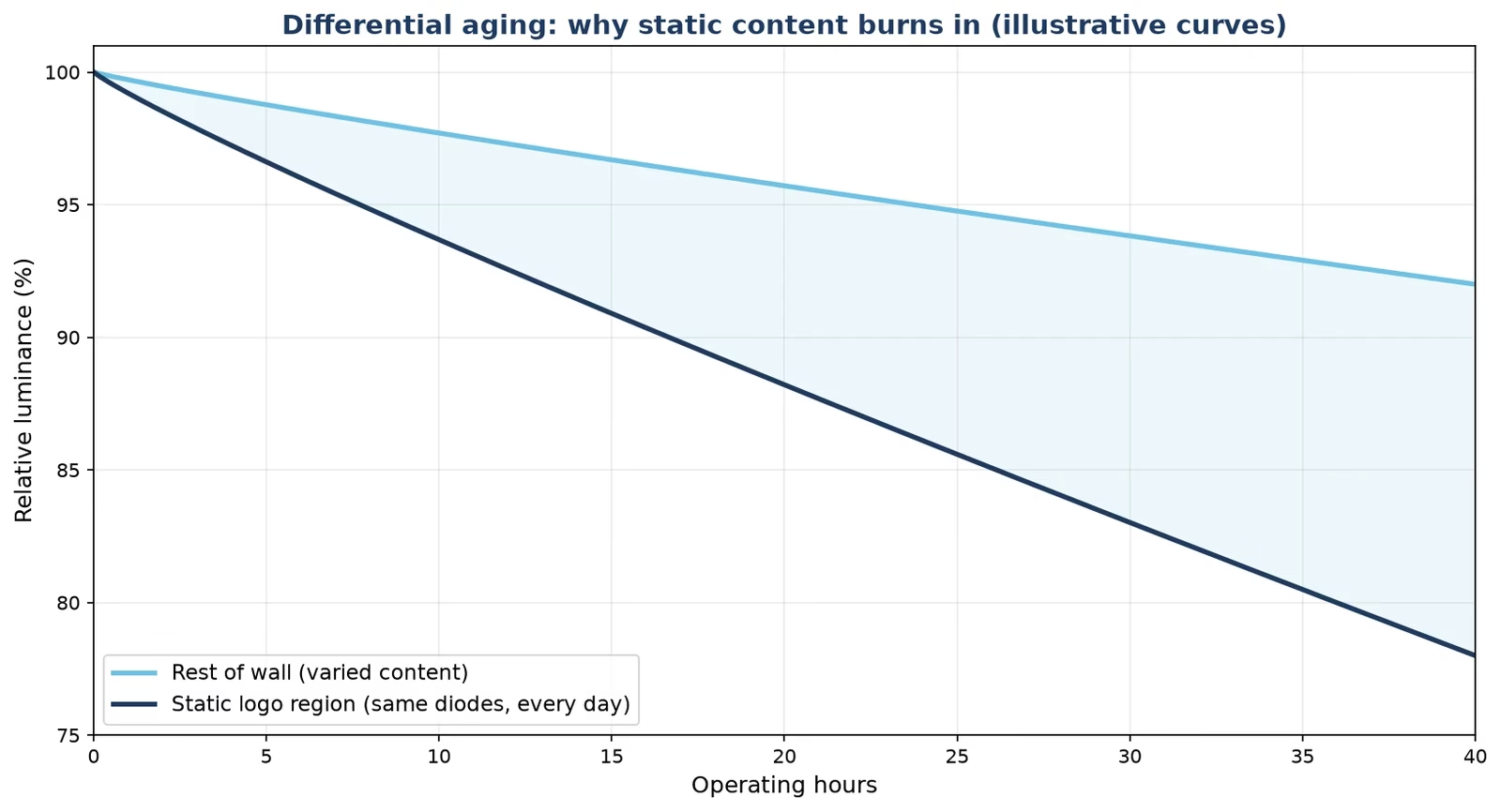
Quick answer: yes, LED displays can burn in — but the mechanism is different from OLED, and in most cases it can be corrected. On a direct-view LED wall, burn-in appears as a faint ghost of whatever content sat still for weeks: a channel logo, a ticker, a wayfinding frame. The diodes in that region have aged slightly faster than their neighbors. Rotate content, cap brightness, and recalibrate, and mild retention fades; severe cases are solved by replacing modules, not the whole wall.
Buyers ask this question more sharply than ever, because signage now runs 24/7. A control-room video wall that shows the same dashboard frame every day, a retail price board that holds one layout for months, an airport FIDS row that never changes position — all of them stress the same diodes in the same places. This guide explains what burn-in actually is on an LED wall, how it differs from OLED and LCD burn-in, how to tell it apart from dead pixels and cable faults, what fixes cost, and the operating habits that keep a 24/7 wall clean for its whole service life.
1. What Is LED Display Burn-In?
LED display burn-in is a visible ghost image: a region of the screen shows a persistent, lower-brightness copy of content that was displayed statically for a long time. The industry also calls it image retention or image sticking. The name is borrowed from older technologies, but on a direct-view LED wall the cause is differential aging: every LED loses a little brightness as it operates, and diodes that have been driven harder — the ones inside a static white logo, for example — lose it slightly faster than the diodes around them. When the content changes, the “tired” region stays measurably dimmer, and the eye reads the boundary as a ghost.
Two clarifications keep the definition honest. First, burn-in is not dead pixels: a dead pixel is a single diode that no longer lights, while burn-in is a large-area brightness difference. Second, burn-in on LED is usually gradual and correctable, which is why the fix section below starts with calibration rather than replacement.
New to the hardware itself? Our guide to how an LED display works explains the signal chain behind every symptom in this article.
2. Can LED Displays Really Get Burn-In?
Yes — and the honest answer needs three paragraphs, one per technology, because “burn-in” means different things on each.
2.1 LED vs OLED vs LCD: Three Different Burn-In Mechanisms
- OLED: each pixel is an organic compound that wears out as it emits. Static logos wear those specific subpixels permanently — true burn-in, not reversible.
- LCD: the liquid-crystal layer can hold a temporary afterimage when a frame sits still for hours, and uneven backlight aging can add a faint permanent difference over years. Most LCD “burn-in” is temporary retention that disappears after showing moving content.
- Direct-view LED: inorganic diodes age slowly and predictably; industry lumen-maintenance testing (IES LM-80 is the common reference method) exists precisely because the decay curve is measurable. Burn-in appears only when one region’s duty cycle is very different from its neighbors — and because the decay is gradual, calibration can re-balance it.
The practical consequence: an LED wall is the most burn-resistant large-format choice for 24/7 operation, but it is not immune when content policy is ignored.
2.2 Which LED Walls Are Most at Risk?
Risk follows static duty, not screen size. The highest-risk applications:
- Control rooms and NOC video walls that park one dashboard layout for months.
- Retail price boards and shelf-edge screens holding a fixed price grid.
- Wayfinding and FIDS rows where every frame reserves the same position for the same element.
- DOOH frames and broadcast sets with a permanent logo or frame in one corner.
- Church and corporate lobby walls that display one announcement slide all week.
3. How Do You Check an LED Wall for Burn-In?
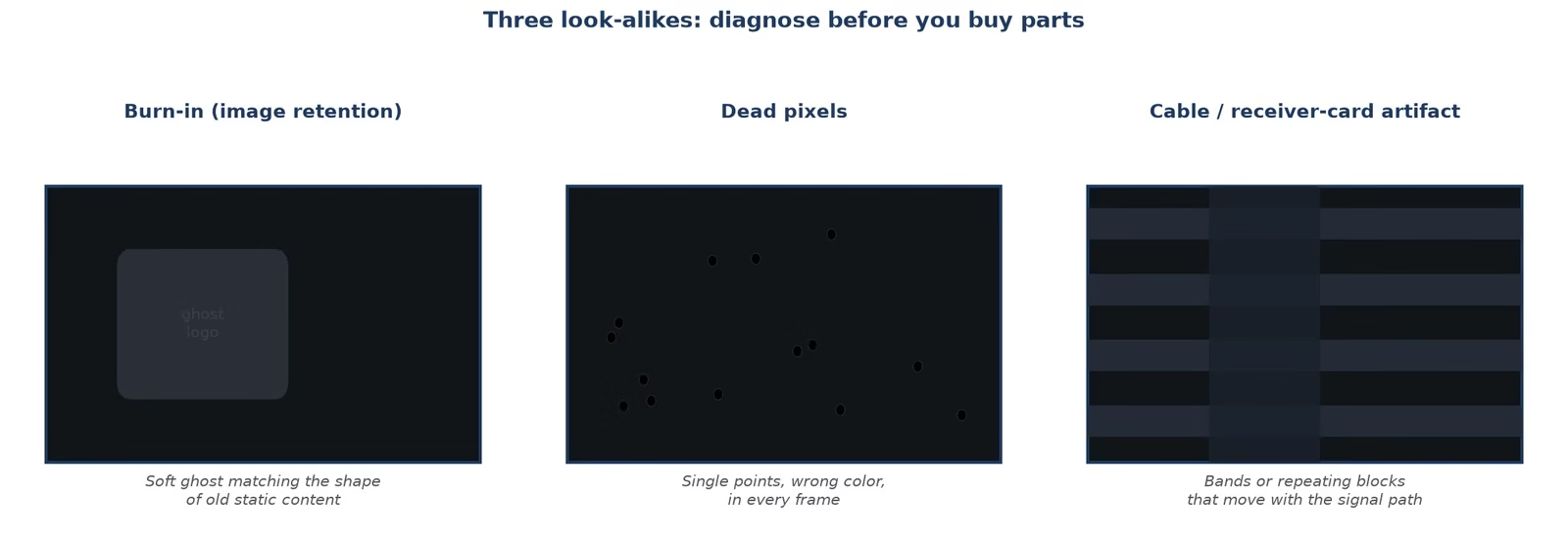
Display a sequence of full-field test colors — white, black, red, green, blue, then 50% gray — and step back to normal viewing distance. Burn-in shows up as a faint density difference in the region where static content used to sit. Then rule out the two look-alikes:
- Burn-in (image retention): a large, soft-edged ghost that matches the shape of old static content; uniform across a region.
- Dead or stuck pixels: individual points that are always black or always one color, in any content. Our dead pixel and module replacement guide covers that failure.
- Cable or receiver-card artifacts: horizontal bands, repeating blocks, or flicker that changes when you re-seat a cable — not aging at all. If the symptom moves with the signal path, start with our signal cable troubleshooting guide.
If brightness varies in patches rather than in a recognizable shape, that is uniformity drift, and the uneven brightness guide is the better starting point.
4. What Causes Burn-In on LED Displays?
- Static content for long periods: the root cause. Weeks of one layout gives one region of diodes a very different aging history.
- High brightness with poor heat path: LED decay accelerates with junction temperature; a wall run at maximum brightness in a hot lobby ages faster — and ages unevenly where content is bright.
- Calibration gaps: walls that are never re-calibrated let early brightness differences between cabinets grow into visible retention.
- Mixed batch aging: replacement modules from a different production batch sit next to aged modules; without point-by-point correction, the seam shows.
- Fixed furniture in the content design: broadcast frames, DOOH templates, and lobby slides often bolt a logo or clock into one corner by default; the layout changes weekly while the furniture never moves, and that furniture is what burns in.
5. Is LED Burn-In Permanent? Can It Be Fixed?
Grade the damage before spending money:
- Mild retention: visible only on full-field test colors. Usually reversible — run moving content and a correction cycle, and the ghost fades as the surrounding diodes catch up.
- Moderate retention: visible on normal content at normal distance. Point-by-point calibration plus a managed content rotation plan usually restores uniformity; expect to iterate.
- Severe burn-in: the static region has aged far beyond its neighbors. Calibration cannot create lost brightness; the honest fix is replacing the affected modules. On a cabinet-built wall this is a module-level repair, not a wall replacement — which is exactly why modular design matters when you buy.
6. How to Fix Burn-In on an LED Display
- Confirm the diagnosis with full-field colors (Section 3) — do not replace anything until retention is distinguished from dead pixels or cable faults.
- Stop the cause: break up the static layout immediately; no fix holds while the same frame keeps running.
- Run a correction/calibration cycle: point-by-point brightness and chroma correction re-balances aged regions against fresh ones. Factories do this with dedicated equipment before shipping — the video below shows a COB screen being calibrated with a professionally calibrated rig on site.
- Exercise the wall: run full-field color sweeps and moving content on a schedule; mild retention often fades within days of balanced driving.
- Replace modules only where calibration cannot reach: if a region is still visibly dim after correction, swap the affected modules and re-calibrate the seams.
7. How to Prevent Burn-In on a 24/7 LED Wall
Prevention is an operating habit, not a hardware purchase:
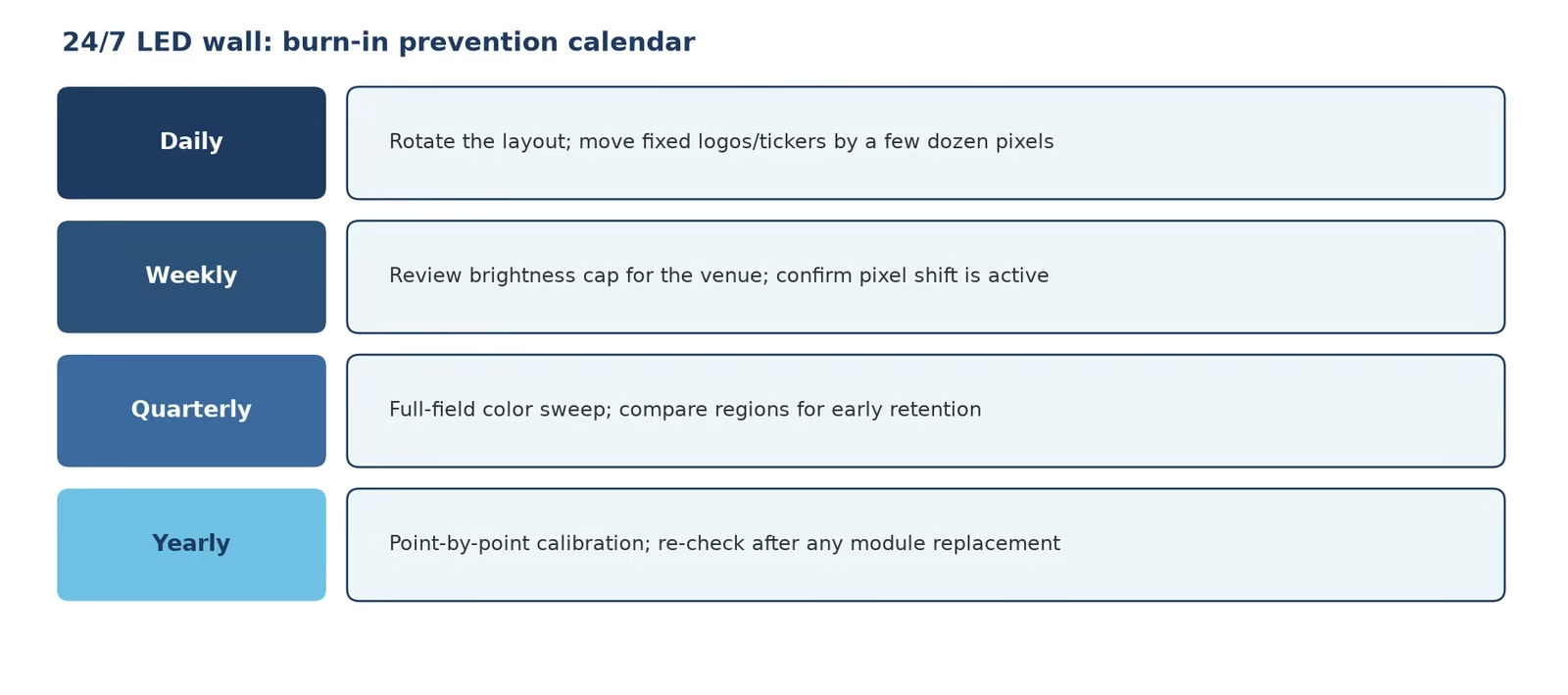
- Rotate the layout: shift logos, tickers, and fixed frames by a few dozen pixels on a daily or weekly schedule; never let one element own the same diodes for months.
- Cap brightness to the environment: run the wall at the lowest nits that read well; indoor walls rarely need more than 800–1,200 nits, and every bit of headroom saved is aging deferred.
- Use pixel shift where the player supports it: subtle sub-frame motion defeats static-region aging without being visible to viewers.
- Schedule calibration: an annual or semi-annual point-by-point correction keeps cabinets matched as they age; walls with mixed new and old modules need it sooner.
- Buy for service, not just spec: a wall with front-serviceable modules, a calibrated driver IC chain, and a documented aging test ships with a head start. Our factory runs a 72-hour full-brightness burn-in on every P2.5 panel before it ships — the clip below shows exactly that test.
8. How Much Does Burn-In Repair Cost?
Cost follows the severity grade. Mild retention costs labor only: a correction cycle run by your operator. Moderate retention adds a calibration service — either a visit from your integrator or a factory remote-assist session with your calibration tool. Severe burn-in becomes a parts purchase: affected modules priced per square meter in the same bands as the original wall (roughly $75–180 per square meter by pitch for outdoor-class cabinets, less for indoor fine-pitch), plus the re-calibration of the replaced region. Two scenarios anchor the math: a 12-square-meter lobby wall with one ghosted logo region typically needs two to four modules and one calibration session; a 100-square-meter FIDS facade with years of fixed-row aging is quoted as a regional refurbishment, because the aged band spans many cabinets even though the rest of the wall is healthy. Against those numbers, the prevention habits in Section 7 cost minutes a week — which is why we put rotation rules into the handover documentation of every wall we ship.
9. FAQs About LED Display Burn-In
Does LED display burn in?
Yes, but differently from OLED: direct-view LED walls develop image retention when one region of diodes ages faster than its neighbors, usually under weeks of static content. Mild cases are reversible with calibration.
What causes screen burn on LED displays?
Static content, high brightness with heat, missed calibration cycles, and mixed-age modules. Anything that gives one region a very different operating history from its neighbors.
Is LED burn-in permanent?
Not always. Mild and moderate retention respond to correction cycles and content changes; severe cases need module replacement, because calibration cannot restore brightness that diodes have lost.
How do I fix burn-in on an LED screen?
Confirm the diagnosis with full-field test colors, stop the static content, run a point-by-point calibration, exercise the wall with moving content, and replace modules only if a region stays dim after calibration.
What is the difference between burn-in and dead pixels?
Burn-in is a large, soft-edged region of lower brightness shaped like old content; dead pixels are individual points that stay black or single-colored in all content.
Do LCD screens get burn-in?
LCD panels mostly show temporary image retention that clears with moving content; permanent LCD burn marks are rare and usually come from backlight aging rather than the LCD layer itself.
How is OLED burn-in different from LED burn-in?
OLED pixels are organic and wear permanently, so static content causes irreversible marks. LED diodes are inorganic and age slowly, so equivalent retention is gradual and usually correctable.
How often should I calibrate an LED wall?
Once or twice a year for mixed-content walls; quarterly for 24/7 static-heavy installations, and always after replacing modules.
How much does LED burn-in repair cost?
Mild cases cost operator labor only; moderate cases add a calibration service; severe cases require replacement modules priced per square meter by pitch, plus re-calibration of the replaced region.
Does screen burn affect LED TVs too?
LED TVs are LCD panels with LED backlights, so they behave like LCD — mostly temporary retention. The burn-in risk discussed here applies to direct-view LED walls, where the LEDs are the pixels.
10. Conclusion: Burn-In Is an Operating Problem Before It Is a Hardware Problem
An LED wall is the most burn-resistant 24/7 display technology you can buy — and it still asks for three habits: rotate what you show, cap the brightness, and calibrate on a schedule. Diagnose with full-field colors before buying parts, lean on calibration before replacement, and choose a supplier whose aging and calibration process is visible, not just claimed. For the failures that look like burn-in but are not, our LED display troubleshooting guide covers the full fault tree — including flickering and uneven brightness — and our team specs walls with front-serviceable modules so that even a severe case stays a one-day repair. As an LED screen manufacturer, we would rather sell you a wall that never ghosts than a repair.