
RGBlink · mini-pro · 3rd Generation Live Streaming Switcher
RGBlink mini-pro 3rd Generation of mini Streaming Switcher
The RGBlink mini-pro v3 is the third generation of RGBlink’s mini streaming switcher line (order code 230-0003-03-1): four HDMI 2.0 inputs up to 4K60, dual HDMI outputs, a 2.1-inch IPS touchscreen with the classic SWITCH joystick, USB recording to 2 TB and RTMP streaming to four platforms — in a 0.42 kg body at $295.
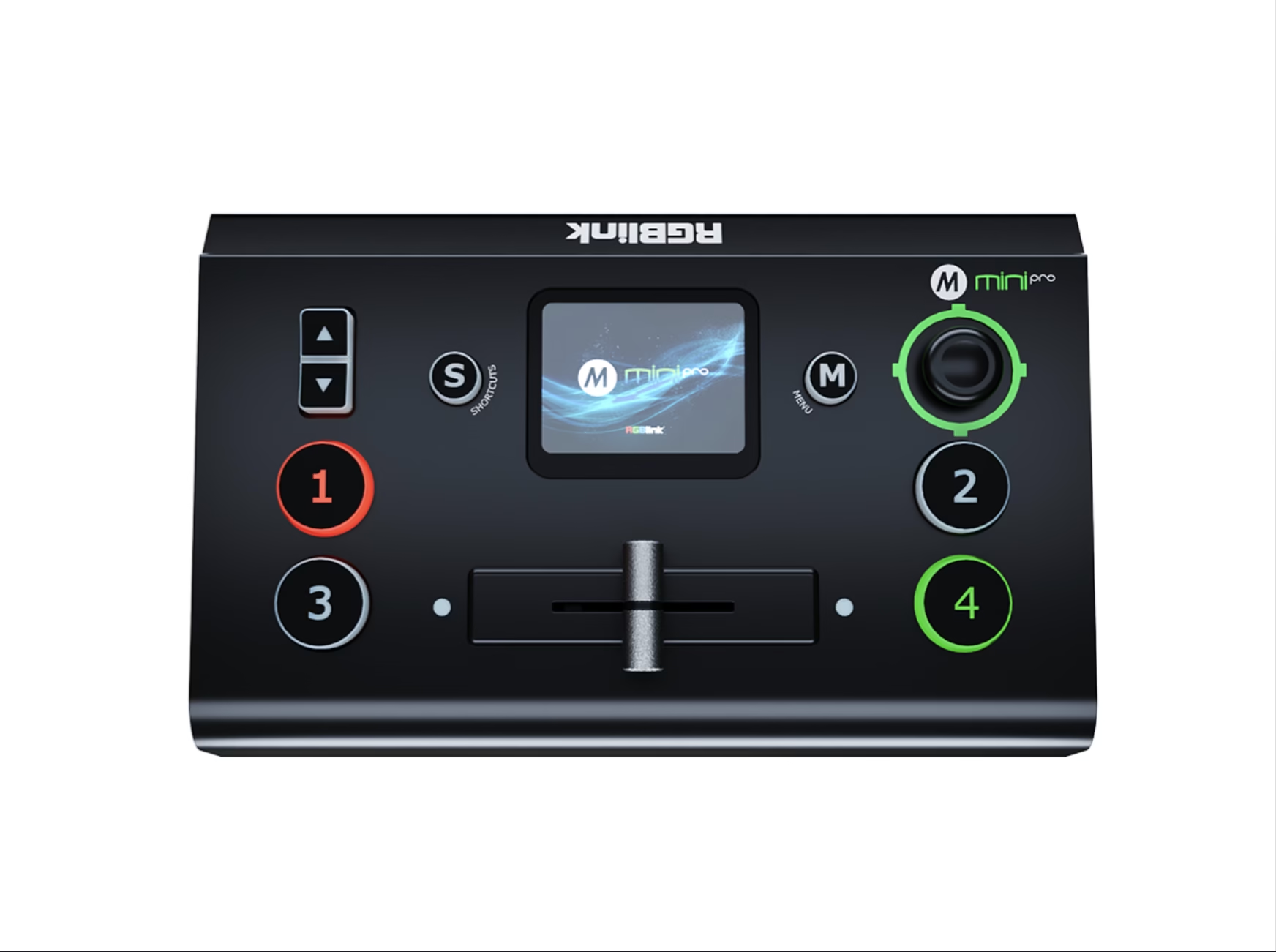
Product Overview
What Is the RGBlink mini-pro 3rd Generation mini Streaming Switcher?
The RGBlink mini-pro 3rd Generation mini Streaming Switcher — sold under the model name mini-pro v3, order code 230-0003-03-1 — is a live streaming switcher from RGBlink’s mini-pro line: four HDMI 2.0 inputs that accept up to 4K60 with HDCP 1.4, two HDMI outputs for simultaneous multi-screen monitoring and program display, a 2.1-inch IPS touchscreen for preview and icon-based menus, the classic five-way SWITCH joystick that has defined the mini-pro since 2021, USB recording of MP4 to media up to 2 TB, and RTMP(S) streaming to four platforms (32 through RGBlink’s TAO Cloud) — powered by USB-C PD at 20 W in a 0.42 kg body. Official data sources on this page are the mini-pro Specification V1.5 (August 2025), the newest User Manual V1.6 (September 2025) and the Product Brochure V1.2 — the same documents RGBlink publishes on its product page today.
Short answer: The RGBlink mini-pro v3 is the third-generation mini streaming switcher: four HDMI 2.0 inputs up to 4K60 (HDCP 1.4) with independent per-input conversion and resync, two HDMI 1.3 outputs (multi-view preview, program or AUX — the second output is the v3 addition over the 2022 v2), a 2.1-inch IPS touchscreen plus the five-way SWITCH joystick, 15 transition effects, chroma and luma keying, PIP and dual scalable video layers, IP VISCA PTZ presets, a fully differential balanced DAC audio circuit, USB 2.0 one-key MP4 recording up to 16 Mbps onto media to 2 TB with 24/7 record-while-stream, RTMP(S) to four platforms and TAO Cloud to 32, USB-C PD power at 20 W, 0.42 kg — listing at $295 in authorized distribution. It is the entry rung of RGBlink’s mini family below the mini-ISO ($599) and mini-edge SDI ($729), and the only one of the three with no SDI or NDI inputs.
One naming fact must come before the specifications, because RGBlink ships two different products whose names collide in search: the mini-pro v3 reviewed on this page launched in June 2024 (the what’s-new video is dated June 14, 2024) and remains the current 230-0003-03-1 unit; the RGBlink mini v3, which RGBlink officially launched and began delivering in July 2025, is a different product line — the streaming industry’s first switcher with user-customizable function subscriptions, covered in its own official tutorial series. Official videos from August 15, 2025 carry both series on the same channel, and third-party copy mixes them; this page reviews the mini-pro v3 and states the difference in the comparison section below.
In the production chain the mini-pro v3 sits at the content-entry point: cameras and laptops connect over HDMI, the switcher cuts and keys them, and the program output feeds a screen — a monitor, a projector, or an LED video processor that scales and drives the wall behind a church stage, conference room or rental event. Two outputs on the v3 mean one can carry the venue display while the other shows the operator’s multi-view or an independent input — the flexibility the first two generations did not have, and the reason this page’s architecture section starts there.
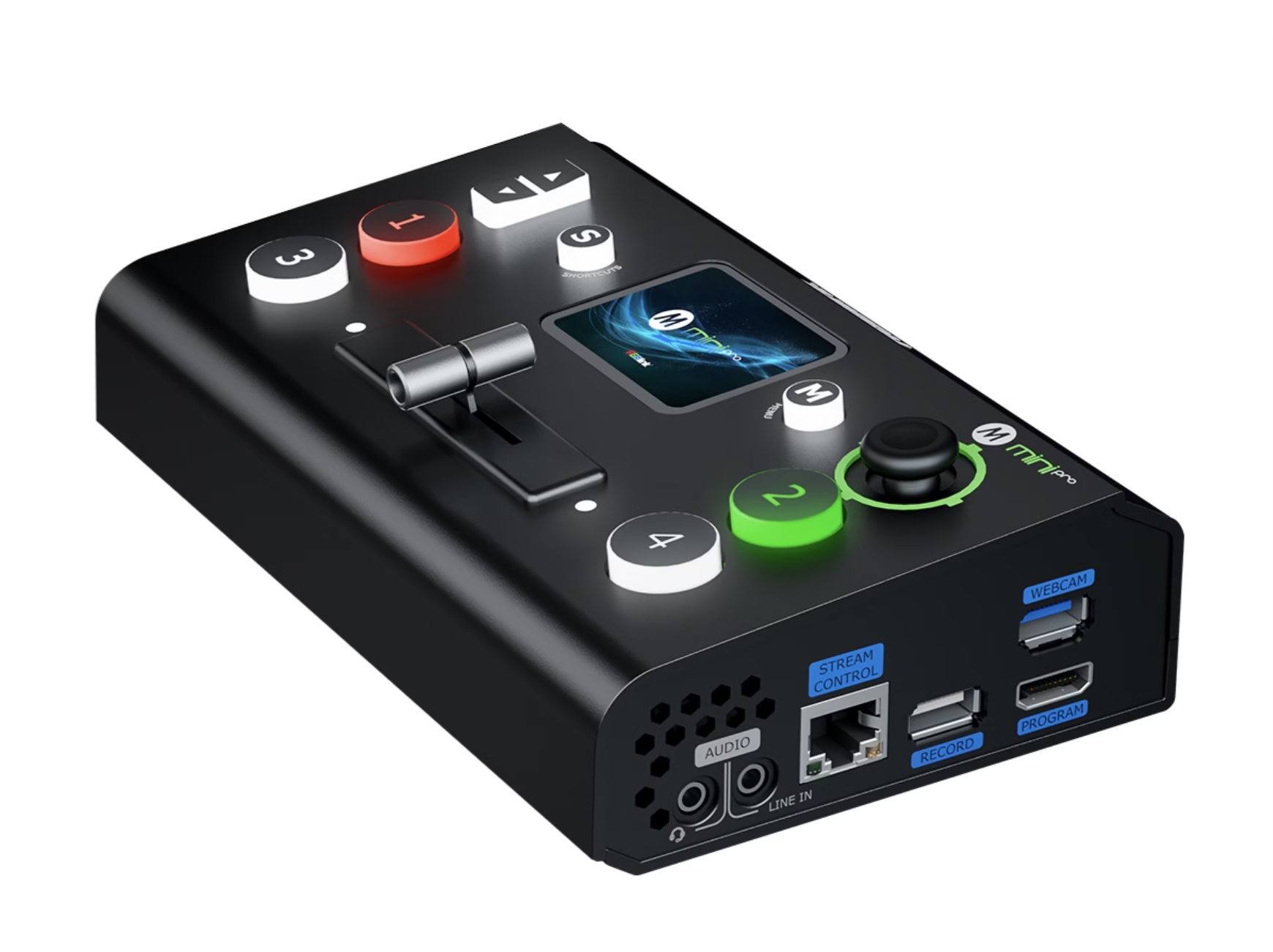
Official RGBlink video — mini-pro v3 unboxing and interface introduction.
Specifications
What Are the RGBlink mini-pro 3rd Generation Streaming Switcher Specifications?
Data from the official RGBlink mini-pro Specification V1.5 (August 2025) and Brochure V1.2.
Video, Audio & Control
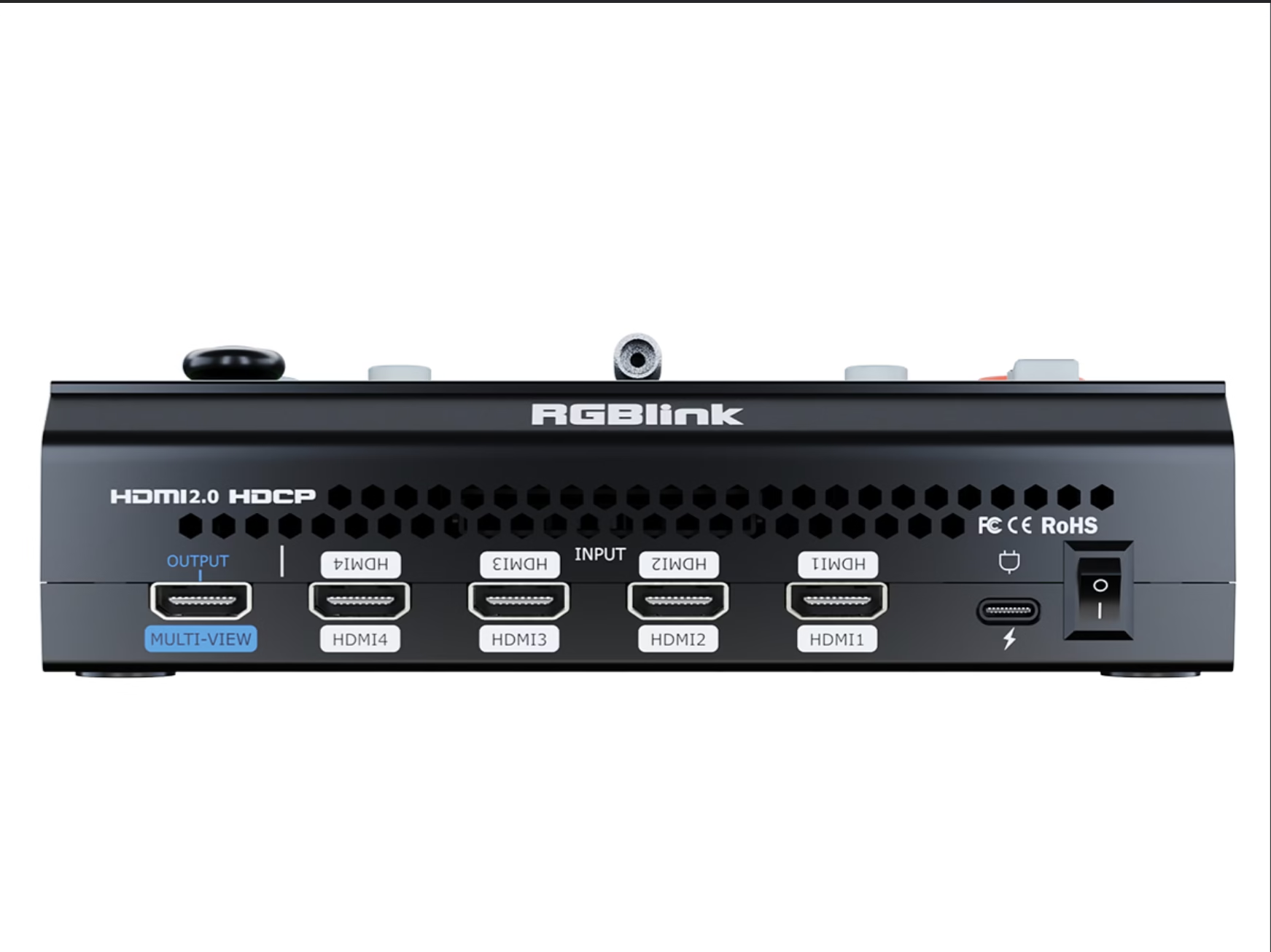
Official Data Check
What Do Official mini-pro Documents Say That Distributor Pages Get Wrong?
Four points deserve the official-document treatment. First, power: the Specification V1.5 lists USB-C PD 12 V / 1.5 A at 20 W maximum, while the Brochure V1.2 cites 24 W — both are RGBlink’s own numbers; any certified USB-C PD supply at 12 V covers the unit, and the power-bank workflow in RGBlink’s own material works from either figure. Second, dimensions: 180.6 × 112.7 × 53 mm is the mini-pro’s true envelope — and it is exactly the dimension that appears in the appendix of the mini-ISO’s User Manual, where the touchscreen sibling’s own sheet lists 197 × 113 × 60 mm; the mini family’s documents reuse a common specification template, which explains the residue our mini-ISO page flags against its official sheet.
Third, HDCP: the mini-pro v3 carries HDCP 1.4 — not the 2.2 of the mini-edge SDI — which is adequate for 4K streaming and computer sources but worth knowing before promising protected 4K playback chains. Fourth, output naming: RGBlink’s own copy calls the outputs “2K,” and the outputs are 1080p-class (the USB stream and HDMI 1.3 outputs deliver up to 1080p60); 4K input acceptance with 1080p program output is the mini family architecture, and “2K” here means the 1920-wide output family rather than DCI 2K.
Input Architecture
How Do the Four 4K60 Inputs and Dual Outputs of the mini-pro v3 Work?
The mini-pro v3 accepts four HDMI 2.0 sources — cameras, laptops, media players — at up to 4K60 with HDCP 1.4, and each input runs independent signal conversion and resynchronization, so a 4K camera, a 1080p laptop and an interlaced source sit on the same show without a shared format master. Input resolutions span the practical range: 720p50/60 through 1080i and 1080p30/50/60, 3840×2160p23.97–60 and DCI 4096×2160@60. As with every member of the mini family, the program engine is 1080p: 4K inputs down-convert into the program, and the two HDMI 1.3 outputs plus the USB stream and recorder all work in the 1080p output family.
The dual-output design is the v3’s headline change over the 2022 v2, and it fixes a real operating problem: one HDMI output can carry the multi-view preview for the operator while the second carries program to the venue — or both outputs show program with an independent input selected on the second, which is how a director hands a camera feed to a confidence monitor without disturbing the main display. RGBlink’s own v3 introduction describes exactly this split: one local output for program display and a separate output for multiview. For an LED-fronted venue, the pattern is program HDMI into an LED video processor for the wall, and the second output running the operator’s multi-view on a small monitor.
Control
How Do the Touchscreen and Joystick Control the RGBlink mini-pro v3?
The mini-pro v3 pairs two control languages. The 2.1-inch full-color IPS touchscreen shows every source live and runs an icon-based touch menu — source selection, effects, settings — which is the modern layer RGBlink added as the line evolved. Underneath it sits the design element that has defined the mini-pro since 2021: the compact five-way SWITCH joystick with its toggle, built around what RGBlink describes as a user-feedback-driven, responsive design philosophy. The joystick moves layers, adjusts aspect ratio, drives PTZ cameras and trims PiP positions; the toggle complements it for the actions a streamer repeats every show. Both layers address the same engine, so an operator can touch for menus and joystick for live moves — the hybrid that separates the mini-pro from fully touchscreen switchers.
Remote control completes the picture: the mini-pro is compatible with Windows and macOS desktops and controllable from iOS and Android devices through XPOSE and the webAPP, matching the family’s TAO Cloud integration for remote switching and monitoring from a phone or tablet.
Production Depth
What Layer, Key and Transition Power Does the mini-pro v3 Streaming Switcher Offer?
Compositing on the mini-pro v3 runs two true video layers, scalable pixel-to-pixel, with a background, logo and DSK inserts for lower-thirds and branding. Transition control covers 15 effects with AUTO and WIPE switch modes; chroma key selects green or blue as the key color for virtual-set presenters; luma key and PiP blending complete the keying set. Video latency holds under three frames, which keeps confidence-monitor lip sync usable for sung and spoken content — the same sub-three-frame figure as the mini-ISO.
Official RGBlink video — chroma key on the mini-pro v3.
Audio
What Audio Does the RGBlink mini-pro v3 Deliver With Its Balanced DAC?
The v3’s audio story is a hardware upgrade, not a spec sheet afterthought: RGBlink rebuilt the audio stage around a fully differential, true-balanced DAC circuit architecture that measurably improves the quality of both MIC and LINE inputs. Two 3.5 mm inputs accept line and mic levels with variable delay controls — a distant camera or a wireless mic source is delayed into sync with its picture instead of drifting — and a 3.5 mm output feeds monitoring. Four HDMI embedded audio channels plus the two external inputs mix under the front controls, with PCM at 48 kHz in 24- or 16-bit depth.
For podcasters and single-operator streamers the balanced path matters in a specific way: a studio mic through the mic input lands on the program with less noise-floor contamination than the single-ended stages typical at this price, and the delay control is what keeps a Bluetooth-fed interview source in sync. Musicians comparing the mini-pro v3 against HDMI-only switchers should read the DAC line as the audio console difference — the same argument the family’s XLR-equipped mini-edge SDI makes a step up in price.
Recording
How Do You Record on the RGBlink mini-pro v3 Streaming Switcher?
Recording on the mini-pro v3 is a one-key operation: the USB-A record port saves MP4 directly to a portable drive or SSD at up to 16 Mbps, in FAT32 up to 32 GB or exFAT from 64 GB to 2 TB — RGBlink’s own copy calls out the 24/7 live streaming with synchronized recording, so a marathon stream archives while it broadcasts without a laptop or a separate recorder in the chain. The brochure’s workflow note is practical: record to a portable drive, then edit directly from it. Audio and video capture together, and the drive records until the operator stops it.
Official RGBlink video — recording on the mini-pro v3.
Streaming
How Does the mini-pro v3 Stream to Four Platforms and TAO Cloud’s 32?
Streaming runs in two directions. The Ethernet port pushes RTMP(S) to four live-streaming platforms simultaneously — YouTube, Facebook, Twitch and a house RTMP endpoint can all receive the program directly, a capability the v3 added over the v2. The USB-A stream output works the other way: it presents the program to any computer as a driver-free UVC webcam in YUY2 or MJPEG at up to 1080p60, recognized automatically on Windows 10 and macOS — connect one cable and the switcher appears in Facebook, YouTube, Zoom, TikTok, OBS or vMix as a camera, with no capture card and no driver install. RGBlink’s TAO Cloud layer extends the reach: stream once to TAO and the cloud redistributes to up to 32 platforms or connections, with a membership ecosystem the v3 introduction ties to the direct-streaming capability.
Official RGBlink video — live streaming on the mini-pro v3.
Camera & Power
How Do PTZ Presets and USB-C Power Make the mini-pro v3 a Mobile Desk?
PTZ control on the mini-pro v3 uses IP VISCA through the five-way joystick and toggle: pan, tilt, zoom and focus on compatible cameras, with PTZ presets that save camera attribute views for one-click recall — an operator programs camera positions once and recalls them during a show, and the quick preset and mode recall extends to whole scenes for synchronized multi-device operation. The switcher itself weighs 0.42 kg and draws 20 W through USB-C Power Delivery at 12 V / 1.5 A — the lightest and lowest-draw console in the mini family — and the brochure’s power section makes the point explicitly: standard USB-C cables and supplies, never caught without power, usable in disconnected applications. A power bank that tops up a phone drives the mini-pro v3, which is the field story for streamers working outside mains coverage.
Where It Works
Where Does the RGBlink mini-pro v3 Fit in Streaming and LED-Fronted Production?
RGBlink’s own 2025 solution video shows a mini-pro v3 on wireless live streaming for church worship — cameras over Wi-Fi into the switcher, program to the room’s church LED display and online — the pattern behind our UK church project.
24/7 record-while-stream in a 0.42 kg box suits rental crews carrying the console in a backpack ahead of rental LED screens and stage walls — one unit cuts, streams to four platforms and archives the show.
Laptop slides, a podium camera and a Zoom room in one UVC pipe, with the room screen fed by a conference LED display solution — no capture card, no second operator.
A $295 switcher puts multi-camera production on a creator’s desk: four HDMI sources, the balanced DAC mic path, PiP and chroma key for a branded stream to YouTube, TikTok and Twitch.
Official RGBlink video — mini-pro v3 wireless church worship solution.
Comparison
mini-pro v3, mini v3, mini-ISO or mini-edge SDI: Which RGBlink Switcher Ships in 2026?
Four RGBlink names collide in a search for “mini switcher,” and each is a different product. The generations of the mini-pro line itself are documented in RGBlink’s specification and its official series-comparison video:
Name trap: the RGBlink mini v3 launched in July 2025 is not this product. It is a separate mini line — RGBlink describes it as the streaming industry’s first switcher with user-customizable function subscriptions, launched alongside a subscription-services ecosystem. Official RGBlink videos from August 2025 post separate tutorial series for “mini v3” and “mini-pro v3,” and channel listings mix them. When quoting, name the full model — mini-pro v3, order code 230-0003-03-1 — and pin the specification V1.5 document.
Inside RGBlink’s own ten-connector family the mini-pro v3 is the entry rung at $295, against the RGBlink mini-ISO at $599 and the RGBlink mini-edge SDI at $729 (promo):
Official RGBlink video — mini-pro series comparison.
Pricing
How Much Does a RGBlink mini-pro 3rd Generation mini Streaming Switcher Cost?
Price transparency, stated plainly: the RGBlink mini-pro v3 lists at $295.00 at B&H Photo Video (authorized dealer, in stock, September 2026; order code 230-0003-03-1), with the same SKU on Amazon and at 1SourceVideo. The comparison anchor is the Blackmagic ATEM Mini Pro ISO at $585 on the same channel — the mini-pro v3 costs about half and trades per-input ISO recording and DaVinci integration for dual HDMI outputs, a touchscreen-and-joystick console, TAO Cloud reach to 32 platforms and USB-C power. Factory-direct tiers for B2B buyers:
A production budget is the honest frame: a switcher at $295 is the entry line of an event video chain whose display end — the LED screen for events, the LED video processor and the cabinets behind it — carries the larger line items. Genuine unit, 2-year warranty and CE-LVD, CE-EMC, FCC-SDoC and RoHS certificates dated March 2026 ship with every order; ask for a factory-direct quote at your quantity — we are the LED screen manufacturer behind unifyled.com.
FAQ
What Do Buyers Ask About the RGBlink mini-pro 3rd Generation mini Streaming Switcher?
What Assurance Comes With the RGBlink mini-pro v3 Switcher?
Every mini-pro v3 ships with RGBlink original packaging, the latest firmware and compliance documentation.
Ready to Start Streaming With the RGBlink mini-pro v3?
Factory-direct pricing, genuine RGBlink stock, current firmware pre-loaded and 2-year warranty.
unifyledscreen@gmail.com | +86-191-18802497
Technical Deep-Dive
What Should Streamers and Engineers Know Before Buying the RGBlink mini-pro 3rd Generation mini Streaming Switcher?
Published: September 2026 | 12 min read | UnifyLED Engineering Team
The RGBlink mini-pro 3rd Generation mini Streaming Switcher — mini-pro v3, order code 230-0003-03-1 — is the $295 entry rung of RGBlink’s mini family and the current product of a line that has iterated since 2021. This guide is written for streamers, integrators and procurement teams in 2026, using the official mini-pro Specification V1.5 (August 2025), User Manual V1.6 (September 2025) and Brochure V1.2 as data sources, with the naming facts, the generation story and the family comparison that distributor pages skip.
Chapter 1 — Definition and the Design Lineage
The RGBlink mini-pro v3 is a live streaming switcher with four HDMI 2.0 inputs at up to 4K60 (HDCP 1.4), two HDMI outputs, a 2.1-inch IPS touchscreen, the five-way SWITCH joystick, 15 transitions, chroma and luma keying, dual scalable video layers, IP VISCA PTZ presets, a fully differential balanced DAC audio stage, USB MP4 recording to 2 TB with 24/7 record-while-stream, and RTMP(S) streaming to four platforms or 32 through TAO Cloud — in a 0.42 kg body powered by USB-C PD. It is the current generation of a line RGBlink has iterated on continuously since 2021 under a user-feedback-driven, responsive design philosophy, and its $295 street price makes it the entry point to the mini family this site reviews: mini-ISO at $599, mini-edge SDI at $729.
Position matters in the chain: a switcher is the live-direction stage, upstream of the display. Cameras and computers enter over HDMI; the unit cuts, keys and mixes; program exits over HDMI into a monitor, a projector, or an LED video processor that drives a wall — the venue’s LED screen for events, church display or stage backdrop is downstream of the console, and the two halves of a quote belong together.
Chapter 2 — The Generation Story: v1 to v3
RGBlink documents the mini-pro lineage in the specification’s opening copy and in an official series-comparison video. The line began in 2021 with a compact switcher defined by the five-way SWITCH joystick; the 2022 v2 (the era RGBlink also calls mini-pro 2022) brought dual-channel streaming and became the mini-pro most resellers still reference; the v3 reviewed here — launched June 2024 — adds three capabilities without growing the chassis: a second HDMI output for simultaneous multi-screen monitoring plus program display and independent input selection; direct streaming over the Ethernet port with TAO Cloud membership; and a rebuilt audio stage using a fully differential, true-balanced DAC that improves MIC and LINE input quality. Dimensions stayed 180.6 × 112.7 × 53 mm across the redesign — the what’s-new video emphasizes the second output and the direct-to-internet streaming as the buyer-facing changes.
The dual-output addition deserves an engineer’s reading, because it changes show layout. One output can run the operator’s multi-view preview — all four sources plus program — while the second runs program to the venue; alternatively both outputs carry program and the second selects an independent input, handing a director’s cut to a confidence monitor without touching the main display. Before the v3, that split required an external distribution amplifier or a second switcher; on the v3 it is the standard operating mode.
Chapter 3 — The mini v3 Name Trap
The sharpest naming hazard in RGBlink’s 2026 catalog is not the generations of the mini-pro — it is the separate mini v3 product line. In July 2025 RGBlink launched and began delivering the third-generation mini video switcher: the official description calls it the streaming industry’s first switcher offering user-customizable features, tied to a function-subscription service RGBlink explains in dedicated overview and subscription videos. That product is not the mini-pro v3, but both shipped tutorial series on RGBlink’s official channel on the same dates in August 2025, and third-party copy, Amazon listings and forum threads mix the names.
The practical discipline for buyers: never quote “mini v3” or “mini-pro v3” by name alone — pin the order code. The mini-pro v3 is 230-0003-03-1, carries the classic SWITCH joystick and the four-HDMI 4K60 input set documented in Specification V1.5, and is the unit this page reviews. If a listing mentions subscription services or user-customizable functions, it is describing the other line, and the feature sets, price points and upgrade paths differ.
Chapter 4 — Inputs, Outputs and the 1080p Program Engine
The four HDMI 2.0 inputs accept 4K60 sources with HDCP 1.4 and run independent conversion and resynchronization on each port — a 4K camera, a 1080p laptop and an interlaced feed can share one show without a common format master, which is the flexibility a church or conference desk needs when sources arrive from different eras of hardware. The program engine and every output are 1080p-class: inputs above 1080p down-convert, and the two HDMI 1.3 outputs plus the USB stream deliver the 1920-wide family RGBlink calls “2K.” Four-input HDMI-only coverage is the honest boundary of the unit — cameras that must come in over SDI or NDI belong to the ten-connector mini-ISO or the mini-edge SDI, where the SDI vs HDMI question has a connector answer.
Operation pairs the touchscreen with the joystick: the 2.1-inch IPS screen previews sources and runs icon menus, while the five-way SWITCH joystick and its toggle drive the live moves — layer scaling and position, aspect ratio, PiP geometry and PTZ cameras over IP VISCA. PTZ presets save camera attribute views for one-click recall, and quick preset and mode recall extend to complete scenes for synchronized multi-device shows. The hybrid is the line’s identity: touch for browsing, joystick for muscle-memory cuts, both on a desk that fits a backpack.
Output planning is where the dual-port design earns its keep in practice. A typical church or rental layout assigns output one to the venue chain — program over HDMI into an LED video processor at 1080p, or straight to a projector — and output two to the operator’s monitor running the four-window multi-view preview, so the desk always sees the next source before cutting. The same port can carry a test pattern while the venue display runs program, or hand an independent input to a backstage confidence monitor without disturbing the main screen. The USB stream output runs concurrently: one cable to a laptop and the program appears in Zoom, Teams, OBS or vMix while the HDMI outputs serve the room, so a hybrid event reaches the venue display and the remote audience from one console with no capture card in the path.
Chapter 5 — Audio, Recording and the 24/7 Claim
The v3’s audio stage is the hardware upgrade most reviews skip: a fully differential, true-balanced DAC architecture that raises the quality floor of both MIC and LINE inputs. Two 3.5 mm inputs accept line and mic levels with variable delay — a camera or wireless source is delayed into sync instead of drifting — and four HDMI embedded channels plus the two external inputs mix under front controls at PCM 48 kHz, 24- or 16-bit. A creator comparing HDMI-only switchers should treat the balanced path as the audio console difference at this price.
Recording is program-output MP4 through the USB-A record port at up to 16 Mbps onto media to 2 TB — FAT32 up to 32 GB, exFAT from 64 GB — with the unit recording and streaming at the same time and RGBlink rating the combination for 24/7 operation. Marathon-event planners should read that as record-while-stream endurance rather than per-input isolation: like the rest of the mini family, the mini-pro v3 records the finished program, not per-camera ISOs; buyers whose post needs separate camera files sit in ATEM Mini Pro ISO territory at $585. The 2 TB capacity and the stream-recording split cover the typical event archive without a separate recorder in the chain.
Chapter 6 — Streaming Reach and the Family Decision
The v3 streams to four RTMP(S) platforms directly over Ethernet and to 32 through TAO Cloud, and its UVC output turns any computer into a client: plug the USB-A stream port into a laptop and the switcher appears as a driver-free webcam on Windows 10 or macOS, ready for Facebook, YouTube, Zoom, TikTok, OBS or vMix. Power runs on USB-C PD at 20 W in the specification (the brochure cites 24 W — both figures are RGBlink’s, and either powers the 0.42 kg unit from a standard USB-C supply or a power bank). At $295 the mini-pro v3 is the cheapest way into the RGBlink mini ecosystem: TAO Cloud, XPOSE and webAPP control are the same software family the $599 and $729 consoles use, so a creator or church that starts on the v3 upgrades into the family without relearning the platform.
The buying decision in one paragraph: HDMI-only sources and a $295 budget point to the mini-pro v3; SDI cameras or NDI workflows add $300 and point to the mini-ISO; a desk-operated SDI show with XLR audio and 24/7 fan cooling points to the mini-edge SDI; true per-input ISO recording points away from RGBlink entirely to the ATEM Mini Pro ISO at $585. Against that ATEM, the v3 costs about half and answers with dual HDMI outputs, a touchscreen-and-joystick console, balanced-DAC audio, USB-C power and TAO reach — the ISO-recording trade documented honestly on this page.
The official documents are the reference for every number here: Specification V1.5 for the electrical and physical sheet, User Manual V1.6 (September 2025) for operation and upgrades — firmware V1.54 was current in August 2025 — and certificates dated March 2026 (CE-LVD, CE-EMC, FCC-SDoC, RoHS) confirm the unit is in active certification, not end-of-life stock. Where a distributor page differs, the RGBlink documents win, and this page has followed them.
A procurement checklist closes the guide, because the mini-pro v3’s failure modes are paperwork, not hardware. Pin the model: mini-pro v3, order code 230-0003-03-1, Specification V1.5 — and do not accept a quote that says only “mini v3,” which names the separate 2025 subscription product. Confirm the power plan: USB-C PD at 12 V with the unit’s 20 W draw, which a certified PD laptop charger or power bank covers; the included-supply question belongs in the purchase order. Plan media ahead: FAT32 sticks to 32 GB for short shows, exFAT drives from 64 GB to 2 TB for marathons, formatted before first use. Set the stream destinations in TAO Cloud or the RTMP menu before call time — the unit pushes four targets natively and reaches 32 through the cloud. Verify PTZ cameras against the VISCA compatibility list in the manual rather than assuming every IP camera answers the joystick. And record the firmware version on arrival; updates arrive over USB through the documented upgrade path, and RGBlink’s active certification dates argue the unit will keep receiving them.
Conclusion
The RGBlink mini-pro 3rd Generation mini Streaming Switcher is the $295 entry rung of RGBlink’s mini family: four HDMI 2.0 inputs at 4K60, dual outputs (the v3 addition), a 2.1-inch touchscreen with the SWITCH joystick, 15 transitions, chroma and luma keying, balanced-DAC audio, USB recording to 2 TB with 24/7 record-while-stream, RTMP streaming to four platforms and 32 via TAO Cloud — in a 0.42 kg, 20 W body. It is the current product of a line that has iterated since 2021, it is not the subscription-based mini v3 that launched in 2025, and it is the honest start for HDMI-only multi-camera streaming.
Planning a streaming build around an LED wall? Talk to us — we are the LED screen manufacturer behind unifyled.com, and switchers, processors and screens ship together with 2-year warranty and engineering support.
Related Pages
Compare the Rest of the RGBlink mini Family
RGBlink mini-edge SDI 10-Channel All-in-One Switcher
LED video processor
LED screen for events
LED display for church
Conference LED display solution
Stage LED display R series
500×500 rental LED screen
English · August 2025 · full connectors, performance, power and physical sheet · order code 230-0003-03-1
English · September 2025 · 78 pages · operation, PTZ, recording, streaming, upgrade