
Novastar TB40 LED Multimedia Player
1.3 million pixel all-in-one playback & sending controller — 4K@60Hz H.265 decoding, HDMI sync+async dual-mode, dual Gigabit Ethernet, VNNOX cloud ready. Engineered for chain stores, smart city signage, and fixed commercial LED displays.
What Is the Novastar TB40 LED Multimedia Player?
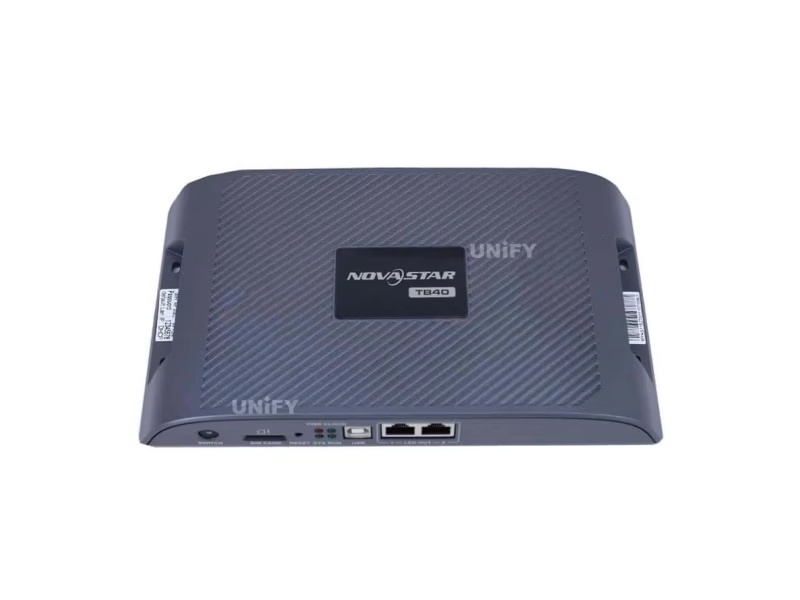
The Novastar TB40 LED Multimedia Player is a new-generation integrated playback and sending controller engineered by NovaStar for full-color LED display systems. As part of the Taurus series, the TB40 combines content playback and signal sending into a single compact unit — eliminating the need for a separate LED video processor or sending card in most installations.
Powered by a quad-core ARM A55 processor at 1.8 GHz with 1 GB RAM and 32 GB internal storage, the TB40 delivers hardware-accelerated 4K@60Hz H.265/HEVC video decoding. It supports 1× 4K, 2× 1080p, 5× 720p, or 6× 480p/360p simultaneous video playback — making it the ideal control hub for mid-to-large commercial LED displays.
Its standout feature is the HDMI 1.3 input/output — enabling synchronous and asynchronous LED control, meaning it can switch between playing pre-loaded content from internal storage and driving a live HDMI video source in real time. The front-panel SWITCH button toggles between modes instantly — a capability absent from entry-level players like the TB30.
Novastar TB40 Technical Specifications
Verified against official NovaStar TB40 Multimedia Player Specifications V1.2.3 (January 2026)
| Parameter | Specification |
|---|---|
| Processor | Quad-Core ARM A55 @1.8 GHz |
| Operating System | Android 11 |
| RAM / Internal Storage | 1 GB / 32 GB |
| Max Loading Capacity | 1,300,000 pixels — Max Width: 4096 px, Max Height: 4096 px |
| Video Decoding | H.264 4K@30fps (80 Mbps) / H.265/HEVC 4K@60fps (100 Mbps) / MPEG4 / VP8 / VP9 |
| Simultaneous Playback | 1× 4K / 2× 1080p / 5× 720p / 6× 480p / 6× 360p |
| Ethernet Outputs | 2× Gigabit Ethernet — configurable as 2 Primary or 1+1 Backup |
| HDMI | 1× HDMI 1.3 IN (sync mode live input) + 1× HDMI 1.3 OUT (max 1920×1200@60Hz, HDMI Loop) |
| USB Ports | 1× USB 3.0 Type-A (playback, firmware upgrade, storage expansion) + 1× USB Type-B (PC control) |
| Audio Output | 3.5mm Stereo Audio Connector — fixed 48 kHz internal sample rate |
| Sensor Inputs | 2× Sensor Connectors — brightness sensor / temperature & humidity sensor |
| Network Connectivity | 1× Gigabit Ethernet RJ45 + 2.4 GHz Wi-Fi (AP + STA simultaneous) + Optional 4G module |
| Multi-Screen Sync | NTP / GPS (with 4G module) / RF (with RF module) |
| Power Supply | DC 12V, 2A — Max 18W / Recommended 25W supply |
| Dimensions / Weight | 238.8 × 140.5 × 32.0 mm / Net: 459.7 g / Gross: 904.0 g |
| Operating Environment | Temperature: –20°C to +60°C / Humidity: 0%–80% RH (non-condensing) |
| IP Rating | IP20 — protect from moisture and water; enclosure required for outdoor use |
| Certifications | CQC, SRRC, RoHS |
Novastar TB40 Key Features: Processing Power, Dual-Mode & Remote Management
Four capabilities that directly impact display reliability, content flexibility, and total cost of ownership.
4K Decoding & Playback Performance
Quad-core ARM A55 @1.8 GHz with hardware H.265/HEVC 4K@60fps decoding at 100 Mbps. Supports 1× 4K, 2× 1080p, 5× 720p, or 6× 480p simultaneous playback. 1 GB RAM + 32 GB internal storage ensure smooth operation for even the most demanding content schedules.
Sync & Async Dual-Mode
Front-panel SWITCH toggles between async (internal storage/USB playback for scheduled ads) and sync (live HDMI input up to 1920×1200@60Hz for real-time content). Dual Gigabit Ethernet ports with configurable primary/backup redundancy — zero-frame-loss failover for 24/7 operations.
Triple-Network Connectivity
Gigabit Ethernet + 2.4 GHz Wi-Fi AP/STA simultaneous + optional 4G module. Priority: Wired > Wi-Fi > 4G. Built-in Wi-Fi hotspot (SSID: TB40+SN) enables direct phone/tablet configuration on-site. Multi-screen sync via NTP, GPS, or RF for chain store and facade networks.
VNNOX Cloud & Remote Control
Native VNNOX cloud integration for remote content updates, playback scheduling, and health monitoring from any browser. ViPlex Express (Windows) + ViPlex Handy (Android/iOS) for local management. CLOUD LED shows real-time connection status.
Novastar TB40 Panel Layout & Hardware Connectivity
Understanding each physical interface prevents misconfiguration and reduces on-site troubleshooting time.
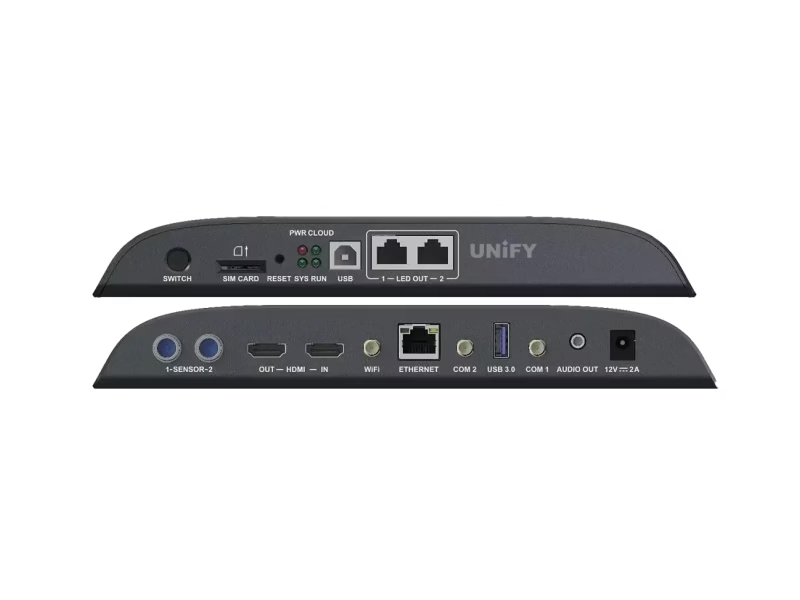
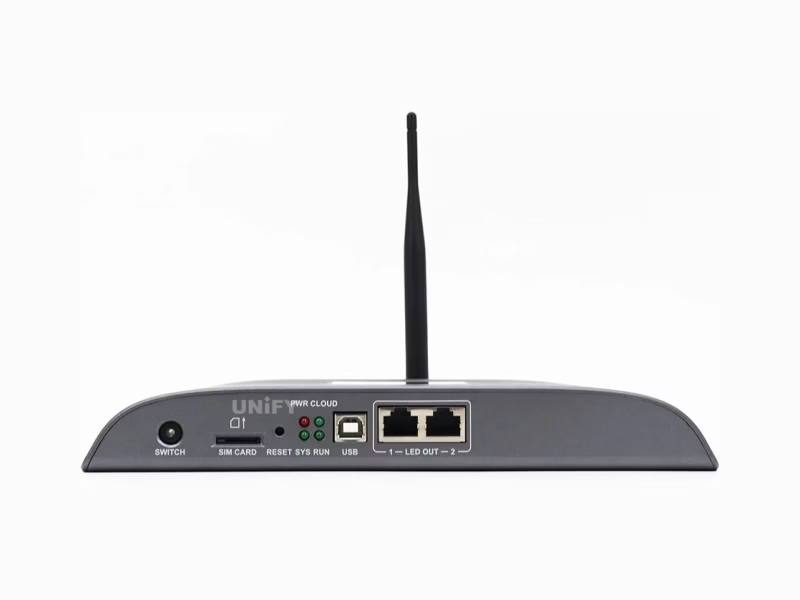
Front Panel
| SWITCH | Toggles Sync mode (solid LED) / Async mode (LED off) |
| SIM CARD | SIM card slot — anti-reverse insertion design |
| RESET | Press and hold 5 seconds to restore factory defaults |
| USB (Type B) | Connects to control PC for content publishing and screen management |
| LED OUT ×2 | Gigabit Ethernet outputs to LED receiving cards — configurable as dual-primary or primary+backup |
Rear Panel
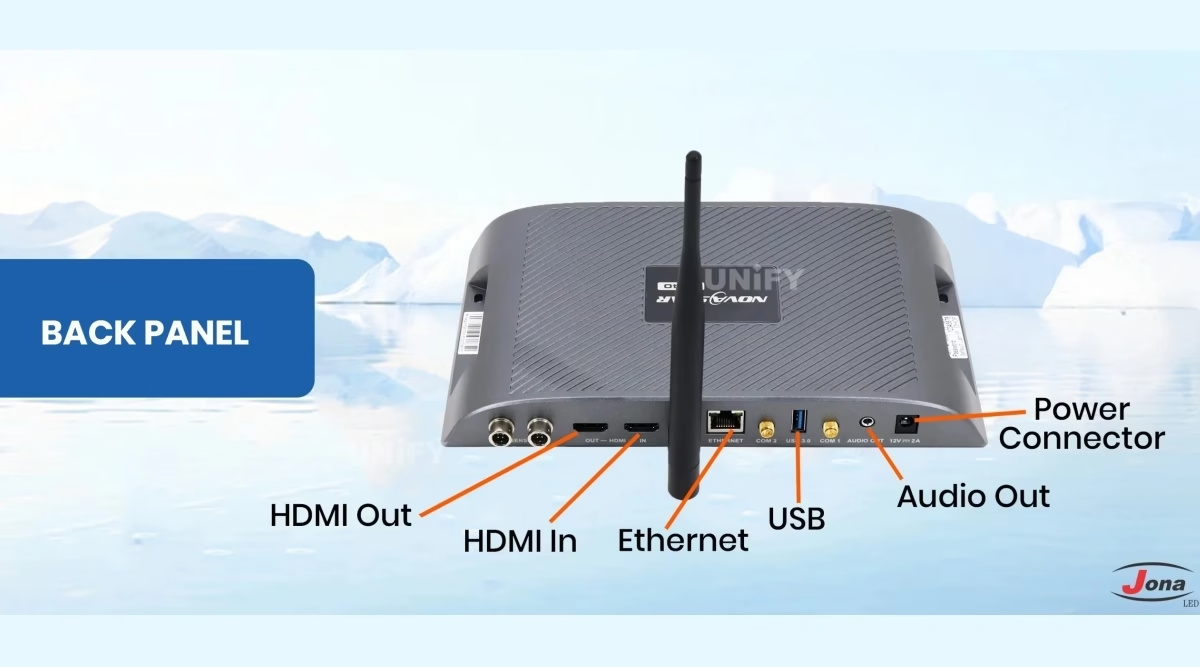
| SENSOR ×2 | Connect brightness sensor or temperature & humidity sensor |
| HDMI IN + OUT | HDMI 1.3 IN (sync video source) + HDMI 1.3 OUT (max 1920×1200@60Hz, HDMI Loop) |
| WiFi | 2.4 GHz Wi-Fi antenna — AP + STA simultaneous operation |
| ETHERNET | Gigabit Ethernet port for LAN / public network / PC connection |
| COM 2 / COM 1 | GPS antenna / 4G antenna (4G module optional, purchased separately) |
| USB 3.0 (Type A) | USB drive playback (FAT32/NTFS, 2–128 GB, single file <4 GB), firmware upgrade |
| AUDIO OUT / 12V | 3.5mm stereo output + DC 12V 2A power input connector |
Status Indicator LEDs — Quick Diagnostic Reference
| LED | Color | Pattern | Meaning |
|---|---|---|---|
| PWR | Red | Solid On | Power supply normal |
| SYS | Green | Flash every 2s | Operating system running normally |
| CLOUD | Green | Solid On / Flash every 2s | Connected to Internet / Connected to VNNOX |
| RUN | Green | Flash every 0.5s / Flash every 4s | FPGA normal / FPGA has no video source |
Novastar TB40 vs TB30 vs TB50 vs TB60: Which Taurus Model Fits Your Project?
Choosing the wrong model means overspending on unused capacity — or undershooting your pixel count. Here is the data-driven comparison.
| Feature | TB30 | TB40 ⭐ | TB50 | TB60 |
|---|---|---|---|---|
| Max Pixel Loading | 650,000 | 1,300,000 | 1,300,000 | 2,300,000 |
| HDMI Input/Output | None | 1 IN + 1 OUT | 1 IN + 1 OUT | 1 IN + 1 OUT |
| Sync Mode (Live HDMI) | No | Yes | Yes | Yes |
| Ethernet Outputs | 1+1 (Fixed Backup) | 2 (Configurable) | 2 (Configurable) | 4 (Configurable) |
| 4K Video Playback | 1×4K / 2×1080p | 1×4K / 2×1080p / 5×720p / 6×480p | 1×4K / 2×1080p / 5×720p / 6×480p | 1×4K / 2×1080p / 5×720p / 6×480p |
| Dimensions (mm) | 274.3×139.0×40.0 | 238.8×140.5×32.0 | 238.8×140.5×32.0 | Larger chassis |
| Best For | Small displays Async only |
Mid-large displays Sync + Async ⭐ |
Same as TB40 + more certifications |
Large projects 4 Ethernet ports |
Verdict: The TB40 is the sweet spot in NovaStar’s Taurus lineup. It delivers the same processing power and HDMI capability as the more expensive TB50/TB60, at a significantly lower cost — while doubling the TB30’s pixel capacity. For 90% of commercial LED display projects, the TB40 represents the optimal price-to-performance ratio.
Novastar TB40 Media Decoding: Supported Formats & Codec Specifications
Before loading content, verify your media files match these specifications. Mismatched codecs are the #1 cause of “file not playing” support tickets.
Video Codecs
| Codec | Max Resolution | Max FPS | Max Bitrate | Container |
|---|---|---|---|---|
| H.265/HEVC | 4096×2304 | 60 fps | 100 Mbps | MP4, MKV, MOV |
| H.264 | 4096×2304 | 30 fps | 80 Mbps | MP4, AVI, MKV, MOV |
| VP9 | 4096×2304 | 60 fps | 80 Mbps | MKV, WEBM |
| MPEG4 | 1920×1088 | 30 fps | 38.4 Mbps | MP4, AVI, MKV, MOV |
| VP8 | 1920×1088 | 30 fps | 38.4 Mbps | MKV, WEBM |
Image Formats
| Format | Max Resolution | Notes |
|---|---|---|
| JPEG | 4096×2304 | SRGB + Adobe RGB; interlaced scan only |
| PNG | 4096×2304 | Full alpha channel support |
| WEBP | 4096×2304 | Recommended for bandwidth efficiency |
| BMP | 4096×2304 | Uncompressed; large file size |
| GIF | 1920×1088 | Max 30fps @1280×720; max 10fps @1920×1088 |
Pro Tip: For 4K content, always use H.265/HEVC — it delivers 60fps at 100 Mbps, whereas H.264 caps at 30fps for the same resolution. Videos with resolutions between 2K and 4K are automatically processed as 4K and count against your single 4K playback slot.
Novastar TB40 Application Scenarios: Chain Stores, Smart City & Retail Digital Signage
The TB40’s dual-mode architecture and multi-network connectivity make it suitable for a wide range of commercial and municipal deployments.
Chain Store & Retail Display Networks
Deploy TB40 units across dozens or hundreds of store locations. Use VNNOX cloud to push promotional content updates network-wide from a single dashboard. 32 GB internal storage holds weeks of scheduled content. Wi-Fi AP+STA enables local on-site adjustments without disrupting the store’s main network.
Smart City Lamp-Post & Roadside Signage
The 238.8×140.5×32mm footprint fits standard lamp-post enclosures. Optional 4G module provides connectivity where wired Ethernet is unavailable. Sensor inputs for brightness and temperature/humidity enable adaptive brightness control — reducing LED display power consumption during nighttime hours.
Fixed Outdoor & Indoor Advertising Billboards
For outdoor LED screens and indoor LED display screens in malls and public spaces. Configure one Ethernet port as backup for 24/7 operation environments where LED screen maintenance windows are limited. Supports non-standard resolutions up to 153 MHz pixel clock.
Door Head & Shelf-Edge Displays
For smaller-format displays at store entrances or product shelves. HDMI Loop output enables local preview on a monitor during content setup. Combine with optional brightness sensor to automatically adjust LED screen brightness based on ambient light — improving visibility and reducing energy costs.
Novastar TB40 Software & Setup: ViPlex, VNNOX & 4-Step Configuration Guide
Three software tools cover every control scenario — from on-site configuration to global fleet management.
ViPlex Express (Windows)
Desktop powerhouse for comprehensive screen configuration, content editing, program publishing, and device management. Recommended for initial setup and complex content layouts.
ViPlex Handy (Android/iOS)
Mobile companion for quick on-site adjustments. Connect via Wi-Fi to the TB40’s built-in hotspot (SSID: “TB40+Last 8 digits of SN”) for content updates and brightness control from your phone.
VNNOX Cloud Platform
NovaStar’s enterprise cloud for multi-screen fleet management. Publish content to hundreds of TB40 units worldwide, monitor real-time playback status, and receive automatic fault alerts — from any web browser.
Note: The TB40 does not support third-party control applications. All content management must use NovaStar’s official software ecosystem — ensuring security, compatibility, and access to firmware updates.
Setup Process — 4 Steps to First Content
Hardware Connection
Connect 12V DC power, Wi-Fi antenna, Ethernet to receiving cards, and optionally HDMI source and LAN cable.
Install Software
Download ViPlex Express (Windows PC) or ViPlex Handy (mobile). Windows 10/11 required for full configuration.
Configure Screen
Set resolution (max 4096×4096), receiving card mapping, and select Sync or Async mode via SWITCH button.
Publish & Go Live
Upload content, set schedules, activate VNNOX cloud for remote management. CLOUD LED confirms connection.
Why Source Your Novastar TB40 from UnifyLED?
Beyond product specifications, your supplier determines long-term reliability, technical support quality, and total cost of ownership.
Authorized Distributor — Guaranteed Genuine
As an authorized NovaStar distributor and professional LED screen manufacturer, UnifyLED sources every TB40 directly from NovaStar’s production line. Each unit includes full manufacturer warranty, original accessories (Wi-Fi antenna, AC power adapter, Certificate of Approval), and latest factory-installed firmware. Grey-market or refurbished units are never sold.
Pre-Shipment QC — 4-Stage Testing
Every TB40 undergoes: (1) visual inspection, (2) power-on LED indicator verification, (3) full functional test — HDMI I/O, Ethernet ports, USB recognition, Wi-Fi AP broadcast, and (4) 2-hour burn-in under load. QC reports are documented and available upon request with your order.
Lifetime Technical Support — Direct Engineering Access
Unlike dropshippers who forward questions to third parties, UnifyLED provides direct access to in-house LED control system engineers. From EDID configuration for custom HDMI resolutions to multi-screen NTP sync troubleshooting — support via WhatsApp (+86-191-18802497), email, or remote desktop.
Global Logistics — Factory to Your Door
Worldwide shipping from Shenzhen logistics center. Standard packaging: 385.0×280.0×75.0 mm, 904.0 g gross — compact for air freight. Bulk orders qualify for pallet shipping. Typical 5–10 business days express, 15–25 days economy. All shipments fully insured with customs documentation.
Novastar TB40 Pricing & Bulk Order Information: Factory-Direct Quotes
Factory-direct pricing with volume discounts — get a customized quote for your project requirements.
What’s Included
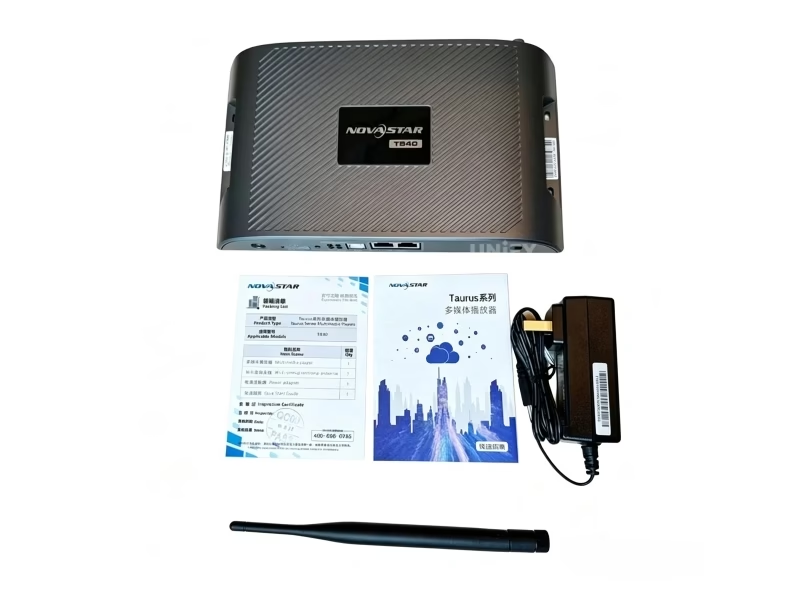
- 1× Novastar TB40 Multimedia Player (latest firmware)
- 1× Wi-Fi Omnidirectional Antenna
- 1× AC Power Adapter (DC 12V, 2A)
- 1× Certificate of Approval
- 1× Quick Start Guide with QR code
- Pre-shipment QC test report (upon request)
- Lifetime technical support access
Optional Add-ons: 4G cellular module, RF synchronization module, GPS antenna, brightness sensor, temperature & humidity sensor. Contact our team for compatibility confirmation and bundle pricing.
Get Your TB40 Quote
Response within 2 hours during business hours (GMT+8)
unifyledscreen@gmail.com
WhatsApp / Phone
+86-191-18802497
Location
Room 301, Building E-2, Jinrong Wangcheng Technology Industrial Park, Changsha, Hunan, China
Request Quote & Availability →
Bulk orders · Project pricing · Technical consultation
Frequently Asked Questions About the Novastar TB40 LED Multimedia Player
Answers based on real customer inquiries and field deployment experience.
What is the maximum pixel loading capacity of the Novastar TB40?
The TB40 supports up to 1,300,000 pixels with a maximum width of 4096 pixels and maximum height of 4096 pixels. Non-standard resolutions are supported in both sync and async modes, provided the pixel clock does not exceed 153 MHz.
Does the TB40 support 4K video playback?
Yes. The TB40 decodes up to 4096×2304 pixels. Use H.265/HEVC for 4K at 60fps (100 Mbps). H.264 supports 4K at 30fps (80 Mbps). Simultaneous playback: 1× 4K, 2× 1080p, 5× 720p, or 6× 480p/360p.
What’s the difference between synchronous and asynchronous mode?
Async mode: plays content from internal 32 GB storage or USB — ideal for scheduled advertising. Sync mode: captures live HDMI video feed (up to 1920×1200@60Hz) and drives the display in real time — for presentations and live events. Toggle via the SWITCH button on the front panel.
Can the TB40 synchronize playback across multiple screens?
Yes — via NTP (internet-based, no extra hardware), GPS (requires optional 4G module), or RF (requires optional RF module). Note: enabling sync mode halves the number of simultaneous video streams within decoding capacity.
Does the TB40 come with built-in 4G?
No — the TB40 ships without a 4G module. It has a dedicated 4G antenna connector (COM 1) and supports optional 4G modules purchased separately. Network priority when multiple types are available: Wired > Wi-Fi > 4G.
What software controls the TB40?
NovaStar official software only: ViPlex Express (Windows), ViPlex Handy (Android/iOS), and VNNOX (cloud). Third-party control applications are not supported.
What are the USB drive requirements?
USB 3.0 Type-A port supports FAT32 and NTFS. Drive capacity: 2 GB to 128 GB. Individual file size: less than 4 GB on FAT32. Use for content playback, firmware upgrades, and storage expansion.
How do I factory reset the TB40?
Press and hold the RESET button on the front panel for approximately 5 seconds. The device restores to factory default settings. Use when repurposing a unit or troubleshooting persistent configuration issues.
Is the TB40 suitable for outdoor use?
The TB40 has an IP20 rating — no water resistance. For outdoor installations, house it inside a weatherproof enclosure with adequate ventilation. Operating range: –20°C to +60°C, 0%–80% RH non-condensing.
What is the TB40’s power consumption?
DC 12V, 2A input. Maximum power consumption: 18W. NovaStar recommends a 25W supply for headroom. The included AC adapter handles 100–240V AC, 50/60Hz — compatible worldwide.
Ready to Source the Novastar TB40 LED Multimedia Player?
Free controller selection guidance, factory-direct pricing, global logistics. Tailored quotation within 24 hours.
unifyledscreen@gmail.com | +86-191-18802497
How to Choose the Right LED Multimedia Player — A Novastar TB40 Evaluation Framework & 2026 Buyer’s Guide
Published: August 2026 | Reading time: 12 min | UnifyLED Engineering Team
Selecting the wrong LED multimedia player for a commercial display project is a costly mistake — one we’ve seen integrators make across hundreds of deployments. Choose a model with insufficient pixel capacity, and your display shows black bars or refuses to light. Choose one without synchronous mode support, and you lose the ability to display live video feeds — a dealbreaker for event venues, broadcast studios, and corporate presentation environments. Over-specify, and you waste budget on features your project will never use.
This guide provides a structured, data-driven framework for evaluating LED multimedia players across five dimensions that actually determine project success: pixel loading capacity, playback modes, network connectivity, media codec support, and remote management capability. Whether deploying a single outdoor LED billboard or a 200-location chain store network, the evaluation criteria remain the same.
Dimension 1: Pixel Loading Capacity — Match the Player to Your Display
Pixel loading capacity is the single most important specification — and the one most frequently overlooked by first-time buyers. It defines the maximum number of physical LED pixels a multimedia player can drive. For context: a standard P2.5 indoor display measuring 3.84m × 2.08m contains approximately 1,280,000 pixels — within a 1.3M pixel controller’s limit. A P3.91 outdoor display of 5.76m × 3.84m contains approximately 1,470,000 pixels — requiring a higher-capacity model or multi-controller setup.
The calculation is straightforward: Total Pixels = (Display Width in mm ÷ Pixel Pitch) × (Display Height in mm ÷ Pixel Pitch). The LED pixel pitch you select directly determines how many pixels your controller must handle. As a rule of thumb, add 15–20% headroom above your calculated pixel count to accommodate non-standard aspect ratios or future expansion.
For mid-range controllers like the NovaStar TB40 (1.3M pixels), this typically covers: P2.5 indoor displays up to ~8.5 m², P3.91 outdoor up to ~18 m², P4.81 outdoor up to ~28 m², and P10 outdoor up to ~120 m².
Dimension 2: Synchronous vs Asynchronous — The Architectural Decision
This is the most fundamental architectural decision in LED display control. Asynchronous mode means the player runs independently — content is pre-loaded onto internal storage and plays on a schedule. No live video input. This is standard for fixed advertising billboards, retail signage, and information displays where content changes are planned, not real-time.
Synchronous mode means the player takes a live video feed (typically HDMI) and displays it in real time — like a computer monitor. Required for live events, video conferencing, broadcast studios, and sports venues.
The critical hardware requirement: HDMI input. Without it, synchronous mode is physically impossible. Many entry-level players (including the NovaStar TB30) lack HDMI entirely — they are asynchronous-only. If your project requires both modes at different times, you need a dual-mode player like the TB40. For a deeper technical breakdown, see our guide on synchronous vs asynchronous LED control systems.
Dimension 3: Network Connectivity — Managing Displays at Scale
Content doesn’t stay fresh forever. A display that’s difficult to update becomes a display showing outdated content — damaging brand perception. The network connectivity stack determines how easily you can publish new content, adjust schedules, and monitor health over time.
The modern minimum is Gigabit Ethernet + Wi-Fi. Ethernet provides reliability for initial configuration and large file transfers. Wi-Fi AP+STA simultaneous mode (as on the TB40) enables on-site technicians to connect directly to the player’s hotspot for adjustments without disrupting the main network. For remote installations without wired infrastructure, optional 4G cellular support becomes essential. Our guide on cloud-based remote content updates for LED displays covers this architecture.
For multi-location deployments, verify cloud platform integration. NovaStar’s VNNOX enables centralized content management across hundreds of players from a single dashboard — reducing the operational cost of content updates to near zero compared to dispatching technicians to each location.
Dimension 4: Media Codec Support — Your Files Must Actually Play
The #1 cause of “my display won’t play this file” support tickets is codec mismatch. Before committing to a multimedia player, verify its codec support matrix against the media files your content team produces:
- H.265/HEVC support: Essential for 4K content. H.265 delivers the same quality as H.264 at roughly half the bitrate — smoother playback, smaller files.
- Container format support: MP4, MKV, MOV, AVI, WEBM — verify all are supported, not just codec compatibility.
- Image format support: Beyond JPEG, verify PNG (transparency), WEBP (bandwidth efficiency), and GIF (animation, noting resolution/framerate limits).
- Audio sample rate compatibility: The TB40’s audio output is fixed at 48 kHz — content with different sample rates may play without sound.
Dimension 5: Remote Management — The Operational Cost Multiplier
The purchase price is a one-time cost. The operational cost of managing a display — updating content, troubleshooting issues, monitoring health — recurs monthly for the life of the installation. A player with robust remote management can reduce this by 80–90% compared to one requiring on-site visits for every change.
Key remote management capabilities to verify: cloud-based content publishing, real-time health monitoring with automatic fault alerts, firmware-over-the-air (FOTA) updates, multi-user access control, and usage analytics tracking playback hours and system uptime across your fleet.
Making the Final Decision
When evaluating specific models, create a comparison matrix with your project’s non-negotiable requirements. Not every project needs 4K decoding, HDMI input, or 4G connectivity — but knowing which features are mandatory versus nice-to-have prevents both under-buying and over-buying.
For the vast majority of commercial LED display projects in 2026 — fixed advertising screens, retail displays, chain store networks, and smart city signage with pixel counts under 1.3 million — a mid-range dual-mode player like the NovaStar TB40 represents the optimal price-to-performance ratio. It provides the HDMI input and sync mode that entry-level players lack, without the premium pricing of high-end controllers designed for multi-million-pixel video walls.
For further technical guidance, explore our resource library covering LED display refresh rate optimization, how to choose an asynchronous LED media player, and LED display power consumption analysis.
Download Novastar TB40 LED Multimedia Player Specifications
Official NovaStar TB40 datasheet — V1.2.3 (January 2026). Includes full electrical parameters, mechanical dimensions, media decoding specifications, connector pinouts, and packing information.
TB40 Specifications V1.2.3
PDF · 12 pages · 238.8×140.5×32.0 mm
Processor · Ports · Decoding · Power · Dimensions · Certifications
Also available: NovaStar LED Controller Software Downloads
Explore the Complete NovaStar Taurus Range
Taurus TB2 Player
Taurus TB3 Controller
Taurus TB6 Controller
NovaStar Software Downloads
Download TB40 Specifications
unifyledscreen@gmail.com | +86-191-18802497 | Worldwide Shipping