
Black Spots on LED Screens: Causes, Diagnosis, and Repairs That Last
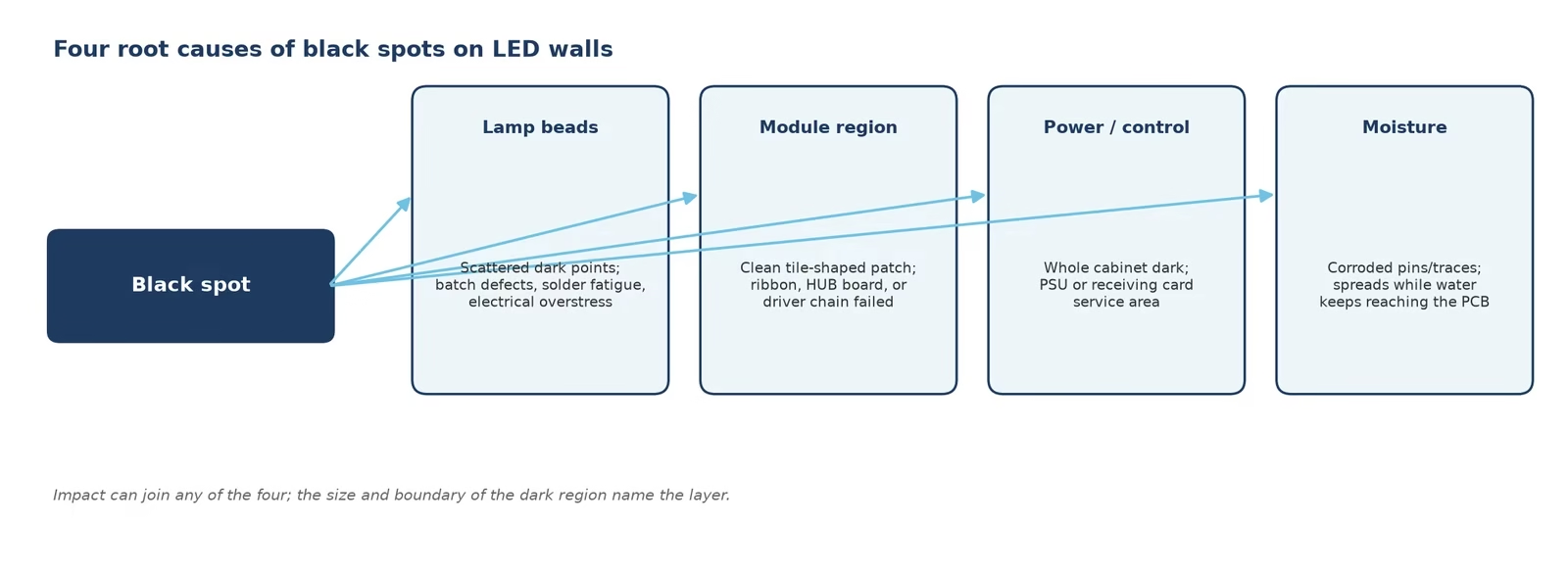
Quick answer: a black spot on an LED screen is a small region of diodes that no longer lights, and on a direct-view LED wall it almost always traces to hardware — a failed lamp bead cluster, a dead module or ribbon connection, a regional power fault, or moisture ingress. Find which of the four it is with a full-field color test, fix it by swapping the module or part at fault, and prevent the next one with sealing, spares, and scheduled checks. TV-style home remedies do not apply to LED walls.
A black spot is the dark twin of the white spot problem: one region of the wall goes dark while the rest performs normally. On consumer TVs the answer is often “replace the panel.” On a commercial LED wall the answer is almost always better: the failure lives in one module or one part, and that part is replaceable in minutes. This guide covers the four root causes, how to tell black spots from their three look-alikes, the repair sequence our technicians use, what it costs, and the sealing and stocking habits that keep the next spot from appearing.
1. What Is a Black Spot on an LED Screen?
A black spot on an LED screen is a visibly dark region — from a pinprick to a whole tile — where diodes that should light simply do not. The size hints at the layer: a few dark points sit at the lamp-bead level; a clean rectangular patch the size of a module means that module or its ribbon is dead; a full cabinet gone dark points to its power supply or receiving card. The boundary tells the story, which is why diagnosis starts with geometry, not guesswork.
Note what a black spot is not: it is not burn-in (a soft ghost of old content — covered in our burn-in guide), and it is not uneven brightness (a gradual variation across the wall). Black spots are binary: the diodes there emit nothing.
2. What Causes Black Spots on LED Walls?
Four root causes account for nearly every case:
- Failed lamp beads: individual RGB LEDs die from manufacturing defects, solder fatigue, or electrical overstress. Failures cluster when a batch is weak, which is why factory 72-hour aging matters (see our LED display technology guide).
- Module-region death: a whole module or row goes black while neighbors stay lit — the ribbon cable, HUB board, or the module’s own driver chain failed. The image boundary matches the module outline exactly.
- Regional power or control fault: one cabinet or section dark while the rest plays: its power supply died or its receiving card stopped outputting. Dark area = service area of the failed part.
- Moisture and corrosion: water reaching the PCB corrodes pins and traces until a region fails. Outdoor walls with tired gaskets and indoor walls near pools, kitchens, and coastal air all qualify. Sealing quality decides this one (Section 8).
Physical impact joins any of the four: a trolley corner, a dropped tool, or an unseated magnet can kill diodes outright or crack a trace. Timing is a diagnostic clue of its own — a spot that appears right after a venue install, a rental strike, or a module swap points straight at handling, while one that appears after a humid summer points at sealing.
3. Black Spots vs Dead Pixels vs Burn-In vs Cable Faults
Four look-alikes, four different fixes — diagnose before buying parts:
| Symptom | Signature | Fix |
|---|---|---|
| Black spot | Dark cluster or tile-shaped region, same in all content | Swap lamp/module/part at fault |
| Dead pixel | Single points, always black or one color | Module replacement or lamp repair — see the dead pixel guide |
| Burn-in | Soft ghost shaped like old static content, region is dim, not dark | Content rotation + calibration |
| Cable fault | Bands, repeated blocks, or a section that changes when cables are re-seated | Re-seat/replace cable — signal cable guide |
The full fault tree, including color and half-screen faults, lives in our LED display troubleshooting guide.
4. How Do You Diagnose a Black Spot on an LED Wall?
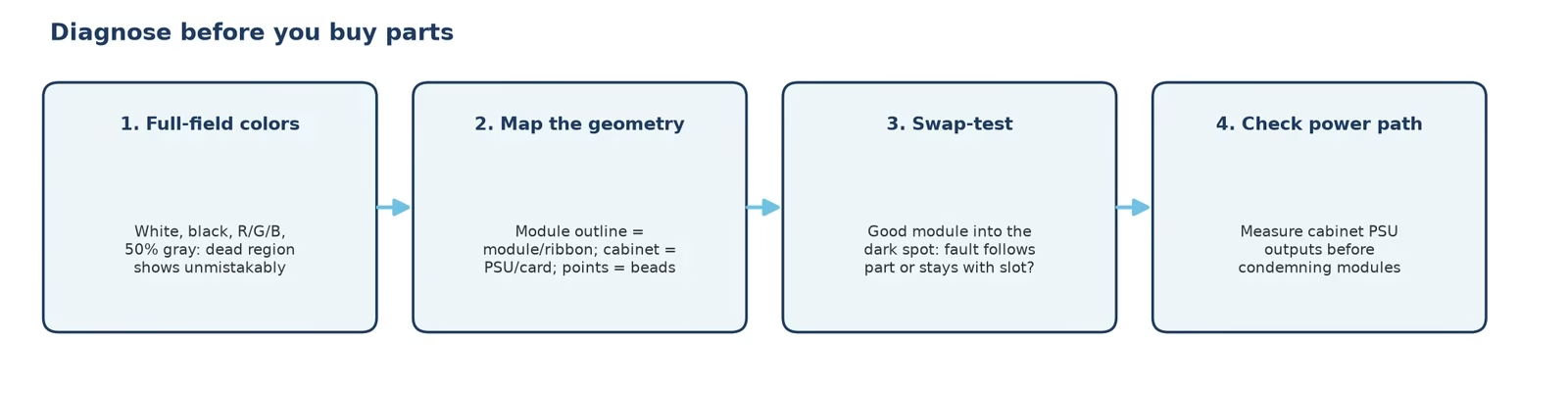
Run the sequence before touching hardware:
- Full-field test colors: display white, then black, then red, green, blue, and 50% gray. On white, dead regions are unmistakable; the other fields reveal whether only one color channel died (a red-only failure points at the bead or its channel, not the module).
- Map the geometry: measure the dark region against the cabinet grid. Matching a module outline = module/ribbon; matching a cabinet = power or receiving card; scattered points = lamp beads.
- Swap-test the suspect: move a known-good module into the dark position (or the suspect into a good position). If the fault follows the part, the part is guilty; if it stays with the position, look at the ribbon, HUB, or receiving card behind it.
- Check the power path last-but-not-least: measure the cabinet’s supply outputs before condemning modules — a dying PSU kills everything it feeds and will eat the replacement module too.
5. How to Fix Black Spots on an LED Wall
Once the guilty part is isolated, the fix is mechanical — that is the point of modular design:
- Front-access module swap: most commercial walls service from the front. A vacuum suction tool grips the module face, the module releases from its magnets or locks, the ribbon moves over, and the replacement seats in minutes. The clip below shows the pull on a real cabinet.
- Ribbon/HUB repair: if the swap test cleared the module, re-seat the ribbon, inspect the HUB sockets, and replace the HUB or receiving card as indicated.
- Re-calibrate the seam: a fresh module sits next to aged neighbors; a point-by-point correction of the region makes the boundary invisible. This is the step DIY repairs skip and why our swaps end with calibration.
- Lamp-level repair (factory): scattered bead failures on a large scale go back to the bench for reflow or relamping — economic when the module count is high, not worth the shipping for one module.
6. What About Black Spots on TVs, OLED, and LCD Screens?
Search traffic mixes LED walls with consumer TVs, so here is the honest bridge. OLED black spots or dark patches come from failed organic emissive regions or panel defects — they are not user-repairable, and static-content burn-in on OLED is permanent (the mechanism differs from LED; see the burn-in guide). LCD dark spots usually trace to backlight zones, pressure damage to the liquid-crystal layer, or debris behind the polarizer; the “massage it gently” folk remedy occasionally redistributes an LCD pressure mark and just as often spreads the damage — on a bonded panel there is nothing an owner should press. If the screen is a TV, the practical fix is a warranty claim; if it is an LED wall, keep reading — that is what the rest of this guide is for.
7. Repair or Replace? The Commercial Owner’s Math
A black spot rarely justifies replacing a wall; run the three-line calculation instead. Line one — parts: a replacement module prices in the same per-square-meter band as the original wall (roughly $75–180/㎡ by pitch outdoors, less for indoor fine pitch), and one incident usually needs one or two modules. Line two — labor: a front-access swap is minutes per module plus a calibration session. Line three — warranty: failures inside the warranty window are the manufacturer’s modules and freight, which is why the warranty’s module-coverage terms deserve a read at purchase time, not at failure time. Replacement of the whole wall only enters when aging, uptime demands, and pitch obsolescence coincide — never for one black spot.
The operational habit that changes the math permanently: stock spares. Two to five percent of module count (rounded up to whole modules per batch) kept on site turns a next-day warranty shipment into a ten-minute fix, and the batch-matched spares calibrate in more cleanly than new-production replacements. Store them sealed with the desiccant they shipped in; a spare module that spent a year in a damp storeroom can arrive with its own black spots.
8. How to Prevent Black Spots on an LED Wall
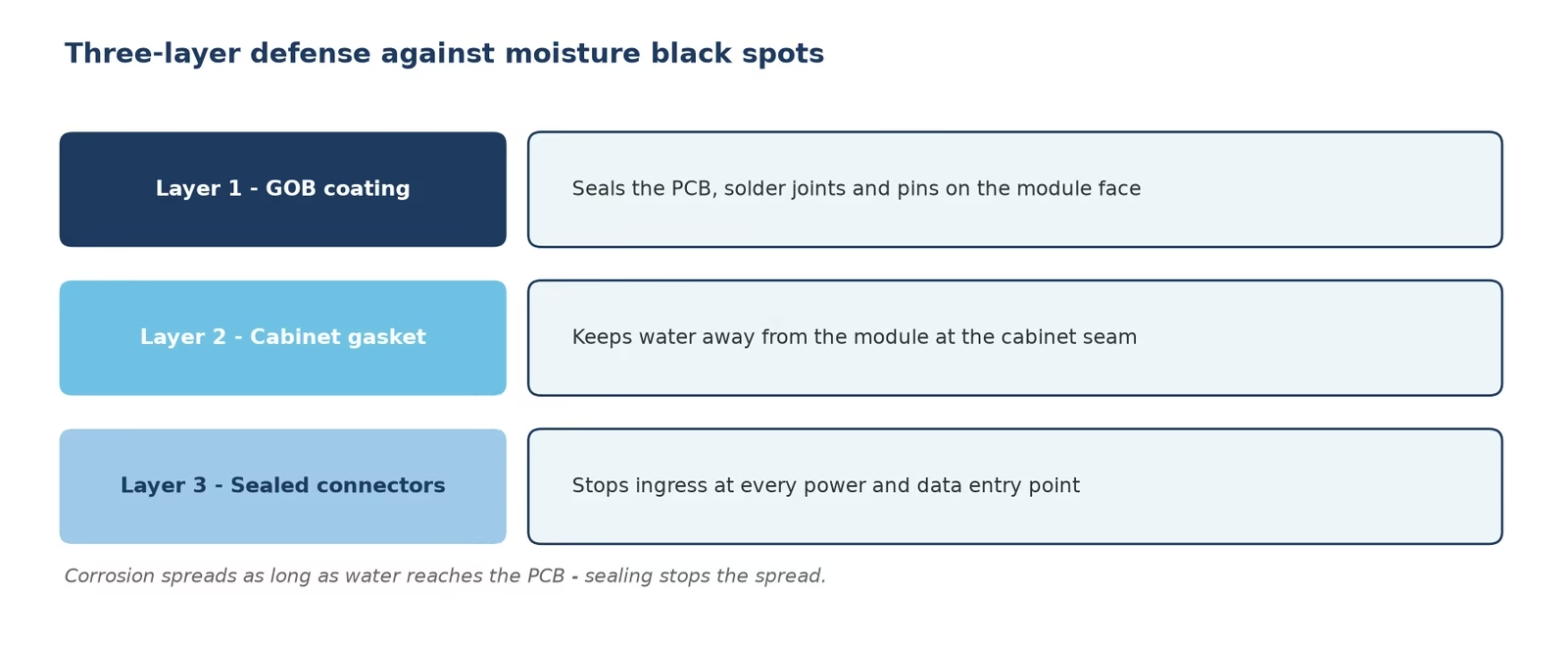
Prevention targets the four causes directly:
- Seal against moisture: for outdoor and humidity-exposed walls, specify GOB coating on the modules, cabinet gaskets in good condition, and sealed connectors — the video shows how these three layers stack. Re-check gaskets at every maintenance visit.
- Buy aged, calibrated stock: the 72-hour full-brightness burn-in at the factory weeds out infant-mortality beads before they become your black spot; ask any supplier what their bench actually tests.
- Handle with discipline: most impact deaths happen during installs and service — protect the face during transport, keep tools off the module surface, and re-seat every ribbon after any cabinet move.
- Schedule the checks: a weekly full-field color sweep catches new dark regions while they are still single-module repairs; pair it with the maintenance calendar in our troubleshooting guide.
Cleaning discipline closes the loop: films and standing moisture on the face are the early stages of the moisture failures above, and the routine in how to clean an LED screen doubles as your weekly inspection.
9. FAQs About Black Spots on Screens
What causes black spots on an LED screen?
Four roots: failed lamp beads, a dead module or ribbon connection, a regional power or receiving-card fault, and moisture corrosion. Physical impact can join any of them.
How do I fix a black spot on an LED screen?
Diagnose with full-field colors, map the dark region to the module or cabinet, swap-test the suspect part, replace it, and re-calibrate the seam.
Can you fix black spots yourself?
On an LED wall with front access, a module swap with a suction tool is a routine owner-level repair. On TVs and OLED panels, no — the panel is bonded and the practical path is warranty.
What is the difference between a black spot and a dead pixel?
Scale: a dead pixel is a single diode stuck black or single-color; a black spot is a cluster or region, usually pointing at a module, ribbon, or power fault.
Why is part of my LED wall dark while the rest works?
The dark area matches the service area of one failed part — a module outline means module or ribbon; a whole cabinet means its power supply or receiving card.
What are black spots on an OLED screen?
Failed organic emissive regions or panel defects. They are permanent and not user-repairable; OLED also burns in from static content, which LED walls resist.
Do black spots spread?
Lamp-bead failures stay put; moisture corrosion spreads as long as water keeps reaching the PCB — sealing the cabinet stops the spread.
How much does it cost to fix a black spot on an LED wall?
Typically one or two replacement modules priced per square meter by pitch, plus labor minutes for a front-access swap and one calibration session — covered by warranty if within term.
Does moisture really cause black spots?
Yes — water corrodes pins and traces until a region fails. GOB coating, cabinet gaskets, and sealed connectors are the three-layer defense.
How do I prevent black spots on my LED wall?
Sealed hardware, factory-aged modules, disciplined handling, spare modules on site, and a weekly full-field color sweep.
10. Conclusion: A Black Spot Is a Module Problem, Not a Wall Problem
On a direct-view LED wall, a black spot is the most fixable fault in this entire series: the geometry of the dark region names the guilty layer, a swap-test confirms it, a front-access module change ends it, and a calibration pass makes the repair invisible. Contrast that with the bonded-panel answer on TVs and OLED, and the commercial case for modular walls writes itself. Keep sealed hardware, aged stock, spares on the shelf, and a weekly color sweep — and the next black spot becomes a ten-minute line item instead of a procurement decision. When you spec your next wall, our team — an LED screen manufacturer that ships front-serviceable cabinets with batch aging and calibration reports — builds all of this in from the first quotation.