
How to Clean an LED Screen: The Commercial Owner’s Playbook
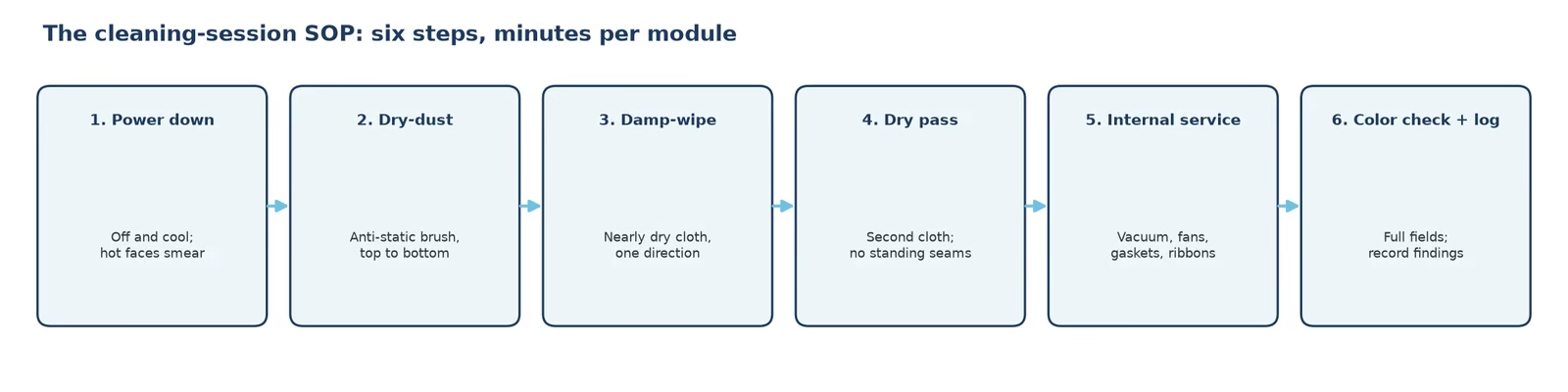
Quick answer: cleaning an LED screen is a dry-first, low-pressure, chemistry-disciplined routine — power down, remove dust with soft anti-static tools, wipe the module face with a barely damp neutral-pH cloth in one direction, dry, then run a full-field color check. What never touches the face: ammonia or acetone cleaners, paper towels, and pressurized water. How often you clean depends on the environment, and every session doubles as a fault inspection.
On a consumer TV, cleaning is cosmetic. On a commercial LED wall it is operational: dust loads drive operating temperature up, films and fingerprints scatter light, and every cleaning session is the cheapest inspection your wall will ever get. This playbook covers the chemistry, the sequence, the frequency matrix by environment, the packaging differences that change what you wipe, and the mistakes that turn a routine clean into a service call.
1. What Does Cleaning an LED Screen Actually Involve?
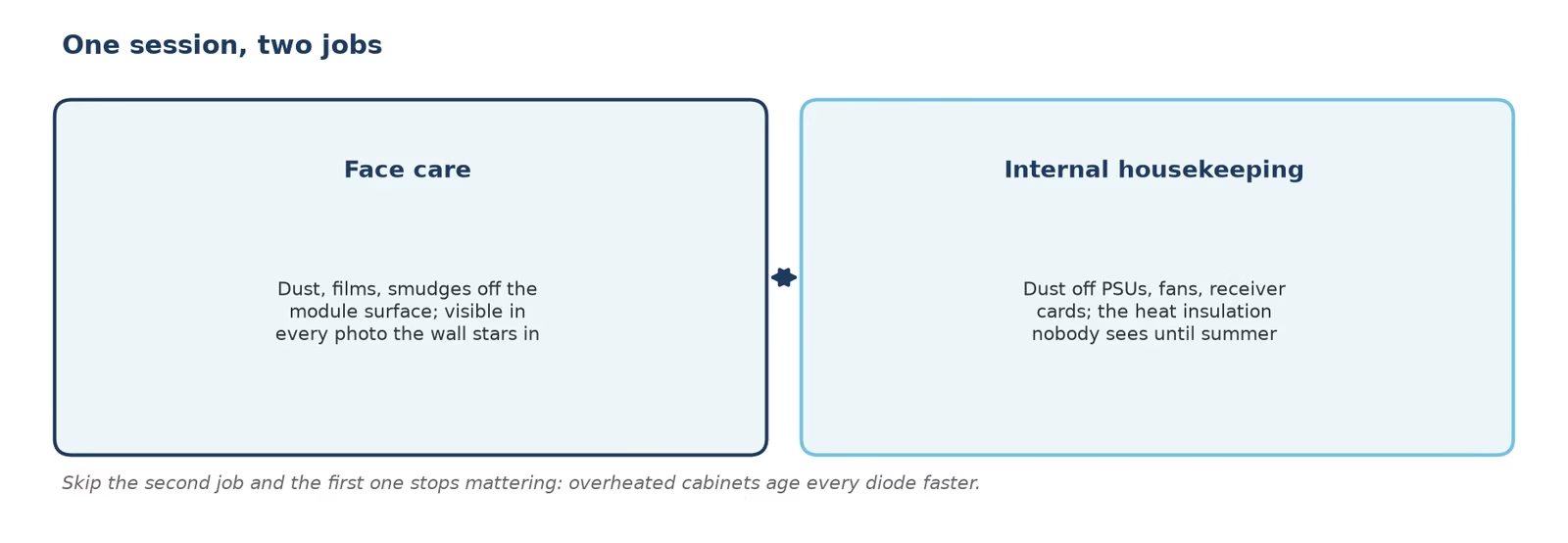
Two separate jobs hide behind one word. Face care is what most guides mean: removing dust, films, and smudges from the module surface without stressing the diodes or their encapsulation. Internal housekeeping is the part owners skip: dust settling on cabinet interiors, power supplies, and receiver cards insulates heat and invites moisture problems — the same dust that dulls the face is quietly cooking the electronics behind it. A complete cleaning session covers both, which is why it pairs naturally with the maintenance calendar in our troubleshooting guide.
The stakes differ from a TV for one structural reason: on a direct-view wall the diodes are the surface. There is no protective glass layer to hide behind; the emitting face is exposed, and its coating — SMD epoxy, GOB resin, or bare COB — is a finite resource you are preserving with every wipe. (If the layers under that face are new to you, our how an LED display works guide covers the full signal chain first.)
2. Which Products Can Touch an LED Module Face?
The chemistry rules are short and unforgiving:
| Safe zone | Forbidden zone |
|---|---|
| Deionized or distilled water (first choice) | Ammonia-based glass cleaners — attack encapsulation and masks |
| Neutral-pH mild soap solution, well wrung out | Acetone, ketones, and strong solvents — craze GOB and SMD epoxy |
| Isopropyl alcohol ≤70%, spot use only on GOB/coated faces | Paper towels and rough fabrics — micro-abrade the surface |
| Soft anti-static brush, microfiber cloth, air bulb | Pressure washers and compressed-air guns at close range — bend lamp beads, drive dust past gaskets |
Two habits make any safe product safer: spray the cloth, never the screen; and wipe in one direction with light pressure, lifting at the end of each stroke rather than scrubbing back and forth.
Static deserves its own note. The module face is a charged surface — that is why it collects dust so efficiently — and dry rubbing on a dry day pumps more charge into it. Anti-static brushes and slightly damp cloths exist for this reason. The same discipline extends to spares: store spare modules sealed with their shipping desiccant, inspect and (if the factory provides one) run the calibration report before installing a module that has waited in storage, because a damp spare introduces its own faults into a healthy wall.
3. How Often Should You Clean an LED Wall?
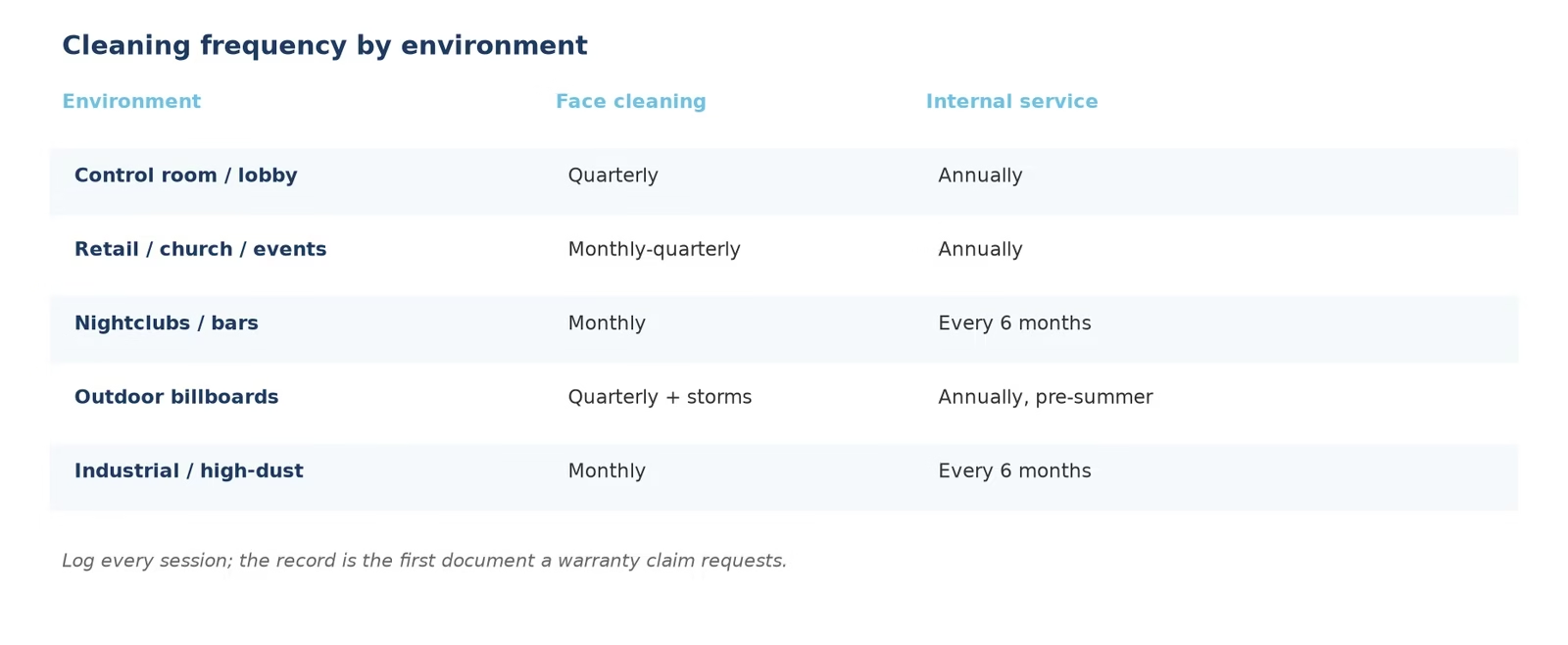
Frequency follows the environment, not the calendar:
| Environment | Face cleaning | Internal dust service |
|---|---|---|
| Control room / office lobby | Quarterly, or on visible film | Annually |
| Retail / church / event venues | Monthly to quarterly | Annually |
| Nightclubs / bars (smoke, residue) | Monthly | Every 6 months |
| Outdoor billboards and facades | Quarterly, plus after storms | Annually, pre-summer |
| Industrial / high-dust sites | Monthly | Every 6 months |
Log every session. A written record turns “the wall looks dim” complaints into data, and it is the first thing a warranty claim asks for.
4. How to Clean an LED Screen Step by Step
- Power down and dim: switch the wall off and let it cool for several minutes. Cleaning a hot face smears films and risks thermal shock; a dark wall also makes dust and damage easier to see.
- Dry-dust first: sweep the face with a soft anti-static brush or air bulb, top to bottom. Never skip to wet wiping — dry grit is what scratches.
- Damp-wipe the face: microfiber cloth, wrung nearly dry with deionized water (or the mildest neutral-pH solution for films), one direction, light pressure, working in module-width strips so you know exactly which area you covered. Fold the cloth to a fresh face for each strip; a cloth that has picked up grit from one module will drag it across the next.
- Dry immediately: a second dry microfiber pass removes residue before it settles into seams — standing moisture at the module edge is how black spots start.
- Open-housekeeping (qualified staff): with power locked out and breakers tagged, vacuum cabinet interiors with a low-suction brush attachment, check that PSU fans spin freely and gaskets sit flush, inspect receiving-card seating, and re-seat any ribbon disturbed during service — connectors work loose with thermal cycling, and a half-seated ribbon is a future black region.
- Inspect under full-field colors: power back on and run white, black, and primary-color fields. The session ends with evidence: any new bright spot, dark region, or line gets logged now, not discovered by an audience later.
- Log the session: date, areas cleaned, products used, and inspection findings. The log converts year-over-year comparisons into facts and is the first document a warranty claim requests.
5. How Do SMD, COB, and GOB Faces Change the Job?
The packaging on the module face decides how gentle “gentle” has to be:
| Face type | Surface | Cleaning posture |
|---|---|---|
| SMD | Exposed epoxy-domed beads | Softest touch of the three: the dome and its solder legs take lateral stress poorly; water-damp microfiber only |
| GOB | Transparent resin seal over SMD | Tolerates spot IPA and firmer wipes; the seal protects beads but can craze under solvents |
| COB | Chips bonded and sealed into a flush face | Most serviceable face: one flush surface, wipe-friendly, humidity-tolerant |
Long-term, the face you choose also decides how much cleaning your environment can forgive: a GOB or COB face shrugs off the coastal salt film that would etch bare SMD epoxy, while an uncoated SMD wall in a demanding site simply needs the quarterly rhythm kept honestly. The full packaging trade-offs — brightness, repair economics, pitch limits — live in our SMD vs COB vs GOB comparison.
6. What About Indoor Versus Outdoor Walls?
Indoor walls fight dust, fingerprints, and static attraction; a quarterly wipe-down plus annual internal service covers most sites, with high-traffic lobbies leaning monthly during event seasons. Outdoor walls add pollen, bird collisions, storm films, and traffic grit — clean in the early morning while the face is cool, use generous deionized water for film softening, never cold water on a sun-hot face, and treat every storm as an inspection trigger. Bird droppings soak off rather than scrub — a ten-minute soak with a damp cloth beats an hour of pressure that bends beads; coastal sites add a salt film that a monthly deionized rinse keeps from etching coatings; and windborne grit means the dry-dust step earns its keep before any cloth touches the face. Where modules sit behind front-access service, a cleaning session is also the moment to check gaskets and module seating: the video below shows why front maintenance makes this routine practical on wall-mounted screens with no rear access.
For owners planning service access into the purchase, the cabinet choice itself — front-serviceable, rear-serviceable, or both — is a maintenance decision; the walkthrough below compares both on aluminum-substrate cabinets.
7. Which Cleaning Mistakes Kill LED Walls?
- Glass cleaner on the face: ammonia attacks encapsulants and leaves films — the most common self-inflicted wound.
- Pressure washing outdoors: drives water past gaskets and bends beads; the wall is IP-rated against weather, not against a jet nozzle.
- Cleaning a hot face at noon: thermal shock plus instant-drying films; schedule outdoor cleaning for cool hours.
- Scrubbing dark regions: a black spot is a hardware fault (see the black spot guide) — rubbing delivers zero lumens and real damage.
- Skipping the log: an undocumented wall cannot prove its maintenance history when a warranty claim needs one.
8. When Is Cleaning Not Enough?
Cleaning fixes dirt, not failures. If a full-field check during the session shows a persistent bright spot or dark region, the module needs service, not another wipe; if the whole wall reads dim against its old photos, that is aging, and the response is calibration and brightness planning (see the burn-in guide); and if sections flicker or drop out as you wipe, suspect a connection — hand the wall to the troubleshooting flow before cleaning again. Cleaning does have real wins of its own: a wall that reads dull but tests clean comes back to life the moment its film lifts, and dust removal measurably lowers cabinet temperatures before a summer. An LED screen manufacturer that ships front-serviceable cabinets with documented aging and calibration turns every one of these from a project into a task.
9. FAQs About Cleaning LED Screens
How often should you clean an LED screen?
Quarterly for offices and control rooms, monthly to quarterly for retail and event venues, monthly for smoke-heavy or industrial sites, and quarterly plus post-storm for outdoor walls — with internal dust service annually or semi-annually.
What can I use to clean an LED screen?
Deionized water first, a well-wrung neutral-pH mild soap solution for films, and 70%-or-weaker isopropyl alcohol only as spot treatment on coated faces — always applied to the cloth, never sprayed on.
Can I use glass cleaner on an LED screen?
No. Ammonia-based glass cleaners attack module encapsulation and leave films; they are the most common self-inflicted damage on commercial walls.
How do you clean an outdoor LED display?
Early morning while the face is cool: dry-dust, soften films with generous deionized water, damp-wipe in one direction, dry, then inspect — and never pressure-wash or throw cold water on a sun-hot face.
What is the best way to clean dust out of an LED cabinet?
Power locked out, low-suction vacuum with a soft brush attachment on interiors, PSU fans checked, ribbons re-seated — internal housekeeping belongs to qualified staff during the annual service.
Do SMD and COB screens clean differently?
Yes: SMD’s exposed epoxy domes want the softest touch and water only; GOB and COB present sealed faces that tolerate firmer wipes and spot alcohol.
Can cleaning fix bright or dark spots?
No — spots are hardware faults. Cleaning is inspection time: log what the full-field colors show, then hand persistent spots to the repair guides.
Is it safe to clean an LED wall while it is on?
Face wiping should happen with the wall powered down and cool; a lit face hides dust, smears films, and adds thermal shock to every pass.
What wipes are safe on LED module faces?
Clean microfiber cloths and soft anti-static brushes. Paper towels and rough fabrics micro-abrade the surface and scratch coatings.
Why does my LED wall look dim even after cleaning?
Films on the face are one cause; wall-level dimness after a clean points to diode aging, and the response is calibration and brightness planning, not harder scrubbing.
10. Conclusion: Cleaning Is Inspection With a Cloth
Done right, cleaning an LED screen costs minutes: dry dust, one-direction damp wipe, dry pass, color check, log. Done wrong, it is ammonia on epoxy and a pressure washer at the gaskets. Keep the chemistry discipline, match the frequency to the environment, combine every session with a full-field inspection, and the wall repays you with years between service calls. If you are specifying a new wall, choose front-serviceable cabinets and documented factory aging — our team, an LED screen manufacturer with the production and calibration process shown across our guides, builds maintenance into the hardware quote.