
Contact us
- Home
- »
- LED Display Technology
- »
- Screen Aspect Ratio Guide: Calculator, Types & How to Check
Screen Aspect Ratio Guide: Calculator, Types & How to Check
Have you ever wondered why some movies fit your TV perfectly while others display annoying black bars? The answer lies in the screen aspect ratio. It defines the proportional relationship between the width and height of your display, shaping your entire viewing experience. Whether you are configuring a gaming monitor, setting up a commercial LED video wall, or simply trying to fix a stretched image on your laptop, understanding this concept is crucial. This guide covers everything from simple calculation formulas to the battle between 16:9 and 4:3.
Table of Contents
1. What is the Aspect Ratio of Screen?
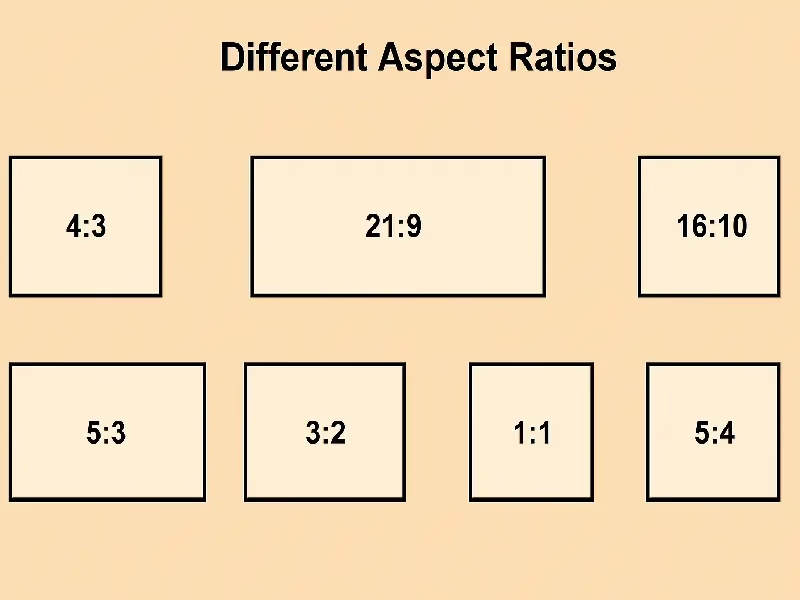
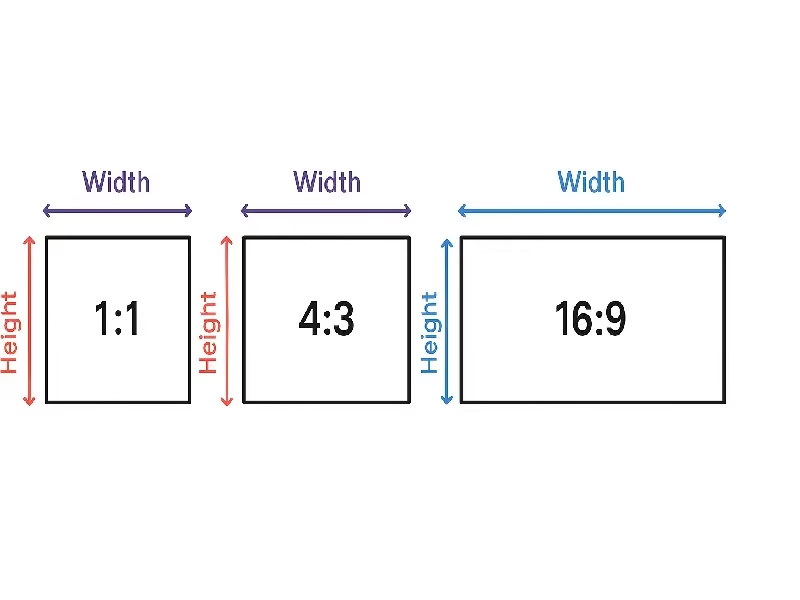
Simply put, the aspect ratio of screen describes the proportional relationship between a display’s width and its height. It doesn’t tell you the physical size (like 55 inches) or the resolution (how many pixels); instead, it defines the shape of your viewing area.
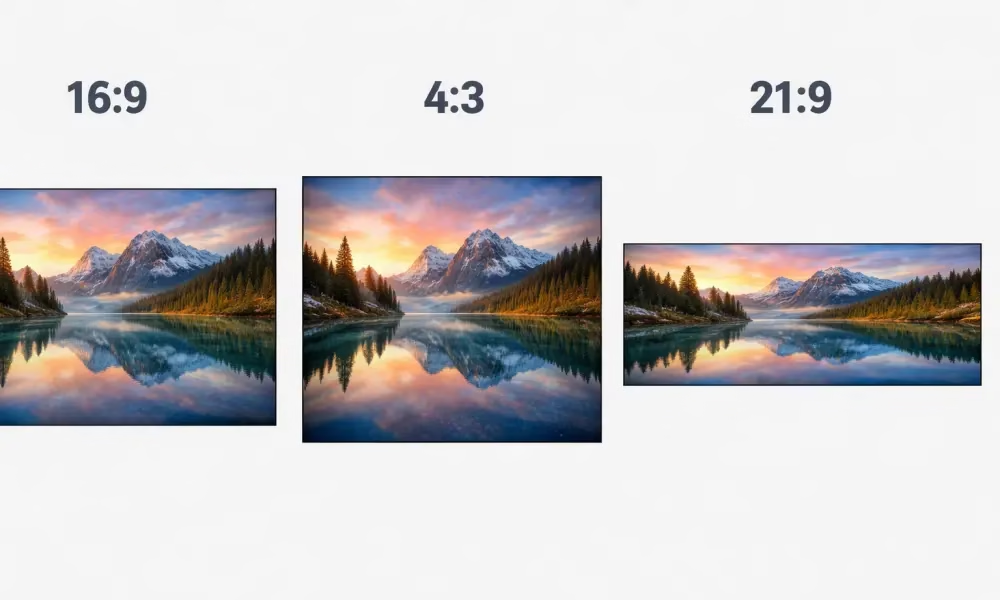
It is always written as two numbers separated by a colon, such as 16:9 or 4:3. For example, a 16:9 aspect ratio means that for every 16 units of width, there are 9 units of height.
Many people often ask, “How do I know what aspect ratio is my screen?” or “Why does my screen look boxy while others look wide?” The answer lies in these numbers:
Wider numbers (e.g., 16:9, 21:9) mean the screen is rectangular and wide, ideal for modern movies and immersive gaming.
Square-ish numbers (e.g., 4:3, 1:1) mean the screen is taller or closer to a square, often found in older monitors or specific data displays.
Why does this matter?
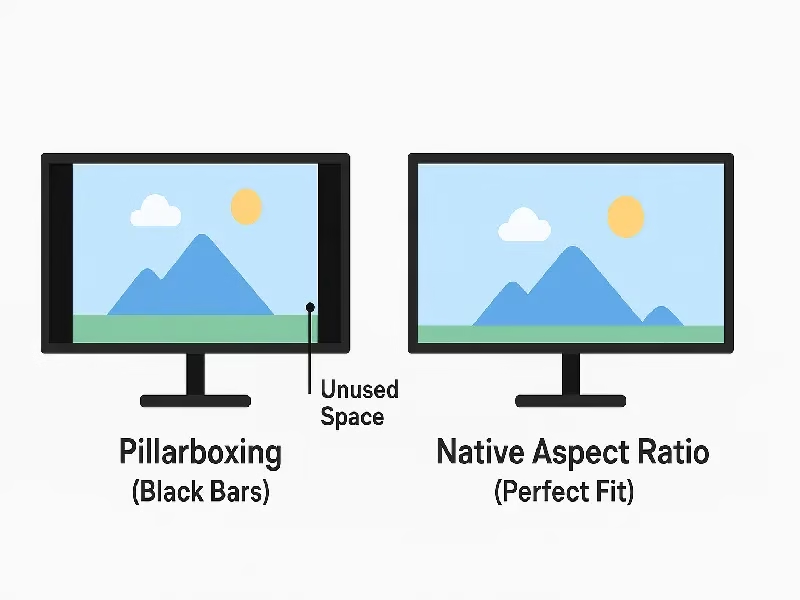
Understanding the aspect ratio of screen is critical for your viewing experience. If your content’s ratio doesn’t match your screen’s ratio, the image may appear stretched, squished, or surrounded by annoying black bars (a phenomenon known as letterboxing).
This concept applies to everything from watching Netflix on your laptop to designing massive commercial LED video walls. While consumer TVs come in fixed shapes, understanding aspect ratio is the first step to ensuring your content looks pixel-perfect on any display.
2. Screen Aspect Ratio Calculator & How to Check Yours
Searching for a screen aspect ratio calculator or wondering “how do I know what is my screen aspect ratio?” You don’t need complex software. You can find it by checking your system settings or doing a simple calculation.
Here is the complete guide on how to find aspect ratio of screen dimensions easily.
How to Calculate Screen Aspect Ratio?
If you know your screen’s resolution, you can act as your own screen calculator for aspect ratio.
The Formula:
Resolution Width ÷ Resolution Height = Aspect Ratio
Method A: Using Digital Resolution (Most Accurate)
Take your screen’s resolution (e.g., 1920 x 1080).
Divide the width by the height: 1920 ÷ 1080 = 1.777…
Match the decimal to a ratio:
1.77 = 16:9
1.33 = 4:3
1.6 = 16:10
2.33 = 21:9
Method B: Using Physical Measurement (For Old Screens)
If you cannot turn on the screen, use the physical measurement method:
Measure: Use a tape measure to find the visible width and height of the screen (excluding the bezel/frame).
Calculate: Divide the Width by the Height.
Simplify: For example, if the screen is 16 inches wide and 9 inches tall, the ratio is 16:9.
Quick Reference Chart (Resolution to Aspect Ratio)
Don’t want to do the math? Use this screen aspect ratio calculator chart to match your LED screen resolution instantly.
Resolution (Pixels) | Aspect Ratio | Common Device |
1024 x 768 | 4:3 | Old Monitors / Projectors |
1280 x 720 (HD) | 16:9 | Standard Laptops |
1920 x 1080 (FHD) | 16:9 | TVs / LED Video Walls |
1920 x 1200 | 16:10 | Office Monitors |
2560 x 1440 (2K) | 16:9 | Gaming Monitors |
3440 x 1440 | 21:9 | Ultrawide Monitors |
3840 x 2160 (4K) | 16:9 | Ultra HD Displays |
How to Check on Your Device
If you don’t know your resolution, here is how to find aspect ratio of screen directly in your operating system.
For Windows Users:
Right-click on your desktop and select Display Settings.
Scroll down to the “Scale and layout” section.
Look for Display resolution (e.g., 1920 x 1080).
Use the chart above to confirm your ratio.
For Mac Users:
Click the Apple Menu > System Settings (or System Preferences).
Click Displays.
You will see the resolution listed (e.g., “Default” or a specific number).
Unlike a single monitor, finding the aspect ratio of a custom LED display is different. It depends on the number of LED screen cabinets (modules).
Example: If you use 10 cabinets wide and 5 cabinets tall (assuming 500x500mm cabinets), your wall is 2:1 ratio.
To achieve a perfect 16:9 ratio on a large LED wall, you need to calculate the precise count of horizontal and vertical cabinets.
How to Change Screen Aspect Ratio
Sometimes, your image might look stretched or have black bars. This is usually a settings mismatch. Here is how to change screen aspect ratio:
Check Resolution: Ensure your PC’s output resolution matches the screen’s native resolution (Recommended settings).
Graphics Card Settings: Open NVIDIA Control Panel or AMD Radeon Settings. Look for “Scaling Mode” and select “Aspect Ratio” or “Full Screen” to force the image to fit.
Monitor OSD: Use the physical buttons on your monitor (or the remote for an LED video processor) to find the “Ratio” or “Picture Size” setting. You can often toggle between “Wide,” “4:3,” or “Auto.”
3. Screen Resolution vs. Screen Aspect Ratio: What’s the Difference?
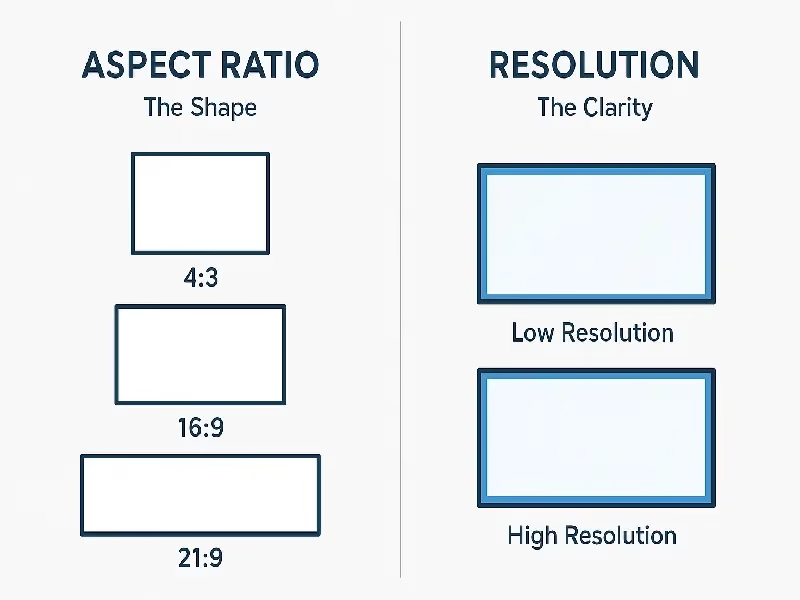
While screen resolution and aspect ratio are often mentioned together in display specifications, they refer to two completely different characteristics of your screen. Understanding the distinction is key to choosing the right display for your needs.
3.1 Screen Resolution (The Clarity)
Screen resolution defines the total number of LED pixels that make up the image on your screen. It is expressed as Width x Height (e.g., 1920×1080 or 3840×2160).
What it does: It determines the level of detail, sharpness, and clarity.
Why it matters: Higher resolutions mean more pixels. This results in sharper images and more screen real estate, which is essential for high-definition gaming, movie watching, and graphic design.
3.2 Aspect Ratio (The Shape)
Aspect ratio describes the proportional relationship between the width and the height of the display. It is written as a ratio separated by a colon (e.g., 16:9 or 4:3).
What it does: It determines the physical shape of the screen (e.g., square, wide, or ultra-wide).
Why it matters: A standard 16:9 ratio fits most modern TV shows and YouTube videos perfectly, while wider ratios like 21:9 are designed for immersive gaming and multitasking.
3.3 Common Aspect Ratios and Their Resolutions
The table below shows how different aspect ratios correspond to common screen resolutions:
Aspect Ratio | Common Resolutions | Usage & Notes |
16:9 | 1920×1080 (FHD), 2560×1440 (QHD), 3840×2160 (4K) | The Standard. Used in most TVs, monitors, and laptops. |
16:10 | 1920×1200, 2560×1600, 1280×800 | Productivity. Popular in MacBooks and premium office monitors for extra vertical space. |
21:9 | 2560×1080, 3440×1440 (UWQHD) | Ultrawide. Ideal for immersive gaming and side-by-side multitasking. |
32:9 | 3840×1080, 5120×1440 | Super Ultrawide. Replaces dual monitor setups (e.g., Samsung Odyssey G9). |
4:3 | 1024×768, 1600×1200 | Retro/Industrial. Found in older CRT monitors, iPads, and industrial displays. |
Resolution determines the sharpness of the display (how many pixels).
Aspect Ratio determines the shape of the display (how wide it is).
These two factors work together to define your viewing experience, influencing everything from how crisp the text looks to how a movie fits on your screen without black bars. While resolution controls sharpness and aspect ratio defines the shape, true image quality also depends on color dynamics. To fully understand display specs, you should also learn about display contrast ratio, which determines the difference between the darkest blacks and brightest whites.
4. Types of Screen Aspect Ratio
Aspect ratio is not a one-size-fits-all metric; it involves different measurement methods depending on whether you are looking at the screen, the pixels, or the file itself. To fully understand display specifications, it is important to distinguish between the three main technical types: DAR, PAR, and SAR.
4.1 Display Aspect Ratio (DAR)
Display Aspect Ratio (DAR) refers to the proportional relationship between the physical width and height of the screen. It is calculated based on the actual dimensions of the display hardware (in inches or centimeters).
For example, a screen with a 16:9 DAR implies that for every 16 units of width, there are 9 units of height. This is the most prevalent standard used in modern consumer TVs, monitors, and LED video walls.
4.2 Pixel Aspect Ratio (PAR)
Pixel Aspect Ratio (PAR) defines the shape of the individual pixels that make up the display. It is the ratio of the width to the height of a single pixel.
While most modern digital screens utilize square pixels (1:1), some older or specialized video formats use rectangular pixels. If the PAR is ignored, the image may appear distorted or stretched. Correcting the PAR ensures that the image geometry is rendered accurately on the screen.
4.3 Storage Aspect Ratio (SAR)
Storage Aspect Ratio (SAR) is determined by the digital resolution of the content, such as 1920×1080 pixels. It measures the ratio between the total number of horizontal pixels and vertical pixels in the video file.
SAR is critical for video encoding and storage. It ensures that the media player understands the frame size and scales the content to display the correct aspect ratio during playback, regardless of the device being used.
5. Applications of Screen Aspect Ratio
Screen aspect ratio plays a critical role across various modern devices and display systems. It defines how content is framed and ensures that images or videos maintain the correct proportions on any screen size.
5.1 Televisions and Monitors
For TVs and computer monitors, the aspect ratio dictates how movies, games, and broadcasts are rendered. The industry-standard 16:9 aspect ratio provides a widescreen experience ideal for HD and 4K content. Meanwhile, PC gamers and editors often turn to ultrawide monitors (21:9) for a more immersive field of view.
5.2 Smartphones and Tablets
Mobile screen aspect ratios have evolved to optimize readability and usability. Modern smartphones now use taller formats—such as 18:9 or 19.5:9—to maximize vertical display space. This structure is specifically designed to accommodate long feeds on apps and vertical social media video formats.
5.3 LED Screens and Digital Signage
In the commercial sector, the LED display aspect ratio is vital for digital signage. Selecting the correct ratio ensures that advertisements and branding visuals fit perfectly without being stretched. This is particularly important for large-scale video walls where maintaining a professional, distortion-free image is a priority.
5.4 Photography and Video Production
In creative media, the aspect ratio is a stylistic tool that affects composition. Directors and photographers choose specific formats to create different moods—ranging from the classic 4:3 ratio found in older broadcasts to the expansive cinematic aspect ratio used in feature films.
Overall, understanding these specific applications helps users and designers ensure that content matches the device aspect ratio, creating a superior visual experience across all platforms.
6. How to Change Screen Aspect Ratio (Source & Display Settings)
Changing the aspect ratio isn’t just about tweaking computer settings; it requires matching the source signal to your display hardware. This is particularly critical for LED video walls, where custom resolutions are common.
Here is how to manage aspect ratio settings correctly to ensure a perfect fit.
6.1 Adjusting the Source Output (Windows & Mac)
Whether you are connecting to a monitor or an LED sending box (sending card), the input source determines the initial ratio.
For LED Walls: You usually need to set a custom resolution (e.g., 3840×640 for a banner screen) rather than a standard 16:9 format.
How to change:
NVIDIA Control Panel: Go to Change Resolution > Customize > Create Custom Resolution. Input the exact pixel width and height of your LED screen.
Why this matters: Sending a standard 16:9 signal to a custom-shaped LED wall will result in a squeezed or cropped image.
6.2 Hardware Scaling via Video Processors
Unlike standard monitors, professional LED displays rely on Video Processors (like NovaStar, Magnimage, or VDWall) to manage the aspect ratio.
Pixel-to-Pixel Mapping: For the sharpest image, bypass scaling and map the content pixel-for-pixel to the screen.
Hardware Scaling: If the source (e.g., a live camera feed) is 16:9 but the LED screen is 21:9, you use the video processor to scale the image. You can choose to:
Crop: Cut off the top/bottom to fill the width.
Letterbox: Keep the whole image with black bars.
Stretch: Force the image to fit (not recommended for faces/text).
6.3 Troubleshooting Black Bars (Aspect Ratio Full Screen)
If your content isn’t filling the LED screen (black bars appearing), it is usually a mismatch between the content file and the screen resolution.
The Problem: Playing a standard 16:9 commercial on a custom 4:1 LED banner.
The Fix:
Re-render Content: The best solution is to create content with the exact resolution of the screen.
LED Software Setting: In LED control software (like NovaLCT), ensure the “Screen Configuration” matches the physical module layout.
Full Screen Mode: Set your media player software (e.g., vMix, Resolume) to “Scale to Fit” or “Aspect Ratio Full Screen” mode to force the content to cover the entire display area.
7. The Importance of Aspect Ratio in LED Screens
When planning an LED video wall installation—whether for commercial advertising, live events, or permanent digital signage—the aspect ratio is just as critical as the pixel pitch. It is not merely a technical detail; it is the factor that dictates the final visual quality and impact of your display.
Here is why selecting the correct LED screen aspect ratio is essential for a successful project:
Preventing Image Distortion and Black Bars
The primary role of the aspect ratio is to ensure that your source content matches the physical screen. If the video wall aspect ratio does not align with the content (e.g., playing a 16:9 video on a square screen), the image will either be stretched (distorted) to fill the space or display unsightly black bars (letterboxing). A matched ratio guarantees a seamless, full-screen experience.
Ensuring Professional Digital Signage
For digital signage and brand advertising, visual integrity is non-negotiable. Using an incorrect or mismatching ratio can warp logos and make text unreadable. By calculating the precise width-to-height ratio during the design phase, businesses can ensure their brand visuals remain sharp, professional, and eye-catching.
Simplifying Content Creation and Management
In fixed installations like shopping malls or stadiums, adhering to standard aspect ratios (like 16:9) simplifies content management. Since most standard video files are produced in 16:9, using this format eliminates the need for expensive custom content creation or complex video scaling.
Efficiency for Rental and Live Events
For rental LED displays used in concerts and events, time is money. Using a standard screen ratio ensures instant compatibility with media servers and cameras. Non-standard ratios often require custom editing, cropping, or specialized processors, which increases both setup time and project costs.
In short, choosing the right aspect ratio maximizes the ROI of your LED display by improving the viewer experience, reducing content production costs, and ensuring compatibility with standard media formats.
8. Which Aspect Ratio is Better: 16:9 or 4:3?
Choosing the winner in the battle of 16:9 vs. 4:3 largely depends on your content and the device you are using. While one is the modern standard, the other remains vital for specific niche applications. Let’s break down the differences to help you decide.
(1)16:9 Aspect Ratio (The Modern Standard)
The 16:9 aspect ratio is the dominant format for almost all modern display technologies, including LED video walls, Smart TVs, gaming monitors, and smartphones. It is the native format for High Definition (HD), Full HD (1080p), and 4K UHD content.
Content Compatibility: Since most modern movies, Netflix series, and video games are produced in widescreen, 16:9 is the ideal choice. It covers the full field of view.
Screen Usage: It offers a wider, cinematic experience. Unlike older formats, it eliminates “letterboxing” (the black bars seen at the top and bottom of the screen) when watching modern media.
Best For: Streaming, console gaming, digital signage, and general entertainment.
(2)4:3 Aspect Ratio (The Classic Format)
The 4:3 aspect ratio was the gold standard for traditional television (CRT) and computer monitors before the HD era. It features a boxier, nearly square shape where the width is only slightly larger than the height.
Content Compatibility: This ratio is native to standard definition (SD) TV broadcasts, classic sitcoms, and retro video games.
Screen Usage: While less common for entertainment, 4:3 is excellent for maximizing vertical space. This makes it popular for viewing documents, reading on tablets (like the iPad), and specific business presentations.
Best For: Retro gaming, watching vintage content without distortion, classroom projectors, and office work.
(3) Which One Should You Choose?
Choose 16:9 If: You are displaying modern digital content. Whether it is for an LED advertising screen, a home theater, or a gaming setup, 16:9 ensures the highest quality image without cropping or stretching.
Choose 4:3 If: You are working with legacy media or specialized hardware. If your source material is from the 90s or earlier, maintaining a 4:3 ratio prevents the image from looking unnaturally wide (“fat”).
9. Learn About Other Screen Aspect Ratios
While 16:9 and 4:3 are the most recognizable standards, the world of displays is vast. Not all screens fit into these two boxes. Depending on the industry—from cinema and gaming to specialized business displays—different screen aspect ratios are used to optimize the viewing experience.
Here is a breakdown of other common and niche ratios you might encounter:
(1) 21:9 Aspect Ratio – The Ultrawide Cinematic Format
Often referred to as Ultrawide, the 21:9 aspect ratio offers approximately 2.33 times more width than height.
Best For: Immersive gaming monitors, watching movies without black bars (Cinemascope), and multitasking with side-by-side windows.
Application: High-end ultrawide monitors and curved LED walls for immersive experiences.
(2) 16:10 Aspect Ratio – Balanced for Productivity
The 16:10 ratio is slightly taller than the standard 16:9, providing extra vertical screen real estate.
Best For: Office work, coding, and graphic design. The extra height reduces the need to scroll when reading documents or web pages.
Application: Popular in premium laptops (like MacBooks), business projectors, and professional monitors.
(3) 5:3 Aspect Ratio – The Widescreen Alternative
Also known as 15:9, the 5:3 aspect ratio serves as a middle ground between standard wide and ultra-wide formats.
Best For: Compact devices that need width without becoming too narrow.
Application: Commonly found in older smartphones and specific compact LED screens where a balanced widescreen look is required.
(4) 3:2 Aspect Ratio – The Reader’s Favorite
Sitting comfortably between the boxy 4:3 and the wide 16:9, the 3:2 aspect ratio mimics the dimensions of a standard piece of paper.
Best For: Reading, writing, and browsing the web. It offers a natural visual balance that feels less cramped than widescreen.
Application: A staple in Microsoft Surface tablets, modern laptops, and high-end cameras.
(5) 1:1 Aspect Ratio – The Square Format
The 1:1 aspect ratio features equal width and height, creating a perfect square.
Best For: Social media feeds and artistic displays.
Application: The standard for Instagram posts and creative LED signage used in retail shops, art galleries, or logo displays.
(6) 5:4 Aspect Ratio – The Traditional Business Standard
Slightly taller and more square than 4:3, the 5:4 aspect ratio was the resolution of choice for early LCD technology (1280×1024).
Best For: displaying static data, text, and security feeds.
Application: Still widely used in industrial displays, point-of-sale (POS) systems, and CCTV surveillance monitors.
(7) 16:4 Aspect Ratio – The Ultra-Panoramic Format
The 16:4 aspect ratio (often expressed as 4:1) creates an extremely long, ribbon-like display.
Best For: Panoramic visuals and scrolling text tickers.
Application: Ideal for digital signage banners in airports, stock exchange tickers, control centers, or stage backdrops where a continuous, panoramic visual flow is needed.
10. FAQs
Yes. Forcing a 4:3 image to fit an aspect ratio full screen (16:9) will stretch and distort the content. It is better to accept black bars to maintain the original image clarity.
You can, but it will leave unused white space at the top and bottom. For the best experience, your projector screen aspect ratio should always match the projector's native resolution.
No. Screen size measures the diagonal length (in inches), while the aspect ratio of screen measures the shape (width vs. height). Two screens can be the same size but different shapes.
1366x768 is technically ~683:384, but the industry treats it as 16:9. A precise screen aspect ratio calculator shows the math, but for usage, it functions as standard widescreen.
Some operating systems only show resolution (e.g., 1920x1080). If you are unsure what aspect ratio is my screen, simply divide the width by the height (1.77 = 16:9).
11. Summary
In summary, the screen aspect ratio is more than just a technical specification; it is the foundation of a distortion-free visual experience. From the cinematic standard of 16:9 to the productivity-focused 16:10 and the retro 4:3, choosing the correct ratio ensures your content is displayed exactly as intended. Are you planning a custom LED video wall project? Contact us today to get a professional consultation on the perfect screen size, resolution, and aspect ratio for your specific needs!
12. Related Posts
16:9 vs 4:3 vs 21:9 LED Video Wall: Which Aspect Ratio is Best?
Deciding between a 16:9 vs 4:3 LED screen? Read our ultimate comparison guide. We explore standard 16:9, classic 4:3, and ultrawide 21:9 to help you choose.