
Contact us
- Home
- »
- LED Display Technology
- »
- LCD vs LED : Which is Best for Your Business?
LCD vs LED : Which is Best for Your Business?
Choosing the right display determines the impact of your visual content. Yet, comparing LCD vs LED often causes confusion between consumer TVs and professional screens.
The difference lies in the fundamental physics of light. Whether you prioritize high-resolution data or a seamless immersive experience, understanding the mechanics is crucial. This guide breaks down brightness, contrast, and visual performance to help you select the ideal solution.
Table of Contents
1. LCD vs LED Display: Understanding the Core Differences
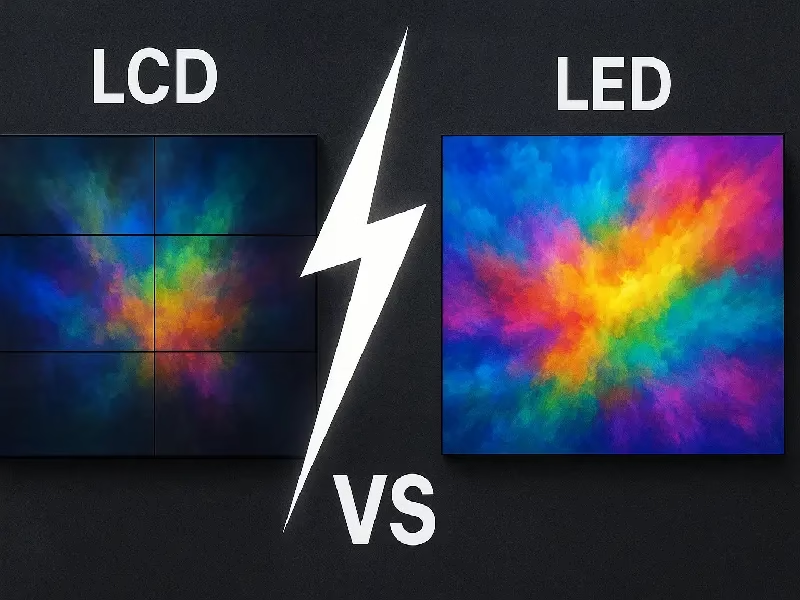
When researching display solutions, the terminology can be overwhelming. A search for “LCD vs LED” often mixes home TV reviews with large-scale display specifications, leading to confusion.
Whether for a large venue, a control room, or a high-end visual setup, choosing the right technology creates a massive difference in performance. To make the right choice, we must distinguish between the two main contenders in the display world: LCD Video Walls and Direct View LED Displays.
1.1 Defining the Difference: LCD vs "True" LED
To understand what is the difference between LCD and LED, we must first clear up a common misconception derived from consumer electronics.
What is commonly sold as an “LED TV” is actually just an LCD screen with an LED backlight. It still uses liquid crystals and frames. In the world of large-scale displays, this is not what is meant by “LED.”
LCD Video Wall: This refers to multiple LCD panels tiled together. While they offer high resolution, they are physically limited by frames. Even “razor-narrow” models result in visible bezels (seams) that create a permanent grid across the content.
Direct View LED (True LED): This is often referred to as “True” LED. It uses modular cabinets filled with millions of tiny, self-emitting lamps. There are no liquid crystals and no frames. These modules click together to create a completely seamless screen of any size or shape.
Key Takeaway: If it has a bezel (grid lines), it is LCD. If it is seamless and the pixels emit their own light, it is Direct View LED.
1.2 The Technology: Transmissive Panels vs Emissive Pixels
The fundamental battle of LCD vs LED comes down to the physics of how they produce an image:
LCD (Transmissive Technology):
LCD works by blocking light. A backlight shines through a layer of liquid crystals, which open and close to let light through colored filters.The Result: Because light must pass through layers of glass and polarizers, maximum brightness is often limited. Also, because the backlight is always on, “true black” is difficult to achieve, often appearing as dark gray.
Direct View LED (Emissive Technology):
LED is an emissive technology, meaning every single pixel (Red, Green, Blue chip) is its own tiny light bulb.The Result: When a pixel needs to be black, it turns off completely, creating perfect contrast. Without glass layers blocking the output, LED screens can achieve brightness levels significantly higher than LCDs, making them ideal for bright environments.
2. LCD vs LED Technology: How Do They Work?
To understand the real difference between LCD vs LED, we need to look past the screen and understand the mechanics inside. The reason why one screen looks seamless and the other has borders comes down to the physics of how they are built.
2.1 LCD Mechanics: Backlights, Liquid Crystals, and Why Bezels Exist
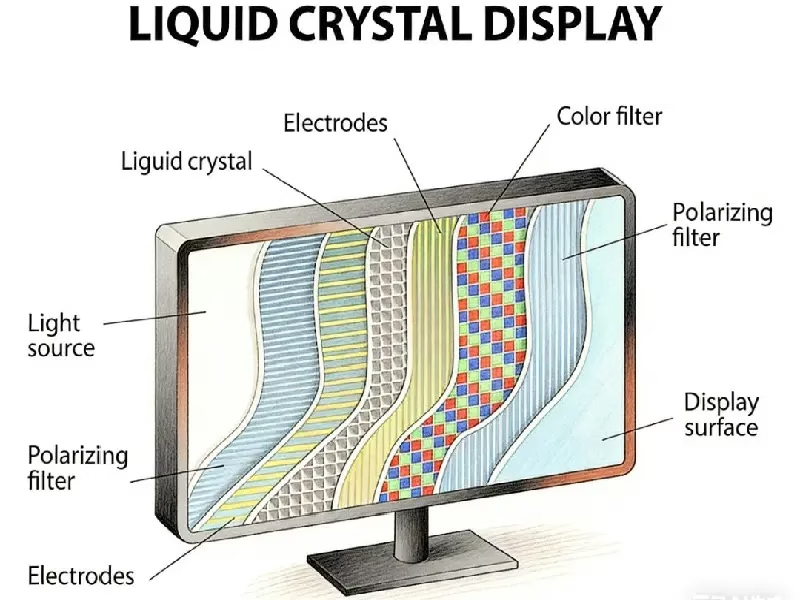
LCD technology is essentially a “light valve.” It doesn’t create its own image; it simply controls light coming from behind it.
The Layered Structure: Think of an LCD as a sandwich. At the back, there is a light source (the Backlight). In the middle, there is a layer of Liquid Crystals. At the front, there are color filters and glass.
The Backlight: Most modern LCDs use white LEDs as the backlight. This is why you often hear the confusing term “LED Monitor” or “LED TV”—it is actually an LCD panel lit by LEDs.
Why Bezels (Seams) Are Unavoidable:
Liquid crystals are a fluid substance. They must be contained between two layers of glass, and the edges must be sealed tight to prevent leaking. Additionally, the electronic drivers that control the pixels are housed at the edges of the panel.
This creates a physical frame, or bezel, around every LCD screen. Even with “frameless” designs, there is always a border. When you place multiple LCDs side-by-side to make a larger screen, these borders touch, creating visible black grid lines (seams) that break up the image.
2.2 LED Mechanics: Pixel Pitch, SMD/COB, and Why LED is Seamless
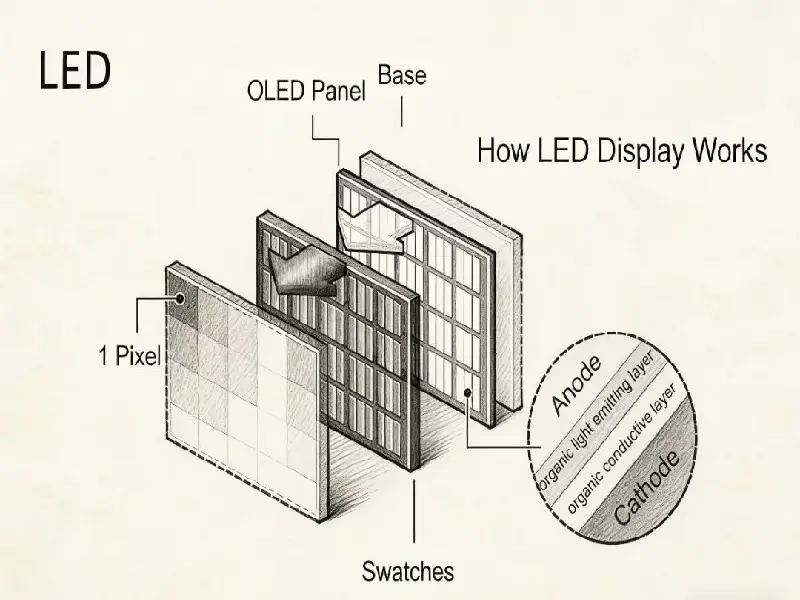
Direct View LED technology works on a completely different principle. It removes the glass, the liquid, and the backlight. It is “Emissive,” meaning the display is the light.
The Modular Design: LED screens are made of small, individual modules that fit together like Lego bricks.
Pixel Pitch: This is a key term in LED technology. It refers to the physical distance between the center of one LED lamp to the next (measured in millimeters).
Fine Pitch (e.g., P0.9, P1.2): The pixels are packed closely together, creating a high-resolution image that looks sharp even from close up (like a monitor).
Standard Pitch (e.g., P2.5, P4.0): The pixels are further apart, used for larger screens viewed from a distance.
SMD vs COB Modules:
SMD (Surface Mounted Device): The traditional method where individual LED lamp beads are soldered onto the board.
COB (Chip on Board): A newer technology where the LED chips are encapsulated directly onto the board with a protective coating. This makes the screen smoother and more durable.
The “Seamless” Advantage:
Because LED diodes are mounted right to the edge of the circuit board, modules can be connected without any frame in between. The distance between pixels across the gap is the same as the distance on the board. This allows you to build a giant screen of any shape or size that looks like one continuous digital canvas.
2.3 Panel Terminology: IPS LCD vs LED – Clearing the Confusion
A common search query is “IPS LCD vs LED,” but comparing them directly is technically incorrect because they refer to different parts of a display system.
IPS (In-Plane Switching): This is a specific type of LCD panel technology. It arranges the liquid crystals horizontally to improve color accuracy and viewing angles compared to older LCD types. However, it is still an LCD—it still needs a backlight and still has a bezel.
LED: In this context, LED refers to the light source.
The Technical Reality:
An “IPS Monitor” is an LCD panel (IPS type) with an LED backlight.
A “Direct View LED Screen” is a grid of actual micro-LED chips with no panel or glass.
So, if you are looking for the best possible color and contrast without grid lines, Direct View LED is the superior technology. If you are looking for a standard, high-quality desktop monitor, IPS LCD is the standard choice.
3. LCD vs LED Performance Comparison: Which is Better?
When comparing LCD vs LED, specs on a datasheet can only tell you so much. The real difference becomes obvious when you see the displays in a real-world environment. From brightness in a sunlit lobby to the “black levels” in a darkened theater, here is how the two technologies stack up head-to-head.
3.1 Visual Continuity: LCD Video Wall vs Seamless LED – The Battle of the Bezels
The most immediate visual difference between the two technologies is the “grid.”
LCD Video Wall: Because LCDs are liquid-based panels, they require a frame to hold the glass and electronics. Even with the most advanced “Razor Narrow Bezel” technology, tiling LCDs together results in a visible gap (usually 0.88mm to 3.5mm).
The Impact: This creates a permanent grid overlaying your content. If you are displaying text, spreadsheets, or detailed maps, these lines can cut through critical information.
Seamless LED: Direct View LED modules are designed without frames. When connected, the pixels align perfectly across the gap.
The Impact: This creates a truly seamless LED canvas. Whether the screen is 100 inches or 100 feet wide, the image appears as a single, uninterrupted visual, maintaining total immersion.
3.2 Brightness Battle: LCD vs LED for High-Ambient Light Environments
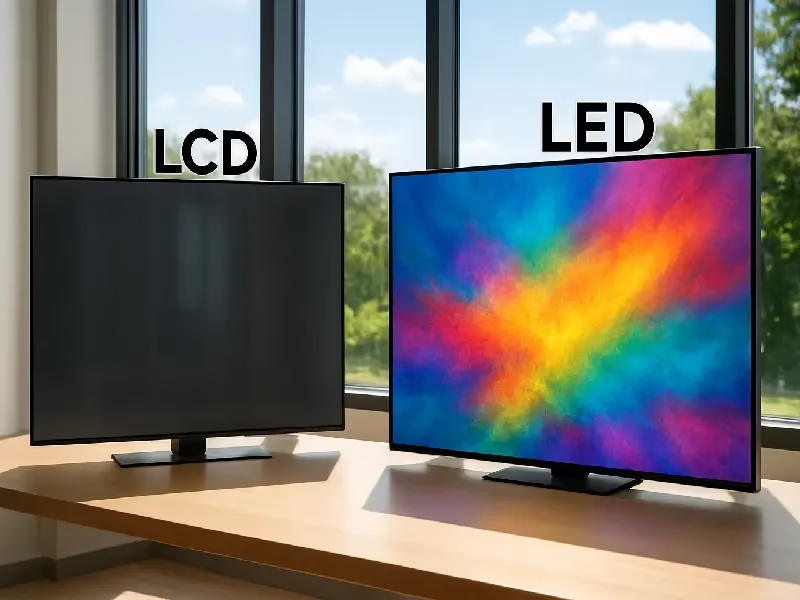
Brightness is measured in “nits.” This is the deciding factor if your screen is placed near windows, in atriums, or outdoors.
LCD: A standard commercial LCD video wall typically produces between 500 to 700 nits. While this is sufficient for a dimly lit room, it struggles against natural daylight. Under direct sunlight, LCDs can appear washed out or practically invisible.
LED: This is where LED dominates. Indoor LED screens typically start at 600 nits and can easily go up to 1,200+ nits without overheating. Outdoor models range from 3,500 to 10,000 nits.
Verdict: In the LCD vs LED battle for visibility, LED is the only choice that can compete with the sun.
3.3 Image Quality: LCD vs LED Contrast Ratio and True Black Levels
Contrast is the difference between the brightest white and the darkest black a screen can display.
LCD (The Gray Black): Because an LCD works by blocking a backlight that is always on, it can never block 100% of the light. There is always some “light bleed,” meaning black parts of the image often appear as dark gray.
LED (The True Black): Since LED is self-emitting, when a pixel needs to be black, it simply turns off. It emits zero light.
The Result: This creates an “infinite” contrast ratio. The LCD vs LED contrast ratio comparison shows that LED delivers punchier, more vibrant colors and deeper blacks, which is essential for High Dynamic Range (HDR) content.
3.4 Viewing Experience: IPS LCD vs LED Viewing Angles in Large Spaces
“Viewing angle” determines how far to the side you can stand before the colors shift or the image looks weird.
IPS LCD: High-end LCDs use IPS (In-Plane Switching) panels, which are famous for maintaining color accuracy even when viewed from the side. However, in a video wall setup, there is a physical problem: the bezels.
The Bezel Blocking Effect: When you view an LCD video wall from an extreme angle, the protruding bezels can physically block the view of the pixels next to them, breaking the image continuity.
LED: Direct View LED diodes emit light in a wide cone (typically 160° horizontal and vertical). Because the surface is flat with no protruding bezels, the image remains perfectly uniform from almost any position in the room.
4. LCD vs LED by Application: Choosing the Right Solution
The question “which is better” often depends entirely on where you are putting the screen. A technology that is perfect for a desktop monitor might be terrible for a stadium. Here is how LCD vs LED compares across the most common professional use cases.
4.1 For Control Rooms: LCD vs LED for Data Visualization
Command centers and security rooms run 24/7 and display critical data like maps, traffic grids, and server status.
LCD: Historically, LCD video walls were the standard because of their high resolution. However, the bezel lines are a major liability. In a traffic control center, a black line cutting across a map could obscure a road or a critical data point.
LED: With the advent of Fine Pitch LED (P0.9 – P1.2), LED screens now offer the high resolution needed for text and data but with a seamless canvas.
The Verdict: For critical monitoring, the seamless nature of LED reduces the risk of misreading data, while LCD remains a cost-effective option for less critical surveillance where grid lines are acceptable.
4.2 For Meeting Rooms: LED Projector vs LCD Projector vs LED Screen
This is a three-way battle. Many organizations are upgrading from traditional projection systems.
Projectors (LCD & LED): When searching for “LED projector vs LCD projector,” you are comparing two types of projection light sources. Both suffer from the same issues: the image is washed out by sunlight, shadows appear when a presenter walks in front, and bulbs/engines fade over time.
Direct View LED Screen: An All-in-One LED screen is a giant, self-emitting TV wall. It allows you to conduct meetings with the lights fully on and blinds open.
The Verdict: The “Modern Standard” is shifting away from projection entirely. Direct View LED provides a brighter, sharper, and more professional environment for video conferencing than any projector can match.
4.3 For Retail & Advertising: LCD Digital Signage vs LED Display
In shopping malls and retail stores, the goal is to grab attention.
LCD Digital Signage: Best for small, eye-level displays (like a digital menu board or a poster replacement). If the viewer is standing 2 feet away, the high pixel density of LCD is advantageous.
LED Display: Best for scale and impact. If you need to fill a whole storefront window, LED is the winner.
Brightness: LED is the only tech visible in direct sunlight (Storefront windows).
Creativity: Unlike rectangular LCDs, LED modules can be curved, wrapped around columns, or transparent, allowing for creative architectural designs.
4.4 For Esports & Venues: LCD vs LED for Gaming and Live Events
When discussing LCD vs LED for gaming, we must distinguish between the player and the audience.
For the Player (Desktop): Competitive gamers usually prefer high-end LCD monitors (TN or IPS panels) for their personal setup due to ultra-low input lag and 360Hz+ refresh rates at a small size.
For the Audience (The Big Screen): You cannot build a stadium-sized screen out of a single LCD. For Esports arenas and live events, Direct View LED is the standard.
Motion Handling: Professional LED walls offer high refresh rates (3840Hz+), ensuring smooth motion handling for fast-paced gameplay without ghosting or flicker on camera.
Scale: LED allows venues to build massive displays that immerse the entire crowd, something physically impossible with LCD panels.
5. LCD vs LED Maintenance and Lifespan: A TCO Analysis
For business buyers, the initial purchase price is only the tip of the iceberg. To understand the real cost of a display system, you must look at the Total Cost of Ownership (TCO) over 5 to 10 years. This is where the gap between LCD vs LED widens significantly.
5.1 Longevity: How Long Do LCD vs LED Screens Last?
When we talk about display “lifespan,” we usually refer to the “half-life”—the number of hours before the screen burns at 50% of its original brightness.
LCD Lifespan: Commercial LCD panels typically are rated for 50,000 to 60,000 hours. After this period, the backlight creates a yellowing effect, and color uniformity degrades significantly.
LED Lifespan: Professional LED diodes are rated for 100,000 hours (roughly 11.4 years of 24/7 operation).
The TCO Impact: To match the lifespan of a single LED wall, you might need to replace an entire LCD video wall twice over a decade.
5.2 Maintenance: Repairing LCD Panels vs Replacing LED Modules
The method of repair is the single biggest operational difference between the two technologies.
Repairing LCD Panels (The Nightmare Scenario):
If one screen in a 3×3 LCD video wall fails, you cannot just fix a pixel. You must replace the entire 55-inch panel.The Problem: LCD panels degrade over time. If you put a brand-new panel into a 3-year-old wall, the new one will be much brighter and whiter than the surrounding old ones. This “checkerboard look” ruins the professional image and is nearly impossible to calibrate away.
Replacing LED Modules (The Surgical Solution):
LED walls are built from small, independent modules. If a pixel fails or a module is damaged, you simply pop out the specific module (often using a magnetic tool from the front) and swap it with a spare.The Solution: Manufacturers typically provide “spare batches” from the same production run. This ensures that repairs match the rest of the wall perfectly, keeping maintenance costs low and visual quality high.
5.3 Energy Efficiency: LCD vs LED Power Consumption
A common myth is that LED consumes massive amounts of power. While this was true for old outdoor billboards, modern indoor LED is highly efficient.
LCD Power Draw: LCDs use a “constant” power draw because the backlight must stay on 100% of the time, even when displaying black content. The liquid crystals just block the light; they don’t save energy.
LED Power Draw: LED is “variable.” Power consumption changes based on the content.
Black Content: Pixels turn off and consume almost zero energy.
Dynamic Content: For typical video content, an LED wall often runs at only 30-40% of its maximum power capacity.
Efficiency Ratio: When comparing LCD vs LED power consumption relative to brightness (Cost per Nit), LED is far more efficient. To get 800 nits from an LCD requires pushing the backlight to the limit (generating heat and noise), whereas an LED screen can hit 800 nits while “cruising” at low power.
6. Advanced LED vs LCD: Why New Tech Beats Traditional Panels
When people ask “Is LCD or LED better?”, they often assume LED is a single technology. In reality, LED has evolved into different “tiers” of performance. While LCD panel technology has reached a plateau, LED technology is rapidly advancing.
Here is how the specific tiers of LED tech compare against traditional LCD video walls.
6.1 Standard SMD LED vs LCD: The Baseline Comparison
SMD (Surface Mounted Device) is the standard technology used in 90% of commercial LED screens today. Individual LED lamps are soldered onto a circuit board.
The Comparison: Even “basic” SMD LED outperforms LCD video walls in two critical areas: Seamlessness and Brightness.
Why it wins: While LCDs are stuck with bezels and limited brightness (700 nits), a standard SMD LED wall offers a completely bezel-free experience with high brightness capabilities. It is the cost-effective “LCD Killer” for retail and large venues.
6.2 GOB LED vs LCD: Enhanced Durability and Impact Resistance
One historic advantage of LCD panels was that the glass surface felt robust. Early LED screens were fragile; if you bumped them, pixels could fall off. GOB (Glue on Board) technology fixes this.
The Tech: GOB fills the gaps between LED lamp beads with a transparent epoxy glue, creating a sealed, smooth surface.
GOB LED vs LCD:
Durability: GOB makes the LED screen impact resistant, waterproof, and dustproof.
The Verdict: If you are comparing LCD vs LED for a high-traffic area (like a shopping mall hallway or a touch-interactive application), GOB LED removes the “fragility” risk while keeping the seamless advantage.
6.3 COB LED vs LCD: The Superior Alternative for Meeting Rooms
COB (Chip on Board) is the premium upgrade. Instead of packaging chips into lamps, the LED chips are bonded directly to the board and encapsulated.
The Visual Experience: COB creates a “surface light” rather than a “point light.” This means the light is softer, non-glaring, and offers wider viewing angles.
COB vs LCD:
Visual Comfort: Standard LCDs can cause eye strain due to blue light and flicker. COB technology provides a matte, paper-like viewing experience that is comfortable for long meetings.
Camera Ready: Unlike LCDs which can show reflection, or standard LEDs which can show “Moiré patterns” (wavy lines) on camera, COB looks perfect on video calls. It is the ultimate LCD projection replacement.
6.4 Micro LED vs OLED vs LCD: The Future of High-End Display
At the very top of the food chain is Micro LED (and MIP technology). This is where the battle shifts from “LED vs LCD” to “Micro LED vs OLED.”
The Context: OLED (Organic LED) is famous in the consumer world (phones/TVs) for perfect blacks, but it has major flaws for commercial use: it suffers from “burn-in” (permanent static images) and has limited lifespan.
The Comparison:
Vs LCD: Micro LED destroys LCD in contrast, color gamut, and response time.
Vs OLED: Micro LED matches OLED’s perfect black levels and infinite contrast but without the burn-in risk.
The Verdict: For mission-critical control rooms or luxury lobbies where money is no object, Micro LED is the future-proof choice that combines the best traits of all technologies.
7. LCD vs LED Price Comparison: Initial Cost vs Long-Term Value
For project managers and CFOs, budget is often the deciding factor. However, smart procurement isn’t just about the “sticker price”—it is about the value the asset delivers over time.
To help you make a quick decision, we have broken down the cost structure of Commercial LCD Video Walls vs Direct View LED Displays.
7.1 LCD vs LED Cost Breakdown
| Category | LCD Video Wall | Direct View LED Display |
| Initial Purchase Price | Lower. Mass-produced panels make entry cost cheaper. | Higher. Fine-pitch technology requires a higher upfront investment. |
| Installation Cost | High. Requires heavy brackets, complex cabling, and bezel alignment calibration. | Moderate. Modular cabinets are lighter and click together magnetically. |
| Maintenance Cost | High (Panel Swap). If a screen fails, you must replace the entire 55″ panel ($1000+), often leading to color mismatch. | Low (Module Swap). If a pixel fails, you replace a small module (50−200). Fast and easy. |
| Lifespan (ROI) | Short (~5 Years). Backlights dim and yellow over time. Requires earlier replacement. | Long (~10 Years). Lasts 100,000 hours. A better long-term asset. |
| Energy Efficiency | Constant. Backlight is always on, consuming steady power. | Variable. Energy efficient. Pixels turn off for black content, saving power. |
| Scalability | Limited. Restricted to 16:9 panel shapes. | Infinite. Can be built to any size, shape, or aspect ratio. |
Choose LCD if: Your priority is Year-1 Cash Flow. If you have a strict, limited budget or are setting up a temporary display (like a 3-day trade show booth), LCD offers the lowest barrier to entry.
Choose LED if: Your priority is Total Cost of Ownership (TCO). Although the upfront cost is higher, the extended lifespan (10 years vs 5 years) and lower maintenance costs make LED the cheaper option on an annualized basis. It is an investment that appreciates in brand value, rather than an expense that depreciates in quality.
8. FAQs
The main difference is the seams. LCD video walls are made of tiled panels with visible bezels (frames) that create a grid across the image. Direct View LED walls are built from modular cabinets that connect perfectly, creating a completely seamless digital canvas without any black lines.
LED is the clear winner. LCD screens typically lack the brightness to compete with the sun (maxing out around 2,500 nits). Outdoor LED screens can easily reach 5,000 to 10,000 nits, ensuring perfect visibility in direct sunlight, and are built to withstand rain and extreme heat.
Upfront, yes; long-term, no. An LED wall usually has a higher initial purchase price. However, because LED lasts twice as long (100,000 hours) and is cheaper to repair (replacing small modules vs. large panels), it often offers a better Total Cost of Ownership (TCO) over 5-7 years.
Yes, and they are superior. Unlike projectors that require dim lights and fade over time, an All-in-One LED Screen offers high brightness and contrast. This allows you to conduct meetings with the lights fully on and blinds open, significantly improving focus and engagement.
To match the sharpness of LCD from close distances (< 2 meters), you need Fine Pitch LED (P0.9 - P1.2). However, for standard conference rooms (viewing distance > 3 meters), P1.8 or P2.5 is visually sharp enough and provides a much more cost-effective solution than ultra-fine pitch options.
9. Summary
The debate of LCD vs LED is no longer just about technology specs; it is about the experience you want to deliver and the budget strategy you want to adopt.
While commercial LCD video walls have served the industry for decades as a reliable workhorse, the era of Direct View LED has arrived. With the ability to deliver seamless visuals, superior brightness, and a lower 10-year Total Cost of Ownership, LED is the clear choice for businesses looking to future-proof their facilities.
So, which should you buy?
Stick with Commercial LCD if: You are equipping individual desktops, small huddle rooms, or have a strictly limited Year-1 budget where upfront savings are the only priority.
Upgrade to Direct View LED if: You need to make an impact. Whether it is a seamless boardroom screen, a bright retail window, or a mission-critical control center, LED offers the durability and visual performance that modern business demands.
Ready to say goodbye to bezels?
Don’t let grid lines break your content. Consult with UnifyLED today. As a leading LED manufacturer of professional LED solutions (COB, GOB, and Fine Pitch), we can help you design a custom screen that fits your space and your long-term goals.
Reference:
https://en.wikipedia.org/wiki/Light-emitting_diode
10. Recommend


Why is The LED Rental Screen Philippines Your Best Event Business Investment?
Maximize ROI with our LED rental screen Philippines guide. Learn P3.91 profit secrets, labor-saving setup, and DDP shipping. Contact our factory for 2026 wholesale prices!

How to Choose Typhoon-Proof Outdoor LED Billboards for Philippine Climate
Master the market with a durable Outdoor LED billboard Philippines. 2026 technical guide on typhoon-proof design, ROI analysis & factory-direct pricing for Manila & Cebu.

How to Choose the Best Church LED Screen in the Philippines?
Upgrade your worship with a high-quality Church LED screen Philippines. Guide for PH ministries on P2.5/P3 walls, 3840Hz for Facebook Live, and factory-direct DDP shipping to Manila & Cebu.