
Contact us
- Home
- »
- LED Display Technology
- »
- Understanding LED Display Viewing Distance: Minimum, Optimal, and Maximum Ranges
Understanding LED Display Viewing Distance: Minimum, Optimal, and Maximum Ranges
One of the most frequent questions we receive from clients is simple yet complex: “How far away should people be from the screen?” Determining the ideal LED display viewing distance is critical because the answer is not a single fixed number, but a range.
In the LED industry, we define this distance in three distinct zones: the Minimum Distance (the threshold of pixelation), the Optimal Distance (the point of high-definition clarity), and the Maximum Distance (the limit of legibility). Understanding the nuance between these three zones is key to balancing visual performance with your project budget.
Below, we explain the science behind these distances and provide the tools you need to calculate them for your specific application.
Table of Contents
1. What Is the Viewing Distance for LED Screens?
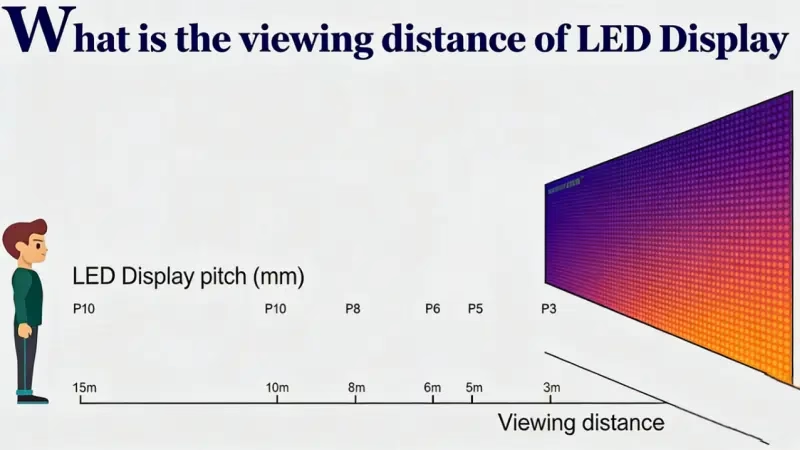
At its core, LED display viewing distance is the calculated range between the screen and the viewer where the image appears continuous, smooth, and cohesive.
Unlike the LCD screens on our phones or laptops, LED displays are made up of individual points of light (pixels) separated by black gaps.
Too Close: If you stand inside the minimum viewing distance, the illusion breaks. The human eye can distinguish individual LED diodes, making the image look “pixelated” or like a grid of dots.
Just Right: When viewed from the correct distance, these dots optically blend together. The gaps vanish, and the brain perceives a seamless, high-definition image.
It is important to understand that viewing distance is not just a single number; it is a spectrum. It determines not only if the audience can see the content but how well they experience it.
Whether you are installing a fine-pitch screen in a luxury boardroom or a massive billboard on a highway, getting this distance right is the foundation of a successful visual experience. It ensures you aren’t paying for LED screen resolution your audience can’t see, while guaranteeing the immersive impact you paid for.
2. Why Is Viewing Distance Important for LED Displays?
Understanding the correct viewing distance is not just a technical requirement—it is the strategic starting point for your entire project. It directly dictates the success of your visual communication and the efficiency of your budget.
Here is why getting this calculation right is critical:
Maximizing Visual Impact (Image Quality)
The primary goal of any LED display is to deliver a clear message.
Too Close: If viewers are within the minimum threshold, the image breaks down. They see the “screen door effect” (black gaps between pixels) rather than the content. This looks unprofessional and distracts from your message.
Correct Distance: When the distance is matched to the pixel pitch, the human eye blends the LED pixels into a seamless image. This ensures your content looks sharp, smooth, and immersive.
Optimizing Your Budget (ROI)
This is the most practical reason. Pixel pitch (resolution) is the biggest cost driver in LED displays.
A finer pixel pitch (e.g., P1.2) is significantly more expensive than a coarser one (e.g., P2.5).
If your audience will never be closer than 5 meters (16 feet), installing a P1.2 screen is wasted money. The human eye cannot perceive that extra resolution from that distance.
Calculating the correct viewing distance allows you to choose the most cost-effective pixel pitch that still delivers a perfect image, saving you potentially thousands of dollars.
Ensuring Viewer Comfort (Ergonomics)
LED screens are powerful light sources.
Standing too close to a massive, high-brightness screen can cause eye strain and visual fatigue (often called “dazzle”).
Correct viewing distance ensures that the screen fills the viewer’s field of vision comfortably without being overwhelming or requiring excessive head movement to see the full picture.
In short: Correct viewing distance finds the balance between performance and price. It ensures you aren’t overpaying for pixels nobody can see, while guaranteeing a comfortable, premium experience for your audience.
3. The Three Zones of LED Display Viewing Distance
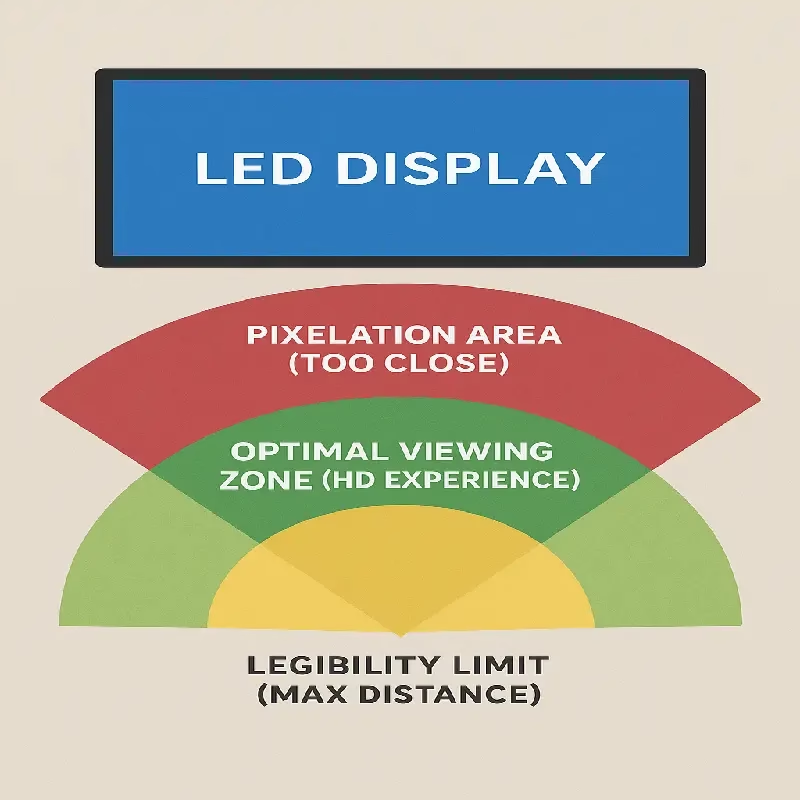
When planning a project, many people ask for “the” viewing distance. However, in the professional LED industry, viewing distance isn’t a single fixed point—it is a range consisting of three distinct zones.
Understanding these three zones helps you define where your audience can stand versus where they should stand for the best experience.
Minimum Viewing Distance (Pixel Pitch Threshold)
This is the “do not cross” line. The minimum viewing distance is the closest point a viewer can stand to the screen before the individual LED dots become visible to the naked eye.
The Experience: If a viewer stands closer than this distance, the image will appear “grainy” or “pixelated.” They will see the black grid between the lights (often called the “screen door effect”), which breaks the illusion of a seamless image.
The Factor: This distance is determined entirely by the spacing between the LED clusters.
To understand the technical details of dot spacing, you can learn more about how Pixel Pitch defines this limit in our detailed guide.
Optimal Viewing Distance (The "Retina" Experience)
This is the “Sweet Spot.” While the minimum distance ensures you don’t see pixels, the optimal viewing distance is where the image becomes truly high-definition.
The Experience: At this distance, the human eye’s visual acuity blends the pixels so perfectly that the screen looks as smooth as a printed poster or a high-end TV. This provides the most comfortable and immersive viewing experience.
The Goal: For conference rooms, control centers, or luxury retail displays, you should always aim to position your main audience in this optimal zone, rather than just at the minimum limit.
Maximum Viewing Distance (Visibility Limit)
This defines the furthest point from which the content on the screen remains legible and impactful. This is particularly critical for outdoor billboards, stadium scoreboards, and large-scale advertising.
The Experience: Beyond this distance, the screen may still be visible, but small text, detailed data, or logos become unreadable. The content loses its impact.
The Factor: Unlike minimum distance (which depends on pixel pitch), maximum distance is primarily determined by the screen size (specifically the screen height) and character size.
Summary:
Minimum: “I don’t see pixels.”
Optimal: “The image looks perfect and sharp.”
Maximum: “I can still read the message.”
4. How to Calculate LED Display Viewing Distance
Guesswork leads to wasted budget. To ensure your LED screen delivers a sharp image without costing more than necessary, professionals use specific mathematical formulas.
Here are the two most common methods to calculate the Minimum (where pixels blend) and Optimal (where the image looks HD) viewing distances.
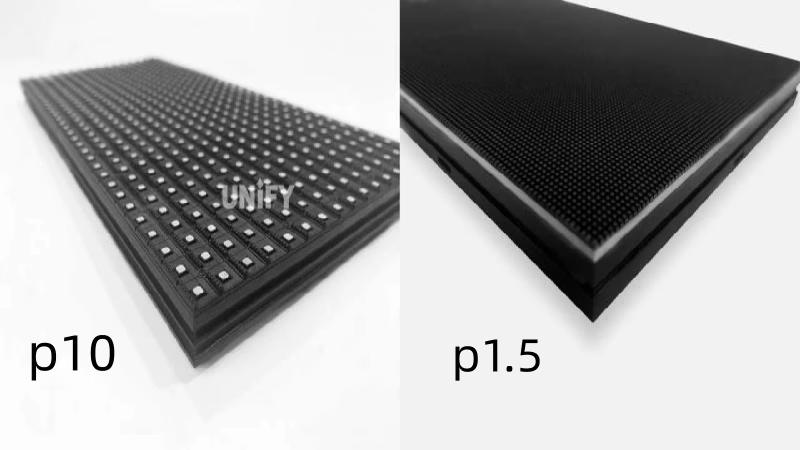
4.1 Method A: The Standard Formulas (The "1000 & 3000" Rule)
This is the most widely used rule of thumb in the AV industry. It is easy to remember and works for 90% of projects.
- Calculating Minimum Viewing Distance (The Blending Point)
This is the closest distance a viewer can stand before seeing individual LED dots.
Formula: Pixel Pitch (mm) × 1000 = Minimum Distance (mm)
Simplified: 1mm of pitch = 1 meter of viewing distance.
- Calculating Optimal Viewing Distance (The HD Experience)
This is the distance where the image looks completely smooth, detailed, and high-definition.
Formula: Pixel Pitch (mm) × 3000 = Optimal Distance (mm)
Simplified: 1mm of pitch = 3 meters of viewing distance.
Practical Example (P2.5 Screen):
If you choose a screen with a P2.5 pixel pitch (2.5mm spacing):
Minimum Distance: 2.5×1=2.5 meters2.5×1=2.5 meters (8.2 ft).
Optimal Distance: 2.5×3=7.5 meters2.5×3=7.5 meters (24.6 ft).
Result: Viewers standing 2.5m away won’t see pixels, but viewers at 7.5m will have the best visual experience.
4.2 Method B: Visual Acuity Calculation (The Science of Arcminutes)
For high-end projects (like control rooms or luxury retail) where precision is critical, we use the “Visual Acuity” method. This is based on 20/20 vision and the eye’s ability to resolve detail at an angle of 1 arcminute.
This calculation mimics the “Retina Display” logic used by companies like Apple. It suggests a distance usually slightly closer than the standard “x3000” rule, allowing for a more immersive setup.
The Theory: The distance equals the pixel pitch multiplied by approximately 3438.
When to use it: Use this method when you want to push the limits of resolution and create a “Retina-like” LED wall experience.
4.3 Quick Reference Chart: Pixel Pitch vs. Viewing Distance
Don’t want to do the math? Use this cheat sheet to find the right range for your project.
Pixel Pitch | Application Scenario | Minimum Viewing Distance (x1000) | Optimal Viewing Distance (x3000) |
P0.9 | Micro-LED / Control Room | 0.9 m (3 ft) | 2.7 m (9 ft) |
P1.2 | High-End Boardroom | 1.2 m (4 ft) | 3.6 m (12 ft) |
P1.5 | Conference Room / Retail | 1.5 m (5 ft) | 4.5 m (15 ft) |
P1.9 | Indoor Event / Church | 1.9 m (6.2 ft) | 5.7 m (19 ft) |
P2.5 | Indoor Signage / Hall | 2.5 m (8.2 ft) | 7.5 m (25 ft) |
P3.9 | Large Venue / Stage | 3.9 m (13 ft) | 11.7 m (38 ft) |
P5 | Outdoor Close-Range | 5.0 m (16 ft) | 15.0 m (49 ft) |
P10 | Outdoor Billboard | 10.0 m (33 ft) | 30.0 m (98 ft) |
If your main audience sits 5 meters away, you don’t need a P1.2 screen (Optimal 3.6m). A P1.5 or P1.9 would look just as good to them and save you significant budget.
5. Beyond Clarity: Field of View (FOV) & Immersion
Calculating the LED screen viewing distance isn’t just about avoiding pixelation—it is about creating an experience.
Once you have determined the right pixel pitch to ensure the image is clear (Chapter 4), the next step is to determine how the screen fits into the viewer’s field of vision. This is where we move from “clarity” to “immersion.”
A screen can be crystal clear, but if it is too small or too far away, it lacks impact. Conversely, if it is too massive and close, it can be overwhelming. To find the balance, we look at the Field of View (FOV).
5.1 What Is the Ideal FOV? (SMPTE & THX Standards)
Field of View (FOV) represents the extent of the observable world that is seen at any given moment. In the context of LED displays, it refers to how much of the viewer’s vision is occupied by the screen.
While there are no specific “LED rules,” we borrow established standards from cinema and professional AV associations to define the perfect LED screen viewing distance for immersion:
SMPTE Standard (30° FOV): The Society of Motion Picture and Television Engineers recommends that the screen should cover at least 30 degrees of the viewer’s horizontal field of vision. This is ideal for corporate boardrooms, sports bars, and general information displays.
THX Standard (40° FOV): For a truly immersive, “cinema-like” experience, THX recommends a 40-degree viewing angle. This is the target for XR virtual production stages, high-end home theaters, and museum installations where you want the viewer to feel “inside” the content.
How to apply this:
To achieve a 30° viewing angle, the distance from the screen should be roughly 1.6 times the screen width.
Example: If your LED wall is 3 meters wide, the immersive viewing distance is roughly 4.8 meters.
5.2 Balancing Screen Size and Viewing Distance
There is a direct relationship between how big your screen is and how far away your audience sits. Many buyers make the mistake of blowing their budget on a super-fine pixel pitch (e.g., P1.2) but buying a small screen size to save costs. This is often a mistake.
The “Postage Stamp” Effect: A small 100-inch screen viewed from 20 meters away will look tiny and unimpressive, even if the resolution is 8K.
The Better Approach: It is often better to choose a slightly larger pixel pitch (e.g., P2.5 instead of P1.5) and use the saved budget to increase the physical size of the screen.
Marketing Insight: A larger screen filling the viewer’s FOV creates a stronger emotional impact than a smaller, sharper screen that looks like a distant square.
5.3 The "Head-Turning" Limit: Avoiding Fatigue
While immersion is good, there is a limit. If the LED screen viewing distance is too short relative to the screen width, you create an ergonomic nightmare.
The “Tennis Neck” Problem: If the screen covers more than 60° of the field of view, the viewer has to physically turn their head from left to right to see the full content.
Where this happens: This is common in Control Rooms or Command Centers where operators sit too close to a massive video wall.
The Rule of Thumb: A viewer should never be closer than 1x the width of the screen if they need to monitor the entire display at once.
Summary:
The perfect viewing distance is a “Goldilocks” zone:
Far enough so pixels blend (Chapter 4).
Close enough to fill at least 30° of vision (Immersion).
Not so close that viewers have to turn their heads (Comfort).
6. Application-Specific LED Screen Viewing Distances
Not all content is created equal. The ideal LED screen viewing distance changes drastically depending on what you are showing. A screen that looks perfect for a concert video might be frustratingly blurry for a control room operator reading flight data.
Here is how to adjust your viewing distance strategy based on your specific application.
Text & Data (Control Rooms, Meeting Rooms)
If your LED wall is used for presentations (PPT), spreadsheets (Excel), or critical data (SCADA systems), “seeing the pixels blend” is not enough. You need legibility.
Text requires much higher pixel density and closer viewing distances than video.
The Legibility Challenge: Small text is made of fine lines. If the pixel pitch is too large or the viewer is too far, letters like “B” and “8” or “M” and “N” can look identical.
The 150x Rule (Standard Legibility Formula):
For comfortable reading of standard text, a common AV industry rule is that the viewing distance should not exceed 150 times the character height.
Formula: Character Height × 150 = Maximum Viewing Distance
Example: If your font on the screen is 5cm (2 inches) tall, the maximum distance for comfortable reading is roughly 7.5 meters (25 feet).
Expert Tip: For meeting rooms, always prioritize a finer pixel pitch (P0.9 – P1.5) to ensure that 12pt fonts remain crisp, even for people sitting in the front row.
Video & Motion (Retail, Events, Billboards)
For applications like shopping malls, sports arenas, or outdoor advertising, the human brain is much more forgiving.
The “Fill-in” Effect: When watching moving video or colorful ads, our brains naturally “fill in the gaps” between pixels.
Distance Strategy: You can typically afford a larger pixel pitch (and save budget) compared to text-based applications.
The Goal: The priority here is impact, not minute detail. As long as the viewer is within the “Optimal Viewing Distance” (calculated in Chapter 4), the experience will be engaging.
Scenario: An outdoor billboard viewed from a highway (30 meters away) looks perfect with P10, whereas a text display at that distance might need P6.
Immersive & Virtual Production (XR Stages)
This is the most technically demanding category. In Virtual Production or Broadcast studios, the “viewer” is not a human eye—it is a camera lens.
Camera vs. Eye: Cameras are unforgiving. They have sharper focus and higher contrast perception than human eyes. A distance that looks fine to the director on set might look terrible through a 4K camera lens.
The Moiré Risk: If the camera is too close or the focus is too sharp on the LED wall, you will see Moiré patterns (strange, rippling waves) or scan lines.
The Solution:
Closer Pitch: XR stages typically require very fine pixel pitches (P1.5 – P2.6) even for large walls to allow cameras to get closer.
Distance Buffer: You must maintain a specific “shooting distance” to defocus the pixels slightly.
Achieving the perfect on-camera look involves more than just distance. For camera-specific issues like Moiré Effect and Refresh Rate, check our detailed technical guides.
7. Indoor vs. Outdoor LED Display Viewing Distances
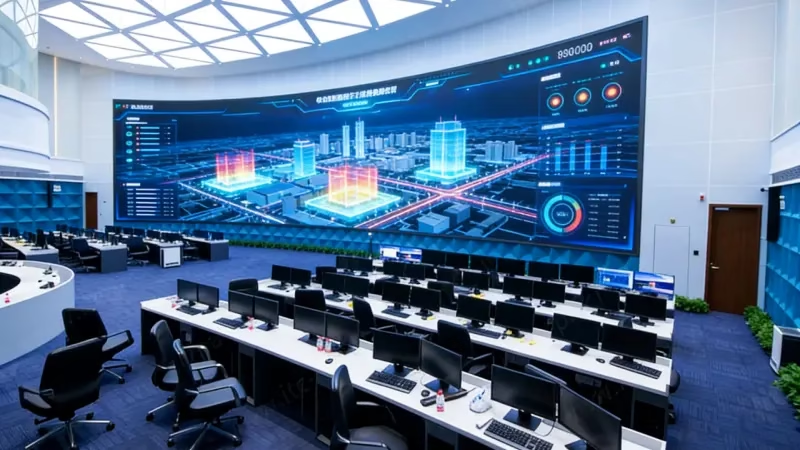
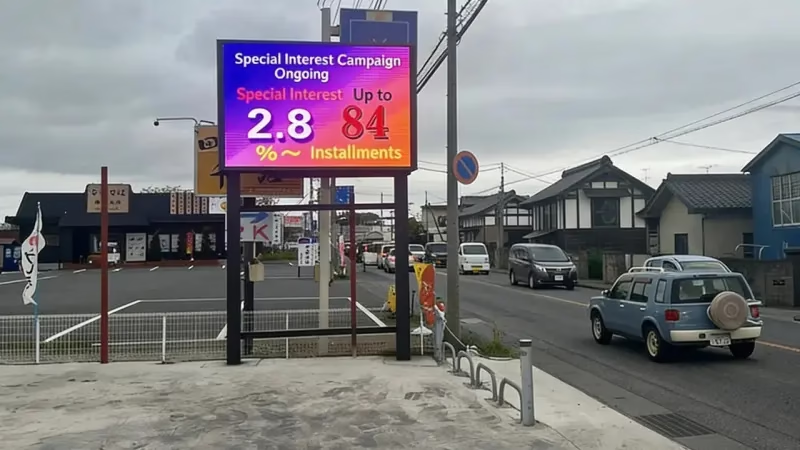
Indoor and outdoor LED screens are engineered for completely different environments. Consequently, the logic for calculating their LED display viewing distance shifts significantly.
Choosing the right category isn’t just about weatherproofing; it is about understanding the “Average Standoff Distance”—the typical gap between your screen and the first row of viewers.
7.1 Indoor LED Displays (The "Close-Up" Zone)
Indoor LED screens are typically installed in spaces where the audience is stationary and relatively close, such as shopping malls, boardrooms, retail stores, or airports.
Typical Viewing Distance: 1 to 5 meters (3 – 16 ft).
The Challenge: Viewers in indoor settings often linger. They have time to scrutinize the details. If the pixel pitch is too large, the image looks blocky and “cheap,” damaging your brand image.
The Solution: You need High Resolution Density.
For meeting rooms or luxury retail, pixel pitches of P0.9 to P1.5 are standard to ensure text is sharp even from arm’s length.
For larger indoor halls or church stages, P1.9 to P2.5 is the sweet spot between cost and clarity.
7.2 Outdoor LED Displays (The "Long-Range" Zone)
Outdoor screens—used for billboards, stadium scoreboards, and building facades—compete with vast spaces and sunlight.
Typical Viewing Distance: 10 to 100+ meters (33 – 328+ ft).
The Challenge: Here, “detail” is less important than “scale” and “visibility.” A super-fine P1.5 screen installed on a highway billboard would be a disaster—not because it isn’t clear, but because the tiny pixels couldn’t generate enough brightness to be seen from 50 meters away in daylight.
The Solution: You need Scale and Brightness.
Since viewers are far away (pedestrians across the street or drivers on a highway), their eyes naturally blend larger pixels.
Standard pitches range from P3.9 to P10.
Trend Alert: While P10 and P16 were standards in the past, modern outdoor screens are moving toward P3.9 – P6 to accommodate closer foot traffic in urban centers.
Key Takeaway:
Go Indoor (Small Pitch): When your audience is within 5 meters. Prioritize resolution to avoid pixelation.
Go Outdoor (Larger Pitch): When your audience is 10+ meters away. Prioritize brightness and screen size over pixel density.
8. FAQs
Yes, but the image will look pixelated (like a mosaic). This is acceptable for fleeting glances (like in a hallway) but terrible for seated audiences who need to read text.
Absolutely. A 4K screen has a much smaller pixel pitch (higher density), allowing viewers to stand significantly closer while maintaining a sharp, seamless image.
Only if the first row is at least 2.5 meters (8 ft) away. If your room is small or viewers sit closer, you should upgrade to P1.5 or P1.8 for better clarity.
It won't cause damage, but it causes fatigue. LED screens are very bright. If sitting close, you must lower the screen brightness to comfortable indoor levels (approx. 600 nits).
Curved screens improve the experience at close range. The curve keeps the distance to your eyes constant across the whole width, reducing distortion and increasing immersion.
9. Summary
Choosing the right LED display viewing distance is the single most important decision you will make for your project.
It is the balancing act between visual performance and budget efficiency.
Too close: The magic is lost, and the image looks like a grid of lights.
Too far: You paid for high-definition details that no one can see.
By using the formulas and guidelines in this guide (remember the Pixel Pitch × 1000 rule), you can confidently select a screen that delivers impact without wasting money.
Still not sure which pixel pitch is right for your space?
Contact Us today. Our experts will analyze your floor plan and calculate the perfect pixel pitch and screen size for your specific environment—free of charge.
10. Recommend

P4 Outdoor LED Display Price Guide (2026): What a 4mm Wall Really Costs
The P4 outdoor LED display price: $600-1,000 per square meter factory-direct, $20-45 modules, the value pitch – 2026 bands.
P3 Outdoor LED Display Price Guide (2026): What a 3mm Wall Really Costs
The P3 outdoor LED display price: $700-1,100 per square meter factory-direct, $25-50 modules, 18-21% under P2.5 – 2026 bands.
P10 Outdoor LED Display Price Guide (2026): What a 10mm Wall Really Costs
P10 Outdoor LED Display Price Guide (2026): What a 10mm Wall Really Costs The P10 outdoor LED display price in 2026 runs $350–650 per square meter for a factory-direct fixed-install wall — iron cabinets, modules, power and basic control included — with bare P10 modules at $8–20 per board and the 4.2V/3.8V energy-saving build adding