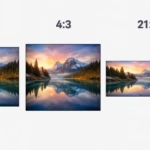
16:9 vs 4:3 vs 21:9 LED Video Wall: Which Aspect Ratio is Best?
- Home
- »
- LED Screen Buying Guides
- »
- 16:9 vs 4:3 vs 21:9 LED Video Wall: Which Aspect Ratio is Best?
Choosing the right LED aspect ratio is the difference between a stunning visual experience and a messy, stretched display. As project requirements evolve, finding the perfect fit between a 16:9 vs 4:3 LED screen—or even the emerging 21:9 ultrawide standard—is critical to your success. In this guide, we compare these aspect ratios to help you select the optimal layout for your specific commercial project, ensuring your content always looks professional, crisp, and distraction-free.
Table of Contents
1. Choosing Between a 16:9 vs 4:3 LED Screen: Why Aspect Ratio Matters
When planning a high-impact visual project, many project managers focus heavily on pixel pitch, brightness, or cabinet installation. However, one of the most critical—yet often overlooked—factors is the LED video wall aspect ratio. Whether you are deciding between a 16:9 vs 4:3 LED screen for a corporate lobby, a church sanctuary, or a modern control room, the aspect ratio dictates how your visual content interacts with the physical display.
Choosing the right layout is not just a technical preference; it is a fundamental design decision that directly affects your ROI and audience experience.
If your chosen aspect ratio does not align with your content source, the consequences are immediate and professional-looking:
- Image Distortion: Content may appear stretched or squashed, making logos and text unreadable.
- Unwanted Cropping: Crucial visual information might be cut off, ruining the composition of your presentation.
- Distracting Letterboxing: You may end up with unsightly black bars at the top, bottom, or sides of your display, which significantly undermines the premium aesthetic of a digital video wall.
For instance, modern media is predominantly produced in 16:9. If you install a legacy 4:3 display without a robust video processor, you are essentially forcing your content to “fit” into a box it wasn’t designed for, leading to a compromised visual output.
Are you in the early stages of planning and need to visualize your setup?
If you are unsure how to determine the optimal screen dimensions or how many cabinets your wall configuration will require based on your budget, we highly recommend using our interactive LED screen aspect ratio calculator. It will provide you with a clear roadmap for your project’s physical dimensions and resolution requirements.
2. 16:9 vs 4:3 LED Screen: What’s the Real Difference?
Deciding between a 16:9 vs 4:3 LED screen is often the biggest dilemma for project managers. While both formats can deliver high-quality visuals, their impact on content distribution, installation costs, and viewer experience varies significantly. Below, we break down the core differences to help you navigate this choice.
The 16:9 LED Screen: The Industry Standard
The 16:9 aspect ratio has become the undisputed standard for modern digital displays. Because the vast majority of today’s video content—from YouTube clips and corporate presentations to live broadcasts—is produced in widescreen 16:9, choosing this format ensures your media is displayed in its native resolution.
- Key Advantage: It is a “plug-and-play” experience. You don’t need expensive video processors to crop or stretch your footage, saving both time and technical complexity.
- Best Applications:
-
- Church Broadcasting: Perfectly matches the aspect ratio of most cameras and live-streaming platforms.
- Large-Scale Events & Conferences: Ensures professional-grade presentation quality for keynote slides.
- Sports Bars & Retail: Provides an immersive, wide-angle viewing experience that attracts customers.
The 4:3 LED Screen: The Classic Retrofit Choice
Before the digital revolution, 4:3 LED screens were the dominant format, mirroring traditional television sets. While less common in modern high-definition setups, the 4:3 ratio remains a vital “retrofit” solution for specific environments.
- Key Advantage: Its squarer shape is ideal for vertical-constrained spaces where you need a large screen area but lack the horizontal wall space required for a 16:9 widescreen layout.
- Best Applications:
-
- CCTV & Security Control Rooms: Multi-channel layouts often rely on a grid-like 4:3 configuration to monitor several security feeds simultaneously.
- Government & Boardroom Retrofits: Many older facilities were designed for 4:3 projectors; upgrading to a 4:3 LED wall allows for a seamless replacement without structural renovations.
- Historic Church Upgrades: For venues with narrow, high-arched wall spaces where a wide display would look out of place.
3. 21:9 Ultrawide LED Screen: The Future of Corporate & XR
While the debate between a 16:9 vs 4:3 LED screen covers the majority of traditional projects, the industry is shifting toward a bold, immersive horizon: the ultrawide 21:9 LED display. As corporate needs and high-end production environments become more complex, this widescreen format is no longer just a luxury—it is becoming a productivity necessity.
Transforming the Modern Meeting Space (MTR Front Row)
Global enterprises are rapidly adopting Microsoft Teams Rooms (MTR) with “Front Row” layouts. In this configuration, a standard 16:9 screen often feels cramped, forcing users to choose between seeing their colleagues’ faces, the shared PPT presentation, or the live chat feed.
An ultrawide 21:9 LED display solves this perfectly. By providing significantly more horizontal screen real estate, it allows the MTR interface to display:
- Active speaker video feeds across the center.
- Content and presentation slides on one side.
- Meeting chat and hand-raise notifications on the other.
This creates an inclusive, immersive “Front Row” experience where remote participants feel like they are sitting at the same table, significantly boosting team collaboration.
The Powerhouse for XR Virtual Production
Beyond the boardroom, the 21:9 ultrawide LED display has revolutionized the world of XR (Extended Reality) virtual production. In film and broadcast, creators need an expansive field of view to simulate realistic backgrounds without the visual “breaks” or framing limitations of standard 16:9 panels.
The 21:9 format provides:
- Cinematic Immersion: Captures a broader perspective for camera tracking, crucial for realistic depth-of-field effects.
- Seamless Workflow: Allows creators to keep production menus and auxiliary visual data on the screen edges without obstructing the primary stage action.
4. Cost & Cabinet Calculation: How Many LED Panels Do You Need?
When moving from conceptual design to project budgeting, the most frequent question we receive is: “How many cabinets are actually required to achieve a perfect 16:9 or 21:9 ratio?”
To make this practical, let’s look at a real-world scenario using industry-standard 500x500mm LED cabinets.
How to Calculate Your LED Cabinet Requirements
Suppose you have a physical wall space that allows for a 3-meter height. Since your cabinets are 500mm (0.5m) tall, this gives you a vertical configuration of 6 cabinets high.
To determine how many panels you need, we must calculate the width required to achieve the desired aspect ratio:
For a 16:9 LED Video Wall:
To maintain a standard 16:9 ratio with a 3-meter height, you need a width of approximately 5.33 meters.
- Calculation: 5.33m / 0.5m = ~10.6 cabinets (round to 11).
- Total Cabinets: 11 cabinets wide × 6 cabinets high = 66 cabinets total.
For a 21:9 Ultrawide LED Video Wall:
To achieve an immersive 21:9 ultrawide ratio at the same 3-meter height, you need a width of approximately 7 meters.
- Calculation: 7m / 0.5m = 14 cabinets.
- Total Cabinets: 14 cabinets wide × 6 cabinets high = 84 cabinets total.
Evaluating ROI: Is the 21:9 Upgrade Worth It?
As the calculation shows, opting for the 21:9 configuration requires roughly 27% more cabinets compared to the 16:9 layout. While this represents a higher upfront investment, it is essential to weigh this against the project’s ROI:
- Functional Capacity: An ultrawide 21:9 screen is not just “bigger”—it is more functional. It allows for advanced split-screen layouts that 16:9 displays cannot accommodate, such as simultaneously displaying an MTR “Front Row” meeting interface, live data dashboards, and active content without overlapping.
- Visual Impact: The 21:9 format creates a panoramic “Wow Factor” that standard screens often lack, making it a powerful branding tool for corporate showrooms and executive boardrooms.
When choosing between a 16:9 vs 4:3 LED screen or upgrading to a 21:9 solution, always calculate the cabinet footprint against your available wall space and your specific content needs. Often, the additional cost for an ultrawide setup is quickly offset by the increased utility and the professional edge it provides to your facility.
5. Conclusion
Choosing the ideal layout comes down to balancing your content requirements with your physical space. Whether you are weighing a 16:9 vs 4:3 LED screen or considering a premium ultrawide upgrade, here is a quick decision matrix to guide your investment:
- Choose 16:9 if: You prioritize compatibility and ease of use. It is the industry standard that works flawlessly with 90% of video sources, making it the safest and most reliable choice for churches, retail advertising, and conference halls.
- Choose 4:3 if: You are dealing with a classic retrofit project or have limited horizontal wall space. It remains the professional choice for CCTV control rooms and older facility upgrades where maximizing screen height is more critical than width.
- Choose 21:9 if: You are building a high-end corporate boardroom (MTR “Front Row”), an XR virtual production studio, or a premium showroom. This ultrawide format offers the ultimate immersive experience for modern multitasking and cinematic visuals.
Ultimately, there is no “one-size-fits-all” solution, but selecting the right aspect ratio at the start of your project will save you from costly content reformatting and visual distortion later on.
Whether you need a standard 16:9, a specialized 4:3, or a custom 21:9 solution, our engineering team is here to help. You can explore our full range of LED display solutions or simply contact us for your custom LED project solution, and our team will provide a professional CAD drawing and a comprehensive quote within 24 hours.
6. FAQs
Yes, but it will require a video processor to handle the scaling. You will typically face three options: "pillarboxing" (black bars on the sides), cropping the video (losing parts of the image), or stretching the image (distorting the content). For the best quality, we recommend choosing an aspect ratio that matches your source content.
Cost is determined by total square footage, not just the ratio. However, 16:9 is often the most cost-effective because it uses standard-sized components and doesn't require complex signal mapping. Ultrawide or custom ratios usually require more cabinets and sophisticated processing, which increases the total project budget.
No. Clarity is determined by pixel pitch (the distance between LED dots), not the aspect ratio. You can have a very wide 21:9 screen that is blurry if the pixel pitch is too high, or a small 4:3 screen that is ultra-sharp. Always prioritize pixel pitch for image quality and aspect ratio for physical layout.
Yes. While standard 16:9 screens can often be driven by basic controllers, custom or ultrawide aspect ratios require a professional video processor to map your signal correctly across the entire width of the wall. Contact our team to ensure your controller matches your screen configuration.