
Contact us
- Home
- »
- LED Display Technology
- »
- Mastering Display Contrast Ratio: The Secret to Cinematic LED Visuals
Mastering Display Contrast Ratio: The Secret to Cinematic LED Visuals
Have you ever wondered why some screens deliver breathtaking, lifelike images while others look flat and washed out? The secret often lies in a single, crucial metric: the display contrast ratio. Whether you are investing in a massive outdoor LED wall or a professional monitor, understanding the difference between the brightest whites and the darkest blacks is essential for visual performance.
In this comprehensive guide, we will demystify what display contrast ratio actually is, how to calculate it accurately, and why distinguishing between static and dynamic ratios can save you from costly mistakes. Read on to discover how to optimize your viewing experience and ensure your content shines in any environment.
Table of Contents
1. What Is Display Contrast Ratio?
Display contrast ratio measures the distinct luminance difference between the brightest white and the darkest black a screen can generate. It indicates how effectively a display can render intricate details in both shadowed and highlighted areas simultaneously. Generally, a higher display contrast ratio translates to more vivid visuals, characterized by deeper blacks and more radiant whites.
For instance, if an LED panel features a peak white brightness of 1000 cd/m² (nits) and a black level of 1 cd/m², its contrast ratio is 1000:1. This implies that the brightest pixel is 1000 times more luminous than the darkest one.
Imagine watching a movie scene featuring bright city lights against a night sky. A unit with a high contrast ratio will present the dark sky clearly without washing out the bright lights. Conversely, a lower ratio often makes shadows appear gray and obscures fine details.
High display contrast ratio is particularly crucial in environments with varying ambient light, such as outdoor spaces or brightly lit rooms. It ensures the content remains sharp and readable, delivering a superior viewing experience.
2. Why Is Display Contrast Ratio Important?
Display contrast ratio measures the intensity gap between the brightest whites and the darkest blacks. It is a defining factor in how your LED wall performs under real-world lighting.
Key Benefits of High Display Contrast Ratio:
Sharper Clarity & Depth: High contrast ratio sharpens boundaries between objects, making fine text and 4K video details stand out clearly.
Richer Colors: It boosts color saturation. With deeper blacks, colors appear more vibrant and lifelike rather than washed out.
Combatting Glare: In bright sunlight or well-lit rooms, a high display contrast ratio ensures your content stays legible and doesn’t fade into the background.
Universal Readability: From sports to digital signage, it ensures every viewer gets a premium experience regardless of the content type.
Visual Comfort: Proper contrast settings reduce eye strain, which is critical for operators in control rooms or travelers looking at flight information.
Premium Aesthetics: A screen with deep blacks looks sleek and professional, enhancing your brand image.
While a display contrast ratio of 5000:1 is a good benchmark for LED screens, balance is necessary. Excessive contrast settings can obscure details in dark shadows or bright spots. The goal is to optimize the display contrast ratio to achieve a vivid picture without sacrificing image completeness.
3. What Affects Display Contrast Ratio?
Display contrast ratio is the defining metric for image clarity and vibrancy. However, it is not a static number; it is influenced by a combination of inherent hardware capabilities and external environmental factors. To optimize your viewing experience, it is essential to understand what drives this metric.
3.1 Display Technology
The underlying technology (LED, LCD, OLED) sets the baseline for contrast. For instance, OLEDs utilize pixel-level control to turn off light completely for true blacks, resulting in a superior display contrast ratio compared to standard backlit panels.
3.2 Backlight Architecture
For LED and LCD screens, backlight quality is paramount. Uneven backlighting leads to light leakage (or bleeding), which elevates the black floor and diminishes the overall display contrast ratio.
3.3 Peak Brightness
High brightness is essential for maintaining image integrity in illuminated environments. Without sufficient LED brightness to counteract ambient light, images appear washed out, effectively reducing the visible display contrast ratio.
3.4 Ambient Lighting Conditions
Environmental light is a major variable. Strong light sources reflecting off the screen surface will wash out dark areas, significantly lowering the effective contrast ratio and obscuring fine details.
3.5 Screen Coating (Matte vs. Glossy)
Anti-glare (matte) coatings are designed to minimize reflections and preserve contrast reliability. Glossy screens, while vibrant in dark rooms, often suffer from glare that degrades the display contrast ratio in typical lighting conditions.
3.6 Calibration Accuracy
Hardware capabilities mean nothing without proper setup. Precise calibration of brightness, contrast, and color settings is required to achieve the optimal display contrast ratio without losing detail in shadows or highlights.
A multitude of factors dictates the final display contrast ratio. By understanding these elements—from panel technology to calibration—you can ensure your display delivers the sharp, high-impact visuals your project demands.
4. Static vs. Dynamic: Types of Display Contrast Ratios
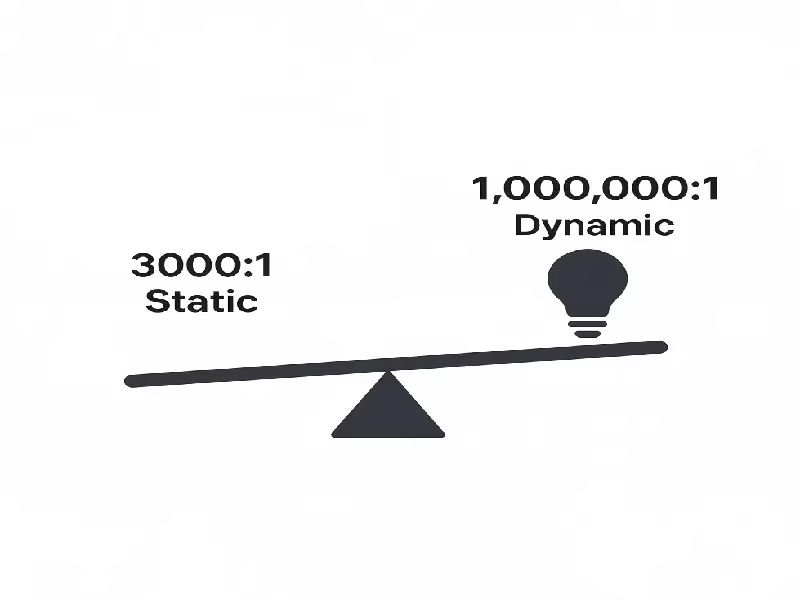
To accurately evaluate an LED screen, one must differentiate between the two prevailing measurement standards for display contrast ratio.
4.1 Static Contrast Ratio
Also known as “native contrast,” this measures the ratio between the maximum and minimum luminance on a single, static frame.
Significance: For example, a 3000:1 static display contrast ratio indicates a consistent, physical capability of the panel. It is the most trustworthy indicator of image depth and clarity, as it does not rely on temporal backlight adjustments.
4.2 Dynamic Contrast Ratio
This technique involves modulating the backlight intensity in response to the video signal. The system dims the entire backlight during dark scenes to simulate deeper blacks.
Limitations: While this allows manufacturers to advertise massive ratios (e.g., 10,000,000:1), it is often misleading. Aggressive dynamic contrast can lead to “clipping” in highlights or shadows, reducing the fidelity of the original content.
Understanding these distinct types of contrast ratios empowers you to look past the marketing specs and select a display that offers genuine, consistent performance.
5. How to Calculate Display Contrast Ratio?
If you are curious about the science behind the specs, calculating the display contrast ratio is surprisingly straightforward. It requires measuring the luminance difference between the brightest and darkest states of your screen.
5.1 Display Contrast Ratio Measurement Methods
Before grabbing your tools, it is vital to understand which method is being used. In the LED industry, different testing standards yield vastly different results.
Comparison of Common Measurement Standards:
|
Contrast Type |
Measurement Method |
Numeric Result |
Best Application |
|
ANSI Contrast |
Measures a black & white checkerboard pattern simultaneously. |
Relatively Low |
Best for assessing real-world performance and optical quality. |
|
Native Contrast |
Compares a full-screen white image vs. a full-screen black image. |
Medium to High |
The standard metric for hardware capability and detail potential. |
|
Extreme (Dynamic) Contrast |
Measures peak white vs. black under adjusted dynamic conditions. |
Very High (Millions) |
Primarily used for marketing; offers limited technical value. |
Native Contrast Ratio: This compares a fully white screen against a fully black screen. It reveals the panel’s raw hardware performance without software tricks. A higher native display contrast ratio means deeper blacks and clearer details.
ANSI Contrast Ratio: This uses a 4×4 checkerboard pattern. Because it forces the screen to display black and white next to each other, it simulates realistic viewing conditions where light might scatter inside the panel.
Extreme Contrast Ratio: Often measured in dark rooms with dynamic backlighting enabled. While numbers like “1,000,000:1” look impressive, they rarely reflect everyday use.
5.2 Step-by-Step: How to Calculate Display Contrast Ratio
To get the accurate number, follow this simple procedure using a luminance meter (nit gun).
Step 1: Measure the Peak Brightness
Display a 100% pure white image on the screen.
Use your luminance meter to record the brightness in nits (cd/m²).
Step 2: Measure the Black Level
Switch to a 100% pure black image.
Record the brightness level again with the same meter.
Step 3: Do the Math
Formula: White Brightness (nits) ÷ Black Brightness (nits) = Display Contrast Ratio
Example Calculation:
White brightness: 300 nits
Black brightness: 0.1 nits
Calculation: 300 ÷ 0.1 = 3000
Result: The display contrast ratio is 3000:1.
5.3 Why This Calculation Matters
This formula reveals the actual dynamic range of your hardware. A result like 3000:1 ensures vibrant whites and deep blacks, whereas 1000:1 might appear flatter. Knowing how to calculate display contrast ratio empowers you to verify manufacturer claims.
5.4 Alternative Estimation Methods (No Tools Required)
If you don’t have a professional meter, try these methods:
Online Calibration Tools: Websites like Lagom LCD Test provide test patterns that help you visually estimate contrast and gamma.
Check the Panel Technology:
IPS Panels: Typically ~1000:1 display contrast ratio.
VA / LED Panels: Typically 3000:1 to 5000:1.
OLED: Infinite (Perfect blacks).
Visual “Eye Test”: Display a dark movie scene on two screens side-by-side. The one that shows details in the shadows without turning the black bars gray has the better display contrast ratio.
6. Comparing Display Contrast Ratio Across Technologies
Not all screens are created equal. The technology behind the screen dictates the achievable display contrast ratio. Below is a quick comparison of how different display types perform.
Quick Comparison Table:
|
Technology |
Typical Contrast Ratio |
Key Characteristic |
Best Application |
|
OLED |
Infinite (∞:1) |
Perfect blacks (pixels turn off). |
Home Cinema, Premium Mobile |
|
LED (Direct View) |
3000:1 – 5000:1+ |
High brightness & high contrast. |
Outdoor Advertising, Large Video Walls |
|
QLED |
Moderate to High |
Enhanced brightness via Quantum Dots. |
Bright Living Rooms |
|
LCD / IPS |
1000:1 – 3000:1 |
Standard performance; darker blacks are gray. |
Offices, Indoor Digital Signage |
|
Plasma |
High (Legacy) |
Deep blacks but high power usage. |
Obsolete (Old Home Theaters) |
6.1 LED Display Contrast
LED displays are unique because they balance high brightness with a high display contrast ratio (often 5000:1+). This makes them the only viable option for outdoor use where sunlight would wash out other screens.
6.2 LCD Display Contrast
LCDs rely on a constant backlight, limiting their display contrast ratio to around 1000:1. While cost-effective, they struggle to show details in dark movie scenes compared to newer tech.
6.3 OLED Display Contrast
With pixel-level control, OLED achieves an infinite display contrast ratio. While visually stunning, they are typically limited to smaller sizes (TVs/Phones) compared to massive LED walls.
6.4 Plasma & QLED
While Plasma is a retired technology known for good contrast, QLED has emerged as a modern bridge—improving the display contrast ratio of LCDs by boosting brightness and color purity using quantum dots.
7. Comparison: High vs. Low Display Contrast Ratio
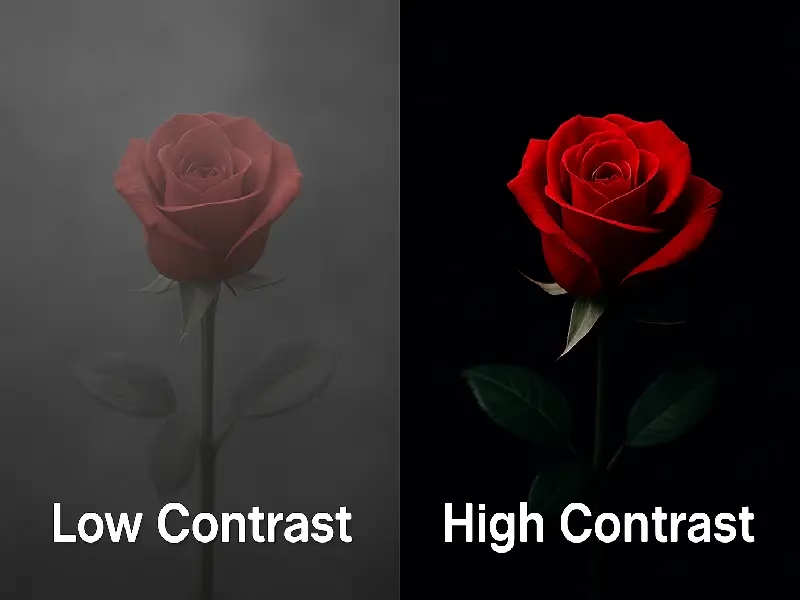
Now that you understand the technology, let’s look at the actual specs. Not all numbers are created equal. A display contrast ratio of 5000:1 delivers a vastly different visual experience compared to 1000:1.
Here is a breakdown of how these common figures stack up in real-world performance.
Visualizing the Difference: 1000:1 to 5000:1
Different applications require different contrast levels. Use this guide to determine what your project actually needs:
1000:1 (Entry Level / Office Standard)
Performance: The baseline for most standard IPS LCD monitors.
Visual Impact: Blacks often appear dark gray rather than true black. While perfectly fine for text documents, data visualization, and well-lit control rooms, it lacks the depth required for immersive video or high-end advertising.
3000:1 (The Media Standard)
Performance: Common in VA panels and mid-range LED screens.
Visual Impact: This is where images start to “pop.” You get significantly deeper blacks and clearer shadow details. It is the solid choice for indoor digital signage, gaming, and general video playback.
5000:1 (Premium / Professional LED)
Performance: Typical of high-quality Direct-View LED displays (like UnifyLED B-Series) and high-end TVs.
Visual Impact: Offers a premium, professional look. The boundary between black and white is sharp, creating a 3D-like depth. Essential for luxury retail, cinema, and outdoor advertising where the screen must compete with ambient light.
10,000:1+ (OLED or Dynamic Tricks)
Performance: Unless you are looking at OLED technology (which is naturally high), seeing numbers this high on an LED/LCD spec sheet often indicates a “Dynamic” measurement.
Visual Impact: While impressive on paper, ensure this isn’t just marketing hype (see the warning below).
Critical Buyer’s Note: Compare Apples to Apples
As mentioned in Section 4, manufacturers use two different methods to measure contrast ratio. This creates a common trap for buyers.
The “Incomparable” Mistake:
Never compare a Static Ratio (e.g., 5000:1) directly against a Dynamic Ratio (e.g., 1,000,000:1).
The Trap: A cheap screen claiming “1 Million:1 Dynamic Contrast” might actually perform worse than a professional screen with “4000:1 Static Contrast.”
The Advice: Always check the datasheet for the Static (Native) Contrast Ratio. This is the only reliable number for judging the screen’s inherent picture quality and depth.
A high static display contrast ratio brings images to life, making them feel realistic and engaging. A low ratio makes visuals feel flat and washed out. For most professional and commercial applications, aiming for a static ratio of 3000:1 to 5000:1 is the sweet spot for performance and value.
8. How to Choose the Right Display Contrast Ratio
Picking the perfect display contrast ratio isn’t a one-size-fits-all decision; it depends entirely on how you plan to use the screen. Here is a simple guide to matching the specs to your specific needs.
(1) For Everyday Use (Browsing & Office Work)
Ideal Range: 1000:1 to 3000:1
For basic tasks like web browsing, spreadsheets, or general office work, a standard display contrast ratio of 1000:1 is perfectly adequate. Text remains crisp, and while black levels won’t be perfect, they are sufficient for productivity environments.
(2) For Entertainment (Movies & Casual Gaming)
Ideal Range: 3000:1 to 5000:1
To truly enjoy movies or casual gaming, aim for a display contrast ratio between 3000:1 and 5000:1. This higher range delivers richer colors and noticeably deeper blacks, making scenes look more dynamic and engaging compared to standard office monitors.
(3) For Professional Creative Work (Photo & Video Editing)
Ideal Range: 5000:1 and above
Accuracy is key for creatives. A display contrast ratio of 5000:1 or higher allows editors to distinguish subtle details in shadows and highlights. This ensures that the color grading and contrast adjustments remain precise and professional.
(4) For High-End Gaming and HDR Content
Ideal Range: 5000:1 to 10,000:1
For the ultimate immersive experience—especially with HDR (High Dynamic Range) content—you need a display contrast ratio between 5000:1 and 10,000:1. This delivers inky blacks alongside brilliant brights, essential for modern cinematic gaming.
(5) For Bright Environments
Ideal Range: 3000:1 or higher
In large spaces like churches or conference halls where the audience is spread out, a high contrast ratio prevents the image from looking washed out. However, don’t forget to check the LED screen viewing angle as well. A combination of high contrast and a wide viewing angle ensures that people sitting at the far edges of the room still see deep blacks and vibrant colors.
9. 6 Ways to Enhance Your LED Display Contrast Ratio
Is your content looking washed out? Several factors can dampen the impact of your visuals. Here are professional tips to boost your display contrast ratio and ensure your images pop.
(1)Calibration & Settings
Accurate settings are crucial. Increase your contrast settings cautiously (avoiding “clipping”) and enable HDR if available. This helps realize the full display contrast ratio potential of your hardware.
(2)Manage the Environment
Ambient light washes out black levels. By installing blinds or dimming the room lighting, you prevent glare from degrading the effective display contrast ratio. For monitors, bias lighting behind the panel can also help darker tones stand out.
(3)Use Professional Calibration Tools
For the best results, use hardware calibrators or software solutions like DisplayCAL. These tools fine-tune the grayscale, ensuring that the display contrast ratio is technically accurate, not just bright.
(4)Prioritize High-Quality Content
Low-bitrate or low LED resolution content often lacks dynamic range. Always play native 4K or HDR media to ensure your screen’s display contrast ratio is utilized to show rich, deep details.
(5) Keep the Surface Clean
A layer of dust can turn deep blacks into dark grays. Regular cleaning with a proper microfiber cloth is the easiest way to instantly restore perceived contrast.
(6) When to Upgrade
If you are limited by older hardware (e.g., screens with a 1000:1 limit), no amount of tweaking can match modern tech. Consider upgrading to a high-performance LED display with a static display contrast ratio of 3000:1 or more, or models featuring local dimming technology for superior depth.
10. FAQs
Generally, yes, but be careful. A higher display contrast ratio (like 5000:1) means richer colors and deeper blacks, which is great for video walls and home theaters. However, extremely high numbers (like 1 million:1) are often "Dynamic Contrast" marketing claims. Always check the Static Contrast Ratio for the true performance measure.
Static contrast ratio measures the difference between black and white in a single fixed image. It is the most reliable metric. Dynamic contrast ratio changes the backlight brightness over time to artificially boost the numbers. For professional LED displays, always prioritize the static figure.
Sunlight is the enemy of contrast. Even a high-contrast screen can look washed out in direct sun. For outdoor displays, you need a balance of high brightness (to compete with the sun) and high contrast (to keep colors vivid). Using high-quality black-face LEDs and anti-glare masks significantly helps maintain the display contrast ratio outdoors.
Not necessarily. If you are using an LED ticker for scrolling text or basic information, a standard display contrast ratio (around 1000:1 to 3000:1) is sufficient. However, if your content includes high-definition images, brand videos, or dark visual effects, a ratio of 4000:1 or higher is recommended for the best impact.
This depends on the LED package used. Standard screens often use "White-face LEDs," which reflect ambient light, making the screen look grayish. High-end screens use "Black-face LEDs" or specialized darker masks. These technologies absorb light rather than reflecting it, significantly improving the display contrast ratio and making the screen look jet-black even when off.
You cannot change the physical hardware, but you can optimize it. First, clean the screen to remove dust. Second, reduce ambient light (close curtains or dim room lights). Third, calibrate the display’s brightness and gamma settings. Finally, ensure you are playing high-quality, high-contrast content (like HDR video) to get the best visual result.
11. Summary
Ultimately, the display contrast ratio is more than just a specification on a datasheet; it is the heartbeat of your screen’s image quality. By prioritizing a high static contrast ratio, you ensure that your visuals possess the sharpness, depth, and vibrancy required to capture attention—whether in a darkened home theater or a sunlit outdoor plaza. Understanding the nuances of panel technology and proper calibration allows you to look past marketing hype and focus on true performance.
Don’t let poor image quality diminish your brand’s impact. If you are looking for a professional LED display solution that delivers industry-leading display contrast ratio and exceptional clarity, we are here to help. Contact us today to consult with our experts and find the perfect high-contrast display for your next project!
12. Recommend
Jumbotron vs. Modular LED Video Wall: Which is Better for Your Project?
Compare Jumbotron vs. Modular LED Video Walls for your next project. Discover the differences in cost, installation, and visual performance. Which technology offers the best ROI?
Video Wall vs. Projector: Best Investment for Churches & Large Venues in 2026
Compare the performance and ROI of an led screen vs projector for your church in our 2026 guide. Discover why LED walls offer superior brightness and lower long-term costs for modern sanctuaries.
IPS Display vs LED Display: 2026 Ultimate Comparison Guide
Compare IPS display vs LED displays to find the perfect screen for gaming, professional design, or retail. Explore 2026 updates on color accuracy, brightness, and energy efficiency to maximize your ROI.